


 वीडियो कनवर्टर अंतिम
 स्क्रीन अभिलेखी
 वीडियो मरम्मत
अपने डेस्कटॉप या ऑनलाइन पर एमपीजी फाइलों को एमओवी में बदलने के 3 अलग-अलग तरीके
किसी फ़ॉर्मेट को कनवर्ट करना बहुत ज़रूरी होता है, खासकर जब हम कम्पैटिबिलिटी और उस फ़ॉर्मेट के उद्देश्य की बात करते हैं। MPG की तरह, यह फ़ॉर्मेट भी DVD से आने वाला डेटा जैसे मेटाडेटा इंटरलीव, ऑडियो और वीडियो को स्टोर करता है। लेकिन DVD से इस फ़ॉर्मेट को रिप करके QuickTime पर चलाना या iMovie पर एडिट करना अपलोड नहीं किया जा सकता, क्योंकि यह फ़ॉर्मेट सपोर्टेड नहीं है। हालाँकि, आप अपनी .mpg फ़ाइल को MOV जैसे सपोर्टेड फ़ॉर्मेट में बदल सकते हैं। यह लेख आपको कुछ बेहतरीन कन्वर्टर सॉफ़्टवेयर सुझाएगा जिनकी मदद से आप बिना क्वालिटी बदले और मुफ्त में Mac पर MPG को MOV में कन्वर्ट कर सकते हैं।.

भाग 1. मैक और विंडोज पर एमपीजी को एमओवी में कैसे बदलें
सूची में सबसे पहले है कन्वर्टर्स की crème‑de‑la‑crème, जिसका इस्तेमाल कर आप Mac या PC पर MPG को MOV में कन्वर्ट करना सीख सकते हैं। FVC Video Converter Ultimate आपको सबसे उच्च क्वालिटी और सबसे तेज़ कन्वर्ज़न देता है, जो आप एक मिनट से भी कम समय में कर सकते हैं। इसके अलावा, अगर आपके पास फ़ाइल कन्वर्ट करने का कोई अनुभव नहीं है और आप पहली बार में ही निराश नहीं होना चाहते, तो इसे डाउनलोड करें। लेकिन अगर आप ऐसे यूज़र हैं जो स्पेशल इफ़ेक्ट्स जोड़ना, क्रॉप करना, मर्ज करना और और भी बहुत कुछ करना चाहते हैं, तो इस कन्वर्टर के Toolbox को ज़रूर देखें। इसके अतिरिक्त, अगर आप भरोसेमंद और आसान‑से‑चलने वाला सॉफ़्टवेयर ढूँढ रहे हैं और तुरंत बेहतरीन आउटपुट पाना चाहते हैं, तो नीचे दिए गए निर्देशों का पालन करें।.
स्टेप 1. Mac या PC पर मुफ्त में MPG से MOV कन्वर्टर डाउनलोड करें। इसके बाद फ़ाइल इंस्टॉल करें और जल्दी‑सा सेट‑अप पूरा करें।.
फ्री डाउनलोडWindows 7 या बाद के संस्करण के लिएसुरक्षित डाउनलोड
फ्री डाउनलोडMacOS 10.7 या बाद के संस्करण के लिएसुरक्षित डाउनलोड
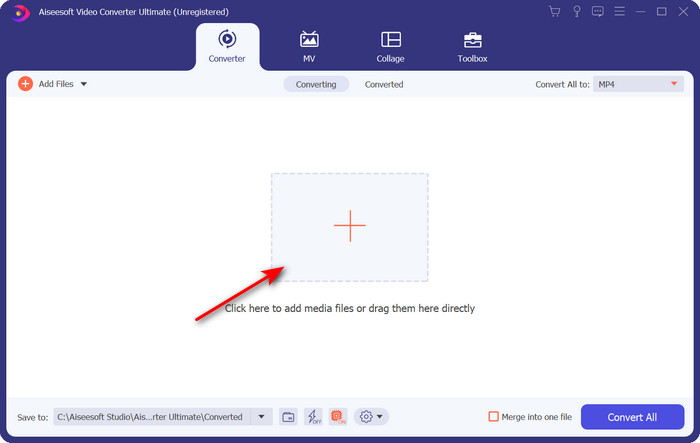
स्टेप 2. फ़ाइल जोड़ने के लिए इंटरफ़ेस के बीच में मौजूद + चिन्ह पर क्लिक करें। अगली बार जो फ़ोल्डर खुलेगा, उसमें .mpg फ़ाइल ढूँढें, फिर Open पर क्लिक करें और आगे बढ़ें।.
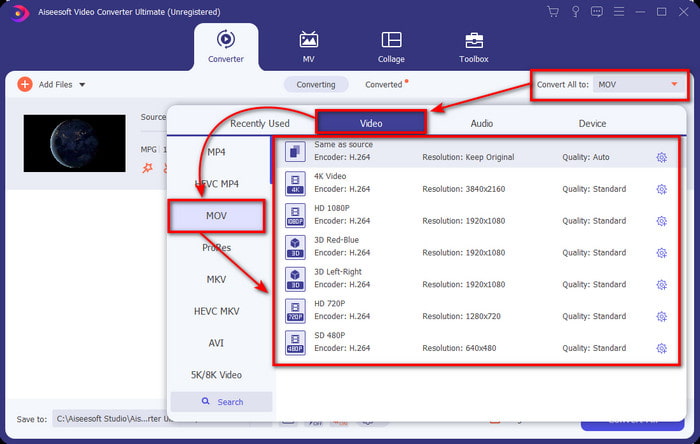
स्टेप 3. ड्रॉप‑डाउन बटन पर क्लिक करें और सूची में से MOV फ़ॉर्मेट या कोई और उपलब्ध फ़ॉर्मेट चुनें।.
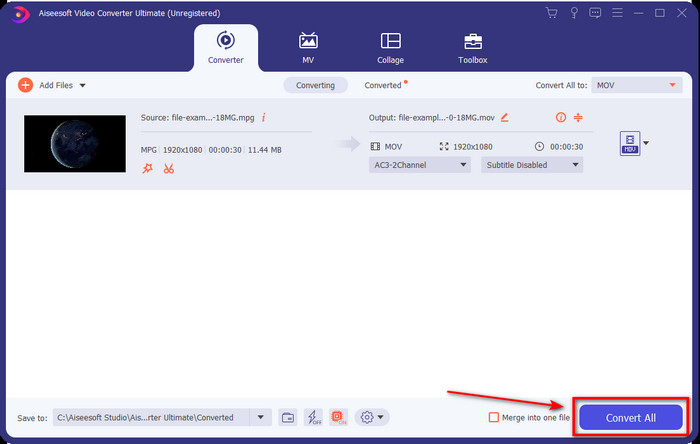
स्टेप 4. जैसे ही आप कन्वर्ज़न प्रक्रिया शुरू करने के लिए तैयार हों, Convert All पर क्लिक करें।.
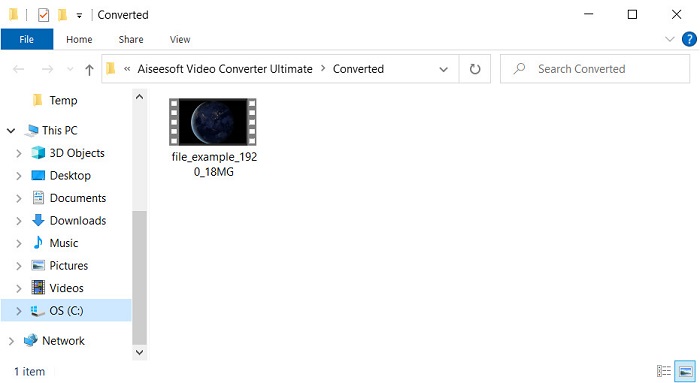
स्टेप 5. कुछ सेकंड बाद आपकी .mov फ़ाइल तैयार हो जाएगी, और अगर फ़ोल्डर आपकी स्क्रीन पर खुल जाए, तो पहली फ़ाइल पर क्लिक करें और अपने Apple डिवाइस पर उसे देखें या एडिट करें।.
भाग 2. क्विकटाइम का उपयोग करके एमपीजी को एमओवी में बदलें
QuickTime Player Apple डिवाइस के लिए बना एक नैटिव मीडिया प्लेयर है, जो लगभग हर तरह के वीडियो और ऑडियो फ़ॉर्मेट चलाने में सक्षम है। लेकिन क्या आप जानते हैं कि आप इसे कन्वर्टर के रूप में भी इस्तेमाल कर सकते हैं? हालाँकि, इस टूल का कन्वर्टर ऊपर बताए गए पहले कन्वर्टर जितना डिटेल्ड नहीं है। फिर भी, अगर आपके पास Apple डिवाइस है और आप QuickTime Player के ज़रिए MPG को MOV में बदलना चाहते हैं, तो नीचे दिए गए स्टेप्स का पालन करें।.
स्टेप 1. अपने Mac पर QuickTime Player खोलें, उसके नीचे File पर क्लिक करें, फिर Open File पर क्लिक करें, फ़ोल्डर में .mkv फ़ाइल को ढूँढें और Open दबाएँ।.
स्टेप 2. दोबारा File पर क्लिक करें, लेकिन अब Export As पर क्लिक करें और सूची में उपलब्ध पिक्सल विकल्पों में से एक चुनें।.
स्टेप 3. QuickTime में फ़ाइल का कन्वर्ज़न शुरू करने के लिए Save पर क्लिक करें।.
भाग 3. एमपीजी को एमओवी में कनवर्ट करें मुफ्त ऑनलाइन एमपीजी का उपयोग करके एमओवी कन्वर्टर
अगर आप सॉफ़्टवेयर डाउनलोड करने का रिस्क नहीं लेना चाहते, तो सबसे अच्छा फ्री ऑनलाइन MPG से MOV कन्वर्टर कौन‑सा है, यह जानना चाहेंगे? तो FVC Free Video Converter Online ही वह टूल है। यह आसान है, हर ब्राउज़र पर उपलब्ध है, मैलवेयर‑फ्री है और एक भरोसेमंद ऑनलाइन टूल है। एक साधारण कन्वर्टर में जो‑जो सुविधाएँ होनी चाहिए, वे सब यहाँ मौजूद हैं। साथ ही, यह सॉफ़्टवेयर अनेक मीडिया फ़ॉर्मेट सपोर्ट करता है और बिना आपका अकाउंट लॉग‑इन कराए कन्वर्ट करता है। इस टूल का इस्तेमाल करना चाहते हैं? तो नीचे दिए गए आसान स्टेप्स फॉलो करें।.
स्टेप 1. इस लिंक पर क्लिक करके FVC Free Video Converter Online की आधिकारिक वेबसाइट पर जाएँ।.
स्टेप 2. जैसे ही आप वेब इंटरफ़ेस पर पहुँच जाएँ, Add Files to Convert पर क्लिक करें। जिस .mpg फ़ाइल को आप कन्वर्ट करना चाहते हैं, उसे फ़ोल्डर में ढूँढें और फिर Open दबाएँ।.
फ़ाइलों को बैच में कनवर्ट करने के लिए डेस्कटॉप संस्करण डाउनलोड करें।.
स्टेप 3. फ़ाइल अपलोड होने के बाद, सब‑मेनू में से MOV फ़ॉर्मेट चुनें।.
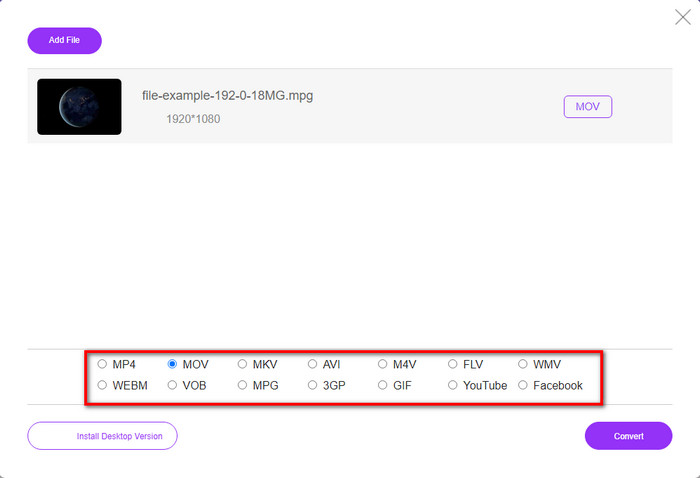
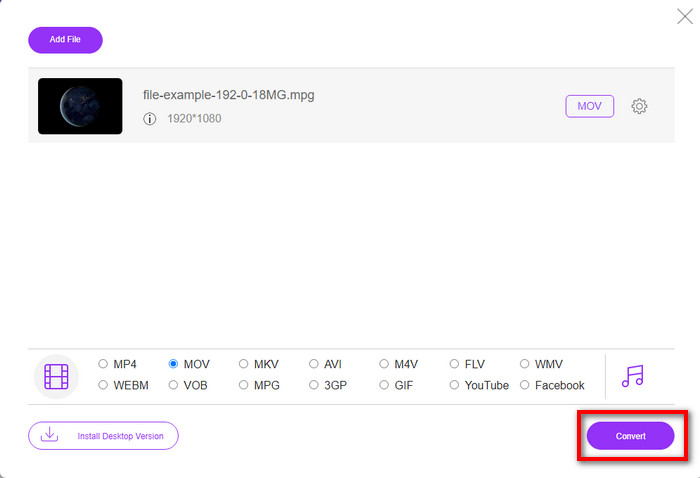
स्टेप 4. चूँकि आप पहले ही MOV पर क्लिक कर चुके हैं, तो अब इसे डाउनलोड करने के लिए Convert बटन दबाएँ।.
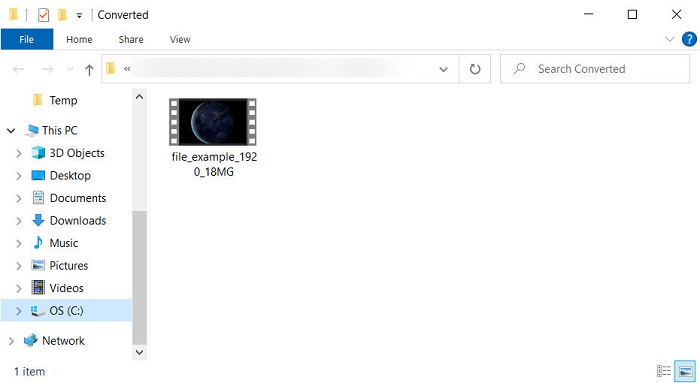
स्टेप 5. कन्वर्ज़न के बाद एक फ़ोल्डर खुलेगा जिसमें .mov फ़ाइल होगी।.
भाग 4. एमपीजी से एमओवी के बारे में व्यापक ज्ञान और हमें इसे बदलने की आवश्यकता क्यों है
एमपीजी एक प्रसिद्ध मीडिया प्रारूप है जो एमपीईजी को डिजिटल मानक वीडियो प्रारूप के रूप में उपयोग करता है। इस प्रकार की फ़ाइल आमतौर पर MPEG-1 और MPEG-2 का उपयोग मीडिया फ़ाइल एन्कोडर के रूप में करती है। यह कंप्रेसर की हर कमी का समर्थन करने के लिए इन दो कम्प्रेसर का उपयोग करता है, विशेष रूप से वीडियो के उच्च रिज़ॉल्यूशन को संग्रहीत करने के लिए। जैसा कि पहले कहा गया था, इस प्रारूप में वेब पर फिल्मों के त्वरित वितरण के लिए एक स्ट्रीम में तीन तत्व शामिल हो सकते हैं: ऑडियो, वीडियो और मेटाडेटा।
लेकिन MOV एक उच्च-गुणवत्ता वाला वीडियो और क्रिस्टल स्पष्ट ऑडियो संग्रहीत कर सकता है जो आमतौर पर वीडियो को संपादित करने के लिए उपयोग किया जाता है। एमपीजी के विपरीत, यह मल्टीप्लेक्स मीडिया प्रारूप वीडियो, ऑडियो और उपशीर्षक जैसे विभिन्न मीडिया डेटा का ट्रैक रख सकता है। लेकिन आमतौर पर इस्तेमाल किए जाने वाले इस प्रारूप का एन्कोडर और डिकोडर एमपीईजी -4 है।
अपने एमपीजी को एमओवी में बदलना सबसे अच्छा होगा क्योंकि जब आप फ़ाइल को ऐप्पल डिवाइस पर स्थानांतरित करते हैं, तो यह क्विकटाइम पर नहीं चलेगा या iMovie पर संपादित नहीं होगा। हालांकि क्विकटाइम प्लेयर और आईमूवी एमपीईजी -1 और एमपीईजी -4 का समर्थन करते हैं, अन्य एमपीईजी, जैसे एमपीईजी -2 जो एक .mpg उपयोग करता है, समर्थित नहीं हैं। इसे Apple उपकरणों पर संगत बनाने के लिए आपको फ़ाइल को MOV में बदलने की आवश्यकता है।
एमपीजी बनाम एमओवी
मूविंग पिक्चर एक्सपर्ट्स ग्रुप (एमपीईजी) द्वारा निर्मित, एमपीजी वीडियो, ऑडियो और मेटाडेटा जानकारी संग्रहीत करने के लिए एक सामान्य डिजिटल वीडियो प्रारूप है। इंटरनेट पर साझा करने के लिए फिल्में बनाते समय यह काफी उपयोगी है। MPG में उन फ़ाइलों में आमतौर पर MPEG-1 या MPEG-2 वीडियो/ऑडियो संपीड़न होता है।
MOV प्रारूप का उपयोग मूवी, टीवी शो, लघु वीडियो क्लिप या होम मूवी को संग्रहीत करने के लिए किया जा सकता है। यह वास्तव में QuickTime फ़ाइल स्वरूप (QTFF) में सहेजा जाता है, जिसे Apple द्वारा 1991 में पेश किया गया था। MOV फ़ाइलों का उपयोग अक्सर तब किया जाता है जब लोग उच्च गुणवत्ता वाले वीडियो को सहेजना चाहते हैं।
भाग 5. एमपीजी और एमओवी रूपांतरण के बारे में अक्सर पूछे जाने वाले प्रश्न
एमपीजी को बदलने में कितना समय लगेगा?
आपकी रूपांतरण प्रक्रिया को प्रभावित करने वाले दो कारक हो सकते हैं। पहला, यदि आप ऑनलाइन कनवर्टर का उपयोग करते हैं तो यह इस बात पर निर्भर करेगा कि आपका इंटरनेट कितना तेज है। अन्य गैर-आधारित कनवर्टर की तुलना में इस प्रक्रिया में अधिक समय लगेगा। और आखिरी, फ़ाइल का आकार जितना बड़ा होगा, उसे परिवर्तित करने में उतना ही अधिक समय लगेगा। इसलिए, यदि आपकी .mpg फ़ाइल का आकार बड़ा है तो आप आमतौर पर इसके समाप्त होने की प्रतीक्षा करेंगे।
क्या मैं वीएलसी पर .mpg फ़ाइलें चला सकता हूँ?
वीएलसी उन प्रमुख मीडिया प्लेयर्स में से एक है जिसे आप अपने मूल मीडिया प्लेयर पर न चलने योग्य प्रारूप में वीडियो चलाने के लिए सभी उपकरणों पर डाउनलोड कर सकते हैं। आप यहां सभी एमपीईजी-1, एमपीईजी-2, एमपीईजी-3 और एमपीईजी-4 प्रारूपों को भी खेल सकते हैं।
क्या MPG को कंप्रेस करने से गुणवत्ता प्रभावित होती है?
किसी फ़ाइल को कंप्रेस करने से उसकी क्वालिटी पर असर नहीं पड़ना चाहिए, क्योंकि आप बस उसे छोटा बना रहे होते हैं। लेकिन अगर आप अपनी .mpg फ़ाइल को बहुत ज़्यादा कंप्रेस कर देते हैं, तो उसकी क्वालिटी में थोड़ा बदलाव आ सकता है। इसलिए, इससे बचने के लिए आपको यह टॉप 7 वीडियो कम्प्रेसर्स ज़रूर पढ़ना चाहिए जिन्हें आप इस्तेमाल कर सकते हैं।.
निष्कर्ष
ऊपर बताई गई सभी विस्तृत जानकारी को फिर से पढ़ने के लिए, यदि आप Apple डिवाइस पर वीडियो का उपयोग करना चाहते हैं, तो आप अपने MPG को MOV में बदल सकते हैं। हालांकि क्विकटाइम और आईमूवी जैसे सॉफ्टवेयर एमपीईजी -1 और एमपीईजी -4 का समर्थन करते हैं, फिर भी एमपीईजी -2 और एमपीईजी -3 समर्थित नहीं हैं। इसलिए, इसे अपने Apple उपकरणों पर संगत बनाने के लिए इसे रूपांतरित करना आदर्श है। यदि आप फ़ाइल को कनवर्ट करते हैं तो यहां बताए गए सभी टूल बहुत प्रभावी और उपयोग में आसान हैं।
-
 FLV से MPG - मैक, पीसी और ऑनलाइन फ्री पर एमपीवी में एफएलवी कैसे कन्वर्ट करें
 FLV को MPEG में कैसे बदलें? क्या मैं FLV को मुफ्त में MPG में बदल सकता हूँ? यह पोस्ट गुणवत्ता हानि के बिना FLV को MPG में बदलने में आपकी मदद करने के लिए 3 मुफ्त वीडियो कन्वर्टर्स साझा करता है।
-
 MPG को GIF फॉर्मेट में कैसे बदलें [ऑनलाइन और ऑफलाइन]
 एक बेहतर भावना व्यक्त करना चाहते हैं? फिर आपको इसकी जगह GIF का इस्तेमाल करना चाहिए। यह राइट-अप आपको सिखाएगा कि अपनी भावना को बेहतर ढंग से व्यक्त करने के लिए एक एमपीजी फ़ाइल को जीआईएफ में कैसे परिवर्तित किया जाए।
-
 [2022] एमपीजी से एवीआई कन्वर्टर के हॉट पिक्स आपको एमपीजी को एवीआई में बदलने में मदद करेंगे
 क्या आपने कभी अपने एमपीजी को केवल अपने वीडियो प्लेयर पर चलाने के लिए एवीआई वीडियो फ़ाइल में बदलने के बारे में सोचा है? यहाँ सबसे अच्छा लेख है जो आप पा सकते हैं जो ऊपर दिए गए मुद्दे के बारे में बात करता है।

