


 वीडियो कनवर्टर अंतिम
 स्क्रीन अभिलेखी
 वीडियो मरम्मत
ऑफलाइन और ऑनलाइन के लिए RMVB को MOV में बदलने के विभिन्न तरीके
इंटरनेट पर उपलब्ध भ्रमित करने वाले वीडियो फ़ाइल फॉर्मैट्स की अधिकता के कारण, कई उपयोगकर्ताओं को यह तय करने में दिक्कत होती है कि उन्हें मिले किसी विशेष वीडियो के लिए कौन‑सा मीडिया प्लेयर इस्तेमाल करें। यकीन कीजिए या नहीं, किसी वीडियो को चलाना हमेशा उसे डाउनलोड करने जितना आसान नहीं होता। कुछ फॉर्मैट केवल उनके निर्माता तक ही सीमित होते हैं, जबकि कुछ ऐसे भी हैं जिन्हें लगभग हर जगह चलाया जा सकता है। इसलिए यह जानना ज़रूरी है कि आपके पास जो प्लेयर हैं, वे किन वीडियो फ़ाइल फॉर्मैट्स को सपोर्ट करते हैं। लेकिन हमें सिर्फ़ इसी पर समझौता नहीं करना चाहिए। ऐसे फ़ाइल फॉर्मैट्स को कनवर्ट करना सीखना, जिन्हें आप रोज़ नहीं देखते, सबसे बेहतर तरीका है। इसलिए, आपकी सुविधा के लिए हम आपको RMVB को MOV में कनवर्ट करने के सभी संभावित तरीके प्रदान करते हैं।.
भाग 1. एक सिंहावलोकन: RMVB और MOV
RMVB और MOV दो अन्य कंपनियों के दो अलग-अलग वीडियो प्रारूप हैं जिन्होंने उन्हें विकसित किया है। आपको आरएमवीबी फाइलों के बारे में पता होना चाहिए, रियलमीडिया वेरिएबल बिटरेट के लिए संक्षिप्त, रीयलमीडिया मल्टीमीडिया डिजिटल कंटेनर प्रारूप के लिए एक रीयलनेटवर्क्स-विकसित वैरिएबल बिटरेट एक्सटेंशन। कुछ लोग स्थानीय रूप से सहेजी गई मल्टीमीडिया सामग्री के लिए RMVB का उपयोग करते हैं। क्योंकि वे छोटे फ़ाइल आकार और कम बिटरेट की सुविधा देते हैं, लेकिन अधिक उत्कृष्ट गुणवत्ता के साथ, RMVB फाइलें एनीमे और एशियाई फिल्म शीर्षकों के लिए एक लोकप्रिय प्रारूप बन गई हैं। इस प्रारूप के लिए फ़ाइल एक्सटेंशन '.rmvb' का उपयोग किया जाता है।
दूसरी ओर, MOV एक Apple द्वारा विकसित मल्टीमीडिया कंटेनर फ़ाइल स्वरूप है जिसे QuickTime फ़ाइल स्वरूप (QTFF) में सहेजा गया है। कंटेनर प्रारूप विभिन्न मीडिया प्रारूपों को संभाल सकता है ताकि उपकरणों, ऑपरेटिंग सिस्टम और अनुप्रयोगों में मल्टीमीडिया ट्रांसमिशन की सुविधा मिल सके। QTFF मल्टीमीडिया फ़ाइलें .mov फ़ाइलें संग्रहीत करती हैं। हालाँकि, वे .qt फ़ाइलों के रूप में भी सहेज सकते हैं।
| दस्तावेज़ विस्तारण | आरएमवीबी | MOV |
| फाइल का प्रकार | रीयलमीडिया वैरिएबल बिटरेट फ़ाइल | ऐप्पल क्विकटाइम मूवी |
| डेवलपर | रियलनेटवोर्क्स | सेब |
| लाभ | RMVB मल्टीमीडिया जानकारी को संग्रहीत और साझा करने का एक प्रारूप है। और यह एशियाई सामग्री के वितरण के लिए विशेष रूप से प्रसिद्ध है, जैसे कि चीनी टेलीविजन एपिसोड और फिल्में। | एक MOV फ़ाइल में कई डेटा ट्रैक शामिल हो सकते हैं, जिनमें से प्रत्येक में एक डिजिटल मीडिया स्ट्रीम या किसी अन्य फ़ाइल में स्ट्रीम से संबंधित होता है। परिणामस्वरूप, आप बाद में डेटा को फिर से किए बिना फ़ाइलों को आसानी से बदल सकते हैं। |
| नुकसान | अन्य मीडिया खिलाड़ियों के साथ उनकी असंगति के कारण वे प्रचलित नहीं हैं। | प्रत्येक MOV फ़ाइल में कई अलग-अलग कोडेक शामिल हो सकते हैं, जिससे इसे चलाना चुनौतीपूर्ण हो जाता है। |
| प्रोग्राम फ़ाइल का समर्थन करते हैं | RealPlayer VLC मीडिया प्लेयर iOrgSoft वीडियो कन्वर्टर | माइक्रोसॉफ्ट विंडोज मीडिया प्लेयर ऐप्पल क्विकटाइम प्लेयर वीडियोलैन वीएलसी मीडिया प्लेयर |
भाग 2. RMVB को MOV [ऑफ़लाइन] में कनवर्ट करने के लिए सुलभ और सर्वोत्तम तरीका
किसी वीडियो को RMVB से MOV में कनवर्ट करना कभी-कभी अप्रत्याशित समय और दिन पर आवश्यक होता है। पूरी प्रक्रिया में ज्यादातर इंटरनेट कनेक्शन की आवश्यकता होती है जो हमेशा किसी भी स्थान पर उपलब्ध नहीं होता है। इसलिए, यदि आप अपने वीडियो को उस स्थिति के अनुकूल प्रारूप में बदलना चाहते हैं, तो वीडियो कन्वर्टर अल्टीमेट सबसे अच्छा विकल्प है। यह आपको बार-बार होने वाली प्रक्रियाओं के झंझट से बचाते हुए एक साथ कई वीडियो परिवर्तित करने की सुविधा भी देता है। यह आपको अपने वीडियो के लिए एक निश्चित रिज़ॉल्यूशन, फ्रेम दर और बिटरेट चुनने जैसे विभिन्न विकल्प भी प्रदान करता है। एक संकल्प को नाम दें और वीडियो कन्वर्टर अल्टीमेट आपको यह देगा।
कदम 1: वेबसाइट पर जाएँ, और आपको Free Download तथा For Mac OS लिखा हुआ एक बटन दिखाई देगा। .exe फ़ाइल डाउनलोड करने के लिए उस पर क्लिक करें। आपको यह सॉफ़्टवेयर इंस्टॉल करना होगा और इसके पूरा होने तक इंतज़ार करना होगा। पूरा हो जाने पर, इंस्टॉलेशन प्रक्रिया जारी रखने के लिए फ़ाइल खोलें।.
फ्री डाउनलोडWindows 7 या बाद के संस्करण के लिएसुरक्षित डाउनलोड
फ्री डाउनलोडMacOS 10.7 या बाद के संस्करण के लिएसुरक्षित डाउनलोड
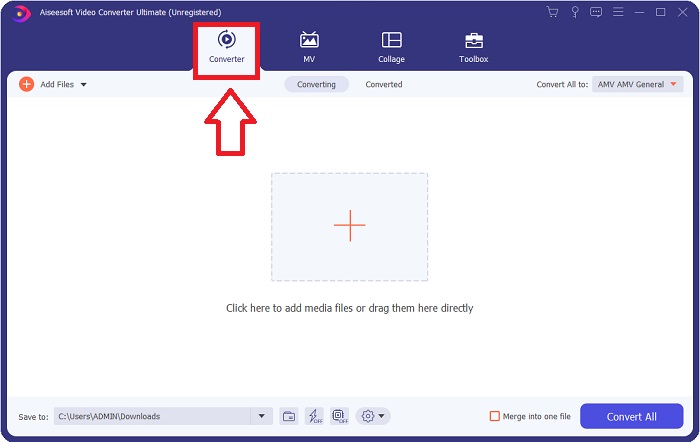
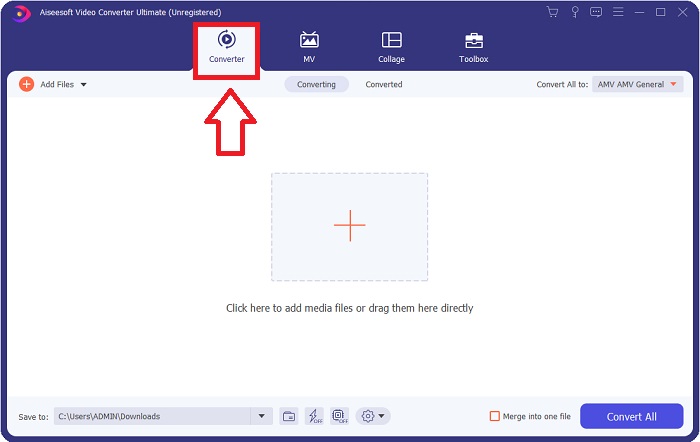
कदम 2: पूरी तरह इंस्टॉलेशन के बाद सॉफ़्टवेयर लॉन्च करें, और एक विंडो खुलेगी। यह आपको ऊपर टैब्स के साथ एक इंटरफ़ेस दिखाएगी। शुरू में, आप Converter टैब में होंगे; अगर नहीं हैं, तो उसे चुन लें।.
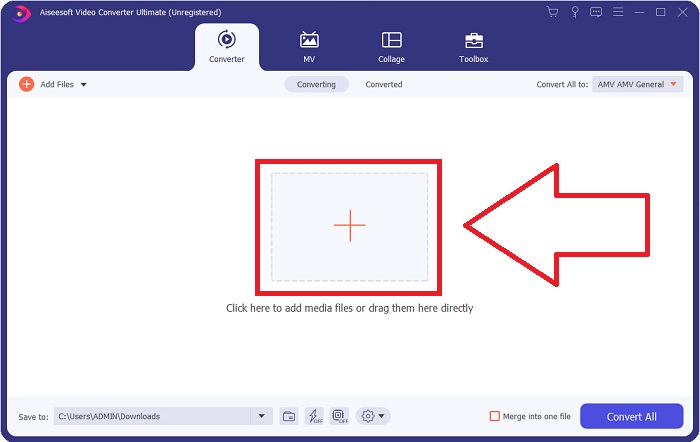
कदम 3: इंटरफ़ेस में आपको बीच में + आइकन वाला एक चौकोर बटन दिखाई देगा। जिस वीडियो फ़ाइल को आप कनवर्ट करना चाहते हैं, उसे इम्पोर्ट करने के लिए उस पर क्लिक करें, या बिना किसी झंझट के फ़ाइल को ड्रैग और ड्रॉप भी कर सकते हैं।.
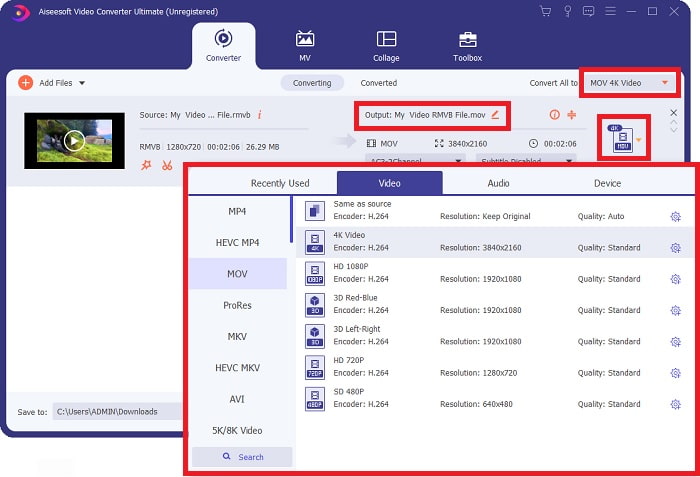
कदम 4: एक नया इंटरफ़ेस खुलेगा जिसमें आपके वीडियो को एडिट करने के लिए सभी विकल्प दिखेंगे। सबसे दाईं ओर, यहीं आप अपने कनवर्ट किए गए वीडियो के लिए मनचाहा फ़ॉर्मैट चुनते हैं। बस ड्रॉप‑डाउन एरो पर क्लिक करें, और आपको उपलब्ध सभी फॉर्मैट्स दिखेंगे।.
इस मामले में, MOV चुनें। साथ ही, आप चुनी गई रेज़ोल्यूशन के बगल में गियर आइकन पर क्लिक करके वीडियो के लिए फ़्रेम रेट और ऑडियो के लिए सैंपल रेट जैसी सेटिंग्स एडिट कर सकते हैं। बदलावों को सुरक्षित रखने के लिए Create New पर क्लिक करें।.
कदम 5: यदि आपने अपने वीडियो के लिए किए गए सभी बदलाव पूरे कर लिए हैं, तो अब आप विंडो के निचले दाएं कोने में मौजूद Convert All बटन पर क्लिक करके कनवर्ज़न प्रक्रिया शुरू कर सकते हैं।.
भाग 3. RMVB को MOV में बदलने का एक और बेहतरीन तरीका [ऑनलाइन]
यदि अपने डेस्कटॉप पर सॉफ़्टवेयर डाउनलोड और इंस्टॉल करना आपको पसंद नहीं है और आपको अपनी फ़िल्मों के लिए सिर्फ़ एक बार का कनवर्ज़न चाहिए, तो यहाँ एक पूरी तरह ऑनलाइन विकल्प है जिसे आप आज़मा सकते हैं। FVC Free Video Converter Online, यह वेब टूल कई तरह की वीडियो और ऑडियो सेटिंग्स के विकल्प प्रदान करता है, साथ ही आपको सॉफ़्टवेयर इंस्टॉल करने का समय भी बचाता है। काम पूरा करने के लिए इसमें केवल तीन आसान चरण शामिल हैं:
कदम 1: शुरुआत करने के लिए वेबसाइट पर जाएँ, जहाँ आपको पेज के बीचोंबीच एक पीला बटन दिखाई देगा जिस पर Add Files to Convert लिखा होगा। जिस वीडियो फ़ाइल को आप कनवर्ट करना चाहते हैं, उसे इम्पोर्ट करने के लिए इस बटन पर क्लिक करें।.
फ़ाइलों को बैच में कनवर्ट करने के लिए डेस्कटॉप संस्करण डाउनलोड करें।.
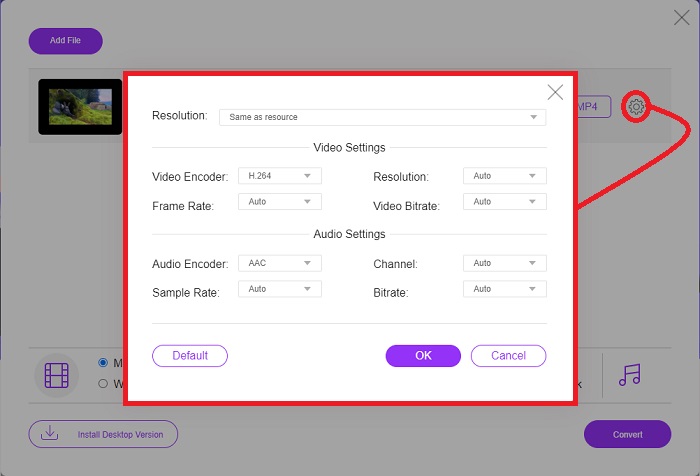
कदम 2: एक विंडो पॉप‑अप होगी, जिसके ऊपर की ओर आपकी इम्पोर्ट की गई वीडियो फ़ाइल दिखाई देगी और नीचे की ओर सभी उपलब्ध फॉर्मैट्स। चूंकि आप अपनी RMVB फ़ाइल को MOV में कनवर्ट करना चाहते हैं, इसलिए MOV चुनें। अतिरिक्त विकल्पों के लिए, सबसे दाईं ओर मौजूद गियर आइकन पर क्लिक करके वीडियो और ऑडियो सेटिंग्स एडिट करें। बदलावों को सुरक्षित रखने के लिए OK पर क्लिक करें।.
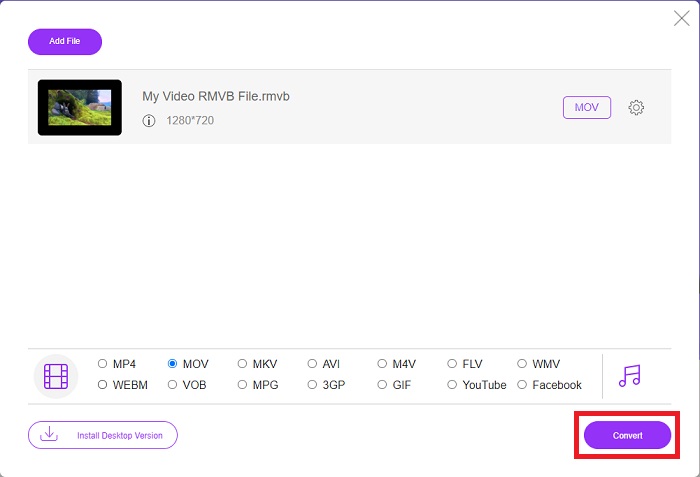
कदम 3: यदि किए गए सभी बदलाव आपके वीडियो की ज़रूरतों को पूरा करते हैं, तो आप अब विंडो के निचले दाएं कोने में मौजूद Convert बटन पर क्लिक करके अपने वीडियो को कनवर्ट करना शुरू कर सकते हैं। वह फ़ोल्डर चुनें जहाँ आप पूरी तरह कनवर्ट की गई फ़ाइल को एक्सपोर्ट करना चाहते हैं और इसके पूरा होने का इंतज़ार करें।.
आरएमवीबी बनाम एमओवी
RMVB, मानक रियल मीडिया (.RM) प्रारूप का एक नया रूपांतर है, एक वास्तविक मीडिया वीडियो फ़ाइल स्वरूप है जो एक चर बिटरेट का उपयोग करके संकुचित होता है। यह एशियाई फिल्मों और एनीमे के लिए एक लोकप्रिय प्रारूप है। RMVB फाइलें आकार में छोटी होती हैं और उनकी बिटरेट कम होती है लेकिन गुणवत्ता बेहतर होती है।
MOV प्रारूप का उपयोग मूवी, टीवी शो, लघु वीडियो क्लिप या होम मूवी को संग्रहीत करने के लिए किया जा सकता है। यह वास्तव में QuickTime फ़ाइल स्वरूप (QTFF) में सहेजा जाता है, जिसे Apple द्वारा 1991 में पेश किया गया था। MOV फ़ाइलों का उपयोग अक्सर तब किया जाता है जब लोग उच्च गुणवत्ता वाले वीडियो को सहेजना चाहते हैं।
भाग 4. आरएमवीबी से एमओवी रूपांतरण के बारे में अक्सर पूछे जाने वाले प्रश्न
RMVB फ़ाइल वास्तव में क्या है?
कोई भी RMVB फ़ाइल एक रियल मीडिया वीडियो फ़ाइल होती है जिसे वीडियो की सामग्री के लिए इष्टतम चर बिटरेट का उपयोग करके संपीड़ित किया जाता है। यह मूल रीयल मीडिया (.RM) फ़ाइल स्वरूप का एक नया संस्करण है जो बेहतर संपीड़न प्रदान करता है।
RMVB फ़ाइलें क्या चला सकती हैं?
क्योंकि अलग‑अलग एप्लिकेशन्स विभिन्न कारणों से RMVB एक्सटेंशन वाली फ़ाइलों का उपयोग करती हैं, आपको ऐसे सॉफ़्टवेयर की ज़रूरत होगी जो उसी फ़ाइल के साथ कम्पैटिबल हो जिसे आप खोलने की कोशिश कर रहे हैं। RealNetworks RealPlayer (Windows), VLC media player (मल्टीप्लैटफॉर्म), और GRETSCH GOM Player (Windows) ऐसे सभी मुफ़्त मीडिया प्लेयर्स हैं जो RMVB फ़ाइलें चला सकते हैं।.
क्या .rmvb फ़ाइलों में कोई त्रुटि संभव है?
यदि आपके पास रियल मीडिया प्लेयर या कोई अन्य उपयुक्त फ़ाइल ओपनर टूल नहीं है, तो हार्ड ड्राइव पर दोषपूर्ण सेक्टर या गलत डाउनलोड के कारण फ़ाइल दूषित हो जाने पर आपको .rmvb फ़ाइलें खोलने में समस्या हो सकती है। यदि Windows सिस्टम रजिस्ट्री में समस्याएँ उत्पन्न होती हैं, जहाँ .rmvb फ़ाइल के लिए फ़ाइल संबद्धता जानकारी संग्रहीत है, तो तीसरी त्रुटि हो सकती है।
निष्कर्ष
किसी वीडियो को परिवर्तित करने के लिए सॉफ़्टवेयर रखना है या केवल एक ऑनलाइन टूल का उपयोग करना चुनना है, इस बारे में चिंता करने की कोई बात नहीं है कि क्या FVC का उपयोग किया जाना चाहिए। सॉफ्टवेयर और इसका ऑनलाइन संस्करण दोनों ही आपकी परिवर्तित आवश्यकताओं के लिए सर्वोत्तम विकल्प प्रदान करते हैं। हालांकि, हम आपको अतिरिक्त टूलबॉक्स के लिए वीडियो कन्वर्टर अल्टीमेट डाउनलोड करने की अत्यधिक अनुशंसा करते हैं, जो आपको केवल रूपांतरण के अलावा आपके वीडियो के लिए और संपादन की तलाश में प्रदान करता है। आप कभी नहीं जानते कि आपको कब शुरुआती-अनुकूल सॉफ़्टवेयर की आवश्यकता है, इसलिए इसे हमेशा अपने कंप्यूटर के पास रखना बेहतर है।
-
 विंडोज / मैक पर आरएमवीबी को MP4 में परिवर्तित करने के लिए गाइड (3 नि: शुल्क तरीके)
 अपने कंप्यूटर या मोबाइल फोन पर आसान प्लेबैक के लिए RMVB को MP4 में कनवर्ट करना चाहते हैं? आपको इस गाइड में अपनी RMVB फ़ाइलों को MP4 में बदलने के सरल तरीके मिलेंगे।
-
 डेस्कटॉप या ऑनलाइन पर शीर्ष 4 मुफ़्त RMVB से FLV कन्वर्टर ऐप्स
 यह लेख आपको सबसे अच्छा RMVB से FLV कनवर्टर सॉफ़्टवेयर और वेब ऐप बताएगा जो RMVB (RealMedia Variable Bitrate) फ़ाइलों को FLV वीडियो में बदल सकते हैं।
-
 मैक / पीसी / ऑनलाइन पर MOV के लिए MP4 कन्वर्ट करने के लिए कैसे
 मैक पर MOV करने के लिए MP4 कन्वर्ट करने के लिए कैसे? क्या बिना गुणवत्ता नुकसान के MP4 को MOV में बदलने का कोई मुफ्त तरीका है? यह पोस्ट मैक, विंडोज पीसी और ऑनलाइन पर MP4 से MOV तक वीडियो रूपांतरण करने में आपकी सहायता करने के लिए 4 सरल तरीके साझा करता है।

