


 वीडियो कनवर्टर अंतिम
 स्क्रीन अभिलेखी
 वीडियो मरम्मत
 सुरक्षित डाउनलोड
ऑडियो गुणवत्ता और पहुंच को बनाए रखने के लिए निर्बाध कैफे से एमपी3 रूपांतरण
बेहतर संगतता और पहुंच के लिए कैफे को एमपी3 में बदलना आवश्यक है। अपनी कैफ फाइलों को एमपी3 में बदलने से अनुकूलता संबंधी समस्याओं को दूर करते हुए विभिन्न प्लेटफॉर्मों पर सहज प्लेबैक सुनिश्चित होता है। इसके अतिरिक्त, MP3 फाइलें आकार में छोटी होती हैं, जिससे उन्हें स्टोर करना, स्थानांतरित करना और साझा करना आसान हो जाता है। चाहे आप स्मार्टफोन, कंप्यूटर, या इन-कार सिस्टम पर अपने ऑडियो संग्रह का आनंद लेना चाहते हैं, कैफे को एमपी3 में परिवर्तित करने से आपको अपने पसंदीदा संगीत, पॉडकास्ट या रिकॉर्डिंग तक पहुंचने में अधिक लचीलापन और सुविधा मिलती है।
Caf से MP3 कनवर्टर का उपयोग करके, आप आसानी से अपनी Caf फ़ाइलों को लोकप्रिय MP3 फ़ॉर्मेट में बदल सकते हैं, जिससे व्यापक पहुँच, छोटी फ़ाइल साइज़ और अपने ऑडियो कलेक्शन को बिना किसी रुकावट के साझा करना संभव हो जाता है। इसी क्रम में, जानिए वे टूल्स जिनकी मदद से आप अपनी फ़ाइलों को Caf से MP3 में बदल सकते हैं।.

भाग 1. सीएएफ क्या है, और सीएएफ को एमपी3 में क्यों बदलें
कैफे या कोर ऑडियो प्रारूप ऐप्पल इंक द्वारा पेश किया गया एक ऑडियो फ़ाइल प्रारूप है। यह आमतौर पर मैकोज़ और आईओएस प्लेटफॉर्म पर प्रयोग किया जाता है। Caf फाइलें अक्सर पेशेवर ऑडियो अनुप्रयोगों में बनाई और उपयोग की जाती हैं, जैसे ध्वनि संपादन, मिश्रण और रिकॉर्डिंग। Caf को MP3 में बदलने के कई सम्मोहक कारण और लाभ हैं। यहाँ कुछ प्रमुख कारण दिए गए हैं कि क्यों आप अपनी Caf फ़ाइलों को MP3 प्रारूप में बदलने पर विचार कर सकते हैं:
बेहतर अनुकूलता: MP3 विभिन्न डिवाइसों, मीडिया प्लेयरों और ऑपरेटिंग सिस्टम्स पर सबसे अधिक समर्थित ऑडियो फ़ॉर्मैट्स में से एक है। अपनी Caf फ़ाइलों को MP3 में कनवर्ट करके, आप बेहतर कम्पैटिबिलिटी सुनिश्चित करते हैं और उन प्लेबैक समस्याओं या सीमाओं को दूर कर देते हैं, जिनका सामना आपको Caf फ़ाइलों के साथ करना पड़ सकता है।.
पहुँच में आसानी: Caf से MP3 में कनवर्ज़न करने से आपके ऑडियो कंटेंट की पहुँच काफी बढ़ जाती है। MP3 फ़ाइलें कई डिवाइसों पर स्ट्रीम की जा सकती हैं, जैसे स्मार्टफोन, टैबलेट, लैपटॉप, डेस्कटॉप कंप्यूटर, पोर्टेबल म्यूज़िक प्लेयर और यहाँ तक कि कार ऑडियो सिस्टम भी। यह बहुमुखी क्षमता आपको अपनी पसंदीदा संगीत, पॉडकास्ट या रिकॉर्डिंग को कभी भी, कहीं भी सुनने की सुविधा देती है।.
छोटी फ़ाइल साइज़: MP3 फ़ाइलें आमतौर पर कम्प्रेस्ड होती हैं, जिसके कारण वे Caf फ़ाइलों की तुलना में काफ़ी छोटी साइज़ की होती हैं। यह कम्प्रेशन आपके डिवाइसों में स्टोरेज स्पेस बचाने में मदद करता है, वह भी बिना ऑडियो क्वालिटी में कोई ख़ास कमी महसूस किए। इसके अलावा, इससे ईमेल, मैसेजिंग ऐप्स या ऑनलाइन प्लेटफ़ॉर्म के ज़रिए ऑडियो फ़ाइलों को ट्रांसफ़र या शेयर करना भी आसान हो जाता है।.
भाग 2। सीएएफ को एमपी3 ऑफलाइन में बदलें
Video Converter Ultimate एक अत्यंत दक्ष सॉफ़्टवेयर है, जो विभिन्न फ़ाइल फ़ॉर्मैट्स को Caf और MP3 जैसे अलग‑अलग ऑडियो फ़ॉर्मैट्स में कनवर्ट करने की सुविधा देता है। यह सॉफ़्टवेयर बैच कनवर्ज़न फ़ंक्शन भी प्रदान करता है, जिससे उपयोगकर्ता एक साथ कई ऑडियो फ़ाइलों को कनवर्ट कर सकते हैं।.
इसके अतिरिक्त, उपयोगकर्ताओं के पास प्रोग्राम की विशेषता के माध्यम से किसी भी वांछित गीत की गुणवत्ता को अनुकूलित करने की क्षमता है जो नमूना दर और बिटरेट सहित आउटपुट तकनीकीताओं के अनुकूलन की अनुमति देता है। कैफे से एमपी3 या इसके विपरीत ऑडियो फाइलों के बैच रूपांतरण करने के इच्छुक व्यक्तियों के लिए, हमने आपके अवलोकन के लिए नीचे एक संक्षिप्त मार्गदर्शिका प्रदान की है। कैफ को एमपी3 में कैसे बदलें, यह जानने के लिए आप नीचे दिए गए निर्देशों का संदर्भ ले सकते हैं।
स्टेप 1. नीचे दिए गए उपयुक्त Free Download आइकन का चयन करें और प्रोग्राम को अपने डिवाइस पर डाउनलोड व लॉन्च करें। अगला चरण पूरा करने के लिए ऑन‑स्क्रीन निर्देशों का पालन करके प्रोग्राम को एक्टिवेट करना सुनिश्चित करें। इंस्टॉल हो जाने के बाद, इसका इंटरफ़ेस आसानी से समझा जा सकता है। यह टूल Mac और Windows दोनों के लिए Caf से MP3 कनवर्टर के रूप में काम करता है।.
Free DownloadWindows 7 या बाद के वर्ज़न के लिएसिक्योर डाउनलोड
Free DownloadMacOS 10.7 या बाद के वर्ज़न के लिएसिक्योर डाउनलोड
स्टेप 2. मुख्य इंटरफ़ेस पर मौजूद Add बटन पर क्लिक करके वह ऑडियो फ़ाइल इम्पोर्ट करें, जिसे आप एडिट करना चाहते हैं। इसके बाद आपको इम्पोर्टेड फ़ाइल का एक थंबनेल दिखाई देगा। आप एक फ़ोल्डर भी सबमिट कर सकते हैं, ताकि एक साथ कई फ़ाइलों को कनवर्ट किया जा सके। अपनी डायरेक्टरी में वह लोकेशन चुनें, जहाँ सभी आवश्यक ऑडियो फ़ाइलें मौजूद हों।.
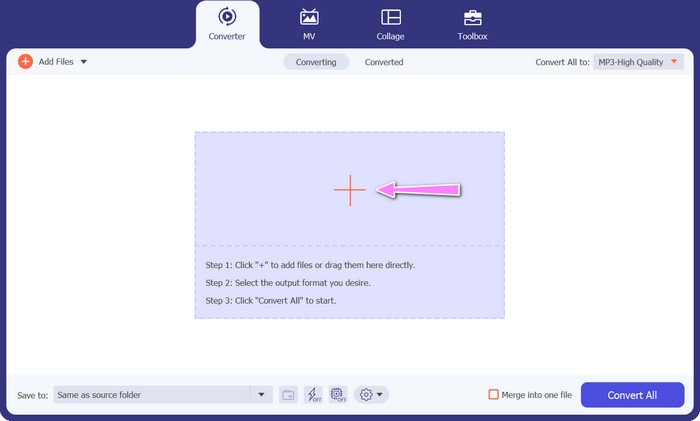
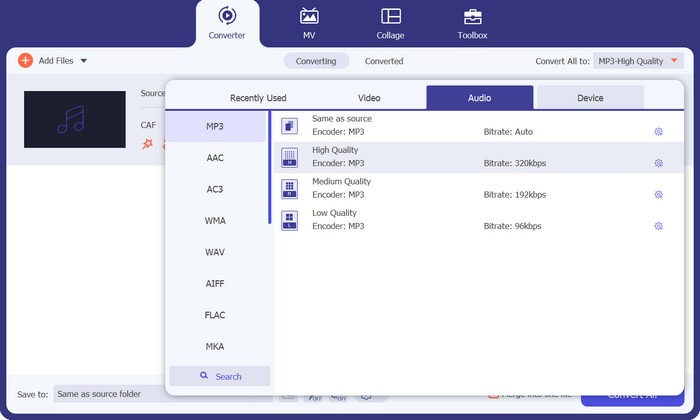
स्टेप 3. अब आप प्रोग्राम विंडो के शीर्ष पर स्थित Converter All to बटन पर क्लिक करके आउटपुट फ़ॉर्मैट बदल सकते हैं। Audio लेबल वाले पेन से MP3 चुनें। इसी दौरान, आप आउटपुट फ़ाइल की सैंपल रेट और बिटरेट को भी अपनी मनचाही क्वालिटी प्राप्त करने के लिए एडजस्ट कर सकते हैं।.
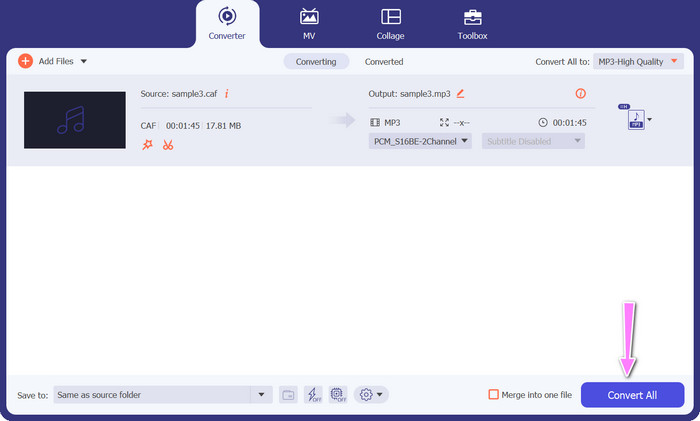
स्टेप 4. अंतिम चरण के रूप में नीचे दिए गए Convert All बटन पर क्लिक करके कनवर्ज़न प्रक्रिया शुरू करें। इसके बाद प्रोग्राम स्वतः ही आउटपुट फ़ोल्डर खोल देगा, ताकि आप नई फ़ाइल फ़ॉर्मैट की जाँच कर सकें।.
पेशेवरों
- यह कैफ को एमपी3 ऑडियो फाइल फॉर्मेट में बैच में बदल सकता है।
- प्रोग्राम विंडोज और मैक ओएस दोनों के साथ अच्छा काम करता है।
विपक्ष
- नि: शुल्क परीक्षण के बाद इसके लिए सशुल्क सदस्यता शुल्क की आवश्यकता होती है।
भाग 3. CAF को MP3 ऑनलाइन में बदलें
आप Free MP3 Audio Converter Online का भी उपयोग कर सकते हैं, जो एक और विकल्प है। यह एक वेब‑आधारित एप्लिकेशन है, जो नाम से ही स्पष्ट है कि इंटरनेट के साथ काम करता है। परिणामस्वरूप, आपको Caf से MP3 कनवर्ट करने के लिए अलग से कोई ऐप इंस्टॉल करने की आवश्यकता नहीं है। सब कुछ ऑनलाइन उपलब्ध है, और काम पूरा करने के लिए आपको केवल अपना ब्राउज़र चाहिए। सुविधाओं की बात करें तो यह Caf से MP3 मुफ्त कनवर्टर किसी भी तरह से कम नहीं है। साथ ही, आप बड़ी संख्या में फ़ाइलें अपलोड कर सकते हैं, उन्हें बल्क में कनवर्ट कर सकते हैं या किसी वीडियो या ऑडियो क्लिप की प्रोफ़ाइल समायोजित कर सकते हैं। यहाँ बताई गई तकनीकों का पालन करके आप सर्वश्रेष्ठ ऑनलाइन Caf से MP3 कनवर्टर के बारे में अच्छी जानकारी प्राप्त कर लेंगे।.
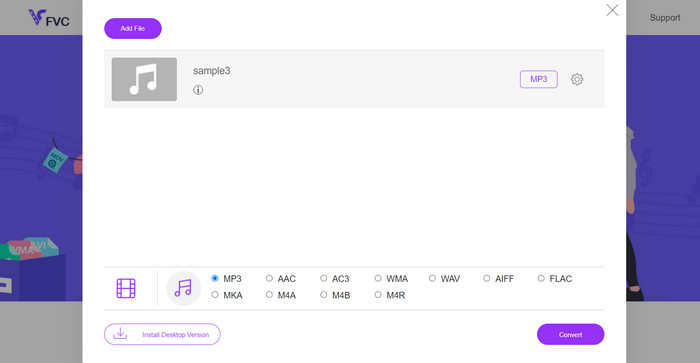
स्टेप 1. ऊपर दिए गए लिंक पर क्लिक करके सीधे Free MP3 Audio Converter Online की मुख्य वेबसाइट पर जाएँ। मुख्य स्क्रीन पर जाकर Add Files to Convert विकल्प चुनकर आप अपनी ऑडियो फ़ाइल सबमिट कर सकते हैं।.
स्टेप 2. स्क्रीन पर आपके द्वारा चुनी गई मूल फ़ाइल का एक प्रीव्यू दिखाई देगा। जिस आउटपुट फ़ॉर्मैट की आपको आवश्यकता है, उसे आप उसी पैनल के नीचे से चुन सकते हैं, जहाँ आप शुरू में थे।.
स्टेप 3. फ़ाइल फ़ॉर्मैट को Caf से MP3 में बदलने के लिए Convert बटन पर क्लिक करें। यदि आप कोई और फ़ाइल कनवर्ट करना चाहते हैं, तो आपको यही प्रक्रिया दोबारा शुरू से दोहरानी होगी।.
पेशेवरों
- उपयोगकर्ता प्रति दिन असीमित रूपांतरणों का आनंद ले सकते हैं।
- यह Caf से MP3 कन्वर्टर ऑनलाइन लगभग सभी वेब ब्राउज़र पर काम करता है।
विपक्ष
- रूपांतरण की गति उपलब्ध इंटरनेट बैंडविड्थ के समानुपाती होती है।
अधिक पढ़ें:
MP3 से AAC कन्वर्ज़न: अपनी ऑडियो गुणवत्ता कैसे सुधारें
MP3 प्लेयर डाउनलोड – 2023 के 10 बेहतरीन फ्री MP3 म्यूज़िक प्लेयर्स
भाग 4. सीएएफ को एमपी3 में बदलने के बारे में अक्सर पूछे जाने वाले प्रश्न
क्या मैं अपनी Caf फ़ाइलों को MP3 में बदलने के बाद उनके मेटाडेटा को बनाए रख सकता हूँ?
Caf से MP3 रूपांतरण के दौरान मेटाडेटा का संरक्षण आपके द्वारा उपयोग किए जा रहे विशिष्ट कनवर्टर या सॉफ़्टवेयर पर निर्भर करता है। कुछ रूपांतरण टूल में मेटाडेटा जैसे कलाकार का नाम, एल्बम का शीर्षक, ट्रैक नंबर और बहुत कुछ बनाए रखने की क्षमता होती है। हालांकि, यह ध्यान रखना महत्वपूर्ण है कि सभी कन्वर्टर्स मेटाडेटा अवधारण का समर्थन नहीं करते हैं।
क्या कोई अन्य ऑडियो प्रारूप है जिसमें मैं कैफ फाइलों को परिवर्तित कर सकता हूं?
हां, एमपी3 के अलावा, कई अन्य ऑडियो प्रारूप हैं जिन्हें आप अपनी विशिष्ट आवश्यकताओं के आधार पर कैफे फाइलों में परिवर्तित कर सकते हैं। सामान्य वैकल्पिक स्वरूपों में WAV, FLAC (फ्री लॉसलेस ऑडियो कोडेक), AAC और OGG (Ogg Vorbis) शामिल हैं।
क्या मुझे एक कैफे से एमपी3 कन्वर्टर के लिए भुगतान करना होगा?
यहां मुफ्त और सशुल्क दोनों तरह के कैफे टू एमपी3 रूपांतरण विकल्प उपलब्ध हैं। कई ऑनलाइन कन्वर्टर्स मुफ्त सेवाएं प्रदान करते हैं, जिससे आप बिना किसी लागत के कैफ फाइलों को एमपी3 में बदल सकते हैं। हालाँकि, कुछ उन्नत सॉफ़्टवेयर या प्रीमियम ऑनलाइन सेवाओं के लिए अतिरिक्त सुविधाओं या उच्च रूपांतरण गति के लिए खरीदारी या सदस्यता की आवश्यकता हो सकती है।
निष्कर्ष
Caf से MP3 कनवर्ज़न के साथ, आप अपने ऑडियो कलेक्शन की पूरी क्षमता का उपयोग कर सकते हैं और कभी भी, कहीं भी बिना रुकावट प्लेबैक का आनंद ले सकते हैं। इससे आप अपने पसंदीदा संगीत, पॉडकास्ट या रिकॉर्डिंग को विविध डिवाइसों और प्लेटफ़ॉर्म्स पर सुन सकते हैं।.
-
 मैक और पीसी पर एआईएफएफ को एमपी3 में बदलने के सर्वोत्तम 4 तरीके
 मुश्किलें आ रही हैं क्योंकि एआईएफएफ फाइलें सहेजी जाने के लिए बहुत बड़ी हैं? इसलिए, आपको पढ़ना जारी रखना चाहिए क्योंकि हम एआईएफएफ को एमपी3 प्रारूप में परिवर्तित करके इसे ठीक करने का तरीका बताते हैं।
-
 एएमआर को एमपी3 में कैसे बदलें [ऑनलाइन और ऑफलाइन]
 कठिन समय हो रहा है क्योंकि .amr फ़ाइलें आपके डेस्कटॉप पर नहीं चलाई जा सकती हैं? फिर AMR को MP3 फॉर्मेट में बदलने का तरीका जानने के लिए इस लेख को पढ़ें।
-
 Breze . पर MP3 Effortlessy में एल्बम आर्ट कैसे जोड़ें, इस पर गाइड
 क्या आप जानना चाहते हैं कि MP3 में एल्बम आर्ट कैसे जोड़ें? यदि ऐसा है, तो पूरी जानकारी और अपनी फ़ाइल पर एल्बम कला को संपादित करने के बारे में एक ट्यूटोरियल पढ़ें।
