


 वीडियो कनवर्टर अंतिम
 स्क्रीन अभिलेखी
 वीडियो मरम्मत
 सुरक्षित डाउनलोड
अपने संगीत गेम को क्रैंक करें: एमपी3 को मिडी और रीमिक्स धुनों में बदलें
यदि आप एक संगीतकार या म्यूज़िक प्रोड्यूसर हैं, तो आप जानते हैं कि सही टूल्स आपकी रचनात्मक प्रक्रिया में कितना बड़ा अंतर ला सकते हैं। ऐसा ही एक टूल जो आपके संगीत को अगले स्तर तक ले जा सकता है, वह है MP3 फ़ाइलों को MIDI में कन्वर्ट करने की क्षमता। जहाँ MP3 संगीत सुनने के लिए बेहतरीन है, वहीं MIDI फ़ाइलें बेहतरीन लचीलापन और कस्टमाइज़ेशन विकल्प प्रदान करती हैं। अपने MP3 को MIDI में बदलकर, आप अलग‑अलग नोट्स में बदलाव कर सकते हैं, गाने की टेम्पो और की बदल सकते हैं, और यहाँ तक कि किसी मौजूदा ट्रैक में नए इंस्ट्रूमेंट या साउंड भी जोड़ सकते हैं।.
सही रूपांतरण उपकरण के साथ, संभावनाएं अनंत हैं। चाहे आप अपने पसंदीदा गानों के अनूठे रीमिक्स बनाना चाह रहे हों, शीट संगीत के लिए संगीत का एक टुकड़ा ट्रांसक्राइब करना चाहते हों, या नई ध्वनियों और व्यवस्थाओं के साथ प्रयोग करना चाहते हों, MP3 को MIDI में बदलना आपके संगीत में क्रांति ला सकता है और आपकी रचनात्मकता को नई ऊंचाइयों तक ले जा सकता है।

भाग 1. एमपी3 बनाम मिडी की तुलना
यदि आप विभिन्न पहलुओं में इन दो स्वरूपों की विशिष्ट तुलना का निरीक्षण करना चाहते हैं, तो आप नीचे दी गई तालिका का संदर्भ ले सकते हैं।
| विशेषताएं | एमपी 3 | मिडी |
| फ़ाइल का साइज़ | अपेक्षाकृत बड़ा | बहुत छोटे से |
| आवाज़ की गुणवत्ता | हानिपूर्ण संपीड़न, उच्च गुणवत्ता | कम गुणवत्ता, लेकिन अनुकूलन योग्य |
| संपादन योग्यता | आसानी से संपादन योग्य नहीं | अत्यधिक संपादन योग्य |
| उपकरण | फिक्स्ड इंस्ट्रूमेंटेशन | अनुकूलन उपकरण |
| प्रयोग | संगीत सुनना | संगीत का संपादन और निर्माण |
| दबाव | हानिपूर्ण संपीड़न | कोई संपीड़न नहीं |
भाग 2। विंडोज और मैक पर एमपी3 को मिडी या मिडी को एमपी3 में बदलने के तरीके
FVC Video Converter Ultimate एक बहुउद्देशीय वीडियो कन्वर्ज़न टूल है, जो वीडियो को विभिन्न फ़ॉर्मैट्स में बेहद आसानी से कन्वर्ट करने की सुविधा देता है। यह सॉफ़्टवेयर MP4, AVI, MOV, WMV आदि जैसे अनेक फ़ाइल फ़ॉर्मैट्स को सपोर्ट करने की क्षमता रखता है। यह विशेषता उन उपयोगकर्ताओं के लिए इसे अत्यंत आकर्षक विकल्प बनाती है जो अपने वीडियो फ़ाइलों को अलग‑अलग डिवाइस या प्लेटफ़ॉर्म के अनुरूप बदलना चाहते हैं।.
इसकी मजबूत वीडियो रूपांतरण कार्यात्मकताओं के अलावा, एफवीसी फ्री वीडियो कन्वर्टर अल्टीमेट में वीडियो संपादन, बैच रूपांतरण और अन्य उन्नत सुविधाओं जैसी परिष्कृत विशेषताएं शामिल हैं। FVC एक उपयोगकर्ता के अनुकूल डिज़ाइन और सहज ज्ञान युक्त इंटरफ़ेस प्रदान करता है जो वीडियो संपादन कार्यों जैसे ट्रिमिंग, क्रॉपिंग, वॉटरमार्क जोड़ना और वीडियो प्रभावों को समायोजित करना आसान बनाता है। यह सॉफ़्टवेयर उपयोगकर्ताओं को उनकी विशिष्ट आवश्यकताओं के अनुरूप अनुकूलित वीडियो बनाने में सक्षम बनाता है। इसके अलावा, यह MIDI से MP3 कन्वर्टर के रूप में काम कर सकता है। चरण-दर-चरण प्रक्रिया के माध्यम से इसका उपयोग करना सीखें।
मुख्य विशेषताएँ:
◆ तेज़ रूपांतरण गति: FVC उन्नत रूपांतरण तकनीक का उपयोग करता है, जिसके परिणामस्वरूप अन्य समान उपकरणों की तुलना में तेज़ रूपांतरण समय होता है।
◆ अनुकूलन विकल्प: एफवीसी आपको अपनी रूपांतरण सेटिंग्स को अनुकूलित करने की अनुमति देता है, जैसे कि वीडियो और ऑडियो कोडेक, बिटरेट, फ्रेम दर और रिज़ॉल्यूशन।
◆ उपयोगकर्ता के अनुकूल इंटरफ़ेस: FVC में एक सहज और उपयोग में आसान इंटरफ़ेस है।
चरण 1. एप्लिकेशन प्राप्त करें और इंस्टॉल करें
शुरुआत में, अपने पर्सनल कंप्यूटर पर FVC Video Converter Ultimate सॉफ़्टवेयर को डाउनलोड और इंस्टॉल करना ज़रूरी है। नीचे दिए गए Free Download बटन पर क्लिक करें और उसके बाद सॉफ़्टवेयर को शुरू करें।.
Free DownloadWindows 7 या बाद के वर्ज़न के लिएसिक्योर डाउनलोड
Free DownloadMacOS 10.7 या बाद के वर्ज़न के लिएसिक्योर डाउनलोड
चरण 2. प्रोग्राम में MIDI या MP3 फ़ाइलें जोड़ें
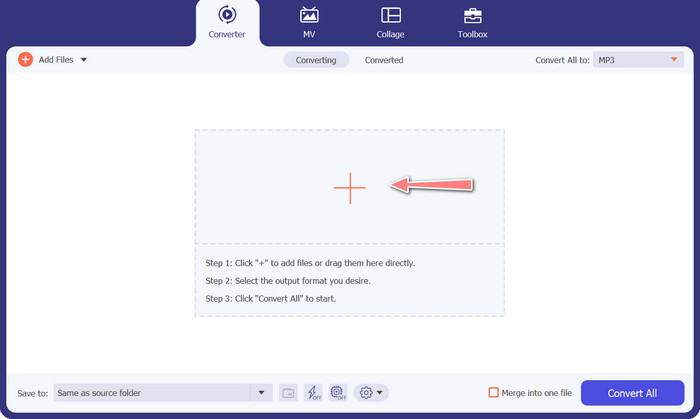
इसके बाद, वह MIDI या MP3 ऑडियो फ़ाइल जोड़ें जिसे आप कन्वर्ट करना चाहते हैं। अपनी ऑडियो फ़ाइलें इम्पोर्ट करने के लिए Add Files बटन पर क्लिक करें। जैसे ही ऑडियो सफलतापूर्वक प्रोग्राम में जुड़ जाती है, उस ऑडियो से जुड़ा थंबनेल दिखाई देने लगेगा।.
चरण 3. आउटपुट फ़ॉर्मैट चुनें
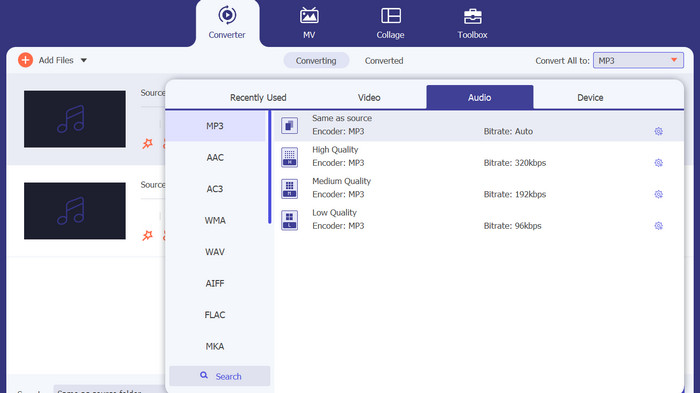
ऊपर दिए गए चरण पूरे करने के बाद, उपयुक्त आउटपुट फ़ॉर्मैट चुनना उचित होगा। Convert All to सेक्शन के पास स्थित ड्रॉप‑डाउन मेनू से MP3 फ़ॉर्मैट को आउटपुट विकल्प के रूप में चुनें। यदि आप कस्टमाइज़ेशन पसंद करते हैं, तो Custom Profile बटन चुनकर आउटपुट वीडियो सेटिंग्स को अपनी आवश्यकता के अनुसार बदल सकते हैं।.
चरण 4. कन्वर्ज़न प्रक्रिया शुरू करें
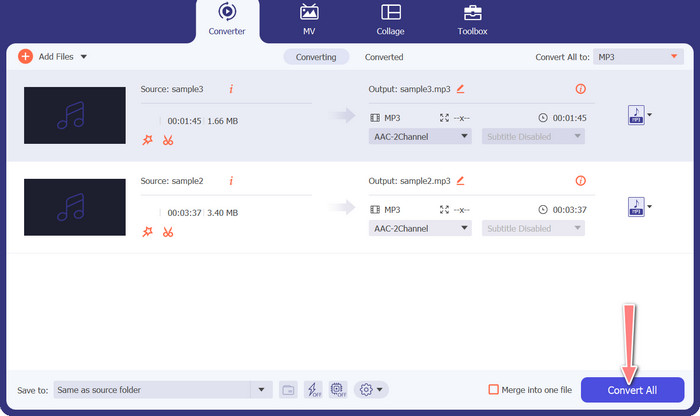
अंत में, कन्वर्ज़न प्रक्रिया शुरू करने के लिए Convert All विकल्प चुनें। कन्वर्ज़न समाप्त होने पर MP3 फ़ाइलें आपके द्वारा तय किए गए आउटपुट डायरेक्टरी में सेव हो जाएँगी।.
2. मुफ्त ऑडियो कनवर्टर ऑनलाइन
एक और तरीका जो आप अपना सकते हैं, वह है Free Audio Converter Online का उपयोग करना। नाम से ही स्पष्ट है कि यह एक ऑनलाइन प्रोग्राम है जो सीधे वेब पर चलता है। इसलिए, आपको अलग से MP3 से MIDI कन्वर्टर ऐप रखने की ज़रूरत नहीं है। सब कुछ सिर्फ़ आपके ब्राउज़र के ज़रिए सुलभ है और किया जा सकता है। सुविधाओं के मामले में भी यह किसी से कम नहीं है। आप कई फ़ाइलें एक साथ अपलोड या बैच कन्वर्ट कर सकते हैं और किसी भी वीडियो या ऑडियो फ़ाइल की प्रोफ़ाइल को कस्टमाइज़ कर सकते हैं। नीचे दिए गए चरणों का पालन करके इस बेहतरीन ऑनलाइन MP3 से MIDI कन्वर्टर के बारे में जानें।.
मुख्य विशेषताएँ
◆ ऑनलाइन एक्सेसिबिलिटी: एक ऑनलाइन टूल के रूप में, एक मुफ्त ऑडियो कन्वर्टर ऑनलाइन कहीं से भी एक्सेस किया जा सकता है।
◆ बैच रूपांतरण: यह मुफ़्त कन्वर्ट मिडी को एमपी3 टूल ऑनलाइन में उपयोगकर्ताओं को एक साथ कई ऑडियो फ़ाइलों को परिवर्तित करने की अनुमति देता है, जिससे समय और प्रयास की बचत होती है।
◆ तेज़ रूपांतरण गति: यह एक क्लाउड-आधारित सर्वर है जो रूपांतरण प्रक्रिया को संभाल सकता है, जिससे तेज़ रूपांतरण गति की अनुमति मिलती है।
चरण 1. Free Audio Converter Online का उपयोग शुरू करने के लिए, पहले अपना पसंदीदा वेब ब्राउज़र खोलें और सीधे इसकी वेबसाइट पर जाएँ।.
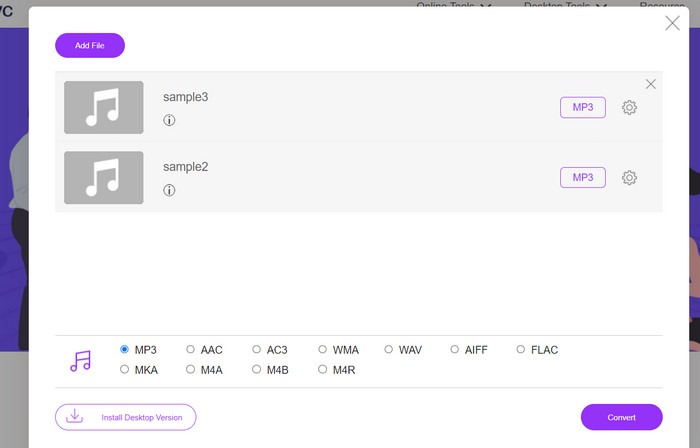
चरण 2. Add Files to Convert विकल्प पर क्लिक करें, और टूल आपको अपने छोटे‑से लॉन्चर को डाउनलोड और इंस्टॉल करने के लिए प्रेरित करेगा। इंस्टॉलेशन पूरा होने पर आप अपनी MIDI या M3 फ़ाइलें अपलोड कर सकते हैं।.
चरण 3. Audio format मेनू से, अंतिम आउटपुट के लिए फ़ॉर्मैट के रूप में MP3 चुनें। तैयार MP3 फ़ाइल की गुणवत्ता को अलग‑अलग बिटरेट चुनकर समायोजित किया जा सकता है।.
चरण 4. अंत में, कन्वर्ज़न प्रक्रिया शुरू करने के लिए Convert बटन पर क्लिक करें।.
भाग 3. एमपी3 को मोबाइल पर मिडी या मिडी को एमपी3 में बदलें
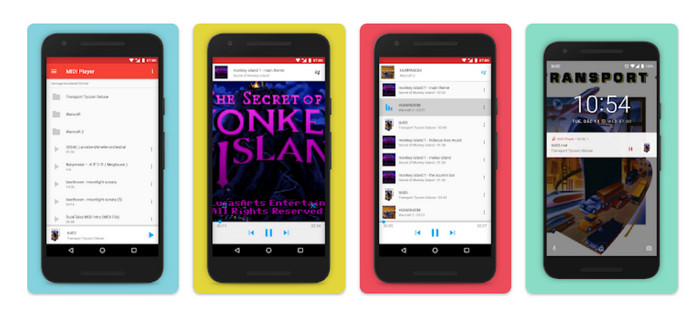
मिडी प्लेयर और कन्वर्टर एक मोबाइल ऐप है जिसे एंड्रॉइड डिवाइस के लिए डिज़ाइन किया गया है और मुख्य रूप से मिडी फाइलों को अन्य ऑडियो प्रारूपों में चलाने और परिवर्तित करने के लिए उपयोग किया जाता है। कार्यक्रम डाउनलोड करने के लिए स्वतंत्र है, और यह एक उपयोगकर्ता के अनुकूल इंटरफेस प्रदान करता है। MIDI प्लेयर और कन्वर्टर की प्रमुख विशेषताओं में से एक इसका बिल्ट-इन MIDI प्लेयर है, जो उपयोगकर्ताओं को उच्च-गुणवत्ता वाली ध्वनि के साथ MIDI फ़ाइलों को सुनने की अनुमति देता है। अपनी MIDI प्लेबैक क्षमताओं के अलावा, MIDI प्लेयर और कन्वर्टर में MIDI फ़ाइलों को MP3, WAV और AAC सहित अन्य ऑडियो प्रारूपों में परिवर्तित करने के उपकरण भी शामिल हैं।
मुख्य विशेषताएँ
◆ ऑडियो रूपांतरण: ऐप उपयोगकर्ताओं को MIDI फ़ाइलों को MP3, WAV और AAC सहित अन्य ऑडियो प्रारूपों में बदलने की अनुमति देता है।
◆ अनुकूलन योग्य आउटपुट सेटिंग्स: उपयोगकर्ता आउटपुट ऑडियो गुणवत्ता, नमूना दर और बिटरेट को अपनी प्राथमिकताओं में समायोजित कर सकते हैं।
◆ टेम्पो और पिच समायोजन: ऐप में रूपांतरण प्रक्रिया के दौरान ऑडियो फ़ाइल की गति और पिच को समायोजित करने के लिए उपकरण भी शामिल हैं।
◆ बैच रूपांतरण: मिडी प्लेयर और कन्वर्टर उपयोगकर्ताओं को एक साथ कई मिडी फ़ाइलों को ऑडियो प्रारूपों में बदलने की अनुमति देता है।
चरण 1. MIDI फ़ाइल को MP3 में बदलने के लिए, आप Google Play Store से MIDI Player & Converter प्राप्त कर के अपने डिवाइस पर इंस्टॉल कर सकते हैं।.
चरण 2. एप्लिकेशन लॉन्च करें और मुख्य मेनू से Convert फ़ीचर चुनें।.
चरण 3. Source श्रेणी में जाएँ और MIDI विकल्प चुनें। अब कन्वर्ज़न के लिए इच्छित MIDI फ़ाइल का चयन करें। Target श्रेणी में, आउटपुट फ़ॉर्मैट के रूप में MP3 चुनें।.
चरण 4. आउटपुट पैरामीटर्स जैसे ऑडियो क्वालिटी, सैंपल रेट और बिटरेट आदि को अपनी पसंद के अनुसार सेट करें। ऑडियो की टेम्पो और पिच बदलने के लिए इंटीग्रेटेड टूल्स का उपयोग करें। Convert विकल्प चुनकर कन्वर्ज़न प्रक्रिया शुरू करें।.
अधिक पढ़ें:
MP3 को OGG में कनवर्ट करें और बेहतर साउंड क्वालिटी का आनंद लें
FLAC बनाम MP3: कौन‑सा ऑडियो फ़ाइल फ़ॉर्मैट है असली विजेता
भाग 4. एमपी3 को मिडी में बदलने के बारे में अक्सर पूछे जाने वाले प्रश्न
क्या MIDI फ़ाइलों को MP3 में बदलना कानूनी है?
MIDI फ़ाइलों को MP3 में बदलने की वैधता आपके देश में कॉपीराइट कानूनों के आधार पर भिन्न हो सकती है। यदि आपके पास MIDI फ़ाइल के अधिकार हैं या आपके पास कॉपीराइट धारक की अनुमति है, तो इसे MP3 में बदलना कानूनी होना चाहिए। दूसरी ओर, यह सुनिश्चित करने के लिए कि आप किसी भी कॉपीराइट नियमों का उल्लंघन नहीं कर रहे हैं, अपने क्षेत्र के कानूनों का निरीक्षण करना हमेशा एक अच्छा विचार है।
क्या मैं MIDI फ़ाइल को MP3 में कनवर्ट करते समय आउटपुट सेटिंग्स को अनुकूलित कर सकता हूँ?
हां, अधिकांश MIDI से MP3 रूपांतरण उपकरण आपको आउटपुट सेटिंग्स को अनुकूलित करने की अनुमति देते हैं, जैसे कि ऑडियो गुणवत्ता, नमूना दर और बिटरेट। यह आपके MP3 के लिए वांछित ध्वनि गुणवत्ता और फ़ाइल आकार प्राप्त करने में आपकी सहायता कर सकता है।
क्या मैं ऑडेसिटी में MP3 को MIDI में बदल सकता हूँ?
ए: ऑडेसिटी एमपी3 फाइलों को सीधे मिडी फाइलों में नहीं बदल सकती। जबकि ऑडेसिटी एक शक्तिशाली ऑडियो संपादन और रिकॉर्डिंग सॉफ्टवेयर है, इसमें एमपी3 फ़ाइल से अलग-अलग नोट्स को पहचानने और निकालने की क्षमता नहीं है, जो कि मिडी फ़ाइल बनाने के लिए आवश्यक है।
निष्कर्ष
MIDI को MP3 फ़ॉर्मैट में बदलने की प्रक्रिया, या इसके विपरीत, विभिन्न प्लेटफ़ॉर्म और डिवाइसेज़ पर संगीत रचनाओं को साझा करने और प्लेबैक करने का एक व्यावहारिक माध्यम साबित हो सकती है। इस उद्देश्य के लिए आपके पास कई प्रकार के टूल्स उपलब्ध हैं, जैसे डेस्कटॉप कंप्यूटर पर इंस्टॉल किए जाने वाले सॉफ़्टवेयर, ऑनलाइन उपलब्ध कन्वर्टर्स, और मोबाइल डिवाइसेज़ के लिए तैयार की गई ऐप्लिकेशनें।.
-
 M4A बनाम MP3: कौन सा ऑडियो फ़ाइल स्वरूप आपके लिए सही है?
 क्या आप M4A और MP3 ऑडियो फॉर्मेट के बीच फंसे हुए हैं? M4A बनाम MP3 की हमारी व्यापक समीक्षा और तुलना आपको अपनी आवश्यकताओं के लिए सर्वश्रेष्ठ फ़ाइल प्रकार चुनने में मदद करेगी
-
 उन्नत ध्वनि गुणवत्ता के लिए MP3 को M4A में कैसे बदलें
 हमारे विशेषज्ञ टिप्स और ट्रिक्स के साथ MP3 को M4A में परिवर्तित करके अपनी संगीत फ़ाइलों की गुणवत्ता में सुधार करें। हमारा गाइड चरण-दर-चरण निर्देश और अनुशंसित सॉफ़्टवेयर प्रदान करता है
-
 विंडोज और मैक के लिए असाधारण एमपी3 से एआईएफएफ कन्वर्टर्स
 यह ट्यूटोरियल विश्वसनीय टूल का उपयोग करके एमपी3 को एआईएफएफ में बदलने के प्रत्येक चरण के माध्यम से आपका मार्गदर्शन करेगा। अधिक जानने के लिए उन पर जाएँ
