


 वीडियो कनवर्टर अंतिम
 स्क्रीन अभिलेखी
 वीडियो मरम्मत
 सुरक्षित डाउनलोड
MPG से MP3: ऑडियो फाइलों को बदलने और बढ़ाने के लिए एक व्यापक गाइड
MPG वीडियो फॉर्मेट का अक्सर फ़िल्मों और अन्य तरह की वीडियो सामग्री को स्टोर करने के लिए उपयोग किया जाता है। कुछ मौकों पर, MPG फॉर्मेट वाली फाइल से केवल ऑडियो भाग निकाल कर उसे MP3 फाइल के रूप में सहेजने की आवश्यकता हो सकती है। ऐसे में एक MPG से MP3 कनवर्टर बहुत उपयोगी टूल साबित होता है।.
एक कुशल कनवर्टर का उपयोग करके, कोई भी अपनी एमपीजी फ़ाइलों को एमपी3 प्रारूप में आसानी से बदल सकता है, जिससे उन्हें विभिन्न प्रकार के उपकरणों पर अपनी पसंदीदा ऑडियो सामग्री का आनंद लेने में सक्षम बनाया जा सकता है। मुफ्त और भुगतान दोनों तरह के कई कन्वर्टर्स मौजूद हैं, जो इस कार्य को पूरा करने में सहायता कर सकते हैं। कार्यक्रमों को ऑनलाइन या ऑफलाइन पहुंच के लिए उनकी वरीयता के आधार पर उपयोगकर्ताओं के लिए वर्गीकृत किया गया था। कृपया उन्हें अपने संदर्भ के लिए नीचे सूचीबद्ध करें।

भाग 1. एमपीजी को एमपी3 या एमपी3 को एमपीजी में वीडियो कन्वर्टर अल्टीमेट के साथ कन्वर्ट करें
MPG से MP3 में कनवर्ट करना, उन कई वीडियो फॉर्मेट्स में से सिर्फ एक है जिन्हें Video Converter Ultimate की मदद से बदला जा सकता है। इसके अलावा, यह प्रोग्राम हाई-डेफिनिशन वीडियो को सेकंडों में बिना क्वालिटी कम किए कनवर्ट कर सकता है, और बैच कनवर्ज़न, हिस्ट्री मैनेजमेंट तथा पैरामीटर ट्यूनिंग जैसी सुविधाएँ भी प्रदान करता है। वीडियो को अन्य फॉर्मेट्स में बदलने के लिए FVC Video Converter Ultimate उपलब्ध सबसे अच्छा विकल्प है।.
स्टेप 1. प्रोग्राम प्राप्त करें
FVC Video Converter Ultimate डाउनलोड करें और अपने कंप्यूटर पर इंस्टॉल करें। नीचे दिए गए Free Download बटन पर क्लिक करें। ऐप शुरू करें और फिर Add Files बटन का उपयोग करके MPG इम्पोर्ट करें।.
फ्री डाउनलोडWindows 7 या बाद के संस्करण के लिएसुरक्षित डाउनलोड
फ्री डाउनलोडMacOS 10.7 या बाद के संस्करण के लिएसुरक्षित डाउनलोड
चरण 2. आउटपुट फॉर्मेट चुनें
Profile विकल्प के ड्रॉपडाउन मेनू से MP3 को इच्छित आउटपुट फॉर्मेट के रूप में चुनें। आवश्यकता हो तो ऑडियो फाइल की सेटिंग्स में बदलाव किया जा सकता है।.
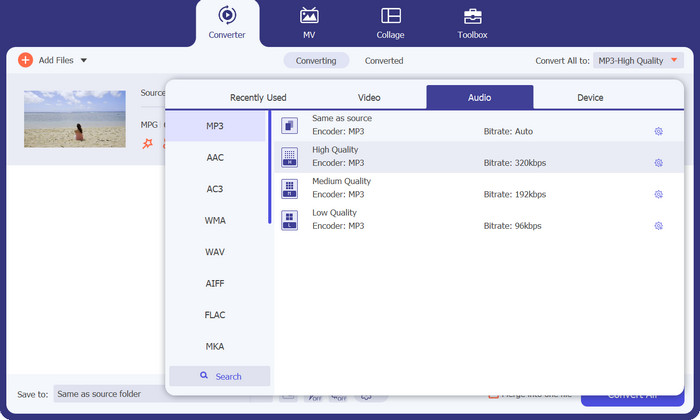
चरण 3. MP3 में कनवर्ट करें
कनवर्ट की गई फाइल को सहेजने के लिए अपने कंप्यूटर पर एक लोकेशन चुनें। कनवर्ज़न प्रक्रिया शुरू करें। अब Convert All बटन पर क्लिक करें। कृपया रूपांतरण पूरा होने तक प्रतीक्षा करें।.
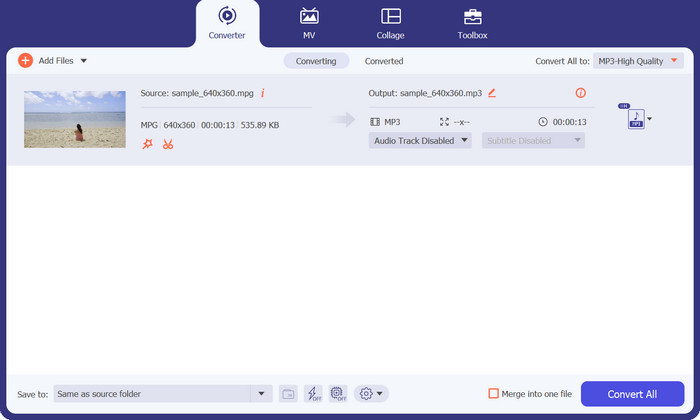
पेशेवरों
- गुणवत्ता बनाए रखते हुए तेज रूपांतरण गति।
- काट-छाँट करें, उपशीर्षक जोड़ें, और बहुत कुछ।
- यह बैच रूपांतरण का समर्थन करता है।
विपक्ष
- इसकी सभी सुविधाओं का उपयोग करने के लिए इसे सशुल्क सब्सक्रिप्शन की आवश्यकता होती है।
भाग 2. एमपीजी को एमपी3 में या एमपी3 को एमपीजी में मुफ्त एमपी3 कन्वर्टर ऑनलाइन के साथ बदलें
एक और MPG से MP3 कनवर्टर ऐप जो आपको MPG को MP3 या MP3 को MPG में बदलने में मदद कर सकता है, वह है Free MP3 Converter Online। यह ऐप पूरी तरह निःशुल्क है और किसी प्रकार की पाबंदी नहीं है। यह टूल उपयोगकर्ताओं को MP3, AAC, AC3, WMA, WAV और अन्य लोकप्रिय ऑडियो फॉर्मेट्स में ऑडियो फाइलें कनवर्ट करने देता है, वह भी बिना किसी छुपे हुए शुल्क के। यह टूल कई तरह के ऑडियो फॉर्मेट विकल्पों में वॉटरमार्क-रहित आउटपुट प्रदान करता है, और इसकी स्पीड आपके इंटरनेट की अपलोड और डाउनलोड स्पीड जितनी तेज हो सकती है। MPG को MP3 में ऑनलाइन और मुफ्त कनवर्ट करने के लिए ये कदम अपनाएँ:
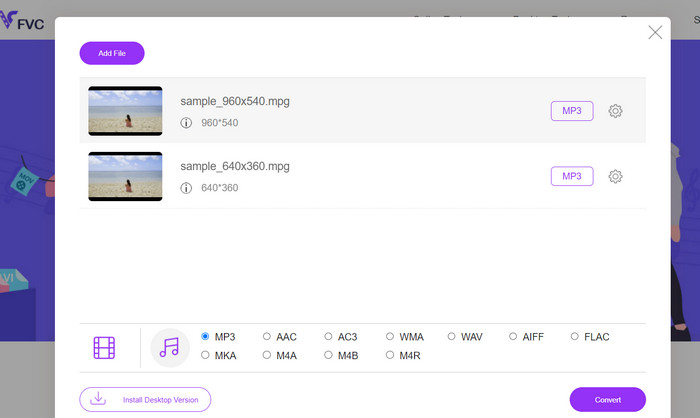
चरण 1. अपने कंप्यूटर पर किसी भी ब्राउज़र का उपयोग करके Free MP3 Converter Online की आधिकारिक वेबसाइट पर जाएँ। अपना म्यूज़िक फाइल जोड़ने के लिए Add Files to Convert बटन पर क्लिक करें और अपनी इच्छित म्यूज़िक फाइल चुनें।.
चरण 2. म्यूज़िक फाइल अपलोड करने के बाद, आपको सभी उपलब्ध ऑडियो फॉर्मेट दिखाई देंगे। प्रोफ़ाइल मेनू से MP3 चुनें।.
चरण 3. कनवर्ज़न प्रक्रिया शुरू करने के लिए Convert बटन पर क्लिक करें। बदलाव पूरा होने तक प्रतीक्षा करें।.
पेशेवरों
- यह पैरामीटर समायोजन का समर्थन करता है।
- गुणवत्ता खोए बिना उच्च-गुणवत्ता वाला ऑडियो ट्रांसकोड करें।
- कोई छिपी हुई फीस या शुल्क नहीं।
विपक्ष
- इसके लिए एक अच्छे इंटरनेट कनेक्शन की आवश्यकता होती है।
- बड़ी ऑडियो फ़ाइलों में धीमा अपलोड समय।
भाग 3. MPG को VLC के साथ MP3 में बदलें
वीएलसी मीडिया प्लेयर एक फ्री और ओपन-सोर्स मीडिया प्लेयर है जो वस्तुतः किसी भी ऑडियो और वीडियो फाइल को खोल सकता है। यह काफी बहुमुखी भी है। दूसरी ओर, यह न केवल मीडिया फ़ाइलों को चलाने में उत्कृष्ट है, बल्कि इसमें एक ऐसा कार्य भी है जो उपयोगकर्ताओं को मीडिया फ़ाइलों को एक प्रारूप से दूसरे प्रारूप में बदलने में सक्षम बनाता है।
वीएलसी का उपयोग करते हुए फ़ाइल को परिवर्तित करते समय, उपयोगकर्ताओं के पास सर्वोत्तम संभव ऑडियो गुणवत्ता प्राप्त करने के लिए बिट दर, चैनल और नमूना दर जैसी कई सेटिंग्स को बदलने की क्षमता होती है। इस बहुमुखी प्रतिभा के कारण, एमपी3 फ़ाइल के आउटपुट को अनुकूलित करना संभव है ताकि इसे विभिन्न संदर्भों में इस्तेमाल किया जा सके।
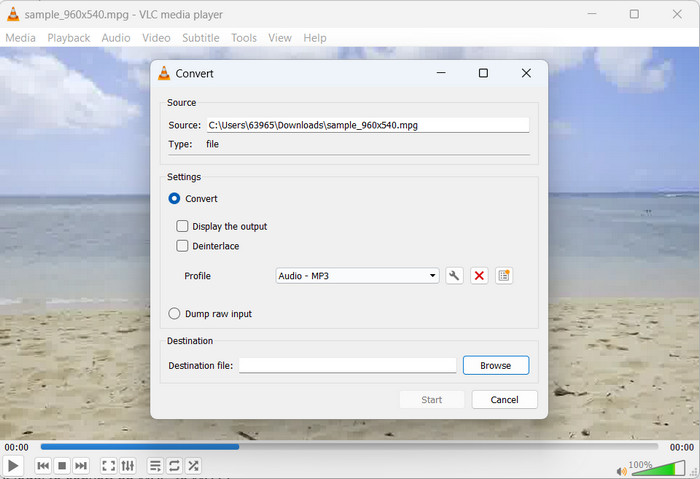
चरण 1. सबसे पहले VLC मीडिया प्लेयर लॉन्च करें और ऊपर बाएँ कोने में Media पर क्लिक करें।.
चरण 2. इसके बाद, ड्रॉपडाउन मेनू से Convert/Save चुनें। फिर Add पर क्लिक करें और वह MPG फाइल चुनें जिसे आप कनवर्ट करना चाहते हैं।.
चरण 3. पेज के निचले हिस्से में Convert/Save पर क्लिक करें। Profile सेक्शन के अंतर्गत ड्रॉपडाउन से Audio-MP3 चुनें। अंत में, वह लोकेशन चुनें जहाँ आप कनवर्ट की गई फाइल सहेजना चाहते हैं और Start पर क्लिक करें। VLC की मदद से MPG से MP3 निकालने की प्रक्रिया इसी तरह पूरी होती है।.
पेशेवरों
- यह कई प्लेटफॉर्म के लिए उपलब्ध है।
- उन्नत ऑडियो और वीडियो कोडेक्स का उपयोग करता है।
- यह कस्टम सेटिंग्स प्रदान करता है।
विपक्ष
- यह केवल कुछ आउटपुट स्वरूपों का समर्थन करता है।
- सीमित संपादन सुविधाएँ।
अधिक जानकारी:
MPG को MP4 में जल्दी बदलने के 3 बेहतरीन तरीके
MKV फ़ाइलों को MP3 में कन्वर्ट करने के टिप्स और ट्रिक्स [2023]
भाग 4. एमपी3 और एमपीजी को परिवर्तित करने के बारे में अक्सर पूछे जाने वाले प्रश्न
क्या MPG को MP3 में बदलना कानूनी है?
आपके प्रश्न का उत्तर देने के लिए, एमपीजी फ़ाइल को एमपी3 में कनवर्ट करना गैर-व्यावसायिक उपयोग के लिए वैध है। यदि आप परिवर्तित ऑडियो को साझा या बेचना चाहते हैं, हालाँकि, आपको उपयुक्त परमिट या लाइसेंस की आवश्यकता होगी।
आउटपुट MP3 फ़ाइल की ऑडियो गुणवत्ता को कौन से कारक प्रभावित करते हैं?
परिणामी एमपी3 फ़ाइल की श्रवण निष्ठा कई कारकों पर निर्भर करती है, जिसमें बिट दर, नमूना आवृत्ति और चैनल मोड शामिल हैं, लेकिन इन तक ही सीमित नहीं है। नमूना आवृत्ति और बिट दर को बढ़ाकर आउटपुट फ़ाइल की ऑडियो गुणवत्ता को बढ़ाया जा सकता है।
मैं अपनी परिवर्तित MP3 फ़ाइल के लिए सही बिटरेट का चयन कैसे करूँ?
एक MP3 फ़ाइल की ध्वनि की गुणवत्ता और फ़ाइल का आकार इसकी बिट दर से निर्धारित होता है, जिसे आमतौर पर किलोबिट्स प्रति सेकंड (kbps) में व्यक्त किया जाता है। एक बढ़ी हुई बिट दर बेहतर ऑडियो निष्ठा के साथ सकारात्मक रूप से सहसंबद्ध है, यद्यपि एक बड़े फ़ाइल आकार की कीमत पर।
निष्कर्ष
MPG से MP3 में कनवर्ज़न ऑडियो कम्पैटिबिलिटी बढ़ाने और विभिन्न डिवाइसों पर बिना रुकावट प्लेबैक पाने का एक व्यावहारिक समाधान है। इस मार्गदर्शिका में बताए गए तरीकों का पालन करके कोई भी अपने MPG फाइलों को आसानी से व्यापक रूप से स्वीकार किए जाने वाले MP3 फॉर्मेट में बदल सकता है।.
-
 अपने मैक/विंडोज/ऑनलाइन पर एमपीजी को एमओवी में बदलने के 3 आसान तरीके
 अपनी MPG फ़ाइलों को कनवर्ट करना चाहते हैं और बाद में उन्हें अपने iOS, iPod, iPad या Mac पर ट्रांसपोर्ट करना चाहते हैं? यह आलेख यह पता लगाने में मदद करेगा कि एमपीजी को एमओवी में कैसे परिवर्तित किया जाए।
-
 विंडोज और मैक पर एक में कई एमपीजी वीडियो फ़ाइलों को कैसे जुड़ें
 कई MPG क्लिप को एक फ़ाइल में शामिल करना आपके लिए एक समस्या हो सकती है। आप इस लेख में अपने कंप्यूटर पर एमपीजी वीडियो को एक साथ मर्ज करने के तरीके के बारे में अधिक जान सकते हैं।
-
 5 MP3 कटर किसी भी ऑडियो को आसानी से काटने के लिए [2023 अपडेटेड]
 क्या आपको ऑडियो ट्रिम करने के लिए MP3 कटर की आवश्यकता है? उस स्थिति में, इस लेख को पढ़ें क्योंकि हम वे उपकरण प्रदान करते हैं जिन पर आप निर्भर हो सकते हैं जो ऑडियो के लिए आसान कटिंग प्रदान करते हैं।
