


 वीडियो कनवर्टर अंतिम
 स्क्रीन अभिलेखी
 वीडियो मरम्मत
 सुरक्षित डाउनलोड
iPhone पर MP3 को रिंगटोन में आसानी से कैसे बदलें
क्या आपको अपने iPhone के डिफ़ॉल्ट रिंगटोन ज़्यादा पसंद नहीं आते और आप चाहते हैं कि आपके MP3 फ़ाइलों में से कोई एक आपकी iPhone रिंगटोन बन जाए? अगर हम कहें कि iPhone पर MP3 को रिंगटोन में बदलना संभव है, तो कैसा लगेगा?
इस लेख में, अपने iPhone पर अपनी MP3 संगीत फ़ाइलों को रिंगटोन बनाने के 3 अलग-अलग तरीके जानें। उन्हें परिवर्तित करना थोड़ा मुश्किल है, लेकिन सही उपकरण और विधि के साथ, आइए इसे आपके लिए जितना संभव हो उतना सरल और सुविधाजनक बनाएं। आप किसका इंतज़ार कर रहे हैं? चलिए शुरू करते हैं!

भाग 1. मैक/विंडोज पर iPhone के लिए MP3 को रिंगटोन में बदलें
iPhone पर MP3 को रिंगटोन में बदलने के सबसे आसान और तेज़ तरीकों में से एक है Windows या macOS कंप्यूटर पर FVC द्वारा चुने गए वीडियो कन्वर्टर अल्टिमेट का इस्तेमाल करना। यह ऑल-इन-वन कन्वर्टर टूल 300 से अधिक फ़ॉर्मैट्स को सपोर्ट करता है, जिनमें M4R फ़ॉर्मैट भी शामिल है, जो MP3 म्यूज़िक फ़ाइलों को iPhone रिंगटोन में बदलने के लिए इसे भरोसेमंद टूल बनाता है। इसके अलावा, यह कन्वर्टर अन्य टूल्स की तुलना में 120 गुना तक तेज़ है, जिससे कन्वर्ज़न प्रक्रिया तेज़ और बिना झंझट के हो जाती है।.
यहाँ बताया गया है कि FVC द्वारा चुने गए वीडियो कन्वर्टर अल्टिमेट का उपयोग करके अपनी MP3 फ़ाइल को रिंगटोन में कैसे बदलें:
स्टेप 1. सबसे पहले, इस टूल को अपने कंप्यूटर (Windows या Mac) पर डाउनलोड और इंस्टॉल करें।.
स्टेप 2. टूल लॉन्च करें, और मुख्य इंटरफेस पर आने के बाद Add Files बटन पर क्लिक करें। इससे आप उस MP3 फ़ाइल को इम्पोर्ट कर पाएँगे जिसे आप iPhone रिंगटोन में बदलना चाहते हैं।.
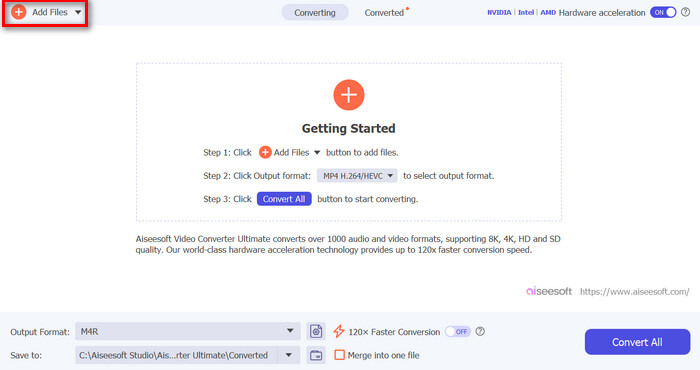
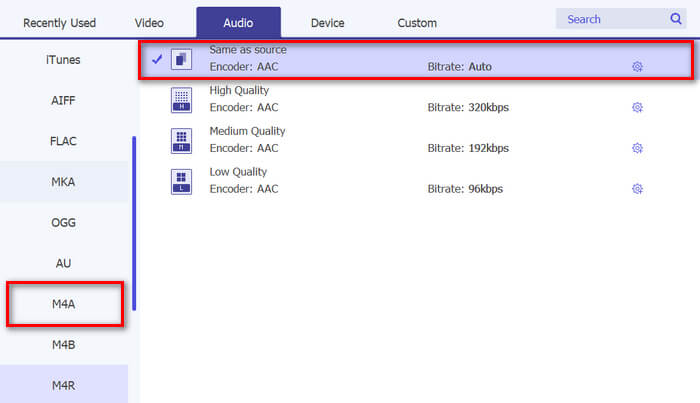
स्टेप 3. अब Output format पर जाएँ, और उपलब्ध ऑडियो फ़ॉर्मैट्स की सूची में से M4R चुनें। M4R iPhone रिंगटोन का फ़ाइल फ़ॉर्मैट है।.
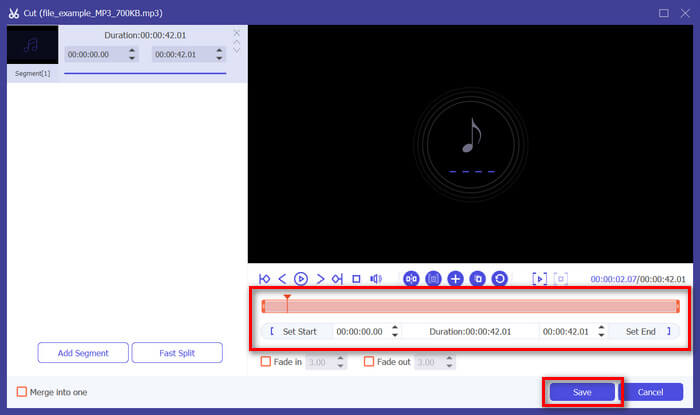
स्टेप 4. इसके बाद, यह सुनिश्चित करें कि आपकी MP3 फ़ाइल केवल 30 सेकंड लंबी हो। अगर यह उससे ज़्यादा है, तो Cut बटन पर जाएँ और टाइमलाइन पर मौजूद बार को एडजस्ट करके या मैन्युअली एंड टाइम 30 सेकंड सेट करके फ़ाइल की लंबाई कम करें।.
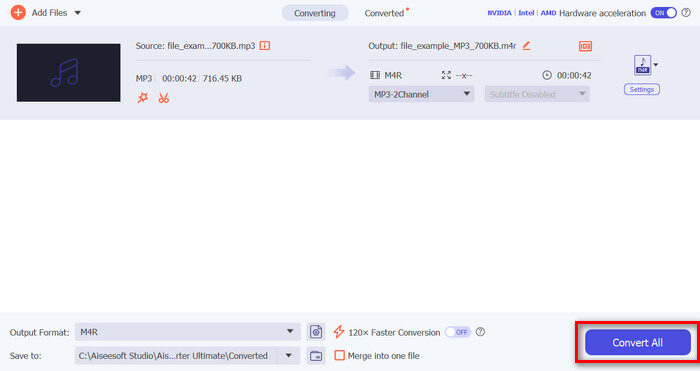
स्टेप 5. अब Convert All बटन पर क्लिक करें ताकि आपकी MP3 फ़ाइलें iPhone रिंगटोन में कन्वर्ट होना शुरू हो जाएँ। कन्वर्ट की गई फ़ाइलें सीधे आपके कंप्यूटर के फ़ोल्डर में सेव हो जाएँगी।.
यह बहुत तेज़ है, है न? यह वाकई अविश्वसनीय है कि FVC द्वारा चुना गया यह वीडियो कन्वर्टर अल्टीमेट टूल MP3 को iPhone रिंगटोन में बदलना कितना आसान और तेज़ बनाता है। इसलिए, अगर आप ऐसे कन्वर्टर टूल की तलाश में हैं जो आपका समय बचा सके, तो अभी इस टूल को आज़माएँ।
भाग 2. iPhone पर MP3 को रिंगटोन में बदलें
यदि आप कंप्यूटर का उपयोग किए बिना सीधे तरीके को पसंद करते हैं, तो GarageBand आपके iPhone पर सीधे MP3 को रिंगटोन में बदलने का सुविधाजनक समाधान प्रदान करता है। यह टूल एक शक्तिशाली संगीत निर्माण ऐप है जो अधिकांश iPhones पर पहले से इंस्टॉल आता है। यह टूल न केवल उपयोगकर्ता के अनुकूल है, बल्कि आपकी ऑडियो फ़ाइलों को प्रभावी ढंग से अनुकूलित करने के लिए विभिन्न सुविधाएँ भी प्रदान करता है।
यहाँ बताया गया है कि GarageBand का उपयोग करके अपनी MP3 फ़ाइल को रिंगटोन में कैसे बदलें:
स्टेप 1. सबसे पहले, अपने iPhone पर GarageBand ऐप लॉन्च करें। अगर यह इंस्टॉल नहीं है, तो App Store में जाएँ और इसे इंस्टॉल करें।.
स्टेप 2. Project आइकन पर टैप करें और फिर ऊपर-दाईं ओर मौजूद Loop आइकन पर टैप करें।.
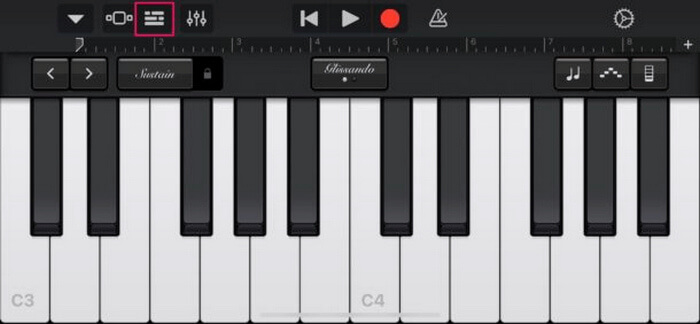
स्टेप 3. अब MP3 फ़ाइल चुनने के लिए Music या Files पर टैप करें और उसे GarageBand में इम्पोर्ट करने के लिए उस पर लॉन्ग-प्रेस करें।.
स्टेप 4. इसके बाद, ट्रैक पर टैप करें और ऑडियो ट्रिम करने के लिए दोनों सिरों को ड्रैग करें। यह सुनिश्चित करें कि रिंगटोन 30 सेकंड से कम हो।.
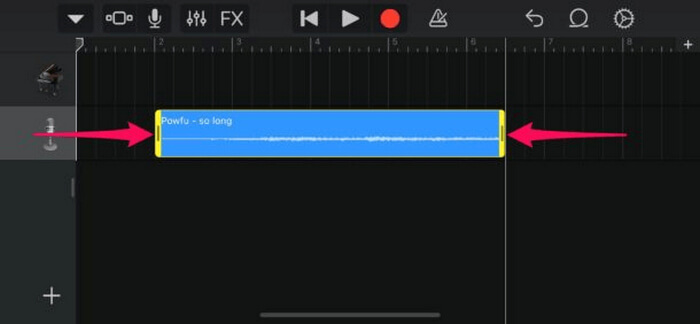
स्टेप 5. आपको ऊपर-बाएँ कोने पर डाउनवर्ड एरो दिखाई देगा। उस पर टैप करें, फिर क्लिप को सेव करने के लिए My Songs चुनें।.
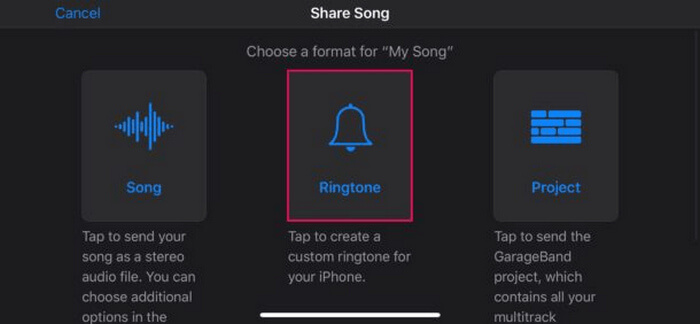
स्टेप 6. आपकी बनाई हुई क्लिप ढूँढें, उस पर लॉन्ग-प्रेस करें, Share पर टैप करें और Ringtone विकल्प चुनें। रिंगटोन को नाम देना न भूलें और Export पर टैप करें।.
स्टेप 7. कन्वर्ट की गई MP3 फ़ाइल को अपने iPhone पर रिंगटोन के रूप में इस्तेमाल करने के लिए Use Sound As पर टैप करें और इसे डिफ़ॉल्ट टेक्स्ट मैसेज टोन या किसी विशेष कॉन्टैक्ट के लिए सेट करें। वैकल्पिक रूप से, अपने iPhone में Settings, Sounds & Haptics और Ringtone पर जाएँ और वहाँ से रिंगटोन बदलें।.
अगर आप अपने iPhone पर MP3 फ़ाइलों को सीधे रिंगटोन में बदलना चाहते हैं, तो यह तरीका आपके लिए बिल्कुल सही है। हालाँकि, नए उपयोगकर्ताओं को इसे सीखने में थोड़ा समय लगेगा, क्योंकि इसमें जटिल विशेषताएँ हैं जो उन्हें पहली बार में परेशान कर सकती हैं।
भाग 3. MP3 को iPhone रिंगटोन में बदलें [ऑनलाइन और निःशुल्क]
वहीं, अगर आप MP3 को iPhone रिंगटोन में बदलने के लिए एक मुफ़्त और ऑनलाइन तरीका पसंद करते हैं, तो FVC Free Audio Converter आपके लिए सही विकल्प है। इस टूल से आप किसी भी फ़ॉर्मैट की ऑडियो फ़ाइल को आसानी से कन्वर्ट कर सकते हैं, खासकर MP3 को M4R में, क्योंकि यह MP3, AAC, AC3, WMA, WAV, AIFF, FLAC, MKA, M4A, M4B और M4R जैसे ऑडियो फ़ॉर्मैट्स को सपोर्ट करता है। इसके अलावा, इसका बहुत ही सहज और सरल इंटरफेस होने के कारण यह उन लोगों के लिए बिल्कुल उपयुक्त है जिन्हें चलते-फिरते इस्तेमाल करने के लिए ऑडियो कन्वर्टर टूल चाहिए।.
यहाँ बताया गया है कि FVC Free Audio Converter का उपयोग करके अपनी MP3 फ़ाइल को रिंगटोन में कैसे बदलें:
स्टेप 1. MP3 फ़ाइलों को इम्पोर्ट करने के लिए Add Files बटन पर क्लिक करें, जिन्हें आप रिंगटोन में कन्वर्ट करना चाहते हैं।.
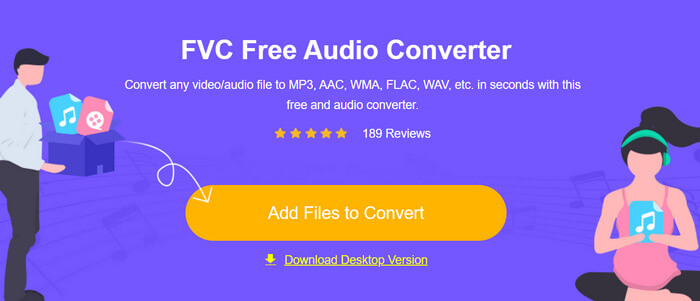
स्टेप 2. अपने ऑडियो आउटपुट फ़ॉर्मैट के रूप में M4R चुनें।.
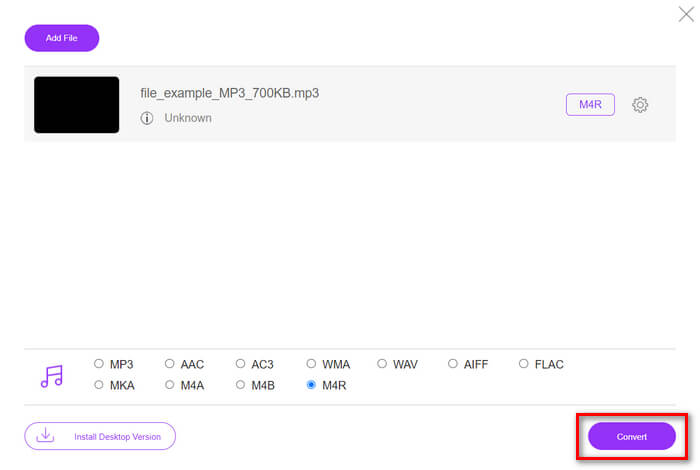
स्टेप 3. अंत में, अपनी MP3 फ़ाइल को रिंगटोन में कन्वर्ट करने की प्रक्रिया शुरू करने के लिए Convert बटन पर क्लिक करें। कन्वर्ट की गई फ़ाइल सीधे आपके कंप्यूटर में सेव हो जाएगी।.
अगर आप iPhone के लिए MP3 को M4R रिंगटोन में बदलने के लिए किसी मुफ़्त और ऑनलाइन वैकल्पिक तरीके की तलाश में हैं, तो FVC Free Audio Converter एक बेहतरीन समाधान है। इसका सहज इंटरफेस कन्वर्ज़न प्रक्रिया को आसान बनाता है और यह कई तरह के ऑडियो फ़ॉर्मैट्स को सपोर्ट करता है, जिससे अलग-अलग प्रकार की फ़ाइलों के साथ कम्पैटिबिलिटी सुनिश्चित होती है।.
भाग 4. कंप्यूटर से iPhone में परिवर्तित रिंगटोन कैसे स्थानांतरित करें
अब जब आपने अंततः अपने कंप्यूटर पर अपनी MP3 फ़ाइलों को रिंगटोन में परिवर्तित कर लिया है, तो उन्हें अपने iPhone में स्थानांतरित करने का सबसे तेज़ तरीका iTunes का उपयोग करना है।
यहाँ बताया गया है कि iTunes का उपयोग करके कन्वर्ट की गई रिंगटोन को iPhone में कैसे ट्रांसफ़र करें:
स्टेप 1. अपने कंप्यूटर पर iTunes खोलें और USB केबल से अपने iPhone को कनेक्ट करें।.
स्टेप 2. कन्वर्ट की गई रिंगटोन फ़ाइल को iTunes लाइब्रेरी में ड्रैग करें। यह सुनिश्चित करें कि वह Tones सेक्शन के तहत दिखाई दे।.
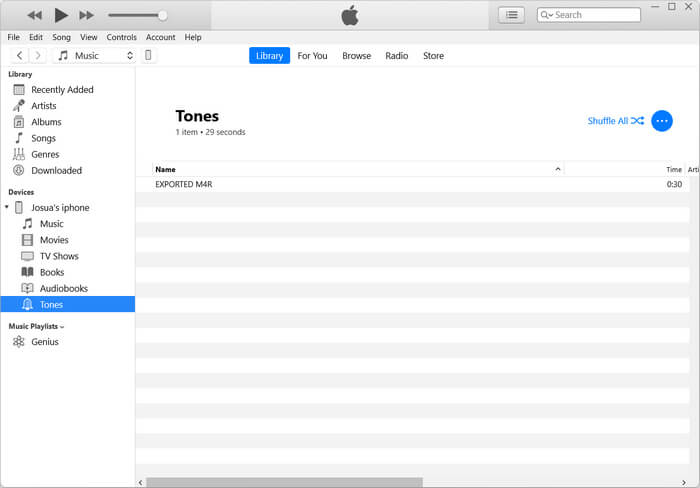
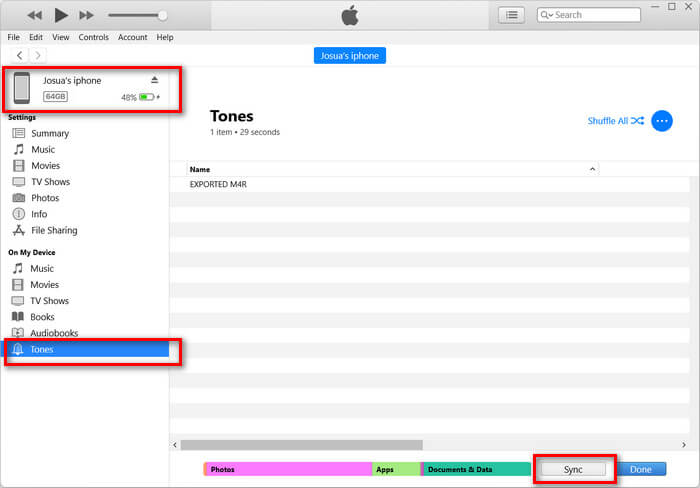
स्टेप 3. iTunes में अपने iPhone आइकन का चयन करें, Tones टैब पर जाएँ, और Sync Tones पर टिक लगाएँ। फिर इम्पोर्ट की गई रिंगटोन फ़ाइल चुनें और सिंक करने के लिए Apply पर क्लिक करें।.
स्टेप 4. अब अपने iPhone पर Settings में जाएँ, Sounds & Haptics चुनें, Ringtone पर टैप करें और अपनी नई रिंगटोन चुनें।.
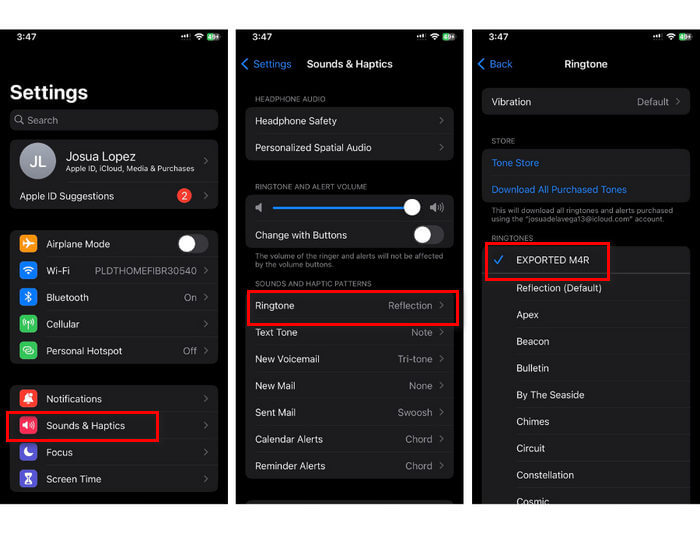
बस, अब आप आसानी से अपने iPhone पर MP3 को रिंगटोन में बदल सकते हैं और उसका इस्तेमाल कर सकते हैं, जिससे आपके डिवाइस को आपकी पसंदीदा ध्वनियों के साथ एक निजी स्पर्श मिलेगा।
भाग 5. MP3 को रिंगटोन में बदलने के बारे में अक्सर पूछे जाने वाले प्रश्न
सबसे अच्छी मुफ्त रिंगटोन साइट कौन सी है?
कई वेबसाइटें मुफ़्त रिंगटोन दे रही हैं, लेकिन कुछ लोकप्रिय और विश्वसनीय वेबसाइट में Zedge, Mobile9 और Tones7 शामिल हैं। ये साइटें कई तरह की रिंगटोन उपलब्ध कराती हैं जिन्हें आप डाउनलोड करके अपने फ़ोन पर इस्तेमाल कर सकते हैं।
MP3 से iPhone रिंगटोन किस प्रारूप में है?
iPhone रिंगटोन का प्रारूप M4R है। जब किसी MP3 फ़ाइल को iPhone पर रिंगटोन के रूप में उपयोग करने के लिए परिवर्तित किया जाता है, तो उसे M4R प्रारूप में सहेजा जाना चाहिए।
iPhone रिंगटोन में MP3 कैसे जोड़ें?
अपने iPhone रिंगटोन में MP3 जोड़ने के लिए, आपको सबसे पहले FVC द्वारा चुने गए Video Converter Ultimate जैसे कनवर्टर टूल का उपयोग करके MP3 फ़ाइल को M4R में बदलना होगा। एक बार जब आप MP3 फ़ाइल को बदल लेते हैं, तो इसे अपने iPhone में स्थानांतरित करने के लिए iTunes का उपयोग करें और इसे अपनी नई रिंगटोन के रूप में उपयोग करें।
निष्कर्ष
अब आप अपनी पसंदीदा MP3 फ़ाइलों का इस्तेमाल करके अपने iPhone के लिए रिंगटोन बना सकते हैं। बस वह कन्वर्टर टूल चुनें जो आपकी ज़रूरतों के लिए सबसे उपयुक्त हो। इन सभी में iPhone पर MP3 को रिंगटोन में बदलने का आसान और सीधा तरीका मिलता है। तो फिर देर किस बात की? अभी से अपनी यूनिक रिंगटोन बनाना शुरू करें और अपने iPhone को सचमुच अपना बनाएं!
-
 MOV VS MP4 - आप कौन सा चुनते हैं?
 MOV VS MP4, कौन सा बेहतर है? यह पोस्ट MP4 और MOV के बीच के अंतर को बताता है, ताकि आप अपनी वीडियो फ़ाइलों के लिए उपयोग करने के लिए बेहतर विकल्प पा सकें।
-
 FLAC बनाम MP3: कौन सा ऑडियो फ़ाइल प्रारूप सर्वोच्च है
 यह पोस्ट FLAC बनाम MP3 के बीच प्रमुख अंतरों की तुलना करेगी। इसमें उनकी ध्वनि की गुणवत्ता, फ़ाइल आकार, अनुकूलता और बहुत कुछ शामिल है।
-
 उन्नत ध्वनि गुणवत्ता के लिए MP3 को M4A में कैसे बदलें
 हमारे विशेषज्ञ टिप्स और ट्रिक्स के साथ MP3 को M4A में परिवर्तित करके अपनी संगीत फ़ाइलों की गुणवत्ता में सुधार करें। हमारा गाइड चरण-दर-चरण निर्देश और अनुशंसित सॉफ़्टवेयर प्रदान करता है।
