


 वीडियो कनवर्टर अंतिम
 स्क्रीन अभिलेखी
 वीडियो मरम्मत
 सुरक्षित डाउनलोड
MPEG को MP4 में कैसे बदलें [निःशुल्क और ऑनलाइन विधियाँ शामिल हैं]
MPEG, या मूविंग पिक्चर एक्सपर्ट्स ग्रुप, एक मल्टीमीडिया कम्प्रेशन मानक प्रारूप है जो उपयोगकर्ताओं को ऑडियो और वीडियो को कुशलतापूर्वक संग्रहीत, प्रसारित और स्ट्रीम करने की अनुमति देता है। इसके अलावा, यह उन्नत कम्प्रेशन तकनीक का उपयोग करता है जो फ़ाइल आकार को कम करते हुए उनकी गुणवत्ता बनाए रखने में सहायक है।
दूसरी ओर, MP4 एक वीडियो फ़ॉर्मेट है जो अपनी लचीलापन और अनुकूलता के लिए जाना जाता है। MPEG की तुलना में, यह फ़ॉर्मेट अधिक बहुउद्देश्यीय है, क्योंकि यह वीडियो और ऑडियो, सबटाइटल, इमेज और मेटाडेटा को सपोर्ट करता है। इसके अलावा, यह बेहतर कंप्रेशन दक्षता भी प्रदान करता है। इसी वजह से MPEG को MP4 में बदलना ज़रूरी हो जाता है। इसे सीखने के लिए, इस लेख में आगे बढ़ें और MPEG फ़ाइलों को MP4 में बदलने के पाँच आसान तरीके जानें।.

भाग 1. MPEG वीडियो को MP4 में कैसे बदलें [बैच कन्वर्ट]
MPEG वीडियो को MP4 में बदलने के सबसे अच्छे तरीक़ों में से एक है FVC द्वारा चुना गया Video Converter Ultimate इस्तेमाल करना। यह पूरी तरह से फीचर-समृद्ध वीडियो कन्वर्टर टूल उपयोगकर्ताओं को अपनी वीडियो फ़ाइलों को तेज़ी से विभिन्न पसंदीदा आउटपुट फ़ॉर्मेट में बदलने की अनुमति देता है, क्योंकि यह कुल मिलाकर 1,000 से अधिक इनपुट और आउटपुट फ़ॉर्मेट को सपोर्ट करता है। इसके अलावा, यदि आपके पास कई MPEG वीडियो फ़ाइलें हैं जिन्हें कन्वर्ट करना है, तो यह वीडियो कन्वर्टर टूल अपने बैच कंप्रेशन फ़ीचर की मदद से आपको उन्हें एक साथ कन्वर्ट करने की सुविधा देता है।.
MPEG वीडियो को बैच में MP4 में कन्वर्ट करने का तरीका इस तरह है:
स्टेप 1. सबसे पहले, अपने कंप्यूटर पर FVC द्वारा चुने गए Video Converter Ultimate को डाउनलोड और इंस्टॉल करें।.
Free DownloadWindows 7 या बाद के वर्ज़न के लिएसिक्योर डाउनलोड
Free DownloadMacOS 10.7 या बाद के वर्ज़न के लिएसिक्योर डाउनलोड
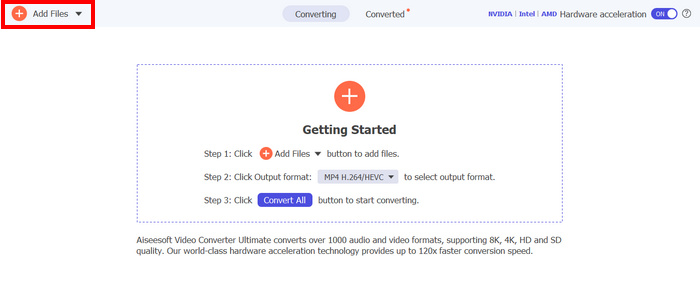
स्टेप 2। अब, जिन MPEG फ़ाइलों को आप बैच में MP4 में कंप्रेस करना चाहते हैं, उन्हें इम्पोर्ट करने के लिए Add Files बटन पर क्लिक करें।.
स्टेप 3। आख़िर में, नीचे दिए गए Output Format पर क्लिक करें और Video टैब पर जाएँ। वहाँ से सूची में से MP4 चुनें। चयन हो जाने के बाद, MPEG वीडियो को MP4 में बैच-कंप्रेस करने के लिए Convert All बटन पर क्लिक करें।.
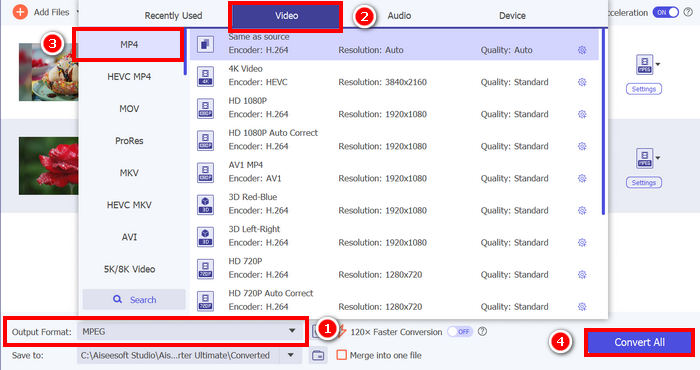
FVC द्वारा चुने गए वीडियो कन्वर्टर अल्टीमेट के साथ, MPEG वीडियो को MP4 में बदलने की प्रक्रिया बहुत आसान है। आपको बस 2 या 3 चरणों का पालन करना होगा, साथ ही इसका यूजर इंटरफेस सहज और बेहद उपयोगकर्ता-अनुकूल है। इसके अलावा, इस टूल की उन्नत एन्कोडिंग तकनीक के साथ, उपयोगकर्ता यह सुनिश्चित कर सकते हैं कि परिवर्तित MPEG फ़ाइलें उच्च गुणवत्ता बनाए रखें और साथ ही इष्टतम संपीड़न भी प्राप्त करें।
भाग 2. MPEG को MP4 में बदलें [निःशुल्क]
अगर आप सोच रहे हैं कि क्या कोई मुफ़्त कन्वर्टर टूल उपलब्ध हैं जिनका इस्तेमाल करके आप MPEG वीडियो को MP4 में बदल सकते हैं, तो आप सही सोच रहे हैं! ये मुफ़्त वीडियो कन्वर्टर टूल आपको वीडियो फ़ाइलों को अपनी पसंद के वीडियो फ़ॉर्मेट में बदलने की सुविधा देंगे। हालाँकि, यह ध्यान रखना ज़रूरी है कि चूँकि ये मुफ़्त हैं, इसलिए इनका इस्तेमाल करते समय कुछ बातों का ध्यान रखना ज़रूरी है। ये मुफ़्त MPEG से MP4 कन्वर्टर टूल हैं:
VLC मीडिया प्लेयर का उपयोग करके MPEG को MP4 में बदलें
आप VLC Media Player से बहुत अच्छी तरह परिचित होंगे, क्योंकि इसे विभिन्न डिवाइसों पर मीडिया प्लेयर के रूप में व्यापक रूप से इस्तेमाल किया जाता है। लेकिन क्या आप जानते हैं कि यह मीडिया प्लेयर MPEG वीडियो को MP4 में कन्वर्ट भी कर सकता है? जवाब है, हाँ। VLC का उपयोग वीडियो फ़ाइलों को MP4, AVI, MKV और अन्य कई वीडियो फ़ॉर्मेट में कन्वर्ट करने के लिए भी किया जा सकता है। यह बुनियादी वीडियो कन्वर्ज़न के लिए एक मुफ़्त और सरल विकल्प है, हालांकि इसमें समर्पित वीडियो कन्वर्टर्स में मिलने वाली उन्नत सुविधाएँ नहीं हैं।.
VLC Media Player का उपयोग करके MPEG वीडियो को MP4 में बदलने का तरीक़ा इस प्रकार है:
स्टेप 1। सबसे पहले, अपने कंप्यूटर पर VLC Media Player को डाउनलोड और इंस्टॉल करें।.
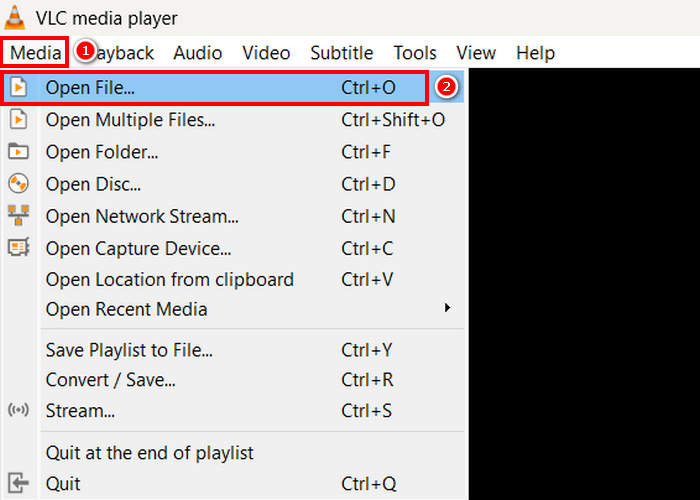
स्टेप 2। अगला, Media टैब पर जाएँ और उसके नीचे Open File पर क्लिक करें। वहाँ से वह MPEG वीडियो इम्पोर्ट करें जिसे आप MP4 में कन्वर्ट करना चाहते हैं।.
स्टेप 3। उसके बाद, फिर से Media टैब पर वापस जाएँ, और इस बार नीचे दिए गए Convert/ Save को चुनें।.
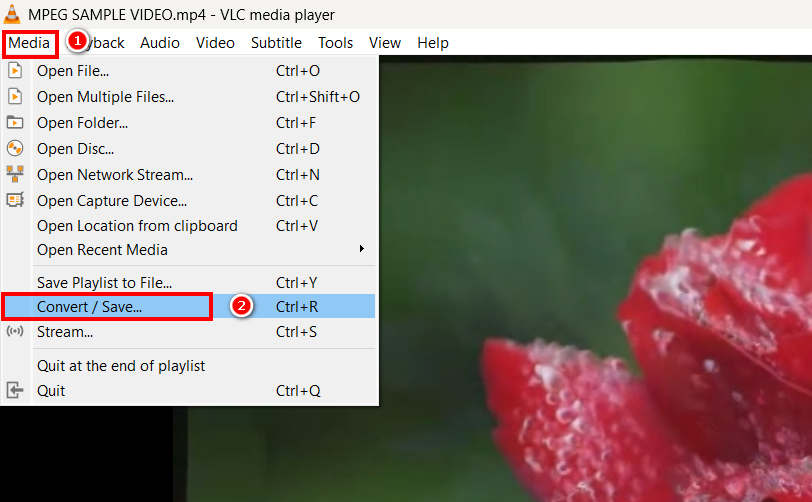
स्टेप 4। अब, Profile पर क्लिक करें और अपने आउटपुट फ़ॉर्मेट के रूप में MP4 चुनें। चयन के बाद, MPEG वीडियो को MP4 में कनवर्ट करना शुरू करने के लिए नीचे दिए गए Start button पर क्लिक करें।.
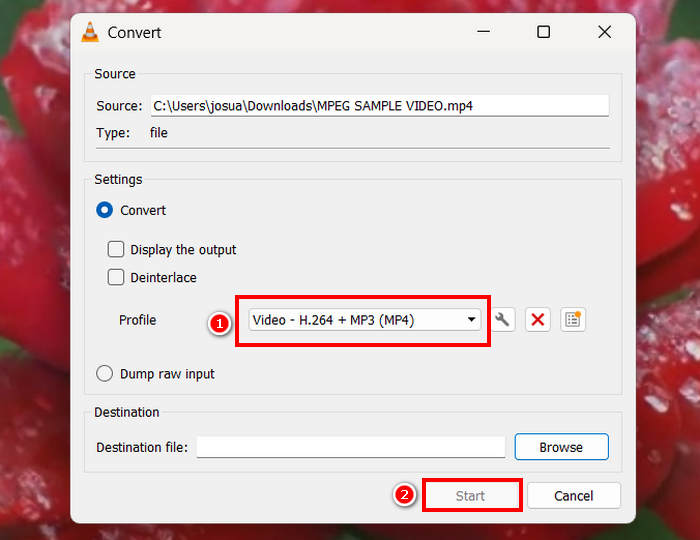
वीएलसी मीडिया प्लेयर एमपीईजी वीडियो को मुफ्त में एमपी4 में बदल सकता है, लेकिन समर्पित वीडियो कनवर्टर टूल्स के विपरीत, वीएलसी में उन्नत एन्कोडिंग विकल्प, बैच रूपांतरण और अन्य आवश्यक सुविधाओं का अभाव है। इसमें सीमित प्रारूप समर्थन भी है, जिससे यह उन उपयोगकर्ताओं के लिए कम कुशल है जिन्हें तेज़ प्रोसेसिंग और अधिक अनुकूलन की आवश्यकता होती है।
हैंडब्रेक के साथ MPEG को MP4 में बदलें
MPEG को MP4 में मुफ़्त में बदलने के लिए आप जिस टूल का इस्तेमाल कर सकते हैं, वह है HandBrake। यह टूल एक ओपन-सोर्स वीडियो ट्रांसकोडर के रूप में जाना जाता है जो उपयोगकर्ताओं को DVD रिप करने की सुविधा देता है। हालाँकि, इसका इस्तेमाल MPEG फ़ाइलों को MP4 जैसे फ़ॉर्मेट में कुशलतापूर्वक बदलने के लिए भी किया जा सकता है।
HandBrake का उपयोग करके MPEG वीडियो को MP4 में बदलने का तरीक़ा इस प्रकार है:
स्टेप 1। सबसे पहले, अपने कंप्यूटर पर HandBrake डाउनलोड और इंस्टॉल करें।.
स्टेप 2। अब, अपने कंप्यूटर पर टूल लॉन्च करें और बाएँ कोने में दिए गए Open Video File पर क्लिक करके वह MPEG वीडियो फ़ाइल इम्पोर्ट करें जिसे आप MP4 फ़ॉर्मेट में कन्वर्ट करना चाहते हैं।.
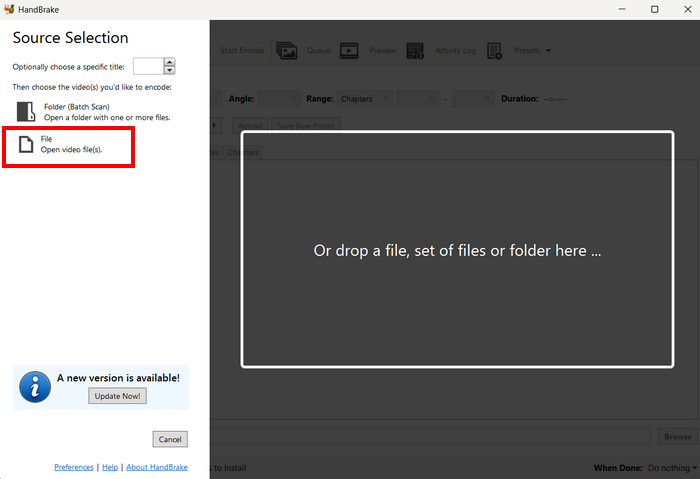
स्टेप 3। उसके बाद, Format पर क्लिक करें और MP4 चुनें।.
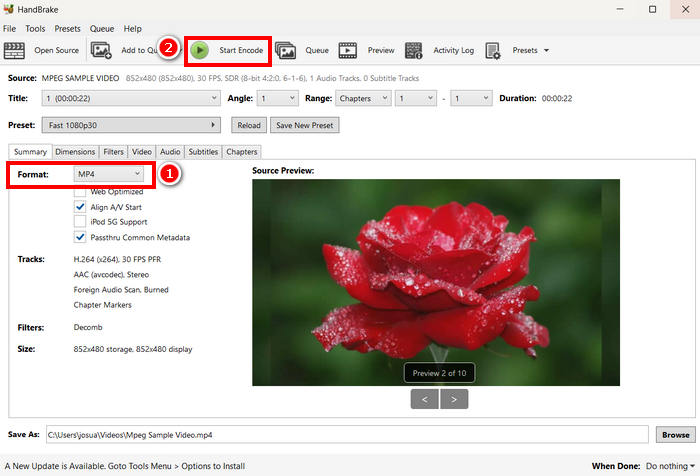
स्टेप 4। हो जाने के बाद, अपने MPEG वीडियो को MP4 में कन्वर्ट करना शुरू करने के लिए Start Encode बटन पर क्लिक करें।.
HandBrake MPEG वीडियो को MP4 में बदलने के लिए उपलब्ध बेहतरीन मुफ़्त वीडियो कन्वर्टर टूल्स में से एक है। हालाँकि, यह टूल केवल 3 आउटपुट फ़ॉर्मेट सपोर्ट करता है, जो फ़ॉर्मेट विकल्पों के लिहाज़ से सीमित महसूस हो सकते हैं। HandBrake केवल MP4, MKV और WebM को सपोर्ट करता है, जो तब आदर्श नहीं होगा जब आपको अन्य फ़ॉर्मेट की ज़रूरत हो।.
भाग 3. MPEG को MP4 में ऑनलाइन कैसे बदलें
MPEG को MP4 में बदलने का एक और बेहतरीन तरीका ऑनलाइन है। ऑनलाइन वीडियो कन्वर्टर टूल उपलब्ध हैं जो उपयोगकर्ताओं को अपने MPEG वीडियो को ऑनलाइन तरीकों से बदलने की सुविधा देते हैं। सॉफ़्टवेयर एप्लिकेशन की तुलना में, ऑनलाइन कन्वर्टर्स का इस्तेमाल आसान होता है क्योंकि इन्हें इंस्टॉलेशन की ज़रूरत नहीं होती। हालाँकि, इनकी फ़ाइल साइज़ सीमाएँ हो सकती हैं और इनका इस्तेमाल करते समय एक स्थिर इंटरनेट कनेक्शन की ज़रूरत होती है।
FVC निःशुल्क वीडियो कनवर्टर ऑनलाइन का उपयोग करके MPEG को MP4 में ऑनलाइन रूपांतरित करें
FVC Free Video Converter Online एक मुफ़्त ऑनलाइन मल्टीमीडिया कन्वर्टर टूल है। यह उन लोगों के लिए बिल्कुल उपयुक्त है जिन्हें MPEG को MP4 में कन्वर्ट करना है, क्योंकि यह MP4, FLV, MKV, MOV, M4V और अन्य कई वीडियो फ़ॉर्मेट को सपोर्ट करता है। इसके अलावा, यह टूल बैच कन्वर्ज़न को भी सपोर्ट करता है, जिससे उपयोगकर्ता कई वीडियो फ़ाइलों को एक साथ कन्वर्ट कर सकते हैं।.
FVC Free Video Converter Online का उपयोग करके MPEG को MP4 में कन्वर्ट करने का तरीक़ा इस प्रकार है:
स्टेप 1। अपने Chrome ब्राउज़र पर जाएँ, FVC Free Video Converter Online टाइप करें और उसे सर्च करें।.
स्टेप 2। जब आप इसके पेज पर पहुँच जाएँ, तो Add Files to Convert बटन पर क्लिक करके वे MPEG फ़ाइलें इम्पोर्ट करें जिन्हें आप MP4 में कन्वर्ट करना चाहते हैं।.
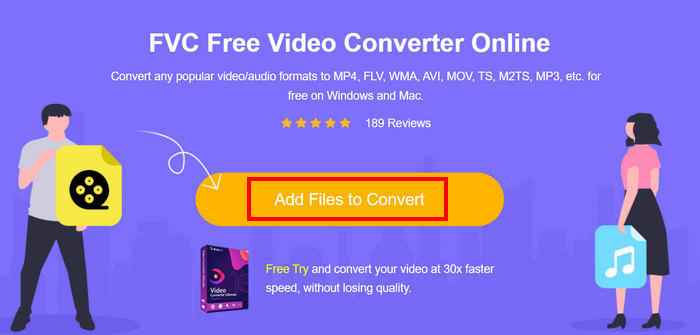
स्टेप 3। उसके बाद, आउटपुट फ़ॉर्मेट के रूप में MP4 चुनें और हो जाने पर Convert पर क्लिक करें।.
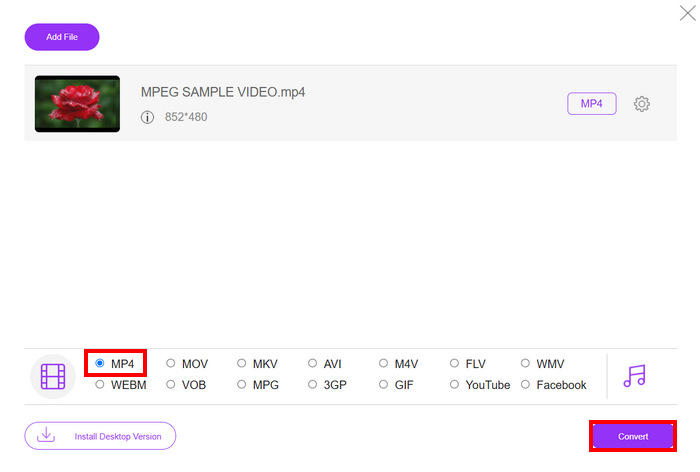
FVC मुफ़्त वीडियो कन्वर्टर ऑनलाइन के साथ, आप बिना किसी सॉफ़्टवेयर एप्लिकेशन इंस्टॉल किए, आसानी से अपने MPEG वीडियो को MP4 में बदल सकते हैं। इसके अलावा, यह MPEG और MP4 सहित विभिन्न वीडियो फ़ॉर्मेट को सपोर्ट करता है। अंत में, इसका इस्तेमाल करना बहुत आसान है, शुरुआती लोगों के लिए भी यह एकदम सही है।
क्लाउड कन्वर्ट का उपयोग करके MPEG को MP4 में बदलें
दूसरी ओर, क्लाउड कन्वर्ट, MPEG को MP4 में बदलने के लिए एक और विश्वसनीय ऑनलाइन टूल है। यह विभिन्न मीडिया फॉर्मेट को सपोर्ट करता है और उपयोगकर्ताओं को MPEG वीडियो फ़ाइलों को आसानी से बदलने की सुविधा देता है।
हालाँकि, इस टूल का पूरी तरह से मुफ़्त में उपयोग नहीं किया जा सकता, क्योंकि मुफ़्त प्लान में कुछ सीमाएँ हैं। आप प्रतिदिन अधिकतम 25 वीडियो फ़ाइलें कनवर्ट कर सकते हैं, लेकिन प्रत्येक फ़ाइल का आकार 1GB से कम होना चाहिए। इसके अतिरिक्त, एक समय में केवल पाँच रूपांतरण ही संसाधित किए जा सकते हैं। यदि आपके पास कनवर्ट करने के लिए कई MPEG फ़ाइलें हैं, तो क्लाउड कन्वर्ट अभी भी एक बेहतरीन विकल्प है।
Cloud Convert का उपयोग करके MPEG को MP4 में कन्वर्ट करने का तरीक़ा इस प्रकार है:
स्टेप 1। सबसे पहले, आपको Cloud Convert की आधिकारिक वेबसाइट पर जाना होगा।.
स्टेप 2। जब आप इस टूल की आधिकारिक वेबसाइट पर पहुँच जाएँ, तो Select File बटन पर क्लिक करके वह MPEG वीडियो इम्पोर्ट करें जिसे आप MP4 में कन्वर्ट करना चाहते हैं।.
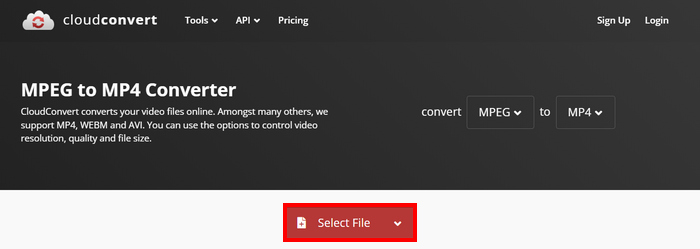
स्टेप 3। अगला, नीचे दिए गए Format विकल्प पर MP4 चुनें। हो जाने पर Convert बटन पर क्लिक करें।.
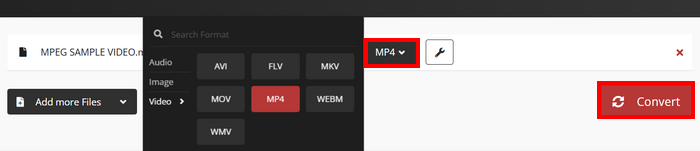
क्लाउड कन्वर्ट के साथ, जो उपयोगकर्ता अपने MPEG वीडियो को MP4 में बदलना चाहते हैं, वे इसे आसानी से कर सकते हैं। हालाँकि, समस्या यह है कि आप इस टूल का पूरी तरह से मुफ़्त उपयोग नहीं कर सकते। अगर आपको असीमित रूपांतरण या बड़ी फ़ाइलों के लिए समर्थन चाहिए, तो आपको एक सशुल्क योजना में अपग्रेड करना पड़ सकता है, जो महंगी होती है।
भाग 4. MPEG को MP4 में बदलने के बारे में अक्सर पूछे जाने वाले प्रश्न
क्या मैं गुणवत्ता खोए बिना MPEG को MP4 में परिवर्तित कर सकता हूँ?
हाँ। FVC वीडियो कन्वर्टर अल्टीमेट या हैंडब्रेक जैसे उच्च-गुणवत्ता वाले वीडियो कन्वर्टर्स का उपयोग करके आप बिना गुणवत्ता खोए MPEG को MP4 में परिवर्तित कर सकते हैं। ये टूल आपको मूल गुणवत्ता बनाए रखने के लिए एन्कोडिंग सेटिंग्स समायोजित करने की सुविधा देते हैं।
क्या MPEG और MP4 एक ही हैं?
नहीं। हालांकि दोनों वीडियो प्रारूप हैं, एमपीईजी संपीड़न मानकों के एक समूह को संदर्भित करता है, जैसे एमपीईजी-1, एमपीईजी-2 और एमपीईजी-4, जबकि एमपी4 एक कंटेनर प्रारूप है जो वीडियो, ऑडियो और उपशीर्षक रख सकता है।
क्या मैं एकाधिक MPEG फ़ाइलों को MP4 में बैच-कन्वर्ट कर सकता हूँ?
हाँ। MPEG वीडियो को MP4 में बैच कन्वर्ट करना संभव है। इसके लिए, आप FVC द्वारा चुने गए वीडियो कन्वर्टर अल्टीमेट का इस्तेमाल कर सकते हैं, क्योंकि यह विभिन्न वीडियो फ़ॉर्मैट के लिए बैच कन्वर्टर सपोर्ट करता है।
निष्कर्ष
MPEG को MP4 में कन्वर्ट करना आज भी कई कारणों से व्यापक रूप से किया जाता है, और अब जब आप यह जान चुके हैं कि विभिन्न तरीक़ों से MPEG को MP4 में बिल्कुल कैसे कन्वर्ट किया जाता है, तो अगला क़दम है आपके लिए सबसे उपयुक्त विकल्प चुनना। तो फिर देर किस बात की? अपने लिए सबसे अच्छा टूल चुनें और अपनी MPEG फ़ाइलों को MP4 में कन्वर्ट करना शुरू करें।.
-
 एमपीईजी -4 फाइलों को ऑनलाइन कैसे संपीड़ित करें - कोई डाउनलोड नहीं, कोई वॉटरमार्क नहीं
 आपके सभी MPEG-4 फ़ाइलों को रखने के लिए पर्याप्त फ़ाइल संग्रहण नहीं है? यहां कुछ समाधान दिए गए हैं जो आपकी वीडियो फ़ाइलों को छोटा करने में आपकी सहायता कर सकते हैं।
-
 विंडोज/मैक/एंड्रॉइड/आईफोन के लिए सर्वश्रेष्ठ 4 MPG/MPEG प्लेयर [2025]
 क्या आप अपनी पसंदीदा एमपीजी या एमपीईजी फ़ाइल को सुचारू रूप से चलाना चाहते हैं? यह आलेख कंप्यूटर और मोबाइल फोन के लिए शीर्ष 4 एमपीजी/एमपीईजी प्लेयर्स पर चर्चा करता है।
-
 MPEG को AVI फॉर्मेट में बदलने के लिए 4 सर्वश्रेष्ठ 5 विकल्प [ऑनलाइन और ऑफलाइन]
 क्या आपके पास एमपीईजी के लिए एक कनवर्टर की तलाश में कठिन समय है? फिर इस लेख को पढ़ने का प्रयास करें क्योंकि हम सीखते हैं कि एमपीईजी को एवीआई प्रारूप में विस्तृत चरणों के साथ कैसे बदला जाए।
