


 वीडियो कनवर्टर अंतिम
 स्क्रीन अभिलेखी
 वीडियो मरम्मत
 सुरक्षित डाउनलोड
जब iPad वीडियो चलाना बंद कर दे तो आप क्या कर सकते हैं?
हाल के एक सर्वेक्षण के अनुसार, वीडियो प्लेबैक के मामले में बड़े स्क्रीन की वजह से iPad, स्मार्टफोन की तुलना में अधिक लोकप्रिय है। हालांकि, iPad बिल्कुल परफेक्ट नहीं है और बहुत‑से उपयोगकर्ताओं को यह समस्या आती है कि iPad वीडियो नहीं चला रहा है। आम लोग यह नहीं समझ पाते कि यह समस्या क्यों होती है, समाधान तो दूर की बात है। इसलिए, यह लेख 100% कारगर समाधान पहचान कर आपके साथ साझा करेगा, ताकि आप अपने पसंदीदा वीडियो फिर से बिना रुकावट के देख सकें।.

भाग 1: क्यों iPad वीडियो नहीं चला रहा है
iPad आपकी मेमोरी में या YouTube पर वीडियो चलाना बंद करने के कई कारण हैं। सबसे आम कारणों में शामिल हैं:
- 1. वीडियो प्रारूप iPad द्वारा समर्थित नहीं है। यह H.264, MPEG-4, और गति JPEG के साथ संगत है।
- 2. खराब इंटरनेट कनेक्शन।
- 3. पुराना सॉफ्टवेयर या ऐप। बग्स को ठीक करने और नई सुविधाओं को पेश करने के लिए Apple iOS के लिए अपडेट जारी करता रहता है। यदि आपने अपने सॉफ़्टवेयर और वीडियो ऐप को अपडेट नहीं किया है, तो इससे वीडियो iPad पर नहीं चल सकते हैं।
- 4. पर्याप्त जगह नहीं। IPad पर वीडियो चलाने के लिए बहुत अधिक मेमोरी और आंतरिक संग्रहण की आवश्यकता होती है, विशेष रूप से उच्च रिज़ॉल्यूशन वाले वीडियो।
- 5. iPad जम रहा है या अटक गया है। कभी-कभी, iPad जल्दी से पर्याप्त प्रतिक्रिया नहीं देता है और वीडियो बिल्कुल भी नहीं चलता है।
भाग २: ५ समाधान आईपैड को ठीक करने के लिए वीडियो नहीं चला रहे हैं
समाधान 1: iPad वीडियो प्रारूप में कनवर्ट करें
अगर iPad Pro पर कोई लोकल वीडियो नहीं चल रहा है, तो उसका मुख्य कारण आम तौर पर कम्पैटिबिलिटी की समस्या होती है। FVC Free FLV Converter आपकी मदद कर सकता है कि आप किसी भी वीडियो को iPad के लिए कनवर्ट करें, जैसे MP4 से iPad, M2TS से iPad आदि। भले ही यह उपयोग करने के लिए फ्री है, लेकिन यह वीडियो कनवर्टर आपको कई प्रो‑लेवल फीचर देता है, जिन्हें कोई भी व्यक्ति आसानी से सीख सकता है।.
फ्री डाउनलोडWindows 7 या बाद के संस्करण के लिएसुरक्षित डाउनलोड
फ्री डाउनलोडMacOS 10.7 या बाद के संस्करण के लिएसुरक्षित डाउनलोड
वीडियो को iPad फॉर्मेट में कैसे बदलें
चरण 1: वीडियो जोड़ें
कंप्यूटर पर इंस्टॉल करने के बाद सर्वश्रेष्ठ iPad वीडियो कनवर्टर चलाएँ। फिर Add File(s) मेनू पर क्लिक करें और वह वीडियो इम्पोर्ट करें जो iPad पर नहीं चल रहा है। यह एक साथ कई वीडियो फाइलों को बैच में कनवर्ट कर सकता है।.
टिप: पहले आपको iPad से वीडियो अपने कंप्यूटर पर ट्रांसफर करने होंगे।.

चरण 2: iPad को आउटपुट फॉर्मैट के रूप में सेट करें
Output format विकल्प पर क्लिक करके उसे विस्तार से खोलें, नीचे स्क्रोल कर के Apple iPad ढूँढें और उसे चुनें, फिर अपना iPad मॉडल सेलेक्ट करें। इसके बाद कनवर्टर अपने‑आप फॉर्मैट, कोडेक और अन्य सेटिंग्स तय कर देगा।.

चरण 3: iPad के लिए वीडियो कनवर्ट करें
मुख्य इंटरफ़ेस पर वापस जाएँ, Open Folder बटन पर क्लिक करके आउटपुट को सेव करने के लिए कोई विशेष लोकेशन चुनें। अंत में, iPad पर प्ले करने के लिए वीडियो कनवर्ट करना शुरू करने हेतु Convert बटन पर क्लिक करें। जब प्रक्रिया पूरी हो जाए, तो रिज़ल्ट फाइलें iPad में ट्रांसफर करें और उन्हें देखें।.

समाधान 2: iPad को पुनरारंभ करें
iPad विशिष्ट मोड में फंस सकता है और वीडियो नहीं चलेंगे। सौभाग्य से, समस्या से छुटकारा पाना बहुत आसान है।
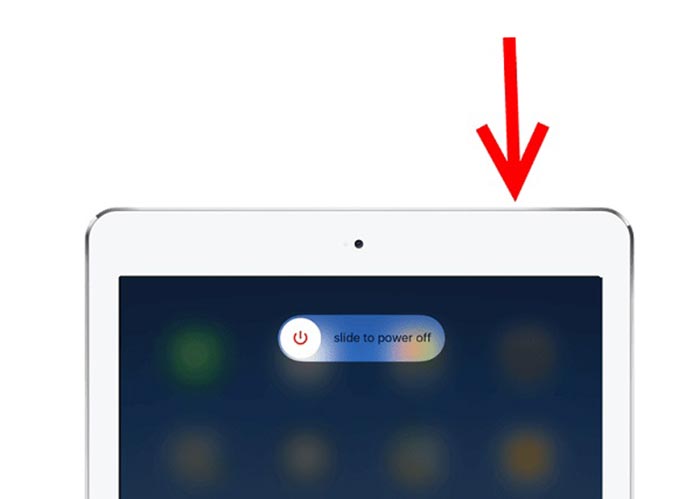
चरण 1: Power या Side बटन को कुछ देर तक दबाकर रखें, जब तक कि शटडाउन स्क्रीन न आ जाए।.
चरण 2: स्लाइडर को दाईं ओर खींचें और आपके iPad की स्क्रीन काली हो जाएगी।.
चरण 3: कम से कम 20 सेकंड प्रतीक्षा करें और फिर से Power बटन को दबाकर रखें, जब तक कि आपकी स्क्रीन पर Apple का लोगो न दिखाई दे। अब, वीडियो फिर से चलाकर देखें।.
समाधान 3: iPad कैश साफ़ करें
भंडारण की कमी एक और कारण है कि आईपैड वेबसाइटों पर वीडियो नहीं चला रहा है। समाधान बहुत ही सरल है, सफ़ारी में बैकग्राउंड ऐप्स को बंद करना और कैशे साफ़ करना।
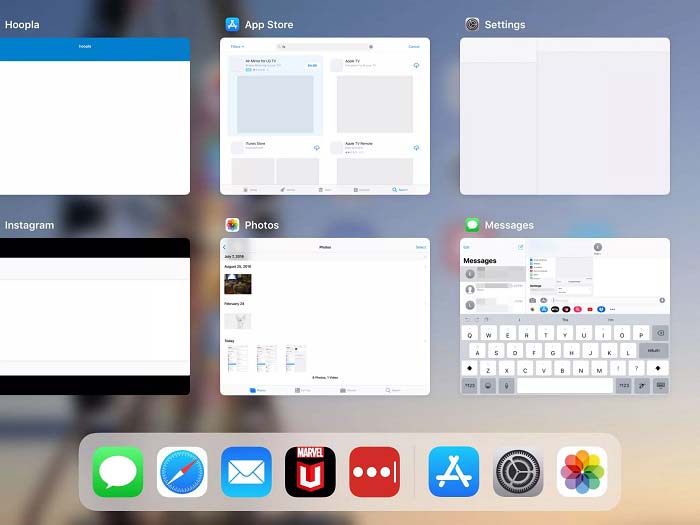
चरण 1: उँगलियों से मल्टी‑टास्क मोड में जाएँ और बैकग्राउंड में चल रहे सभी ऐप बंद कर दें।.
चरण 2: Settings ऐप खोलें, Safari पर टैप करें और फिर Clear History and Website Data पर टैप करें।.
चरण 3: iPad पर दोबारा वीडियो चलाएँ, अब यह सामान्य रूप से काम करना चाहिए।.
समाधान 4: सॉफ़्टवेयर अपडेट करें
पुराने सॉफ़्टवेयर के कारण कई समस्याएं हो सकती हैं, जिनमें iPad पर वीडियो चलना बंद हो जाना शामिल है। वास्तव में, आज तक सॉफ्टवेयर को अप अप करना आसान है।
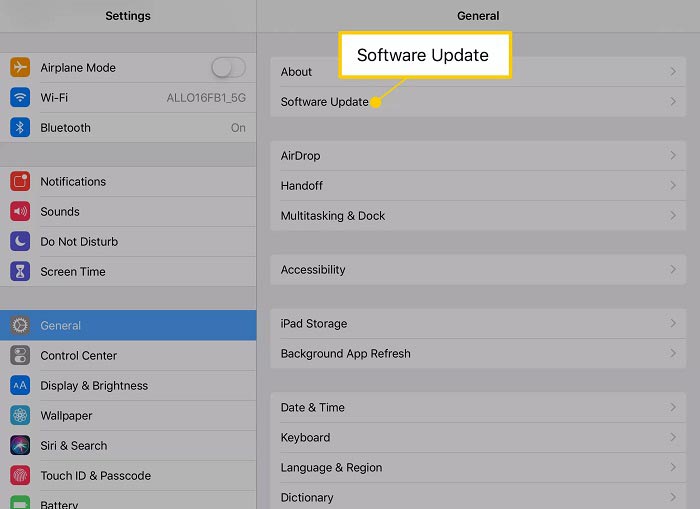
चरण 1: होम स्क्रीन से Settings ऐप चलाएँ, General पर टैप करें और फिर Software Update पर।.
चरण 2: अगर कोई अपडेट उपलब्ध हो, तो Download and Install बटन पर टैप करें। जब पूछा जाए तो अपना पासकोड दर्ज करें।.
चरण 3: इंस्टॉलेशन पूरा होने तक इंतज़ार करें और फिर अपना वीडियो दोबारा चलाएँ।.
समाधान 5: Apple सेवा की जाँच करें
हालाँकि यह दुर्लभ है, Apple सेवा बंद हो सकती है और ऐसी स्थिति में वीडियो iPad पर नहीं चलेंगे। यदि आपने उपरोक्त समाधानों का प्रयास किया है और समस्या बनी रहती है, तो इसे जांचने के लिए नीचे दिए गए चरणों का पालन करें।
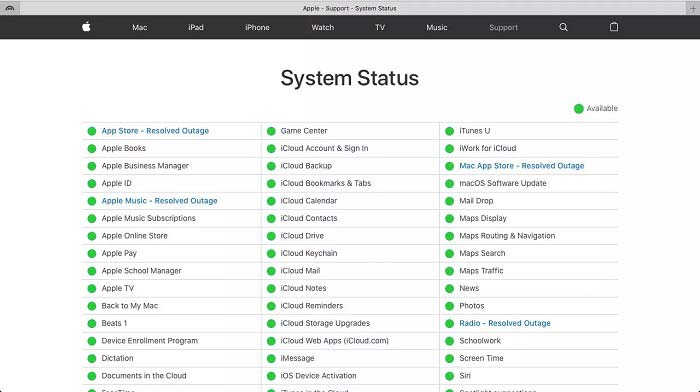
चरण 1: कोई वेबसाइट खोलें और https://www.apple.com/support/systemstatus/ पर जाएँ।.
चरण 2: अगर किसी Apple सेवा के स्टेटस आइकन का रंग पीला या लाल हो जाए, तो इसका मतलब है कि वह सेवा डाउन है। ऐसे में आप केवल इतना ही कर सकते हैं कि उसके दोबारा ऑनलाइन होने का इंतज़ार करें।.
भाग 3: iPad के वीडियो नहीं चलाने के बारे में अक्सर पूछे जाने वाले प्रश्न
मैं अपने iPad पर MKV क्यों नहीं चला सकता?
iPad, MKV वीडियो चलाने का समर्थन नहीं करता। आपको MKV वीडियो को iPad द्वारा समर्थित वीडियो फॉर्मैट, जैसे MOV, में बदलना होगा और फिर उन्हें iPad पर चलाना होगा। अधिक जानकारी के लिए आगे पढ़ें: iPad पर MKV फाइलें चलाने के 2 आसान तरीके।,
टिकटोक वीडियो क्यों नहीं चल रहे हैं?
सबसे पहले, अपने इंटरनेट कनेक्शन की जांच करें जब टिकटॉक वीडियो चलना बंद कर दें। फिर अपने टिकटॉक ऐप को लेटेस्ट वर्जन में अपडेट करें। इसके अलावा, आप बेहतर तरीके से टिकटॉक को वाई-फाई नेटवर्क के साथ देखेंगे लेकिन सेल्युलर डेटा के साथ नहीं।
iPad Air पर MP4 कैसे चलाएं?
iPad Air MP4 वीडियो को AAC ऑडियो कोडेक के साथ सपोर्ट करता है। आप इसे सीधे अपने हैंडसेट पर चलाने का प्रयास कर सकते हैं।
निष्कर्ष
समस्या निवारण का यह टुकड़ा आपको उस समस्या को ठीक करने में मदद करता है जो iPad मेमोरी पर वीडियो नहीं चला रहा है। FVC फ्री FLV से MP4 कन्वर्टर स्थानीय वीडियो नहीं चलने के लिए सबसे अच्छा समाधान है। यह वीडियो कोडेक्स को समायोजित करने और लगभग सभी iPad उपकरणों के लिए प्रीसेट पेश करने में सक्षम है। इससे भी महत्वपूर्ण बात यह है कि कनवर्टर का उपयोग करना बहुत आसान है। यदि आपको अन्य समस्याएं हैं, तो कृपया इस पोस्ट के नीचे टिप्पणी क्षेत्र में एक संदेश छोड़ने के लिए स्वतंत्र महसूस करें।
-
 Chrome बुक पर MP4 चलाने के शीर्ष 3 तरीके
 क्या आप Chromebook पर वीडियो चला सकते हैं? Chromebook पर USB से MP4 फ़ाइलें कैसे चलाएं? यह पोस्ट Chromebook पर MP4 चलाने के 3 तरीके साझा करती है।
-
 WebM प्लेयर की समीक्षा - WebM फ़ाइलों को सुचारू रूप से चलाने के लिए 5 सर्वश्रेष्ठ सॉफ़्टवेयर
 यदि आप अपने डिवाइस पर सफलतापूर्वक एक WebM खेलना चाहते हैं, तो आपको इस लेख से Android, iPhone, Windows, Mac के लिए शीर्ष 5 सर्वश्रेष्ठ WebM खिलाड़ी के बारे में सीखना चाहिए।
-
 विंडोज 10/8/7, मैक, आईओएस और एंड्रॉइड के लिए 10 सर्वश्रेष्ठ एफएलवी वीडियो प्लेयर (2021 नवीनतम)
 एफएलवी प्लेयर आपको अपने विंडोज, मैक, एंड्रॉइड, आईओएस डिवाइस पर अपनी एफएलवी फाइलों तक आसानी से पहुंचने में मदद करता है। सबसे अच्छे FLV फ़ाइल प्लेयर देखें जिन्हें आप अभी डाउनलोड कर सकते हैं।
