


 वीडियो कनवर्टर अंतिम
 स्क्रीन अभिलेखी
 वीडियो मरम्मत
दोषरहित ऑडियो गुणवत्ता का समर्थन करने वाले सर्वश्रेष्ठ एआईएफएफ रिकॉर्डर में से 4
अधिकांश लोग सोचते हैं कि iPhone डिवाइस फोन की सुरक्षा, वीडियो और ऑडियो क्वालिटी और लगातार बेहतर प्रदर्शन के मामले में लगभग परफेक्ट होते हैं। यह कहा जा सकता है कि यह सच भी है। यही बात स्क्रीन क्वालिटी पर भी लागू होती है। जितना हो सके, Apple iOS डिवाइसों पर कम्पैटिबल फीचर्स विकसित कर रहा है। फॉर्मेट, कोडेक्स और वीडियो कॉन्फ़िगरेशन के साथ भी यही किया जा रहा है। जैसे‑जैसे उन्होंने AIFF फॉर्मेट विकसित किया। ताकि उच्च‑गुणवत्ता और अनकम्प्रेस्ड ऑडियो फॉर्मेट प्रदान किया जा सके। जब आप अनकम्प्रेस्ड कहते हैं, तो इसके अच्छा क्वालिटी देने की संभावना ज्यादा होती है, क्योंकि उस पर कोई लिमिटेशन नहीं लगाई जाती। यही कारण है कि आपको इस तरह के फॉर्मेट को तैयार करने के लिए किसी फ्री AIFF साउंड रिकॉर्डर की ज़रूरत महसूस हो सकती है। इस तरह की फ़ाइल बनाना कोई समस्या नहीं है। वेब पर कई ऐप्स और फ्री टूल्स उपलब्ध हैं, जिनका आप उपयोग कर सकते हैं। आगे बढ़ते हुए, यह लेख आपके लिए बिल्कुल सही है। नीचे दिए गए हमारे बेहतरीन AIFF recorders की सूची देखें ताकि आप और अधिक जान सकें।.

भाग 1.शीर्ष 2 ऑनलाइन एआईएफएफ रिकॉर्डर
FVC फ्री ऑडियो रिकॉर्डर
FVC Free Audio Recorder का उपयोग करके अब आप AIFF की तरह बेदाग ऑडियो क्वालिटी हासिल कर सकते हैं। हालांकि यह टूल वही फ़ाइल फॉर्मेट तैयार नहीं कर सकता, लेकिन जो क्वालिटी यह देता है वह लगभग उतनी ही अच्छी है। यह टूल ब्राउज़र के ज़रिए एक्सेस किया जा सकता है और जब तक आपके पास घर पर या जहाँ भी आप हों, इंटरनेट कनेक्शन है, आप दिन के किसी भी समय इसका उपयोग कर सकते हैं। तो अगर आप हमेशा यात्रा में रहते हैं और अपने व्लॉग के लिए रिकॉर्डिंग की ज़रूरत पड़ती है, तो यह एक अच्छा विकल्प है। बाहर रहते हुए भी आप अपने आसपास के बैकग्राउंड शोर की चिंता किए बिना रिकॉर्ड कर सकते हैं। साथ ही, आप अपने iPhone डिवाइस पर स्मूद रिकॉर्डिंग सुन सकते हैं। यह सब देखते हुए, अभी से इसे इस्तेमाल करना शुरू करें, टूल आज़माएँ और नीचे दिए गए निर्देशों का पालन करें।.
आपको इससे क्या मिलेगा?
यह वेबसाइट का उपयोग करने के लिए एक स्वतंत्र है।
आप अपनी संगीत गैलरी पर प्लेलिस्ट बनाने के लिए YouTube से भी संगीत फ़ाइलें रिकॉर्ड कर सकते हैं।
● बिना समय सीमा और बिना अवधि सीमा के ऑडियो रिकॉर्ड करें।
● कभी भी और कहीं भी पहुंचें।
कदम 1. FVC Free Audio Recorder पर जाकर टूल तक पहुँचें और उसे सक्रिय करें, फिर Start Recording बटन पर क्लिक करें।.
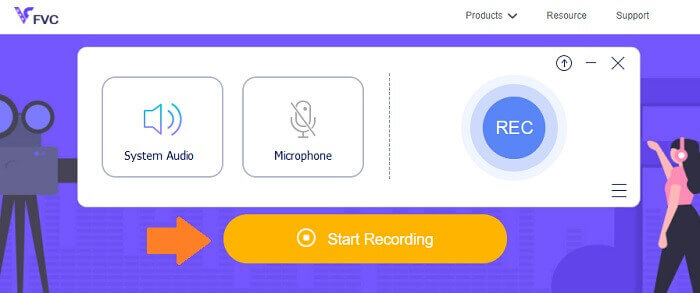
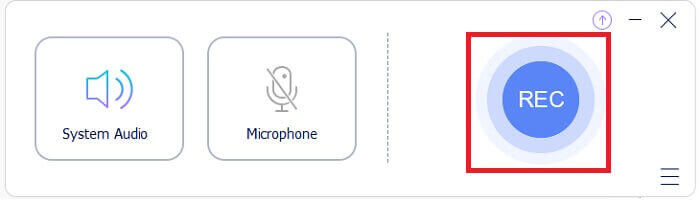
कदम 2. यदि ऑडियो सक्षम नहीं है, तो उसे सक्षम करें। लेकिन डिफ़ॉल्ट रूप से यह सक्षम होना चाहिए। अब रिकॉर्डिंग शुरू करने के लिए REC बटन पर क्लिक करें।.
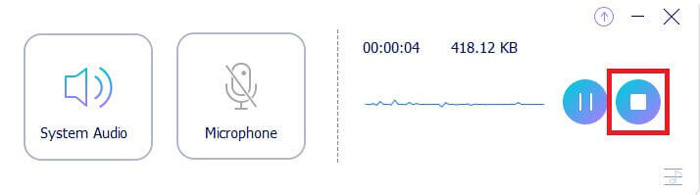
कदम 3. जब आप काम पूरा कर लें, तो नीले Square बटन पर क्लिक करें और फ़ाइल अपने‑आप आपके पीसी पर सेव हो जाएगी।.
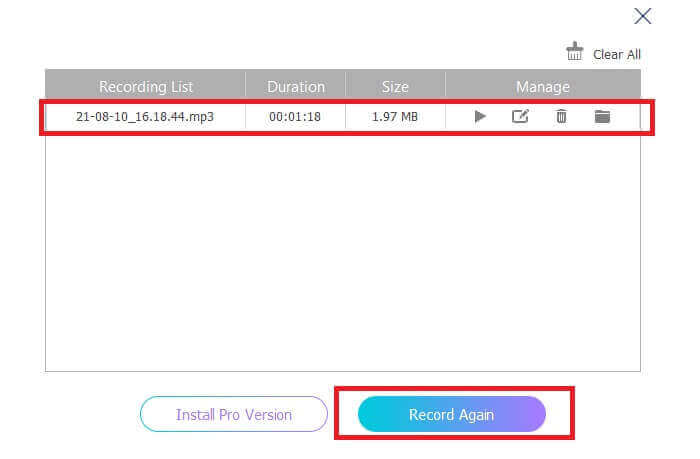
कदम 4. अब फ़ाइल का प्रीव्यू देखने के लिए, फ्लोटिंग बार के नीचे दी गई सूची पर क्लिक करें।.
Screencapture.com
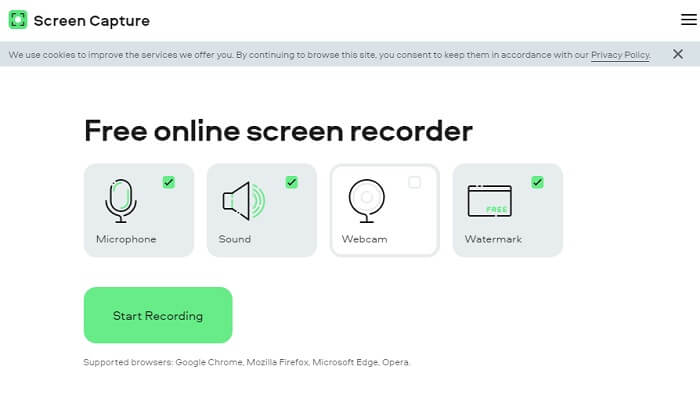
एक और टूल जिसे आप ऑनलाइन ऑडियो रिकॉर्ड करने के लिए इस्तेमाल कर सकते हैं, वह है Screencapture.com। उसी तरह, यह एक फ्री एक्सेस साइट है जो आपको बिना अकाउंट रजिस्टर किए सीधे ऑडियो और स्क्रीन रिकॉर्ड करने की सुविधा देती है। जैसे ही आप स्टार्ट रिकॉर्डिंग बटन पर क्लिक करते हैं, यह टूल अपने‑आप स्क्रीन और कंप्यूटर के सिस्टम साउंड को रिकॉर्ड करेगा। जैसे ही आप मुख्य पेज पर पहुँचते हैं, आपको चार टैब दिखाई देंगे, जिन्हें आपको अपनी ज़रूरत के अनुसार टिक करना होगा। चूँकि हम केवल ऑडियो रिकॉर्ड कर रहे हैं, इसलिए बाकी सबको अनचेक कर दें और सिर्फ ऑडियो को सक्षम रहने दें। वहाँ से Start Recording बटन पर क्लिक करें और उसके बाद रिकॉर्डिंग को डाउनलोड कर लें।.
आपको इससे क्या मिलेगा?
मुफ्त पहुंच।
सुलभ और विश्वसनीय साइट।
सुरक्षित।
एक ही समय में रिकॉर्ड, ऑडियो, वीडियो और दोनों कर सकते हैं।
भाग 2. विंडोज और मैक के लिए शीर्ष 2 एआईएफएफ रिकॉर्डर सॉफ्टवेयर
FVC स्क्रीन रिकॉर्डर
प्राइम टूल्स की बात करें तो FVC स्क्रीन रिकॉर्डर स्क्रीन रिकॉर्डिंग और ऑडियो रिकॉर्डिंग के लिए आपका सबसे पसंदीदा सॉफ्टवेयर है। इस तरह की जरूरत को पूरा करने के लिए इसे विशेष रूप से विकसित किया गया है। केवल तीन सरल चरणों में आप एआईएफएफ और प्रारूप के समान एक ऑडियो गुणवत्ता का उत्पादन करने में सक्षम होंगे। FVC स्क्रीन रिकॉर्डर के साथ, आप सीमित हुए बिना रिकॉर्ड कर सकते हैं और अपनी इच्छित उच्चतम गुणवत्ता प्राप्त करने के लिए बिटरेट को समायोजित करने की स्वतंत्रता रखते हैं। इससे भी बड़ी बात यह है कि आप इसे प्रति दिन कितनी बार इस्तेमाल करते हैं इसकी कोई सीमा नहीं है। जब तक आप इसके लिए पंजीकृत हैं तब तक असीमित उपयोग करें।
आपको इससे क्या मिलेगा?
अच्छी ग्राहक सेवा।
अच्छी तकनीकी सहायता से जो आपकी समस्याओं का समाधान कर सकती है।
टूल का अपडेट जारी रखता है।
विंडो लॉक सुविधा के साथ जो आपको आपके काम में बाधा डाले बिना एक विशिष्ट विंडो रिकॉर्ड करने की अनुमति देती है।
कदम 1. नीचे दिए गए बटनों का उपयोग करके ऐप डाउनलोड और इंस्टॉल करें।.
मुफ़्त डाउनलोडWindows 7 या उसके बाद के वर्ज़न के लिएसुरक्षित डाउनलोड
मुफ़्त डाउनलोडMacOS 10.7 या उसके बाद के वर्ज़न के लिएसुरक्षित डाउनलोड
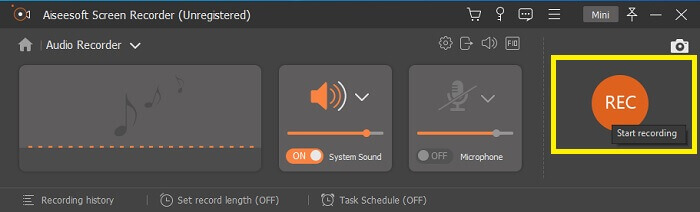
कदम 2. ऐप लॉन्च करें और सिस्टम साउंड को सक्षम करें। अब रिकॉर्डिंग शुरू करने के लिए REC बटन पर क्लिक करें।.
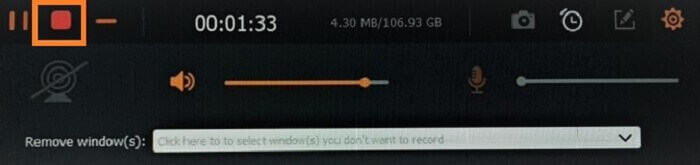
कदम 3. रिकॉर्डिंग पूरी होने पर, इसे रोकने के लिए स्टॉप बटन पर क्लिक करें। इसका आइकन लाल square बटन है।.
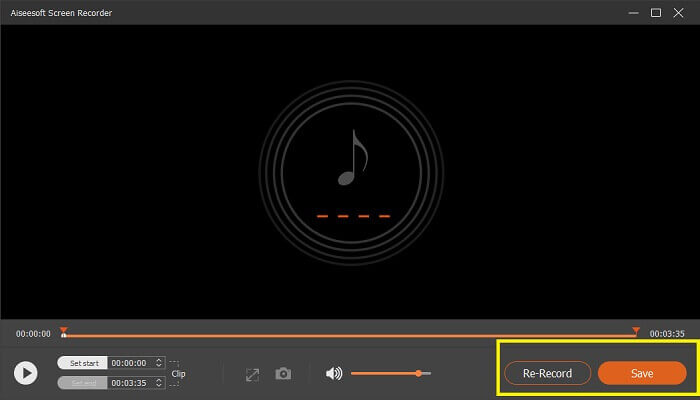
कदम 4. इसके बाद टूल आपको save या re-record करने का विकल्प देगा।.
धृष्टता
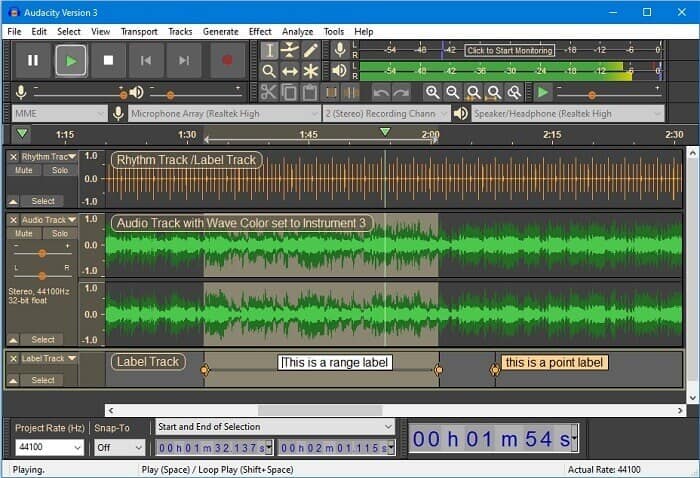
अंत में हमारे पास दुस्साहस है। यह पिछले कुछ समय से सबसे अधिक मांग वाले ऑडियो रिकॉर्डर में से एक माना जाता है। यह उपकरण के लचीलेपन के कारण है। अधिकांश पेशेवर इस रिकॉर्डिंग का उपयोग ऑडियो रिकॉर्ड करने में इसकी विश्वसनीयता के कारण करते हैं, यहां तक कि मिक्सर, कंप्यूटर, कैसेट टेप से ध्वनि और बहुत कुछ जैसे तीसरे पक्ष के कनेक्शन के साथ भी।
आपको इससे क्या मिलेगा?
यह एक ओपन सोर्स सॉफ्टवेयर है।
यह एक रिकॉर्डर और संपादक है।
अधिकांश ऑपरेटिंग सिस्टम द्वारा समर्थित।
भाग 3. तुलना चार्ट
| विशेषताएं | FVC फ्री ऑडियो रिकॉर्डर | FVC स्क्रीन रिकॉर्डर | स्क्रीन कैप्चर.कॉम | धृष्टता |
| मंच | वेब आधारित | डेस्कटॉप ऐप | वेब आधारित | डेस्कटॉप ऐप |
| कीमत | नि: शुल्क | भुगतान किया गया | नि: शुल्क | भुगतान किया गया |
| उच्च ऑडियो गुणवत्ता का समर्थन करता है |  | | | |
| समायोज्य बिटरेट | | |  | |
| अनुशंसित | | | | |
| असीमित उपयोग | | | | |
| कोई अवधि सीमा नहीं | | हाँ सदस्यता पर | | हाँ सदस्यता पर |
भाग 4. एआईएफएफ रिकॉर्डर के बारे में अक्सर पूछे जाने वाले प्रश्न
एआईएफएफ और डब्ल्यूएवी में क्या अंतर है?
जैसा कि उल्लेख किया गया है, एआईएफएफ ज्यादातर ऐप्पल उपयोगकर्ताओं द्वारा उपयोग किया जाता है। हालांकि, इसका मतलब यह नहीं है कि यह एक सीमा है। क्योंकि यह फ़ाइल स्वरूप अन्य मीडिया प्लेयर द्वारा भी समर्थित है। इस बीच, WAV को विशेष रूप से पीसी के लिए विकसित किया गया है। यह केवल डेस्कटॉप पीसी तक ही सीमित है। तकनीकीता और एन्कोडिंग के प्रकार के बारे में बात करते समय, दोनों में अपेक्षाकृत बड़े फ़ाइल आकार होते हैं। तो वे MP3 और MP4 के बिल्कुल विपरीत हैं।
एआईएफएफ, क्या यह दोषरहित है?
इसका उत्तर यह है कि यह दोषरहित है लेकिन असम्पीडित है। यह फ़ाइल स्वरूप असम्पीडित है। यह गुणवत्ता नहीं खोता है और विशुद्ध रूप से गुणवत्ता से समझौता करने के बजाय अच्छे ऑडियो परिणाम लाने के लिए इसे कैसे विकसित किया जाता है।
क्या विंडोज मीडिया प्लेयर एआईएफएफ फाइलों को चला सकता है?
आपके प्रश्न का उत्तर देने के लिए, हाँ! आप इसे वीएलसी प्लेयर और अन्य म्यूजिक प्लेयर का उपयोग करके भी चला सकते हैं।
एआईएफ और एआईएफएफ, क्या कोई अंतर है?
जो भी उपयोग किया जाता है, इससे कोई फर्क नहीं पड़ता, और वे वही हैं। चाहे आप प्रत्यय या प्रत्यय जोड़ें।
निष्कर्ष
अंत में, एआईएफएफ मैक कंप्यूटरों के लिए एक अच्छा प्रारूप है क्योंकि यह विशेष रूप से मैक के लिए बनाया गया है। हालांकि यह फाइल अच्छी है, लेकिन हम इस बात से इनकार नहीं कर सकते कि यह आपके कंप्यूटर की बहुत सारी मेमोरी को खा जाती है। ऊपर समीक्षा की गई ऐप्स इसका समर्थन कर सकती हैं और इसका समर्थन नहीं कर सकती हैं लेकिन कुछ के पास इस फ़ाइल प्रकार के लिए बढ़िया विकल्प हैं। इस बीच, यदि आप वास्तव में इस प्रकार की फ़ाइल रखना चाहते हैं, तो आप एक निःशुल्क कनवर्टर का उपयोग करने पर भी विचार कर सकते हैं।
FVC के पास यह Free Audio Online Converter भी है। आप बस फ़ाइलें जोड़ें और कन्वर्ज़न प्रक्रिया के पूरा होने का इंतज़ार करें, और बस, आपका ऑडियो कन्वर्ट हो जाएगा। इसके बारे में और जानने के लिए आप इसकी आधिकारिक पेज पर जा सकते हैं। एक झलक के तौर पर, यहाँ कुछ फॉर्मेट दिए गए हैं जिन्हें यह सपोर्ट करता है: MP3, WMA, AAC, WAV, AC3, AIFF और FLAC।.
-
 विंडोज़ और मैक पर 3GP को नए प्रारूप में कैप्चर करने के लिए सर्वश्रेष्ठ 3GP रिकॉर्डर
 3GP फ़ाइल स्वरूप तीसरी पीढ़ी के मल्टीमीडिया को संग्रहीत करता है और इसे तीसरी पीढ़ी की भागीदारी परियोजना द्वारा विकसित किया गया है। अधिक विस्तृत जानकारी के लिए नीचे आगे बढ़ें।
-
 विंडोज और मैक के लिए सर्वश्रेष्ठ एएसी रिकॉर्डर में से 7 [2021]
 डिस्कवर करें कि एएसी क्या है और सबसे अधिक रेटिंग वाले एएसी रिकॉर्डर जो आप मैक और विंडोज कंप्यूटर दोनों पर मुफ्त और डाउनलोड करने योग्य उपयोग कर सकते हैं।
-
 स्पॉट-ऑन गाइड: विंडोज और मैक के लिए सर्वश्रेष्ठ M4A रिकॉर्डर क्या हैं?
 M4A कंटेनर फ़ाइल ACA और ALAC हैं जो हानिपूर्ण संपीड़न के लिए एन्कोडेड हैं। नीचे दी गई सूची M4A रिकॉर्डर उपकरण हैं जिनका आप उपयोग कर सकते हैं। निम्नलिखित को अच्छी तरह से पढ़ें।
