


 वीडियो कनवर्टर अंतिम
 स्क्रीन अभिलेखी
 वीडियो मरम्मत
 सुरक्षित डाउनलोड
FLAC बनाम MP3: ऑडियो प्रारूपों का परिचय और तुलना
FLAC बनाम MP3 फ़ाइल फ़ॉर्मैट्स पर बहस कई वर्षों से चल रही है। जहाँ MP3 सबसे पुराने और सबसे ज़्यादा इस्तेमाल किए जाने वाले फ़ॉर्मैट्स में से एक है, वहीं FLAC ने ऑडियोफाइल्स के बीच अपनी लॉसलेस ऑडियो कंप्रेशन की वजह से काफ़ी लोकप्रियता हासिल की है। लेकिन कौन‑सा बेहतर है? इस गाइड में हम FLAC और MP3 के बीच अंतर को क़रीब से देखेंगे—उनकी साउंड क्वालिटी, फ़ाइल साइज़, कम्पैटिबिलिटी आदि सहित—ताकि आप तय कर सकें कि अपनी म्यूज़िक कलेक्शन के लिए कौन‑सा फ़ॉर्मैट चुनें।.

भाग 1. एफएलएसी बनाम एमपी3: ऑडियो प्रारूपों का परिचय
MP3 से जुड़ा एक किस्सा
एमपी3 डिजिटल ऑडियो फाइलों के लिए एक लोकप्रिय प्रारूप है जो 1990 के दशक में इसकी शुरुआत के बाद से व्यापक रूप से उपयोग किया गया है। यह अच्छी ध्वनि गुणवत्ता बनाए रखते हुए ऑडियो फ़ाइलों के आकार को कम करने के लिए हानिपूर्ण संपीड़न के एक रूप का उपयोग करता है। MP3 फ़ाइलों को आसानी से साझा, डाउनलोड और विभिन्न उपकरणों पर चलाया जा सकता है, जिससे यह डिजिटल संगीत के प्रति उत्साही लोगों के लिए एक सुविधाजनक विकल्प बन जाता है। सवाल यह है कि क्या FLAC MP3 से बेहतर है? आइए FLAC के विवरण को पढ़कर पता करें।
FLAC से जुड़ा एक किस्सा
FLAC (फ्री लॉसलेस ऑडियो कोडेक) एक उच्च-गुणवत्ता वाला ऑडियो फ़ाइल प्रारूप है जो गुणवत्ता का त्याग किए बिना मूल ऑडियो डेटा को संरक्षित करने के लिए दोषरहित संपीड़न का उपयोग करता है। इसका अर्थ है कि FLAC फ़ाइलें MP3 फ़ाइलों की तुलना में बहुत बड़ी हैं लेकिन मूल स्रोत सामग्री के समान ऑडियो फ़िडेलिटी स्तर बनाए रखती हैं।
भाग 2. FLAC और MP3 के समर्थित डिवाइस/प्लेटफ़ॉर्म
अब, हम MP3 बनाम FLAC तुलना देखते हैं कि वे उन प्लेटफॉर्म या उपकरणों के संबंध में कैसा प्रदर्शन करते हैं जिनका वे समर्थन करते हैं।
एमपी3 एक व्यापक रूप से समर्थित ऑडियो फ़ाइल प्रारूप है जिसे विभिन्न प्लेटफार्मों पर चलाया जा सकता है, जिनमें निम्न शामिल हैं:
◆ विंडोज, मैकओएस और लिनक्स ऑपरेटिंग सिस्टम चलाने वाले कंप्यूटर।
◆ पोर्टेबल मीडिया प्लेयर्स, जैसे iPods और अन्य MP3 प्लेयर्स।.
◆ आईओएस, एंड्रॉइड और अन्य मोबाइल ऑपरेटिंग सिस्टम चलाने वाले स्मार्टफोन और टैबलेट।
◆ यूएसबी या सहायक इनपुट के साथ कार स्टीरियो।
◆ यूएसबी या नेटवर्क कनेक्टिविटी के साथ होम थिएटर सिस्टम और स्टीरियो रिसीवर।
◆ संगीत स्ट्रीमिंग सेवाएं, जैसे Spotify और Apple Music, अक्सर एमपी3 का उपयोग स्ट्रीमिंग और संगीत डाउनलोड करने के लिए अपने डिफ़ॉल्ट प्रारूप के रूप में करते हैं।
FLAC को MP3 की तरह व्यापक रूप से समर्थित नहीं है, लेकिन यह अभी भी विभिन्न प्लेटफार्मों पर चलाया जा सकता है, जिनमें शामिल हैं:
◆ विंडोज, मैकओएस और लिनक्स ऑपरेटिंग सिस्टम चलाने वाले कंप्यूटर।
◆ कुछ पोर्टेबल मीडिया प्लेयर, जैसे Astell&Kern AK Jr और PonoPlayer।
◆ एंड्रॉइड और अन्य मोबाइल ऑपरेटिंग सिस्टम चलाने वाले कुछ स्मार्टफोन और टैबलेट।
◆ USB या नेटवर्क कनेक्टिविटी के साथ कुछ कार स्टीरियो और होम थिएटर सिस्टम।
◆ कुछ स्ट्रीमिंग संगीत सेवाएं, जैसे टाइडल, जो उच्च-विश्वस्तता FLAC स्ट्रीमिंग और डाउनलोडिंग विकल्प प्रदान करती हैं।
भाग 3. क्या FLAC MP3 से बेहतर है?
इस बार, हमें इन ऑडियो प्रारूपों की व्यापक तुलना करके FLAC और MP3 के बीच के अंतर को सूचीबद्ध करने की अनुमति दें।
यहाँ विभिन्न कारकों के आधार पर FLAC और MP3 की व्यापक तुलना की गई है:
साउंड क्वालिटी: FLAC MP3 की तुलना में बेहतर साउंड क्वालिटी देता है, क्योंकि यह लॉसलेस फ़ॉर्मैट है जो सोर्स मटीरियल के सभी ऑडियो डेटा को सुरक्षित रखता है। दूसरी ओर, MP3 एक लॉसी फ़ॉर्मैट है जो कंप्रेशन के दौरान कुछ ऑडियो डेटा हटा देता है, जिससे ऑडियो क्वालिटी में कमी आ सकती है।.
फ़ाइल साइज़: MP3 फ़ाइलें FLAC फ़ाइलों की तुलना में काफ़ी छोटी होती हैं, क्योंकि MP3 फ़ाइल साइज़ कम करने के लिए लॉसी कंप्रेशन का उपयोग करता है। यही वजह है कि सीमित स्टोरेज वाले उपयोगकर्ताओं या उन लोगों के लिए जिन्हें इंटरनेट पर जल्दी से म्यूज़िक फ़ाइलें शेयर या डाउनलोड करनी होती हैं, MP3 अधिक व्यावहारिक विकल्प बन जाता है।.
कम्पैटिबिलिटी: MP3 डेस्कटॉप और लैपटॉप कंप्यूटर, पोर्टेबल मीडिया प्लेयर्स, स्मार्टफ़ोन, कार स्टीरियो और स्ट्रीमिंग म्यूज़िक सर्विसेज़ सहित विभिन्न डिवाइसेज़ और सॉफ़्टवेयर के साथ व्यापक रूप से कम्पैटिबल है। दूसरी तरफ़, FLAC अपने बड़े फ़ाइल साइज़ और लॉसलेस कंप्रेशन के कारण कुछ डिवाइसेज़ और सॉफ़्टवेयर के साथ कम्पैटिबल नहीं हो सकता।.
बिटरेट: MP3 फ़ाइलों को कम बिटरेट पर एन्कोड किया जा सकता है ताकि फ़ाइल साइज़ और कम हो जाए, लेकिन इससे ऑडियो क्वालिटी में गिरावट भी आती है। दूसरी ओर, FLAC फ़ाइलें हमेशा ओरिजिनल सोर्स मटीरियल के समान बिटरेट को बनाए रखती हैं।.
एडिटिंग: ऑडियो एडिटिंग के लिए FLAC बेहतर विकल्प है, क्योंकि यह उच्च स्तर की ऑडियो फिडेलिटी प्रदान करता है और कोई अतिरिक्त कंप्रेशन आर्टिफ़ैक्ट्स नहीं जोड़ता। दूसरी ओर, MP3 फ़ाइलों में उनकी लॉसी कंप्रेशन प्रकृति के कारण एडिटिंग के दौरान अतिरिक्त कंप्रेशन आर्टिफ़ैक्ट्स आ सकते हैं।.
कीमत: FLAC और MP3 दोनों ही फ़्री और ओपन‑सोर्स फ़ॉर्मैट हैं, इसलिए किसी भी फ़ॉर्मैट का उपयोग करने पर कोई लागत नहीं आती।.
भाग 4. FLAC को MP3 या MP3 को FLAC में बदलें
अब जब हम FLAC की तुलना MP3 से करने की प्रक्रिया पूरी कर चुके हैं, तो आइए हम MP3 को FLAC या MP3 से FLAC में कैसे बदलें, इसकी प्रक्रिया पर आगे बढ़ते हैं।
Video Converter Ultimate एक शक्तिशाली सॉफ़्टवेयर टूल है जो आपको ऑडियो और वीडियो फ़ाइलों को एक फ़ॉर्मैट से दूसरे फ़ॉर्मैट में आसानी से कन्वर्ट करने की सुविधा देता है। FVC Video Converter Ultimate द्वारा समर्थित अनेक फ़ॉर्मैट्स में से एक FLAC भी है, जो एक उच्च‑गुणवत्ता वाला लॉसलेस ऑडियो फ़ॉर्मैट है और अक्सर ऑडियोफाइल्स तथा म्यूज़िक प्रेमियों द्वारा उपयोग किया जाता है। आप अपने FLAC फ़ाइलों को जल्दी और आसानी से MP3 में कन्वर्ट कर सकते हैं, जिससे आप अपने डिवाइस पर स्पेस बचा सकते हैं और अपने म्यूज़िक को और आसानी से शेयर कर सकते हैं। Video Converter Ultimate एक उपयोगकर्ता‑अनुकूल इंटरफ़ेस और कस्टमाइज़ेशन के लिए कई विकल्प प्रदान करता है, जिससे यह उन सभी लोगों के लिए सुविधाजनक और उपयोगी टूल बन जाता है जिन्हें ऑडियो और वीडियो फ़ाइलें कन्वर्ट करने की ज़रूरत है।.
इस टूल का उपयोग करके ऑडियो फ़ाइलों को FLAC और MP3 स्वरूपों के बीच कनवर्ट करने के लिए, आपको कुछ सरल चरणों का पालन करने की आवश्यकता है।
स्टेप 1. सबसे पहले, किसी एक Free Download बटन पर क्लिक करके और सेटअप विज़ार्ड के निर्देशों का पालन करते हुए प्रोग्राम को अपने कंप्यूटर पर डाउनलोड और इंस्टॉल करें। इसके बाद, इसका उपयोगकर्ता‑अनुकूल इंटरफ़ेस एक्सेस करने के लिए प्रोग्राम लॉन्च करें।.
Free DownloadWindows 7 या बाद के वर्ज़न के लिएसिक्योर डाउनलोड
Free DownloadMacOS 10.7 या बाद के वर्ज़न के लिएसिक्योर डाउनलोड
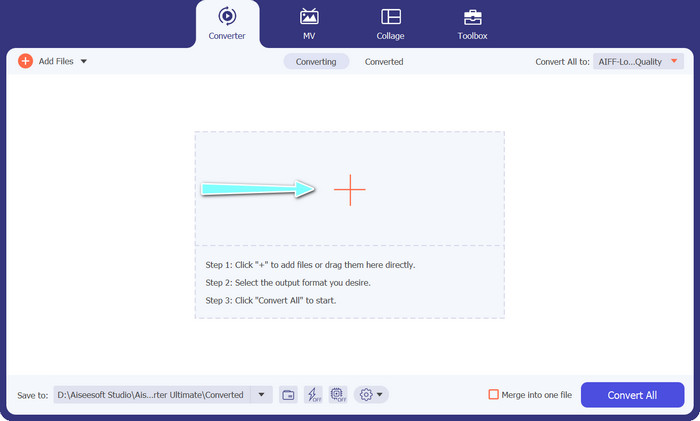
स्टेप 2. अगला कदम, मुख्य इंटरफ़ेस पर मौजूद प्लस चिन्ह वाले बटन पर क्लिक करके वह ऑडियो फ़ाइल जोड़ना है जिसे आप कन्वर्ट करना चाहते हैं। फ़ाइल जोड़ने के बाद, आपको इंटरफ़ेस पर हर फ़ाइल का एक थंबनेल दिखाई देगा।.
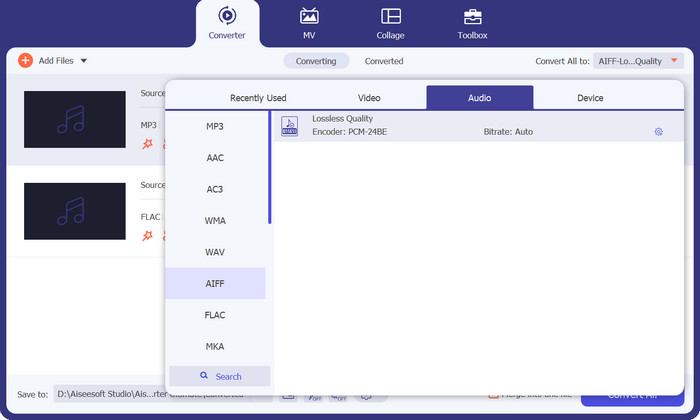
स्टेप 3. टूल के ऊपरी दाईं ओर मौजूद Profile मेन्यू से Audio टैब चुनकर आउटपुट फ़ॉर्मैट निर्धारित करें। फिर कन्वर्शन की दिशा के अनुसार MP3 या FLAC में से कोई एक चुनें।.
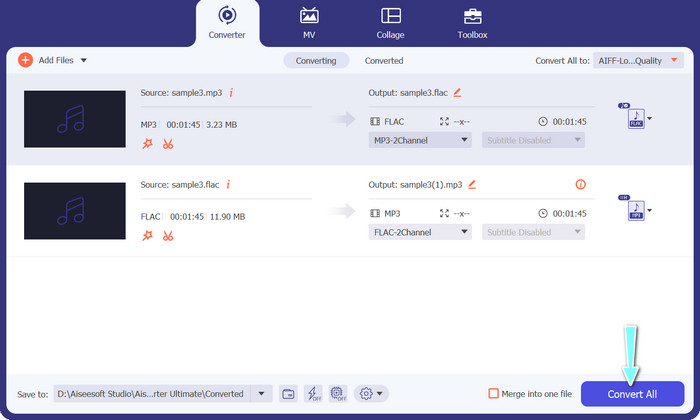
स्टेप 4. इंटरफ़ेस के निचले हिस्से में उपयुक्त लोकेशन चुनकर वह आउटपुट फ़ोल्डर निर्धारित करें जहाँ आप कन्वर्ट की गई फ़ाइलें सेव करना चाहते हैं। अंत में, कन्वर्शन प्रक्रिया शुरू करने के लिए Convert All बटन पर क्लिक करें।.
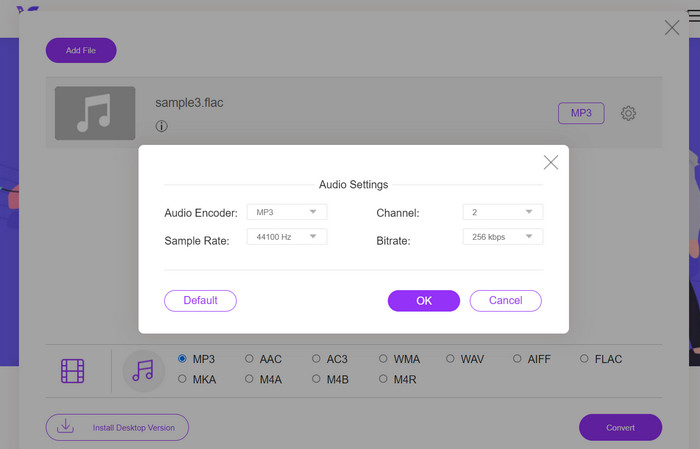
यदि आप FLAC को MP3 में कन्वर्ट करने के लिए किसी मुफ़्त ऑनलाइन टूल की तलाश में हैं, तो Free Video Converter Online से बेहतर कुछ नहीं। यह सुविधाजनक प्रोग्राम उपयोगकर्ताओं को बिना किसी लागत के वीडियो और ऑडियो फ़ाइलों को कन्वर्ट करने देता है और साथ ही आपकी पसंद के अनुसार आउटपुट सेटिंग्स कस्टमाइज़ करने की सुविधा भी देता है। जब तक आपका इंटरनेट कनेक्शन ठीक है, कन्वर्शन स्पीड भी भरोसेमंद रहती है। शुरू करने के लिए निम्न चरणों का पालन करें:
स्टेप 1. अपना पसंदीदा वेब ब्राउज़र लॉन्च करें और Free Video Converter Online वेबसाइट पर जाएँ।.
स्टेप 2. FLAC फ़ाइल को MP3 में कन्वर्ट करने के लिए अपलोड करने हेतु Add Files to Convert बटन पर क्लिक करें।.
स्टेप 3. Audio फ़ॉर्मैट मेन्यू के अंतर्गत उपलब्ध फ़ॉर्मैट्स की सूची से MP3 को आउटपुट फ़ॉर्मैट के रूप में चुनें। आप MP3 फ़ाइल के लिए अपनी मनचाही बिटरेट या आउटपुट क्वालिटी भी चुन सकते हैं।.
स्टेप 4. कन्वर्शन प्रक्रिया शुरू करने के लिए Convert बटन पर क्लिक करें।.
भाग 5. FLAC बनाम MP3 के बारे में अक्सर पूछे जाने वाले प्रश्न
16-बिट FLAC बनाम 320Kbps MP3 में से कौन बेहतर है?
16 बिट FLAC और 320kbps MP3 के बीच का चुनाव व्यक्तिगत वरीयता और ऑडियो फ़ाइल के इच्छित उपयोग पर निर्भर करता है। यदि आप ऑडियो गुणवत्ता को प्राथमिकता देते हैं और आपके पास पर्याप्त संग्रहण स्थान है, तो 16 बिट FLAC बेहतर विकल्प हो सकता है। यदि आपको ऑडियो गुणवत्ता पर बहुत अधिक समझौता किए बिना छोटे फ़ाइल आकार की आवश्यकता है, तो 320kbps MP3 एक अच्छा विकल्प हो सकता है।
क्या FLAC फाइलें MP3 फाइलों से बड़ी हैं?
हां, एफ़एलएसी फ़ाइलें आमतौर पर एमपी3 फ़ाइलों से बड़ी होती हैं क्योंकि उनकी दोषरहित प्रकृति होती है।
क्या सभी मीडिया प्लेयर FLAC का समर्थन करते हैं?
नहीं, सभी मीडिया प्लेयर FLAC का समर्थन नहीं करते हैं। हालाँकि, कई आधुनिक मीडिया प्लेयर और सॉफ्टवेयर FLAC प्लेबैक का समर्थन करते हैं, जिनमें VLC, Foobar2000 और Winamp शामिल हैं।
निष्कर्ष
MP3 और FLAC के बीच चुनाव आपके व्यक्तिगत पसंद और विशिष्ट ज़रूरतों पर निर्भर करता है। इसलिए, आपके निर्णय‑निर्माण के लिए FLAC बनाम MP3 पर विचार करना ज़रूरी है। अंततः, किस फ़ॉर्मैट का उपयोग करना है, यह इस बात पर निर्भर करेगा कि आपके लिए साउंड क्वालिटी, फ़ाइल साइज़ और कम्पैटिबिलिटी में से किसे ज़्यादा प्राथमिकता है।.
-
 विंडोज और मैक पर एमपीवी को एमपी 3 में आसानी से कन्वर्ट करने के लिए 4 सर्वश्रेष्ठ तरीके
 जब आप MOV फ़ाइलों से MP3 ऑडियो फ़ाइलों को निकालना चाहते हैं, तो आप लेख से वांछित फ़ाइलें प्राप्त करने के लिए MP3 कन्वर्टर्स के लिए 4 सबसे कुशल MOV के बारे में अधिक जान सकते हैं।
-
 ऑडियो फ़ाइलों को एमपी3 में आसानी से बदलने के लिए सर्वश्रेष्ठ एमपी3 कन्वर्टर्स
 हमारे उपयोगकर्ता के अनुकूल ऑनलाइन और ऑफलाइन एमपी3 कन्वर्टर्स के साथ आसानी से किसी भी ऑडियो प्रारूप को एमपी3 में परिवर्तित करें। कुछ ही क्लिक में उच्च-गुणवत्ता वाले परिणाम प्राप्त करें।
-
 Mac और Windows पर शीर्ष 3 FLAC मेटाडेटा संपादक [2023 अपडेट किया गया]
 क्या आप FLAC मेटाडेटा बदलना चाहते हैं? इस मामले में, आपको यह लेख अवश्य पढ़ना चाहिए क्योंकि हम उपयोग करने के लिए नवीनतम FLAC मेटाडेटा संपादक के बारे में पर्याप्त जानकारी प्रदान करते हैं।
