


 वीडियो कनवर्टर अंतिम
 स्क्रीन अभिलेखी
 वीडियो मरम्मत
 सुरक्षित डाउनलोड
3D या त्रि-आयामी क्या है, इसके बारे में सब कुछ जानें
क्या आप जानना चाहते हैं कि 3D क्या है? 3डी या त्रि-आयामी फिल्में और छवियां अधिक लोकप्रिय हो रही हैं। चूंकि हम आधुनिक दिनों में हैं, विभिन्न उपकरणों का उपयोग करके एक 3डी फिल्म बनाना आसान है। लेकिन सबसे पहले, हमें 3D के बारे में सब कुछ समझने की आवश्यकता है: पृष्ठभूमि, परिभाषा और 3D वीडियो कैसे बनाया जाता है।
इस लेख में हम 3D और उसके पैरामीटर्स के बारे में विस्तार से जानेंगे। तो यदि आप यह जानना चाहते हैं कि 3D क्या है, तो यह लेख पढ़ें।.

भाग 1. 3डी क्या है
3D या त्रि-आयामी वस्तुएँ चौड़ाई, ऊँचाई और गहराई दिखाती हैं। दैनिक, हम 3D वस्तुओं को देखते हैं क्योंकि हमारा भौतिक वातावरण स्वयं त्रि-आयामी है। हम मनुष्यों के पास जो 3D धारणा है, उसके कारण हम 3D वस्तुओं को देख सकते हैं, जिसे गहराई का बोध भी कहा जाता है। जब आप चारों ओर देखते हैं, तो हमारी आँखों में रेटिना एक द्वि-आयामी छवि बनाता है, और हमारा मस्तिष्क दो छवियों को 3D दृश्य के रूप में संसाधित करता है। लेकिन क्या आप जानते हैं? हम इंसानों के पास उपकरण हैं जिनका उपयोग हम गहराई की धारणा के लिए करते हैं?
यहां वे मानव उपकरण हैं जिनका उपयोग हम गहराई की धारणा के लिए करते हैं:
स्टीरियोस्कोपिक दृष्टि - स्टीरियोस्कोपिक दृष्टि, दोनों आँखों द्वारा महसूस की जाने वाली गहराई की अनुभूति है। यह मस्तिष्क की उन क्षमताओं में से एक है, जिनकी मदद से वह 3D आकृतियों और दृश्य‑चित्रों को दर्ज करता है। इस तरह की दृष्टि में, पास की वस्तुएँ दूर की वस्तुओं की तुलना में अधिक अलग‑अलग दिखाई देती हैं।.
पैरेलैक्स (दृष्टि अंतरण) - इस प्रकार की दृष्टि को दो रेखाओं के बीच के कोण से मापा जाता है। जब आप अपना सिर दाएँ‑बाएँ घुमाते हैं, तो पास की वस्तुएँ दूर की वस्तुओं की तुलना में ज़्यादा हिलती हुई दिखती हैं।.
आकार की परिचितता (साइज़ फ़ेमिलियारिटी) - यदि आप किसी वस्तु के आकार से परिचित हैं, तो वह भले ही दूर हो, आप लगभग अनुमान लगा सकते हैं कि वह आकार में कितनी बड़ी दिखनी चाहिए। इसी प्रकार, यदि दो वस्तुओं का वास्तविक आकार समान हो, लेकिन उनमें से एक आपको बड़ी दिखाई दे रही हो, तो यह माना जाता है कि बड़ी दिखने वाली वस्तु अधिक पास है।.
ऐकमोडेशन - जब आप किसी नज़दीकी वस्तु पर फोकस करते हैं, तो आपकी आँख का लेंस भौतिक रूप से बदलता है। इस तरीके से आप जान पाते हैं कि वस्तु कितनी दूर है। यह आँख का वह तरीका भी है, जिसके द्वारा वह किसी वस्तु पर अपना फोकस बनाए रखती है।.
एरियल परस्पेक्टिव (हवाई परिप्रेक्ष्य) - एरियल परस्पेक्टिव में आप वस्तुओं को छोटा देखते हैं क्योंकि दृश्य बहुत दूर से दिखता है। दूर की वस्तुएँ आमतौर पर कम कॉन्ट्रास्ट और कम रंग संतृप्ति वाली नज़र आती हैं।.
हमारी भौतिक दुनिया में भी विभिन्न प्रकार के 3D हैं। 3डी को एक छवि के रूप में भी वर्णित किया गया है जो अलग-अलग दूरी की गहराई का भ्रम देता है, जो आमतौर पर कंप्यूटर गेम, ग्राफिक्स, आभासी वास्तविकता और फिल्मों में उपयोग किया जाता है।
विभिन्न प्रकार के 3D:
3D कंप्यूटर ग्राफ़िक्स - 3D कंप्यूटर ग्राफ़िक्स डिस्प्ले स्क्रीन या द्वि‑आयामी (2D) स्पेस में 3D वस्तुएँ उत्पन्न कर सकती हैं। 2D ग्राफ़िक्स में पिक्सल्स के पास स्थिति, रंग और चमक जैसी अलग‑अलग विशेषताएँ होती हैं। 3D में पिक्सल्स Z‑अक्ष पर स्थित होते हैं। जब पिक्सल्स को उनकी गहराई (डेप्थ) के साथ जोड़ा जाता है, तो एक 3D सतह बनती है, जिसे टेक्सचर भी कहा जाता है।.
3D फ़िल्में - 3D फ़िल्में वे चलचित्र हैं जिनमें 3D गहराई होती है। 3D चश्मे की मदद से हम 3D फ़िल्में देख सकते हैं। इस तरह की फ़िल्में बनाने के लिए रचनाकार स्टीरियोस्कोपिक दृष्टि का उपयोग करते हैं, यानी दो अलग‑अलग छवियाँ एक साथ दिखाई जाती हैं, हर आँख के लिए एक।.
3D प्रिंटिंग - 3D प्रिंटिंग को ‘ऐडिटिव मैन्युफैक्चरिंग’ भी कहा जाता है। यह किसी डिजिटल फ़ाइल से ठोस रूप में 3D वस्तु बनाने की प्रक्रिया है। कंप्यूटर एडेड डिज़ाइन (CAD) का उपयोग करके आप किसी डिजिटल मॉडल से 3D वस्तु प्रिंट कर सकते हैं।.
भाग 2। 3डी फिल्में कैसे चलाएं
अब जबकि आप 3D का अर्थ जान गए हैं तो आइए जानते हैं कि सबसे उत्कृष्ट सॉफ़्टवेयर एप्लिकेशन का उपयोग करके आप 3D मूवी कैसे चला सकते हैं।
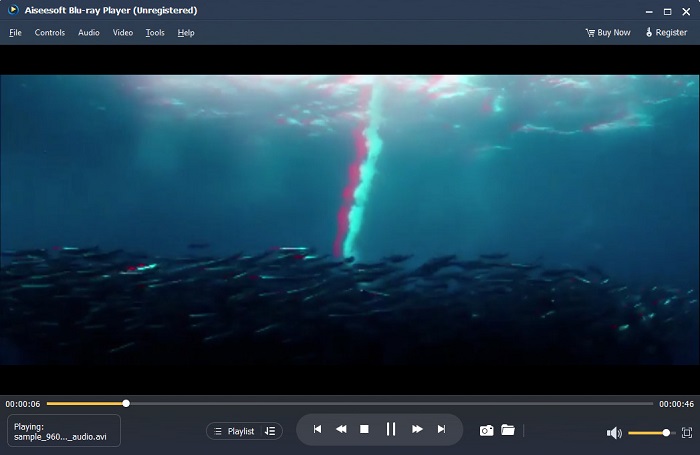
ब्लू-रे प्लेयर एक डेस्कटॉप एप्लिकेशन है जहां आप किसी भी प्रकार का वीडियो चला सकते हैं। इस टूल से, आप बिना किसी प्लग-इन का उपयोग किए 3D मूवी भी चला सकते हैं। इसके अलावा, कई लोग इस मीडिया प्लेयर को इसके सरल और साफ यूजर इंटरफेस के कारण सुझाते हैं। इसके अलावा, यह शक्तिशाली मीडिया प्लेयर ब्लू-रे डिस्क, ब्लू-रे फ़ोल्डर, डीवीडी/फ़ोल्डर/आईएसओ फ़ाइलें चला सकता है, जिसका अन्य मीडिया प्लेयर समर्थन नहीं करते हैं। आप 100 प्रतिशत दोषरहित ऑडियो और नाटकीय एचडी सराउंड साउंड के साथ एचडी वीडियो देखने का भी आनंद ले सकते हैं। और भी आश्चर्यजनक बात यह है कि आप अपनी प्लेलिस्ट बना सकते हैं ताकि आपको अपने इच्छित वीडियो या ऑडियो को अलग करने में कठिनाई न हो।
ब्लू-रे प्लेयर में 3डी मूवी कैसे चलाएं:
चरण 1. अपने डिवाइस पर Blu-ray Player डाउनलोड करें। इंस्टॉलेशन प्रक्रिया का पालन करें, फिर ऐप चलाएँ।.
चरण 2. सॉफ़्टवेयर के मुख्य इंटरफ़ेस पर Open File बटन पर क्लिक करें। इसके बाद आपके डिवाइस की फ़ाइलें दिखाई देंगी, जहाँ से आप अपनी 3D मूवी चुनेंगे।.
चरण 3. इसके बाद आपका वीडियो अपलोड होना शुरू हो जाएगा। अब आप अपने विशेष 3D चश्मे पहन सकते हैं और अपनी 3D मूवी देखने का आनंद ले सकते हैं।.
भाग 3. 3डी टीवी और 3डी चश्मा क्या हैं
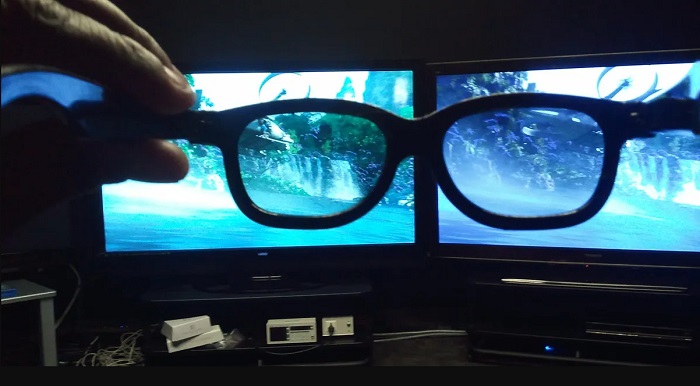
3डी टीवी दो प्रकार के होते हैं: एक्टिव-शटर 3डी, एक्टिव 3डी और पैसिव 3डी। यह भाग उनके अंतरों को अलग करेगा और यह निर्धारित करेगा कि एक्टिव-शटर या पैसिव 3डी टीवी देखते समय किस प्रकार के 3डी चश्मे का उपयोग किया जाए।
एक्टिव‑शटर या एक्टिव 3D ऐसा प्रकार का 3D टीवी है जो स्क्रीन पर उच्च‑गुणवत्ता वाली 3D छवियाँ बारी‑बारी से प्रदर्शित करता है। एक्टिव 3D टीवी दाएँ और बाएँ आँख के लिए स्क्रीन पर अलग‑अलग छवियाँ क्रम‑क्रम से दिखाता है। फिर 3D चश्मे लेंसों को बारी‑बारी से काला (शटर) कर देते हैं, ताकि आपकी टीवी स्क्रीन पर दिखने वाला 3D प्रभाव उत्पन्न हो सके। इससे हर आँख केवल वही छवि देखती है जो उसके लिए बनाई गई है। एक्टिव‑शटर 3D देखते समय आपको जिन 3D चश्मों का उपयोग करना होता है, वे 3D एक्टिव ग्लासेस कहलाते हैं। इस प्रकार के 3D चश्मों में बैटरी की आवश्यकता होती है, जिसका उपयोग लेंसों को इलेक्ट्रॉनिक तरीके से ब्लॉक और शटर करने के लिए किया जाता है। इन चश्मों में LCD लेंस लगाए जाते हैं, जो टीवी पर दिखने वाले वैकल्पिक फ़्रेमों के साथ तालमेल बिठाते हैं।.
इसके विपरीत, पैसिव 3D टीवी किसी हद तक वही 3D तकनीक उपयोग करता है जो सिनेमाघरों में इस्तेमाल होती है। इस प्रकार के 3D टीवी में स्क्रीन पर विशेष फ़िल्टर लगे होते हैं, और 3D देखने के लिए चश्मों में ध्रुवीकृत (पोलराइज़्ड) लेंसों का उपयोग किया जाता है। इसके अतिरिक्त, पैसिव 3D टीवी दो फ़्रेमों को एक में मिला देता है और उन्हें बारी‑बारी से क्षैतिज लाइनों के रूप में बाएँ और दाएँ आँख के लिए प्रदर्शित करता है। इन टीवी के साथ जो चश्मे उपयोग किए जाते हैं, वे पैसिव 3D ग्लासेस होते हैं, जिनमें दोनों लेंसों पर अलग‑अलग ध्रुवीकरण होता है। एक आँख केवल विषम (ऑड) लाइनों को देखती है, जबकि दूसरी आँख सम (ईवन) लाइनों को देखती है, जिससे 3D छवि बनती है। पैसिव 3D चश्मों को काम करने के लिए बैटरी की ज़रूरत नहीं होती।.
भाग 4. 2डी बनाम 3डी
कंप्यूटर कार्यक्षेत्र में 2D और 3D वास्तविक आयाम हैं। 2D या द्वि-आयामी समतल वस्तुएँ हैं जो क्षैतिज और ऊर्ध्वाधर आयामों (X और Y-अक्ष) का उपयोग करती हैं। चूँकि 2D में केवल दो आयाम होते हैं, आप केवल एक रेखा देखेंगे जब आप उन्हें एक ओर मोड़ेंगे। इसमें केवल ऊंचाई और चौड़ाई होती है लेकिन गहराई नहीं होती। जबकि दूसरी ओर, 3D या त्रि-आयामी में ऊंचाई, चौड़ाई और गहराई होती है। त्रि-आयामी इमेजरी को त्रि-आयामी अवधारणात्मक देखने के लिए मिलकर काम करने वाली दो आंखों के प्रभाव की आवश्यकता होती है। यदि 2D X और Y-अक्ष का उपयोग करता है, तो 3D Z आयाम जोड़ता है, जिससे आप किसी वस्तु की गहराई देख सकते हैं।
यदि आप पूछते हैं कि कौन सा उपयोग करना अच्छा है, 2D बनाम 3D, तो उत्तर दोनों है। 2डी और 3डी के अलग-अलग फायदे और नुकसान हैं। उदाहरण के लिए, आप कोई विशेष 3D चश्मा पहने बिना किसी भी डिवाइस पर कहीं भी 2D वीडियो या मूवी देख सकते हैं। हालाँकि, 3D फिल्मों का 3D प्रभाव आश्चर्यजनक है और 2D की तुलना में देखने में अधिक मज़ेदार है।
भाग 5. 2डी फिल्म को 3डी में कैसे बदलें
यदि आप बिना किसी 3डी चश्मे के अपने घर पर एक अद्भुत 3डी फिल्म या क्लिप देखना चाहते हैं, तो आप परम वीडियो कनवर्टर का उपयोग करके अपनी 2डी फिल्म को 3डी में बदल सकते हैं। इसलिए, यदि आप अपनी 2डी फिल्म को 3डी फिल्म में बदलना चाहते हैं, तो इस अद्भुत सॉफ्टवेयर एप्लिकेशन का उपयोग करें।
FVC Video Converter Ultimate एक ऐसा एप्लिकेशन है जो वीडियो कन्वर्ज़न के लिए काफ़ी मशहूर है। यह सॉफ़्टवेयर एप्लिकेशन केवल फ़ाइल फ़ॉर्मेट बदल ही नहीं सकता, बल्कि आपको अपने 2D वीडियो को 3D वीडियो, जैसे एनाग्लिफ़ 3D और स्प्लिट‑स्क्रीन 3D में बदलने की सुविधा भी देता है। FVC Video Converter Ultimate उपयोगकर्ताओं के बीच इसलिए भी लोकप्रिय है क्योंकि यह लगभग सभी फ़ाइल फ़ॉर्मेट जैसे MP4, MKV, AVI, FLV, WEBM, MOV, DIVX और 1000+ अन्य फ़ॉर्मेट को सपोर्ट करता है। इसमें कई उन्नत एडिटिंग फ़ीचर्स भी मौजूद हैं, जैसे 3D मेकर, GIF मेकर, वीडियो वॉटरमार्क रिमूवर आदि।.
FVC वीडियो कन्वर्टर अल्टीमेट का उपयोग करके 2D फिल्मों को 3D फिल्मों में कैसे बदलें:
चरण 1. सबसे पहले नीचे दिए गए Download बटन पर क्लिक करके FVC Video Converter Ultimate डाउनलोड करें।.
फ्री डाउनलोडWindows 7 या बाद के संस्करण के लिएसुरक्षित डाउनलोड
फ्री डाउनलोडMacOS 10.7 या बाद के संस्करण के लिएसुरक्षित डाउनलोड
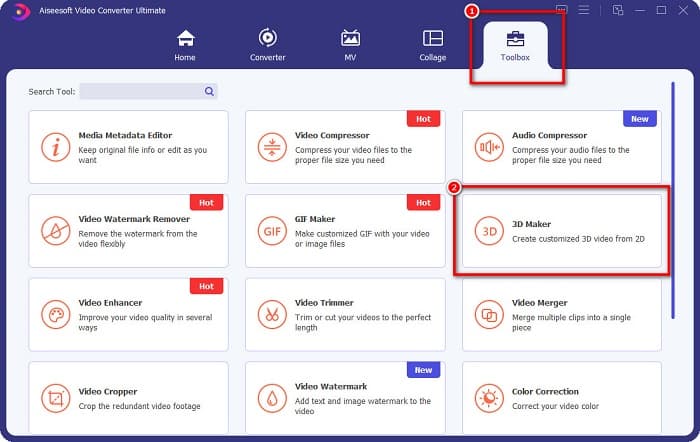
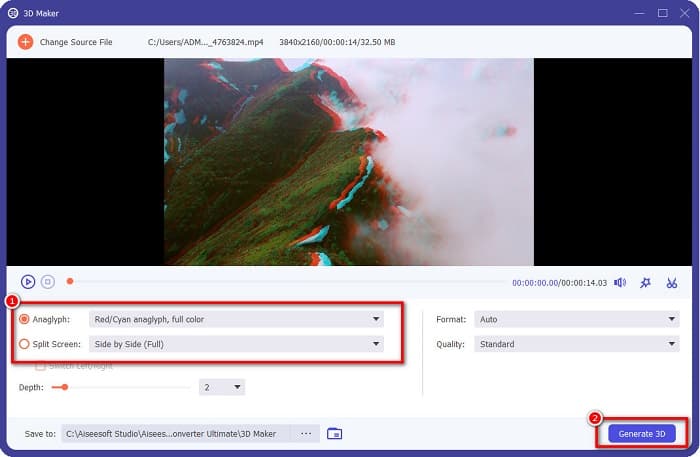
चरण 2. ऐप खोलें, फिर Toolbox पैनल पर जाएँ और 3D Maker चुनें।.
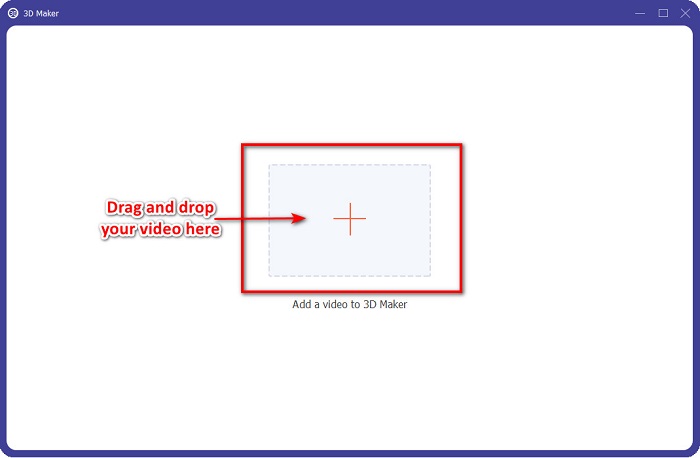
चरण 3. अगली इंटरफ़ेस पर + चिन्ह वाले बटन पर क्लिक करें या अपना 2D वीडियो उस बॉक्स में ड्रैग और ड्रॉप करें।.
चरण 4. फिर Anaglyph 3D या Split Screen 3D में से एक चुनें। उसके बाद Generate 3D बटन पर क्लिक करें।.
से संबंधित:
AVI को WMV में कन्वर्ट करने के सबसे तेज़ तरीके [सर्वश्रेष्ठ कन्वर्टर्स]
इन बेहतरीन कन्वर्टर्स का उपयोग करके MOV को WMV में आसानी से कन्वर्ट करें
भाग 6. 3D क्या है के बारे में अक्सर पूछे जाने वाले प्रश्न
क्या आप वीएलसी मीडिया प्लेयर पर 3डी वीडियो देख सकते हैं?
हाँ। वीएलसी मीडिया प्लेयर सभी फ़ाइल स्वरूपों का समर्थन करता है। आप VLC मीडिया प्लेयर में 3D मूवी भी चला सकते हैं।
क्या आप 3D वीडियो को 2D में बदल सकते हैं?
FVC वीडियो कन्वर्टर अल्टीमेट 3D वीडियो को 2D में बदल सकता है। आप इस कन्वर्टर से अपने वीडियो का फाइल फॉर्मेट भी बदल सकते हैं।
कौन सा अधिक उपयोग किया जाता है, 2D या 3D?
आजकल फिल्म उद्योग में 2डी फिल्मों की तुलना में 3डी फिल्मों का अधिक बोलबाला है। दिलचस्प ग्राफिक्स और यथार्थवादी एनीमेशन के कारण, 3डी फिल्में 2डी फिल्मों की तुलना में अधिक लोकप्रिय हैं।
निष्कर्ष
3D या त्रि‑आयामी तकनीक फ़िल्म उद्योग में और विशेष रूप से कंप्यूटर पर काफ़ी प्रसिद्ध है। अब जब आप जान चुके हैं कि 3D क्या है, तो आपके पास यह बुनियादी जानकारी है कि आप इसे कैसे बना सकते हैं। यदि आप आसानी से 3D वीडियो बनाना चाहते हैं, तो FVC Video Converter Ultimate का उपयोग करें।.
-
 Windows और Mac पर MPG को 3GP में बदलने के 3 तरीके [मुक्त]
 यदि आप MPG को 3GP में बदलने के तरीके खोज रहे हैं, तो Windows और Mac पर MPG को 3GP में बदलने के सर्वोत्तम तरीके जानने के लिए इस लेख को पढ़ें।
-
 विंडोज और मैक के लिए शीर्ष 5 सर्वश्रेष्ठ मुफ्त एमपीईजी से डिवएक्स कन्वर्टर
 सर्वश्रेष्ठ एमपीईजी से डिवएक्स कन्वर्टर्स का उपयोग करके आसानी से अपनी एमपीईजी फ़ाइल को डिवएक्स फ़ाइल में कनवर्ट करें। उनके बारे में अधिक जानकारी जानने के लिए यह लेख पढ़ें।
-
 मैक और विंडोज के लिए कन्वर्टर्स का उपयोग करने के लिए डिवएक्स फ्री टू बेस्ट एमओवी
 यदि आप MOV से DivX मुक्त कन्वर्टर्स की तलाश कर रहे हैं तो हमारे पास आपके लिए समाधान है। यह आलेख Mac और Windows के लिए DivX कन्वर्टर्स के लिए शीर्ष MOV प्रस्तुत करता है।
