


 वीडियो कनवर्टर अंतिम
 स्क्रीन अभिलेखी
 वीडियो मरम्मत
 सुरक्षित डाउनलोड
PNG फ़ाइल क्या है, इसके बारे में आप जो कुछ भी सीख सकते हैं
आजकल, PNG फ़ाइल फ़ॉर्मेट मानक इमेज फ़ॉर्मेट्स में से एक है। आप इसे इंटरनेट पर, कंप्यूटर्स पर, मोबाइल फ़ोन्स पर आदि देख सकते हैं। हालांकि, कुछ उपयोगकर्ताओं को इस फ़ॉर्मेट के बारे में जानकारी नहीं होती। सौभाग्य से, यह पोस्ट आपको वह सारी जानकारी देगी जिसकी आपको ज़रूरत है। आप जानेंगे कि PNG फ़ाइल क्या है फ़ॉर्मेट। इसके अलावा, यह पोस्ट आपको इमेज को PNG फ़ाइल फ़ॉर्मेट में बदलने के बेहतरीन तरीक़े भी बताएगी।.

पार्ट 1. पीएनजी फाइल के बारे में विस्तृत जानकारी
रेखापुंज परिवार का पोर्टेबल नेटवर्क ग्राफिक्स (पीएनजी) एक्सटेंशन दोषरहित चित्र संपीड़न करता है। यह पेटेंट नहीं है और जीआईएफ, ग्राफिक्स इंटरचेंज फॉर्मेट के प्रतिस्थापन के रूप में बनाया गया था। पारदर्शिता प्रदान करने वाली मानक ग्रेस्केल छवियों के अतिरिक्त, वे पैलेट पर आधारित हो सकते हैं। पीएनजी सीएमवाईके जैसे अतिरिक्त रंग प्रकारों का समर्थन नहीं करता है। ऐसा इसलिए है क्योंकि इसका एक मुख्य उद्देश्य इंटरनेट पर चित्र भेजना है। साथ ही, इसने किसी भी पेशेवर मुद्रण कार्य को ध्यान में नहीं रखा। फ़ाइल में छवि जानकारी के साथ विखंडू में बांटा गया है। इसमें एन्कोडेड पिक्सेल या पाठ्य टिप्पणियाँ शामिल हैं, और अखंडता सत्यापन RFC 2083 के तहत किया जाता है। कई उपयोगकर्ता PNG प्रारूप में आते हैं। ऐसा इसलिए है क्योंकि यह आजकल लोकप्रिय स्वरूपों में से एक है। यह एक ईमेल अटैचमेंट या आपके द्वारा किसी वेबसाइट से प्राप्त की गई तस्वीर हो सकती है। कभी-कभी, स्क्रीनशॉट में यह रिज़ॉल्यूशन भी होता है। यह उन पेशेवरों के लिए अधिक सहायक है जो इसका उपयोग कर सकते हैं।
ऐतिहासिक रूप से, PNG छवि प्रारूप 1995 में शुरू हुआ था। ओलिवर फ्रॉम, एक आईटी विशेषज्ञ, पिंग प्रारूप के साथ आया था। लेकिन बाद में यह पीएनजी बन गया। यह फ़ाइल स्वरूप GIF प्रारूप का अगला विकास है। GIF फॉर्मेट PNG से आठ साल पुराना है। जीआईएफ के कई नुकसान हैं। इसके लिए पेटेंट लाइसेंस और 256 रंगों की सीमित रेंज की जरूरत है। कंप्यूटर स्क्रीन पर इसे खोलते समय यह सीमा छवि को प्रभावित कर सकती है। नतीजतन, पीएनजी फ़ाइल बनाना सबसे अच्छा विकल्प है। यह पेटेंट मुक्त है और इसमें एक बड़ा रंग पैलेट है।
भाग 2। एक पीएनजी फ़ाइल कैसे खोलें
चूंकि आप पहले से ही जानते हैं कि एक .png फ़ाइल क्या है, यह भाग आपको बताएगा कि इस प्रारूप को अपने उपकरणों और विभिन्न ब्राउज़रों पर कैसे खोलें। आप किसी भी लोकप्रिय वेब ब्राउज़र में अपनी पीएनजी तस्वीरें खोल सकते हैं। इसमें फ़ायरफ़ॉक्स, क्रोम, एक्सप्लोरर और बहुत कुछ शामिल है। तरीका परेशानी रहित है।
अगर आप अपना ब्राउज़र उपयोग कर रहे हैं, तो आप कीबोर्ड पर ctrl + O दबाकर PNG इमेज खोल सकते हैं। वह PNG इमेज चुनें जिसे आप खोलना चाहते हैं। फिर, अपने फ़ाइल फ़ोल्डर से Open बटन पर क्लिक करें।.
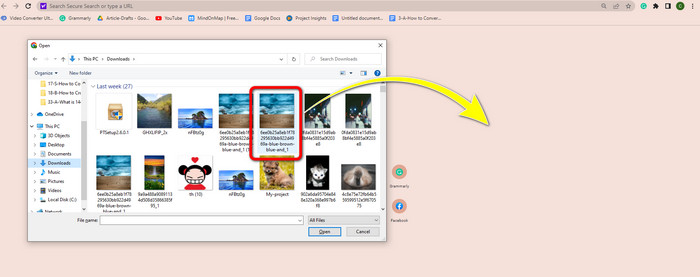
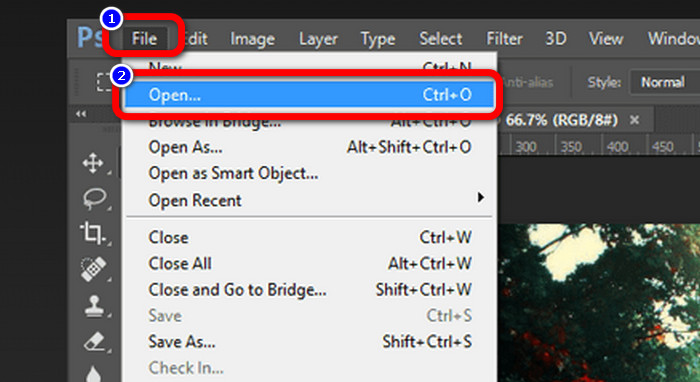
Photoshop, Drive या अन्य ऐप्स पर भी PNG इमेज खोलने के तरीके हैं। आप File > Open > पर जाकर फ़ोटो चुन सकते हैं। उसके बाद, Enter दबाएँ। इस तरह आप उस एप्लिकेशन पर अपनी PNG इमेज देख सकते हैं।.
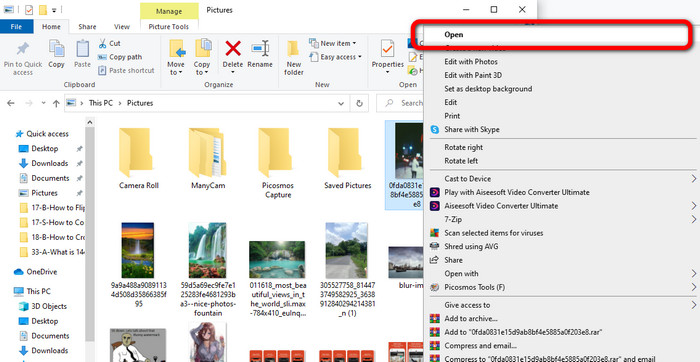
अपने Windows कंप्यूटर पर PNG फ़ाइल खोलना आसान है। टास्कबार से File folder पर क्लिक कर के उसे खोलें। PNG इमेज देखने के लिए Quick access टैब पर जाएँ। जब आपको इमेज दिखे, तो उस पर राइट‑क्लिक करें और Open विकल्प चुनें। इस तरह आप इमेज को फुल‑स्क्रीन मोड में देख सकते हैं।.
भाग 3। छवियों को पीएनजी प्रारूप में बदलने का प्रभावी तरीका
FVC फ्री इमेज कन्वर्टर का उपयोग करके छवियों को PNG में बदलें
आप इमेज को PNG फ़ॉर्मेट में बदलने के लिए विभिन्न ऑनलाइन कन्वर्टर्स का उपयोग कर सकते हैं। हालांकि, उनमें से कुछ सुरक्षित नहीं होते। साथ ही, कुछ कन्वर्टर्स काफ़ी महंगे भी होते हैं। अगर आप सुरक्षित और मुफ़्त इमेज कन्वर्टर चाहते हैं, तो FVC Free Image Converter का उपयोग करें। यह टूल ऑनलाइन इमेज कन्वर्ट करने के लिए बेहतरीन एप्लिकेशनों में से एक है। आप इसे मुफ़्त में इस्तेमाल कर सकते हैं, जिससे यह सभी उपयोगकर्ताओं के लिए सुलभ हो जाता है। साथ ही, आप TIFF, JPG, PNG, GIF और अन्य कई फ़ॉर्मेट की इमेज अपलोड कर सकते हैं। इसके अलावा, इमेज कन्वर्ट करना सरल है। यह आपकी इमेज को PNG फ़ॉर्मेट में बदलने के लिए केवल तीन स्टेप्स प्रदान करता है। आप एक बार में कई इमेज भी कन्वर्ट कर सकते हैं। यह कन्वर्टर बैच कन्वर्ज़न प्रक्रिया प्रदान करता है। इस तरह, आप अधिक समय बचा सकते हैं। साथ ही, यह कन्वर्ज़न प्रक्रिया के बाद आपका डेटा डिलीट कर के गोपनीयता सुनिश्चित करता है। इसके अलावा, आपको इस ऐप में रजिस्टर या अकाउंट बनाने की आवश्यकता नहीं है। वेबसाइट खोलने के बाद आप इसे सीधे उपयोग कर सकते हैं।.
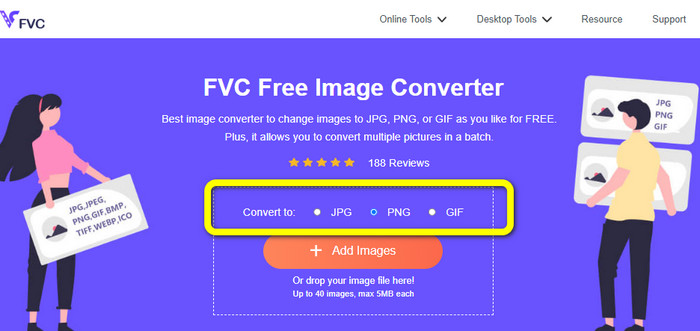
Step 1: सबसे पहले FVC Free Image Converter वेबसाइट पर जाएँ। जब आप मुख्य वेबपेज पर हों, तो फ़ॉर्मेट विकल्प पर जाएँ और इच्छित आउटपुट फ़ॉर्मेट के रूप में PNG फ़ाइल चुनें।.
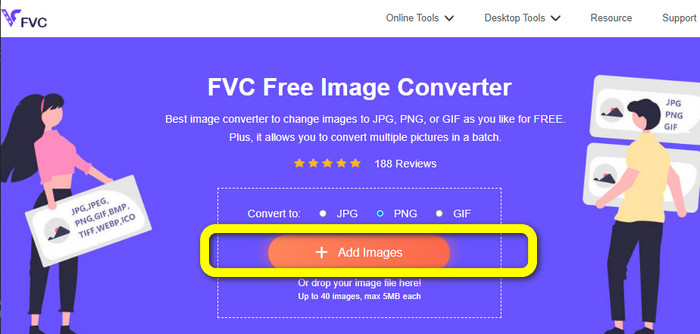
Step 2: फ़ोटो अपलोड करने के लिए बीच में स्थित Add Images बटन पर क्लिक करें। अपने फ़ाइल फ़ोल्डर से वह फ़ोटो खोलें जिसे आप कन्वर्ट करना चाहते हैं।.
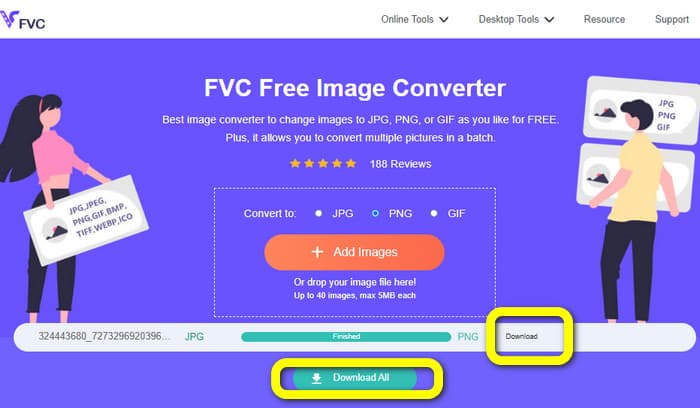
Step 3: कन्वर्ज़न प्रक्रिया के बाद, अपनी अंतिम इमेज को सेव करने के लिए Download बटन पर क्लिक करें। उसके बाद, आप अपने कंप्यूटर पर PNG इमेज खोल सकते हैं।.
Coolutils का उपयोग करके छवियों को PNG में बदलें
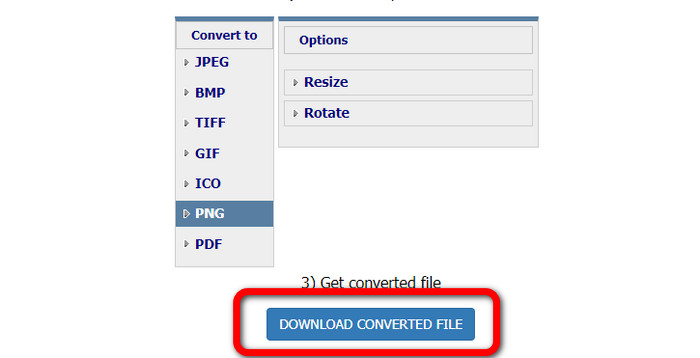
आप बिना कुछ डाउनलोड किए ऑनलाइन इमेज फ़ाइल कन्वर्टर Coolutils का उपयोग कर सकते हैं। आपको ईमेल लिंक का इंतज़ार करने की ज़रूरत नहीं है, क्योंकि यह ऑनलाइन कन्वर्टर तुरंत ही कन्वर्ज़न कर देता है। यह ऑनलाइन टूल आपको जल्दी से इमेज को PNG में कन्वर्ट करने की सुविधा देता है। इस सेवा की एक विशेषता जो हमें पसंद है, वह है कन्वर्ट करने से पहले इमेज को घुमाने (rotate) और उसका आकार बदलने (resize) की क्षमता। हालांकि, यह यह नहीं दिखाता कि कन्वर्ज़न के बाद घुमाई गई इमेज कैसी दिखाई देगी। चूँकि यह वेब ब्राउज़र के ज़रिए काम करता है, आप इस तरीक़े का उपयोग किसी भी ऑपरेटिंग सिस्टम, जैसे Windows, Linux और Mac के साथ कर सकते हैं। यह प्रोग्राम JPEG, PNG, GIF, BMP और TIFF सहित कई इनपुट फ़ॉर्मेट्स को सपोर्ट करता है।.
Step 1: अपना ब्राउज़र खोलें और Coolutils सर्च करें। फिर, वह इमेज जोड़ने के लिए जिसे आप कन्वर्ट करना चाहते हैं, Upload File to Convert बटन पर क्लिक करें।.
Step 2: फ़ॉर्मेट विकल्पों में से PNG फ़ॉर्मेट चुनें।.
Step 3: अपनी इमेज को डेस्कटॉप पर सेव करने के लिए Download converted file बटन पर क्लिक करें। आप इस टूल का उपयोग इमेज को JPG में कन्वर्ट करने के लिए भी कर सकते हैं।.
भाग 4. पीएनजी फाइल के बारे में अक्सर पूछे जाने वाले प्रश्न
1. पीएनजी और जेपीजी में क्या अंतर है?
PNG और JPG फ़ाइल स्वरूपों के बीच मुख्य अंतर उनका संपीड़न एल्गोरिथम है। पीएनजी फ़ाइल प्रारूप दोषरहित एल्गोरिथम का उपयोग करता है। इसका मतलब है कि यह छवि से सभी जानकारी रख सकता है। जेपीजी प्रारूप हानिपूर्ण संपीड़न एल्गोरिदम का उपयोग करता है। फ़ाइल आकार को कम करने के लिए यह छवि की कुछ जानकारी को छोड़ देता है।
2. पीएनजी प्रारूप लिखित पाठ को कितनी प्रभावी ढंग से प्रदर्शित करता है?
यह प्रभावी है। इस फ़ाइल का दोषरहित संपीड़न टेक्स्ट-भारी फ़ोटो प्रदर्शित कर सकता है। इसमें पेज लेआउट और स्क्रीनशॉट शामिल हैं। हस्तलिखित दस्तावेजों और अखबारों के पन्नों जैसे मुद्रित पाठ के स्कैन शामिल हैं।
3. बेहतर क्या है, जेपीजी या पीएनजी?
यह आपके उद्देश्य पर निर्भर करता है। जेपीजी फ़ाइल छवि गुणवत्ता को कम करती है। यह छवि के फ़ाइल आकार को कम करने के लिए भी बेहतर काम करता है। PNG ने छवि गुणवत्ता को बनाए रखते हुए फ़ाइल को संकुचित किया। यह टेक्स्ट, आइकॉनिक ग्राफिक्स और लाइन ड्रॉइंग जैसे आइटम्स को स्टोर करने के लिए उत्कृष्ट है।
निष्कर्ष
ऊपर दी गई सारी जानकारी आपको PNG फ़ाइल फ़ॉर्मेट के बारे में बताती है। यह आपको इस बारे में भी पर्याप्त जानकारी देता है कि PNG फ़ाइल किस काम आती है। इसके अलावा, यह लेख आपको FVC Free Image Converter का उपयोग करके इमेज को PNG फ़ॉर्मेट में कन्वर्ट करने के व्यावहारिक निर्देश दिखाता है। तो, अगर आप इमेज फ़ाइलों को कन्वर्ट करना चाहते हैं, तो इस भरोसेमंद ऑनलाइन इमेज कन्वर्टर का उपयोग करें।.
-
 8 आश्चर्यजनक इमेज कन्वर्टर्स [पूरी जानकारी]
 यह समीक्षा आपको उन सर्वोत्तम छवि फ़ाइल कन्वर्टर्स के बारे में बताएगी जिनका उपयोग आप छवि फ़ाइलों को परिवर्तित करने के लिए कर सकते हैं। आपके लिए सबसे अच्छा इमेज कन्वर्टर जानने के लिए इस पोस्ट को पढ़ें
-
 जेपीईजी बनाम जेपीजी बनाम पीएनजी के अंतर के बारे में पूरी जानकारी
 यह पोस्ट आपको जेपीईजी बनाम जेपीजी बनाम पीएनजी के अंतर के बारे में पर्याप्त जानकारी देगी। इसके अलावा, आप सीखेंगे कि छवियों को इन फ़ाइलों में कैसे परिवर्तित किया जाए
-
 जेपीईजी/जेपीजी क्या है: अपनी छवियों को आसानी से जेपीजी में बदलें
 क्या आप जेपीईजी के अर्थ के बारे में उत्सुक हैं? हमारे पास आपके लिए एक जवाब है। साथ ही, आप सीखेंगे कि अलग-अलग छवि प्रारूपों को जेपीजी फाइलों में कैसे परिवर्तित किया जाए। अभी पोस्ट पढ़ें।
