


 वीडियो कनवर्टर अंतिम
 स्क्रीन अभिलेखी
 वीडियो मरम्मत
 सुरक्षित डाउनलोड
M4A क्या है, और इसे अधिक सुगमता के लिए MP3 या WAV में कैसे परिवर्तित करें
क्या आपने कभी गाने या म्यूज़िक फाइलें डाउनलोड की हैं जो आपके म्यूज़िक प्लेयर पर चल ही नहीं पाईं? हो सकता है इसकी वजह यह हो कि वे M4A फ़ॉर्मेट में हों। असल में यह अच्छा साउंड क्वालिटी और छोटी फ़ाइल साइज़ के कारण एक लोकप्रिय फ़ॉर्मेट है। लेकिन, जैसे बाकी ऑडियो फ़ॉर्मेट्स के साथ होता है, M4A के साथ काम करते समय भी कुछ सीमाएँ हैं जिनका आपको सामना करना पड़ता है। लेकिन चिंता न करें, क्योंकि यह लेख आपको मदद करने के लिए तैयार है! आइए विस्तार से समझते हैं कि M4A क्या है, ताकि आप इसके फ़ायदे और कमियों के साथ‑साथ अन्य ज़रूरी जानकारी भी जान सकें, और यह भी देख सकें कि इन फाइलों को ऐसे फ़ॉर्मेट्स में आसानी से कैसे बदला जाए जो किसी भी डिवाइस पर चल सकें। हमें पता है कि आप इसमें दिलचस्पी रखते हैं, तो बिना देर किए नीचे दिए गए कंटेंट को पढ़कर सीखना शुरू करें।.

भाग 1. M4A क्या है
M4A प्रारूप, जिसे MPEG-4 ऑडियो भी कहा जाता है, एक डिजिटल ऑडियो प्रारूप है जिसका व्यापक रूप से संपीड़ित ऑडियो डेटा संग्रहीत करने के लिए उपयोग किया जाता है। यह एक छोटे फ़ाइल आकार में उच्च-गुणवत्ता वाली ध्वनि प्रदान करने के लिए जाना जाता है। इसके अलावा, M4A फ़ाइलें Apple डिवाइस और iTunes से जुड़ी होती हैं और संपीड़ित ऑडियो के अलावा, कलाकार और एल्बम की जानकारी जैसे मेटाडेटा भी रखती हैं। यही कारण है कि, iTunes स्टोर में, गाने डाउनलोड आमतौर पर M4A प्रारूप में होते हैं, जबकि कॉपी-संरक्षित गाने M4P एक्सटेंशन के साथ सहेजे जाते हैं। एक और बात जो आपको संपीड़न M4A के बारे में जाननी चाहिए वह यह है कि यह विभिन्न ऑडियो कोडेक्स का समर्थन करता है, जो विभिन्न मीडिया प्लेयर और उपकरणों के साथ संगतता सुनिश्चित करता है। फ़ाइल आकार को कम करने के लिए इसे अक्सर लॉसी एडवांस्ड ऑडियो कोडिंग या AAC कोडेक के साथ एन्कोड किया जाता है, और M4A फ़ाइलें लॉसलेस Apple लॉसलेस ऑडियो कोडेक या ALAC का भी उपयोग कर सकती हैं।
एम4ए के बारे में आपको स्पष्ट जानकारी देने के लिए नीचे एक चार्ट बनाया गया है।
| एम4ए के पहलू | |
| दस्तावेज़ विस्तारण | .एम4ए |
| कंटेनर प्रारूप | एमपीईजी -4 |
| ऑडियो कोडेक्स | • उन्नत ऑडियो कोडिंग (AAC) • एप्पल लॉसलेस ऑडियो कोडेक (ALAC) |
| सामान्य उपयोग | • आईट्यून्स स्टोर से संगीत डाउनलोड करें। • ऑडियोबुक. • पॉडकास्ट. • छोटे फ़ाइल आकार के कारण डिजिटल ऑडियो साझा करना। |
भाग 2. M4A के पक्ष और विपक्ष
पेशेवरों
- M4a की गुणवत्ता आम तौर पर उच्च होती है। यह उन्हें संगीत और अन्य ऑडियो रिकॉर्डिंग के लिए बेहतरीन बनाता है।
- M4A फ़ाइलें उन्नत संपीड़न एल्गोरिदम का उपयोग करती हैं। यह आपको ऑडियो गुणवत्ता से समझौता किए बिना भी अपने डिवाइस पर महत्वपूर्ण स्थान बचाने की अनुमति देता है।
- यह फ़ाइल विभिन्न प्लेटफ़ॉर्म और डिवाइस पर व्यापक रूप से समर्थित है। मुख्य रूप से Apple डिवाइस, iTunes और कई अन्य मीडिया प्लेयर।
- ऑडियो फ़ाइल मेटाडेटा का समर्थन करती है जो आपको जानकारी एम्बेड करने की अनुमति देती है। इस प्रकार, आप कलाकार का नाम, ट्रैक विवरण और एल्बम शीर्षक जैसे विवरण सीधे फ़ाइल में एम्बेड कर सकते हैं।
विपक्ष
- कुछ M4A फ़ाइलें DRM या डिजिटल अधिकार प्रबंधन द्वारा संरक्षित हो सकती हैं। यह उन्हें स्वतंत्र रूप से संशोधित या साझा करने की आपकी क्षमता को प्रतिबंधित करता है।
- वे अभी भी MP3 जैसे अन्य ऑडियो फ़ॉर्मेट से बड़े हो सकते हैं। यह उच्च-गुणवत्ता वाली ऑडियो रिकॉर्डिंग के लिए विशेष रूप से सच है।
- कभी-कभी, M4A फ़ाइल को संपादित करने से ऑडियो की गुणवत्ता में कमी आ सकती है। यह विशेष रूप से तब सच होता है जब आप फ़ाइल को बार-बार संशोधित या पुनः एनकोड करते हैं।
भाग 3. M4A को WAV और MP3 में कैसे बदलें
अगर आपके पास बहुत सारी M4A फाइलें पड़ी हैं, लेकिन आपको उन्हें M4A से MP3 या WAV में बदलना ज्यादा सुविधाजनक लगता है, तो आप उन्हें ज़रूर बदलना चाहेंगे। अब, अगर आपकी स्थिति ऐसी है कि आपको ऑनलाइन कन्वर्ज़न करना है और आपको किसी साधारण कन्वर्टर से ज़्यादा शक्तिशाली टूल चाहिए, तो FVC Free Audio Converter Online से मिलिए। यह एक उपयोगी ऑनलाइन टूल है, जो आपको ऑडियो फाइलों को एक प्रकार से दूसरे प्रकार में बदलने में मदद करता है। इस शानदार कन्वर्टर की मदद से आप बिना किसी झंझट के अपनी म्यूज़िक फाइलों को M4A, MP3, WAV, WMA, AIFF, AAC, AC3, FLAC और अन्य कई फ़ॉर्मेट्स के बीच बदल सकते हैं।.
इस FVC फ्री ऑडियो कन्वर्टर के बारे में सबसे अच्छी बात यह है कि यह आपके ऑडियो को बेहतरीन बनाए रखने के लिए बेहतरीन तरीके से काम करता है। यह आपको चिंता करने की अनुमति नहीं देगा क्योंकि यह रूपांतरण प्रक्रिया में किसी भी गुणवत्ता को नहीं खोएगा, इसलिए आपका ऑडियो अभी भी शानदार लगेगा। अब, आप किसी भी डिवाइस पर M4A प्रारूप में अपने पसंदीदा गाने सुन सकते हैं या उन्हें अपने दोस्तों के साथ साझा कर सकते हैं, बिना किसी चिंता के कि अगर आप M4A को WAV या MP3 में बदलते हैं तो असंगतता होगी। साथ ही, यह आपको बिना किसी अतिरिक्त प्रयास के सीधे अपने कंप्यूटर पर परिवर्तित फ़ाइलों को डाउनलोड करने की सुविधा भी देता है। कैसे? बस कुछ आसान चरणों का पालन करें, और आप जाने के लिए तैयार हैं।
स्टेप 1. इसकी सुरक्षित और कुशल कन्वर्टर क्षमता का अनुभव करने के लिए सबसे पहले इसका शक्तिशाली लॉन्चर डाउनलोड करें। बस Add Files to Convert बटन पर क्लिक करें और फिर सामने आए Download बटन पर क्लिक करें।.
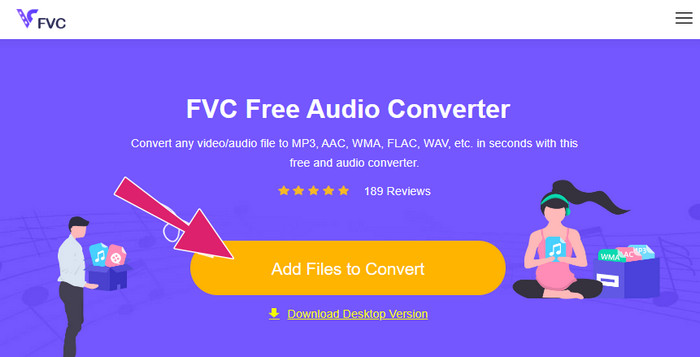
स्टेप 2. कुछ ही सेकंड के बाद टूल आपको वे M4A फाइलें अपलोड करने देगा जिन्हें आप कन्वर्ट करना चाहते हैं। अगर शुरुआती इम्पोर्ट में आप केवल एक ही फ़ाइल अपलोड कर पाए हों, तो और M4A फाइलें अपलोड करने के लिए मुख्य इंटरफ़ेस में मौजूद Add File टैब पर क्लिक करें।.
स्टेप 3. इम्पोर्ट होने के बाद, टूल आपको आउटपुट फ़ॉर्मेट के कई विकल्प देगा, जिन्हें आप इंटरफ़ेस के निचले हिस्से में देखेंगे। वहाँ से आप अपनी M4A फाइलों के लिए WAV या MP3 में से कोई एक चुन सकते हैं।.
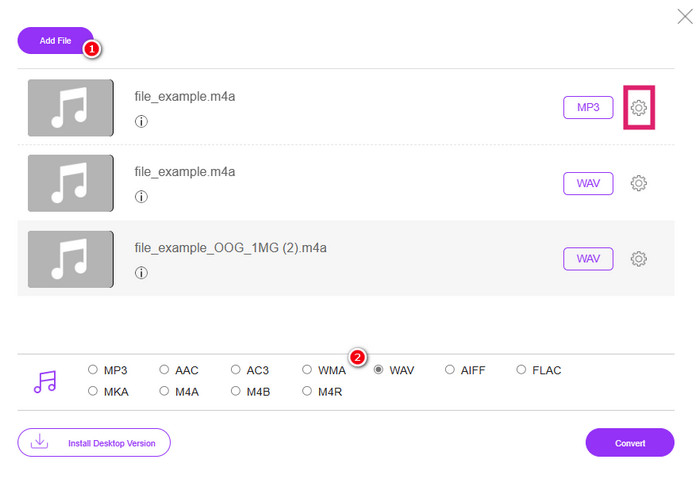
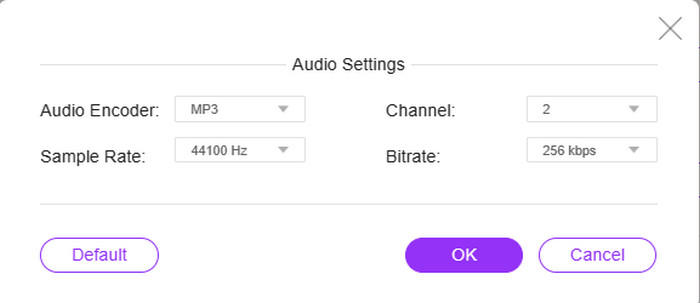
स्टेप 4. यह स्टेप सेटिंग्स का एक वैकल्पिक हिस्सा है। अगर आप हर फ़ाइल के Setting बटन पर क्लिक करेंगे, तो आपको फ़ाइल के ऑडियो एन्कोडर, सैंपल रेट, चैनल और बिटरेट तक पहुंचने और उन्हें समायोजित करने का मौका मिलेगा।.
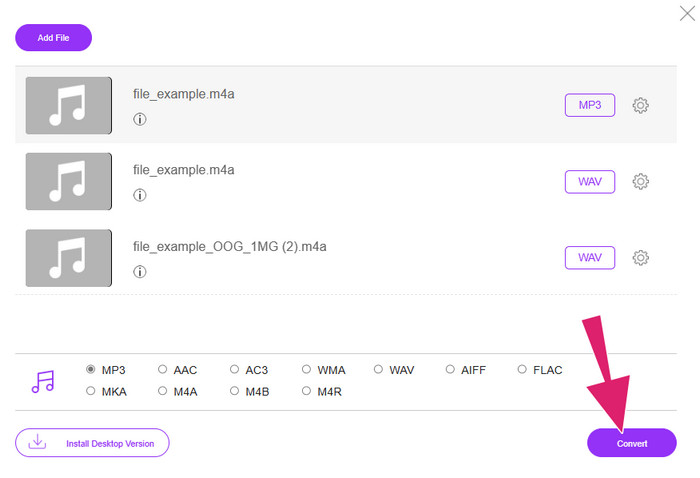
स्टेप 5. वरना, अगर आप सीधा और जल्दी से कन्वर्ज़न प्रक्रिया पर बढ़ना चाहते हैं, तो उसकी जगह Convert बटन पर क्लिक करें।.
भाग 4. M4A के बारे में अक्सर पूछे जाने वाले प्रश्न
M4A और MP3 एक दूसरे से किस प्रकार भिन्न हैं?
M4A बनाम MP3 में, आम तौर पर M4A फाइलें, समान बिटरेट होने पर भी, MP3 की तुलना में बेहतर ऑडियो क्वालिटी देती हैं। M4A कवर आर्ट और मेटाडेटा टैगिंग जैसी अन्य सुविधाओं को भी सपोर्ट करता है। हालांकि, MP3 फाइलें अलग‑अलग प्लेटफॉर्म और डिवाइस पर कहीं ज़्यादा व्यापक रूप से समर्थित हैं।.
क्या मैं M4A फ़ाइल को वीडियो प्रारूप में परिवर्तित कर सकता हूँ?
हाँ, M4A ऑडियो फाइलों को वीडियो फाइलों में बदलना संभव है, उदाहरण के लिए M4A से MP4। यह किसी स्टैटिक इमेज या वीडियो क्लिप के साथ उन्हें जोड़कर वीडियो एडिटिंग सॉफ्टवेयर की मदद से किया जाता है।.
M4A फ़ाइल के लिए सर्वोत्तम बिटरेट क्या होना चाहिए?
M4A फ़ाइलों के लिए सबसे अच्छी बिटरेट आपकी प्राथमिकताओं पर निर्भर करती है। आपको अपनी पसंद की ऑडियो गुणवत्ता और फ़ाइल आकार पर विचार करना चाहिए। उच्च बिटरेट आमतौर पर बेहतर ऑडियो गुणवत्ता लेकिन बड़ी फ़ाइल आकार का परिणाम देते हैं। इस बीच, M4A फ़ाइलों के लिए सामान्य या मानक गुणवत्ता बिटरेट 128 kbps से 256 kbps और उच्च गुणवत्ता वाले ऑडियो के लिए 320 kbps तक होती है।
निष्कर्ष
तो लीजिए! इस पोस्ट ने आपके M4A क्या है वाले सवाल का जवाब दे दिया है। आपने जाना कि M4A अपनी उच्च गुणवत्ता के कारण बेहतरीन सुनने का अनुभव देता है। हाँ, यह कई मीडिया प्लेयर्स पर चल सकता है, लेकिन यह भी याद रखने की ज़रूरत है कि कुछ प्लेयर्स इसे सपोर्ट नहीं करते। यही वजह है कि आपके पास इसे MP3 और WAV जैसे अन्य ऑडियो फ़ॉर्मेट्स में कन्वर्ट करने का विकल्प मौजूद है।.
-
 MP4 क्या है: विवरण, लाभ और अधिक
 MP4 को दूसरे फॉर्मेट में बदलने से पहले आपको इसके बारे में कुछ जानकारी होनी चाहिए। यह पोस्ट आपको MP4 और इसके विकल्पों के बारे में जानने लायक सभी जानकारी देती है।
-
 MP4 वीडियो प्रीमियर प्रो में क्यों नहीं दिख रहा है [फिक्स्ड]
 MP4 वीडियो प्रीमियर प्रो में नहीं दिख रहे हैं, ऐसा इसलिए हो सकता है क्योंकि फ़ाइलें दूषित या गलत जगह पर हैं। सभी संभावित कारणों और समाधानों की जाँच यहाँ करें!
-
 M4V बनाम MP4 के बीच क्या अंतर हैं?
 M4V और MP4 वीडियो प्रारूपों के बीच अंतर के बारे में उलझन में हैं? उन्हें यहाँ जानें, और आपको यह भी बताया जाएगा कि ये दोनों कैसे भिन्न हैं और उन्हें आसानी से कैसे परिवर्तित किया जाए।
