


 वीडियो कनवर्टर अंतिम
 स्क्रीन अभिलेखी
 वीडियो मरम्मत
 सुरक्षित डाउनलोड
MP4 क्या है: MP4 के बारे में आपको जो कुछ भी जानना चाहिए, जानिए
MP4 कंप्यूटरों, फ़ोनों और यहाँ तक कि इंटरनेट पर भी वीडियो संग्रहीत करने का एक बहुत आम तरीका है। यह एक सार्वभौमिक भाषा की तरह है जिसे लगभग सभी डिवाइस समझ सकते हैं, यही कारण है कि इसे सार्वभौमिक वीडियो फ़ॉर्मेट कहा जाता है। और MP4 क्या है इसे बेहतर समझने के लिए, यह लेख वह सब कुछ बताएगा जो आपको इसके बारे में जानने की ज़रूरत है। इस जानकारी में इसका परिचय, यह इतना लोकप्रिय क्यों है, यह कैसे काम करता है, अन्य वीडियो फ़ॉर्मेट्स की तुलना में यह कैसा है, और भी बहुत‑सी बातें शामिल हैं। इस पोस्ट के अंत तक, हम आपको भरोसा दिलाते हैं कि आप MP4 वीडियो चलाने, एडिट करने और कन्वर्ट करने में माहिर हो जाएँगे!

भाग 1. MP4 की सटीक समीक्षा
विवरण
MP4 या आप इसे MPEG-4 भाग 14 के रूप में लेबल कर सकते हैं, यह एक ऐसा प्रारूप है जो वीडियो, ऑडियो, उपशीर्षक और छवियों जैसे विभिन्न प्रकार के मीडिया को पकड़ सकता है। इसका उपयोग आमतौर पर डिजिटल सामग्री को संग्रहीत करने के लिए भी किया जाता है जिसे ऑनलाइन स्ट्रीम किया जा सकता है। इसके अलावा, यह H.264/AVC, HEVC, AAC, 3GP और MP3 जैसे विभिन्न कोडेक्स के साथ काम करता है। अब, H.264/AVC नामक MP4 के विशिष्ट प्रकार के साथ, यह MPEG-4 मानक का हिस्सा है और अपने प्रभावशाली प्रदर्शन के कारण लोकप्रियता प्राप्त कर रहा है। इसके अलावा, MPEG द्वारा मानकीकृत MP4, ऑनलाइन वीडियो और ऑडियो स्ट्रीमिंग के लिए बनाया गया था। यह तब से विकसित हुआ है और कम डेटा दरों पर भी उच्च गुणवत्ता वाले वीडियो पेश करने के लिए जाना जाता है।
MP4 कैसे काम करता है
तो, MP4 तकनीक कैसे काम करती है? यह कोडिंग मुद्दों को संबोधित करके गुणवत्ता का त्याग किए बिना वीडियो फ़ाइलों को कुशलतापूर्वक संपीड़ित करता है। यह अतिरेक को कम करता है और कोडेक्स के रूप में जानी जाने वाली संपीड़न और विसंपीड़न तकनीकों का उपयोग करता है। इसके अलावा, MP4 उपभोक्ताओं और व्यवसायों के लिए समान रूप से विभिन्न लाभ प्रदान करता है। इसके संबंध में, आप आसानी से मूवी क्लिप को ऑनलाइन एक्सेस और शेयर कर सकते हैं, उन्हें अपने डिवाइस पर सहेज सकते हैं और उन्हें ईमेल के माध्यम से शेयर कर सकते हैं। इसके अलावा, यदि आप एक व्यवसाय के मालिक हैं, तो आप अपनी वेबसाइटों पर प्रस्तुतियों के लिए MP4 का उपयोग कर सकते हैं। इस प्रारूप के साथ, आप संभावित ग्राहकों और विज्ञापन उद्देश्यों के लिए उत्पादों और सेवाओं का प्रदर्शन कर सकते हैं।
अनुकूलता
आइए इसकी अनुकूलता पर आगे बढ़ते हैं, साथ ही यह भी देखते हैं कि आप MP4 को अन्य फ़ॉर्मेट में क्यों बदलेंगे। जैसा कि मैंने कुछ समय पहले बताया था, MP4 एक सार्वभौमिक वीडियो फ़ॉर्मेट है। यह प्रसारण, रिकॉर्डिंग और स्ट्रीमिंग वीडियो जैसे डिजिटल सामान में हर जगह है। इसके लोकप्रिय होने का मुख्य कारण यह है कि यह एक ऐसा मानक है जिसका उपयोग हर कोई करता है, और यह 8K, HDR और 3D जैसी कई अलग-अलग वीडियो तकनीकों को संभाल सकता है। इसलिए, यह विभिन्न मीडिया प्लेयर और डिवाइस जैसे डेस्कटॉप, एंड्रॉइड फोन, टैबलेट, गेम कंसोल, स्मार्ट टीवी, डीवीडी प्लेयर और मैक, आईफ़ोन और आईपैड सहित ऐप्पल डिवाइस द्वारा लोकप्रिय रूप से समर्थित है।
MP4 लोकप्रिय क्यों है?
ऊपर दी गई जानकारी को देखकर, आपको पहले से ही अंदाजा हो गया होगा कि MP4 क्यों लोकप्रिय है। इसलिए, इस भाग में इस प्रारूप की लोकप्रियता के कारणों को सूचीबद्ध करने की अनुमति दें।
◆ MP4 फ़ाइलें सभी डिवाइसों और मीडिया प्लेयर्स के साथ संगत हैं।
◆ यह प्रारूप HLS और MPEG-DASH जैसे लोकप्रिय स्ट्रीमिंग प्रोटोकॉल के साथ काम करता है।
◆ यह आपके सभी स्टोरेज स्पेस को खाए बिना ऑनलाइन स्ट्रीमिंग और वीडियो डाउनलोड करने के लिए एकदम सही है क्योंकि यह फ़ाइलों की गुणवत्ता का त्याग किए बिना उन्हें छोटा करने के लिए संपीड़न का उपयोग करता है।
◆ MP4 एक ऑल-इन-वन पैकेज फ़ाइल है जो न केवल वीडियो बल्कि ऑडियो, उपशीर्षक और यहां तक कि छवियों को भी रख सकती है।
भाग 2. MP4 विकल्प
एमकेवी बनाम एमपी4
MP4 और MKV समान वीडियो कंटेनर हैं जिन्हें अलग‑अलग समूहों ने बनाया है। लेकिन देखें कि ये एक‑दूसरे से कैसे अलग हैं। MKV को मुफ्त में उपयोग किया जा सकता है और यह असीमित मीडिया ट्रैक्स की अनुमति देता है। इसे अक्सर Blu-ray और DVD से HD मूवीज़ स्टोर करने के लिए इस्तेमाल किया जाता है और सैद्धांतिक रूप से किसी के लिए भी मुक्त है। दूसरी ओर, MP4 पेटेंटेड है और इसमें कंटेंट प्रतिबंध होते हैं, और यह MKV की तुलना में ज़्यादा आम है। अधिक विस्तृत तुलना के लिए, MKV बनाम MP4 देखें।.
MOV बनाम MP4
MOV और MP4 दोनों ही वीडियो कंटेनर फ़ॉर्मेट हैं। अब, MKV क्विकटाइम के साथ मैक पर संपादन के लिए अच्छा है, और इसमें उच्च गुणवत्ता वाले वीडियो और ऑडियो हैं, लेकिन कम संपीड़न के कारण बड़ी फ़ाइलें हैं। MP4 एक मानक फ़ॉर्मेट है जिसमें संपीड़न के कारण छोटी फ़ाइलें होती हैं, और यह ऑनलाइन या कम स्टोरेज वाले डिवाइस पर साझा करने के लिए बेहतर है, हालाँकि गुणवत्ता थोड़ी कम हो सकती है।
वेबएम बनाम एमपी4
भले ही WebM भी MP4 की तरह एक आम वीडियो फ़ॉर्मेट है, फिर भी दोनों उपयोगकर्ताओं की अलग‑अलग ज़रूरतों को पूरा करते हैं। क्या आप इनके अंतर का बड़ा कारण जानना चाहते हैं? MP4 व्यापक अनुकूलता (कम्पैटिबिलिटी) और संभावित रूप से उच्च गुणवत्ता प्रदान करता है। यही कारण है कि ऑफ़लाइन वीडियो या सार्वभौमिक प्लेबैक के लिए यह अच्छा विकल्प है। वहीं, WebM ऑनलाइन क्षेत्र में चमकता है, क्योंकि इसकी कुशल वीडियो कंप्रेशन की बदौलत इसकी फ़ाइल साइज़ छोटी होती है। इसका नतीजा तेज़ लोडिंग टाइम और स्मूद स्ट्रीमिंग के रूप में मिलता है, जो वेब वीडियो और ऑनलाइन शेयर की जाने वाली क्लिप के लिए आदर्श है।.
भाग 3. बिना गुणवत्ता हानि के MP4 को अन्य वीडियो फ़ाइल स्वरूपों में कैसे परिवर्तित करें
अब आगे MP4 को बताए गए वीडियो फ़ॉर्मेट्स या अन्य फ़ॉर्मेट्स में बदलने की प्रक्रिया आती है। तो, यदि आप ऐसा बेहतरीन कन्वर्ज़न प्रोसेस सीखना चाहते हैं जो वीडियो की गुणवत्ता पर असर न डाले, तो FVC Free Video Converter Online से मिलिए। यह एक समर्पित वीडियो और ऑडियो कन्वर्टर है जो लगभग सभी ऑडियो और मुख्यधारा के वीडियो फ़ाइलों जैसे MOV, MKV, FLV, WebM, VOB, M4V, WMV, आदि को सपोर्ट करता है। उल्लेखनीय बात यह है कि यह ऑनलाइन फ्री वीडियो कन्वर्टर आपको अपने MP4 और अन्य मीडिया फ़ाइलों को कुछ ही सेकंड में कन्वर्ट करने देता है, वह भी लॉसलेस क्वालिटी बनाए रखते हुए। यही बात इसके बैच कन्वर्ज़न प्रोसेस पर भी लागू होती है। इस तरह, आप एक ही बार में अपने MP4 को MOV, WebM और MKV में बदल सकते हैं!
इसके अलावा, यह FVC मुफ़्त वीडियो कनवर्टर ऑनलाइन आपको बिना वॉटरमार्क आउटपुट प्रदान करता है जबकि आपके डेटा और फ़ाइलों को सुरक्षित और स्थिर रखता है। इस प्रकार, यदि आपकी MP4 फ़ाइलें और इंटरनेट रूपांतरण के लिए तैयार हैं, तो नीचे दी गई त्वरित और सरल रूपांतरण प्रक्रिया का पालन करें।
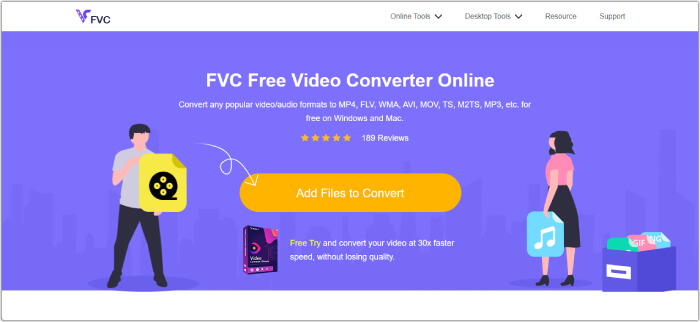
चरण 1. टूल की आधिकारिक वेबसाइट पर Add Files to Convert बटन पर क्लिक करके अपनी MP4 फ़ाइलें अपलोड करें।.
चरण 2. जब MP4 वीडियो वर्कस्पेस पर दिखाई दें, तो आप उन्हें अपनी पसंद के आउटपुट फ़ॉर्मेट में सेट करना शुरू कर सकते हैं। नीचे वाले हिस्से में उपलब्ध फ़ॉर्मेट सेक्शन से कोई फ़ॉर्मेट चुनें।.
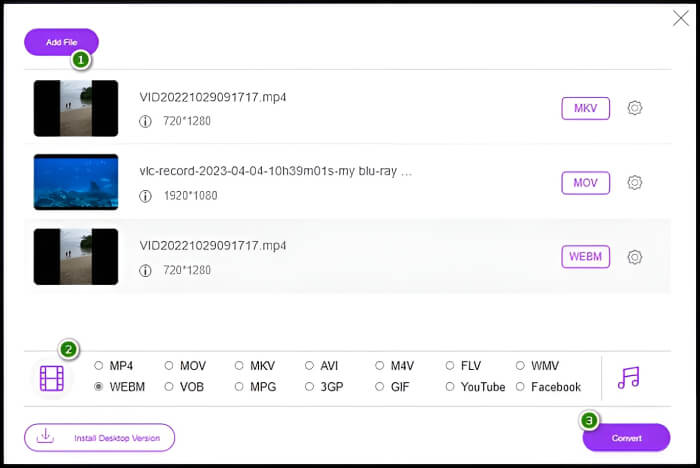
चरण 3. इसके बाद, तेज़ कन्वर्ज़न प्रक्रिया शुरू करने के लिए Convert बटन पर क्लिक करें।.
भाग 4. MP4 के बारे में अक्सर पूछे जाने वाले प्रश्न
क्या MP4 संपादन के लिए ठीक है?
हां। हालांकि, कुछ संपादन सॉफ़्टवेयर अन्य प्रारूपों को प्राथमिकता दे सकते हैं जो उच्च गुणवत्ता या अधिक संपादन लचीलापन प्रदान करते हैं।
मैं MP4 को ऑफ़लाइन कैसे परिवर्तित कर सकता हूँ?
ऑफ़लाइन भी कई शक्तिशाली वीडियो कन्वर्टर्स उपलब्ध हैं। लेकिन आउटपुट की लॉसलेस क्वालिटी सुनिश्चित करने के लिए, बेहतर होगा कि आप FVC Video Converter Ultimate का उपयोग करें।.
क्या MP4 एक स्वामित्व प्रारूप है?
नहीं, MP4 एक खुला मानक प्रारूप है। इसका मतलब यह है कि यह मालिकाना हक वाला नहीं है और इसे बिना किसी प्रतिबंध के कोई भी इस्तेमाल कर सकता है।
निष्कर्ष
अब आपके पास पर्याप्त जानकारी है और आप MP4 क्या है इस सवाल का जवाब दे सकते हैं। वाकई, MP4 एक बहुउद्देश्यीय (वर्सेटाइल) फ़ॉर्मेट है जो एक साथ न केवल वीडियो बल्कि ऑडियो, इमेज और सबटाइटल्स भी रख सकता है। आप अपने MP4 को ऑनलाइन भी स्ट्रीम कर सकते हैं, क्योंकि इसे एक्सेस करना बेहद सुविधाजनक है!
-
 WebM से MP4 | नि: शुल्क वेबएम को MP4 (ऑनलाइन और डेस्कटॉप) में बदलें
 वेब ब्राउज़र के बिना WebM फ़ाइलें कैसे देखें? आपको WebM को MP4 में कनवर्ट करना होगा। यहां ऑनलाइन और Mac/Windows पर शीर्ष 10 निःशुल्क WebM से MP4 कनवर्टर दिए गए हैं।
-
 AVI VS MP4 - AVI और MP4 प्रारूप के बीच अंतर और समानताएं
 एक बेहतर वीडियो प्रारूप, AVI या MP4 कौन सा है? यदि आप विस्तृत तुलना प्राप्त करना चाहते हैं, तो आप इस AVI VS MP4 लेख की जांच कर सकते हैं। आप AVI और MP4 के बीच अंतर और समानता को कई पहलुओं में जान सकते हैं।
-
 MP4 वॉल्यूम ऑनलाइन और ऑफलाइन बढ़ाने के सर्वोत्तम तरीके
 क्या आपको अपने वीडियो क्लिप की आवाज़ सुनने में परेशानी होती है? अलग-अलग तरीकों से mp4 वॉल्यूम कैसे बढ़ाएं, यह जानने के लिए नीचे दिया गया लेख पढ़ें।
