


 वीडियो कनवर्टर अंतिम
 स्क्रीन अभिलेखी
 वीडियो मरम्मत
AVI को 3GP फ़ाइल में आसानी से कैसे बदलें
तीसरी पीढ़ी के मोबाइल डिवाइस AVI फाइलें नहीं चला सकते क्योंकि 3G मोबाइल डिवाइस इस फॉर्मैट को सपोर्ट नहीं करते। यदि आप अपनी AVI फाइल को 3G मोबाइल डिवाइस पर चलाना चाहते हैं, तो एक तरीका यह है कि आप अपनी AVI फाइल को 3GP फाइल में कनवर्ट करें। सौभाग्य से, हमने आपके लिए AVI को 3GP में आसानी से कनवर्ट करने के बेहतरीन तरीके ढूँढ़ लिए हैं, जिनमें शीर्ष कनवर्टर शामिल हैं।.

भाग 1. 2 डेस्कटॉप पर अपनी AVI फ़ाइल को 3GP में बदलने के लिए सर्वोत्तम विकल्प
यदि आप एक ऐसे कनवर्टर की तलाश में हैं जिसे आप अपने डेस्कटॉप पर ऑफ़लाइन उपयोग कर सकें, तो ये विकल्प आपकी समस्या का समाधान हो सकते हैं। लेख का यह भाग AVI को 3GP फ़ाइल स्वरूप में बदलने के लिए शीर्ष 2 विकल्पों को सूचीबद्ध करता है।
विकल्प 1. FVC वीडियो कन्वर्टर अल्टीमेट [ऑफ़लाइन टूल] का उपयोग करें
बिना किसी संदेह के, FVC Video Converter Ultimate बाज़ार में उपलब्ध सबसे अच्छे ऑफ़लाइन कनवर्टरों में से एक है। यह कनवर्टर AVI, 3GP, MOV, MP4, WMV, WebM और अन्य सहित 1000+ से अधिक फाइल फॉर्मैट को सपोर्ट करता है। इसमें कई बेहतरीन फीचर भी हैं, जिन्हें आप आज़मा सकते हैं, जैसे वीडियो में इफ़ेक्ट्स जोड़ना, फाइल को कॉम्प्रेस करना और यहाँ तक कि कई वीडियो फाइलों को एक में मर्ज करना। इसके अतिरिक्त, यह टूल इस्तेमाल करने में बहुत आसान है क्योंकि इसका इंटरफ़ेस यूज़र‑फ्रेंडली है। नीचे दिए गए चरणों का पालन करके FVC Video Converter Ultimate का उपयोग कर AVI को 3GP में कनवर्ट करें।.
चरण 1. नीचे दिए गए Download बटन पर क्लिक करके अपने डेस्कटॉप पर FVC Video Converter Ultimate डाउनलोड करें। इंस्टॉलेशन प्रक्रिया का पालन करें और फिर ऐप खोलें।.
फ्री डाउनलोडWindows 7 या बाद के संस्करण के लिएसुरक्षित डाउनलोड
फ्री डाउनलोडMacOS 10.7 या बाद के संस्करण के लिएसुरक्षित डाउनलोड
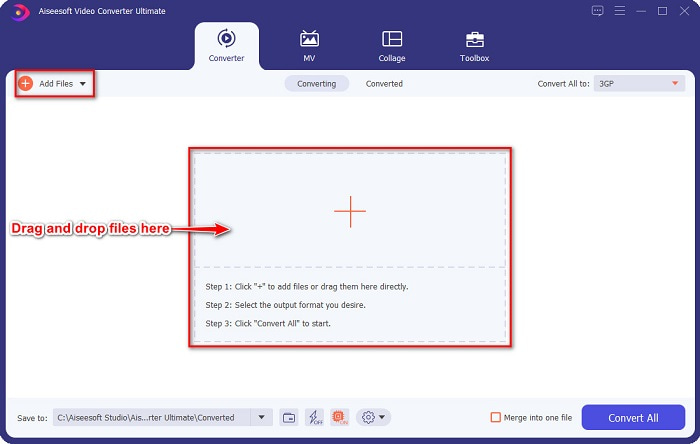
चरण 2. कनवर्टर के मुख्य इंटरफ़ेस पर Add Files बटन पर क्लिक करें, या आप अपनी AVI फाइल को अपलोड करने के लिए उसे + साइन बटन पर ड्रैग और ड्रॉप भी कर सकते हैं।.
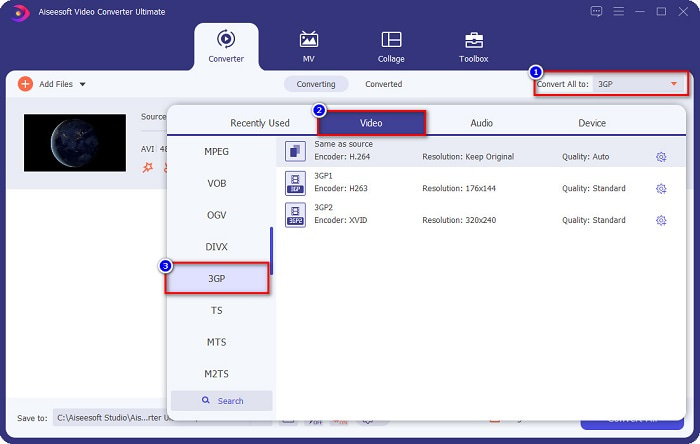
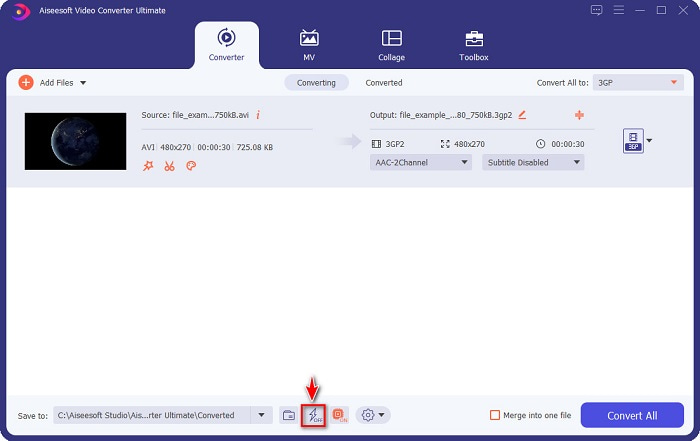
चरण 3. इसके बाद आउटपुट फॉर्मैट चुनने के लिए Convert All to बटन पर क्लिक करें। 3GP फाइल फॉर्मैट चुनें। सॉफ़्टवेयर इंटरफ़ेस के नीचे मौजूद lightning bolt sign पर टिक करके अल्ट्राफास्ट कन्वर्ज़न सक्षम करें।.
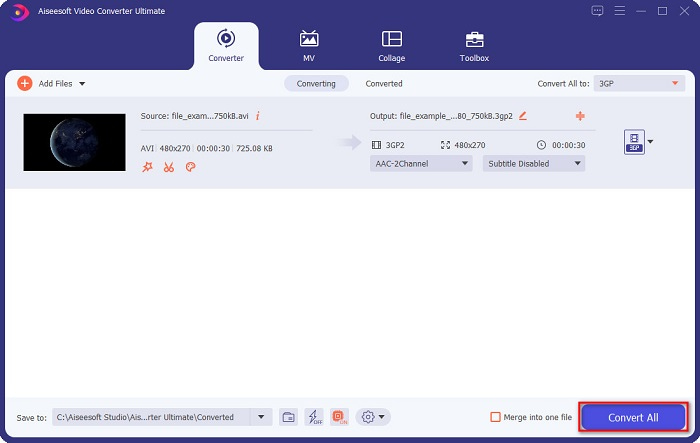
चरण 4. अपनी फाइल का आउटपुट फॉर्मैट चुनने के बाद, अपनी AVI फाइल को 3GP फाइल में कनवर्ट करने के लिए Convert All बटन पर क्लिक करें।.
Prism Video Converter Software एक फ्रीवेयर कनवर्टर है जो कई फाइल फॉर्मैट को सपोर्ट करता है। इसके अलावा, यह कनवर्टर इस्तेमाल करने में आसान है। हालांकि, यह अन्य कनवर्टरों की तरह बहुत अधिक फॉर्मैट को सपोर्ट नहीं करता। फिर भी, दक्षता के कारण बहुत से लोग इस कनवर्टर का उपयोग करते हैं।.
फिर बस कुछ सेकंड प्रतीक्षा करें। और वोइला! आप आसानी से AVI को 3GP फ़ाइल में आसानी से परिवर्तित कर सकते हैं।
पेशेवरों
- यह आपको अपनी फ़ाइलों को संपादित करने, बढ़ाने और संपीड़ित करने की अनुमति देता है।
- यह कई फ़ाइल-प्रारूपों को एक में मर्ज करने के लिए बैच रूपांतरण प्रदान करता है।
- फाइलों को बिजली की तरह तेजी से परिवर्तित कर सकता है।
- विंडोज और मैक सहित सभी प्लेटफॉर्म पर उपलब्ध है।
विपक्ष
- इसकी विशेषताओं का विशेष रूप से उपयोग करने के लिए, आपको ऐप खरीदना होगा।
विकल्प 2. प्रिज्म वीडियो कन्वर्टर [फ्रीवेयर टूल]
चरण 1. Prism Video Converter डाउनलोड करें और फिर ऐप खोलें।.
कनवर्टर के रूप में वीएलसी मीडिया प्लेयर का उपयोग करने के चरण यहां दिए गए हैं:
चरण 2. AVI फाइल अपलोड करने के लिए Add Files पर क्लिक करें। Output Format पर ड्रॉप‑डाउन बटन पर क्लिक करें और 3GP फॉर्मैट चुनें।.
चरण 3. अंत में, कन्वर्ज़न प्रक्रिया शुरू करने के लिए Convert पर क्लिक करें।.
ऑनलाइन कनवर्टर का उपयोग ऑफ़लाइन या फ्रीवेयर टूल से अधिक सुविधाजनक है क्योंकि आपको कुछ डाउनलोड करने की ज़रूरत नहीं पड़ती। और यदि आप वेब पर उपलब्ध सबसे अच्छे ऑनलाइन कनवर्टर की तलाश में हैं, तो FVC Free Online Video Converter आपके लिए सही विकल्प है। यह ऑनलाइन कनवर्टर AVI, 3GP, MP4, MOV, FLV, WMV, MKV आदि जैसे कई फाइल फॉर्मैट को कनवर्ट कर सकता है। और यदि आप अपने वीडियो की फ्रेम रेट बदलना चाहते हैं, तो यह कनवर्टर यह सुविधा भी प्रदान करता है। साथ ही, यह इंटरनेट पर उपलब्ध अन्य किसी भी ऑनलाइन टूल की तुलना में तेज़ी से कनवर्ट कर सकता है। इसलिए, इस ऑनलाइन कनवर्टर का उपयोग करने के लिए नीचे दिए गए चरणों का पालन करें।.
भाग 2. सर्वश्रेष्ठ ऑनलाइन कनवर्टर का उपयोग करके AVI को 3GP में बदलें
चरण 1. अपने ब्राउज़र पर FVC Free Online Video Converter टाइप करें, या इस लिंक पर क्लिक करके सीधे उनकी वेबपेज पर जाएँ।.
चरण 2. Add Files to Convert बटन पर क्लिक करें। आपके कंप्यूटर की फाइलें दिखाई देंगी, फिर वह AVI फाइल चुनें जिसे आप कनवर्ट करना चाहते हैं।.
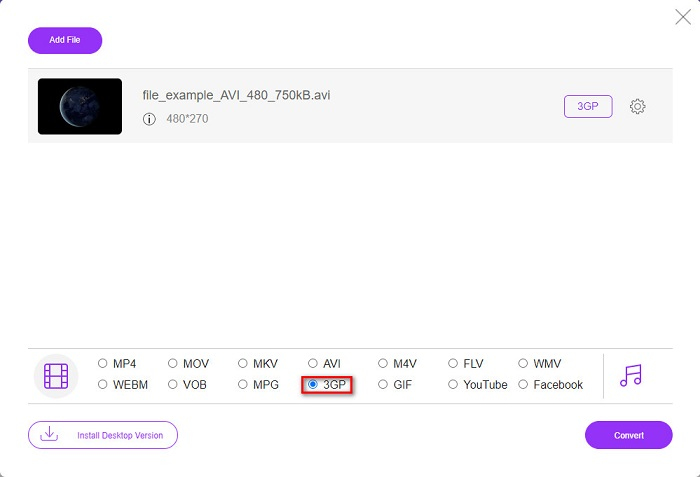
चरण 3. इसके बाद, सॉफ़्टवेयर के दूसरे इंटरफ़ेस पर 3GP फाइल फॉर्मैट के सामने वाले सर्कल को टिक करें।.
फ़ाइलों को बैच में कनवर्ट करने के लिए डेस्कटॉप संस्करण डाउनलोड करें।.
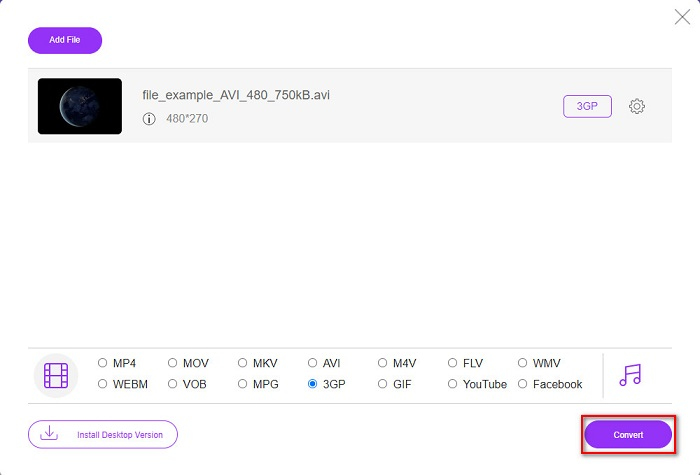
चरण 4. और अंत में, अपनी AVI फाइल को 3GP फाइल में कनवर्ट करने के लिए Convert बटन पर क्लिक करें।.
दुर्भाग्य से नहीं। Mac का नेटिव मीडिया प्लेयर QuickTime, AVI को सपोर्ट नहीं करता। हालांकि, आप अपनी AVI फाइल को उस फाइल फॉर्मैट में कनवर्ट कर सकते हैं जिसे Mac सपोर्ट करता है, जैसे MOV। AVI को आसानी से MOV में कनवर्ट कैसे करें जानने के लिए इस लिंक पर क्लिक करें।.
भाग 3. एवीआई और 3पीजी के बारे में विस्तृत ज्ञान
इन दो प्रारूपों के बारे में अधिक जानकारी के लिए नीचे दी गई जानकारी पढ़ें:
AVI या ऑडियो वीडियो इंटरलीव Microsoft द्वारा बनाया गया एक व्यापक फ़ाइल स्वरूप है। इस प्रकार की फ़ाइल में DivX और XviD जैसे विभिन्न वीडियो संपीड़न होते हैं। इसके अलावा, लगभग सभी मीडिया प्लेटफ़ॉर्म AVI फ़ाइलें चला सकते हैं, और Windows व्यापक रूप से इसका समर्थन करता है। इसे फिल्मों और मीडिया अभिलेखागार के भंडारण के लिए मानक के रूप में भी जाना जाता है।
दूसरी ओर, एक 3GP फ़ाइल स्वरूप जो तीसरी पीढ़ी के मोबाइल उपकरणों का समर्थन करता है। इसे थर्ड जनरेशन पार्टनरशिप प्रोजेक्ट (3GPP) द्वारा विकसित किया गया है। इसके अलावा, इस प्रकार की फ़ाइल का फ़ाइल आकार केवल छोटा होता है क्योंकि इसे 3G मोबाइल उपकरणों को साझा करने के लिए बनाया जाता है। इसके शीर्ष पर, दोनों फ़ाइल प्रारूप बहुत अच्छे हैं, हालांकि उनके अंतर हैं।
| AVI | बनाम | 3GP |
| असम्पीडित | संपीडित/असंपीड़ित | दबा हुआ |
| लगभग सभी उपकरणों पर उपलब्ध | अनुकूलता | तीसरी पीढ़ी के मोबाइल उपकरणों पर उपलब्ध |
| उच्च परिभाषा संकल्प | संकल्प समर्थित | कम दृश्यता |
| बजाने | 4जी मोबाइल उपकरणों पर खेलने योग्य | खेलने योग्य नहीं |
| यदि आप एक अधिक सामान्य प्रारूप चाहते हैं, जो लगभग सभी उपकरणों द्वारा समर्थित है, तो इस फ़ाइल प्रारूप का उपयोग करें | इस फ़ाइल प्रारूप का उपयोग करने के लाभ | यदि आप तीसरी पीढ़ी के मोबाइल डिवाइस का उपयोग करते हैं, और कम फ़ाइल आकार चाहते हैं, तो इस फ़ाइल प्रारूप का उपयोग करें |
AVI बनाम 3GP
रिसोर्स इंटरचेंज फाइल फॉर्मेट (आरआईएफएफ) के आधार पर, एवीआई प्रारूप को माइक्रोसॉफ्ट द्वारा 1992 में पेश किया गया था। यह उच्च गुणवत्ता वाले वीडियो / ऑडियो को सहेज सकता है क्योंकि यह कम संपीड़न का उपयोग करता है। लेकिन यह AVI फ़ाइल के बड़े फ़ाइल आकार का भी कारण बनता है, जो सीमित स्थान होने पर एक समस्या हो सकती है।
3rd जनरेशन पार्टनरशिप प्रोजेक्ट (3GPP) ने मल्टीमीडिया कंटेनर फॉर्मेट के रूप में 3GP/3GPP फॉर्मेट तैयार किया। यह वास्तव में ISO मीडिया फ़ाइल स्वरूप पर आधारित है। हम अक्सर इसका उपयोग 3जी मोबाइल फोन और ऑनलाइन के बीच प्रसारित होने वाले वीडियो/ऑडियो स्ट्रीम को बचाने के लिए करते हैं।
भाग 4. AVI को 3GP में बदलने के बारे में अक्सर पूछे जाने वाले प्रश्न
क्या आप Mac पर AVI फ़ाइलें चला सकते हैं?
हाँ। आप FVC Video Converter Ultimate का उपयोग करके AVI को 3GP फाइल में बिना क्वालिटी खोए कनवर्ट कर सकते हैं। यह अल्टीमेट कनवर्टर AVI को 3GP में लॉसलेसली कनवर्ट कर सकता है।.
क्या मैं AVI को दोषरहित रूप से 3PG में बदल सकता हूँ?
दुर्भाग्य से नहीं। नाम से ही स्पष्ट है कि 3G मोबाइल डिवाइस वे डिवाइस हैं जो 3GP फाइलें चला सकते हैं। लेकिन यदि आप 4G मोबाइल डिवाइस पर 3GP फाइल चलाना चाहते हैं, तो आप अपनी 3GP फाइल को MOV में कनवर्ट करना चाहेंगे। 3GP फाइलों को MOV में कनवर्ट कैसे करें, यह जानने के लिए इस लिंक पर क्लिक करके लेख पढ़ें।.
क्या आप 4G मोबाइल उपकरणों पर 3GP फ़ाइलें चला सकते हैं?
रेटिंग: 4.4 / 5 (188 वोटों के आधार पर).
निष्कर्ष
यदि आप AVI को 3GP फ़ाइलों में बदलने के लिए समाधान ढूंढ रहे हैं, तो हमने आपकी पीठ को कवर कर लिया है। एक उच्च मानक वाले कनवर्टर की तलाश करना कठिन है। लेकिन अगर आप एक बेहतरीन कन्वर्टर की तलाश में हैं, तो FVC वीडियो कन्वर्टर अल्टीमेट आपके लिए सबसे उपयुक्त टूल है। यह कनवर्टर आपको केवल आपके लिए सबसे अनूठी और उपयोगी सुविधाएँ प्रदान करता है! इसलिए, यदि आप अंततः इस उत्कृष्ट कनवर्टर का उपयोग करना चाहते हैं, तो इसे अभी निःशुल्क डाउनलोड करें।
-
 3GP को AVI प्रारूप में बदलने के शीर्ष 4 सबसे प्रभावी तरीके [2021]
 क्या मैं अपनी 3GP फ़ाइलों को AVI में बदल सकता हूँ? ठीक है, आप इसे आसानी से परिवर्तित कर सकते हैं यदि आप उपलब्ध इन उपकरणों को आजमाते हैं क्योंकि हमने आपके 3GP से AVI रूपांतरण समस्या के सभी संभावित समाधान एकत्र किए हैं।
-
 3GP को FLV में बदलने में उपयोग करने के लिए सर्वश्रेष्ठ 3GP से FLV कनवर्टर [2022]
 क्या आपने कभी 3GP को FLV में बदलने का प्रयास किया है, लेकिन आप नहीं जानते कि आप किस प्रकार के कनवर्टर का उपयोग करेंगे? 3GP को FLV में बदलने के बारे में सभी विवरण जानने के लिए इस लेख को पढ़ें।
-
 असमर्थित 3GP को DivX में बदलने के 2 सर्वोत्तम संभावित तरीके [2022]
 बहुत सारे उपयोगकर्ता पूछते हैं कि 3GP को DivX में कैसे बदलें। तो अब, हम आपकी .3gp फ़ाइल को परेशानी मुक्त कनवर्ट करने में आपकी सहायता के लिए उसके लिए एक लेख प्रदान करते हैं।

