


 वीडियो कनवर्टर अंतिम
 स्क्रीन अभिलेखी
 वीडियो मरम्मत
नि: शुल्क कन्वर्टर्स का उपयोग करके AVI को WMV में कैसे बदलें [त्वरित कदम]
AVI या Audio Video Interleave फ़ाइलें, जिन्हें सबसे पहले Microsoft Corporation ने विकसित किया था, एक हाई-एंड वीडियो फ़ॉर्मैट हैं। इस फ़ाइल फ़ॉर्मैट की रेज़ोल्यूशन क्वालिटी बहुत अच्छी होती है, लेकिन इसकी फ़ाइल साइज़ बहुत बड़ी होती है। अपने वीडियो को चलाने या किसी भी प्लेटफ़ॉर्म पर फ़ाइल का इस्तेमाल करने का एक आम तरीका यह है कि आप अपनी AVI फ़ाइल को WMV फ़ाइल में बदलें। इसलिए, अगर आप यह जानना चाहते हैं कि AVI को WMV में कैसे कनवर्ट करें, तो आगे पढ़ते रहें; हम अलग-अलग कन्वर्टर्स के बारे में, चरणों सहित, विस्तार से बताएंगे।.

भाग 1. विंडोज 10/11 पर अपने एवीआई को डब्लूएमवी में कनवर्ट करें
Windows 10 ऑपरेटिंग सिस्टम विभिन्न प्रकार की फ़ाइलों को सपोर्ट करता है जिन्हें आप ऑनलाइन पा सकते हैं। AVI और WMV जैसी फ़ाइलें, दोनों ही Windows 10 द्वारा सपोर्ट की जाती हैं। इसलिए, अपनी AVI फ़ाइल को WMV फ़ाइल में बदलना आसान होगा, खासकर अगर आप इस बिजली-सी तेज़ कन्वर्टर, FVC Video Converter Ultimate का इस्तेमाल करते हैं। यह कन्वर्टर आज के भरोसेमंद और लोकप्रिय कन्वर्टर्स में से एक है। इसके अलावा, यह कन्वर्टर आपको अपनी फ़ाइल को एडिट करने, बेहतर बनाने और कंप्रेस करने की सुविधा देता है। यह उपयोग में भी आसान है और Windows 10 पर AVI फ़ाइलों को जल्दी से WMV में बदल सकता है।.

FVC वीडियो कन्वर्टर अंतिम
5,689,200+ डाउनलोड- आपको AVI सहित विभिन्न फ़ाइल स्वरूपों को WMV, MP4, MOV, VOB, आदि में बदलने की अनुमति देता है।
- इसमें ऐसी विशेषताएं हैं जो आपको कई फाइलों को एक में मर्ज करने की अनुमति देती हैं।
- आप अपनी फाइल को एडिट, एन्हांस और कंप्रेस कर सकते हैं।
फ्री डाउनलोडWindows 7 या बाद के संस्करण के लिएसुरक्षित डाउनलोड
फ्री डाउनलोडMacOS 10.7 या बाद के संस्करण के लिएसुरक्षित डाउनलोड
अपनी AVI फ़ाइल को WMV फ़ाइल स्वरूप में बदलने के चरण इस प्रकार हैं:
चरण 1. Windows 10 पर FVC Video Converter Ultimate इंस्टॉल करने के लिए नीचे दिए गए डाउनलोड बटन पर क्लिक करें। फिर इंस्टॉलेशन प्रक्रिया को फ़ॉलो करें और ऐप को रन करें।.
फ्री डाउनलोडWindows 7 या बाद के संस्करण के लिएसुरक्षित डाउनलोड
फ्री डाउनलोडMacOS 10.7 या बाद के संस्करण के लिएसुरक्षित डाउनलोड
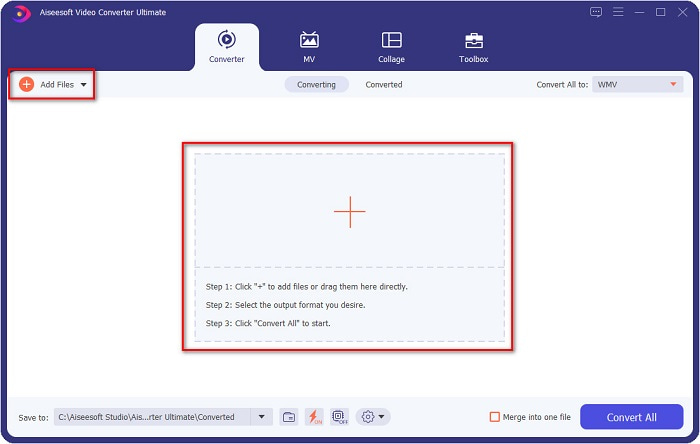
चरण 2. एप्लिकेशन खोलने के बाद, अपनी स्क्रीन के ऊपर बाएँ स्थित Add files बटन पर क्लिक करें, या + बटन पर, ताकि आप अपनी AVI फ़ाइलें सॉफ़्टवेयर के मुख्य इंटरफ़ेस में जोड़ सकें। आपके कंप्यूटर की फ़ाइलें दिखाई देंगी, फिर वह AVI फ़ाइल चुनें जिसे आप WMV में कन्वर्ट करना चाहते हैं। अपनी फ़ाइल अपलोड करने के लिए Open बटन पर क्लिक करें।.
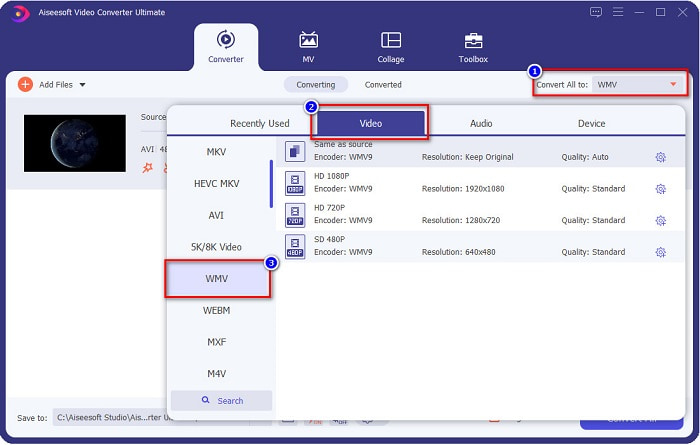
चरण 3. फ़ाइल फ़ॉर्मैट बदलने के लिए, सॉफ़्टवेयर इंटरफ़ेस के ऊपर दाएँ कोने में स्थित Convert All to बटन पर क्लिक करें। फ़ाइल फ़ॉर्मैट्स की एक सूची दिखाई देगी, फिर Video कैटेगरी से WMV चुनें।.
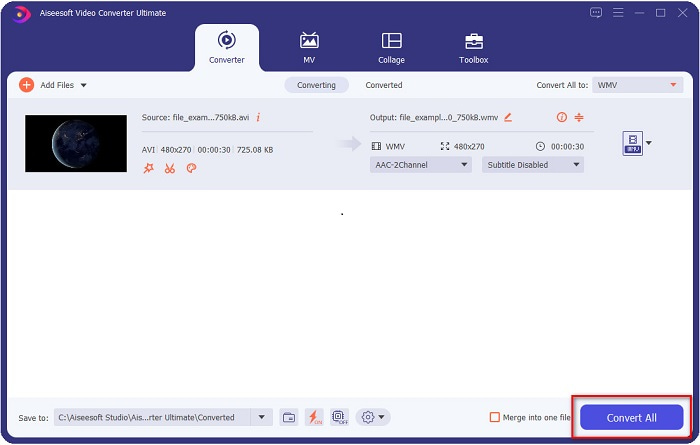
चरण 4. WMV फ़ाइल फ़ॉर्मैट चुनने के बाद, अपनी AVI फ़ाइल को WMV में बदलने के लिए Convert All बटन पर क्लिक करें। कुछ सेकंड इंतज़ार करें, और बस! इतने सरल तरीक़े से आप आसानी से अपनी AVI फ़ाइल को WMV में कन्वर्ट कर सकते हैं।.
भाग 2. AVI को WMV में मुफ्त में कैसे बदलें
AVI फ़ाइलों को WMV में कन्वर्ट करते समय आप मुफ़्त में डाउनलोड किए जा सकने वाले कन्वर्टर टूल्स का भी उपयोग कर सकते हैं। एक प्रसिद्ध कन्वर्टर है Freemake Video Converter। यह ऑफ़लाइन कन्वर्टर आपको AVI से WMV, MP3, MP4, DVD और कई अन्य सहित 500+ से अधिक फ़ॉर्मैट्स में कन्वर्ट करने देता है। हालांकि, इसका ग्राफ़िकल यूज़र इंटरफ़ेस (GUI) बहुत अच्छा नहीं है, और इसका इंटरफ़ेस उपयोग में भी उतना आसान नहीं है। फिर भी, फ़ाइलें कन्वर्ट करने के लिए कई उपयोगकर्ता अब भी इसका उपयोग करते हैं।.
फ्रीमेक वीडियो कन्वर्टर का उपयोग करके अपनी AVI फ़ाइल को WMV फ़ाइल में कैसे बदलें, इस पर त्वरित मार्गदर्शिका:
चरण 1. अपने ब्राउज़र में Freemake Video Converter सर्च करके ऐप डाउनलोड करें। डाउनलोड होने के बाद, एप्लिकेशन खोलें।.
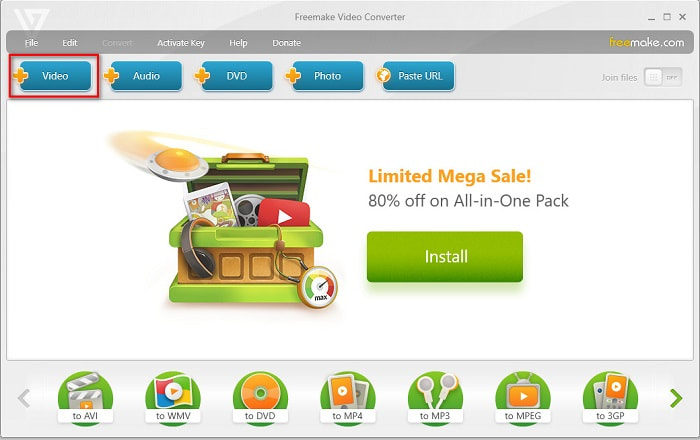
चरण 2. एप्लिकेशन खोलने के बाद, Video बटन पर क्लिक करें; आपके कंप्यूटर की फ़ाइलें दिखाई देने पर अपनी AVI फ़ाइल चुनें। AVI फ़ाइल को कतार (queue) में जोड़ने के लिए Open दबाएँ।.
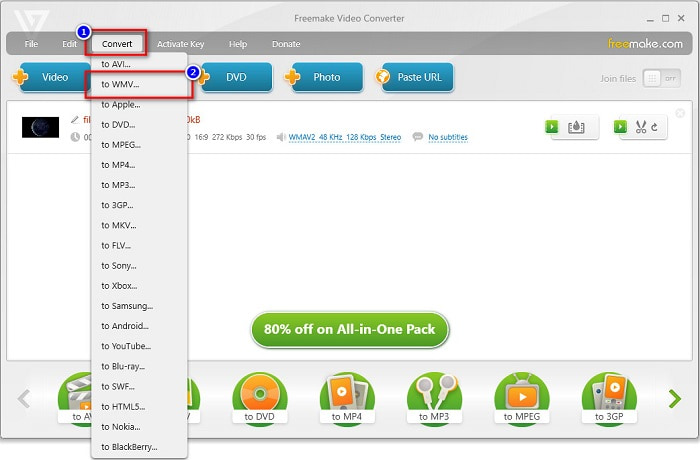
चरण 3. AVI फ़ाइल चुनने के बाद, सॉफ़्टवेयर के इंटरफ़ेस के ऊपरी भाग में स्थित Convert विकल्प पर क्लिक करें। फ़ाइल फ़ॉर्मैट्स की एक सूची दिखाई देगी, फिर WMV चुनें।.
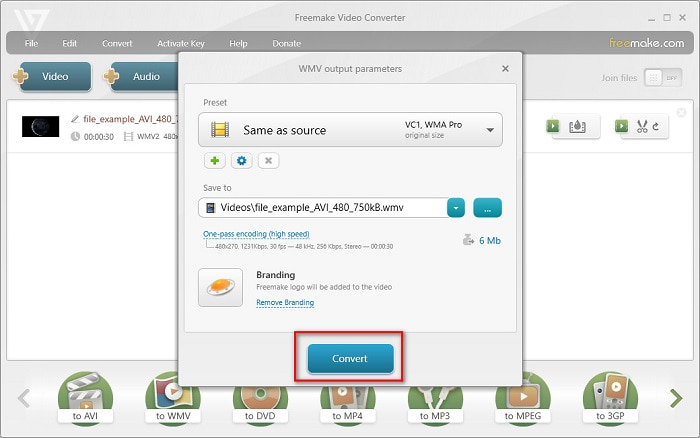
चरण 4. अब एक नया इंटरफ़ेस दिखाई देगा जहाँ आप अपनी फ़ाइल को कन्वर्ट करेंगे। अपनी AVI फ़ाइल को WMV में कन्वर्ट करना शुरू करने के लिए Convert बटन पर क्लिक करें।.
भाग 3. AVI फ़ाइलों को WMV फ़ाइलों में ऑनलाइन परिवर्तित करना
यह बात इनकार नहीं की जा सकती कि ऑनलाइन फ़ाइलें कन्वर्ट करना ज़्यादा सुविधाजनक है। इसलिए, हमने कुछ ऑनलाइन कन्वर्टर्स से AVI को WMV ऑनलाइन कन्वर्ट करके देखा, और सिफ़ारिश करने के लिए FVC Free Video Converter Online को सबसे बेहतर चुना। यह कन्वर्टर आपको बिना किसी लिमिटेशन के बड़ी फ़ाइलें कन्वर्ट करने देता है। हालांकि, आपको कन्वर्ज़न थोड़ा धीमा लग सकता है, क्योंकि यह कन्वर्टर इंटरनेट पर निर्भर है। यानी कन्वर्ज़न की गति आपके इंटरनेट कनेक्शन पर निर्भर करती है। फिर भी, FVC Free Video Converter Online का बहुत से लोगों ने इस्तेमाल किया है और इसे बेहतरीन ऑनलाइन कन्वर्टर्स में से एक के रूप में साबित किया है।.
FVC Free Video Converter का उपयोग करके अपनी AVI फ़ाइल को WMV में कन्वर्ट करने के चरण
चरण 1. अपने ब्राउज़र में FVC Free Video Converter Online सर्च करें।.
चरण 2. जब आप वेबपेज पर पहुँच जाएँ, तो Add Files to Convert बटन पर क्लिक करें। फिर Add Files to Convert बटन पर क्लिक करने पर जो लॉन्चर दिखाई देगा, उसे डाउनलोड करें। उसके बाद, अपनी AVI फ़ाइल चुनें।.
फ़ाइलों को बैच में कनवर्ट करने के लिए डेस्कटॉप संस्करण डाउनलोड करें।.
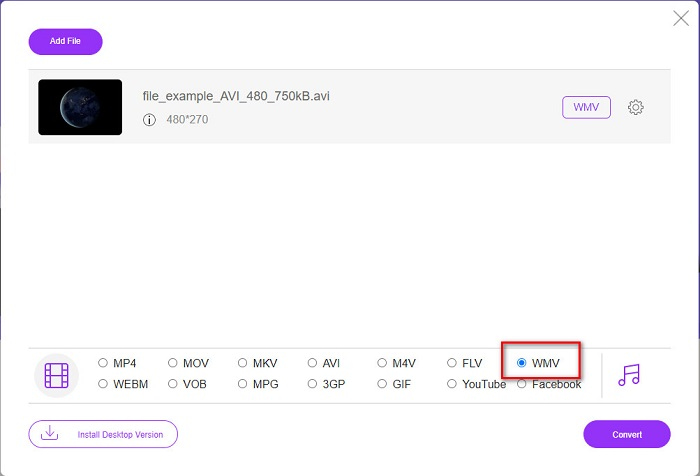
चरण 3. फ़ाइल चुनने के बाद, सॉफ़्टवेयर के दूसरे इंटरफ़ेस में आपको फ़ाइल फ़ॉर्मैट्स की सूची दिखाई देगी, फिर WMV पर क्लिक करें।.
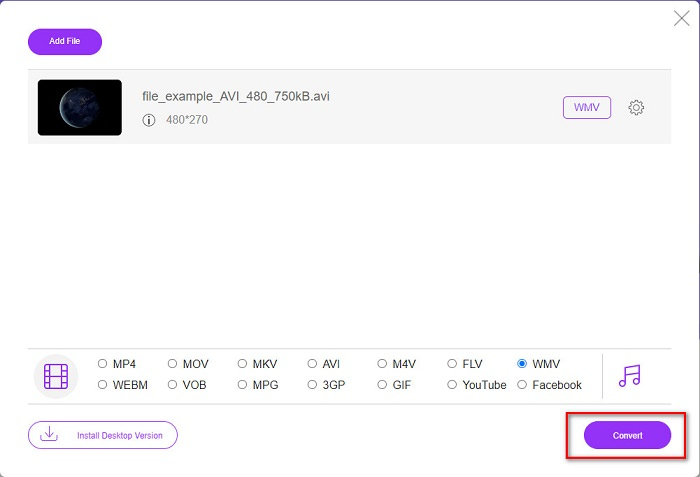
चरण 4. अंत में, सॉफ़्टवेयर के इंटरफ़ेस के नीचे दाएँ हिस्से में स्थित Convert बटन पर क्लिक करें। आपके कंप्यूटर की फ़ाइलें दिखाई देंगी, जहाँ आप कन्वर्ट की गई फ़ाइल के लिए गंतव्य (destination) चुन सकते हैं। इसके बाद आपकी AVI से WMV फ़ाइल का कन्वर्ज़न शुरू हो जाएगा।.
भाग 4. AVI और WMV के बारे में अधिक जानकारी
AVI या Audio Video Interleave फ़ाइलें Windows मशीनों के लिए मानक वीडियो फ़ॉर्मैट हैं। इन फ़ाइलों में ऑडियो और वीडियो दोनों होते हैं और ये DivX और XviD सहित विभिन्न कोडेक्स का उपयोग करती हैं। हालांकि, यह फ़ाइल फ़ॉर्मैट कम से कम कंप्रेशन का उपयोग करता है। इसलिए, इसकी फ़ाइल साइज़ काफ़ी बड़ी होती है। दूसरी ओर, WMV या Windows Media Video कई सॉफ़्टवेयर और डिवाइसेज़ द्वारा सपोर्ट किया जाता है, और Windows Media Player इन प्रकार की फ़ाइलों को कंप्रेस करता है। इसके अलावा, Windows सिस्टम आमतौर पर इस प्रकार की फ़ाइलें चलाता है। अगर आप WMV फ़ाइलों को आसानी से चलाना चाहते हैं, तो Best WMV Players पढ़ें।.
AVI बनाम WMV
रिसोर्स इंटरचेंज फाइल फॉर्मेट (आरआईएफएफ) के आधार पर, एवीआई प्रारूप को माइक्रोसॉफ्ट द्वारा 1992 में पेश किया गया था। यह उच्च गुणवत्ता वाले वीडियो / ऑडियो को सहेज सकता है क्योंकि यह कम संपीड़न का उपयोग करता है। लेकिन यह AVI फ़ाइल के बड़े फ़ाइल आकार का भी कारण बनता है, जो सीमित स्थान होने पर एक समस्या हो सकती है।
Microsoft द्वारा निर्मित, WMV 2000 के दशक में सबसे आम वीडियो प्रारूपों में से एक था। इसे वेब पर देखा जा सकता है और विंडोज़ पर विभिन्न मीडिया प्लेयर द्वारा चलाया जा सकता है। और यह विंडोज मीडिया प्लेयर का डिफॉल्ट वीडियो फाइल फॉर्मेट भी है। लेकिन इसे हाल ही में अन्य प्रारूपों द्वारा ले लिया गया है।
भाग 5. AVI को WMV फ़ाइल स्वरूप में कनवर्ट करने के बारे में अक्सर पूछे जाने वाले प्रश्न
क्या AVI को WMV में बदलने से फ़ाइल की गुणवत्ता खराब होती है?
जब आप AVI को WMV में कनवर्ट करते हैं, तो आपकी फ़ाइलों की गुणवत्ता प्रभावित नहीं होनी चाहिए। हालांकि, कुछ कन्वर्टर्स उच्च-गुणवत्ता वाले पिक्सेल वीडियो का समर्थन नहीं करते हैं, जिससे गुणवत्ता गिरती है।
क्या आप AVI फ़ाइलों को संपीड़ित कर सकते हैं?
हाँ। आप ऑनलाइन उपलब्ध वीडियो कंप्रेसर का इस्तेमाल कर सकते हैं। आप अपनी AVI फ़ाइल को WMV फ़ॉर्मैट में बदलकर भी फ़ाइल साइज कम कर सकते हैं। इसके अलावा, आप FVC Video Converter Ultimate का उपयोग करके अपनी AVI फ़ाइलों को कंप्रेस भी कर सकते हैं।.
क्या कनवर्ट करने के बाद मेरी AVI फ़ाइल का फ़ाइल आकार बदल जाएगा?
आपकी AVI फ़ाइल के फ़ाइल आकार में कुछ ऐसे उदाहरण हैं जो मूल फ़ाइल से भिन्न हो सकते हैं। क्योंकि जब फ़ाइलें कनवर्ट की जाती हैं, तो संपीड़ित फ़ाइलें असम्पीडित हो जाएंगी, जिसके परिणामस्वरूप फ़ाइल का आकार थोड़ा बदल जाएगा।
निष्कर्ष
संक्षेप में, ऊपर प्रस्तुत किए गए ऑनलाइन और ऑफलाइन टूल आशाजनक रूपान्तरण सुविधाएँ दिखाते हैं जो AVI को WMV फ़ाइलों में कनवर्ट करने की बात आने पर आपकी ज़रूरतों को पूरा कर सकती हैं। लेकिन अगर आप एक ऐसे कनवर्टर की तलाश कर रहे हैं जिसमें कई विशेषताएं हों जो आपकी आवश्यकताओं को पूरा करने में आपकी मदद करें, तो हम FVC वीडियो कन्वर्टर अल्टीमेट का उपयोग करने की सलाह देते हैं—अभी भी इसके बारे में संदेह है? इसे अभी आज़माएं और अपनी फ़ाइलों का सर्वोत्तम उपयोग करें!
-
 AVI को FLV में मुफ्त में बदलने में आपकी मदद करने के लिए ठोस गाइड Con
 AVI को FLV में बदलने के लिए, आपको एक शक्तिशाली वीडियो कनवर्टर की आवश्यकता है। सौभाग्य से, आप इस एकल लेख से दो और उनके चरण-दर-चरण मार्गदर्शिका सीख सकते हैं।
-
 विंडोज़/मैक पर एवीआई वीडियो को एनिमेटेड जीआईएफ फाइलों में कैसे बदलें
 जीआईएफ मेम बनाने के लिए दिलचस्प एवीआई सेगमेंट चुनना चाहते हैं? यह लेख आपको एवीआई वीडियो को क्लिप करने और एवीआई को एनिमेटेड जीआईएफ फाइलों में मुफ्त में बदलने के लिए 2 सर्वोत्तम तरीके बताएगा।
-
 तय करें कि एमपी3 कन्वर्टर सॉफ्टवेयर के लिए आदर्श एवीआई कौन सा है [पीसी और मैक]
 क्या आप जानना चाहते हैं कि AVI को MP3 ऑडियो फॉर्मेट में कैसे बदलें? नीचे दी गई सूची में आपको विभिन्न टूल और चरण भी मिलेंगे जो आपकी आवश्यकताओं के अनुरूप होंगे।

