


 वीडियो कनवर्टर अंतिम
 स्क्रीन अभिलेखी
 वीडियो मरम्मत
 सुरक्षित डाउनलोड
GIF को आसानी से M4V में बदलने के 2 उपयोगी तरीके
आज इंटरनेट पर विभिन्न प्रकार की फ़ाइलें उपयोग की जाती हैं। GIF फ़ाइल फ़ॉर्मेट, जो वर्तमान में वेब ग्राफ़िक्स के लिए सबसे ज़्यादा इस्तेमाल होने वाले फ़ॉर्मेट्स में से एक है, आमतौर पर देखने में अच्छा लगता है। हालाँकि, किसी न किसी कारण से ऐसा समय आ सकता है जब आपको इस फ़ाइल को M4V जैसे दूसरे फ़ॉर्मेट में बदलना पड़े। ऐसे में आपको यह जानकारीपूर्ण लेख पढ़ना चाहिए। हम आपको GIF को M4V में बदलने के सबसे आसान तरीके बताएँगे ताकि गैर‑पेशेवर उपयोगकर्ता भी आसानी से इन्हें अपना सकें। इस अवसर को न गँवाएँ और जल्दी से GIF को M4V में कनवर्ट करना सीखें।.

भाग 1: डेस्कटॉप पर GIF को M4V में बदलने का सबसे अच्छा तरीका
क्या आप बिना किसी झंझट के GIF को M4V में कनवर्ट करना चाहते हैं? तो आप जो सबसे अच्छा कदम उठा सकते हैं, वह है Video Converter Ultimate का उपयोग करना। आप इस सॉफ़्टवेयर को अपने डेस्कटॉप पर मुफ़्त में डाउनलोड कर सकते हैं। साथ ही, इस टूल की मदद से अपने GIF फ़ाइल को M4V फ़ॉर्मेट में कनवर्ट करना बेहद आसान है। इसके अलावा, इसका इंटरफ़ेस सीधा‑साधा है और फ़ाइलें कनवर्ट करने के तरीके भी आसानी से समझ में आने वाले हैं, जो खास तौर पर शुरुआती उपयोगकर्ताओं के लिए उपयुक्त हैं। साथ ही, इस एप्लिकेशन की सबसे रोमांचक बात यह है कि यह एक ही प्रक्रिया में कई फ़ाइलों को कनवर्ट कर सकता है, क्योंकि यह बैच कनवर्ज़न की सुविधा देता है। कनवर्ट करते समय आपको समय की भी चिंता नहीं करनी पड़ेगी, क्योंकि इस टूल में आप अपनी फ़ाइलों को औसत गति से 30 गुना तेज़ी से कनवर्ट कर सकते हैं।.
लेकिन रुकिए, और भी बहुत कुछ है। परिवर्तित करने के अलावा, आप इस एप्लिकेशन से और अधिक शानदार सुविधाओं का अनुभव कर सकते हैं। यदि आप कनवर्ट करने के बाद अपने M4V वीडियो की गति को समायोजित करना चाहते हैं, तो यह इस एप्लिकेशन में संभव है। वीडियो कन्वर्टर अल्टीमेट वीडियो स्पीड कंट्रोलर का उपयोग करके आपके वीडियो की गति को आसानी से बदल सकता है। आप अपने वीडियो को औसत गति से 0.125x धीमी से 8x तेज तक समायोजित कर सकते हैं। इसके अतिरिक्त, आप रंग सुधार फ़ंक्शन का उपयोग करके अपने वीडियो का रंग बदल सकते हैं। आप अपने वीडियो की संतृप्ति, चमक, कंट्रास्ट और ह्यू को आसानी से समायोजित कर सकते हैं। इस तरह, आप अपने वीडियो को बेहतर और शानदार बना सकते हैं।
विशेषताएँ
M4V, GIF, MP4, FLV, MKV, MOV, VOB, AVI, WMV, SWF, और 100+ अधिक जैसी कई वीडियो फ़ाइलों को कनवर्ट करें।
◆ एक साथ कई फाइलों को कनवर्ट करें।
◆ विभिन्न विषयों के साथ एक संगीत वीडियो बनाएं।
◆ कोलाज़ मेकर ऑफ़र करें, जिसमें मुफ़्त टेम्प्लेट और फ़िल्टर शामिल हैं।
◆ वीडियो ट्रिमर, बढ़ाने वाला, कंप्रेसर, क्रॉपर, रंग सुधार इत्यादि जैसे संपादन उपकरण प्रदान करता है।
◆ बीएमपी, जेपीजी, पीएनजी, आदि जैसे छवि फ़ाइल स्वरूपों को परिवर्तित करें।
◆ वीडियो की गति को 0.125x से 8x तेज गति से समायोजित करें।
◆ एक छवि और एक वीडियो से जीआईएफ को अनुकूलित कर सकते हैं।
FVC वीडियो कन्वर्टर अल्टीमेट का उपयोग करके अपने डेस्कटॉप पर GIF को M4V में बदलने के लिए नीचे दी गई विस्तृत गाइड का पालन करें।
चरण 1: नीचे दिए गए Download बटन पर क्लिक करके अपने डेस्कटॉप पर Video Converter Ultimate डाउनलोड और इंस्टॉल करें। इंस्टॉलेशन के बाद एप्लिकेशन को लॉन्च करें।.
फ्री डाउनलोडWindows 7 या बाद के संस्करण के लिएसुरक्षित डाउनलोड
फ्री डाउनलोडMacOS 10.7 या बाद के संस्करण के लिएसुरक्षित डाउनलोड
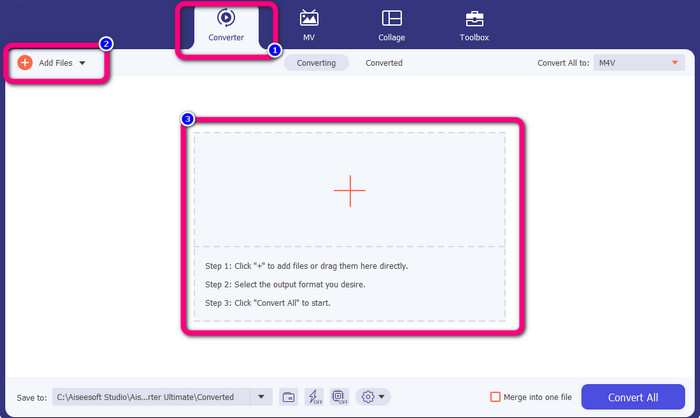
चरण 2: इसके बाद, इंटरफ़ेस के ऊपरी भाग में Converter पैनल चुनें। फिर, जिस GIF फ़ाइल को आप कनवर्ट करना चाहते हैं उसे जोड़ने के लिए Add File बटन या + आइकन पर क्लिक करें। आप सीधे GIF फ़ाइल को बॉक्स पर खींचकर (ड्रैग‑एंड‑ड्रॉप) भी छोड़ सकते हैं।.
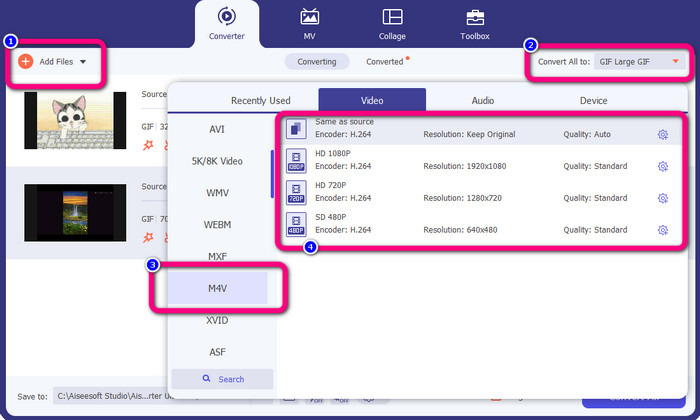
चरण 3: यह टूल आपको कई फ़ाइलें कनवर्ट करने की अनुमति देता है, इसलिए एक फ़ाइल जोड़ने के बाद आप Add File बटन पर क्लिक करके और भी फ़ाइलें जोड़ सकते हैं। फिर, फ़ॉर्मेट विकल्प देखने के लिए Convert All to बटन पर जाएँ और M4V फ़ाइल फ़ॉर्मेट चुनें। आप 480p से 1080p तक अपनी पसंद की क्वॉलिटी भी चुन सकते हैं।.
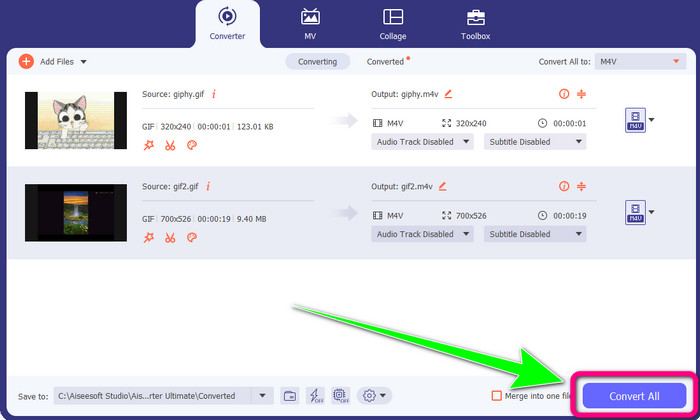
चरण 4: जब आप फ़ाइलों का आउटपुट फ़ॉर्मेट चुनने का काम पूरा कर लें, तो Convert All बटन पर क्लिक करें। इसके बाद कनवर्ज़न प्रक्रिया के पूरा होने का इंतज़ार करें और कनवर्ट किया गया वीडियो अपने डेस्कटॉप पर सेव कर लें। आप इस टूल का उपयोग GIF क्रॉप करने के लिए भी कर सकते हैं।.
भाग 2: जीआईएफ को ऑनलाइन एम4वी में बदलने का आसान तरीका
Convertio एक प्रभावी ऑनलाइन टूल है जो GIF को M4V में कनवर्ट करने के काम आता है। यह GIF, M4V, 3GP, DIVX, XVID, AVID, MP4, M4V, ASF और अन्य कई फ़ॉर्मेट्स को सपोर्ट करता है। आप सिर्फ़ वीडियो ही नहीं बल्कि तस्वीरें, ऑडियो, डॉक्युमेंट्स, आर्काइव आदि भी कनवर्ट कर सकते हैं। अपने GIF फ़ाइल को M4V फ़ॉर्मेट में कनवर्ट करने के लिए आपको ज़्यादा परेशान होने की ज़रूरत नहीं है, क्योंकि Convertio एक सीधा‑सादा टूल है। साथ ही, Convertio बैच कनवर्ज़न की सुविधा भी देता है, जिसमें आप एक से ज़्यादा फ़ाइलें जोड़ सकते हैं। इस तरह आपको फ़ाइलों को एक‑एक करके कनवर्ट नहीं करना पड़ेगा।.
हालाँकि, आप इस सॉफ़्टवेयर का उपयोग इंटरनेट एक्सेस के बिना नहीं कर सकते हैं, जैसे अन्य ऑनलाइन टूल के साथ। इसके अतिरिक्त, यह ऑनलाइन टूल कभी-कभी खराब प्रदर्शन प्रदर्शित करता है। साथ ही, Convertio के निःशुल्क संस्करण पर भी प्रतिबंध है। केवल 100 एमबी आकार तक की फाइलों को परिवर्तित किया जा सकता है। अधिकतम फ़ाइल आकार बढ़ाने और उत्कृष्ट प्रदर्शन का आनंद लेने के लिए आपको सॉफ़्टवेयर खरीदना होगा। GIF फ़ाइल को M4V फ़ाइल स्वरूप में कनवर्ट करने के लिए, निम्न प्रक्रियाओं का पालन करें।
चरण 1: Convertio की वेबसाइट पर जाएँ। फिर GIF फ़ाइल अपलोड करने के लिए Choose Files बटन पर क्लिक करें।.
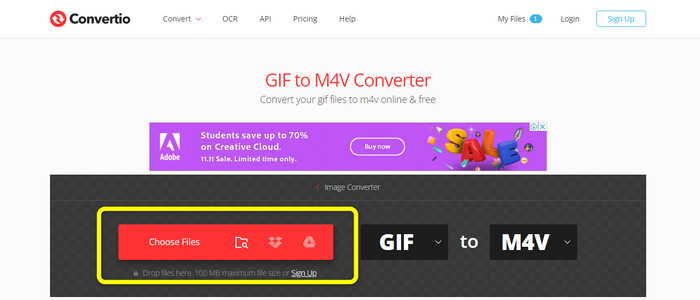
चरण 2: इसके बाद फ़ॉर्मेट विकल्पों पर जाएँ। वीडियो सेक्शन में जाकर आउटपुट फ़ॉर्मेट के रूप में M4V फ़ाइल चुनें। आप जिन और फ़ाइलों को कनवर्ट करना चाहते हैं, उन्हें जोड़ने के लिए Add more files बटन पर भी क्लिक कर सकते हैं।.
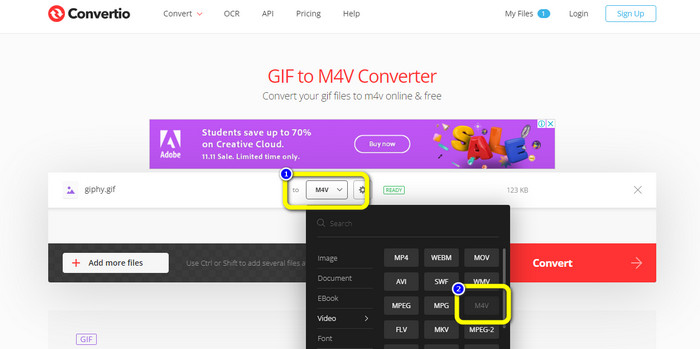
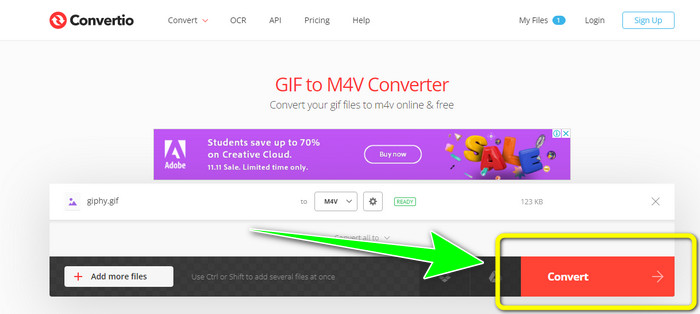
चरण 3: आख़िरी चरण में, GIF को M4V में कनवर्ट करने के लिए Convert बटन दबाएँ। कनवर्ज़न प्रक्रिया के पूरा होने तक इंतज़ार करें और फिर अपना वीडियो डेस्कटॉप पर सेव करें। यह टूल GIF को DIVX में कनवर्ट करने में भी आपकी मदद कर सकता है।.
भाग 3: GIF और M4V के बीच अंतर
| फाइल का प्रारूप | GIF | M4V |
| फ़ाइल का नाम | ग्राफिकल इंटरचेंज फॉर्मेट फाइल | आईट्यून्स वीडियो |
| दस्तावेज़ विस्तारण | जीआईएफ | .m4v |
| विवरण | ग्राफिकल इंटरचेंज फॉर्मेट, या GIF, एक बिटमैप पिक्चर फॉर्मेट है, जिसे CompuServe ने पहली बार 1987 में जारी किया था। GIF अपनी पोर्टेबिलिटी और क्रॉस-प्लेटफॉर्म संगतता के कारण केवल 256 रंगों का समर्थन करने के बावजूद जबरदस्त वेब उपयोगिता प्रदान करता है। अधिकांश समय, वेबसाइटें अपने बटनों, बैनरों और हेडर चित्रों के लिए GIFs का उपयोग करती हैं। चूँकि GIF दोषरहित LZW कम्प्रेशन एल्गोरिथम का उपयोग करता है, छवि का आकार कम होने पर छवि गुणवत्ता प्रभावित नहीं होती है। जीआईएफ फाइलों को देखना काफी सरल है क्योंकि अधिकांश वेब ब्राउज़र उनका समर्थन करते हैं। | टीवी शो, म्यूजिक वीडियो और फीचर-लेंथ फिल्में सभी को Apple iTunes स्टोर से M4V फाइलों के रूप में डाउनलोड किया जा सकता है, जो MPEG-4 फाइलें हैं। हालाँकि यह .MP4 प्रारूप के बराबर है, यह Apple के FairPlay DRM कॉपीराइट सुरक्षा का उपयोग करके प्रति-संरक्षित हो सकता है। |
| डेवलपर | कॉम्प्युसर्व | सेब |
| संबद्ध कार्यक्रम | एडोब फोटोशॉप सेब पूर्वावलोकन कोरल पेंट शॉप प्रो माइक्रोसॉफ्ट विंडोज फोटो गैलरी व्यूअर | एप्पल आईट्यून VLC मीडिया प्लेयर ऐप्पल क्विकटाइम प्लेयर |
| माइम प्रकार | इमेज/जीआईएफ | वीडियो/x-m4v |
भाग 4: GIF को M4V में बदलने के बारे में अक्सर पूछे जाने वाले प्रश्न
क्या जीआईएफ फाइलें उच्च गुणवत्ता वाली हैं?
GIF फ़ाइलें उच्च-गुणवत्ता वाली छवियां रखने के लिए डिज़ाइन नहीं की गई हैं। इसके बजाय, GIF सीमित रंगों, स्पष्ट किनारों और रेखाओं वाले डिज़ाइन और लोगो के साथ सबसे अच्छा काम करते हैं।
मैं GIF को जल्दी से M4V में कैसे बदल सकता हूँ?
यदि आप GIF फ़ाइलों को M4V प्रारूप में बदलने का सबसे तेज़ तरीका ढूंढ रहे हैं, तो वीडियो कन्वर्टर अल्टीमेट का उपयोग करने की अत्यधिक अनुशंसा की जाती है। यह कन्वर्टर एक अल्ट्रा-स्पीड रूपांतरण प्रक्रिया प्रदान करता है, जो अन्य वीडियो कन्वर्टर्स की तुलना में 30 गुना तेज है।
जीआईएफ के लिए संकल्प क्या है?
आदर्श जीआईएफ आकार 480x480 है। छवियों की तरह, लगभग वर्गाकार फ़ोटो चुनना महत्वपूर्ण है। यदि वे पूरी तरह से आनंद लेने के लिए बहुत व्यापक या लम्बे हैं तो उपयोगकर्ताओं को उन्हें बड़ा करने की आवश्यकता हो सकती है।
निष्कर्ष
ये दोनों एप्लिकेशन GIF को M4V में कनवर्ट करने के लिए सबसे प्रभावी तरीके प्रदान करती हैं। लेकिन ऑनलाइन टूल की कुछ सीमाएँ हैं। यदि आप बिना किसी सीमा के कनवर्टर का उपयोग करना चाहते हैं, तो आप Video Converter Ultimate का इस्तेमाल कर सकते हैं।.
-
 M4V को 3GP में बदलने की सरल प्रक्रिया सीखें
 आपके डिवाइस पर M4V को 3GP में बदलने के लिए यहां सबसे सरल प्रक्रियाएं दी गई हैं। यदि आप सीखने के इच्छुक हैं, तो चलिए आगे बढ़ते हैं और इस लेख पर आगे बढ़ते हैं।
-
 SWF को कुशलतापूर्वक M4V में बदलने की सरल प्रक्रिया
 SWF को M4V में ऑनलाइन बदलने और डाउनलोड करने योग्य एप्लिकेशन का उपयोग करने के सरल तरीकों को सीखने का यह अवसर न चूकें। जानने के लिए इस पोस्ट को पढ़ें!
-
 एमटीएस को आसानी से एम4वी में बदलने के आसान तरीके
 क्या आप किसी परेशानी का सामना किए बिना अपनी MTS फाइल को M4V में बदलना चाहते हैं? इस लेख पर जाएँ। हमने विस्तृत प्रक्रियाएँ प्रदान की हैं जिनका आप पालन कर सकते हैं।
