


 वीडियो कनवर्टर अंतिम
 स्क्रीन अभिलेखी
 वीडियो मरम्मत
3 सर्वश्रेष्ठ सॉफ्टवेयर [ऑनलाइन और ऑफलाइन] के साथ M4V को AVI फ्री में कैसे बदलें
Apple उपयोगकर्ता पहले से ही iTunes को अपने लोकल मीडिया प्लेयर के रूप में जानते हैं, जिसका इस्तेमाल वे फ़िल्में, म्यूज़िक और यहाँ तक कि टीवी शो चलाने के लिए करते हैं। वास्तव में, वे इसके एक डिफ़ॉल्ट फ़ॉरमैट का भी उपयोग करते हैं, और वह है M4V। हालाँकि, यह फ़ॉरमैट आपके लोकल Windows प्लेयर पर नहीं चलाया जा सकता, और कुछ थर्ड-पार्टी प्लेयर भी इस फ़ॉरमैट को सपोर्ट नहीं करते। लेकिन उदास होने की ज़रूरत नहीं है, क्योंकि आप इस फ़ाइल को कनवर्ट करके इसे दूसरे डिवाइस पर भी देख सकते हैं। साथ ही, आप इन दोनों फ़ॉरमैट्स के बीच तुलना भी पढ़ सकते हैं। तो अब हम आपको नीचे दी गई सूची में सिखाएँगे कि M4V को मुफ्त में AVI में कैसे कनवर्ट करें।.
भाग 1. M4V और AVI स्वरूपों के लिए संक्षिप्त विवरण
तो अब, आइए परिचय में बताए गए दो प्रारूपों के बीच के अंतर पर एक नजर डालते हैं। जैसा कि हम नीचे आगे बढ़ते हैं, हम दो प्रारूपों को समझेंगे लेकिन एक अलग दृष्टिकोण से। और इससे पहले कि आप मुड़ें, आप जानते हैं कि AVI कनवर्टर के लिए सबसे अच्छा मुफ्त M4V क्या है। आइए नीचे पढ़कर पहले दो प्रारूपों में अंतर करें।
M4V
यह फ़ाइल स्वरूप iTunes के स्वामित्व में है, और यह DRM द्वारा संरक्षित है जो कॉपीराइट मुद्दों को लागू करता है।
वीडियो, ऑडियो, टीवी शो और मूवी चलाने के लिए उपयोग की जाने वाली मीडिया फ़ाइलों को एन्कोड करने के लिए उपयोग किया जाता है।
इस प्रारूप के साथ फ़ाइलें संग्रहीत और स्थानांतरित करना बहुत आसान और तेज़ है।
इसकी संरचना लगभग MP4 प्रारूप जैसी ही है।
चूंकि यह प्रारूप सुरक्षित है और Apple उपकरणों तक सीमित है, इसलिए यह अन्य मीडिया प्लेयर के साथ खेलने के लिए उतना लचीला नहीं है।
AVI
एक विस्तृत वीडियो और ऑडियो फ़ाइल को चलाने और संग्रहीत करने के लिए उपयोग किया जाने वाला प्रसिद्ध प्रारूप।
एक फ़ाइल कंटेनर एक सतत प्लेबैक स्टोर करने के लिए।
फ़ाइल का आकार अन्य फ़ाइल स्वरूप की तुलना में बहुत बड़ा है क्योंकि यह एन्कोडेड नहीं है।
फ़ाइल को छोटा करने के लिए एक कंप्रेसर या कोडेक का उपयोग करने की आवश्यकता है।
भाग 2. जानें 3 तरीके M4V को AVI में कैसे बदलें
पहला रास्ता। FVC वीडियो कन्वर्टर अल्टीमेट
FVC Video Converter Ultimate PC या Mac पर डाउनलोड करने के लिए सबसे बेहतरीन M4V से AVI कनवर्टरों में से एक है। इसकी हाई-एंड फ़ंक्शनैलिटी और उन्नत फीचर्स की वजह से, यह कनवर्ज़न करते समय यूज़र्स की सुविधा का पूरा ध्यान रखता है। दूसरे कनवर्टर्स के मुकाबले, यह सॉफ़्टवेयर कई मायनों में काफ़ी अलग है। जैसे कि यह बहुत बड़ी रेंज के फ़ॉरमैट्स को सपोर्ट करता है, एडिटिंग फीचर्स को आसानी से इस्तेमाल किया जा सकता है, परफ़ॉर्मेंस के लिहाज़ से यह तेज़ और बेहतर है, इत्यादि।.
हालांकि यहां कनवर्ट करना मुफ़्त है और इसकी कोई सीमा नहीं है, आपको इसे इस्तेमाल करने से पहले इसे खरीदना होगा, लेकिन यह बहुत सस्ता है। कुल मिलाकर देखते हैं कि इस कनवर्टर के साथ एक प्रारूप को एक नए प्रारूप में बदलने में क्या लगता है। यदि आप जानना चाहते हैं कि किसी फ़ाइल का रूपांतरण कैसे किया जाता है तो नीचे दिए गए समकालिक चरणों का पालन करें।
स्टेप 1. सबसे पहले सॉफ़्टवेयर को अपने PC या Mac पर डाउनलोड करें। डाउनलोड की प्रक्रिया पूरी होने के बाद अब इसे इंस्टॉल करना और सेटअप करना सही समय होगा।.
फ्री डाउनलोडWindows 7 या बाद के संस्करण के लिएसुरक्षित डाउनलोड
फ्री डाउनलोडMacOS 10.7 या बाद के संस्करण के लिएसुरक्षित डाउनलोड
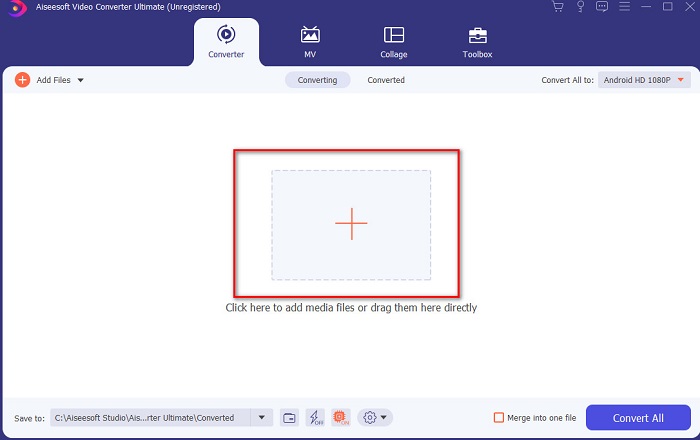
स्टेप 2. टूल को लॉन्च करें और इंटरफ़ेस के बीच में दिए गए + बटन पर क्लिक करें, इससे एक फ़ोल्डर खुल जाएगा। उसमें अपनी फ़ाइल खोजें, फिर उसे चुनें और M4V फ़ाइल जोड़ने के लिए Open पर क्लिक करें।.
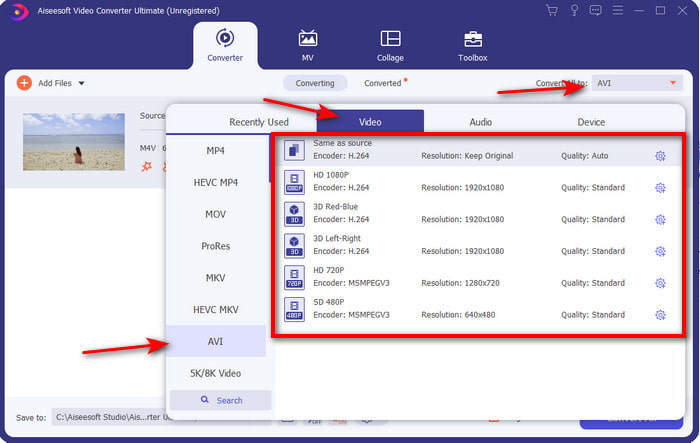
स्टेप 3. Mac या PC पर M4V को AVI में कनवर्ट करना शुरू करने से पहले, आपको पहले ड्रॉप-डाउन बटन पर क्लिक करके AVI फ़ॉरमैट ढूँढ़ना होगा।.
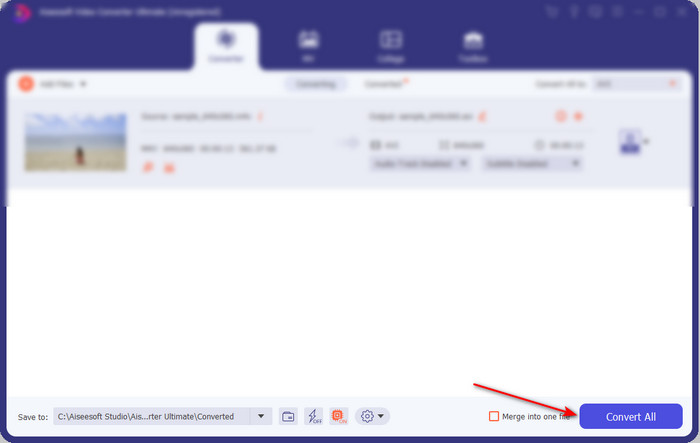
स्टेप 4. फ़ॉरमैट चुनने के बाद, अब इसे कनवर्ट करने का समय है। इंटरफ़ेस के निचले हिस्से में दिए गए Convert All बटन पर क्लिक करें।.
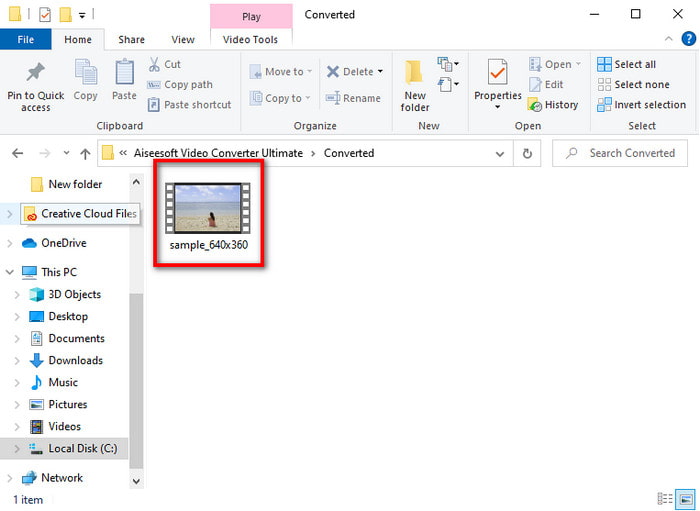
स्टेप 5. प्रोसेस के पूरा होने के लिए कुछ सेकंड प्रतीक्षा करें। जैसे ही यह पूरा हो जाएगा, आपके द्वारा पहले कनवर्ट की गई फ़ाइल के साथ एक फ़ोल्डर दिखाई देगा, उसे तुरंत देखने के लिए उस पर क्लिक करें।.
दूसरा रास्ता। FVC फ्री वीडियो कन्वर्टर
यदि आप ऊपर दिए गए सॉफ़्टवेयर को ख़रीदना नहीं चाहते, तो आपके वेब पर उपलब्ध यह मुफ़्त M4V से AVI कनवर्टर, FVC Free Video Converter इस्तेमाल करने के लिए एक अच्छा विकल्प है। और यदि आप FVC Video Converter Ultimate जैसा बेहतरीन कनवर्ज़न पाना चाहते हैं, तो यह आपका चुनाव होना चाहिए। हालाँकि यह टूल ठीक-ठाक कनवर्ज़न प्रदान करता है, फिर भी यह वेब टूल केवल कुछ सीमित फ़ॉरमैट्स को सपोर्ट करता है, एडिटिंग फीचर्स नहीं देता और डेस्कटॉप टूल की तुलना में कनवर्ज़न की स्पीड काफ़ी धीमी है। इसके अलावा, इसे इस्तेमाल करने के लिए आपको इंटरनेट कनेक्शन की भी ज़रूरत पड़ेगी। लेकिन अगर आप एक ऑनलाइन कनवर्टर ढूँढ़ रहे हैं, तो यह सही विकल्प है। तो अब, नीचे दिए गए स्टेप्स को फ़ॉलो करें और जानें कि इसे कैसे करना है।.
स्टेप 1. FVC कनवर्टर की मुख्य वेबसाइट पर जाने के लिए इस लिंक पर क्लिक करें।.
स्टेप 2. अगर आप इसे पहली बार इस्तेमाल कर रहे हैं, तो लॉन्चर डाउनलोड करने के लिए Add Files to Convert पर क्लिक करें। डाउनलोड पूरा हो जाने के बाद, दोबारा उस पर क्लिक करें ताकि यह लॉन्च हो जाए, फिर अपने फ़ोल्डर से फ़ाइल चुनें और Open पर क्लिक करें।.
फ़ाइलों को बैच में कनवर्ट करने के लिए डेस्कटॉप संस्करण डाउनलोड करें।.
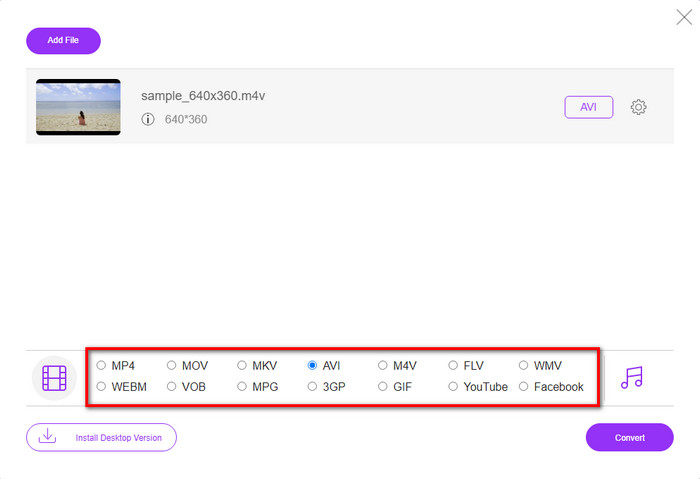
स्टेप 3. कनवर्ज़न की प्रक्रिया शुरू होने से पहले, नीचे उपलब्ध फ़ॉरमैट्स में से उपयुक्त फ़ॉरमैट चुनने के लिए उस पर क्लिक करें।.
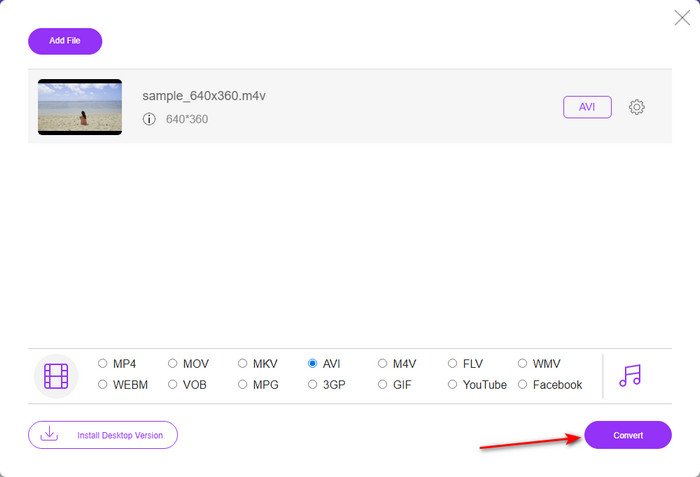
स्टेप 4. फ़ॉरमैट चुनने के बाद, फ़ॉरमैट को बदलने की प्रक्रिया आगे बढ़ाने के लिए Convert पर क्लिक करें।.
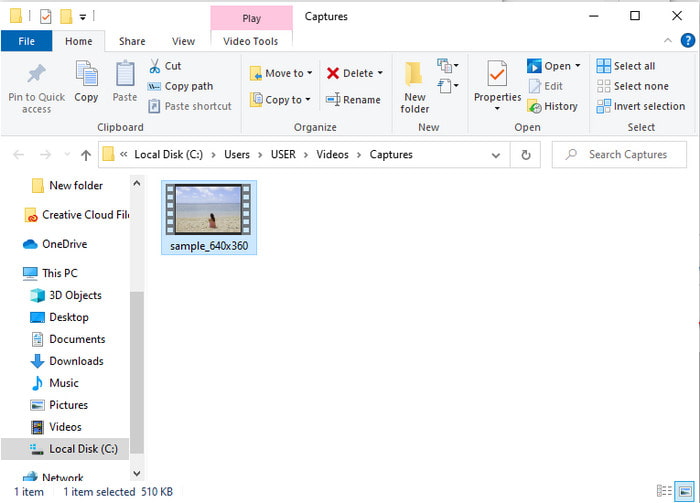
स्टेप 5. कुछ मिनट प्रतीक्षा करें, और फ़ाइल तैयार हो जाने के बाद, कनवर्ट की गई फ़ाइल के साथ एक फ़ोल्डर दिखाई देगा; फिर उसे देखने के लिए उस पर क्लिक करें।.
तीसरा रास्ता। विनएक्स वीडियो कन्वर्टर फ्री
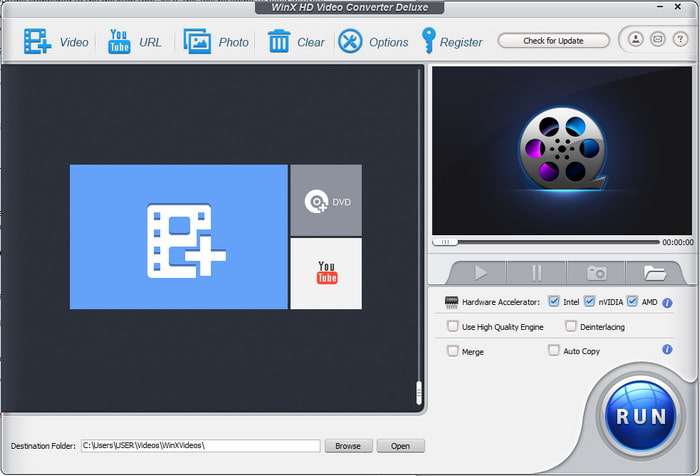
एक और सॉफ़्टवेयर जो हमने चुना है, जो आपको फ़ाइल का फ़ॉरमैट बदलने में मदद करेगा, वह है WinX Video Converter Free। यह टूल बेहतरीन कनवर्ज़न प्रदान करता है और कई तरह के फ़ॉरमैट्स को भी सपोर्ट करता है। हालाँकि इसकी परफ़ॉर्मेंस काफ़ी अच्छी है, जिससे Mac या PC पर इस M4V से AVI कनवर्टर को डाउनलोड करना फ़ायदेमंद है। फिर भी, यह ऊपर बताए गए टूल जैसा नहीं है। तो, अगर आप इसे आज़माना चाहते हैं, तो नीचे दिए गए स्टेप्स को फ़ॉलो करें।.
स्टेप 1. सॉफ़्टवेयर को अपने PC या Mac पर डाउनलोड करें।
स्टेप 2. फिर फ़ाइल जोड़ने के लिए Video पर क्लिक करें, इसके बाद PC General Manager को ढूँढ़ें और AVI Video पर क्लिक करें, फिर OK दबाएँ।.
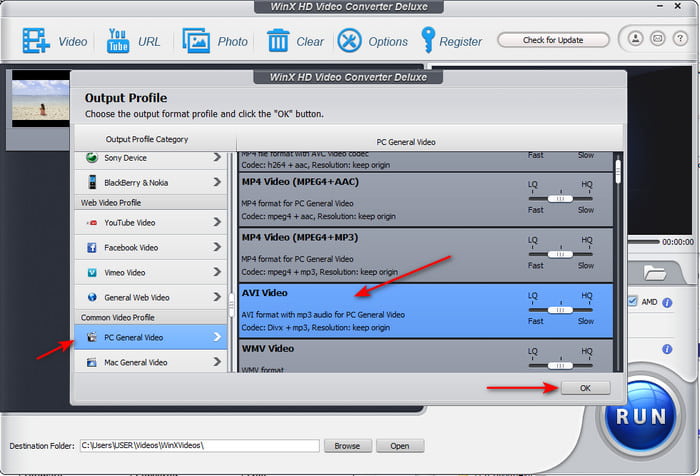
स्टेप 3. कनवर्ज़न शुरू करने के लिए Run पर क्लिक करें।.
भाग 3. 3 M4V का AVI कनवर्टर से तुलना चार्ट
| विशेषताएं | FVC वीडियो कन्वर्टर अंतिम | FVC मुफ्त वीडियो कनवर्टर | विनएक्स वीडियो कन्वर्टर फ्री |
| कनवर्टिंग प्रारूप |  | | |
| एकाधिक रूपांतरण | |  | |
| हार्डवेयर एक्सिलरेशन | | | |
| अल्ट्राफास्ट रूपांतरण | | | |
| समर्थित कार्यक्रम | सभी प्लेटफार्मों में उपलब्ध | सभी प्लेटफार्मों में उपलब्ध | सभी प्लेटफार्मों में उपलब्ध |
M4V बनाम AVI
M4V Apple द्वारा विकसित किया गया है, जो MPEG 4 का भी उपयोग करता है। M4V फ़ाइलों का उपयोग अक्सर Apple iTunes स्टोर से डाउनलोड किए गए उन वीडियो को संग्रहीत करने के लिए किया जाता है, जैसे संगीत वीडियो, टीवी एपिसोड, आदि। आपको कुछ M4V फ़ाइलें कॉपी-संरक्षित मिल सकती हैं क्योंकि यह उपयोग करता है Apple का फेयरप्ले DRM कॉपीराइट संरक्षण।
रिसोर्स इंटरचेंज फाइल फॉर्मेट (आरआईएफएफ) के आधार पर, एवीआई प्रारूप को माइक्रोसॉफ्ट द्वारा 1992 में पेश किया गया था। यह उच्च गुणवत्ता वाले वीडियो / ऑडियो को सहेज सकता है क्योंकि यह कम संपीड़न का उपयोग करता है। लेकिन यह AVI फ़ाइल के बड़े फ़ाइल आकार का भी कारण बनता है, जो सीमित स्थान होने पर एक समस्या हो सकती है।
भाग 4. M4V और AVI प्रारूपों के बारे में अक्सर पूछे जाने वाले प्रश्न
मुझे M4V प्रारूप में बदलने की आवश्यकता क्यों है?
M4V फ़ॉरमैट केवल Apple डिवाइसेज़ पर ही उपलब्ध होता है, इसलिए अगर आप इस फ़ॉरमैट की फ़ाइल को Windows या किसी और डिवाइस पर ट्रांस्फ़र करते हैं, तो यह चल नहीं पाएगी। इसलिए बेहतर है कि आप M4V फ़ाइल को MP4 या AVI जैसे नए फ़ॉरमैट में कनवर्ट कर लें ताकि इसे चलाया जा सके।.
M4V को परिवर्तित करने के बाद क्या यह गुणवत्ता खो देता है?
वास्तव में, M4V या किसी अन्य प्रारूप में गुणवत्ता हानि होने की संभावना कम होती है जिसे एक नए प्रारूप में बदल दिया गया है। हालाँकि, यह सॉफ़्टवेयर या कनवर्टर की खराबी का कारण भी बन सकता है। इसलिए, आपके लिए वह कनवर्टर चुनना सबसे अच्छा है जो पूरी तरह से अच्छी तरह से काम करता है और उपयोग में आसान है।
क्या M4V को कनवर्ट करने से इसका फ़ाइल आकार कम हो जाता है?
खैर, यह उस प्रारूप पर निर्भर करता है जिसे आप चुनने वाले थे। जैसे अगर आप इसे AVI में कनवर्ट करते हैं तो उम्मीद है कि यह थोड़ा बड़ा हो जाएगा क्योंकि फाइल असम्पीडित है। इसके विपरीत, यदि आप इसे MP4 में परिवर्तित करते हैं तो फ़ाइल का आकार अभी भी बना रहेगा या कम हो जाएगा। हालाँकि फ़ाइल का आकार अभी भी बदलेगा जो भी प्रारूप आप चुनने जा रहे थे, आपको अंत में एक बढ़िया आउटपुट प्राप्त होगा।
निष्कर्ष
समापन के तौर पर, ये तीनों वेब और डेस्कटॉप टूल्स पूरी तरह से अच्छी तरह काम करते हैं और कनवर्टर के रूप में अपना काम बखूबी करते हैं। यहाँ सूचीबद्ध हर सॉफ़्टवेयर को जाँचने के बाद हमने पाया कि FVC Video Converter Ultimate हर किसी के लिए सबसे बेहतर विकल्प है। इसकी उपयोग में आसान इंटरफ़ेस, किफ़ायती कीमत और लचीलापन, उन्नत फीचर्स और कई अन्य कारणों से यह अलग दिखता है। तो यदि आप अभी भी यह सोच रहे हैं कि क्या चुनें, तो इस बेहतरीन कनवर्टर को आज़मा कर देखें और तेज़ तथा आसान कनवर्ज़न प्रक्रिया का आनंद लें।.
-
 M4V को MP3 कन्वर्टर - M4V फाइल्स से MP3 निकालने के 4 बेस्ट तरीके
 जब आप एमपी 4 ऑडियो को एम 4 वी वीडियो से आसानी से निकालना चाहते हैं, तो आप लेख से वांछित ऑडियो फाइलें प्राप्त करने के लिए एमपी 4 कन्वर्टर्स के लिए 4 सर्वश्रेष्ठ एम 4 वी के बारे में अधिक जान सकते हैं।
-
 GIF को AVI में बदलने का सबसे अच्छा तरीका क्या है [ओपन-सोर्स और प्रीमियम]
 क्या आप वीडियो की गुणवत्ता खोए बिना अपने GIF को AVI प्रारूप में बदलना चाहते हैं? अपनी GIF फ़ाइल को AVI में बदलने का तरीका जानने के लिए पढ़ते रहें।
-
 पीसी और मैक पर MOV को AVI में बदलने के 4 प्रभावी तरीके [2021]
 क्या आप जानना चाहते हैं कि वेब पर AVI कनवर्टर के लिए बेहतरीन MOV क्या है? और FVC अल्टीमेट वीडियो कन्वर्टर आपके लिए एक क्यों हो सकता है।

