


 वीडियो कनवर्टर अंतिम
 स्क्रीन अभिलेखी
 वीडियो मरम्मत
5 सुलभ एमपीईजी से एवीआई वीडियो कन्वर्टर के साथ एमपीईजी को एवीआई में बदलें
MPEG उन बेहतरीन फ़ॉर्मैट्स में से एक है जिनसे आप पहले ही परिचित हो सकते हैं, क्योंकि यह वीडियो और ऑडियो दोनों तरह की फ़ाइलों को स्टोर करता है। साथ‑ही‑साथ, यह सिर्फ़ एक कंटेनर नहीं है, बल्कि इसमें MPEG‑1 और MPEG‑2 कम्प्रेशन का भी उपयोग होता है। हालाँकि, MPEG‑1 और MPEG‑2 पुराने फ़ॉर्मैट हैं, जिन्हें पहले ब्लू‑रे डिस्क पर स्टोर किया जाता था। इसलिए अब हम बताएँगे कि इसको बेहतर कैसे बनाया जा सकता है, यानी फ़ॉर्मैट को AVI में बदलकर। नीचे दी गई सूची में हम वे अलग‑अलग टूल प्रस्तुत कर रहे हैं जिनकी मदद से आप MPEG को AVI में कनवर्ट कर सकते हैं, और साथ ही MPEG और AVI के बारे में विस्तृत जानकारी भी देंगे।.
भाग 1. एमपीईजी और एवीआई फ़ाइल स्वरूप के बारे में संक्षिप्त विवरण
एमपीईजी और एवीआई उन शीर्ष प्रारूपों में से एक हैं जिनका उपयोग आप मीडिया फ़ाइल को स्टोर करने के लिए कर सकते हैं। हालांकि वे महान हैं, फिर भी कुछ कारण हैं कि आपको एमपीईजी से एवीआई वीडियो कनवर्टर का उपयोग करने की आवश्यकता क्यों है। लेकिन अभी के लिए, हम दो प्रारूपों के बारे में बहुत सारी जानकारी देंगे और एमपीईजी और एवीआई के बारे में एक विचार रखेंगे।
जैसा कि पहले कहा गया है, एमपीईजी न केवल एक कंटेनर है, बल्कि इसमें एक अंतर्निर्मित कंप्रेसर भी है। मूल रूप से, यह एक दोहरे उद्देश्य वाला फ़ाइल स्वरूप है। इसके अलावा, यह प्रारूप ब्लू-रे पर सबसे अधिक उपयोग किया जाने वाला प्रारूप है क्योंकि यह गुणवत्ता और संपीड़न प्रदान करता है। इसके अलावा, एमपीईजी प्रारूप को 6 में वर्गीकृत किया गया है, लेकिन हम आमतौर पर उपयोग किए जाने वाले दो और एमपीईजी -1 और एमपीईजी -2 पर चर्चा करेंगे। इसके अलावा, एमपीईजी-1 एमपीईजी की पहली पीढ़ी है। यह प्रारूप मानक आधारित संकल्प को संग्रहीत करता है लेकिन अन्य प्रारूप के संकल्प की तुलना में एमपीईजी -1 बहुत कम है। जबकि MPEG-2 MPEG-1 की तुलना में बहुत बेहतर गुणवत्ता प्रदान करता है, हालांकि यह ब्लू-रे और डीवीडी पर सबसे अच्छा काम करता है। साथ ही, टीवी स्टेशन द्वारा वीडियो को स्थानांतरित करने और चलाने के लिए इस प्रारूप का सबसे अधिक उपयोग किया जाता है।
लेकिन AVI MPEG से काफ़ी अलग है क्योंकि यह अनकम्प्रेस्ड होता है। साथ ही, इस फ़ॉर्मैट की क्वालिटी बहुत ऊँची होती है, क्योंकि यह अपनी फ़ाइलों को कम्प्रेस नहीं करता। हालाँकि इसका साइज काफ़ी बड़ा होता है, फिर भी MPEG फ़ाइलों की तुलना में इसे लगभग सभी प्लेटफ़ॉर्म पर बेहतर समर्थन मिलता है।.
एमपीईजी को एवीआई प्रारूप ऑफ़लाइन में कनवर्ट करने के लिए प्रयुक्त सर्वश्रेष्ठ कनवर्टर का भाग 2
1. FVC वीडियो कन्वर्टर अल्टीमेट
यदि आप एक बहुउद्देश्यीय MPEG से AVI कनवर्टर और डाउनलोडर ढूँढ रहे हैं, तो FVC Video Converter Ultimate आपके लिए सबसे उपयुक्त टूल है। इसकी विशेषताओं और सरल इंटरफ़ेस के कारण इस टूल को इस लेख में ऊँचा स्थान दिया गया है। उपयोग में आसान होने के बावजूद, आप इससे वही बेहतरीन आउटपुट प्राप्त कर सकते हैं, जिसकी आप हमेशा चाह रखते हैं। साथ ही, अन्य कनवर्टरों के विपरीत, यह सॉफ़्टवेयर मानकों को एक उच्च स्तर तक ले जाता है। इसलिए, यदि आप अपनी कन्वर्ज़न से पहले, दौरान और बाद में 100% सफलता पाना चाहते हैं, तो इस टूल का उपयोग करना ज़रूरी है। अब, आइए देखें कि FVC Video Converter Ultimate का इस्तेमाल कैसे किया जाए, इसकी चरणबद्ध मार्गदर्शिका नीचे दी गई है।.
चरण 1. अपने डेस्कटॉप पर यह टूल डाउनलोड करने के लिए नीचे दिए गए बटन पर क्लिक करें। डाउनलोड पूरा हो जाने के बाद इसे इंस्टॉल करें, त्वरित सेट‑अप करें और फिर Start Now पर क्लिक करें।.
फ्री डाउनलोडWindows 7 या बाद के संस्करण के लिएसुरक्षित डाउनलोड
फ्री डाउनलोडMacOS 10.7 या बाद के संस्करण के लिएसुरक्षित डाउनलोड
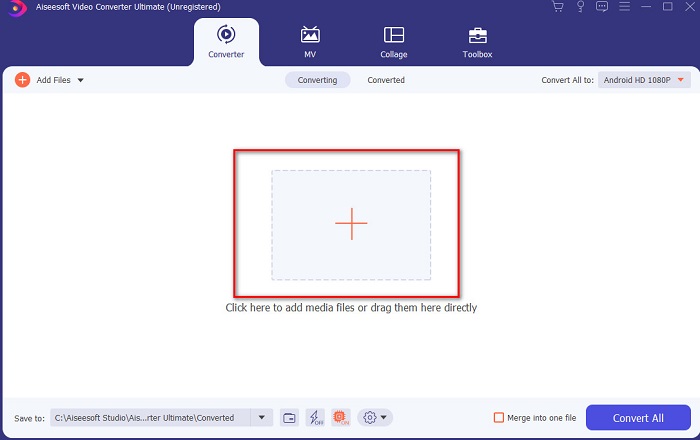
चरण 2. टूल का इंटरफ़ेस कुछ इस तरह दिखेगा, फिर बीच में बने + चिन्ह पर क्लिक करें। आपकी स्क्रीन पर एक फ़ोल्डर दिखाई देगा; उसमें से वह MPEG वीडियो फ़ाइल चुनें जिसे आप कनवर्ट करना चाहते हैं और फिर Open पर क्लिक करें।.
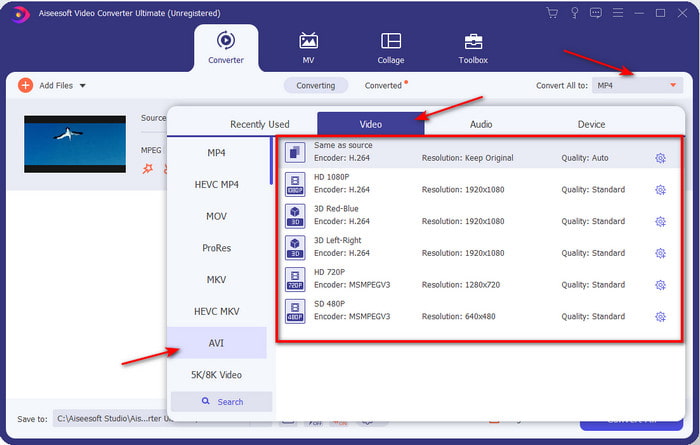
चरण 3. जब फ़ाइल इंटरफ़ेस पर आ जाए, तो Convert All to: पर क्लिक करें और सूची में से AVI फ़ॉर्मैट चुन लें।.
चरण 4. अब MPEG‑4 मूवीज़ को AVI फ़ॉर्मैट में कनवर्ट शुरू करने के लिए Convert All बटन दबाएँ।.
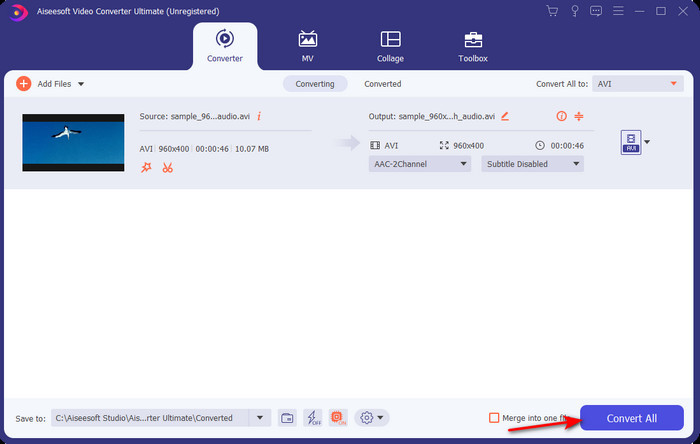
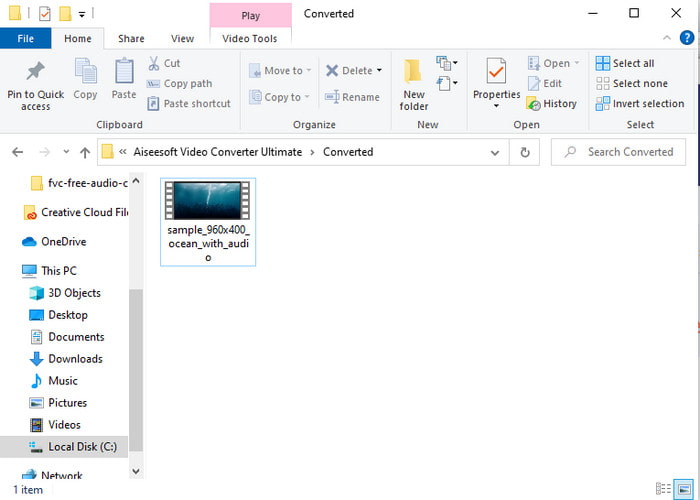
चरण 5. फ़ाइल को डाउनलोड होने में कुछ ही मिनट लगेंगे और प्रक्रिया पूरी होने पर कनवर्ट की गई फ़ाइल वाले फ़ॉर्मैट के साथ एक फ़ोल्डर खुल जाएगा। अब उस फ़ाइल पर क्लिक करें और अपनी MPEG फ़ाइल के नए कनवर्टेड फ़ॉर्मैट को चलाकर देखें।.
2. एफएफएमपीईजी
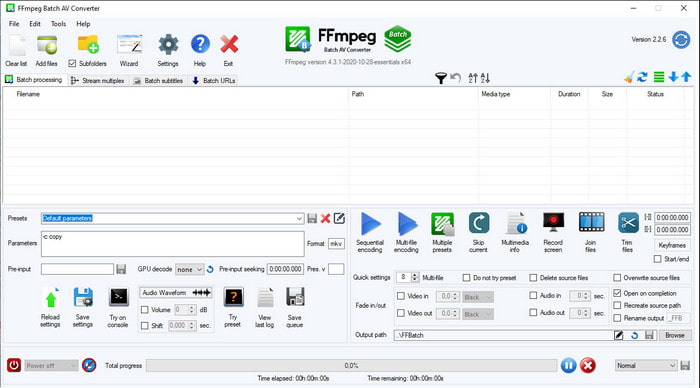
इस सूची में एक और उपलब्ध सॉफ़्टवेयर है FFmpeg। यदि आप ओपन‑सोर्स सॉफ़्टवेयर की तलाश में हैं, तो यह वेब पर मिलने वाले विकल्पों में से एक है। हालाँकि, इस टूल का इंटरफ़ेस समझना काफ़ी मुश्किल है, खासकर शुरुआती और कई अनुभवी उपयोगकर्ताओं के लिए भी। यहाँ कन्वर्ज़न की प्रक्रिया सामान्यतः बहुत अच्छी है और आउटपुट भी अन्य कनवर्टरों की तरह उच्च गुणवत्ता का मिलता है। तो यदि आप FFmpeg का उपयोग करके MPEG से AVI में कन्वर्ट करना चाहते हैं, तो नीचे दिए गए चरणों का पालन करें, जिन्हें हमने समझने में आसान बना दिया है।.
चरण 1. अपने डेस्कटॉप पर FFmpeg डाउनलोड करें और एक नया फ़ोल्डर बनाएँ, फिर उसके अंदर डाउनलोड किए गए ज़िप फ़ाइल को अनज़िप करें।.
चरण 2. अपने Window पर CDM (कमांड प्रॉम्प्ट) खोजें और उसे खोलें।.
चरण 3. कमांड प्रॉम्प्ट के माध्यम से फ़ाइल के स्थान पर जाएँ, फिर यह कोड टाइप करें: ffmpeg -i input.mpeg -vn -ar 44100 -ac 2 -b:a 192k output.avi और प्रक्रिया शुरू करने के लिए कीबोर्ड पर Enter दबाएँ।.
एमपीईजी को एवीआई प्रारूप में ऑनलाइन बदलने के लिए प्रयुक्त सर्वश्रेष्ठ कनवर्टर का भाग 3
3. एफवीसी फ्री वीडियो कन्वर्टर
यदि आप सबसे अच्छा मुफ़्त ऑनलाइन MPEG से AVI कनवर्टर ढूँढ रहे हैं, तो FVC Free Video Converter एक ऐसा ऑनलाइन कनवर्टर है जो आपकी ज़रूरत के अनुरूप होगा। इसकी वेब‑टूल इंटरफ़ेस की सादगी इसकी खासियत है। साथ ही, इस ऑनलाइन टूल की एक बड़ी बात यह है कि आप इसे अपने पसंदीदा ब्राउज़र से आसानी से एक्सेस कर सकते हैं। इसके अलावा, इस टूल से कन्वर्ट करने पर कोई सीमा नहीं है, यानी आप कभी भी, किसी भी फ़ॉर्मैट को कन्वर्ट कर सकते हैं। हालाँकि, FVC Video Converter Ultimate की तरह यहाँ आप बैच कन्वर्ज़न नहीं कर सकते। अब यदि आप इस ऑनलाइन टूल को आज़माना और उपयोग करना चाहते हैं, तो नीचे दिए गए चरणों का पालन करें।.
चरण 1. FVC कनवर्टर की मुख्य वेबसाइट पर जाने के लिए पहले इस लिंक पर क्लिक करना ज़रूरी है।.
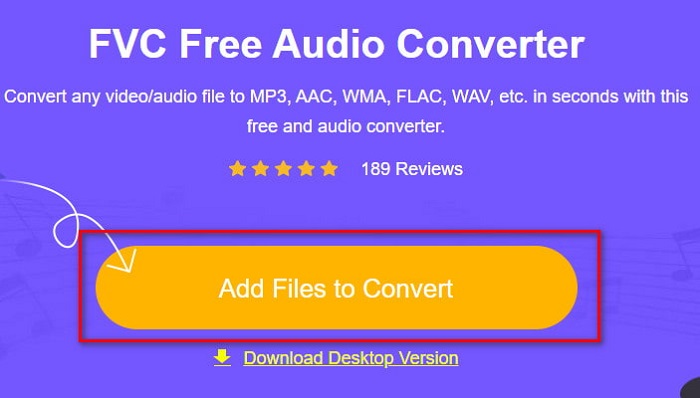
चरण 2. Add Files to Convert पर क्लिक करें, इसके बाद वेब‑टूल लॉन्च होगा और एक फ़ोल्डर खुल जाएगा। वहाँ से अपनी फ़ाइल ढूँढें और Open पर क्लिक करें।.
चरण 3. जब वेब‑टूल पूरी तरह लॉन्च हो जाए, तो इस सेक्शन में प्रस्तुत फ़ॉर्मैट्स में से अपना इच्छित फ़ॉर्मैट चुनें।.
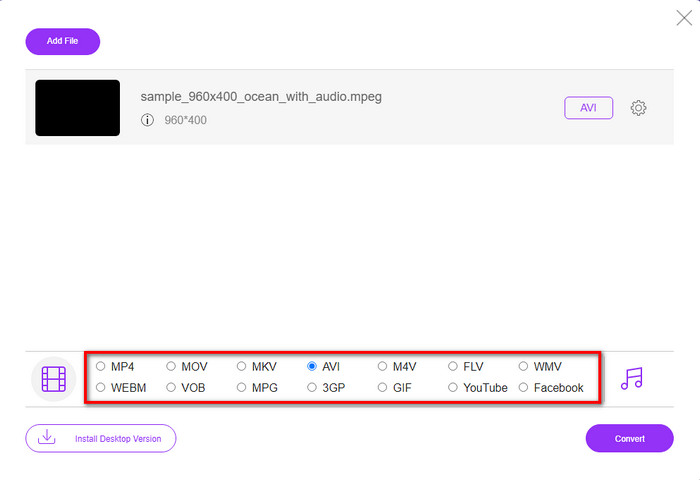
चरण 4. फ़ॉर्मैट चुन लेने के बाद, अब कन्वर्ज़न शुरू करने का समय है; इसके लिए Convert बटन पर क्लिक करें।.
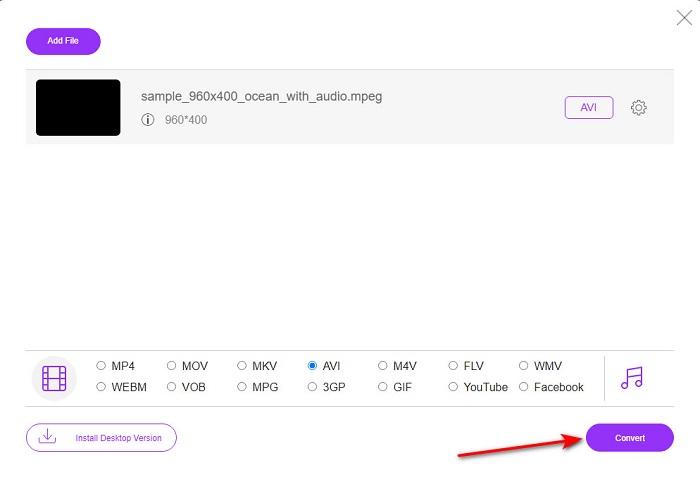
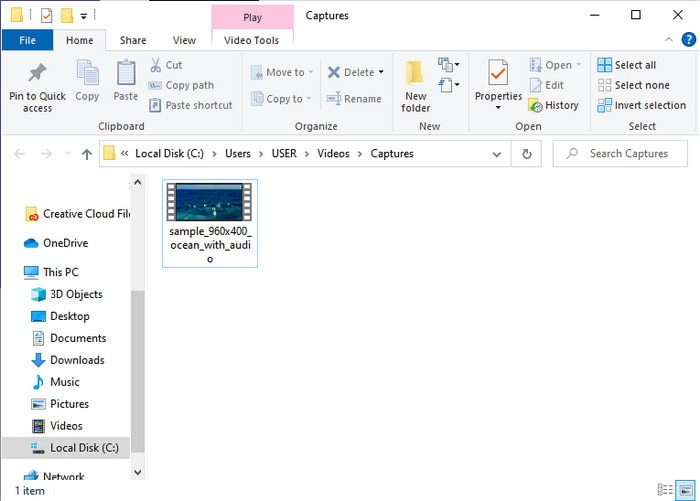
चरण 5. प्रक्रिया शुरू होने के लिए थोड़ी देर प्रतीक्षा करें। प्रक्रिया पूरी हो जाने पर आपके द्वारा पहले चुनी गई कनवर्टेड फ़ाइल वाला एक फ़ोल्डर दिखाई देगा।.
4. फ्रीकॉनवर्ट.कॉम
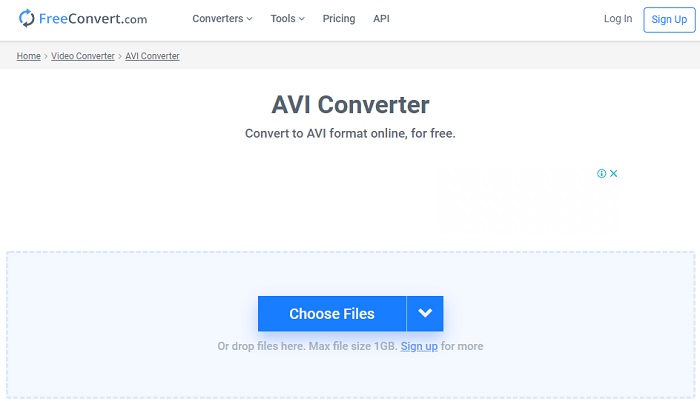
ऊपर बताए गए ऑनलाइन टूल की तरह ही यह एक और ऑनलाइन टूल है जिसका आप उपयोग कर सकते हैं, Freeconvert.com। यह वेब‑टूल इंटरनेट उपयोगकर्ताओं के बीच पहले से ही काफ़ी लोकप्रिय है। कई उपयोगकर्ता इसकी आसानी और अन्य सुविधाओं की वजह से इसकी काफ़ी सराहना करते हैं। हालाँकि, यदि आप इस वेब‑टूल को चुनते हैं, तो एक बड़ा नुकसान यह है कि यह सीमित फ़ॉर्मैट्स को ही सपोर्ट करता है। दूसरा यह कि यहाँ कन्वर्ज़न की प्रक्रिया अपेक्षा से कुछ धीमी है। अब यदि आप जानना चाहते हैं कि इस ऑनलाइन कनवर्टर का उपयोग कैसे करें, तो नीचे दिए गए चरणों का पालन करें।.
चरण 1. अपने ब्राउज़र में freeconvert.com वेबसाइट खोजें। फिर Video Converters के अंतर्गत AVI पर क्लिक करें।.
चरण 2. Choose File दबाएँ और जो फ़ोल्डर खुलेगा उसमें से MPEG फ़ाइल चुनें। फ़ाइल चुनने के बाद Convert To AVI पर क्लिक करें।.
चरण 3. अपलोडिंग की प्रक्रिया पूरी होने तक प्रतीक्षा करें, फिर फ़ाइल को सेव करने के लिए Download AVI पर क्लिक करें।.
भाग 4. एमपीईजी से एवीआई रूपांतरण के बारे में अक्सर पूछे जाने वाले प्रश्न
क्या एमपीईजी को परिवर्तित करने से गुणवत्ता कम हो जाती है?
खैर, यह इस बात पर निर्भर करता है कि आप इसे किस प्रारूप में बदलते हैं। इसलिए, यदि आप अपने एमपीईजी को जीआईएफ में बदलते हैं तो भारी बदलाव की अपेक्षा करें क्योंकि यह अन्य प्रारूप की तुलना में कम रंग संयोजन का समर्थन करता है। हालाँकि, यदि आप GIF के अलावा किसी अन्य प्रारूप का उपयोग करते हैं तो कोई नुकसान नहीं होने की उम्मीद है।
एमपीईजी हानिपूर्ण या दोषरहित हैं?
एमपीईजी हानिपूर्ण संपीड़न का समर्थन करता है इसलिए यदि आप इस प्रारूप का उपयोग करते हैं तो एक छोटे फ़ाइल आकार की अपेक्षा करें, भले ही आपके पास एक लंबा वीडियो और ऑडियो हो।
क्या एमपीईजी एक अच्छा प्रारूप है?
इससे पहले कि यह सबसे अच्छे प्रारूपों में से एक था जिसका उपयोग आप अपनी डीवीडी पर डेटा स्टोर करने के लिए कर सकते हैं। हालांकि, इस युग में, डेटा स्टोर करने के लिए एमपीईजी सबसे अच्छा विकल्प नहीं है। लेकिन अगर आप इसे डीवीडी, सीडी या ब्लू-रे पर स्टोर करना चाहते हैं और उन्हें बहुत तेजी से स्थानांतरित करना चाहते हैं, तो यह एक विकल्प होना चाहिए।
निष्कर्ष
संक्षेप में, यहां प्रस्तुत सभी ऑनलाइन और ऑफलाइन सॉफ्टवेयर प्रारूप को बदलने के लिए उपयोग किए जाने के लिए बहुत अच्छे हैं। हालाँकि, एक उपकरण है जो यह साबित करता है कि आप FVC वीडियो कन्वर्टर अल्टीमेट के साथ आसानी से एक अभूतपूर्व रूपांतरण प्राप्त कर सकते हैं। वास्तव में, हम इसे 3 शब्दों में समझा सकते हैं और यह प्रयोग करने में आसान, प्रभावी और सुरक्षित भी है। तो, अगर आप महानता हासिल करना चाहते हैं, तो अभी इस टूल को डाउनलोड करें और इसे आजमाएं।
-
 विंडोज, मैक, ऑनलाइन पर मुफ्त के लिए MP4 फ़ाइलों के लिए एमपीईजी कन्वर्ट करने के लिए कैसे
 अपने कंप्यूटर पर एमपीईजी को MP4 फ़ाइलों में बदलने के लिए 3 मुफ्त तरीके पढ़ें और प्राप्त करें। आप एमपीईजी को MP4 प्रारूप में आसानी से चालू करने के लिए ऑनलाइन और डेस्कटॉप वीडियो कन्वर्टर्स का उपयोग कर सकते हैं।
-
 [2021] एमपीईजी को एमपी3 में बदलने के लिए सर्वोत्तम उपकरण और आसान तरीके
 यह लेख मुख्य रूप से इस बारे में बात करता है कि आप अपने एमपीईजी वीडियो को एमपी3 पर सूची में सबसे विश्वसनीय टूल के उपयोग से कैसे परिवर्तित कर सकते हैं।
-
 7 मुफ्त वीडियो कन्वर्टर्स के साथ AVI फ़ाइलों को MP4 कन्वर्ट करने के लिए ट्यूटोरियल
 AVI को MP4 वीडियो में बदलने के सभी मुफ्त तरीके प्राप्त करना चाहते हैं? आपको यह लेख मिस नहीं करना चाहिए। विंडोज, मैक, आईफोन, एंड्रॉइड और ऑनलाइन पर एवीआई फाइलों को एमपी4 में मुफ्त में बदलने के 7 तरीके यहां दिए गए हैं।
