


 वीडियो कनवर्टर अंतिम
 स्क्रीन अभिलेखी
 वीडियो मरम्मत
विवरण आपको एमपीजी को एवीआई में परिवर्तित करने में प्रबुद्ध होने की आवश्यकता है
सामान्य तौर पर, एक MPG फ़ाइल एक सामान्य वीडियो फ़ाइल होती है जो मूविंग पिक्चर एक्सपर्ट्स ग्रुप (MPEG) द्वारा मानकीकृत डिजिटल वीडियो फ़ॉर्मेट का उपयोग करती है। यह वीडियो, ऑडियो और मेटाडेटा को एक ही इंटरलीव्ड फ़ाइल में संग्रहीत करती है। इंटरनेट के माध्यम से पहुँचाए जाने वाले फ़िल्मों को बनाने के लिए MPG फ़ाइलों का उपयोग करना आम बात है। यदि आपके पास ऐसे किसी कन्वर्टर के बारे में जानकारी या पृष्ठभूमि नहीं है जो MPG से AVI को सपोर्ट या कन्वर्ट करता हो, तो इस प्रकार का वीडियो फ़ॉर्मेट बदलना आसान नहीं होता। वह रूपांतरण प्रक्रिया हासिल करने के लिए, जिसकी आपको आवश्यकता है, आपको किन‑किन विवरणों और विकल्पों पर विचार करना चाहिए, यह जानने के लिए आगे पढ़ते रहें।.
भाग 1. एमपीजी और एवीआई - एक सिंहावलोकन
MPEG एक वीडियो फ़ाइल फ़ॉर्मेट है जिसे मूविंग पिक्चर एक्सपर्ट्स ग्रुप ने विकसित किया है; यही समूह आपको MP3 और MP4 जैसे फ़ॉर्मेट भी दे चुका है। इसके उपयोग के आधार पर, MPEG या तो MPEG-1 या MPEG-2 फ़ाइल कम्प्रेशन का उपयोग करेगा।.
VHS‑स्तर के कच्चे वीडियो और CD म्यूज़िक को 1.5 मेगाबिट प्रति सेकंड तक कंप्रेस करने के लिए, और वह भी बहुत अधिक गुणवत्ता खोए बिना, MPEG-1 बनाया गया था। नतीजतन, यह दुनिया के सबसे लोकप्रिय और व्यापक रूप से संगत वीडियो/ऑडियो फ़ॉर्मेट्स में से एक बन गया है। MPEG-1 के लिए वीडियो डेटा आम तौर पर 30 फ़्रेम प्रति सेकंड की दर से, लगभग 352×240 पिक्सेल के रेजोल्यूशन के साथ प्रसारित किया जाता है।.
हालाँकि, विंडोज़ कंप्यूटर AVI को डिफ़ॉल्ट वीडियो फ़ॉर्मेट के रूप में उपयोग करते हैं। DivX या XviD जैसे मल्टीमीडिया कंटेनर फ़ॉर्मेट में, ऑडियो और वीडियो को कई कोडेक्स का उपयोग करके संग्रहीत किया जा सकता है। MPEG और MOV जैसे कई वैकल्पिक वीडियो फ़ॉर्मेट, AVI फ़ाइल की तुलना में कम कम्प्रेशन और अधिक स्टोरेज स्पेस का उपयोग करते हैं। बिना कम्प्रेशन वाली AVI फ़ाइलें भी तैयार की जा सकती हैं। इसका परिणाम अत्यधिक बड़े फ़ाइल आकारों में होता है — प्रति मिनट वीडियो के लगभग 2–3 GB — क्योंकि अब फ़ाइलें लॉसलेस होती हैं। आप फ़ाइल को चाहे जितनी बार खोलें या सेव करें, लॉसलेस फ़ाइल अपनी गुणवत्ता बनाए रखती है। अतिरिक्त लाभों में यह भी शामिल है कि प्लेबैक के लिए किसी कोडेक की आवश्यकता नहीं होती।.
भाग 2. एमपीजी को एवीआई में बदलने के लिए सबसे प्रभावी सॉफ्टवेयर
यदि आप कभी यह सोचते रहे हैं कि MPG वीडियो फ़ाइल को मुफ्त में AVI में कैसे बदला जाए, तो यह नया और बेहतरीन सॉफ़्टवेयर वही है जिसे यह लेख आपके उपयोग के लिए सुझाता है। Video Converter Ultimate एक फ्री‑टू‑डाउनलोड सॉफ़्टवेयर है, जो Windows और Mac दोनों पर उपलब्ध है, और जो आपकी MPG फ़ाइल को ऑनलाइन फ़ाइल कन्वर्ज़न की तुलना में बहुत तेज़ी से AVI में बदल सकता है। इन दो वीडियो फ़ाइलों के अलावा, यह सॉफ़्टवेयर आपके लिए चुनने हेतु कई अन्य फ़ॉर्मेट्स को भी सपोर्ट करता है। यह सर्वश्रेष्ठ है क्योंकि यदि आप इस सॉफ़्टवेयर का उपयोग करते हैं तो आपको उच्च गुणवत्ता वाला आउटपुट मिलता है। अब जब आपको इस सॉफ़्टवेयर की क्षमताओं की झलक मिल गई है, तो आइए कमर कसें और देखें कि यह सॉफ़्टवेयर कैसे काम करता है:
Step 1. शुरू करने के लिए, नीचे दिए गए Free Download बटन पर बस क्लिक करें। डाउनलोड पूरा हो जाने के बाद, आप सॉफ़्टवेयर को Windows या Mac में से किसी पर भी डाउनलोड करने का विकल्प चुन सकते हैं। जब सॉफ़्टवेयर आपके कंप्यूटर के डेस्कटॉप पर इंस्टॉल हो जाए, तो आप Start Now बटन पर क्लिक करके इसका उपयोग शुरू कर सकते हैं।.
फ्री डाउनलोडWindows 7 या बाद के संस्करण के लिएसुरक्षित डाउनलोड
फ्री डाउनलोडMacOS 10.7 या बाद के संस्करण के लिएसुरक्षित डाउनलोड
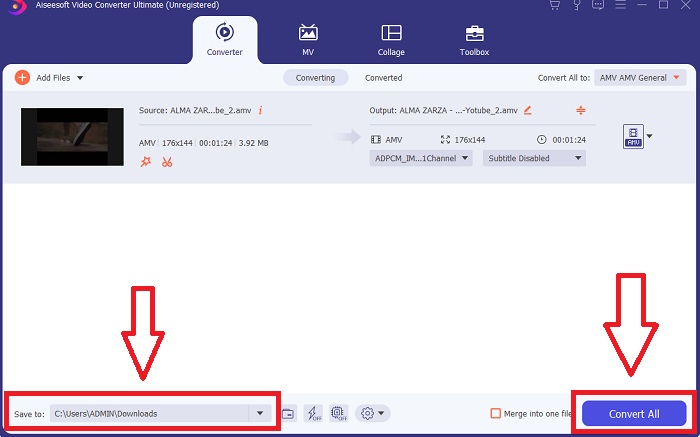
Step 2. आपने जो सॉफ़्टवेयर अभी डाउनलोड किया है उसे खोलें। पहली बार सॉफ़्टवेयर खोलने पर आपको Converter इंटरफ़ेस वाली एक विंडो दिखाई देगी। यहीं से आप अपने वीडियो को ट्रान्सकोड करने की प्रक्रिया शुरू करेंगे।.
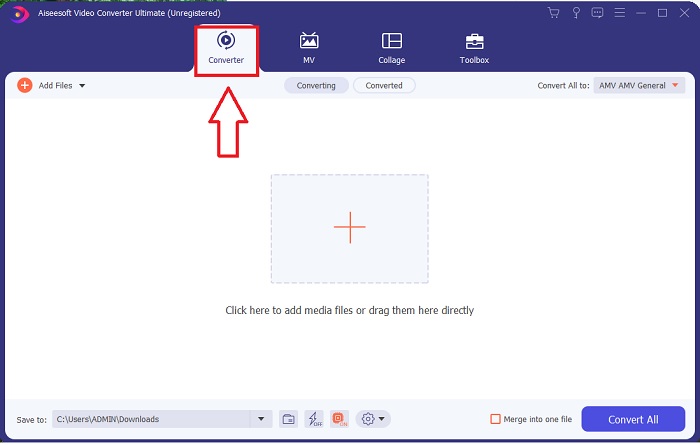
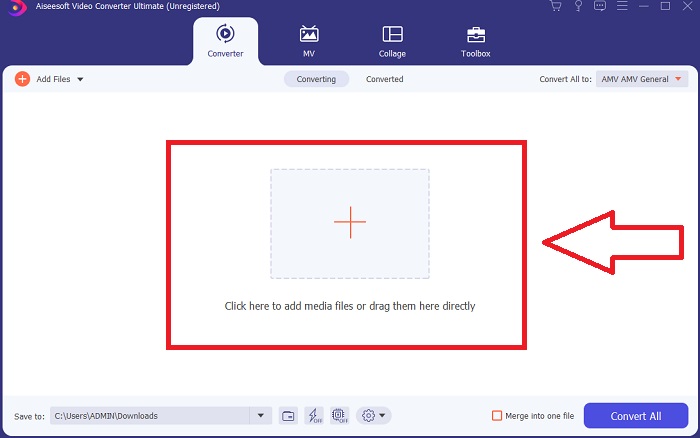
Step 3. आप अपनी फ़ाइलों को सॉफ़्टवेयर में इम्पोर्ट करके रूपांतरण प्रक्रिया शुरू कर सकते हैं। किसी वीडियो को कन्वर्ट करना उतना ही आसान है जितना कि उसे Plus प्रतीक पर खींचकर छोड़ देना।.
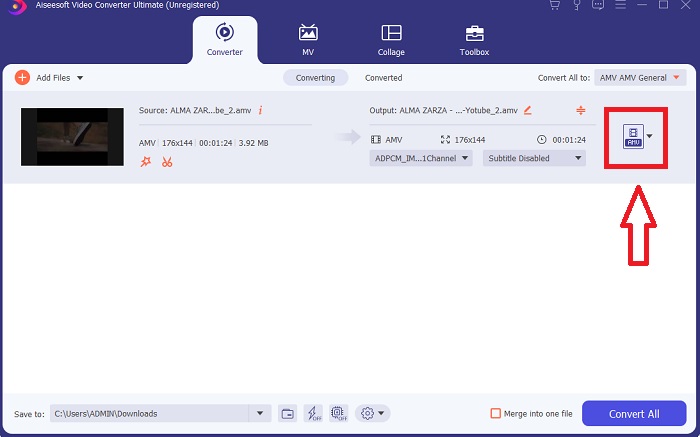
Step 4. किसी वीडियो फ़ॉर्मेट पर राइट‑क्लिक करें और Save to या Save to external storage चुनें। ड्रॉप‑डाउन विकल्प से AVI फ़ाइल प्रकार को खोजें और चुनें। एक बार AVI वीडियो फ़ाइल प्रकार चुन लेने के बाद आपके पास वीडियो गुणवत्ता संबंधी कई सेटिंग्स होंगी। यदि आपकी वांछित वीडियो आउटपुट सूची में नहीं है, तो आप गुणवत्ता सेटिंग्स को बदल सकते हैं। गियर आइकन की मदद से आप डिस्प्ले का रेजोल्यूशन, फ़्रेम रेट और ऑडियो गुणवत्ता बदल सकते हैं। अपने संपादनों को सहेजने के लिए Create New बटन पर क्लिक करें।.
Step 5. जब आपने चुने हुए वीडियो को संपादित कर लिया हो और वह आपके कंप्यूटर में ट्रांसफ़र किए जाने के लिए तैयार हो, तो Convert All पर क्लिक करें।.
भाग 3. त्वरित सुझाव: अन्य प्रभावी उपकरण जिन पर आपको विचार करना चाहिए
विधि 1. CloudConvert का उपयोग करें
CloudConvert एक ऑनलाइन वीडियो कनवर्टर है। यह ऑनलाइन कन्वर्टर MP4, WEBM और AVI को अन्य फॉर्मेट के साथ सपोर्ट करता है। आप वीडियो की गुणवत्ता, रिज़ॉल्यूशन और फ़ाइल का आकार चुन सकते हैं। यदि आप इस ऑनलाइन टूल में एमपीजी को एवीआई में बदलने के बारे में सोच रहे हैं, तो इसका उपयोग करने की प्रक्रिया यहां दी गई है:
Step 1. अपने कंप्यूटर से फ़ाइल अपलोड करने के लिए Select the File पर क्लिक करें।.
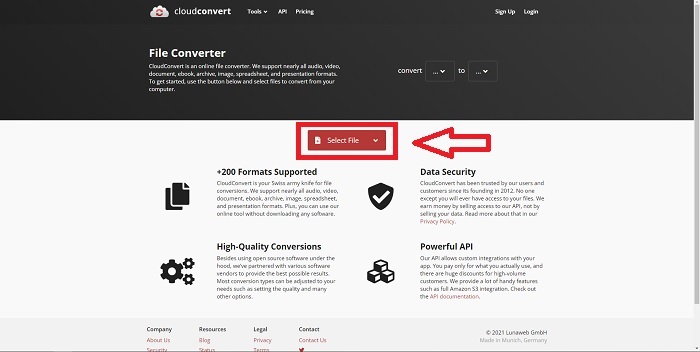
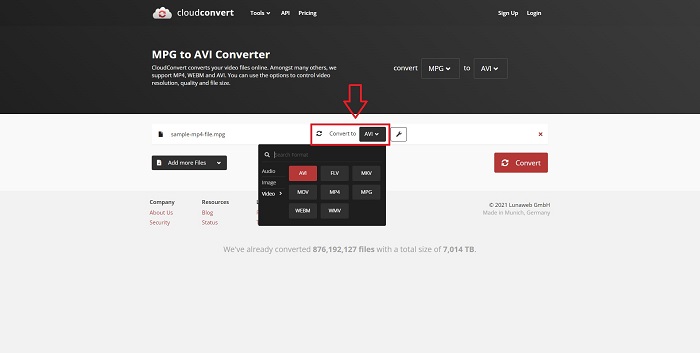
Step 2. फिर, रिंच आइकन के बगल में दिए गए फ़ॉर्मेट सेक्शन पर क्लिक करके यह चुनें कि आपकी फ़ाइल किस फ़ॉर्मेट में कन्वर्ट होगी। आप कन्वर्ट करने के लिए और भी फ़ाइलें जोड़ने का विकल्प भी रखते हैं।.
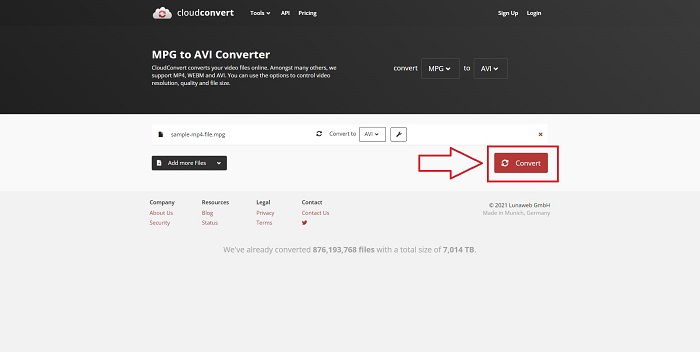
Step 3. आपने जो सभी फ़ाइलें अपलोड की हैं, उन्हें कन्वर्ट करने के लिए Convert पर क्लिक करें।.
विधि 2. ज़मज़ार . का प्रयोग करें
ज़मज़ार फ़ाइलों को परिवर्तित करने के लिए एक वेब-आधारित उपकरण है। किसी भी सॉफ़्टवेयर को डाउनलोड किए बिना विभिन्न स्वरूपों में रूपांतरण किए जा सकते हैं। ज़मज़ार एक यूआरएल में टाइप करके या एक या अधिक फाइलें अपलोड करके एक फाइल को एक प्रारूप से दूसरे प्रारूप में, जैसे एडोब पीडीएफ को माइक्रोसॉफ्ट वर्ड दस्तावेज़ में परिवर्तित कर सकता है (जब तक कि वे सभी एक ही प्रारूप में हों)। इस ऑनलाइन टूल के बारे में जानकारी हासिल करने के लिए, यहां आपके लिए दिए गए चरण दिए गए हैं:
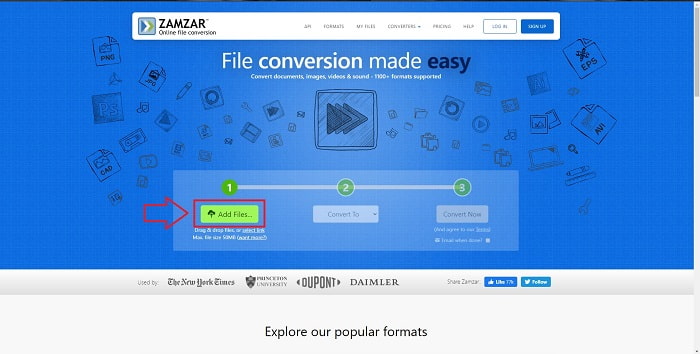
Step 1. किसी भी सर्च इंजन पर Zamzar खोजें। वेबसाइट पर क्लिक करने के बाद, आप इसके इंटरफ़ेस में Add Files पर क्लिक करके अब फ़ाइल अपलोड कर सकते हैं।.
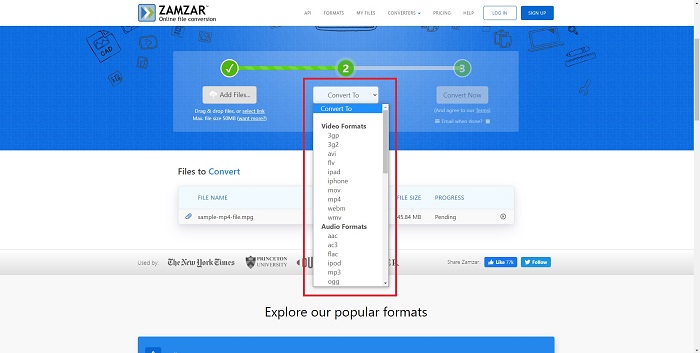
Step 2. अगला चरण यह है कि आप वह फ़ाइल चुनें जिसे आप कन्वर्ट करना चाहते हैं और फिर उसे कन्वर्ट करें। यह ऑनलाइन टूल जितने भी फ़ॉर्मेट्स को सपोर्ट करता है, उन्हें देखने के लिए Convert To पर क्लिक करें।.
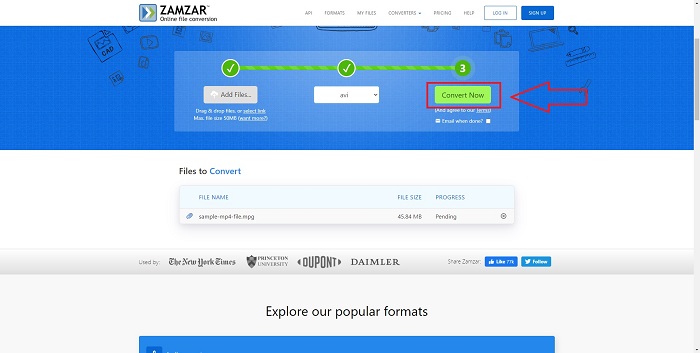
Step 3. फ़ाइल को कन्वर्ट करने के लिए Convert Now पर क्लिक करें।.
भाग 4. एमपीजी और एवीआई के बारे में अक्सर पूछे जाने वाले प्रश्न
क्या एवीआई या एमपीजी बेहतर है?
एवीआई फाइलों के साथ भंडारण संभव है, जबकि एमपीईजी फाइलों के साथ वीडियो रिकॉर्डिंग पूरी की जाती है। एवीआई एमपीईजी से थोड़ा बेहतर है; हालाँकि, यदि एमपीईजी उपयोग करने के लिए प्रारूप है, तो आप डीवीडी वीडियो को बर्न करना चाहते हैं। Microsoft Windows ने Apple के MOV फ़ाइल स्वरूप के जवाब में AVI फ़ाइल स्वरूप विकसित किया, जबकि मूविंग पिक्चर ग्रुप ने MPG प्रारूप विकसित किया।
एवीआई के फायदे और नुकसान क्या हैं?
अन्य फ़ाइल स्वरूपों की तुलना में, यदि संपीड़ित न हो तो AVI फ़ाइलें बहुत बड़ी हो सकती हैं। आपको AVI फ़ाइल के लाभों के बदले में कुछ डिस्क स्थान देने के लिए तैयार रहना चाहिए, क्योंकि आप उतनी फ़ाइलें संग्रहीत नहीं कर पाएंगे, जितनी आप अन्यथा करेंगे। यदि आप किसी AVI फ़ाइल को एक निश्चित बिंदु से आगे ऑनलाइन संपीड़ित करते हैं, तो परिणामस्वरूप वीडियो की गुणवत्ता कम हो जाएगी।
AVI या MPG छोटे आकार का कौन सा है?
इंटरनेट पर बड़े आकार की फ़ाइलों को डाउनलोड होने में अधिक समय लगता है। इसलिए यह तर्कसंगत है कि फिल्मों को छोटे फ़ाइल आकार में एन्कोड किया जाए, भले ही इससे गुणवत्ता में थोड़ी‑सी कमी आ जाए। प्लेबैक के मामले में, AVI को अभी भी MPG पर तरजीह दी जाती है, क्योंकि अधिक सेट‑टॉप प्लेयर्स AVI फ़ाइलों को चला सकते हैं, जबकि MPG फ़ाइलों को कम। यदि आप अपने MPG फ़ाइलों को अपने कंप्यूटर पर चलाना चाहते हैं, तो और अधिक जानने के लिए यहाँ क्लिक करें।.
निष्कर्ष
हमने जो भी चर्चा की है, उसका निष्कर्ष यह है कि Video Converter Ultimate वह सर्वोत्तम कन्वर्टर है जिसे आपको ऊपर सूचीबद्ध सभी ऑनलाइन MPG से AVI कन्वर्टर्स की तुलना में चुनने पर विचार करना चाहिए। यह सॉफ़्टवेयर मुफ़्त है, और इसमें ऑनलाइन कन्वर्टर टूल की तुलना में सबसे तेज़ कन्वर्ज़न प्रक्रिया है। यह कई फ़ॉर्मेट्स को सपोर्ट करता है और आपको उच्च गुणवत्ता वाला वीडियो आउटपुट प्रदान करता है। इसके अलावा, ऐसा कोई कारण नहीं है कि आपको इस सॉफ़्टवेयर का उपयोग नहीं करना चाहिए।.
-
 विंडोज, मैक, ऑनलाइन पर मुफ्त के लिए MP4 फ़ाइलों के लिए एमपीईजी कन्वर्ट करने के लिए कैसे
 अपने कंप्यूटर पर एमपीईजी को MP4 फ़ाइलों में बदलने के लिए 3 मुफ्त तरीके पढ़ें और प्राप्त करें। आप एमपीईजी को MP4 प्रारूप में आसानी से चालू करने के लिए ऑनलाइन और डेस्कटॉप वीडियो कन्वर्टर्स का उपयोग कर सकते हैं।
-
 [2025] MPEG को MP3 में बदलने के सर्वोत्तम उपकरण और आसान तरीके
 यह लेख मुख्य रूप से इस बारे में बात करता है कि आप अपने एमपीईजी वीडियो को एमपी3 पर सूची में सबसे विश्वसनीय टूल के उपयोग से कैसे परिवर्तित कर सकते हैं।
-
 पीसी और मैक पर MOV को AVI में बदलने के 4 कुशल तरीके [2025]
 क्या आप जानना चाहते हैं कि वेब पर AVI कनवर्टर के लिए बेहतरीन MOV क्या है? और FVC अल्टीमेट वीडियो कन्वर्टर आपके लिए एक क्यों हो सकता है।
