


 वीडियो कनवर्टर अंतिम
 स्क्रीन अभिलेखी
 वीडियो मरम्मत
 सुरक्षित डाउनलोड
मैक और विंडोज पर OGV को M4V में बदलने के लिए 2 सर्वश्रेष्ठ ध्यान देने योग्य तरीके
क्या आपको अंदाज़ा नहीं है कि OGV को M4V में कैसे बदलें? तो इस मार्गदर्शक लेख पर जाएँ, और आपको अन्य आवश्यक जानकारी भी मिलेगी जिसकी आपको ज़रूरत है। यह लेख Mac और Windows पर OGV को M4V में बदलने के लिए बिना किसी परेशानी वाली प्रक्रियाएँ प्रस्तुत करेगा। क्या आप इन तरीकों को सीखने के लिए उत्साहित हैं? तो पूरा लेख पढ़ें!

भाग 1: OGV और M4V का परिचय
| नाम | ओजीवी | M4V |
| फ़ाइल का नाम | ओजीजी वॉर्बिस वीडियो फ़ाइल | खूंटी-4 वीडियो |
| दस्तावेज़ विस्तारण | .ogv | .m4v |
| द्वारा विकसित | Xiph.org | एप्पल इंक. |
| विवरण | माइक्रोसॉफ्ट मीडिया प्लेयर मुख्य रूप से ओजीवी फाइलों के लिए जिम्मेदार है। OGG वीडियो फ़ाइलों में "OGV" फ़ाइल नाम एक्सटेंशन होता है। मीडिया प्लेबैक के दौरान, एक OGV फ़ाइल में वीडियो, ऑडियो, टेक्स्ट, प्रेजेंटेशनल टेक्स्ट डेटा और मेटाडेटा की कई धाराएँ हो सकती हैं। थियोरा का उपयोग अक्सर उन वीडियो को एनकोड करने के लिए किया जाता है जो ओजीवी फाइलों के रूप में सहेजे जाते हैं। थियोरा कोडेक की बदौलत उच्च-गुणवत्ता वाले वीडियो कम बिटरेट पर संग्रहीत किए जा सकते हैं। यह एक खुला-स्रोत, हानिपूर्ण वीडियो संपीड़न विधि है। एक OGV फ़ाइल में, आप Daala, Tarkin, और Dirac वीडियो कोडेक को भी एकीकृत कर सकते हैं। OGV की ऑडियो स्ट्रीम को FLAC, Opus, Vorbis, या Speex के साथ एन्कोड किया जा सकता है। OGV फ़ाइलें VLC और अन्य जैसे वीडियो प्लेयर पर देखी और चलाई जा सकती हैं। | Apple ने M4V वीडियो प्रारूप विकसित किया। यह वीडियो रखने की एक विधि है और MP4 प्रारूप के समान है। हालाँकि, DRM कॉपी सुरक्षा इस बार M4V फ़ाइलों के लिए हो सकती है, जिससे फर्क पड़ता है। Apple अपने iTunes Store में M4V एन्कोडिंग मानक का उपयोग करता है। Apple का FairPlay कॉपी प्रोटेक्शन अवांछित M4V फाइल कॉपी को रोकने में मदद करता है। QuickTime फेयरप्ले DRM वाले M4V वीडियो को 'AVC0 मीडिया' के रूप में संदर्भित करता है। |
| टेक्निकल डिटेल | एक पिछड़ा-संगत सुपरसेट थियोरा वीडियो-संपीड़न प्रारूप को मूल रूप से VP3 वीडियो-संपीड़न प्रारूप के साथ संगत बनाता है। VP3 और Theora को बिना पुनर्संपीड़न के संयोजित किया जा सकता है क्योंकि Theora VP3 का सुपरसेट है। | अनधिकृत प्रतिकृति को रोकने के लिए M4V फ़ाइलों को Apple के FairPlay कॉपी सुरक्षा का उपयोग करके सुरक्षित किया जा सकता है। वीडियो खरीदने के लिए उपयोग किए गए खाते के साथ स्वीकृत (iTunes के माध्यम से) केवल कंप्यूटर ही FairPlay-सुरक्षित M4V फ़ाइल चला सकते हैं। |
| संबद्ध कार्यक्रम | FFmpeg एम प्लेयर VLC मीडिया प्लेयर | एप्पल आईट्यून ऐप्पल क्विकटाइम प्लेयर VLC मीडिया प्लेयर ज़ूम प्लेयर मीडिया प्लेयर क्लासिक के-मल्टीमीडिया प्लेयर सच्चा खिलाड़ी |
| माइम प्रकार | वीडियो/ओग | वीडियो/x-m4v |
भाग 2: ऑनलाइन टूल का उपयोग करके OGV को M4V में कैसे बदलें
OGV को आसानी से M4V फ़ाइल फ़ॉर्मेट में बदलने के लिए, आपको बस एक भरोसेमंद कनवर्टर की ज़रूरत है। तो, इस भाग में, हम आपको दिखाएँगे कि FVC Free Video Converter Online का उपयोग करके OGV को M4V में कैसे बदलें। इस टूल की मदद से आप MP4, MOV, VOB, MOV, AVI, FLV और अन्य कई फ़ाइलों को कनवर्ट कर सकते हैं। यह बैच कनवर्ज़न भी सपोर्ट करता है, ताकि आप एक साथ कई फ़ाइलों को बिना गुणवत्ता खोए बदल सकें। इसके अलावा, कुछ ही क्लिक में आप अपनी फ़ाइलों को कनवर्ट कर सकते हैं, क्योंकि इसका इंटरफ़ेस सहज और समझने में आसान है। इन बुनियादी प्रक्रियाओं से आप समझ सकते हैं कि यह वीडियो कनवर्टर शुरुआती उपयोगकर्ताओं के लिए उपयुक्त है। आप रेज़ॉल्यूशन को 1920x1080 तक समायोजित कर सकते हैं। आप बिटरेट को 20000 kbps तक बदल सकते हैं। अंत में, यह फ़्रेम रेट को 60fps तक बदल सकता है। साथ ही, आप ऑडियो सेटिंग्स में जाकर अपनी ऑडियो को भी संपादित कर सकते हैं। आप ऑडियो का बिटरेट और सैंपल रेट समायोजित कर सकते हैं। यह FLAC, MP3, AC3, AAC और अन्य ऑडियो फ़ॉर्मेट को भी सपोर्ट करता है।.
विशेषताएँ
◆ OGV, M4V, MP4, AVI, FLV, MKV, और अन्य जैसे विभिन्न वीडियो प्रारूपों को परिवर्तित करें।
◆ बैच रूपांतरण प्रदान करता है।
◆ वीडियो की बिटरेट, फ्रेम दर और रिज़ॉल्यूशन संपादित करें।
◆ यह MP3, AC3, AAC, FLAC, WAV, आदि जैसे ऑडियो प्रारूपों का समर्थन करता है।
◆ ऑडियो की बिटरेट और नमूना दर संपादित करें।
FVC फ्री वीडियो कन्वर्टर ऑनलाइन का उपयोग करके अपनी OGV फाइल को M4V फॉर्मेट में बदलें। नीचे दी गई सरल प्रक्रिया का पालन करें।
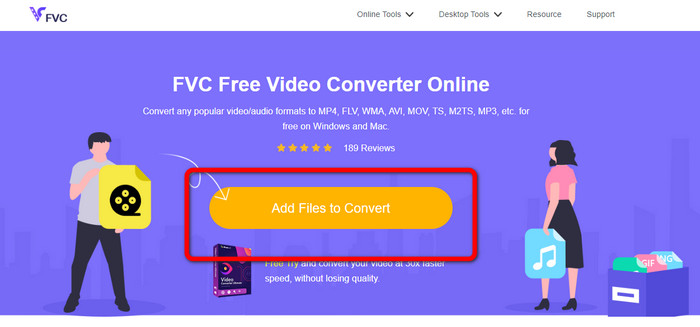
चरण 1: FVC Free Video Converter Online वेबसाइट पर जाएँ। फिर OGV वीडियो फ़ाइल अपलोड करने के लिए Add Files to Convert बटन पर क्लिक करें। आपका फ़ोल्डर आपकी स्क्रीन पर दिखाई देगा, और वहाँ से वह वीडियो चुनें जिसे आप कनवर्ट करना चाहते हैं।.
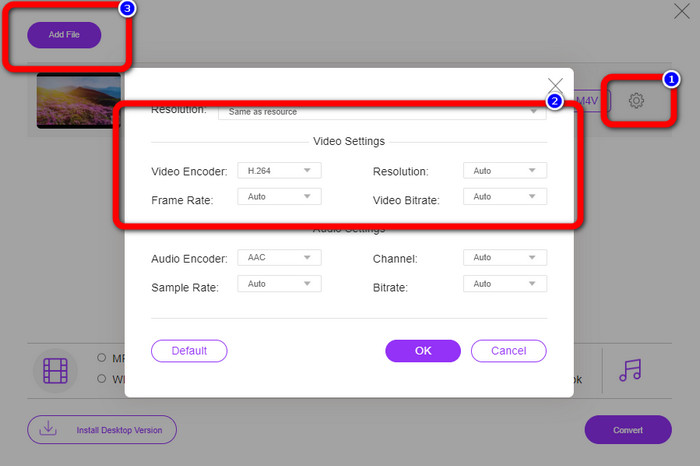
चरण 2: OGV वीडियो फ़ाइल अपलोड करने के बाद, आप Setting आइकन पर क्लिक करके बिटरेट, फ़्रेम रेट और रेज़ॉल्यूशन बदल सकते हैं। फिर OK पर क्लिक करें। साथ ही, यदि आप और फ़ाइलें जोड़ना चाहते हैं, तो इंटरफ़ेस के ऊपर बाएँ हिस्से में मौजूद Add File बटन दबा सकते हैं।.
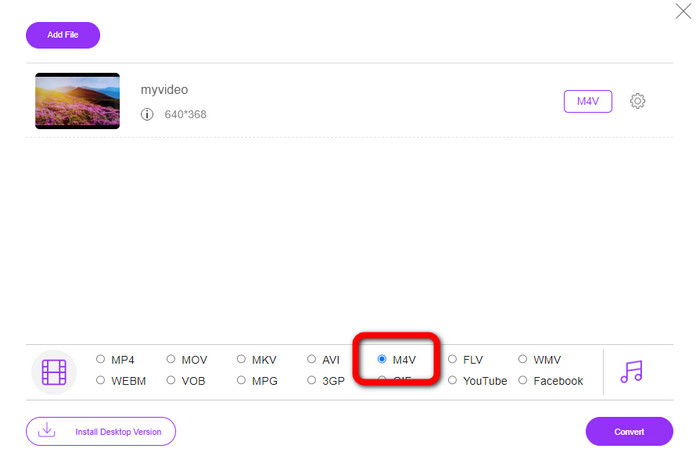
चरण 3: अपनी OGV वीडियो फ़ाइल में कुछ बदलाव करने के बाद, इंटरफ़ेस के निचले हिस्से में फ़ॉर्मेट विकल्पों से M4V फ़ाइल फ़ॉर्मेट चुनें। फिर अपना वीडियो अपनी पसंदीदा फ़ाइल लोकेशन पर सेव करें।.
भाग 3: OGV को M4V ऑफ़लाइन में बदलने के लिए आसान मार्गदर्शिका
ऑफ़लाइन एप्लिकेशन के संदर्भ में, आप Mac और Windows पर OGV को M4V में बदलने के लिए वीडियो कन्वर्टर अल्टीमेट का उपयोग कर सकते हैं। यह उपकरण एक शीर्ष पायदान डाउनलोड करने योग्य कनवर्टर है। यह कई फाइलों को आसानी से परिवर्तित कर सकता है क्योंकि यह उपयोगकर्ताओं को बैच रूपांतरण करने में सक्षम बनाता है। इसके अलावा, इसकी एक अति-तेज रूपांतरण प्रक्रिया है, जो अन्य कन्वर्टर्स की तुलना में 30 गुना तेज है। इस तरह, आप कई वीडियो को अकेले ही रूपांतरित कर सकते हैं। इसके अलावा, भले ही आप अपने वीडियो परिवर्तित कर रहे हों, फिर भी आप वीडियो संपादन टूल का उपयोग करके उन्हें अनुकूलित या संपादित कर सकते हैं। आप फ़िल्टर जोड़ सकते हैं, वीडियो काट सकते हैं, वीडियो बढ़ा सकते हैं और बहुत कुछ कर सकते हैं।
इसके अलावा, Video Converter Ultimate में और भी कई फ़ीचर हैं जिनका आप अनुभव कर सकते हैं। आप Audio Sync फ़ंक्शन की मदद से ऑडियो को वीडियो के साथ सिंक कर सकते हैं। साथ ही, यदि आप अपने वीडियो की वॉल्यूम बढ़ाना चाहते हैं, तो यह भी संभव है। यह टूल Volume Booster प्रदान करता है, जिसकी मदद से आप वॉल्यूम को 200% तक बढ़ा सकते हैं। इस वीडियो कनवर्टर का उपयोग करके आपको और भी सुविधाओं की खोज करनी चाहिए।.
विशेषताएँ
M4V, OGV, SWF, MP4, AVI, FLV, MOV, VOB, MKV, WMV, और अन्य जैसी वीडियो फ़ाइलों को कनवर्ट करें।
◆ एक आकर्षक कोलाज बना सकते हैं।
◆ वीडियो में सुधार के लिए वीडियो संपादन उपकरण प्रदान करता है, जैसे वीडियो बढ़ाने वाला, रंग सुधार, ट्रिमर, वॉटरमार्क रिमूवर, और बहुत कुछ।
◆ संगीत वीडियो बनाना उपलब्ध है।
◆ वीडियो की गति को समायोजित करें।
◆ वीडियो और ऑडियो कंप्रेसर प्रदान करता है
◆ 2डी से 3डी वीडियो को अनुकूलित करें
चरण 1: यदि आप Video Converter Ultimate डाउनलोड करना चाहते हैं, तो नीचे दिए गए Download बटन पर क्लिक करें। फिर इंस्टॉलेशन प्रक्रिया के बाद एप्लिकेशन लॉन्च करें।.
फ्री डाउनलोडWindows 7 या बाद के संस्करण के लिएसुरक्षित डाउनलोड
फ्री डाउनलोडMacOS 10.7 या बाद के संस्करण के लिएसुरक्षित डाउनलोड
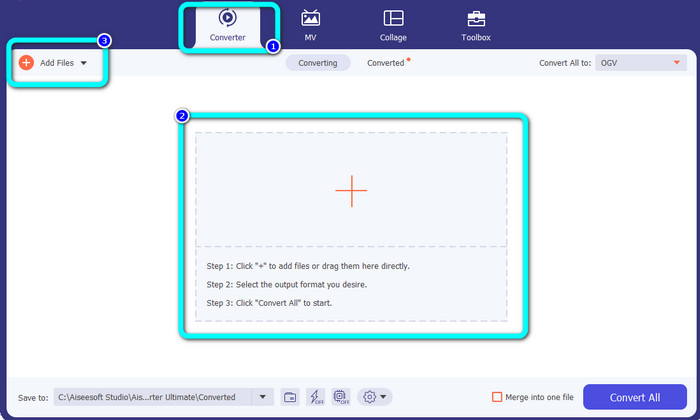
चरण 2: Converter पैनल चुनें और OGV वीडियो फ़ाइल जोड़ने के लिए Plus साइन बटन पर क्लिक करें। आप Add Files बटन पर भी क्लिक कर सकते हैं या फ़ाइल को सीधे बॉक्स में ड्रैग‑एंड‑ड्रॉप कर सकते हैं।.
चरण 3: यदि आप अपनी OGV वीडियो को एडिट करना चाहते हैं, तो पहले बॉक्स में दिए गए आइकन पर क्लिक करें। इस तरह आप अपने वीडियो को क्रॉप और रोटेट कर सकते हैं तथा कुछ फ़िल्टर, वॉटरमार्क और अन्य इफ़ेक्ट जोड़ सकते हैं। फिर संपादन करने के बाद OK चुनें।.
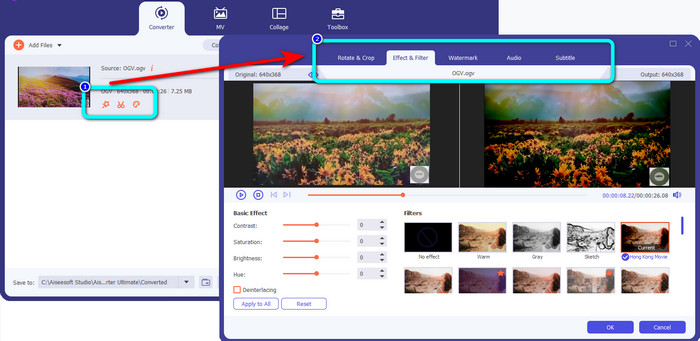
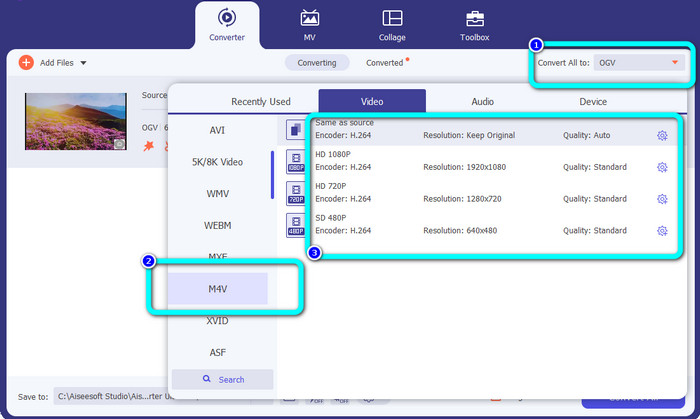
चरण 4: इसके बाद, OGV को M4V में कनवर्ट करने के लिए, Convert All to बटन पर जाएँ ताकि फ़ॉर्मेट विकल्प दिखाई दें। M4V फ़ाइल फ़ॉर्मेट चुनें और अपना इच्छित रेज़ॉल्यूशन सेलेक्ट करें।.
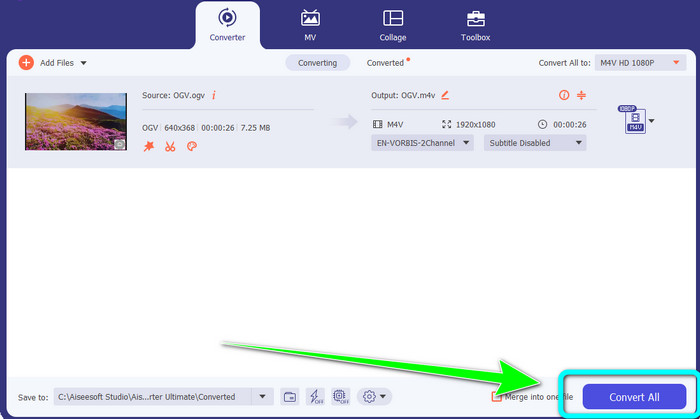
चरण 5: अंतिम चरण के रूप में, Convert All बटन पर क्लिक करें ताकि OGV फ़ाइल को M4V फ़ॉर्मेट में कनवर्ट करके आपका वीडियो आपके डिवाइस पर सेव हो जाए।.
अधिक पढ़ें:
M2TS को M4V में कनवर्ट करने के दो बेहतरीन तरीके
MXF को M4V में बदलने के सर्वोत्तम तरीके जानें और खोजें
भाग 4: OGV को M4V में बदलने के बारे में अक्सर पूछे जाने वाले प्रश्न
क्या ओजीवी हानिकारक है?
हाँ। OGV प्रारूप एक ओपन-सोर्स वीडियो संपीड़न मानक के साथ संयुक्त है जिसे .ogv फ़ाइल एक्सटेंशन के रूप में जाना जाता है, जिसे मुख्य रूप से Xiph.org द्वारा बनाया गया था; यह OGG Vorbis से निकटता से संबंधित है और हानिपूर्ण भंडारण या ऑनलाइन स्ट्रीमिंग के लिए इसका उपयोग किया जा सकता है।
OGV को MP4 में बदलने में कितना समय लगता है?
यह आपके द्वारा उपयोग किए जा रहे कनवर्टर पर निर्भर करता है। यदि आप तेज़ कनवर्ज़न प्रक्रिया वाला कनवर्टर चाहते हैं, तो Video Converter Ultimate का उपयोग करें। यह 30x तेज़ कनवर्ज़न स्पीड प्रदान करता है।.
क्या मैं अपनी M4V फ़ाइल को सभी उपकरणों पर खोल सकता हूँ?
दुर्भाग्य से नहीं। आप केवल Apple-अधिकृत कंप्यूटरों के माध्यम से ही M4V फ़ाइलों तक पहुँच सकते हैं। यदि आप अपने वीडियो को सभी उपकरणों पर चलाना चाहते हैं, तो आप अपने वीडियो को MP4 फ़ाइल में बदल सकते हैं।
निष्कर्ष
जब तक आपको उपयोगी एप्लिकेशन के बारे में पता है, Mac और Windows पर OGV को M4V में बदलना आसान है। इस लेख ने आपको OGV को M4V में आसानी और तेज़ी से कनवर्ट करने के लिए दो बेहतरीन एप्लिकेशन से परिचित कराया है। ऑनलाइन कनवर्टर के रूप में, आप FVC Free Video Converter Online चला सकते हैं। दूसरी ओर, आप ऑफ़लाइन फ़ाइलें कनवर्ट करने के लिए Video Converter Ultimate का उपयोग कर सकते हैं।.
-
 शानदार OGV से FLV कन्वर्टर आपको चूकना नहीं चाहिए [सिद्ध]
 यदि आप'सोच रहे हैं कि OGV को FLV फ़ाइलों में शीघ्रता से कैसे परिवर्तित किया जाए, तो यह लेख आपको एकमात्र ऐसा कनवर्टर दिखाएगा जिसकी आपको कभी आवश्यकता होगी।
-
 आपकी ओजीवी फाइलों को परिवर्तित करने के लिए 5 फायदेमंद ओजीवी से डब्लूएमवी कन्वर्टर्स
 डब्ल्यूएमवी कन्वर्टर्स के लिए 5 अलग-अलग ओजीवी हैं जिनका उपयोग आप ओजीवी फाइलों को कन्वर्ट करने के लिए कर सकते हैं। यह लेख उपलब्ध 5 ogv कन्वर्टर्स के बारे में एक मजबूत तथ्य प्रदान करता है।
-
 ओजीवी को एमकेवी में कुशलतापूर्वक और आसानी से बदलने के आश्चर्यजनक तरीके
 यह मार्गदर्शिका आपको OGV को दोषरहित MKV में परिवर्तित करने की परेशानी-मुक्त प्रक्रिया प्रदान करेगी। इन सबसे विश्वसनीय कन्वर्टर्स को आजमाएं, और उनके शानदार कार्य का अनुभव करें।
