


 वीडियो कनवर्टर अंतिम
 स्क्रीन अभिलेखी
 वीडियो मरम्मत
 सुरक्षित डाउनलोड
टीआरपी को एमकेवी में बदलने के 3 सरल तरीके
Are you having a hard time with your TRP file because you can’t play it on your media player or other programs? If you are one of those users that encounter this kind of problem, then it is highly recommended for you to read this article. You can convert your TRP file into MKV because most programs support MKV format. This article will show uncomplicated methods to convert TRP to MKV using your Windows, Mac, and online. What are you waiting for? Don’t waste your time and start reading this article!

भाग 1: टीआरपी और एमकेवी की परिभाषा
टीआरपी क्या है?
TRP is a high-definition media file encoded into MPEG-2 part 1 transport format. It is often used in digital video broadcasting. Also, it is used for audio streams, synchronizing the output, and digital multiplexing video, and it includes excellent features to correct errors. TRP also contains AC3 audio data and H.264 video. It can be played with several video playback programs.
एमकेवी क्या है?
MKV, or Matroska, is a multimedia container that manages numerous audio, subtitle files, and video in a single file format. MKV is also different from other multimedia standards like MP4 and AVI because it is open-source and can be customized by people with open-source software implementation. Lastly, the MKV file format is most commonly used for HD videos and online video streaming.
भाग 2: टीआरपी को एमकेवी ऑफलाइन में बदलने के सबसे आसान तरीके
वीडियो कन्वर्टर अल्टीमेट का उपयोग करना
टीआरपी को बिना किसी नुकसान के एमकेवी में बदलने के लिए आपको वीडियो कन्वर्टर अल्टीमेट को डाउनलोड और इस्तेमाल करना होगा। इस एप्लिकेशन का उपयोग करके, आप टीआरपी और एमकेवी सहित किसी भी वीडियो फ़ाइल प्रारूप को परिवर्तित कर सकते हैं। आप एक ही प्रक्रिया में कई वीडियो फ़ाइलों को परिवर्तित कर सकते हैं क्योंकि इस उपकरण में एक बैच रूपांतरण कार्य है। इसके अलावा, इसमें 30x तेज रूपांतरण प्रक्रिया है, इसलिए आपको विभिन्न फ़ाइलों को परिवर्तित करने के लिए अधिक समय नहीं लगता है। यह एप्लिकेशन TRP और MKV के अलावा अन्य कई प्रारूपों का समर्थन करता है, जैसे 5K/8K वीडियो, ProRes, DV, ASF, M4V, MXF, MP4, MOV, और बहुत कुछ। सबसे अच्छी बात यह है कि आप अपने विंडोज और मैक का उपयोग करके इस एप्लिकेशन का उपयोग कर सकते हैं, जो सभी उपयोगकर्ताओं के लिए अच्छी खबर है। इसके अलावा, यदि आप अपने वीडियो की गति बदलना चाहते हैं, तो आप वीडियो स्पीड कंट्रोलर फ़ंक्शन का उपयोग कर सकते हैं। आप अपने वीडियो को 0.125x से धीमा कर सकते हैं और मूल गति से 8 गुना तेज कर सकते हैं। साथ ही, अगर आप अपने वीडियो को क्रॉप करना चाहते हैं, तो आप ऐसा कर सकते हैं। यह टूल एक वीडियो क्रॉपर फ़ंक्शन भी प्रदान करता है,
इस बेहतरीन सॉफ्टवेयर के बारे में अधिक जानने के लिए, आपको इसे डाउनलोड करना होगा और इसे स्वयं आजमाना होगा।
विशेषताएँ:
◆ कई फ़ाइल स्वरूपों को कनवर्ट करें।
◆ एक रचनात्मक महाविद्यालय बना सकते हैं।
◆ यह संगीत वीडियो निर्माता प्रदान करता है।
◆ वीडियो बढ़ाने के लिए टूलबॉक्स प्रदान करता है।
पेशेवरों
- अन्य सॉफ्टवेयर कन्वर्टर्स की तुलना में 30 गुना तेज।
- एक अनुकूल उपयोगकर्ता इंटरफ़ेस है, जो गैर-पेशेवर उपयोगकर्ताओं के लिए उपयुक्त है।
- परिवर्तित करने के अलावा अन्य विशेषताएं हैं।
- विंडोज और मैक दोनों पर उपलब्ध है।
- विभिन्न फ़ाइल स्वरूपों को परिवर्तित करें, जैसे FLV, MP4, MOV, WBM, GIF, AMV, आदि।
- दिनांक विवरण व्यक्तिगत रूप से या बैचों में बदल सकते हैं।
विपक्ष
- अधिक उन्नत सुविधाओं का उपयोग करने के लिए सदस्यता खरीदें।
यदि आप टीआरपी को एमकेवी में बदलने के लिए उत्सुक हैं, तो नीचे दिए गए इन सरल चरणों का पालन करें।
Step 1: Using your Windows or Mac, download the Video Converter Ultimate by clicking the Download button below. Open the application after downloading and installing it.
फ्री डाउनलोडWindows 7 या बाद के संस्करण के लिएसुरक्षित डाउनलोड
फ्री डाउनलोडMacOS 10.7 या बाद के संस्करण के लिएसुरक्षित डाउनलोड
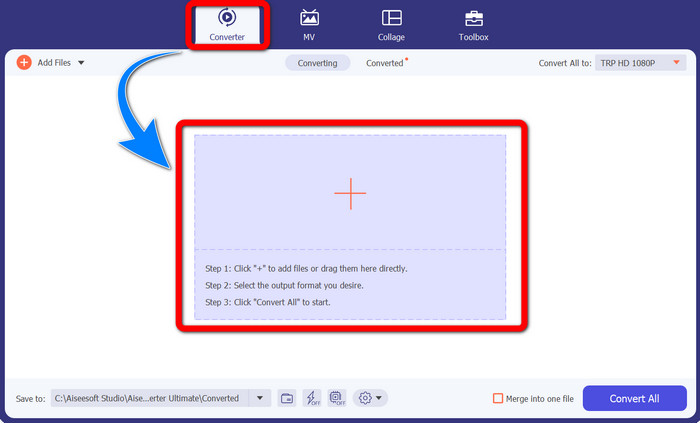
Step 2: When you already launch the Video Converter Ultimate, select the Converter panel. Then, click the + sign to import your video with the TRP format.
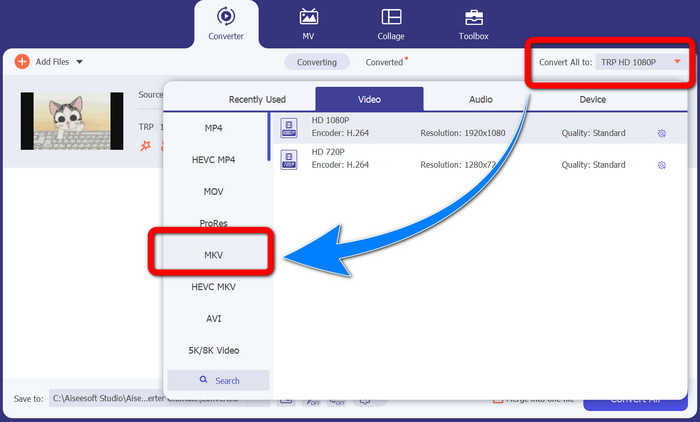
Step 3: After you import your video, click the Convert all to icon. Find the MKV format from the format options and click it.
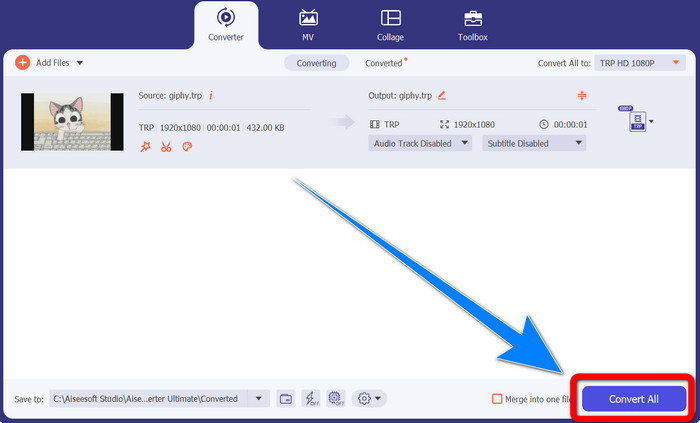
Step 4: Then, click the Convert All button to convert your TRP to MKV format.
प्रिज्म वीडियो कन्वर्टर का उपयोग करना
Prism is another application you can download on your Windows and Mac. This application can help you to convert TRP to MKV easily. Also, it supports different file formats, such as AMV, MP4, DVD, VOB, MOV, DIVX, AVI, 3GP, and more. However, this application is very slow when installed on Windows or Mac. Also, the conversion process takes a while. And it has a complicated interface, which will confuse beginners, so you must look for some tutorials or seek help from advanced users. If you want to download and use this application, follow the simple steps below.
Step 1: Download the Prism Video Converter on your Mac or Windows.
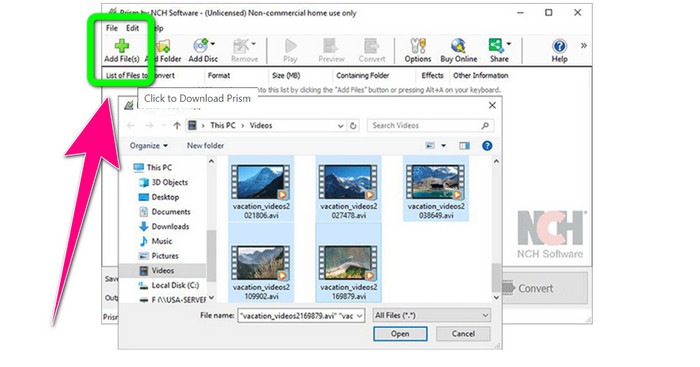
Step 2: Click the green Add Files button and insert your TRP file.
Step 3: Set the output format. Click the MKV file from the format options.
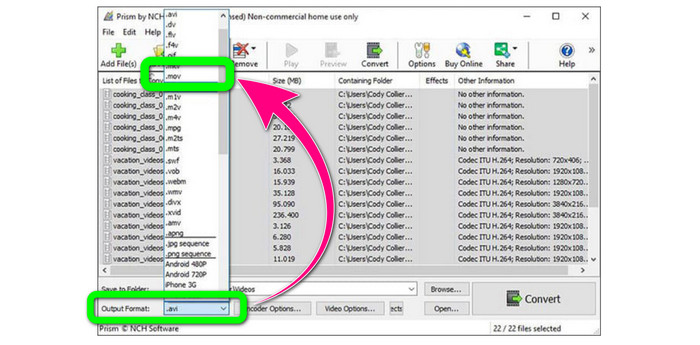
Step 4: Lastly, select the Convert button to convert your TRP file into MKV format.
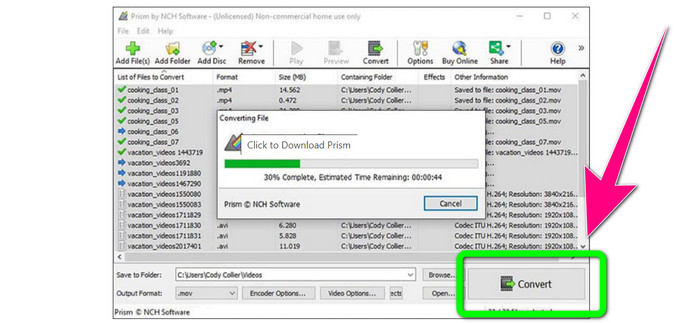
भाग 3: टीआरपी को एमकेवी में बदलने के लिए ऑनलाइन आवेदन
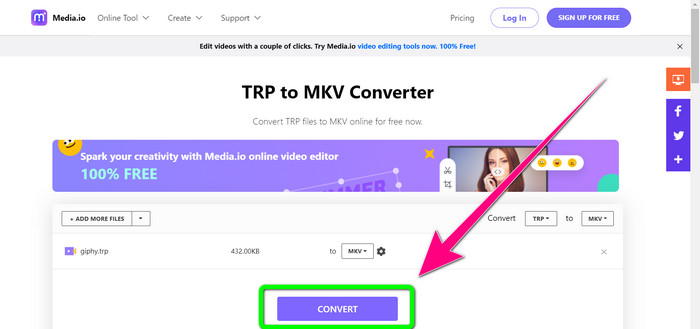
Are you interested in converting TRP to MKV online? Then, you can use Media.io. With the assistance of this application, you can convert TRP to MKV. In addition, it has more supported formats, like MP4, AVI, WMV, MOV FLV, DIVX, XVID, 3GP, etc. It is also an audio and image converter.
इसके अलावा, यह वीडियो संपादन में भी सक्षम है। आप क्रॉप, ट्रिम, मर्ज, लूप वीडियो और बहुत कुछ कर सकते हैं। हालांकि, जब रूपांतरण प्रक्रिया की बात आती है तो यह धीमी होती है। प्रक्रिया पूरी करने के लिए आपको थोड़ा और इंतजार करना होगा। इसमें परेशान करने वाले विज्ञापन भी हैं जो स्क्रीन पर दिखाई देते हैं। साथ ही, इसे अच्छा प्रदर्शन करने के लिए तेज़ इंटरनेट कनेक्शन की आवश्यकता होती है। यदि आप Media.io का उपयोग करके TRP को MKV में बदलना चाहते हैं, तो नीचे दिए गए चरणों का पालन करें।
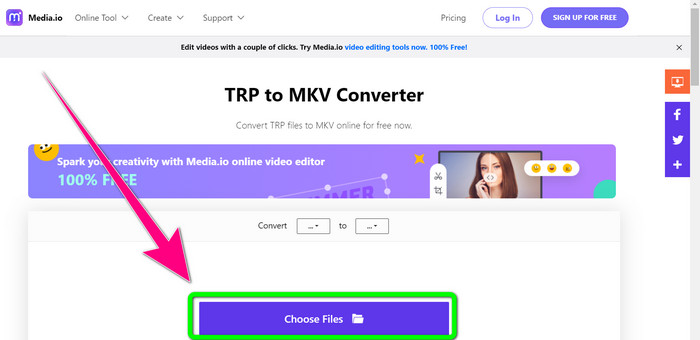
Step 1: Go to the website of Media.io. Then, click the Choose Files button to add your video with the TRP file format.
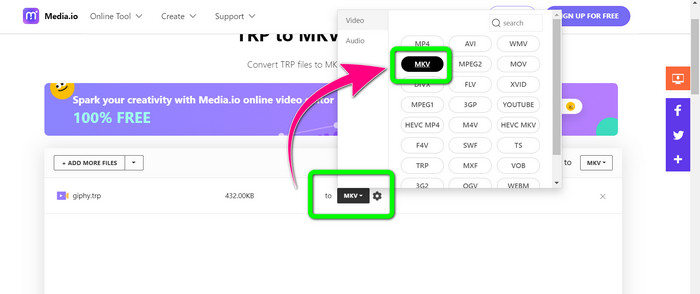
Step 2: After adding your video, go to the format options, look for the MKV file, and select it.
Step 3: For the final step, click the Convert button. Wait for the conversion process and save your video in MKV file format.
और पढ़ें
Best Procedures about How to Convert AMV to MKV for Free
इन अल्टीमेट कनवर्टर्स की मदद से आसानी से MTV को MKV में कनवर्ट करें
भाग 4: टीआरपी को एमकेवी में बदलने के बारे में अक्सर पूछे जाने वाले प्रश्न
एमकेवी फ़ाइल मेरे टीवी पर समर्थित क्यों नहीं है?
एक MKV फ़ाइल केवल एक वीडियो कंटेनर है जिसे कई कोडेक्स के साथ एन्कोड किया जा सकता है, जैसे HEVC, MPEG-4, VP9, आदि। टीवी की इन कोडेक्स के साथ खराब संगतता है, इसलिए आप अपने टीवी पर MKV नहीं चला सकते।
क्या MKV फ़ाइल अच्छी गुणवत्ता वाली है?
MKV फ़ाइल स्वरूप उच्च-गुणवत्ता वाले वीडियो में लोकप्रिय है। इसका फाइल साइज भी बड़ा होता है। इसका मतलब है कि एमकेवी एक कंटेनर है और इसका गुणवत्ता पर कोई प्रभाव नहीं पड़ता है।
क्या कोई तेज़ कनवर्टर है जिसका उपयोग मैं अपने कंप्यूटर पर कर सकता हूँ?
निश्चित रूप से हां! यदि आप एक तेज सॉफ्टवेयर कनवर्टर की तलाश कर रहे हैं, तो वीडियो कन्वर्टर अल्टीमेट सबसे अच्छा एप्लीकेशन है। आप अपनी फाइलों को कई गुना तेजी से और आसानी से बदल सकते हैं।
निष्कर्ष
With all the applications and ways of converting TRP to MKV above, we highly suggest using Video Converter Ultimate. This can convert numerous files instantly with an ultra-fast conversion speed. So, what are you waiting for? Try it yourself to discover more.
-
 टीआरपी को एमओवी में बदलने के लिए उपलब्ध सबसे प्रभावशाली सॉफ्टवेयर में से 2
 टीआरपी फाइलों को एमओवी में नहीं बदल सके? फिर इस लेख में दिए गए गाइड का पालन करें। जैसा कि हम सबसे अच्छे टूल चुनते हैं जिनका उपयोग आप अपनी टीआरपी फाइलों को परिवर्तित करने के लिए कर सकते हैं।
- टीआरपी को एमओवी में बदलने के लिए उपलब्ध सबसे प्रभावशाली सॉफ्टवेयर में से 2
टीआरपी फाइलों को एमओवी में नहीं बदल सके? फिर इस आलेख में प्रदान की गई मार्गदर्शिका का पालन करें। जैसा कि हम अपनी टीआरपी फ़ाइलों को परिवर्तित करने के लिए उपयोग किए जा सकने वाले सर्वोत्तम टूल चुनते हैं
-
 TRP को WMV प्रारूप में बदलने के लिए 2 पेशेवर कन्वर्टर्स [गाइड]
 क्या आप उन उपयोगकर्ताओं में से एक हैं जिनके पास टीआरपी फ़ाइल के साथ जटिल समय है? यदि ऐसा है, तो टीआरपी को डब्ल्यूएमवी में कैसे बदलें और अधिक जानने के लिए इस लेख को पढ़ना जारी रखें
