


 वीडियो कनवर्टर अंतिम
 स्क्रीन अभिलेखी
 वीडियो मरम्मत
VOB को 3GP में आसानी से बदलने के उत्कृष्ट तरीके [सर्वश्रेष्ठ कन्वर्टर्स]
क्या आप अपने VOB फ़ाइल को अपने थर्ड-जेनरेशन डिवाइस पर चलाना चाहते हैं लेकिन ऐसा नहीं कर पा रहे हैं? तो आपके लिए सबसे अच्छा समाधान है कि आप अपनी VOB फ़ाइल को 3GP फ़ाइल में कनवर्ट करें। 3GP फ़ाइलें वे फ़ाइलें होती हैं जिन्हें 3G डिवाइस सपोर्ट करते हैं। इसलिए, यदि आप अपने VOB फ़ाइल को 3GP में डिकोड करने का सबसे अच्छा तरीका ढूँढ रहे हैं, तो यह लेख आपके लिए उत्तर हो सकता है। हमने VOB को 3GP में कनवर्ट करने के लिए सबसे आसान और बेहतरीन तरीके बताए हैं।.

भाग 1. FVC वीडियो कनवर्टर अल्टीमेट का उपयोग करके कनवर्ट कैसे करें
FVC Video Converter Ultimate वेब पर उपलब्ध शीर्ष प्रदर्शन करने वाले कनवर्टर्स में से एक है। यह मुफ़्त ऑफ़लाइन कनवर्टर कई फ़ाइल फ़ॉर्मेट्स को कनवर्ट कर सकता है, जिनमें VOB, 3GP, MP4, MKV, MOV, AVI, FLV और 1000+ फ़ॉर्मेट शामिल हैं। यह कनवर्टर आपको अपने वीडियो की लंबाई ट्रिम करने की अनुमति देता है, और यहाँ तक कि आपके वीडियो फ़ाइल को बेहतर बनाने के लिए इफ़ेक्ट्स भी जोड़ सकता है। इसके अलावा, यदि आप कई फ़ाइलों को मर्ज करना चाहते हैं, तो यह कनवर्टर बैच कन्वर्ज़न भी प्रदान करता है। तो, यदि आप अपनी VOB फ़ाइल को 3GP में बिना किसी झंझट के कनवर्ट करना चाहते हैं, तो नीचे दिए गए और विवरण पढ़ें और इसे मुफ़्त में डाउनलोड करें।.

FVC वीडियो कन्वर्टर अंतिम
5,689,200+ डाउनलोड- वेब पर उपलब्ध 1000+ से अधिक फ़ाइल स्वरूपों में कनवर्ट कर सकते हैं।
- बैच एकाधिक फ़ाइल स्वरूपों को परिवर्तित कर सकता है।
- इसमें अल्ट्रा-फास्ट कनवर्टिंग प्रक्रिया और हार्डवेयर त्वरण है।
- इसमें आपकी फ़ाइल को काटने, उपशीर्षक जोड़ने और वॉटरमार्क जोड़ने के लिए उन्नत संपादन सुविधाएँ हैं।
- विंडोज और मैक जैसे सभी मीडिया प्लेटफॉर्म पर उपलब्ध है।
फ्री डाउनलोडWindows 7 या बाद के संस्करण के लिएसुरक्षित डाउनलोड
फ्री डाउनलोडMacOS 10.7 या बाद के संस्करण के लिएसुरक्षित डाउनलोड
FVC वीडियो कन्वर्टर अल्टीमेट का उपयोग करके VOB को 3GP में बदलने के तरीके यहां दिए गए हैं:
स्टेप 1. पहले, Windows या Mac के लिए Download बटन पर क्लिक करके ऐप डाउनलोड करें। फिर इंस्टॉलेशन प्रक्रिया का पालन करें और ऐप को खोलें।.
फ्री डाउनलोडWindows 7 या बाद के संस्करण के लिएसुरक्षित डाउनलोड
फ्री डाउनलोडMacOS 10.7 या बाद के संस्करण के लिएसुरक्षित डाउनलोड
स्टेप 2. Add Files बटन या + साइन बटन पर क्लिक करें। आपके कंप्यूटर की फ़ाइलें दिखाई देंगी, फिर अपनी VOB फ़ाइल चुनें ताकि उसे क्यू में अपलोड किया जा सके।.
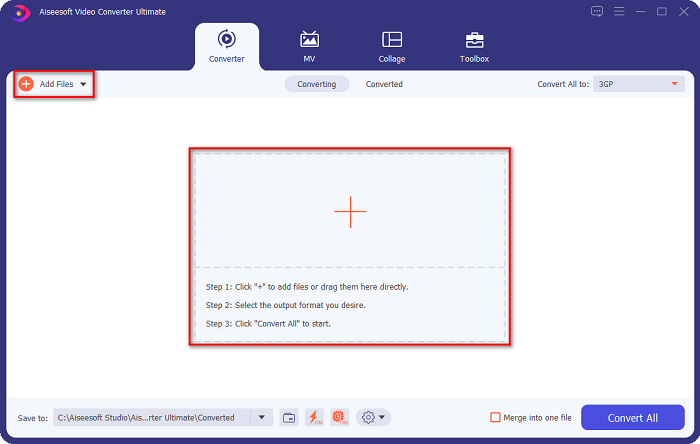
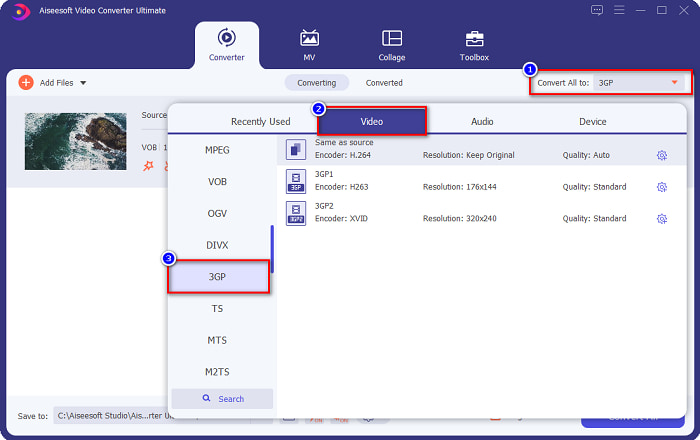
स्टेप 3. तीसरे स्टेप के लिए, Convert All to बटन पर क्लिक करें ताकि आप अपना इच्छित आउटपुट फ़ॉर्मेट चुन सकें। 3GP पर क्लिक करें, फिर अगला स्टेप जारी रखें।.
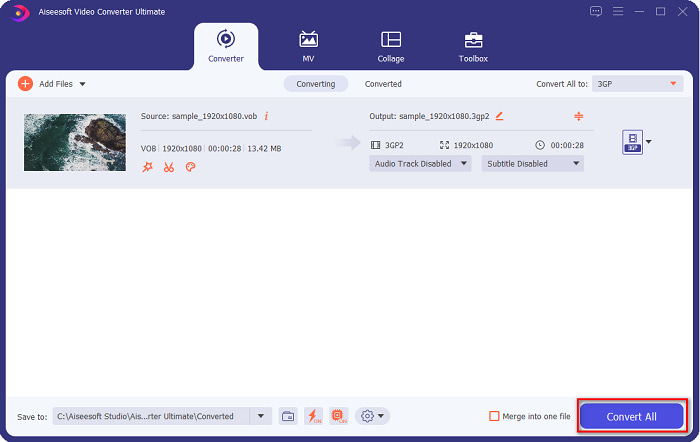
स्टेप 4. अपनी मनचाही आउटपुट फ़ॉर्मेट चुनने के बाद, Convert All बटन पर क्लिक करें ताकि आपका कन्वर्ज़न शुरू हो सके। कुछ सेकंड तक इंतज़ार करें, और लो हो गया! इन साधारण स्टेप्स के साथ, आप आसानी से अपनी VOB फ़ाइल को 3GP में कनवर्ट कर सकते हैं।.
भाग 2. मुफ्त ऑनलाइन के लिए VOB को 3GP में कैसे बदलें
यदि आप अपनी VOB फ़ाइल को बिना डाउनलोड किए 3GP फ़ाइल में कनवर्ट करना चाहते हैं, तो आप वेब पर उपलब्ध ऑनलाइन कन्वर्टर्स का उपयोग कर सकते हैं। ऑनलाइन कनवर्टर का उपयोग करने की सुविधा और दक्षता निस्संदेह अच्छी है। इसलिए, हमने आपकी VOB फ़ाइल को 3GP फ़ाइल स्वरूप में बदलने के दो तरीके प्रदान किए हैं।
फाइलप्रोइन्फो
FileProInfo एक ऑनलाइन कनवर्टर है जिसमें आसान-से-उपयोग वाला GUI है, जो इसे शुरुआती उपयोगकर्ताओं के लिए अनुकूल टूल बनाता है। यह इंटरनेट पर उपलब्ध लगभग सभी मानक फ़ाइल फ़ॉर्मेट्स को सपोर्ट करता है। हालाँकि, इन ऑनलाइन कनवर्टर्स में कई परेशान करने वाले विज्ञापन होते हैं। इसके बावजूद, बहुत से लोग अब भी इस कनवर्टर का उपयोग करते हैं।.
स्टेप 1. अपने ब्राउज़र में FileProInfo सर्च करें, ताकि उनकी वेबपेज पर जा सकें। सॉफ़्टवेयर के मुख्य इंटरफ़ेस पर, Select VOB file बटन पर क्लिक करें। और अपनी VOB फ़ाइल चुनें ताकि उसे अपलोड किया जा सके।.

स्टेप 2. अगला, शब्द to के पास वाले बॉक्स में अपना मनचाहा फ़ाइल आउटपुट चुनें।.

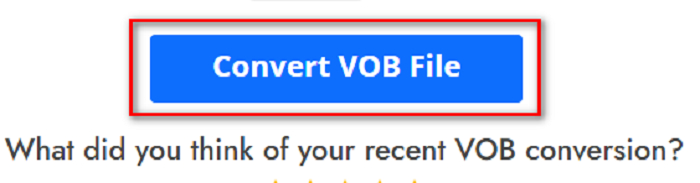
स्टेप 3. अंत में, सॉफ़्टवेयर के इंटरफ़ेस के निचले हिस्से में Convert VOB File पर क्लिक करें। फिर अपने कन्वर्ज़न के पूरा होने का इंतज़ार करें।.
और यही है! बिना पसीना बहाए आप अपनी VOB फाइल को 3GP में बदल सकते हैं।
कन्वर्ट365
Convert365 एक ऑनलाइन VOB से 3GP कनवर्टर है जो आपको अधिकांश मानक फ़ॉर्मेट्स, जैसे VOB, 3GP, AVI, MOV, MP4, MPEG, आदि को कनवर्ट करने की सुविधा देता है। और यदि आप ऐसा ऑनलाइन कनवर्टर ढूँढ रहे हैं जो ऑडियो वॉल्यूम को नॉर्मलाइज़ कर सके, तो इस टूल में वह फ़ीचर मौजूद है। हालाँकि, चूँकि यह एक ऑनलाइन टूल है, आप धीमे कन्वर्ज़न का अनुभव कर सकते हैं क्योंकि यह इंटरनेट पर निर्भर है। इसके अलावा, Convert365 का उपयोग करके VOB फ़ाइल को 3GP में कनवर्ट करने के लिए नीचे दी गई प्रक्रिया का पालन करें।.
स्टेप 1. अपने ब्राउज़र में Convert365 सर्च करें, Add Files बटन पर क्लिक करें और जब आपके कंप्यूटर की फ़ाइलें दिखें तो अपनी VOB फ़ाइल चुनें।.

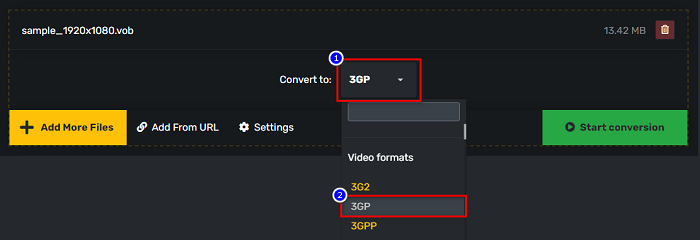
स्टेप 2. फिर Convert to के पास वाले drop-down बटन पर, अपना आउटपुट फ़ॉर्मेट चुनें। 3GP फ़ाइल फ़ॉर्मेट पर क्लिक करें।.
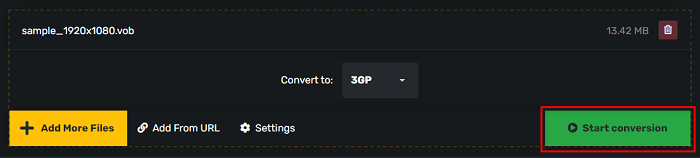
स्टेप 3. और अंत में, Start conversion पर क्लिक करें अपने VOB को 3GP फ़ाइल में बदलने के लिए बटन।
भाग 3. मुझे कौन सा VOB से 3GP कन्वर्टर इस्तेमाल करना चाहिए
VOB को 3GP में बदलने के लिए सबसे अच्छा कनवर्टर चुनते समय, आपको हमेशा गति, इसके द्वारा समर्थित फ़ाइलों और कनवर्टर की विशेषताओं की विशिष्टता पर विचार करना चाहिए। हम ऊपर दिखाए गए सर्वश्रेष्ठ ऑनलाइन और ऑफलाइन कन्वर्टर्स में से ऑफ़लाइन टूल FVC वीडियो कन्वर्टर अल्टीमेट का उपयोग करने की सलाह देते हैं। यह कनवर्टर कई विशिष्ट सुविधाएँ प्रदान करता है जो अन्य कन्वर्टर्स के पास नहीं हैं, जैसे कि GIF क्रिएटर 3D मेकर, वॉटरमार्क रिमूवर, और बहुत कुछ।
इसके अलावा, भले ही यह पेशेवर जैसे आउटपुट दे सकता है, इसमें उपयोग में आसान इंटरफ़ेस भी है ताकि आपको इसका उपयोग करने में कठिनाई न हो।
भाग 4. वीओबी और 3जीपी के बारे में अधिक जानकारी
VOB या वीडियो ऑब्जेक्ट एक फ़ाइल कंटेनर स्वरूप है जो DVD का उपयोग करता है। इसमें वीडियो, ऑडियो, उपशीर्षक और मेनू सामग्री शामिल है। इस प्रकार की फ़ाइल की सीमाएँ और प्रतिलिपि प्रतिबंध हैं, ताकि उन्हें सीधे कॉपी होने से बचाया जा सके। इसके विपरीत, 3GP फ़ाइलें फ़ाइल स्वरूप हैं जिन्हें केवल तीसरी पीढ़ी के मोबाइल उपकरणों पर चलाया जा सकता है। ये फ़ाइल स्वरूप थर्ड जनरेशन पार्टनरशिप प्रोजेक्ट (3GPP) द्वारा विकसित किए गए हैं। इसके अलावा, इस प्रकार की फ़ाइल में VOB फ़ाइलों की तुलना में केवल एक छोटा फ़ाइल आकार होता है, क्योंकि वे 3G उपकरणों को साझा करने के लिए बनाई जाती हैं। 3GP वीडियो और ऑडियो फाइलों को स्टोर कर सकता है जो आमतौर पर 3G फोन में उपयोग किए जाते हैं।
भाग 5. VOB को 3GP में बदलने के बारे में अक्सर पूछे जाने वाले प्रश्न
क्या आप macOS पर 3GP चला सकते हैं?
3GP फ़ाइलों को macOS पर चलाना असंभव है, खासकर QuickTime के नए संस्करण में। हालाँकि, आप अपनी 3GP फ़ाइल को ऐसे फ़ाइल फ़ॉर्मेट में कनवर्ट कर सकते हैं जिसे macOS सपोर्ट करता है, यानी MOV। 3GP फ़ाइलों को MOV में कनवर्ट करने के बारे में अधिक जानने के लिए, इस लिंक पर क्लिक करें।.
क्या VOB को 3GP में बदलने से आपकी फ़ाइल की गुणवत्ता प्रभावित होगी?
बिल्कुल हाँ। जब आप VOB को 3GP में कनवर्ट करते हैं तो फ़ाइल का आकार प्रभावित होगा। चूँकि 3GP में केवल वीडियो और ऑडियो फ़ाइलें होती हैं और फ़ाइल का आकार छोटा होता है, इसलिए आपकी VOB फ़ाइल का फ़ाइल आकार छोटा होगा।
क्या 3GP फ़ाइल स्वरूप एक सामान्य फ़ाइल है?
दुर्भाग्य से, आजकल 3GP फ़ाइल स्वरूप इतने सामान्य नहीं हैं क्योंकि इन दिनों 3G फ़ोन कम हैं। आजकल मोबाइल उपयोगकर्ताओं के लिए सबसे आम फ़ाइल MP4 फ़ाइल स्वरूप है।
निष्कर्ष
जैसा कि हम विंडोज और मैक पर वीओबी को एमओवी में बदलने के लिए कन्वर्टर्स का उपयोग करने के लिए सबसे अच्छा और आसान प्रस्तुत करते हैं, हम निष्कर्ष निकालते हैं कि एफवीसी वीडियो कन्वर्टर अल्टीमेट प्रस्तुत ऑनलाइन और ऑफलाइन कन्वर्टर्स पसंद के टूल में सबसे अच्छा है। इसमें न केवल कोशिश करने के लिए अनूठी विशेषताएं हैं, बल्कि यह उच्च गति रूपांतरण भी प्रदान करता है। अभी भी इस कनवर्टर के बारे में संदेह है, इसे अभी डाउनलोड करें और सर्वश्रेष्ठ VOB से 3GP कनवर्टर का प्रयास करें।
-
 VOB को FLV में बदलने के सर्वोत्तम तरीके [मुफ्त और ऑनलाइन शामिल]
 VOB फ़ाइल को FLV फ़ाइल में कनवर्ट करना चाहते हैं? आप डेस्कटॉप या ऑनलाइन कन्वर्टर्स के साथ कार्य को आसानी से पूरा कर सकते हैं। इस गाइड को पढ़ें और जानें कि VOB को FLV में आसानी से और जल्दी से कैसे बदला जाए।
-
 VOB फाइल को AVI फॉर्मेट में बदलने के लिए उपलब्ध 3 आसान कन्वर्टर्स [2021]
 कोई समस्या है क्योंकि VOB फ़ाइलें चलाने के लिए समर्थित नहीं हैं? फिर आइए प्रत्येक कनवर्टर पर विस्तृत चरणों के साथ नीचे प्रस्तुत 3 तरीकों से इसे बदलने का प्रयास करें।
-
 VOB को MOV में बदलने के लिए उपयोग करने के उत्कृष्ट तरीके
 ऑनलाइन वीडियो डाउनलोड सुविधाजनक हैं, लेकिन क्या होगा यदि वीडियो वीओबी प्रारूप में है और आपका प्लेयर इसका समर्थन नहीं करता है? यह पोस्ट आपको सिखाएगी कि VOB को MOV में कैसे बदलें।
