


 वीडियो कनवर्टर अंतिम
 स्क्रीन अभिलेखी
 वीडियो मरम्मत
 सुरक्षित डाउनलोड
शीर्ष 3 विधियाँ जिन्हें आप WebM को 3GP में बदलने का प्रयास कर सकते हैं
WebM को लगभग सभी ब्राउज़रों, जैसे Google Chrome, Microsoft Edge, Mozilla Firefox, Opera आदि द्वारा सपोर्ट किया जाता है। फिर भी कई बार ऐसा होता है कि आप अपना WebM फ़ाइल कुछ डिवाइसों, जैसे फ़ोन, पर नहीं चला पाते। अन्य डिवाइसों पर अपना वीडियो चलाने के लिए आपको ऑनलाइन या ऑफ़लाइन कन्वर्टर डाउनलोड करने होंगे, ताकि WebM फ़ाइल को दूसरे फ़ॉर्मैट में बदला जा सके। सौभाग्य से, यह लेख कुछ आज़माए‑परखे सॉफ़्टवेयर की मदद से WebM को 3GP में बदलने के सबसे आसान तरीकों का परिचय देगा।.

भाग 1: विंडोज और मैक पर WebM को 3GP में बदलने के प्रभावी तरीके
यदि आप Windows और Mac पर इस्तेमाल करने के लिए WebM से 3GP कन्वर्टर ढूँढ रहे हैं, तो यह लेख आपके लिए है। Video Converter Ultimate वह बेहतरीन सॉफ़्टवेयर है जिसे आप उपयोग कर सकते हैं। यह एप्लिकेशन आपको कई तरह की फ़ाइलें कन्वर्ट करने देता है, जैसे FLV, MKV, DIVX, XVID, MT2S, MTS, M4V, AVI, MP4 और 1000+ अन्य। इसके अलावा, आपको कन्वर्ज़न प्रक्रिया की चिंता करने की ज़रूरत नहीं है, क्योंकि आप फ़ाइलों को दूसरे कन्वर्टरों की तुलना में 30 गुना तेज़ी से कन्वर्ट कर सकते हैं। आप इस शानदार एप्लिकेशन को मुफ़्त में भी डाउनलोड कर सकते हैं।.
इसके अलावा, इस एप्लिकेशन के फ़ाइलों को परिवर्तित करने के तरीके जटिल नहीं हैं क्योंकि इसका एक अनुकूल इंटरफ़ेस और सरल तरीके हैं, जो सभी उपयोगकर्ताओं के लिए एकदम सही है। कनवर्ट करने के अलावा, ऐसे और भी टूल हैं जिनका आप आनंद ले सकते हैं, जैसे अपने वीडियो को बेहतर बनाना, संगीत वीडियो बनाना, कोलाज बनाना, फ़ाइल का आकार बदलना, और बहुत कुछ।
विशेषताएँ
◆ कोलाज बनाने के लिए बिल्कुल सही।
◆ जीआईएफ को वैयक्तिकृत और अनुकूलित करें।
◆ वीडियो की गति बदलें।
◆ वीडियो का फ़ाइल आकार बदलने में सक्षम
◆ यह ऑडियो फ़ाइल को संपीड़ित कर सकता है।
पेशेवरों
- विंडोज और मैक उपयोगकर्ताओं के लिए बिल्कुल सही।
- इसकी एक तेज़ रूपांतरण प्रक्रिया है।
- यह MP4, M4V, DIVX, FLV, MKV, 3GP, SWF, आदि जैसे 1000+ स्वरूपों का समर्थन करता है।
- एक दोस्ताना यूजर इंटरफेस है, जो शुरुआती लोगों के लिए उपयुक्त है।
- वॉटरमार्क, लोगो, हस्ताक्षर आदि जैसे अनावश्यक तत्वों को आसानी से जोड़ और हटा सकते हैं।
विपक्ष
- सभी बेहतरीन सुविधाओं का उपयोग करने के लिए प्रो संस्करण के लिए भुगतान करें।
चरण 1: नीचे दिए गए Download बटन पर क्लिक करके Windows या Mac के लिए Video Converter Ultimate डाउनलोड करें। इसे अपने डिवाइस पर इंस्टॉल करें और सॉफ़्टवेयर चलाएँ।.
फ्री डाउनलोडWindows 7 या बाद के संस्करण के लिएसुरक्षित डाउनलोड
फ्री डाउनलोडMacOS 10.7 या बाद के संस्करण के लिएसुरक्षित डाउनलोड
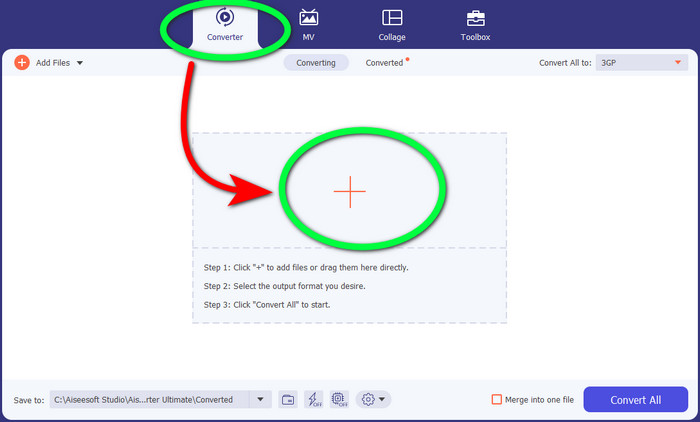
चरण 2: जब आपको इंटरफ़ेस के ऊपरी हिस्से में चार विकल्प दिखाई दें, तो Converter पैनल चुनें और WebM वीडियो फ़ाइल अपलोड करने के लिए + चिन्ह पर क्लिक करें।.
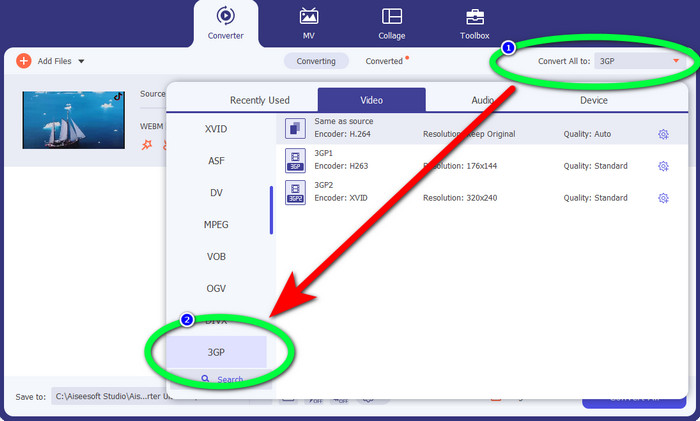
चरण 3: WebM वीडियो फ़ाइल अपलोड करने के बाद Convert all to विकल्प पर क्लिक करें और 3GP फ़ाइल चुनें।.
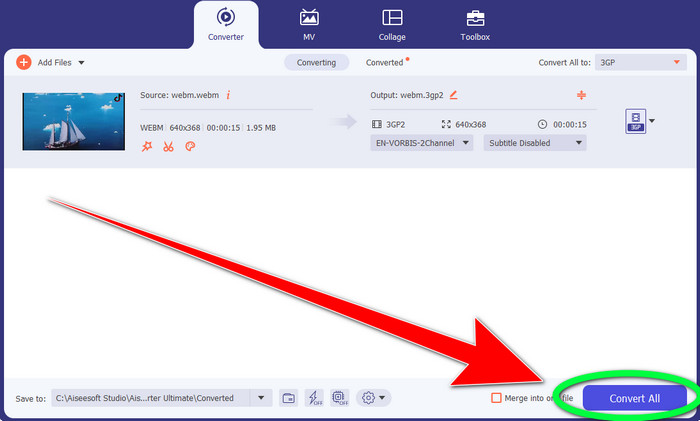
चरण 4: जब आप WebM से 3GP में फ़ाइल फ़ॉर्मैट बदलना पूरा कर लें, तो Convert बटन पर क्लिक करें।.
भाग 2: WebM को 3GP ऑनलाइन में बदलने के आसान तरीके
एफवीसी मुफ्त वीडियो कन्वर्टर ऑनलाइन का उपयोग करना
क्या आप ऑनलाइन मुफ़्त वीडियो कन्वर्टर इस्तेमाल करना चाहते हैं? तो आप जिस ऑनलाइन टूल को मुफ़्त में उपयोग कर सकते हैं, वह है FVC Free Video Converter Online। यह ऑनलाइन एप्लिकेशन आपको WebM को आसानी से 3GP में बदलने देता है। इसमें केवल तीन बुनियादी चरण हैं, इसलिए अलग‑अलग फ़ाइलों को कन्वर्ट करते समय आप उलझन में नहीं पड़ेंगे। यह मुफ़्त कन्वर्टर Windows और Mac दोनों पर सुलभ है। यह MP4, AVI, M4V, MKV, WMA, MP3 और अन्य कई फ़ाइलों को भी कन्वर्ट करता है। साथ ही, इसकी कन्वर्ज़न स्पीड तेज़ है, जिससे आप अपनी फ़ाइल जल्दी कन्वर्ट कर सकते हैं और अगली फ़ाइल के लिए ज़्यादा इंतज़ार नहीं करना पड़ता। यदि आप FVC Free Video Converter Online का उपयोग करके अपना WebM 3GP में कन्वर्ट करने में रुचि रखते हैं, तो नीचे दिए गए आसान चरणों का पालन करें।.
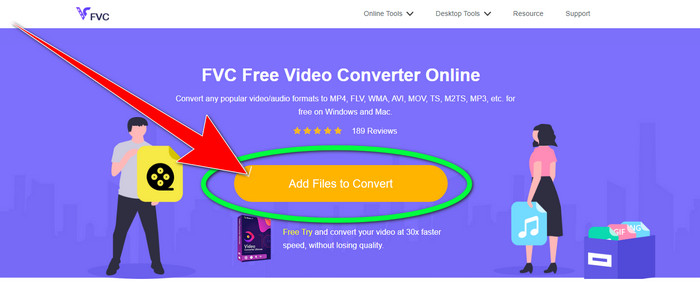
चरण 1: FVC Free Video Converter Online पर जाएँ। बीच में दिखाई देने वाले नारंगी रंग के बटन पर क्लिक करके अपनी WebM वीडियो फ़ाइल जोड़ें।.
चरण 2: इसके बाद, 3GP फ़ाइल को अपना चुना हुआ फ़ॉर्मैट निर्धारित करें। आपको फ़ॉर्मैट विकल्प इंटरफ़ेस के निचले हिस्से में दिखाई देंगे।.
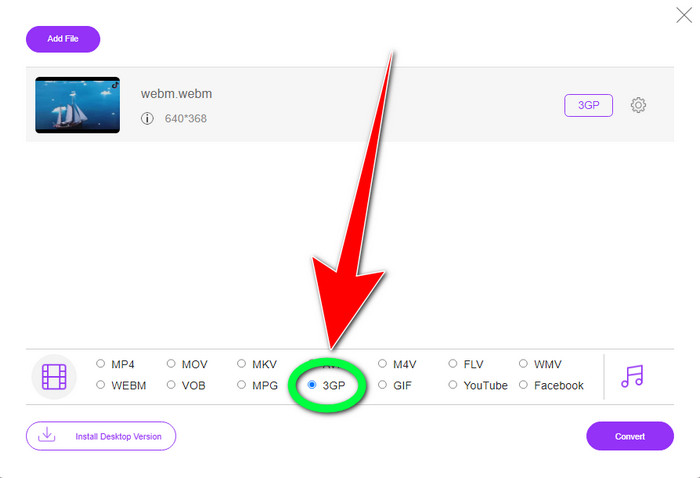
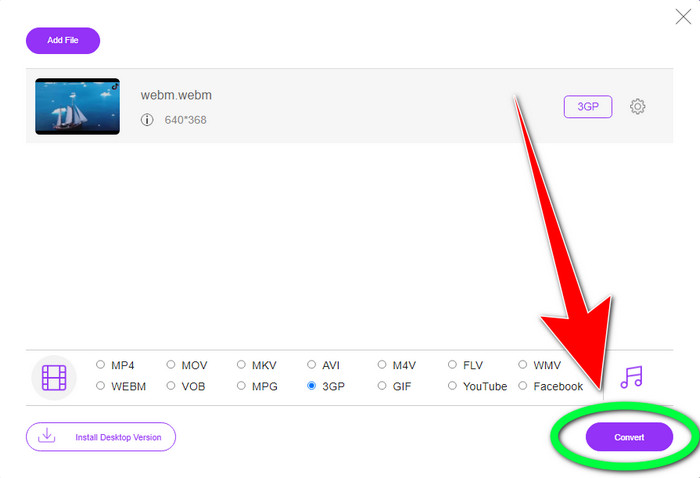
चरण 3: जब आप 3GP फ़ाइल फ़ॉर्मैट चुन लें, तो अपने वीडियो को सहेजने के लिए Convert बटन पर क्लिक कर सकते हैं। यह टूल आपको WebM को DIVX में कन्वर्ट करने की सुविधा भी देता है।.
कन्वर्टियो का उपयोग करना
यदि आप अभी भी किसी अन्य WebM से 3GP कन्वर्टर की ऑनलाइन तलाश कर रहे हैं, तो Convertio वह टूल है जिसे आप ढूंढ रहे हैं। इसमें आपकी फ़ाइलों को परिवर्तित करने के सरल चरण भी हैं। इसके अलावा, आप अपनी फ़ाइल को 37 विभिन्न वीडियो फ़ाइल स्वरूपों में परिवर्तित कर सकते हैं, जिनमें HEVC, MPG, M4V, MKV, WMV, MP4, MOV, AVI, आदि शामिल हैं। Convertio केवल वीडियो प्रारूपों को परिवर्तित करने तक सीमित नहीं है। आप विभिन्न ऑडियो, छवियों और दस्तावेज़ स्वरूपों को भी परिवर्तित कर सकते हैं।
हालांकि, मुफ्त संस्करण का उपयोग करने के लिए 100 एमबी इस ऑनलाइन आवेदन का अधिकतम फ़ाइल आकार है। असीमित फ़ाइल आकार और अधिक सुविधाओं का आनंद लेने के लिए आपको सशुल्क संस्करण प्राप्त करना होगा। लेकिन, सब्सक्रिप्शन खरीदना महंगा है। यदि आप Convertio का उपयोग करके WebM फ़ाइल को 3GP में बदलना चाहते हैं, तो नीचे दिए गए चरणों का पालन करें।
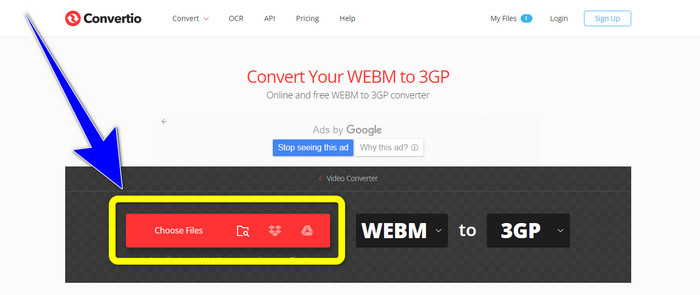
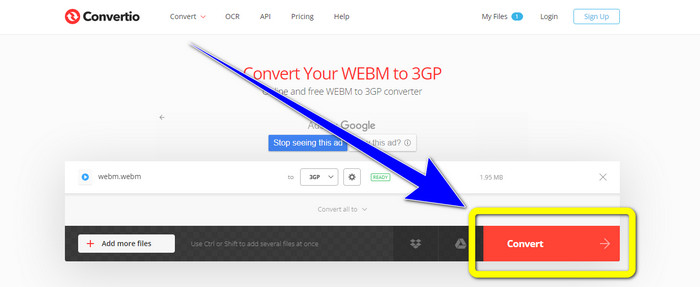
चरण 1: Convertio वेबसाइट पर जाएँ और अपनी WebM वीडियो फ़ाइल जोड़ने के लिए Choose files बटन दबाएँ।.
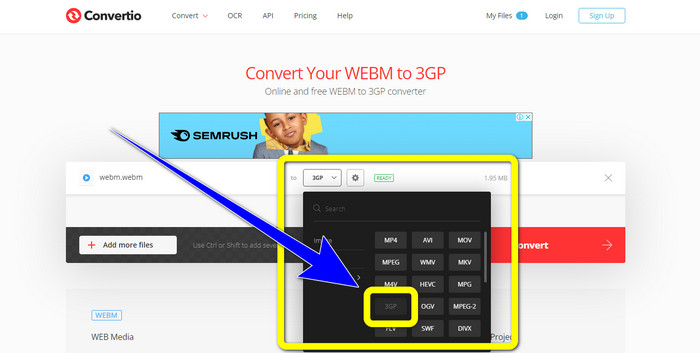
चरण 2: Convertio में WebM वीडियो फ़ाइल जोड़ने के बाद, फ़ॉर्मैट विकल्प में से 3GP फ़ाइल फ़ॉर्मैट चुनें।.
चरण 3: अंतिम चरण के तौर पर, फ़ाइल को कन्वर्ट करने के लिए Convert बटन पर क्लिक करें। फिर कन्वर्ज़न प्रक्रिया पूरी होने पर अपनी अंतिम फ़ाइल कंप्यूटर पर सेव कर लें। यह जानने के लिए यहाँ क्लिक करें कि MPG को 3GP में कैसे कन्वर्ट करें।.
भाग 3: WebM और 3GP के बारे में जानकारी
WEBM
VP8 वीडियो और Vorbis ऑडियो कम्प्रेशन के साथ WebM एक ओपन मीडिया कंटेनर है। WebM फ़ॉर्मैट आम तौर पर वेब पेजों में मीडिया जोड़ने के लिए उपयोग किया जाता है और Opera, Mozilla Firefox, और Google Chrome सहित सभी वेब ब्राउज़रों द्वारा सपोर्ट किया जाता है। यह अच्छी वीडियो प्लेबैक क्वॉलिटी और डेटा कम्प्रेशन की विशेषताएँ प्रदान करता है। वेबसाइट पेजों पर WebM वीडियो का एम्बेडिंग बिना रुकावट या त्रुटि के हो जाता है। WebM फ़ॉर्मैट को h.264 मानकों से प्रतिस्पर्धा करने के लिए डिज़ाइन किया गया है। इस एक्सटेंशन के कॉपीराइट का मालिक Google है।.
3GP
GSM‑आधारित (Global System for Mobile Communications) फ़ोनों के लिए, Third Generation Partnership Project ने 1998 में 3GP मल्टीमीडिया कंटेनर बनाया। यह कंटेनर मोबाइल फ़ोनों के लिए बिल्कुल उपयुक्त है क्योंकि यह कम डेटा, बैंडविड्थ और स्टोरेज का उपयोग करता है। यह MMS (Multimedia Messaging Service) फ़ाइलों के लिए एक आम कंटेनर है।.
भाग 4: वेबएम को 3जीपी में बदलने के बारे में अक्सर पूछे जाने वाले प्रश्न
WebM को 3GP में बदलने के लिए मैं कौन से सर्वश्रेष्ठ ऑफ़लाइन और ऑनलाइन कन्वर्टर्स का उपयोग कर सकता हूँ?
यहाँ WebM को 3GP और अन्य विभिन्न फ़ाइलों में कन्वर्ट करने के लिए परीक्षण किए गए और भरोसेमंद एप्लिकेशन दिए गए हैं। 1. FVC Free Video Converter Online 2. Video Converter Ultimate 3. Convertio 4. HitPaw Video Converter 5. Online Convert Free 6. AnyMP4 Video Converter Ultimate 7. OnlineConvert
क्या 3GP एक अच्छा वीडियो प्रारूप है?
जब 3जी नेटवर्क फोन की बात आती है, तो 3जीपी प्रारूप उत्कृष्ट है क्योंकि यह विशेष रूप से डिवाइस के लिए बनाया गया है। हालाँकि, पोर्टेबल मीडिया प्लेयर्स या डेस्कटॉप पर स्ट्रीमिंग के मामले में MP4 जैसे अधिक अच्छे प्रारूप हैं क्योंकि यह 3GP की तुलना में उच्च रिज़ॉल्यूशन वीडियो का समर्थन कर सकता है।
3GP का संकल्प क्या है?
3GP वीडियो के दो रिज़ॉल्यूशन होते हैं: पहला 176x144 है जो 3G प्रारूप का समर्थन करने वाले सभी फ़ोनों के लिए है। अन्य रिज़ॉल्यूशन वाइडस्क्रीन, PSP, MP4 प्लेयर और iPad टच वाले फ़ोन के लिए 320x240 है।
निष्कर्ष
इस लेख से हम निष्कर्ष निकाल सकते हैं कि WebM को 3GP में कन्वर्ट करने के कई तरीके हैं। यदि आप ऑनलाइन वीडियो फ़ाइलों को कन्वर्ट करने का सबसे अच्छा तरीका चाहते हैं, तो FVC Free Video Converter Online का उपयोग करें। फिर, यदि आप डाउनलोड करने योग्य सॉफ़्टवेयर ढूँढ रहे हैं, तो Video Converter Ultimate का उपयोग करें। दोनों ही विभिन्न वीडियो फ़ॉर्मैट को कन्वर्ट करने में भरोसेमंद हैं।.
-
 वेब और डेस्कटॉप पर सबसे अधिक पसंद वेबएम से एफएलवी कनवर्टर नि:शुल्क
 क्या आपको अपने स्मार्ट फ़ोन पर WebM फ़ाइलें चलाने में भी यही समस्या है? फिर WebM को FLV में कैसे बदलें, यह जानने के लिए इस लेख को पढ़ने में 5 मिनट का समय दें।
-
 WMV कन्वर्टर्स के लिए शीर्ष 3 सर्वश्रेष्ठ वेबएम आपको चूकना नहीं चाहिए
 WebM फ़ाइल को WMV फ़ाइल में बदलने का तरीका खोज रहे हैं? हमने आज बाजार में कुछ प्रसिद्ध कन्वर्टर्स की कोशिश की और उनमें से सबसे अच्छा और उपयोग करने में आसान चुना।
-
 सर्वश्रेष्ठ वेबएम से एमकेवी कन्वर्टर्स जिन्हें आपको जल्दी से कनवर्ट करने के लिए उपयोग करना चाहिए
 क्या आप वेबएम को एमकेवी फाइलों में बदलने के तरीकों की तलाश कर रहे हैं? यह आलेख आपके लिए प्रयास करने के लिए सर्वश्रेष्ठ वेबएम से एमकेवी कन्वर्टर्स प्रस्तुत करता है।
