


 वीडियो कनवर्टर अंतिम
 स्क्रीन अभिलेखी
 वीडियो मरम्मत
 सुरक्षित डाउनलोड
2 बड़ी OGV फ़ाइलों को सिकोड़ने के त्वरित तरीके [नि: शुल्क और ऑनलाइन]
OGV files are often used for playing webpage video content using the HTML5 < video > tag. When you are going to send large OGV files to partners, clients, or friends, compressing those files becomes incredibly useful. Since there are many file size limitations of many email and file transfer platforms, compressed videos can greatly prevent the file transfer failure, at least in most cases. So, we’ll take a look at two online ways to compress your OGV files and make them smaller in this post.

भाग 1. ओजीवी कंप्रेसर के साथ ओजीवी फ़ाइलों को संपीड़ित करने का ऑनलाइन तरीका
Free Video Compressor is a popular and useful free online OGV compressor tool available for users. Unlike many other common free online tools, Free Video Compressor comes without restrictions on either the number or size of the files uploaded. More importantly, there will be no watermark on your exported video files. Also, it allows you to compress MP4, AVI, WMV, MOV, and many other common video files without destroying quality.
मुफ्त वीडियो कंप्रेसर का उपयोग करके ओजीवी फ़ाइलों को कैसे संपीड़ित करें
Step 1. Go to the online OGV video compressor website by entering https://www.free-videoconverter.net/free-video-compressor/.
Step 2. Locate and click Add Files to Compress button, and then download its launcher to activate the service. In the window that pops up, go and find your OGV files and hit Open to confirm.

Step 3. Next, you should define the compression settings to make the file smaller. You can set the size of your video, change the resolution, select the bitrate, and more.

Step 4. Hit on the Compress button to commence the process. After it’s finished, the file will be downloaded to your computer automatically.

इसके अलावा, यह मुफ्त वीडियो कंप्रेसर आपको अन्य वीडियो संपीड़न मुद्दों को हल करने में मदद कर सकता है। बस निम्नलिखित लेख देखें:
How to Compress a Video for Email
How to Compress AVCHD Video Files for Free on Windows and Mac
भाग 2. क्लिडो के साथ एक ओजीवी फ़ाइल को कैसे संपीड़ित और अनुकूलित करना है
Clideo एक मुफ्त ऑल-इन-वन वीडियो टूलकिट है। यह सभी लोकप्रिय प्रारूपों के साथ काम करता है और तेजी से सेक करता है और इसे किसी भी डाउनलोडिंग की आवश्यकता नहीं होती है। यह आपको 500 एमबी तक की ओजीवी फाइल को मुफ्त में संपीड़ित करने की अनुमति देता है, लेकिन इसकी मात्रा सीमा नहीं है। अब आप अपने OGV फ़ाइल आकार को कम करने के लिए नीचे दिए गए चरणों का पालन कर सकते हैं।
Step 1. Visit https://clideo.com/compress-video and then hit on the Choose file button.
Step 2. Upload an OGV file you want to compress from your computer. You can also select the file from Dropbox or Google Drive by clicking the blue downward arrow.
Step 3. When the file is uploaded, the tool will start processing the video. The processing time depends on the size of the video.
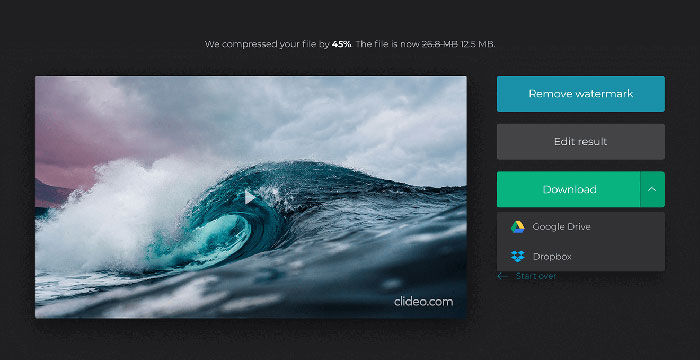
Step 4. Once the compression is over, you can see the initial file size and the compressed one. Now, you can preview the result to make sure it looks good. If you’re satisfied with it, you can click on the Download button to save it to your device or cloud storage.
भाग 3. OGV फ़ाइलों को संपीड़ित करने के सामान्य प्रश्न
OGV फाइल क्या है?
एक OGV फ़ाइल Xiph.Org खुले स्रोत Ogg कंटेनर प्रारूप में सहेजी गई एक वीडियो फ़ाइल है। इसमें वीडियो स्ट्रीम शामिल हैं, जो एक या अधिक अलग-अलग कोडेक्स का उपयोग कर सकते हैं, जैसे थियोरा, डीराक, या डाला। OGV फ़ाइलों को विभिन्न मीडिया खिलाड़ियों का उपयोग करके खेला जा सकता है।
OGV संपीड़न कैसे काम करता है?
जब ओजीवी फ़ाइल संपीड़न की बात आती है, तो यह इंटरफ़्रेम संपीड़न है जो वीडियो फ़्रेम के बीच होने वाली समानता को हटाकर फ़ाइल आकार को कम करने की ओर जाता है।
मैं MP4 को OGV प्रारूप में कैसे संपीड़ित करूं?
आप अपने MP4 फ़ाइलों को OGV को संपीड़ित करने के लिए उपर्युक्त टूल - फ्री वीडियो कंप्रेसर का उपयोग कर सकते हैं। या आप इसे बनाने में मदद करने के लिए एक वीडियो कनवर्टर एप्लिकेशन चुन सकते हैं।
निष्कर्ष
ऊपर दिए गए ऑनलाइन तरीके आपको OGV वीडियो को कुशलता से सिकोड़ने में मदद कर सकते हैं। आप किसका उपयोग करना पसंद करते हैं? आप नीचे दिए गए टिप्पणियों में अपनी सिफारिशें साझा कर सकते हैं!
-
 50MB से 5MB तक - सेकंड में MP4 फाइल को कैसे कंप्रेस करें
 MP4 वीडियो अपलोड करने के लिए बहुत बड़ा है? वीडियो का आकार कम करना चाहते हैं? यहां MP4 फ़ाइल को छोटे आकार में संकुचित करने के 3 कुशल तरीके हैं जिनकी कोई सीमा नहीं है।
-
 ट्यूटोरियल - गुणवत्ता खोने के बिना मुफ्त में वीडियो संपीड़ित करने के 7 तरीके
 अपने कंप्यूटर या फोन पर मुफ्त में वीडियो सेक करने के 7 तरीके पढ़ें और प्राप्त करें। आप ईमेल, ट्विटर, इंस्टाग्राम, यूट्यूब, व्हाट्सएप और अधिक आसानी से छोटे फ़ाइल आकारों में बड़े वीडियो को कम कर सकते हैं।
-
 विंडोज, मैक, आईफोन और एंड्रॉइड पर एमओवी फाइलें कैसे संपीड़ित करें
 यह लेख दिखाता है कि अपने फोन या कंप्यूटर पर क्विकटाइम एमओवी वीडियो को विवरण में कैसे संपीड़ित करें। यदि आपका MOV वीडियो भेजने, साझा करने या सहेजने के लिए बहुत बड़ा है, तो आप यहां 4 व्यावहारिक समाधान प्राप्त कर सकते हैं।
