


 वीडियो कनवर्टर अंतिम
 स्क्रीन अभिलेखी
 वीडियो मरम्मत
FLV मेटाडेटा संपादित करने के लिए FLV मेटाडेटा संपादकों के बारे में समीक्षा करें [आसानी से]
FLV एक लोकप्रिय फ़ॉर्मेट है जो SWF के साथ एम्बेड किए गए Adobe Flash Player का उपयोग करके डिजिटल कंटेंट डिलीवर करने के लिए इस्तेमाल किया जाता है। हालांकि .flv एक्सटेंशन में फ़ाइल ट्रांसफर करना सबसे अच्छा माना जाता है, लेकिन कुछ कंटेंट खो सकते हैं, खासकर अगर ट्रांसफर बीच में रुक जाए। जब ऐसा हो जाए, तो आपको क्या करना चाहिए? सौभाग्य से, हमारे पास बाज़ार में मेटाडेटा उपलब्ध है। जानना चाहते हैं कि Windows, Mac और ऑनलाइन पर कौन‑कौन से टूल आप इस्तेमाल कर सकते हैं? आगे पढ़ते रहें और आसानी से FLV मेटाडेटा फ़ॉर्मेट बदलने के सबसे अच्छे तरीके जानें।.

विंडोज/मैक/ऑनलाइन पर उपलब्ध सर्वश्रेष्ठ वीडियो मेटाडेटा संपादक का भाग 1. 3
वीडियो कनवर्टर अंतिम
Video Converter Ultimate सबसे शक्तिशाली FLV मेटाडेटा एडिटर में से एक है, जिसकी मदद से आप आसानी से FLV टैग को अपडेट और बदल सकते हैं। यह टूल Windows और Mac OS दोनों पर उपलब्ध है। इस अल्टीमेट टूल का उपयोग करते समय आप न केवल FLV पर, बल्कि 1000+ फ़ॉर्मेट्स के मेटाडेटा को भी जल्दी से जोड़, हटाकर या अपडेट कर सकते हैं। दूसरे मेटाडेटा एडिटर की तुलना में यह टूल कई तरह के विकल्प देता है, जो किसी भी तरह की वीडियो से जुड़ी समस्या के लिए बेहतरीन हैं; जैसे कन्वर्ट करना, स्पीड को तेज या धीमा करना, रिवर्स करना और कई कमाल के फ़िल्टर लगाना, जिनसे आपकी वीडियो बिल्कुल अलग दिखती है – ऐसे विकल्प दूसरे टैग एडिटर आम तौर पर नहीं देते।.
इसके अलावा, अपने FLV वीडियो पर कुछ संपादन करने की योजना बनाएं, जैसे प्रभाव जोड़ना, फ़िल्टर करना, काटना, मर्ज करना, टेक्स्ट जोड़ना या वॉटरमार्क। यह टूल किसी भी यूजर में टास्क को आसानी से पूरा करने में मदद कर सकता है। ये सभी चीजें परम साधन की सहायता से संभव हैं। आपको सर्वश्रेष्ठ जीयूआई और सुविधाओं के साथ कुछ भी नहीं देखना होगा। यदि आप सोच रहे हैं और इस उपकरण का उपयोग करने का प्रयास करना चाहते हैं, तो आप नीचे दिए गए चरणों का पालन करके यह जान सकते हैं कि उपकरण का उपयोग कैसे करें।
स्टेप 1. FLV मेटाडेटा इंजेक्टर को अपने डेस्कटॉप पर पाने के लिए डाउनलोड बटन दबाएँ और Windows या Mac चुनें। फ़ाइल पर क्लिक करके टूल इंस्टॉल करें, निर्देशों को फॉलो करें और फिर इसे रन करें।.
फ्री डाउनलोडWindows 7 या बाद के संस्करण के लिएसुरक्षित डाउनलोड
फ्री डाउनलोडMacOS 10.7 या बाद के संस्करण के लिएसुरक्षित डाउनलोड
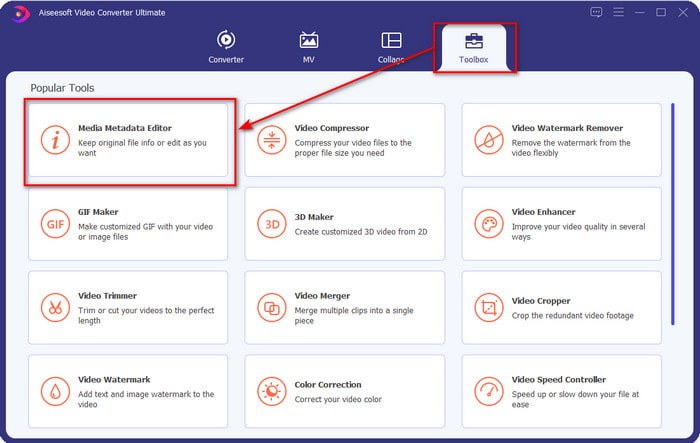
स्टेप 2. सॉफ़्टवेयर खोलने के बाद, Toolbox में जाएँ और Media Metadata Editor चुनें ताकि आप अपने FLV के टैग एडिट कर सकें।.
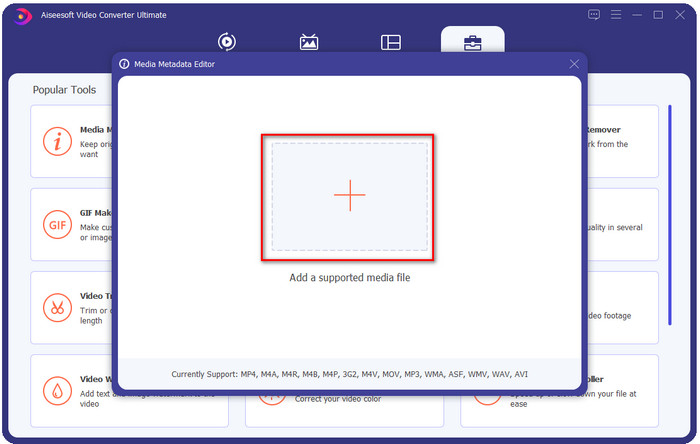
स्टेप 3. + आइकन पर क्लिक करके FLV फ़ाइलें जोड़ें, स्क्रीन पर दिखने वाले फ़ाइल फ़ोल्डर में फ़ाइल का लोकेशन चुनें और Open पर क्लिक करें।.
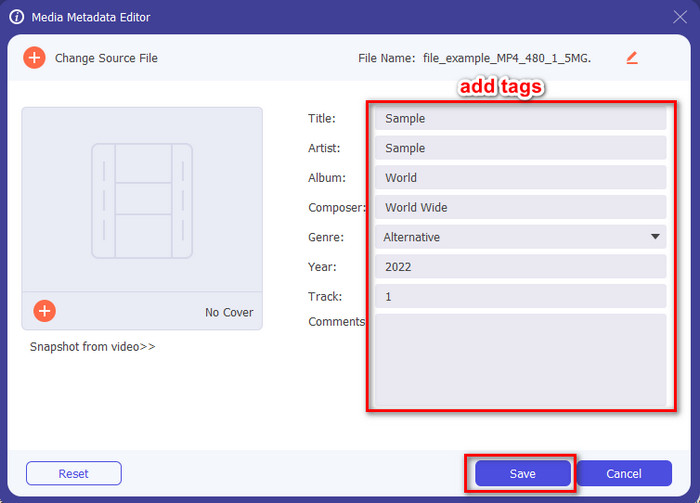
स्टेप 4. textbox में जानकारी जोड़ें, बदलें या हटा दें और फिर Save दबाएँ। बस इतना करने से आपके FLV फ़ाइल में टैग जुड़ जाएँगे।.
FLVMeta - FLV मेटाडेटा संपादक
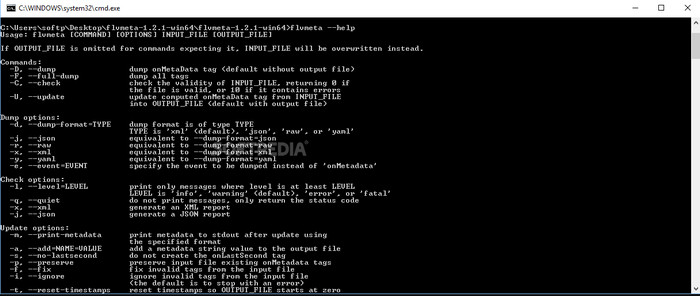
अगर आप प्रो यूज़र हैं और एक समर्पित FLV मेटाडेटा एडिटर आज़माना चाहते हैं जिसे डाउनलोड किया जा सके, तो हम आपका परिचय FLVMeta – FLV Metadata Editor से कराना चाहेंगे। यह टूल सामान्य एडिटर जैसा नहीं है, क्योंकि यह एक कमांड‑लाइन टूल है। इसका मतलब है कि टूल को चलाने के लिए आपको खास कमांड कोड डालने होंगे। FFmpeg की तरह, आपको लोकेशन, फ़ाइल का नाम, डेटा और कई जटिल चीजें इनपुट करनी पड़ती हैं। भले ही FLV मेटाडेटा एडिट करने की शुरुआत कर रहे यूज़र्स के लिए यह सबसे अच्छा विकल्प न हो, लेकिन इसका ज़िक्र ज़रूर करना चाहिए, क्योंकि यह काम बहुत सटीक तरीके से कर देता है।.
इसके अलावा, सॉफ्टवेयर अन्य प्रारूपों के साथ काम नहीं करता है; आप इसे केवल FLV पर उपयोग कर सकते हैं यदि आप टूल का उपयोग करना चाहते हैं। यदि आपके पास कई FLV फ़ाइलें हैं और आप उनके टैग बदलना चाहते हैं और कमांड-लाइन टूल में हेरफेर करने के बारे में बुनियादी ज्ञान रखते हैं, तो हमारा सुझाव है कि आप इसका उपयोग करें। यदि नहीं, तो आपको मेटाडेटा जोड़ने जैसे सरल कार्य करने के लिए टूल का अध्ययन करने के लिए समय की आवश्यकता होगी।
ऑनलाइन FLV मेटाडेटा संपादक
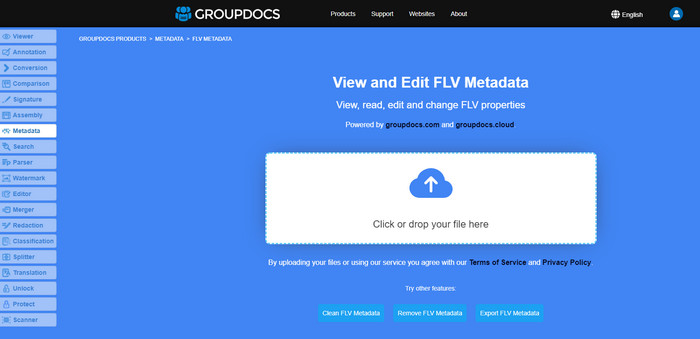
FLV मेटाडेटा फ़ॉर्मेट एडिट करने के लिए कोई टूल डाउनलोड नहीं करना चाहते? ऐसे में आप Online FLV Metadata Editor का इस्तेमाल कर सकते हैं। इस वेब‑आधारित टूल के ज़रिए आप बिना कोई सॉफ़्टवेयर इंस्टॉल किए, मुफ्त में ही अपने FLV का मेटाडेटा एडिट कर सकते हैं। हालांकि यह टूल वेब पर फ्री है, मगर बिना इंटरनेट के यह बिल्कुल काम नहीं करेगा, और अगर इंटरनेट स्लो है तो प्रोसेस बीच में रुक भी सकता है।.
FLVMeta के विपरीत, यह टूल अधिक स्वरूपों का समर्थन करता है और न केवल FLV; यह परम उपकरण के रूप में व्यापक रूप से समर्थन नहीं करता है। इसलिए, यदि आप सॉफ़्टवेयर को डाउनलोड किए बिना कार्य को संपादित करना समाप्त करना चाहते हैं, तो हमारा सुझाव है कि आप इसका उपयोग करें, क्योंकि यह एक्सेस करने के लिए सुरक्षित भी है। लेकिन अनपेक्षित मुद्दों से बचने के लिए याद रखें, सुनिश्चित करें कि आपके पास एक स्थिर इंटरनेट कनेक्शन है।
भाग 2. शीर्ष 3 FLV मेटाडेटा संपादक के बारे में तुलना चार्ट
| विशेषताएं | वीडियो कनवर्टर अंतिम | FLVMeta - FLV मेटाडेटा संपादक | ऑनलाइन FLV मेटाडेटा संपादक |
| उपयोग के लिए सुरक्षित |  | | |
| यूजर फ्रेंडली | |  | |
| इंटरनेट पर निर्भर | | | |
| एडिटिंग फीचर्स, जैसे कटिंग, ट्रिमिंग, क्रॉपिंग, मर्जिंग आदि। | | | |
| सर्वश्रेष्ठ ग्राफिक्स यूजर इंटरफेस | | | |
भाग 3. FLV मेटाडेटा संपादक के बारे में अक्सर पूछे जाने वाले प्रश्न
क्या FLV और F4V समान हैं?
हालाँकि वे दोनों ही Adobe Flash से जुड़े हैं, लेकिन उनका उद्देश्य अलग‑अलग है। उदाहरण के लिए, FLV में वही एन्कोडर इस्तेमाल होता है जो SWF फ़ाइलों में होता है, और इसे आम तौर पर इंटरनेट पर डेटा ट्रांसफर के लिए उपयोग किया जाता है। इसके विपरीत, F4V एक ISO‑आधारित फ़ॉर्मेट है जो MP4 जैसा दिखता है। दोनों ही इंटरनेट पर फ़ाइल ट्रांसफर करने में अच्छे हैं, लेकिन उनकी बनावट और संरचना अलग‑अलग है। अगर आप अपना F4V को FLV में कन्वर्ट करना चाहते हैं, तो इस पर क्लिक करें और जानें कि फ़ॉर्मेट को FLV में कैसे बदलें।.
मैं एफएलवी कहां खेल सकता हूं?
हर मीडिया प्लेयर FLV फ़ॉर्मेट को प्ले नहीं कर सकता, क्योंकि इस फ़ॉर्मेट के लिए सपोर्ट सीमित है। लेकिन आपकी किस्मत अच्छी है, क्योंकि हमने आपके लिए बेहतरीन FLV प्लेयर इकट्ठा किए हैं, जिन्हें आप अपने डिवाइस पर FLV फ़ाइल चलाने के लिए इस्तेमाल कर सकते हैं, बिना इस बात की चिंता किए कि वह सपोर्ट होगा या नहीं। इन टूल्स को टेस्ट किया गया है ताकि यह सुनिश्चित हो सके कि वे Windows, Mac, Android और iPhone पर FLV फ़ाइलें प्ले कर सकते हैं; ज़्यादा जानने के लिए इस लिंक पर क्लिक करें।.
क्या FLV मानक वीडियो-साझाकरण प्रारूप है?
इससे पहले कि हम इसे सबसे अच्छा वीडियो साझाकरण प्रारूप मानते, जिसका उपयोग आप उच्च गुणवत्ता वाले वीडियो चलाने के लिए वेब पर कर सकते हैं; हालाँकि, इस नए युग में और भी बेहतर प्रारूप हैं, जैसे कि MP4। क्योंकि यह उपयोगकर्ताओं के पास विभिन्न उपकरणों के साथ अधिक संगत है, इसे मानक वीडियो प्रारूप के रूप में जाना जाता है। यद्यपि आप अभी भी वेब पर FLV फ़ाइलें साझा कर सकते हैं, फिर भी आपको उस फ़ाइल के रिसीवर के उपकरण पर पुनर्विचार करने की आवश्यकता होगी। और अगर आप रिसीवर हैं, तो आपको इसे चलाने के लिए या इसे खेलने योग्य प्रारूप में बदलने के लिए किसी तृतीय-पक्ष टूल को डाउनलोड करना होगा।
निष्कर्ष
हालांकि एफएलवी का समर्थन करने वाले सीमित उपकरण हैं, फिर भी हम भाग्य में हैं; क्योंकि हम अभी भी ऊपर दिए गए टूल के कारण FLV मेटाडेटा को संपादित कर सकते हैं। लेकिन यह हमारे दिल को दुखी करता है कि हमें उपयोग करने के लिए एक को चुनना होगा, भले ही वे हमारी मदद कर सकें। यदि आपने तय नहीं किया है कि क्या उपयोग करना है, तो आपको इसके बजाय अंतिम उपकरण के साथ जाना चाहिए। यह सबसे सुरक्षित विकल्प है क्योंकि यह सरल है फिर भी आसानी से कार्य को संभालने में आपकी सहायता कर सकता है। अभी भी विश्वास नहीं हो रहा है कि इस उपकरण की क्षमताएं क्या हैं? उस स्थिति में, आपको इसका उपयोग करने के लिए इसे अपने डेस्कटॉप पर डाउनलोड करना होगा और यह देखने के लिए स्वयं का परीक्षण करना होगा कि क्या यह कार्य करता है। यदि आप हमें ऐप पर अपने सुझाव, अनुशंसा, और बहुत कुछ के बारे में संदेश भेज सकते हैं तो हम इसकी सराहना करेंगे।
-
 मेटा डेटा क्या है: मेटाडेटा के बारे में बुनियादी जानकारी जानें
 मेटाडेटा क्या है? क्या यह महत्वपूर्ण है? मेटाडेटा के भाग क्या हैं? क्या आपके पास भी यही प्रश्न है? इस लेख में, आप मेटाडेटा के बारे में बुनियादी जानकारी जानेंगे।
-
 4 सर्वश्रेष्ठ ऑनलाइन और ऑफलाइन मेटाडेटा व्यूअर [2025 तक अपडेट किया गया]
 क्या मैं अपनी फाइल के मेटाडेटा की जांच कर सकता हूं? हां, आप कर सकते हैं, इस पोस्ट की मदद से हम आपको उन विभिन्न मेटाडेटा दर्शकों से परिचित कराएंगे जिनका आप उपयोग कर सकते हैं।
-
 स्नैपचैट पर 6 पसंदीदा विकल्प स्नैपचैट एनिमेटेड स्नैपचैट फिल्टर
 स्नैपचैट वीडियो पर फिल्टर जोड़ने का सबसे अच्छा तरीका जानना चाहते हैं? ठीक है, आप इसे क्लिक कर सकते हैं और विभिन्न फ़िल्टर सीख सकते हैं जिनका उपयोग आप स्नैपचैट वीडियो पर लागू करने के लिए कर सकते हैं।
