


 वीडियो कनवर्टर अंतिम
 स्क्रीन अभिलेखी
 वीडियो मरम्मत
 सुरक्षित डाउनलोड
कंप्यूटर पर एमपीजी फाइलों को कैसे मर्ज करें
जब आप किसी DVD से मूवी को कंप्यूटर पर रिप करने की कोशिश करते हैं, तो आमतौर पर वह MPG फॉर्मेट में सेव होती है। चूँकि रिप की गई मूवी अक्सर कई छोटे‑छोटे MPG क्लिप्स में बँटी होती है, इसलिए आप पूरी मूवी फ़ाइल प्राप्त करने के लिए कई MPG फॉर्मेट वाले मूवी क्लिप्स को एक साथ जोड़ना चाह सकते हैं। इस लेख में, हम आपको 2 तरीकों से MPG फ़ाइलों को कैसे जोड़ा जाए यह दिखाएँगे।.

भाग 1. वीडियो कन्वर्टर अल्टीमेट के साथ एमपीजी फाइलों में कैसे शामिल हों
एमपीजी फिल्मों को मर्ज करने और उन्हें संपादित करने के लिए, आपको पेशेवर वीडियो जॉइनिंग सॉफ्टवेयर की आवश्यकता हो सकती है। वीडियो कन्वर्टर अल्टीमेट आपकी समस्या को हल करने का सबसे अच्छा तरीका है। शक्तिशाली वीडियो मर्जिंग, कनवर्टिंग और संपादन सुविधाओं के साथ, आप बेझिझक कई एमपीजी फाइलों में शामिल हो सकते हैं और उन्हें अपने कंप्यूटर पर समायोजित कर सकते हैं।
- 1. एक क्लिक के साथ एमपीजी फाइलों सहित विभिन्न प्रकार के वीडियो प्रारूपों में शामिल हों और कनवर्ट करें।
- 2. कई एमपीजी वीडियो संपादन सुविधाएँ जिनमें ट्रिमिंग, स्प्लिटिंग रोटेटिंग और वॉटरमार्क और सबटाइटल जोड़ना शामिल है।
- 3. विशेष टूलबॉक्स जो आपको वीडियो गुणवत्ता को अपग्रेड करने के लिए एमपीजी वीडियो एन्हांसर प्रदान करता है।
- 4. अपने mpg मूवी क्लिप को सजाने के लिए थीम और फिल्टर जोड़ें
फ्री डाउनलोडWindows 7 या बाद के संस्करण के लिएसुरक्षित डाउनलोड
फ्री डाउनलोडMacOS 10.7 या बाद के संस्करण के लिएसुरक्षित डाउनलोड
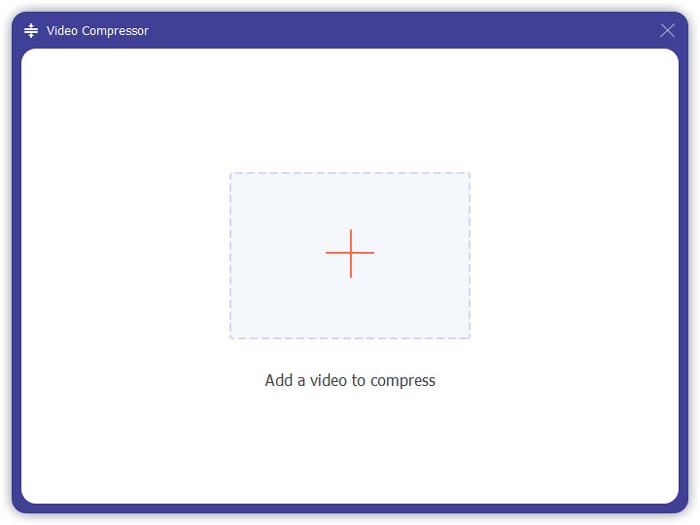
चरण 1. Video Converter Ultimate डाउनलोड करें और इंस्टॉल करें। Converter इंटरफ़ेस चुनें। फिर आप इंटरफ़ेस के बीच में स्थित Add Files वाले वर्ग पर क्लिक करके वे MPG फ़ाइलें जोड़ सकते हैं जिन्हें आप जोड़ना चाहते हैं। आप कई MPG फ़ाइलों को ड्रैग करके भी उस वर्ग में छोड़कर जोड़ सकते हैं। यह आपको कई MPG फ़ाइलें जोड़ने और उन्हें एक में मर्ज करने की सुविधा देता है।.
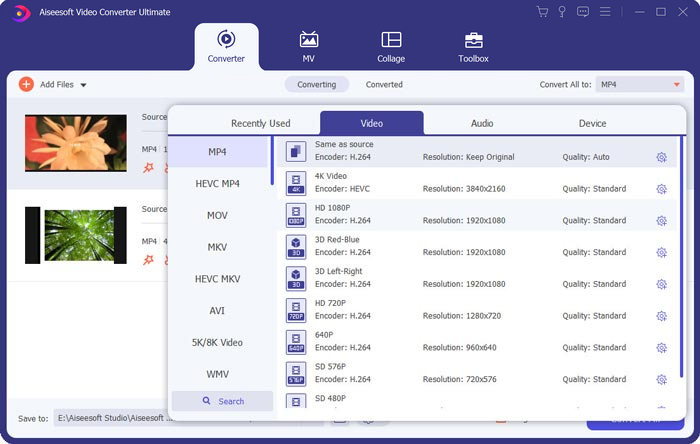
चरण 2. इसके बाद दायीं तरफ स्थित Convert All to फ़ील्ड पर क्लिक करके वह वीडियो फॉर्मेट चुनें जिसमें आप आउटपुट चाहते हैं। मेनू में आप MP4, MOV, MKV आदि सहित कई प्रकार के फॉर्मेट चुन सकते हैं। gear आइकन पर क्लिक करके आप फॉर्मेट के पैरामीटर मैन्युअली समायोजित कर सकते हैं।.
चरण 3. अपने वीडियो को एडिट करने के लिए आप scissor आइकन पर क्लिक करके एडिटिंग इंटरफ़ेस खोल सकते हैं। आप वीडियो के शुरुआती और अंतिम समय सेट करके उन्हें ट्रिम कर सकते हैं। बाईं ओर की पट्टी पर MPG वीडियो कालानुक्रमिक क्रम में सूचीबद्ध होते हैं। यदि आप वीडियो के अनुक्रम को बदलना चाहते हैं, तो आप उन्हें ड्रैग करके अलग क्रम में रख सकते हैं। ऊपर वाला वीडियो अंतिम मर्ज किए गए वीडियो में नीचे वाले से पहले चलाया जाएगा।.
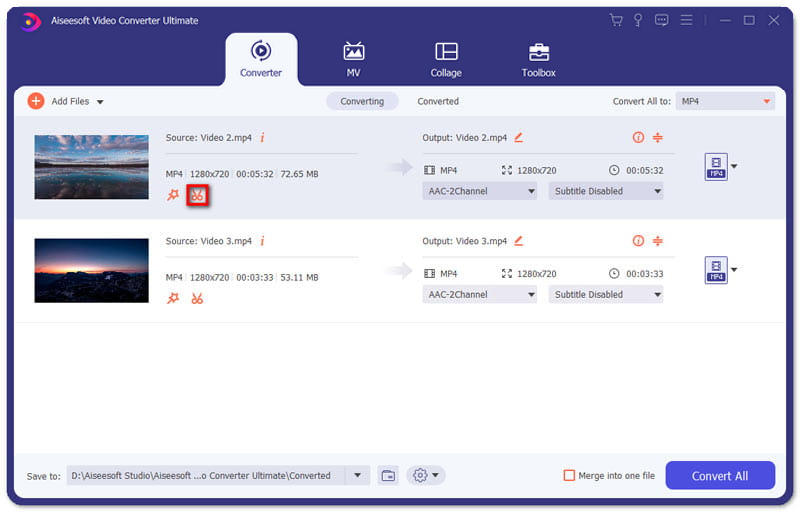
चरण 4. जब आप एडिटिंग पूरी कर लें, तो आप उन्हें मर्ज करके अंतिम प्रोजेक्ट एक्सपोर्ट कर सकते हैं। आपको यह पता होना चाहिए कि इंटरफ़ेस में दिख रहे क्रम के अनुसार वीडियो को कालानुक्रमिक क्रम में ही मर्ज किया जाएगा। मर्जिंग शुरू करने के लिए, आपको Merge into One File बॉक्स पर क्लिक करना है और फिर Convert All बटन पर क्लिक करना है। पूरा होने के बाद, आप जुड़े हुए वीडियो को फ़ोल्डर में पा सकते हैं।.
फिर आप MPG MPEG प्लेयर के साथ सीधे MPG फ़ाइलें चला सकते हैं।.
भाग 2. एमपीजी फाइलों को मुफ्त में ऑनलाइन कैसे शामिल करें
यदि आप मुफ्त में ऑनलाइन MPG फ़ाइलों को मर्ज करना चाहते हैं, तो आप Free Online Video Merger का उपयोग कर सकते हैं। इसका साधारण और सुगठित इंटरफ़ेस सभी उपयोगकर्ताओं के लिए सुविधाजनक है।.
चरण 1. लॉन्चर डाउनलोड करें और मर्जर सेटअप करें। फिर आप इंटरफ़ेस में मौजूद + पर क्लिक करके MPG फ़ाइलें जोड़ सकते हैं। स्क्रीन के नीचे दिए गए मेनू में आप मर्ज किए गए वीडियो का रिज़ॉल्यूशन और फॉर्मेट समायोजित कर सकते हैं। स्क्रीन पर बाएँ से दाएँ तक वीडियो का अनुक्रम कालानुक्रमिक क्रम में होता है।.
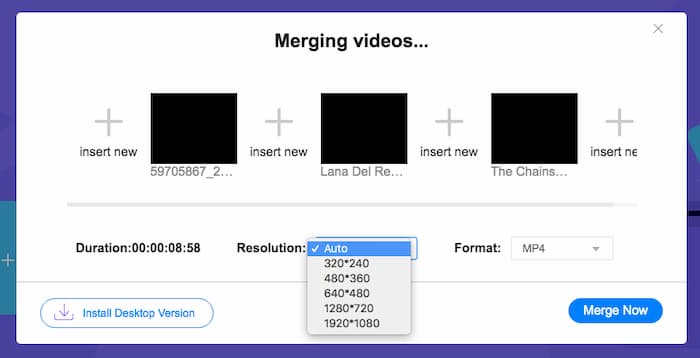
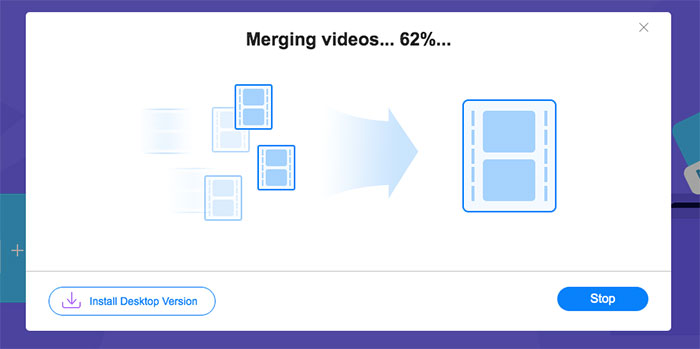
चरण 2. जॉइनिंग शुरू करने के लिए आपको Merge Now बटन पर क्लिक करना होगा। मर्जिंग खत्म होने पर आप अपने कंप्यूटर में डिफ़ॉल्ट फ़ोल्डर Download में वीडियो पा सकते हैं।.
भाग 3. एमपीजी फाइलों में शामिल होने के बारे में अक्सर पूछे जाने वाले प्रश्न
1. मैं एमपीजी वीडियो फाइल कैसे खोल सकता हूं?
आमतौर पर, MPG वीडियो फ़ाइल MPEG-1 और MPEG-2 संस्करण होती है। MPEG-1 अधिकांश मुख्यधारा के मीडिया प्लेयर जैसे Windows Media Player और VLC Media Player के साथ संगत है। MPEG-2 को DVD वीडियो के लिए डिज़ाइन किया गया है। इसे खोलने के लिए आप किसी तृतीय-पक्ष DVD डिकोडर को डाउनलोड कर सकते हैं।
2. एमपीजी फाइल क्या है?
एमपीजी फ़ाइल वीडियो और ऑडियो डेटा को बचाने के लिए बेतहाशा उपयोग की जाने वाली वीडियो फ़ाइल है। यह गुणवत्ता खोए बिना बड़े ऑडियो और वीडियो डेटा को छोटे आकार में सहेज और संपीड़ित कर सकता है। इसे मूविंग पिक्चर एक्सपर्ट्स ग्रुप (एमपीईजी) द्वारा मानकीकृत किया गया है। MPG का उपयोग इंटरनेट पर मूवी को सेव और डिस्ट्रीब्यूट करने के लिए किया जाता है। MPG फ़ाइलें PS या MPEG-PS के रूप में प्रोग्राम स्ट्रीम कंटेनर स्वरूप में सहेजी जाती हैं।
3. मैं एमपीजी वीडियो फाइलों को मुफ्त में कैसे मर्ज कर सकता हूं?
इंटरनेट पर कई मुफ्त वीडियो जॉइनिंग टूल हैं। ऊपर उल्लिखित फ्री ऑनलाइन वीडियो मर्जर एक आसान और स्पष्ट इंटरफेस वाला एक फ्री टूल है जो आपकी मांग को पूरा कर सकता है।
निष्कर्ष
जब आप कई MPG फ़ाइलों को एक में जोड़ना चाहते हैं, तो आपको एक प्रोफेशनल वीडियो जॉइनर की ज़रूरत होती है। इस लेख में, आप जान सकते हैं कि अपनी ज़रूरत पूरी करने के लिए वीडियो जॉइनर का उपयोग कैसे करें। यदि आपके पास वीडियो मर्जिंग टूल्स के बारे में कोई प्रश्न हों या MPG फ़ाइलों को साथ में जोड़ने के बारे में और जानना चाहते हों, तो कृपया नीचे अपनी टिप्पणी लिखें।.
-
 Sony X70 से MXF वीडियो में शामिल होने के 2 अंतिम तरीके
 यदि आपने Sony X70 से कुछ MXF वीडियो लिए हैं, तो MXF फ़ाइलों में शामिल होने के सर्वोत्तम तरीके क्या हैं? उच्च गुणवत्ता वाले वीडियो को संयोजित करने के 2 प्रभावी तरीके यहां दिए गए हैं।
-
 YouTube के लिए वीडियो कंप्रेस करने के 2 तरीके
 YouTube वीडियो अपलोड करने के लिए बड़े और धीमे हैं? ऑनलाइन और कंप्यूटर पर 2 तरह से YouTube के लिए वीडियो फ़ाइल का आकार छोटा करें।
-
 जीआईएफ प्लेयर - विंडोज पीसी, मैक, एंड्रॉइड और आईफोन के लिए 5 सर्वश्रेष्ठ जीआईएफ प्लेयर
 जीआईएफ फ़ाइलें क्या प्रोग्राम खोलता है? मैं एंड्रॉइड पर जीआईएफ कैसे देख सकता हूं? क्या iPhone में GIF खोलने के लिए GIF प्लेयर है? यह पोस्ट आपके लिए 5 सर्वश्रेष्ठ GIF खिलाड़ियों को साझा करता है।
