


 वीडियो कनवर्टर अंतिम
 स्क्रीन अभिलेखी
 वीडियो मरम्मत
 सुरक्षित डाउनलोड
अपने वीडियो देखने के अनुभव को बदलने के लिए ऑनलाइन वीडियो मिरर करें
फ़्लिप या उल्टा वीडियो देखना निराशाजनक हो सकता है। हां, यह पता लगाने के लिए कि वीडियो को फ़्लिप करने या घुमाने की आवश्यकता है, केवल एक आदर्श क्षण को कैप्चर करना निराशाजनक हो सकता है। लेकिन डरो मत। ऑनलाइन वीडियो फ़्लिप करना एक आसान और सुविधाजनक समाधान है!
इसी बीच, सोशल मीडिया या वीडियो‑शेयरिंग साइटों पर वीडियो कंटेंट इंटरनेट का एक अहम हिस्सा तेजी से बनता जा रहा है। और इसकी वाजिब वजह भी है: वीडियो को साझा करना बेहद आसान होता है और आप अपनी ऑडियंस से तुरंत फ़ीडबैक पा सकते हैं—साथ ही इन्हें ब्रांड जागरूकता बढ़ाने और अपनी ऑडियंस के साथ एंगेजमेंट बढ़ाने के लिए भी इस्तेमाल किया जा सकता है। इस ब्लॉग पोस्ट में, हम वे अलग‑अलग तरीके बताएंगे जिनसे आप ऑनलाइन मुफ्त में वीडियो फ्लिप कर सकते हैं.

भाग 1. ऑनलाइन वीडियो पलटने के विभिन्न तरीके
यहां, हम सबसे अच्छे वीडियो फ़्लिपर्स और वीडियो मिरर एक्सटेंशन के बारे में बात करेंगे जिनका उपयोग आप वीडियो के ओरिएंटेशन को बदलने के लिए कर सकते हैं। इससे कोई फर्क नहीं पड़ता कि वीडियो आपके स्थानीय ड्राइव से अपलोड किया गया है या वीडियो सीधे वीडियो-साझाकरण साइट से है, ये टूल उन्हें संभाल सकते हैं।
1. वीडियो मिरर
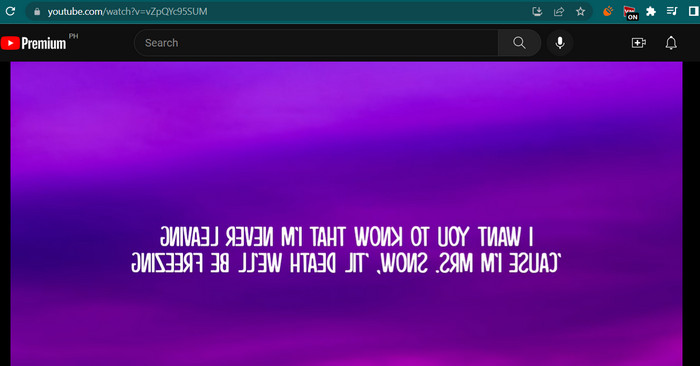
वीडियो मिरर क्रोम एक्सटेंशन एक शक्तिशाली और उपयोगकर्ता के अनुकूल उपकरण है जो देखने के बेहतर अनुभव के लिए आपके वीडियो को मिरर करना आसान बनाता है। बस एक क्लिक में, आप किसी भी विकृति को ठीक करने के लिए अपने वीडियो को फ्लिप और मिरर कर सकते हैं और उचित ओरिएंटेशन में उनका आनंद उठा सकते हैं। विस्तार वीडियो प्रारूपों की एक विस्तृत श्रृंखला के साथ संगत है और सबसे लोकप्रिय वीडियो प्लेयर के साथ सहजता से काम करता है। इसके अतिरिक्त, सहज ज्ञान युक्त नियंत्रण और एक सरल इंटरफ़ेस के साथ, एक्सटेंशन को स्थापित करना और उपयोग करना आसान है। यदि आप इस टूल का उपयोग करके क्षैतिज वीडियो को ऑनलाइन फ़्लिप करना चाहते हैं, तो नीचे दिए गए चरणों का पालन करें:
स्टेप 1. अपना पसंदीदा ब्राउज़र खोलें और Chrome Web Store से Video Mirror क्रोम एक्सटेंशन इंस्टॉल करें।.
स्टेप 2. इंस्टॉल होने के बाद, अपने वेब ब्राउज़र में उस वीडियो पर जाएँ जिसे आप फ्लिप करना चाहते हैं। आप YouTube, Netflix आदि जैसे वीडियो‑शेयरिंग साइटों पर जा सकते हैं।.
स्टेप 3. अब टूलबार में मौजूद Video Mirror आइकॉन पर क्लिक करें। वीडियो फ्लिप होकर क्षैतिज (horizontally) मिरर हो जाएगा। दुर्भाग्य से, इस टूल की मदद से आप वीडियो को वर्टिकली मिरर नहीं कर सकते।.
2. कपविंग
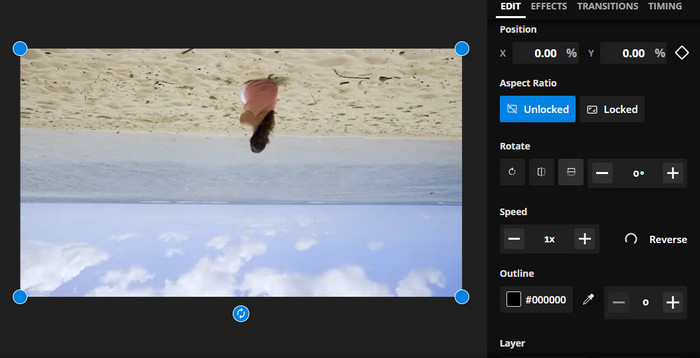
Kapwing एक शक्तिशाली ऑनलाइन वीडियो एडिटिंग प्लेटफॉर्म है जो वीडियो को जल्दी और आसानी से बनाने और संपादित करने में आपकी मदद करने के लिए कई तरह के टूल और सुविधाओं का समर्थन करता है। कपविंग के साथ, आप ट्रिम कर सकते हैं, आकार बदल सकते हैं, टेक्स्ट और छवियां जोड़ सकते हैं, और यहां तक कि अपने वीडियो में प्रभाव और बदलाव भी जोड़ सकते हैं। कपविंग की आकर्षक विशेषताओं में से एक इसकी ऑनलाइन वीडियो फ़्लिप करने की क्षमता है। वीडियो को क्षैतिज या लंबवत फ़्लिप किया जा सकता है, विकृतियों को ठीक किया जा सकता है, और आप उन्हें आदर्श अभिविन्यास में देख सकते हैं।
स्टेप 1. इस टूल के साथ शुरुआत करने के लिए, अपना पसंदीदा वेब ब्राउज़र लॉन्च करें और Kapwing की आधिकारिक वेबपेज पर जाएँ।.
स्टेप 2. जब आपका अकाउंट बन जाए, तो Create New Project बटन पर क्लिक करें और Upload बटन दबाकर वह वीडियो अपलोड करें जिसे आप ऑनलाइन फ्लिप करना चाहते हैं।.
स्टेप 3. जैसे ही मीडिया ऑनलाइन टूल में जोड़ दिया जाता है, दाईं ओर एडिटिंग टूल अपने‑आप दिखाई देने लगेंगे। इस बार, EDIT टैब में जाएँ और Rotate सेक्शन ढूँढें। इसके बाद, Flip Horizontally या Flip Vertically आइकॉन पर क्लिक करें।.
स्टेप 4. जब आप परिणाम से संतुष्ट हों, तो इंटरफ़ेस के ऊपर दाएँ कोने में Export Project बटन पर क्लिक करें। इसके बाद आप वीडियो को ऑनलाइन क्षैतिज और ऊर्ध्वाधर दोनों तरह से फ्लिप कर पाएँगे।.
3. क्लिडियो
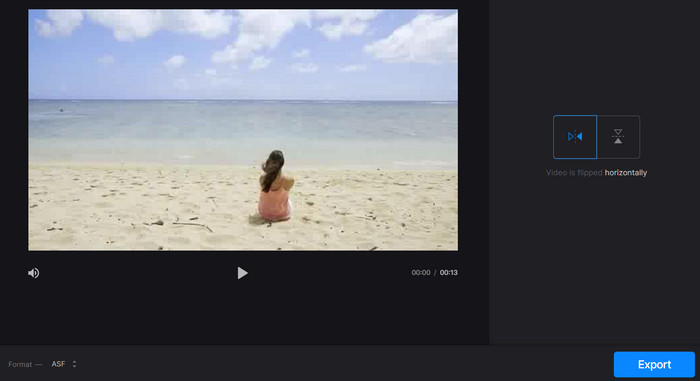
Clideo एक उत्कृष्ट ऑनलाइन वीडियो संपादन उपकरण है जो सभी के लिए वीडियो संपादन प्रक्रिया को सरल करता है। इस कार्यक्रम के बारे में सबसे अच्छी बात यह है कि यह हर उद्देश्य के लिए समर्पित उपकरणों के साथ आता है। फ्लिप वीडियो एक सहायक उपकरण है। आप बिना किसी जटिल सेटअप के वीडियो को क्षैतिज या लंबवत रूप से फ़्लिप कर सकते हैं। साथ ही, टूल उपयोगकर्ताओं को वीडियो फ़्लिप करने के बाद अपना पसंदीदा प्रारूप चुनने में सक्षम बनाता है। इसलिए, निम्न चरणों के माध्यम से वीडियो को 90 डिग्री ऑनलाइन फ़्लिप करें:
स्टेप 1. अपने कंप्यूटर पर उपलब्ध किसी भी वेब ब्राउज़र का उपयोग करते हुए Clideo की वेबपेज पर जाएँ। फिर, होम पेज पर मौजूद टूल्स की सूची में से Flip Video विकल्प ढूँढें।.
स्टेप 2. अब, अपने लोकल कंप्यूटर ड्राइव से वीडियो अपलोड करने के लिए Choose file बटन पर क्लिक करें। यदि आप क्लाउड स्टोरेज से वीडियो एम्बेड करना चाहते हैं, तो ड्रॉप‑डाउन बटन पर क्लिक करके अपनी मनचाही स्टोरेज सेवा चुन सकते हैं।.
स्टेप 3. अगला कदम, प्रोग्राम में वीडियो जोड़ने के बाद आप उसकी ओरिएंटेशन बदल सकते हैं। अपनी ज़रूरत के अनुसार ओरिएंटेशन सेट करने के लिए उचित बटनों पर क्लिक करें।.
स्टेप 4. यदि आप वीडियो का फ़ॉर्मेट बदलना चाहते हैं, तो Format चुनें और वीडियो को अपने कंप्यूटर में सेव करने के लिए Export बटन पर क्लिक करें। इन निर्देशों का पालन करने के बाद, आप बिना वॉटरमार्क के मुफ्त में ऑनलाइन वीडियो फ्लिप करने में सक्षम होंगे।.
भाग 2. वीडियो को ऑफ़लाइन फ़्लिप करने का बढ़िया तरीका
कई बार इंटरनेट उपलब्ध नहीं होता, खासकर जब आप अक्सर सफ़र में रहते हैं। ऐसे में FVC Video Converter Ultimate जैसा ऑफ़लाइन प्रोग्राम आपके लिए काफ़ी मददगार साबित हो सकता है। यह डेस्कटॉप एडिटिंग टूल ऑनलाइन वीडियो फ्लिप ऐप्स की तुलना में कहीं अधिक संपादन विकल्प प्रदान करता है। पीसी और मैक दोनों के लिए, FVC Video Editor सबसे प्रोफेशनल‑ग्रेड वीडियो एडिटिंग प्रोग्राम है। यह सबसे बेहतर वीडियो एडिटर है, क्योंकि यह आपको वीडियो को अपनी मर्ज़ी से कन्वर्ट, रोटेट, फ्लिप, क्लिप, ट्रिम और वॉटरमार्क करने की सुविधा देता है।.
स्टेप 1. सॉफ़्टवेयर प्राप्त करें और इंस्टॉल करें
नीचे दिए गए Free Download बटन पर क्लिक करके प्रोग्राम के इंस्टॉलर की कॉपी डाउनलोड करें। फिर इंस्टॉलेशन विज़ार्ड की मदद से इसे सेटअप करें। उसके तुरंत बाद, इसे अपने कंप्यूटर पर लॉन्च करें और इंटरफ़ेस से परिचित हों।.
Free DownloadWindows 7 या बाद के वर्ज़न के लिएसिक्योर डाउनलोड
Free DownloadMacOS 10.7 या बाद के वर्ज़न के लिएसिक्योर डाउनलोड
स्टेप 2. वीडियो फ्लिपर लॉन्च करें
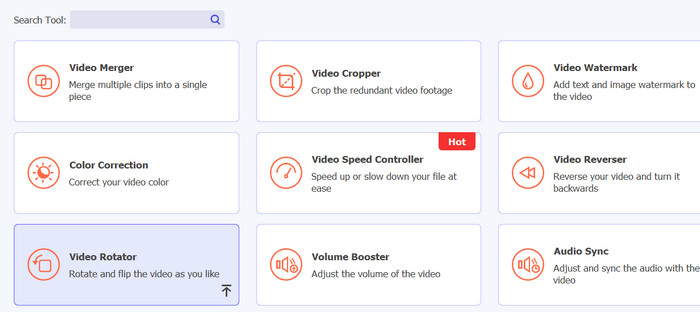
एप्लिकेशन लॉन्च करने के बाद, आपको मुख्य इंटरफ़ेस पर चार टैब दिखाई देंगे। ड्रॉप‑डाउन मेनू से Toolbox > Video Rotator चुनें। आप चाहें तो सर्च बॉक्स का उपयोग करके भी इस टूल को जल्दी ढूँढ सकते हैं।.
स्टेप 3. वीडियो फ़ाइल अपलोड करें
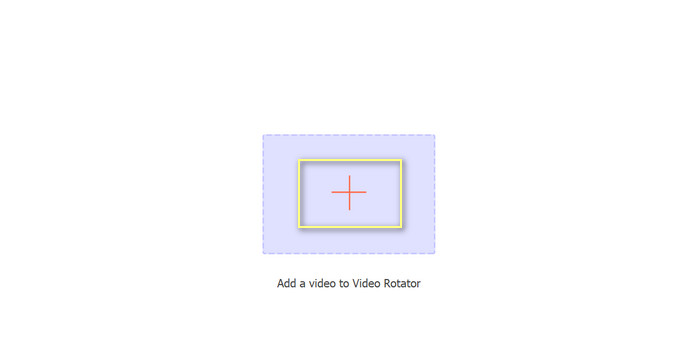
वीडियो रोटेटर के अपलोड पैनल पर अपने वांछित वीडियो को अपलोड करने के लिए धन चिह्न का चयन किया जा सकता है। फ़्लिपिंग के लिए इंटरफ़ेस तब प्रस्तुत किया जाएगा।
स्टेप 4. वीडियो फ्लिप करें
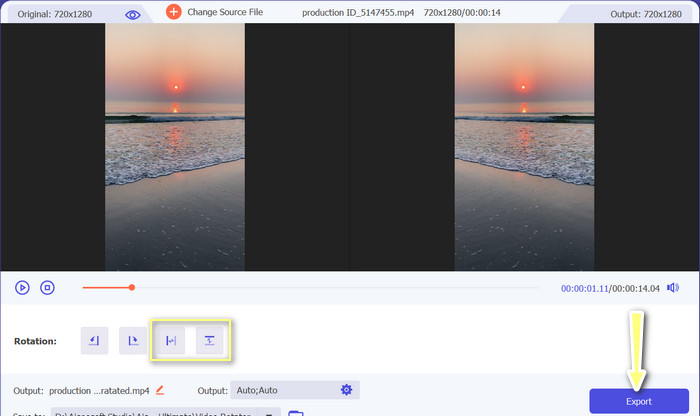
फ्लिपिंग इंटरफ़ेस दिखाई देने के बाद, आपको इसके फ्लिपिंग बटनों तक पहुँच मिल जाएगी। आप वीडियो को क्षैतिज या ऊर्ध्वाधर दिशा में रोटेट करने का विकल्प चुन सकते हैं। उपयुक्त बटन चुनें और प्रक्रिया पूरी करने के लिए Export बटन पर क्लिक करें।.
अधिक पढ़ें:
ऑनलाइन आसानी से वीडियो काटने के बेहतरीन तरीके
एक बेहतरीन सिनेमैटिक वीडियो बनाने के लिए प्रो की तरह वीडियो को कैसे रिवर्स करें
भाग 3. ऑनलाइन वीडियो फ़्लिप करने के बारे में अक्सर पूछे जाने वाले प्रश्न
किसी वीडियो को ऑनलाइन मिरर करने का क्या मतलब है?
किसी वीडियो को मिरर करने का मतलब है कि उसे क्षैतिज या लंबवत रूप से फ़्लिप करना ताकि बाईं ओर दाईं ओर हो जाए और इसके विपरीत। यह उस फ़ुटेज को सही करने के लिए उपयोगी है जो एक अजीब कोण पर रिकॉर्ड किया गया था या कुछ प्रकार की सामग्री बनाते समय।
क्या किसी और के वीडियो को मिरर करना कानूनी है?
आम तौर पर, बिना अनुमति या उचित आरोपण के किसी और के वीडियो को मिरर करना कानूनी नहीं है। किसी भी वीडियो को मिरर करने से पहले, सुनिश्चित करें कि आपके पास इसका उपयोग करने का अधिकार है और आप किसी कॉपीराइट कानून का उल्लंघन नहीं कर रहे हैं।
क्या मैं अपने फोन पर वीडियो मिरर कर सकता हूं?
हां, आप वीडियो एडिटिंग ऐप का इस्तेमाल करके अपने फोन पर वीडियो मिरर कर सकते हैं। कई लोकप्रिय वीडियो संपादन ऐप, जैसे इनशॉट, वीडियोशो और कीनमास्टर, मिररिंग विकल्प प्रदान करते हैं। बस अपने वीडियो को ऐप पर अपलोड करें, मिररिंग विकल्प चुनें, और नए मिरर किए गए संस्करण को सेव करें।
निष्कर्ष
ऑनलाइन वीडियो मिरर करना अब पहले से कहीं ज़्यादा आसान हो गया है, और इसकी वजह है उपलब्ध ऑनलाइन वीडियो एडिटिंग टूल्स की बड़ी रेंज। इतने सारे मिरर वीडियो ऑनलाइन ऐप विकल्पों के बीच, यह ज़रूरी है कि आप अपनी ज़रूरतों को ध्यान में रखते हुए कोई भरोसेमंद और उच्च‑गुणवत्ता वाला ऑनलाइन वीडियो एडिटिंग टूल चुनें।.
-
 [4 तरीके] ऑनलाइन अपने वीडियो को आसानी से कैसे तेज करें
 क्या आप ऑनलाइन वीडियो को गति देना चाहते हैं? वीडियो को अलग-अलग तरीकों से तेज करने के बारे में अधिक जानने के लिए इस लेख को पढ़ें।
-
 IPhone पर पूरी तरह से टाइम-लैप्स वीडियो कैसे बनाएं
 क्या आप जानना चाहते हैं कि अपने iPhone पर टाइम-लैप्स वीडियो कैसे बनाएं? आप नीचे दिए गए इन सरल चरणों का पालन करके अपने iPhone पर एक संपूर्ण वीडियो टाइम-लैप्स बना सकते हैं।
-
 जीआईएफ के लिए 5 सर्वश्रेष्ठ ऑनलाइन कन्वर्टर मुफ्त और प्रीमियम के लिए किसी भी वीडियो प्रारूप में
 यदि प्लेटफॉर्म में जीआईएफ समर्थित नहीं हैं, तो अपने जीआईएफ को किसी भी वीडियो प्रारूप में ऑनलाइन परिवर्तित करना बेहतर है। और जीआईएफ की सामग्री को भी सुरक्षित रखें।
