


 वीडियो कनवर्टर अंतिम
 स्क्रीन अभिलेखी
 वीडियो मरम्मत
 सुरक्षित डाउनलोड
आसानी से निर्यात किए गए वीडियो पर DaVinci समाधान वॉटरमार्क हटाने के 2 दृष्टिकोण
क्या आपको ऐसा एडिटर चाहिए जो विशेष और अनोखी फीचर्स व फ़ंक्शंस देता हो, जिनकी मदद से आप साधारण वीडियो को कुछ शानदार में बदल सकें? DaVinci Resolve Pro वर्ज़न के साथ, आप इसके सभी एडवांस टूल्स का आनंद ले सकते हैं, जो यहाँ दायरे में आने वाले अन्य सॉफ़्टवेयर पर आपको नहीं मिलते। अगर आप प्रो वर्ज़न खरीदना नहीं चाहते, तो भी आप इस टूल को डाउनलोड करके इसके फ़्री वर्ज़न में उपलब्ध एडिटिंग टूल्स का उपयोग कर सकते हैं। लेकिन जैसे ही आप फ़्री वर्ज़न का इस्तेमाल करते हुए वीडियो पर कोई एक्सक्लूसिव टूल लगाते हैं, एक्सपोर्ट किए गए वीडियो पर वॉटरमार्क जोड़ दिया जाएगा। अगर आप DaVinci Resolve वॉटरमार्क हटाने का तरीका ढूंढ रहे हैं, तो यह जानकारी आपके लिए है! इस बारे में और जानने के लिए इस लेख को आगे पढ़ते रहें।.

भाग 1. क्या DaVinci के नि:शुल्क संस्करण में वॉटरमार्क है?
यदि आप DaVinci Resolve मुक्त संस्करण का उपयोग करते हैं तो यह उत्पाद वॉटरमार्क नहीं जोड़ता है। लेकिन आप केवल मुफ्त संस्करण पर मूल संपादन सुविधा का उपयोग कर सकते हैं। हम जानते हैं कि यह एक पेशेवर की पेशेवर वीडियो संपादन आवश्यकताओं के लिए पर्याप्त नहीं होगा। मान लीजिए कि आप केवल प्रीमियम संस्करण पर उपलब्ध एक विशेष सुविधा का उपयोग करने का प्रयास करते हैं। उस स्थिति में, आपके द्वारा फ़ाइल निर्यात करने के बाद वॉटरमार्क स्वचालित रूप से एम्बेड हो जाएगा। उन उपयोगकर्ताओं के लिए जो DaVinci Resolve पर वॉटरमार्क रखना पसंद नहीं करते हैं, आपको इसकी प्रो सुविधाओं का उपयोग करने से बचना चाहिए। यदि आप अभी भी इस लेख को पढ़ रहे हैं, तो अगला भाग उन टूल पर चर्चा करेगा जिनका उपयोग आप यहां संपादित किए गए वीडियो पर वॉटरमार्क हटाने के लिए कर सकते हैं।
भाग 2. कैसे निकालें DaVinci 2 अलग-अलग दृष्टिकोणों के साथ वीडियो पर वॉटरमार्क हल करें
FVC वीडियो कन्वर्टर अल्टीमेट- वीडियो पर वॉटरमार्क हटाने का सबसे आसान तरीका
FVC Video Converter Ultimate आपके वीडियो को ढकने वाले किसी भी वॉटरमार्क को हटाता है और इस काम में सबसे बेहतर साबित होता है। भले ही आप पहली बार अपने वीडियो से वॉटरमार्क हटा रहे हों, इस टूल की मदद से आप अपने वीडियो पर लगे लोगो, स्टैम्प, तारीख, टेक्स्ट और वॉटरमार्क को किसी प्रोफेशनल की तरह मिटा सकते हैं। यह टूल पेड है, लेकिन इसकी कीमत DaVinci Resolve और यहाँ बताए गए दूसरे टूल की तुलना में ज़्यादा नहीं है।.
इसके अलावा, आप इस उपकरण के अंतिम संपादन सुविधाओं और कार्यों का भी उपयोग कर सकते हैं जो आपको DaVinci Resolve पर मिल सकते हैं या नहीं। यह एक वन-स्टॉप टूल है जिसने उन लाखों उपयोगकर्ताओं की मदद की है जो पहले ही इसे आजमा चुके हैं। तो, मान लीजिए कि आपको इसके साथ DaVinci Resolve वॉटरमार्क चरणों को हटाने का तरीका चाहिए। उस स्थिति में, आपको हमारे द्वारा जोड़े गए ट्यूटोरियल को पढ़ना जारी रखना चाहिए।
चरण 1. टूल लॉन्च करने से पहले, उसे अपने डेस्कटॉप पर डाउनलोड करें, सॉफ़्टवेयर इंस्टॉल करें और फिर इसे खोलें।.
फ्री डाउनलोडWindows 7 या बाद के संस्करण के लिएसुरक्षित डाउनलोड
फ्री डाउनलोडMacOS 10.7 या बाद के संस्करण के लिएसुरक्षित डाउनलोड
चरण 2. इस टूल में दिए गए Video Watermark Remover को खोलने के लिए Toolbox सेक्शन खोलें।.
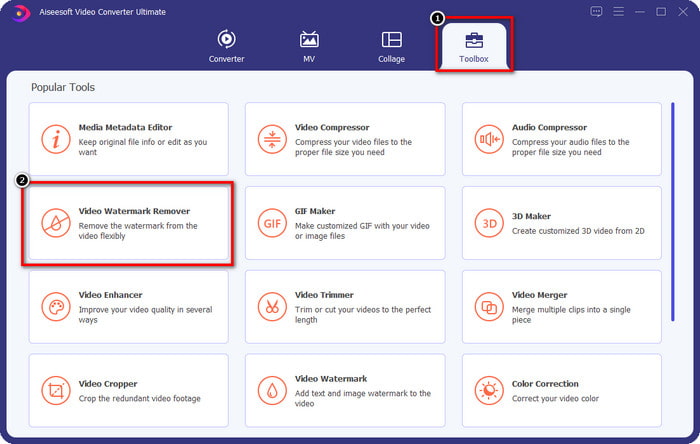
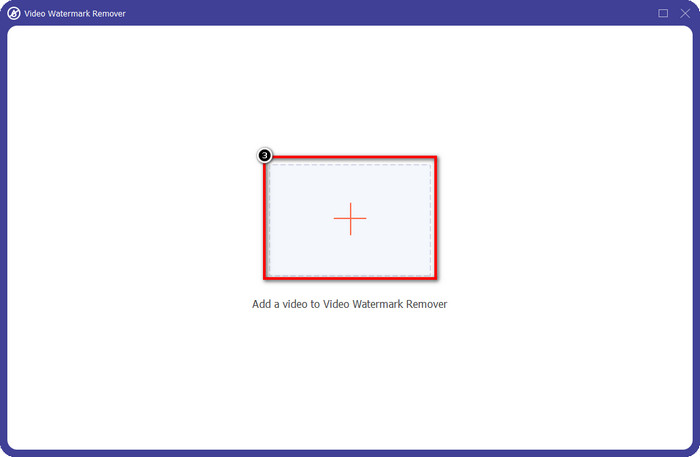
चरण 3. इसके बाद, DaVinci में एडिट किया हुआ और वॉटरमार्क वाला अपना वीडियो अपलोड करने के लिए + आइकन पर क्लिक करें।.
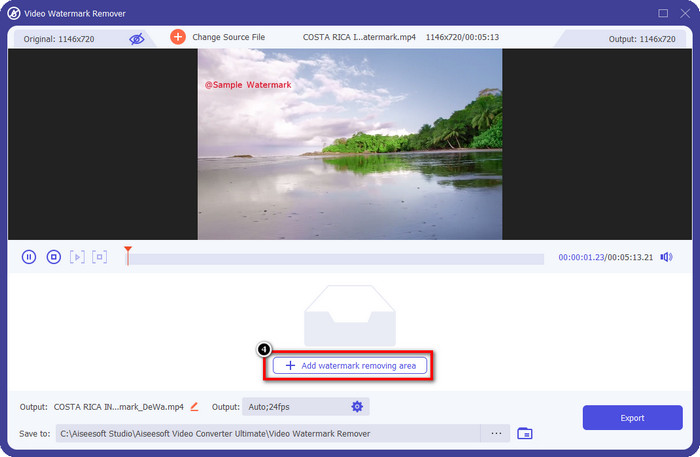
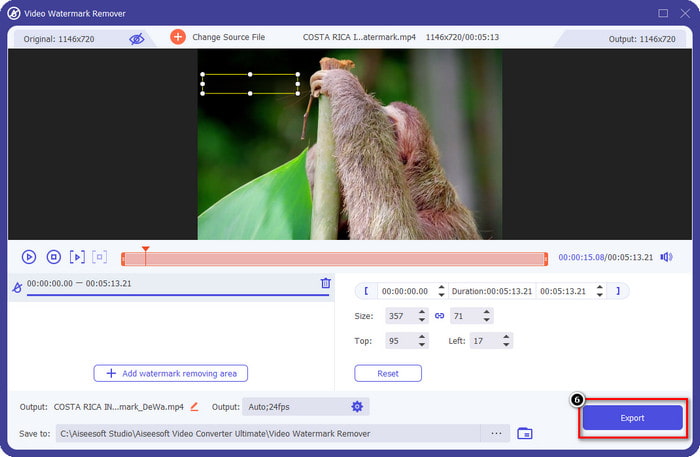
चरण 4. आपने जो वीडियो यहाँ अपलोड किया है, उससे वॉटरमार्क हटाने के लिए Add Watermark Removing Area पर क्लिक करें।.
चरण 5. आपको वॉटरमार्क वाले हिस्से पर मैन्युअली सिलेक्शन बॉक्स रखना होगा। अगर इसका आकार बहुत छोटा या बड़ा हो, तो उसे समायोजित करके उस क्षेत्र के अनुसार फिट करें।.
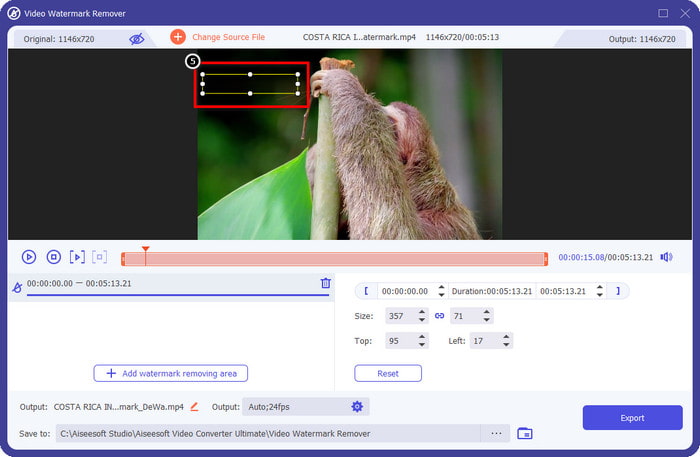
चरण 6. अब जब आप वॉटरमार्क हटाने वाला क्षेत्र सेट कर चुके हैं, तो Export बटन पर क्लिक करके वीडियो एक्सपोर्ट करें; इसमें वॉटरमार्क का कोई निशान नहीं बचेगा।.
पेशेवरों
- किसी अन्य वॉटरमार्क रिमूवर की तुलना में इसका उपयोग करना बहुत आसान और सस्ता है।
- यह किसी भी वीडियो प्रकार पर वॉटरमार्क को हटाने पर त्रुटिपूर्ण रूप से काम करता है।
- टूलबॉक्स पर अतिरिक्त टूलसेट उपलब्ध हैं जिनका आप उपयोग कर सकते हैं।
- यह तेजी से अपलोड करने और फ़ाइलों को डाउनलोड करने के लिए एक अल्ट्राफास्ट प्रक्रिया और हार्डवेयर त्वरण का समर्थन करता है।
- इसका संस्करण अपने विंडोज या मैकओएस पर डाउनलोड करें।
विपक्ष
- एक्सटेंशन समर्थित नहीं हैं.
- यह वॉटरमार्क को स्वचालित रूप से नहीं हटाता है।
एडोब आफ्टर इफेक्ट के लिए एडोब क्लोक एक्सटेंशन - वीडियो के लिए प्रोफेशनल वॉटरमार्क रिमूवर
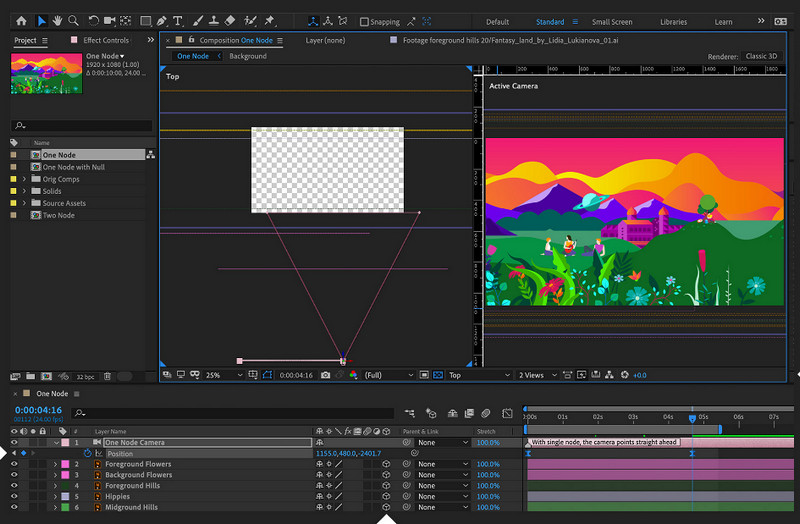
Adobe After Effect में आपके लिए एक एक्सटेंशन उपलब्ध है, जो Davinci Resolve वॉटरमार्क को प्रोफेशनल तरीके से हटा सकता है, जिसका नाम है Adobe Cloak। इस प्लग‑इन के साथ, आपके वीडियो पर कोई भी वॉटरमार्क इतना मुश्किल नहीं रहेगा कि इसे हटाया न जा सके। यह After Effect में अपलोड किए गए वीडियो से किसी भी ऑब्जेक्ट को हटाने का काम करता है। हालांकि, आप इस टूल का तुरंत इस्तेमाल नहीं कर सकते, क्योंकि पहले आपको Adobe पर इसका एक्सटेंशन डाउनलोड करना होगा। तो, अगर आपने Cloak पहले ही इंस्टॉल कर लिया है, तो चलिए बिना किसी रुकावट के वॉटरमार्क छुपाना शुरू करते हैं।.
चरण 1. After Effect खोलें और वह वीडियो खोलें जिसे आप यहाँ एडिट करना चाहते हैं।.
चरण 2. इस सॉफ़्टवेयर के पेन टूल का उपयोग करके वॉटरमार्क पर एक मास्क बनाएं।.
चरण 3. Content Fill Awareness में, drop-down बटन पर क्लिक करने के बाद सूची में उपलब्ध भरने (fill) की विधि में से एक चुनें।.
चरण 4. चुनी गई विधि की प्रभावशीलता जाँचने के लिए Generate Fill Layer पर क्लिक करें। वीडियो को प्रीव्यू करके चलाएँ, फिर ज़रूरत हो तो कुछ समायोजन करें।.
पेशेवरों
- यह वीडियो पर वॉटरमार्क को हटाकर अधिक प्रभावी ढंग से काम करता है जैसा कि एक प्रो टूल को करना चाहिए।
- यह पेशेवरों की ज़रूरतों को दूर करने वाले एक गहन वॉटरमार्क के लिए सबसे अच्छा विकल्प है।
- यह वीडियो के प्रत्येक फ्रेम पर वॉटरमार्क हटा देता है।
विपक्ष
- आपको एक्सटेंशन डाउनलोड करना होगा।
- इसकी कीमत आपको बाजार में मिलने वाली सबसे महंगी में से एक है।
संबंधित:
Renderforest से एक्सपोर्ट किए गए वीडियो से वॉटरमार्क कैसे हटाएँ
Viva Video के वीडियो पर लगा वॉटरमार्क कैसे हटाएँ
भाग 3. DaVinci Resolve पर वॉटरमार्क कैसे निकालें पर अक्सर पूछे जाने वाले प्रश्न
क्या मुझे DaVinci Resolve खरीदना चाहिए?
यदि आप उन्हें अधिक बार उपयोग करने का निर्णय लेते हैं, तो आप $295 के लिए उपकरण खरीद सकते हैं। यह सस्ता है अगर हम तुलना करने वाले हैं और अन्य पेशेवर वीडियो संपादकों की तलाश कर रहे हैं जिनका उपयोग आप बाजार में कर सकते हैं। साथ ही, आपको मासिक के बारे में चिंता करने की आवश्यकता नहीं होगी क्योंकि यह एक ही भुगतान है।
क्या मैं लिनक्स पर DaVinci डाउनलोड कर सकता हूँ?
बिल्कुल, यह वीडियो संपादक लिनक्स का समर्थन करता है, और इसके उपयोगकर्ता इसकी संपादन सुविधाओं का लाभ उठा सकते हैं। आप DaVinci Resolve की आधिकारिक वेबसाइट पर जा सकते हैं और Linux पर उपलब्ध हॉलीवुड जैसा वीडियो संपादक डाउनलोड कर सकते हैं।
क्या मुझे कभी भी DaVinci का उपयोग करने में कोई समस्या आ सकती है?
कुछ समस्याएं आपके सामने आ सकती हैं। एक ज्ञात समस्या जिसका उपयोग करते समय कई उपयोगकर्ता सामना करते हैं, वह है इसकी सीपीयू क्षमता। इसलिए, यदि आप इस कार्यक्रम का उपयोग करने वाले हैं, तो आपको यह देखने के लिए अपने कंप्यूटर के विनिर्देशों को देखना होगा कि क्या यह इस वीडियो संपादक की आवश्यकता के अनुरूप है।
निष्कर्ष
यह आलेख आपको विशिष्ट सुविधाओं का उपयोग करने पर आपके वीडियो में जोड़े जा रहे DaVinci Resolve वॉटरमार्क को हटाने के विभिन्न तरीकों को दिखाता है। एफवीसी वीडियो कन्वर्टर अल्टीमेट और एडोब क्लोक प्रो के साथ, हम आपको आश्वस्त कर सकते हैं कि हमारे द्वारा जोड़े गए चरणों का पालन करने के बाद आपके पास वॉटरमार्क के बिना वीडियो होगा। आप वॉटरमार्क को अलविदा कह सकते हैं क्योंकि अब आप उन्हें हटा सकते हैं, और यह आपको सिरदर्द नहीं देगा। हमें उम्मीद है कि इस लेख ने आपकी बहुत मदद की है, और इस लेख को पढ़ने के लिए धन्यवाद। अगर आपको इसे पढ़ने में मज़ा आता है तो कृपया हमें नीचे 5-स्टार रेट दें!
-
 अंतिम टूल का उपयोग करके Pond5 वॉटरमार्क कैसे निकालें
 नीचे दिए गए सरल चरणों का पालन करके पॉन्ड5 वॉटरमार्क हटाने का तरीका जानें। आप इन प्रभावशाली उपकरणों का उपयोग करके अपनी छवि पर पॉन्ड5 वॉटरमार्क को आसानी से हटा सकते हैं।
-
 Dxtory वॉटरमार्क हटाने के 2 शक्तिशाली तरीके
 दो सर्वोत्तम तरीकों का पालन करके Dxtory वॉटरमार्क हटाने का तरीका जानें। यदि आप Dxtory वॉटरमार्क हटाने के लिए सबसे उपयुक्त टूल खोज रहे हैं, तो यहां पढ़ें।
-
 बकाया अर्नोल्ड माया वॉटरमार्क रिमूवर आपको याद नहीं करना चाहिए
 कई वॉटरमार्क रिमूवर अर्नोल्ड माया वॉटरमार्क को हटा सकते हैं। लेकिन अगर आप जानना चाहते हैं कि अर्नोल्ड माया वॉटरमार्क रिमूवर कौन से हैं, तो इस पेज को पढ़ें।
