


 वीडियो कनवर्टर अंतिम
 स्क्रीन अभिलेखी
 वीडियो मरम्मत
विंडोज, मैक, ऑनलाइन और फोन के जरिए फाइलों से मेटाडेटा कैसे निकालें
हर मीडिया फ़ाइल में उस फ़ाइल के बारे में मेटाडेटा जुड़ा होता है, चाहे वह वीडियो हो, इमेज हो, ऑडियो हो आदि। मान लीजिए कि आप कोई मीडिया फ़ाइल ऑनलाइन पोस्ट करते हैं; उस पोस्ट के ज़रिए कोई व्यक्ति आपके स्थान के निर्देशांक, समय, तारीख, निर्माता, डिवाइस मॉडल और बहुत सी जानकारी प्राप्त कर सकता है, जिसे EXIF डेटा कहा जाता है। क्या यह डरावना नहीं है कि कोई व्यक्ति सिर्फ़ आपके पोस्ट के मेटाडेटा से आपके बारे में जानकारी हासिल कर सकता है? शुक्र है, यह लेख आपको सिखाएगा कि Windows, Mac, ऑनलाइन और यहाँ तक कि अपने फ़ोन पर भी किसी भी मीडिया फ़ाइल से ऑनलाइन पोस्ट करने से पहले मेटाडेटा कैसे हटाएँ।.

भाग 1. विंडोज में किसी भी फाइल पर मेटाडेटा को हटाने के सर्वोत्तम तरीके
इस लेख में हम जिन तरीकों को प्रस्तुत करेंगे, वे अंतर्निहित डेटा रिमूवर हैं जिनका उपयोग आप विंडोज पर कर सकते हैं और तीसरे पक्ष के टूल का उपयोग आप मेटाडेटा को आसानी से मिटाने के लिए कर सकते हैं। इसलिए, अपनी फ़ाइल पर मेटाडेटा को वाइप करने के तरीके के बारे में अधिक विचार प्राप्त करने के लिए, आप नीचे दिए गए विवरण को पढ़ सकते हैं और इसे सफलतापूर्वक करने के लिए चरणों का पालन कर सकते हैं।
विंडोज़ पर गुणों का प्रयोग करें
यदि आप चाहें तो विंडोज़ पर, आप आसानी से वीडियो से मेटाडेटा हटा सकते हैं। नीचे दिए गए चरणों का पालन करके, आप अपनी फ़ाइल को ऑनलाइन पोस्ट करने से पहले उसके बारे में जानकारी निकाल सकते हैं।
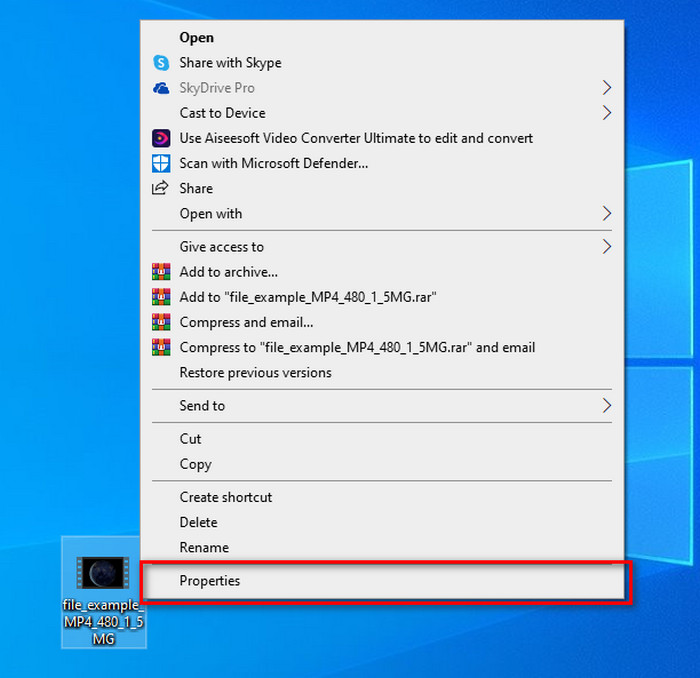
कदम 1. अपने डेस्कटॉप पर फ़ाइल को ढूँढें और माउस से राइट‑क्लिक करें; उसके नीचे आपको Properties दिखाई देगा, उस पर क्लिक करें।.
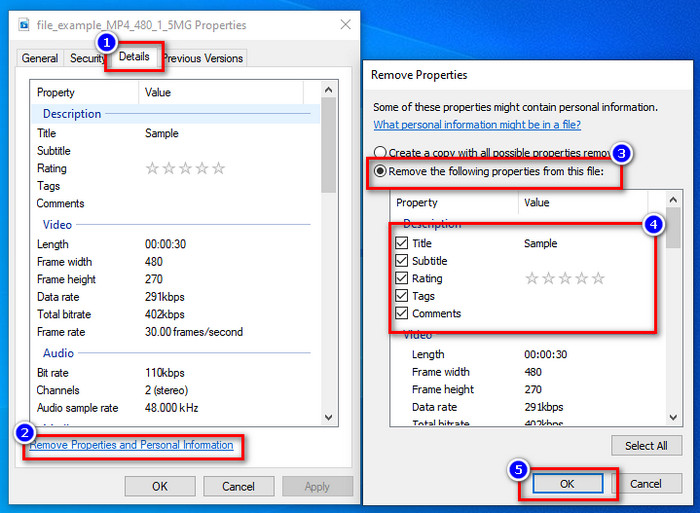
कदम 2. Details पर जाएँ, और उसके अंदर Remove Properties and Personal Information पर क्लिक करें।.
कदम 3. कृपया उस मेटाडेटा के बॉक्स पर टिक लगाएँ जिसे आप अपनी मीडिया फ़ाइल में शामिल नहीं करना चाहते, पोस्ट करने से पहले। ऐसा करने के बाद OK दबाएँ; यह फ़ाइल की एक कॉपी बनाएगा जिसमें मेटाडेटा नहीं होगा।.
विंडोज और मैकओएस पर सर्वश्रेष्ठ मेटाडेटा रिमूवल टूल का उपयोग करें
अगर आप सबसे अच्छा मेटाडेटा रिमूवल टूल चाहते हैं, तो FVC Video Converter Ultimate वही टूल है जिसकी आपको तलाश है। यह वह विशेषज्ञ टूल है जो आपकी मीडिया फ़ाइल से मेटाडेटा हटाने के लिए इस्तेमाल किया जाता है, ताकि उपयोगकर्ता फ़ाइल को ऑनलाइन पोस्ट करने से पहले डेटा मिटा सकें। हालाँकि यह एक्सपर्ट‑लेवल टूल है, फिर भी कोई भी इसे आसानी से इस्तेमाल कर सकता है और बिना ज़्यादा मेहनत किए फ़ाइल से डेटा हटा सकता है। इसके अलावा, अगर हमने जो तकनीकें सिखाई हैं उनसे आपके फ़ाइल का मेटाडेटा पूरी तरह नहीं हटता, तो यह आपके लिए एक थर्ड‑पार्टी विकल्प है। नीचे दिए गए चरण आपकी फ़ाइल से वह डेटा हटाने में मदद करेंगे जिसे आप मिटाना चाहते हैं, बस उन्हें ध्यान से फ़ॉलो करें।.
कदम 1. मेटाडेटा हटाने से पहले आपको यह टूल डाउनलोड करना होगा, इसके लिए नीचे दिए गए डाउनलोड बटन पर क्लिक करें। आप जो ऑपरेटिंग सिस्टम इस्तेमाल कर रहे हैं, Windows या Mac, उसका विकल्प चुनें, फिर तुरंत इसे इंस्टॉल करें। उसके बाद Start Now दबाकर टूल खोलें।.
फ्री डाउनलोडWindows 7 या बाद के संस्करण के लिएसुरक्षित डाउनलोड
फ्री डाउनलोडMacOS 10.7 या बाद के संस्करण के लिएसुरक्षित डाउनलोड
एक सुचारू प्रक्रिया के लिए, अगले चरण पर आगे बढ़ने से पहले आपको टूल UI से परिचित होना चाहिए।
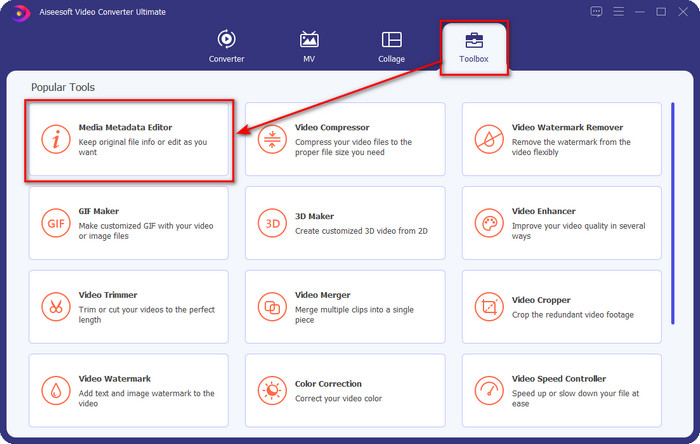
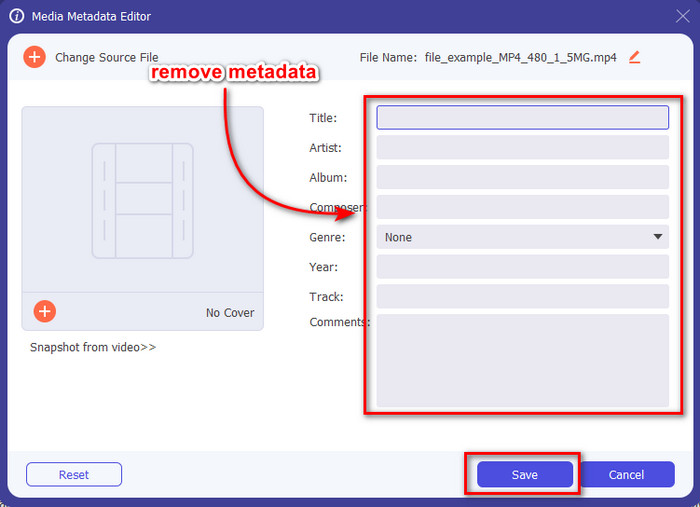
कदम 2. अब जब आपने Toolbox सेक्शन खोल लिया है, तो उसके अंदर Media Metadata Editor पर क्लिक करें।.
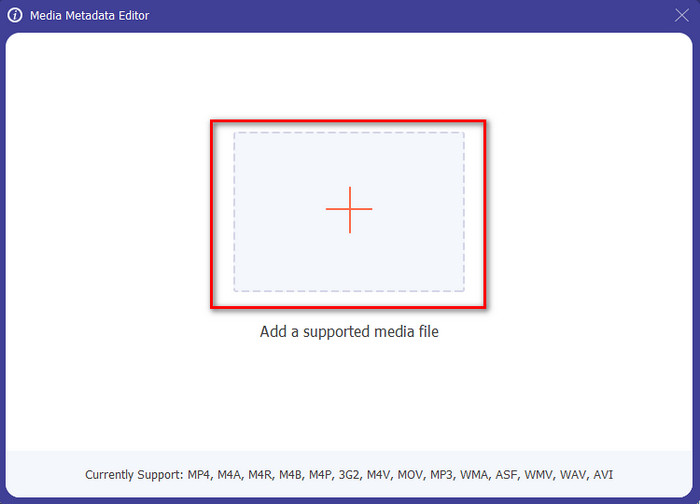
कदम 3. आपकी स्क्रीन पर एक नई विंडो दिखाई देगी; + बटन दबाकर आप वह मीडिया फ़ाइल जोड़ सकते हैं जिसका मेटाडेटा आप हटाना चाहते हैं, फिर उसे अपलोड करने के लिए Open पर टैप करें।.
कदम 4. जिस‑जिस मेटाडेटा को आप हटाना चाहते हैं, उसके टेक्स्ट बॉक्स पर क्लिक करें, फिर कीबोर्ड पर Delete Key दबाएँ। फ़ाइल को सेव करने के लिए आप Save पर क्लिक कर सकते हैं, और यह बिना मेटाडेटा के एक कॉपी नहीं बनाएगा, बल्कि उसी फ़ाइल को सेव कर देगा। आसान नहीं है? यह आपके डेस्कटॉप की स्पेस भी बचाता है क्योंकि यह उस फ़ाइल की अलग से कॉपी नहीं बनाता जिससे आपने मेटाडेटा हटाया है।.
भाग 2। मैक पर फ़ाइलों से मेटाडेटा को पोंछने का सबसे अच्छा तरीका
Mac पर, आप आसानी से अपनी फ़ोटो के बारे में जानकारी निकाल सकते हैं; हालाँकि, आप केवल स्थान डेटा निकाल सकते हैं। इसलिए, यदि आप स्थान से अधिक मैक पर किसी फ़ाइल से मेटाडेटा निकालना सीखना चाहते हैं, तो आपको हमारे द्वारा ऊपर प्रस्तुत टूल का उपयोग करना चाहिए।
कदम 1. Preview में जाएँ और फ़ाइल खोलें।.
कदम 2. Tools पर क्लिक करें, फिर Show Inspector चुनें और लोकेशन डेटा देखने के लिए i पर क्लिक करें।.
कदम 3. GPS टैब पर, Remove Location info पर क्लिक करें, और यह अपने‑आप आपकी मीडिया फ़ाइल से लोकेशन से जुड़ी जानकारी हटा देगा।.
भाग 3. Android और iOS उपकरणों पर मेटाडेटा कैसे निकालें
Exiftool का उपयोग करें - फोटो और वीडियो के मेटाडेटा देखें, संपादित करें (एंड्रॉइड)
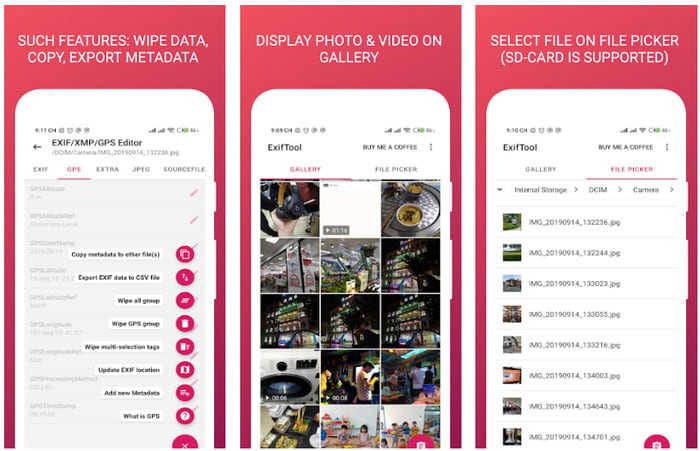
Exiftool – view, edit metadata of photo and video Android पर वीडियो का मेटाडेटा हटाने में आपकी मदद कर सकता है, बशर्ते आप इस टूल को डाउनलोड करें। इस टूल की मदद से आप वीडियो और तस्वीरों के EXIF डेटा को मुफ़्त में जोड़, हटा और अपडेट कर सकते हैं। तो, अगर आप इस ऐप का इस्तेमाल करना चाहते हैं, तो नीचे दिए गए चरणों का पालन करें।.
कदम 1. Playstore पर ऐप डाउनलोड करें और Install पर क्लिक करें।.
कदम 2. ऐप खोलें और वह फ़ाइल चुनें जिसका मेटाडेटा आप हटाना चाहते हैं।.
कदम 3. option दबाएँ और मेटाडेटा अपने‑आप हटाने के लिए Wipe Quicktime Group पर क्लिक करें।.
फ़ोटो और वीडियो मेटाडेटा रिमूवर (iOS) का उपयोग करें
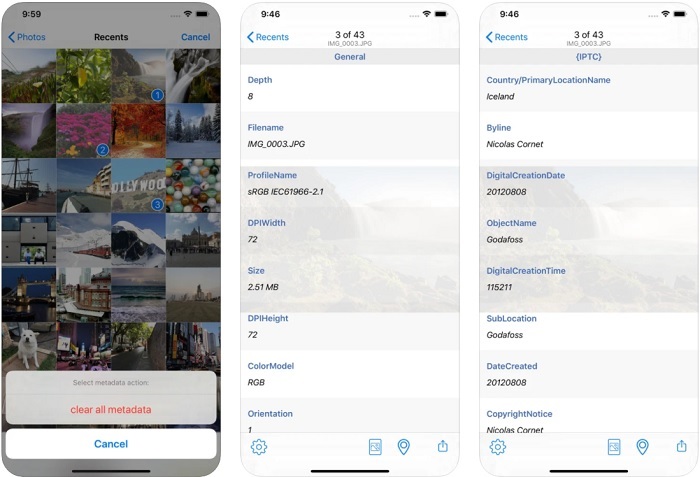
यदि आप एक आईओएस उपयोगकर्ता हैं, तो आप फोटो और वीडियो मेटाडेटा रीमूवर का उपयोग कर सकते हैं और सीख सकते हैं कि अपने आईओएस डिवाइस पर मेटाडेटा कैसे साफ़ करें। यह ऐप ऐप्पल डिवाइस पर सभी मूल मीडिया प्रारूपों का समर्थन करता है, और यह मेटाडेटा रीमूवर के रूप में अपना काम करता है। यदि आपके पास आईओएस डिवाइस है, तो आप नीचे दिए गए चरणों को कॉपी कर सकते हैं।
कदम 1. ऐप डाउनलोड करने के लिए आपको App Store पर जाना होगा, वहाँ इसे खोजें और फिर इंस्टॉल करें।.
कदम 2. टूल खोलें और ऐप को आपकी Photos तक पहुँच की अनुमति दें, फिर वह वीडियो या फोटो चुनें जिसका मेटाडेटा आप हटाना चाहते हैं।.
कदम 3. gear आइकन पर टैप करें, फिर clear all metadata पर क्लिक करें, और यह बिना मेटाडेटा के फ़ाइल की एक कॉपी बना देगा।.
भाग 4. मुफ्त में वेब टूल का उपयोग करके मेटाडेटा कैसे निकालें
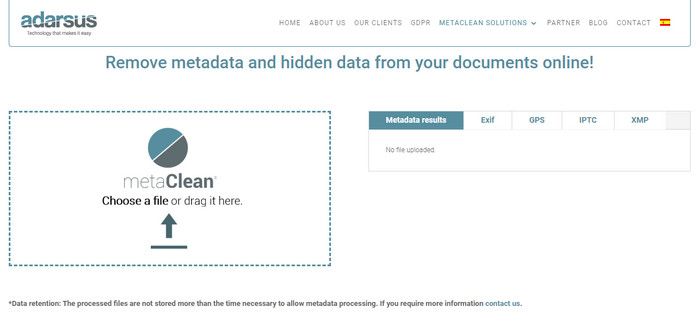
Adarsus – Remove Metadata आपकी मदद कर सकता है ऑनलाइन मेटाडेटा हटाने में, और यह मुफ़्त है। ऊपर बताए गए अन्य कन्वर्टरों के विपरीत, इस टूल का उपयोग करने के लिए आपको इसे अपने डेस्कटॉप पर डाउनलोड करने की ज़रूरत नहीं है, क्योंकि यह एक वेब टूल है; इसे एक्सेस करने के लिए आपको इंटरनेट कनेक्शन चाहिए। अगर आप मुफ़्त में मेटाडेटा हटाने का अनुभव करना चाहते हैं, तो नीचे दिए गए चरणों का पालन करें।.
कदम 1. अपना वेब ब्राउज़र खोलें और इस टूल को सर्च करें।.
कदम 2. टूल की वेबसाइट पर, upload बटन पर क्लिक करें और वह फ़ाइल चुनें जिसका मेटाडेटा हटाना है।.
कदम 3. Get my File Clean पर क्लिक करें, और यह बिना मेटाडेटा के एक कॉपी बना देगा।.
भाग 5. विंडोज, मैक, ऑनलाइन, एंड्रॉइड और आईओएस पर मेटाडेटा रिमूवर के बारे में तुलना चार्ट
| विशेषताएं | FVC वीडियो कन्वर्टर अंतिम | विंडोज़ पर गुण | Mac . पर पूर्वावलोकन करें | Exiftool - फोटो और वीडियो के मेटाडेटा देखें, संपादित करें (एंड्रॉइड) | फोटो और वीडियो मेटाडेटा रिमूवर | एडरसस - मेटाडेटा हटाएं |
| उपयोग के लिए सुरक्षित |  | | | | | |
| यूजर फ्रेंडली | | | | | | |
| संपूर्ण मेटाडेटा साफ़ करें | | |  | | | |
| मेटाडेटा संपादित करें | | | | | | |
| फ़ाइल को डुप्लिकेट करें | | | | | | |
| सीमा/एस | यह मोबाइल उपकरणों और ऑनलाइन पर उपलब्ध नहीं है | कभी-कभी डेटा पूरी तरह से हटाया नहीं जाता है। | यह स्थान के अलावा अन्य मेटाडेटा को नहीं हटाता है। | अंतिम उपकरण जितना प्रभावी नहीं है। | अधिकांश समय, यह मेटाडेटा को हटाने में विफल रहता है | फ़ाइल आकार पर एक सीमा है, जो 5 एमबी है। |
भाग 6. मेटाडेटा को हटाने के बारे में अक्सर पूछे जाने वाले प्रश्न
क्या मेटाडेटा हटाने से फ़ाइल का आकार कम हो जाता है?
हां, ऐसा इसलिए होगा क्योंकि मेटाडेटा अपनी जानकारी के साथ मीडिया फ़ाइल में आकार जोड़ता है। आप इसे हटाकर कम जगह बचा सकते हैं, और यह पहले से छोटा होगा। हालाँकि, आपकी फ़ाइल में मौजूद जानकारी को हटा दिया जाता है।
मेटाडेटा हटाने के बाद, क्या गुणवत्ता उस पर प्रभाव डालेगी?
नहीं, यह नहीं होगा; गुणवत्ता प्रभावित नहीं होगी, भले ही आप अपनी मीडिया फ़ाइल के मेटाडेटा को बदल दें या हटा दें। इसलिए, चिंता न करें क्योंकि आपके पास मेटाडेटा के बिना या उसके साथ भी वही गुणवत्ता होगी।
क्या सभी फ़ाइल स्वरूपों में मेटाडेटा होता है?
अधिकांश मीडिया फ़ॉर्मैट्स की मेटाडेटा संरचनाएँ अलग‑अलग होती हैं, लेकिन सभी मीडिया फ़ॉर्मैट्स में मेटाडेटा नहीं होता। कुछ मामलों में, फ़ॉर्मैट्स की बनावट, डिज़ाइन और कई अन्य कारणों की वजह से वे मेटाडेटा को सपोर्ट ही नहीं कर पाते।.
निष्कर्ष
अब हमने सीख लिया है कि फ़ाइल पर मौजूद मेटाडेटा कैसे हटाएँ ताकि आप अपनी प्राइवेसी की रक्षा उतनी ही आसानी से कर सकें। इस लेख में प्रस्तुत टूल्स की मदद से वेब पर पोस्ट करने से पहले मेटाडेटा हटाना संभव हो गया है। हालाँकि हमने मेटाडेटा मिटाने के लिए पाँच टूल्स बताए हैं, लेकिन FVC Video Converter Ultimate की क्षमताओं पर कोई संदेह नहीं, क्योंकि यह टूल पूरी तरह से या सिर्फ़ चुनिंदा हिस्सों का डेटा, दोनों ही तरीकों से, 1‑2‑3 जितनी जल्दी हटा सकता है। अगर आपको हमारी समीक्षा पर शक है, तो आप इसे अपने कंप्यूटर ड्राइव पर डाउनलोड करके ख़ुद चेक कर सकते हैं और देख सकते हैं कि यह सच में कितना कारगर है!
-
 मैक, विंडोज और ऑनलाइन पर WMV को MKV में बदलने के 4 तरीके दोषरहित
 मैक और विंडोज पर WMV को MKV में बदलना चाहते हैं? यह लेख WMV को MKV में शीघ्रता से बदलने के सर्वोत्तम तरीके प्रस्तुत करता है।
-
 सर्वश्रेष्ठ मेटाडेटा व्यूअर में से 4 ऑनलाइन और ऑफलाइन [अपडेट किया गया 2022]
 क्या मैं अपनी फाइल के मेटाडेटा की जांच कर सकता हूं? हां, आप कर सकते हैं, इस पोस्ट की मदद से हम आपको उन विभिन्न मेटाडेटा दर्शकों से परिचित कराएंगे जिनका आप उपयोग कर सकते हैं।
-
 सर्वश्रेष्ठ वेबएम से एमकेवी कन्वर्टर्स जिन्हें आपको जल्दी से कनवर्ट करने के लिए उपयोग करना चाहिए
 क्या आप वेबएम को एमकेवी फाइलों में बदलने के तरीकों की तलाश कर रहे हैं? यह आलेख आपके लिए प्रयास करने के लिए सर्वश्रेष्ठ वेबएम से एमकेवी कन्वर्टर्स प्रस्तुत करता है।
