


 वीडियो कनवर्टर अंतिम
 स्क्रीन अभिलेखी
 वीडियो मरम्मत
 सुरक्षित डाउनलोड
पावर डायरेक्टर वॉटरमार्क से कैसे छुटकारा पाएं मुफ्त में [1001टीपी2टी वर्किंग]
एक पूर्ण-विशेषताओं वाला वीडियो एडिटर और मेकर चुनने के लिए, आप अपने डिवाइस पर Power Director चुनकर कभी गलती नहीं करेंगे। उम्मीद कीजिए कि जब आप इसे प्रेज़ेंटेशन, व्लॉग, ट्यूटोरियल, डेमो आदि के लिए अपने वीडियो को एडिट करने में इस्तेमाल करेंगे, तो आपको शानदार परिणाम मिलेगा। साथ ही, आपको यह भी जानना चाहिए कि यदि आप फिलहाल इसका फ्री वर्ज़न इस्तेमाल कर रहे हैं, तो यह एडिट किए गए वीडियो पर वॉटरमार्क जोड़ देता है। कुछ उपयोगकर्ता इस बात से परेशान हो जाते हैं कि जिस वीडियो पर उन्होंने कड़ी मेहनत की है, उस पर वॉटरमार्क लग जाता है। परेशान होने के बजाय, क्यों न आप इस लेख को पढ़कर देखें? आइए सीखते हैं कि इस समस्या को हमेशा के लिए हल करने के लिए Power Director वॉटरमार्क को मुफ्त में कैसे हटाएं।.

भाग 1। बाजार पर शीर्ष समाधानों के साथ बिजली निदेशक वॉटरमार्क से कैसे छुटकारा पाएं?
FVC वीडियो कन्वर्टर अंतिम
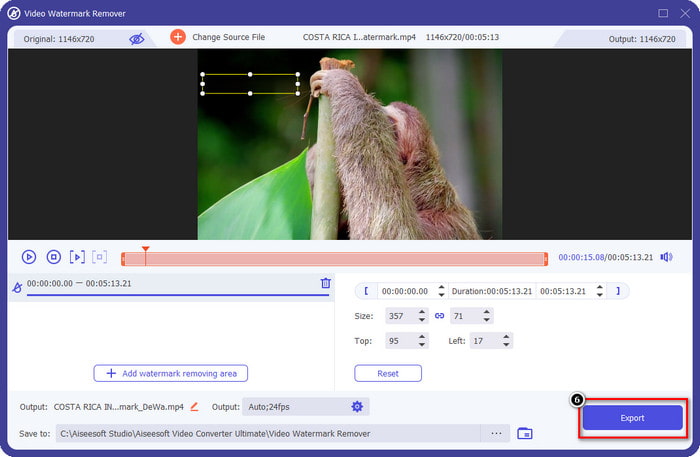
FVC वीडियो कन्वर्टर अल्टीमेट के अपडेटेड वर्जन में एक वीडियो वॉटरमार्क रिमूवर है जिसका उपयोग आप बिना वॉटरमार्क के पीसी के लिए पॉवरडायरेक्टर पर वीडियो के लिए कर सकते हैं। यह टूल एक संपूर्ण टूल बन गया जो एक साथ बहुउद्देशीय कार्य कर सकता है और इसे पेशेवर रूप से तेजी से प्रसंस्करण के साथ कर सकता है। इस उपकरण के साथ हमें जो आश्चर्य होता है वह यह है कि इसका उपयोग करना कितना आसान है। यदि आप इसका उपयोग करते हैं, तो आपको अपने वीडियो पर वॉटरमार्क हटाने के लिए पेशेवर बनने की आवश्यकता नहीं है। सर्वश्रेष्ठ वॉटरमार्क रिमूवर की तलाश करने वाले उपयोगकर्ताओं के लिए, आप इस सॉफ़्टवेयर को अपने डेस्कटॉप पर मुफ्त में डाउनलोड करने में गलत नहीं हो सकते। अभी भी आश्वस्त नहीं हैं? आपको यह समझाने का एकमात्र तरीका है कि यह एक अंतिम प्रदर्शन करता है, हम आपके द्वारा अनुसरण किए जाने वाले ट्यूटोरियल की प्रतिलिपि बनाते हैं।
स्टेप 1. आप नीचे दिए गए डाउनलोड बटन पर क्लिक करके यह सॉफ़्टवेयर अपने Windows या macOS पर मुफ्त में डाउनलोड कर सकते हैं। जिस वर्ज़न को आप डाउनलोड करना चाहते हैं, उसे चुनने के बाद तुरंत सॉफ़्टवेयर इंस्टॉल करें, फिर उसे खोलें।.
फ्री डाउनलोडWindows 7 या बाद के संस्करण के लिएसुरक्षित डाउनलोड
फ्री डाउनलोडMacOS 10.7 या बाद के संस्करण के लिएसुरक्षित डाउनलोड
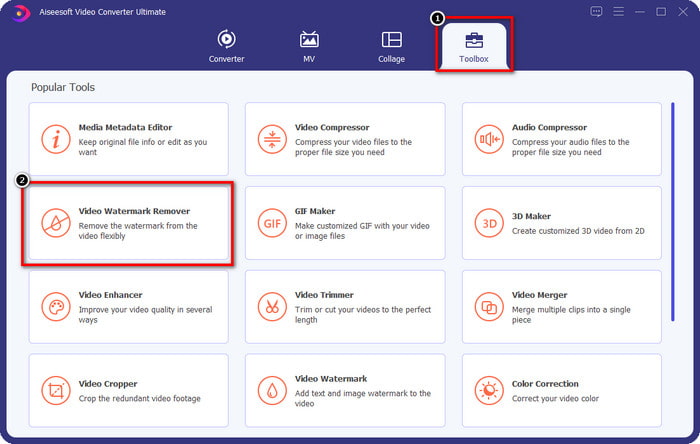
स्टेप 2. अब जब यह सिस्टम पर चल रहा है तो Toolbox में जाएँ और दिए गए फीचर्स में से Video Watermark Remover खोजें।.
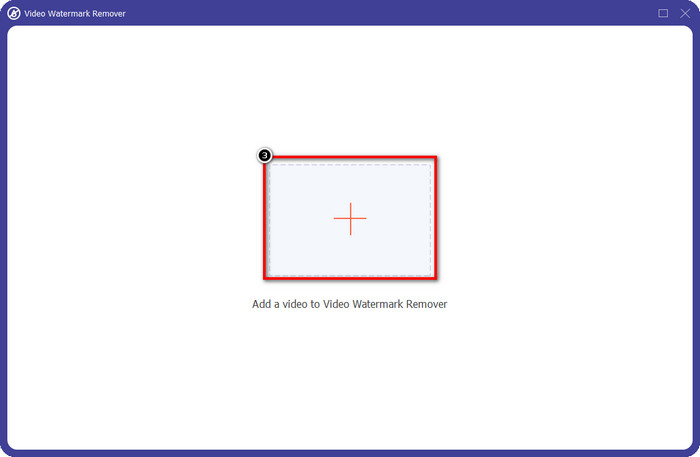
स्टेप 3. इसके बाद, वीडियो फ़ाइल अपलोड करने के लिए + आइकन पर क्लिक करें, जिसमें आपको समस्या आ रही है।.
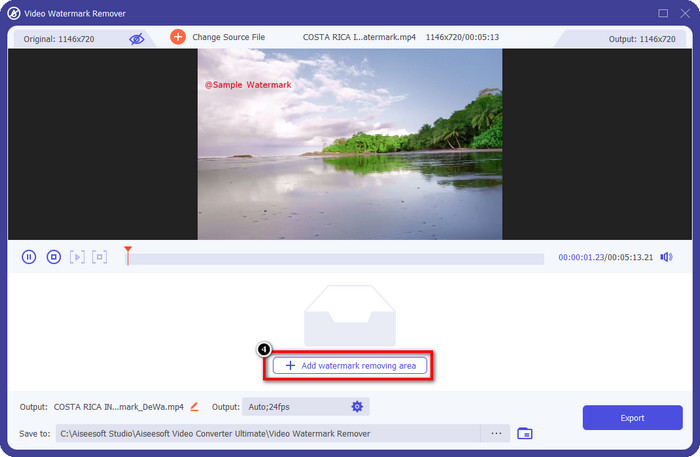
स्टेप 4. इस सॉफ़्टवेयर के टूल का उपयोग शुरू करने के लिए Add Watermark Removing Area पर क्लिक करें।.
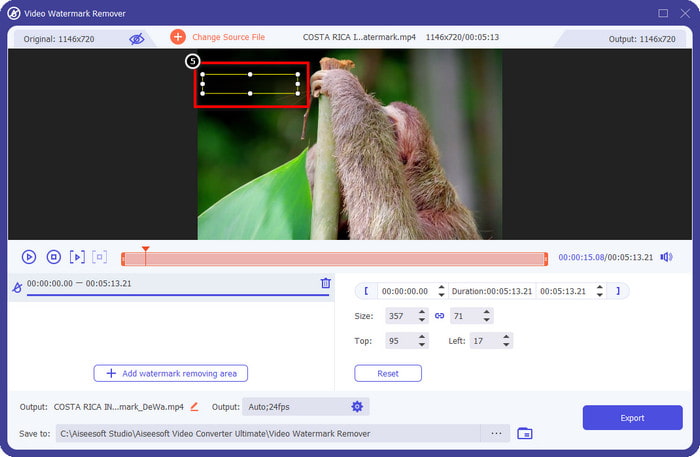
स्टेप 5. अपने माउस की मदद से आयताकार बॉक्स को वॉटरमार्क वाले हिस्से तक खींचें और छोड़ दें। आपको वॉटरमार्क को ठीक से हाईलाइट करने के लिए इस आयताकार बॉक्स को एडजस्ट करने की अनुमति है।.
स्टेप 6. वॉटरमार्क हटाने की प्रक्रिया शुरू करने के लिए Export बटन दबाएँ। काम पूरा होने पर आपकी स्क्रीन पर एक पॉप-अप फ़ोल्डर दिखाई देगा; बिना वॉटरमार्क वाला वीडियो देखने के लिए फ़ाइल पर क्लिक करें।.
VLC मीडिया प्लेयर
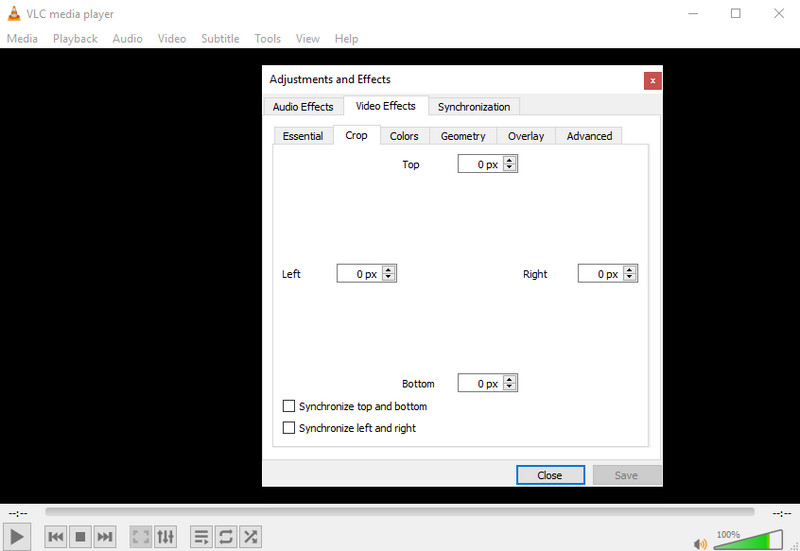
VLC Media Player एक समर्पित वॉटरमार्क रिमूवर नहीं है। फिर भी, यह आपके वीडियो से वॉटरमार्क को क्रॉप करके काम कर सकता है। यह टूल केवल वीडियो प्लेयर और क्रॉपर ही नहीं है; यह लोकप्रिय मीडिया प्लेयर आपको और भी बहुत सी चीज़ें देने में सक्षम है। लेकिन यह उम्मीद न करें कि यह टूल प्रोफेशनल एडिटिंग करने और इस्तेमाल में बेहद आसान होने में सक्षम है, क्योंकि ऐसा नहीं है। वीडियो को क्रॉप करते समय, आपको वॉटरमार्क को हटाने के लिए सटीक माप जोड़ने की ज़रूरत होगी। तो, अगर आपको वीडियो के सटीक x और y का पता है, तो आप इस मीडिया प्लेयर की मदद से PowerDirector द्वारा लगाए गए “edited by” वॉटरमार्क को हटाने का तरीका अपना सकते हैं।.
स्टेप 1. VideoLAN.org से सॉफ़्टवेयर डाउनलोड करने के बाद, सॉफ़्टवेयर खोलें। Media पर क्लिक करें, फिर Open File चुनें, और स्थानीय ड्राइव पर वह वीडियो फ़ाइल खोजें जिसे आप Power Director में एडिट कर रहे हैं।.
स्टेप 2. वीडियो चलना शुरू हो जाएगा, Tools पर क्लिक करें, फिर Effects and Filter पर। आप कीबोर्ड का उपयोग करके Windows पर Control + E और Mac पर Command + E भी दबा सकते हैं।.
स्टेप 3. Video Effects, Crop पर जाएँ, और वॉटरमार्क को क्रॉप करने के लिए वीडियो में माप जोड़ें।.
स्टेप 4. जो एडजस्टमेंट आपने किए हैं, उन्हें लागू करने के लिए Save पर क्लिक करें।.
कपविंग
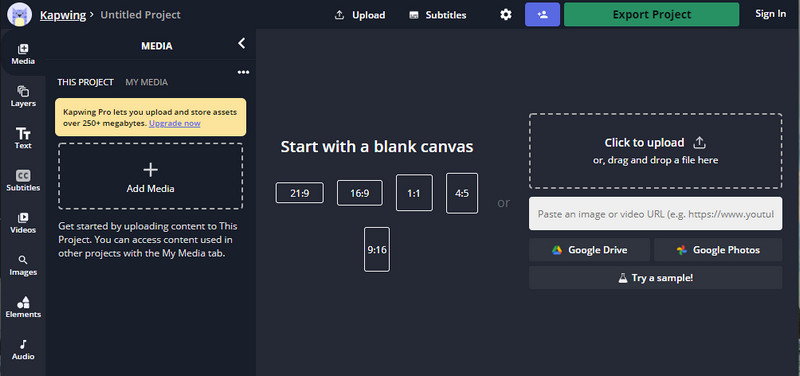
ऑनलाइन वीडियो एडिटर चाहिए? कपविंग का उपयोग करने का प्रयास करें। यह एक सहज ज्ञान युक्त वेब टूल है जिसका उपयोग आप वीडियो संपादित करने के लिए कर सकते हैं जैसे आप पावर डायरेक्टर पर क्या कर सकते हैं। फिर भी यह विद्युत निदेशक के सममूल्य पर नहीं है। अधिकांश वीडियो संपादन जिनकी आपको आवश्यकता हो सकती है, वे पहले से ही यहां हैं, जैसे वॉटरमार्क को क्रॉप करना। यद्यपि टूल वॉटरमार्क को हटाने पर वीएलसी के समान कार्य करता है, इस टूल में एक पूर्वावलोकन फलक है जहां आप निर्यात करने से पहले क्रॉप किए गए वीडियो को देख सकते हैं। इसलिए, यदि आप वीडियो सहेजना चाहते हैं, तो आप पीसी के लिए वॉटरमार्क के बिना पावरडायरेक्टर पर संपादित करें; आपको उन्हें पहले यहां से बाहर निकालना होगा।
स्टेप 1. अपने ब्राउज़र में इसे खोजकर वेब टूल खोलें, फिर वीडियो फ़ाइल अपलोड करने के लिए Add Media पर क्लिक करें। एक अपलोडिंग प्रक्रिया होगी, इसलिए आपने जो वीडियो अपलोड किया है, उसे इस्तेमाल करने से पहले आपको इंतज़ार करना होगा।.
स्टेप 2. क्रॉपिंग फीचर्स खोलने के लिए इंटरफ़ेस के बाएँ तरफ़ Crop पर क्लिक करें।.
स्टेप 3. फ़्रेम को एडजस्ट करें और यह सुनिश्चित करें कि वीडियो का वॉटरमार्क फ़्रेम में शामिल न हो।.
वैकल्पिक: यदि आप वीडियो के डायमेंशन को मैन्युअल रूप से बदलना नहीं चाहते हैं, तो नीचे उपलब्ध तैयार विकल्पों का उपयोग कर सकते हैं।.
ram और सुनिश्चित करें कि वीडियो का वॉटरमार्क फ्रेम पर शामिल नहीं है। ” /]स्टेप 4. काम पूरा होने पर, Kapwing के साथ क्रॉप किए गए वीडियो को सेव करने के लिए Done Cropping पर क्लिक करें।.
संबंधित:
Renderforest से एक्सपोर्ट किए गए वीडियो से वॉटरमार्क कैसे हटाएँ
Viva Video के वीडियो पर लगा वॉटरमार्क कैसे हटाएँ
भाग 2. पावर निदेशक वॉटरमार्क हटाने पर अक्सर पूछे जाने वाले प्रश्न
क्या Android के लिए Powerdirector no वॉटरमार्क APK को मुफ्त में डाउनलोड करना सुरक्षित है?
हां, आप Play Store पर जा सकते हैं और पावर डायरेक्टर ऐप डाउनलोड करने के लिए उसका नाम खोज सकते हैं। हालाँकि, इस टूल का निःशुल्क परीक्षण संस्करण वॉटरमार्क जोड़ता है। मान लीजिए कि आप पूर्ण संस्करण के लिए तृतीय-पक्ष वेबसाइटों पर ऐप डाउनलोड करने का प्रयास करते हैं। उस स्थिति में, आपको ऐसा नहीं करना चाहिए क्योंकि आपके Android पर एक बार डाउनलोड की गई फ़ाइल में दुर्भावनापूर्ण वायरस हो सकते हैं। Powerdirector पर वॉटरमार्क हटाने के लिए, आपको लाइसेंस कुंजी खरीदनी होगी।
पीसी पर पावर डायरेक्टर ऐप कितना है?
आपके पास हर महीने $ 4.08 की शुरुआती कीमत के लिए पावर डायरेक्टर 365 हो सकता है, आप इसकी आधिकारिक वेबसाइट पर योजनाओं और सदस्यता पर जा सकते हैं। एक बार जब आप अपनी पसंद की योजना का लाभ उठा लेते हैं तो आप शामिल सुविधाओं को भी देख सकते हैं।
क्या साइबरलिंक पॉवरडायरेक्टर में वॉटरमार्क है?
हां, जब आप ऐप के मुफ्त संस्करण पर वीडियो निर्यात करते हैं तो यह वॉटरमार्क जोड़ता है, फिर भी इसे टाला जा सकता है। यदि आप किसी योजना या सदस्यता का सॉफ़्टवेयर खरीदते हैं, तो आपको वॉटरमार्क के बारे में चिंता करने की आवश्यकता नहीं होगी क्योंकि निर्यात के बाद कोई उत्पाद वॉटरमार्क नहीं जोड़ा जाएगा।
निष्कर्ष
यदि आप वीडियो निर्यात करना चाहते हैं, तो आप उन्हें बिना वॉटरमार्क के पीसी के लिए PowerDirector पर बनाते हैं। आपको इस कार्यक्रम के लिए लाइसेंस कुंजी खरीदनी होगी। लेकिन अगर आप कम से कम एक पैसा खर्च नहीं करना चाहते हैं, तो इस लेख में हमारे द्वारा जोड़े गए टूल चुनें क्योंकि ये टूल आपके संपादित वीडियो पर वॉटरमार्क को प्रभावी ढंग से हटा सकते हैं। अभी भी इस लेख में हमारे द्वारा जोड़े गए टूल से आश्वस्त नहीं हैं? तब यह मदद करेगा यदि आपने पावर डायरेक्टर के वॉटरमार्क को हटाने के लिए अंतिम टूल से शुरुआत करते हुए पहले उन्हें आजमाया।
-
 वीडियो पर एनिमोटो वॉटरमार्क को आसानी से और प्रभावी ढंग से हटाएं
 वीडियो पर एनिमोटो वॉटरमार्क कैसे हटाएं? इस लेख को पढ़ना जारी रखें क्योंकि हमने इसे कैसे करना है पर एक संपूर्ण ट्यूटोरियल प्रदान किया है।
-
 फ़ाइनल कट प्रो का उपयोग करके वीडियो से वॉटरमार्क कैसे निकालें [पूरी गाइड]
 वीडियो पर वॉटरमार्क के साथ कोई समस्या है? अब और नहीं कहा, क्योंकि हमने फ़ाइनल कट प्रो का उपयोग करके वीडियो से वॉटरमार्क हटाने के बारे में एक ट्यूटोरियल प्रदान किया है।
-
 वीवीडियो वॉटरमार्क को तुरंत प्रभाव से हटाने के 3 तरीके
 क्या आपको WeVideo द्वारा छोड़ी गई वॉटरमार्क समस्या को हल करने में समस्या है? अधिक चिंता न करें, क्योंकि हम वह जानकारी जोड़ते हैं जो आपको अवश्य पता होनी चाहिए।
