


 वीडियो कनवर्टर अंतिम
 स्क्रीन अभिलेखी
 वीडियो मरम्मत
 सुरक्षित डाउनलोड
Renderforest निर्यात किए गए वीडियो से वॉटरमार्क कैसे निकालें अंततः
Renderforest इंट्रो, आउट्रोस, शीर्षक, विज्ञापन, या ऐसे के लिए उत्कृष्ट एनिमेटेड टेम्पलेट्स का एक पूर्ण समझौता है। आप स्क्रैच से शुरू कर सकते हैं या यहां उपलब्ध टेम्प्लेट का उपयोग कर सकते हैं। भले ही आप वीडियो संपादन के विशेषज्ञ नहीं हैं, फिर भी आप इस वेब प्लेटफॉर्म का उपयोग करके इसे दूर करने का प्रबंधन कर सकते हैं। इसके उपयोग और इष्टतम लाभ के कारण, यदि आप सदस्यता प्राप्त करते हैं, तो कई उपयोगकर्ताओं ने उच्च-गुणवत्ता, कुशल, संगत और विश्वसनीय डिज़ाइन बनाने के लिए इस प्लेटफ़ॉर्म को चुना है।
Thus, you can download the video you edit here for free if you sign up but with a watermark. The watermark creates a problem for many of us who already export the video here and those who can't avail of this tool's subscription fee. Downward we will list tutorials on removing the watermark from Renderforest using the most valuable tools we accumulate during our investigation. We can share them with you if you keep reading the next part of this article.

भाग 1. Renderforest वीडियो से वॉटरमार्क हटाने के 3 प्रभावी तरीके
FVC वीडियो कन्वर्टर अंतिम
FVC Video Converter Ultimate is a phenomenal video watermark remover that can give you a walkthrough on how to remove the Renderforest watermark. You can rely on this tool to remove the watermark in your video without hassle. If we are about to compare this ultimate tool to others, this tool has the power to remove the watermark in your video with the support of AI technology. Nonetheless, it is the finest tool to remove the watermark in your video with any format you upload. What makes this tool excellent? You don't need to be techy to use it; with a simple guide and steps underneath, you can remove the watermark that the Renderforest attaches to the video.
Step 1. Kindly download the software on your desktop by clicking the suitable download button. Click the download file, install it, and Start Now to launch the software immediately.
फ्री डाउनलोडWindows 7 या बाद के संस्करण के लिएसुरक्षित डाउनलोड
फ्री डाउनलोडMacOS 10.7 या बाद के संस्करण के लिएसुरक्षित डाउनलोड
Step 2. After launching the software, open the Toolbox, then click the Video Watermark Remover under it.
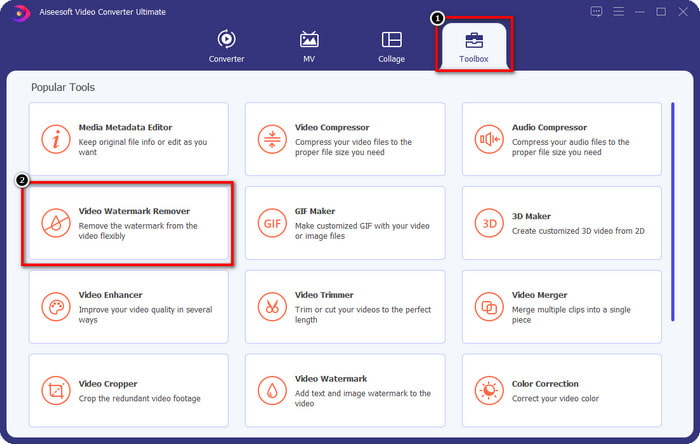
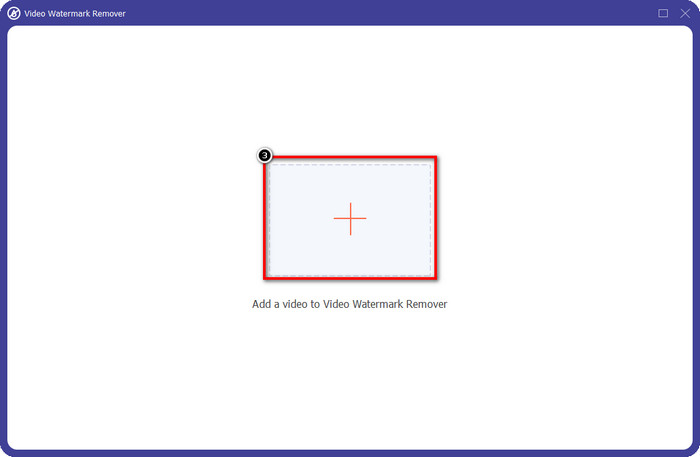
Step 3. Click the + icon on your screen to upload the Renderforest video you export with a watermark.
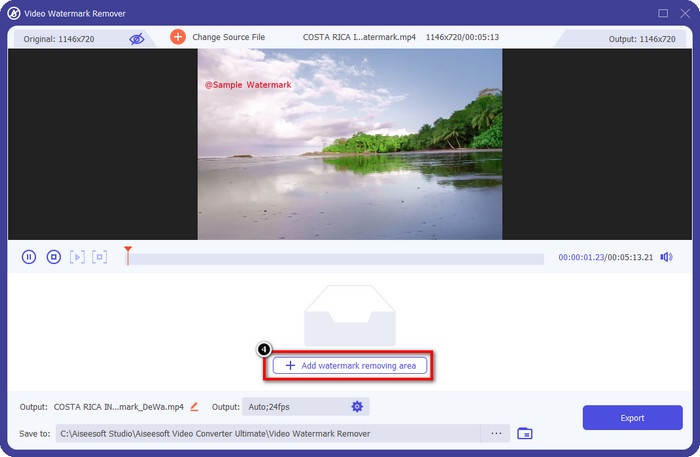
Step 4. Press Add Removing Watermark Area to begin removing the Renderforest watermark.
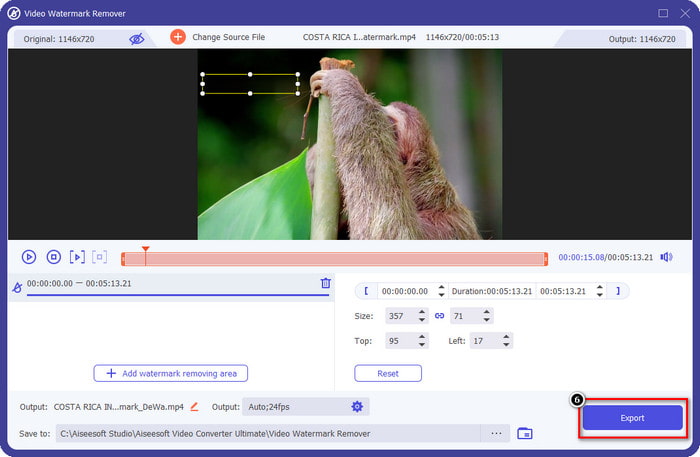
Step 5. On the new windows on your screen, drag the selection box and make it fit the watermark. You can adjust the selection box freely if you need to.
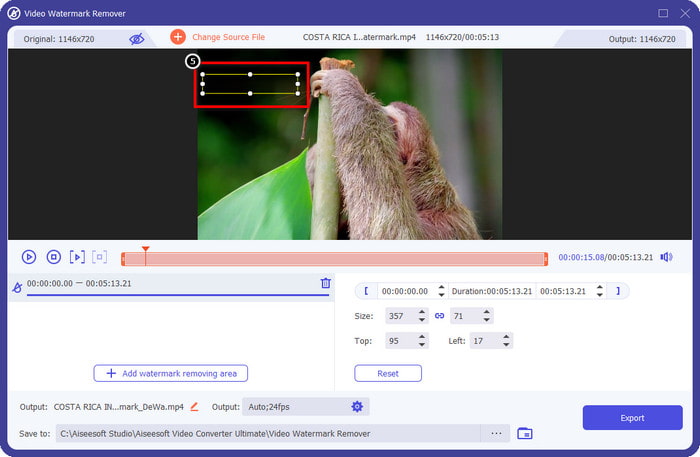
Step 6. Now that the selection box detects the watermark in your video, click Export to begin removing and saving the video without a watermark. It will process the video quickly in no time, and you can now use the video without the disturbing watermark.
संबंधित:
लोगो को अभी हटाएं
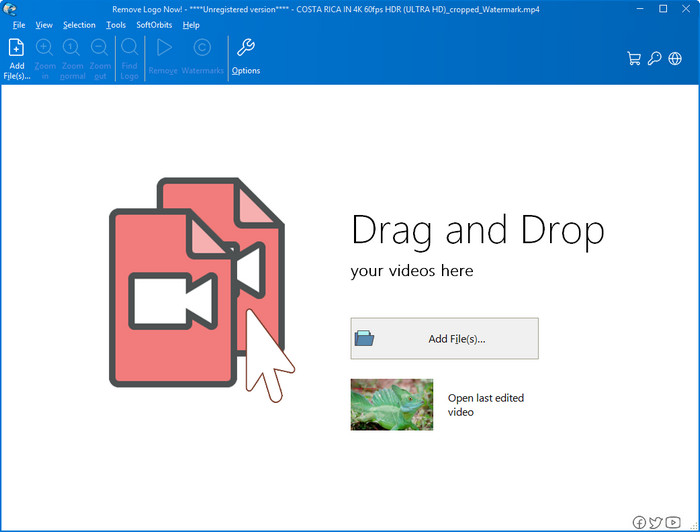
Next on our list, Remove Logo Now built an excellent reputation for removing the overlaid watermark on Windows. With this tool, you wouldn't need the expertise to know how to remove the Renderforest watermark on a PC. After removing the watermark, there are traces of the residue where the watermark originated if you take a closer look. But if you don’t look at it deeply, you wouldn’t notice the watermark or residue on the exported video. The tutorial below will teach you how to remove the watermark in your video on your Windows devices.
Step 1. Download and install the Remove Logo Now on your desktop, then follow the installation process.
Step 2. Launch the software, then click Add Files to upload the video here. You can drag and drop the video here for more efficient file uploading.
Step 3. Choose which tool you want to use to mark the watermark. After selecting one, highlight the watermark and click Remove.
Step 4. Click Start to begin the watermark removing process this tool provides.
वीडियो वॉटरमार्क रिमूवर ऑनलाइन

Doesn’t like to download software on your desktop but still want to know how to remove the Renderforest watermark, then try to use the Video Watermark Remover Online. You can use this fully automated watermark remover to eliminate the watermark in your video for free without downloading it on your desktop. Same as the mentioned tool here, even if you are a beginner at video editing or removing the watermark, you can master using this tool in a few minutes. You can follow the tutorial below to know how to use it.
Step 1. Open the watermark remover online by searching it over your favorite web browser.
Step 2. Click the upload cloud icon on the main website to insert the video you export on Renderforest.
Step 3. Wait for the uploading processing because it automatically removes the watermark in your video, then clicks Download to have the video without the watermark.
भाग 2. Renderforst वॉटरमार्क कैसे निकालें पर अक्सर पूछे जाने वाले प्रश्न
Renderforest के लिए सदस्यता शुल्क कितना है?
Renderforest तीन अलग-अलग प्रकार के मूल्य निर्धारण का समर्थन करता है जिनका आप लाभ उठा सकते हैं; लाइट के लिए $ 14.99, प्रो के लिए $24.99 और हर महीने बिजनेस के लिए $29.99। इस मूल्य निर्धारण का एक दूसरे से अलग उद्देश्य है; आप इसकी मुख्य वेबसाइट पर जा सकते हैं यह देखने के लिए कि आप जिस सदस्यता का लाभ उठाना चाहते हैं, उस पर कौन से सूचीबद्ध उपलब्ध हैं।
क्या बिना टूल के Renderforest Video से वॉटरमार्क हटाना संभव है?
हां, आप अपने Renderforest में एक टूल का उपयोग किए बिना वॉटरमार्क हटा सकते हैं, और वह तरीका है सॉफ़्टवेयर पर मासिक या वार्षिक शुल्क खरीदना। ताकि जब आप वीडियो फाइल को एक्सपोर्ट करेंगे तो उसमें कोई वॉटरमार्क नहीं जोड़ा जाएगा।
Renderforest के लिए सबसे अच्छी योजना कौन सी है; मासिक या वार्षिक?
यदि आप टूल का कुछ बार उपयोग करना चाहते हैं तो मासिक सदस्यता एक अच्छा विकल्प है, लेकिन यदि आप लंबे समय तक सॉफ़्टवेयर का उपयोग करने का निर्णय लेते हैं, तो वार्षिक योजना का लाभ उठाना बेहतर है क्योंकि यह आपको नवीनीकरण से कम खर्च करेगा हर महीने। लेकिन इससे पहले कि आप लाभ उठाएं, आप यहां अपने खाते में लॉग इन करके मुफ्त में रेंडरफॉरेस्ट का उपयोग कर सकते हैं, फिर इसके द्वारा प्रदान किए जाने वाले अन्य टेम्प्लेट का उपयोग करने का प्रयास करें।
निष्कर्ष
वास्तव में यह लेख आपके द्वारा उपयोग किए जा सकने वाले तीन सबसे उपयोगी वॉटरमार्क रिमूवर का उपयोग करके रेंडरफॉरेस्ट वॉटरमार्क को मुफ्त में हटाने के लिए मजबूत सबूत प्रदान करता है। यदि आप एक विंडोज़ उपयोगकर्ता हैं और अपने डेस्कटॉप पर वॉटरमार्क हटाना चाहते हैं, तो आपको अभी निकालें लोगो का उपयोग करने का प्रयास करना चाहिए। लेकिन अगर आपको सॉफ्टवेयर डाउनलोड करना पसंद नहीं है, तो आपको वीडियो वॉटरमार्क रिमूवर ऑनलाइन का उपयोग करने का प्रयास करना चाहिए क्योंकि आप वॉटरमार्क को प्रभावी ढंग से हटाने के लिए इस टूल का उपयोग कर सकते हैं।
लेकिन अगर आप एक विंडोज या मैक उपयोगकर्ता हैं जो एक प्रभावी वॉटरमार्क रिमूवर चाहते हैं, तो बिना किसी संदेह के, सबसे अच्छा वॉटरमार्क रिमूवर जो आप उपयोग कर सकते हैं, वह है एफवीसी वीडियो कन्वर्टर अल्टीमेट। यह अंतिम वॉटरमार्क रिमूवर है जिसका उपयोग आप उस वॉटरमार्क को हटाने के लिए कर सकते हैं जो आपके Renderforest वीडियो को कुशलतापूर्वक और पेशेवर रूप से परेशान कर रहा है।
-
 विंडोज़ और मैक पर वीएसडीसी वॉटरमार्क को जल्दी से हटाने के 2 तरीके
 क्या आप अपने वीडियो पर वीएसडीसी वॉटरमार्क हटाने का तरीका ढूंढ रहे हैं? इस लेख के साथ, हम ऐसे उपकरण प्रदान करते हैं जिनका उपयोग आप वॉटरमार्क से छुटकारा पाने के लिए कर सकते हैं।
-
 वीडियो पर एनिमोटो वॉटरमार्क को आसानी से और प्रभावी ढंग से हटाएं
 वीडियो पर एनिमोटो वॉटरमार्क कैसे हटाएं? इस लेख को पढ़ना जारी रखें क्योंकि हमने इसे कैसे करना है पर एक संपूर्ण ट्यूटोरियल प्रदान किया है।
-
 फ़ाइनल कट प्रो का उपयोग करके वीडियो से वॉटरमार्क कैसे निकालें [पूरी गाइड]
 वीडियो पर वॉटरमार्क के साथ कोई समस्या है? अब और नहीं कहा, क्योंकि हमने फ़ाइनल कट प्रो का उपयोग करके वीडियो से वॉटरमार्क हटाने के बारे में एक ट्यूटोरियल प्रदान किया है।
