


 वीडियो कनवर्टर अंतिम
 स्क्रीन अभिलेखी
 वीडियो मरम्मत
वीडियो से वॉटरमार्क जल्दी कैसे हटाएं
क्या आप आसान तरीके से किसी वीडियो से वॉटरमार्क हटाना चाहते हैं? इसके लिए आपको एक सही टूल की ज़रूरत होगी। उदाहरण के लिए, कई यूज़र चाहते हैं कि वीडियो देखते समय यह वॉटरमार्क टेक्स्ट या लोगो हट जाए ताकि वे वीडियो का पूरा अनुभव ले सकें। लेकिन यह काम कुछ एडिटरों के लिए पेचीदा है, क्योंकि हर टूल में प्रभावी वॉटरमार्क रिमूवर मौजूद नहीं होता। आम तौर पर आपको इस काम के लिए महँगा एडिटर खरीदना पड़ता है, और फिर भी सभी अच्छे से काम नहीं करते। लेकिन आज हम आपको आपके कंप्यूटर या iOS डिवाइस – किसी भी पर – इस्तेमाल करने के लिए सबसे बेहतर समाधान बताएंगे। साथ ही, जिन भी सॉफ़्टवेयर की हम सिफ़ारिश कर रहे हैं, उन्हें बहुत ध्यान से छाँटकर चुना गया है। तो बिना देर किए, इस लेख में जानिए कि किसी भी वीडियो से वॉटरमार्क कैसे हटाएँ।.

भाग 1. विंडोज और मैक पर किसी भी वीडियो से वॉटरमार्क हटाने का अंतिम समाधान
वीडियो से वॉटरमार्क हटाना सीखना, बेहतरीन वीडियो एडिटर Video Converter Ultimate के साथ बहुत आसान काम है। इस टूल का इस्तेमाल करने के लिए आपको एडिटिंग का ज़्यादा अनुभव होने की भी ज़रूरत नहीं, क्योंकि इसका इंटरफ़ेस इंटरएक्टिव और आसानी से समझ में आने वाला है। इसके अलावा यह कई उन्नत फीचर भी देता है जिन्हें आप इस्तेमाल कर सकते हैं, जैसे मर्ज करना, काटना, कलर करेक्शन, रिवर्स करना, एन्हांसर वगैरह।.
जहां तक आज की बात है, कई उपयोगकर्ता इस टूल को पहले ही डाउनलोड कर चुके हैं, और वे सभी संतुष्ट हैं क्योंकि उन्होंने ऐसा किया है। प्रभावशाली है ना? इस उपकरण का उपयोग करने का प्रयास करना चाहते हैं? उस स्थिति में, आइए नीचे दिए गए चरणों की जाँच करें और देखें कि वॉटरमार्क पर यह टूल हमारी समस्या का सबसे अच्छा समाधान है या नहीं।

FVC वीडियो कन्वर्टर अंतिम
5,689,200+ डाउनलोड- यह उन सभी के लिए सबसे अच्छा विकल्प है जो किसी भी वीडियो पर अपना वॉटरमार्क हटाना चाहते हैं।
- यह अंतिम उपकरण केवल एक ही है जो कनवर्टर, क्रॉपर, विलय, कटर के रूप में कार्य करता है।
- विंडोज और मैक जैसे सभी डेस्कटॉप प्लेटफॉर्म पर डाउनलोड करने के लिए उपलब्ध है।
- इसका उपयोग करना आसान है, फिर भी यह उनके वीडियो पर समस्या के संबंध में सबसे अधिक चुना गया है।
फ्री डाउनलोडWindows 7 या बाद के संस्करण के लिएसुरक्षित डाउनलोड
फ्री डाउनलोडMacOS 10.7 या बाद के संस्करण के लिएसुरक्षित डाउनलोड
स्टेप 1. इस अल्टीमेट टूल को अपने कंप्यूटर पर डाउनलोड करें और चुनें कि आप Windows इस्तेमाल कर रहे हैं या Mac। डाउनलोड पूरा होने के बाद इंस्टॉलेशन प्रक्रिया को फॉलो करें और Start Now पर क्लिक करके टूल को अपने सिस्टम पर चलाएँ।.
फ्री डाउनलोडWindows 7 या बाद के संस्करण के लिएसुरक्षित डाउनलोड
फ्री डाउनलोडMacOS 10.7 या बाद के संस्करण के लिएसुरक्षित डाउनलोड
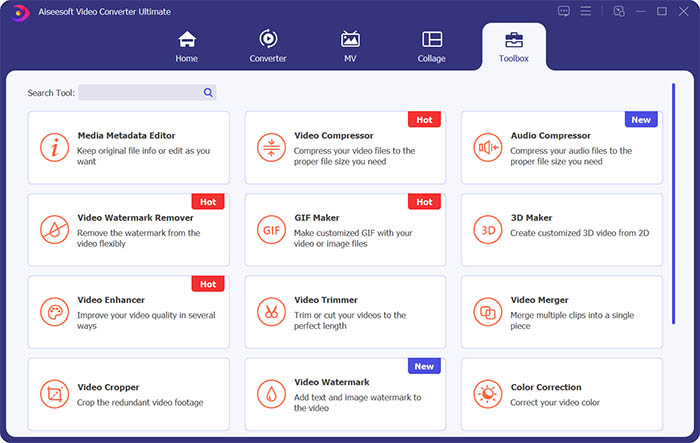
स्टेप 2. Toolbox सेक्शन में जाएँ और वीडियो से वॉटरमार्क मिटाने के लिए Video Watermark Remover पर क्लिक करें।.
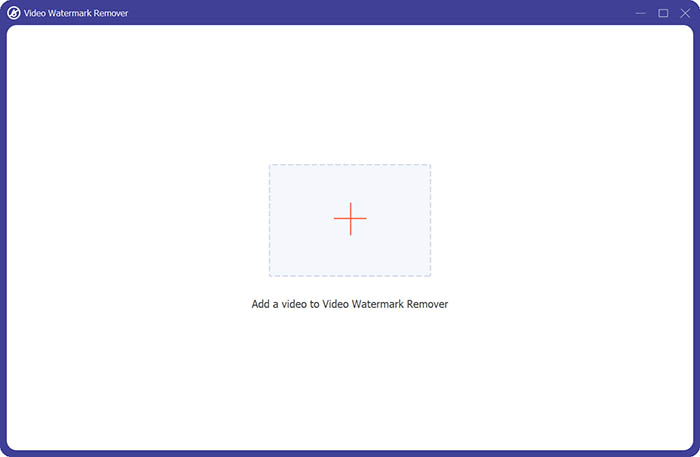
स्टेप 3. अब आपको बीच में दिख रहे प्लस चिन्ह पर क्लिक करके वह वीडियो इम्पोर्ट करना है, जिससे आप वॉटरमार्क हटाना चाहते हैं।.
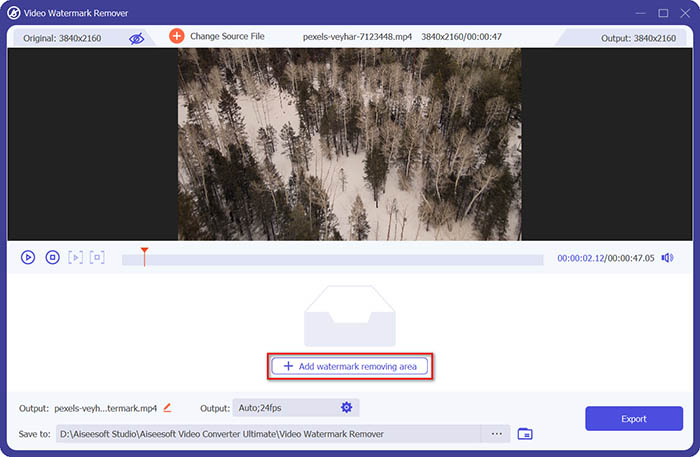
स्टेप 4. वीडियो को वॉटरमार्क रिमूवर में जोड़ने के बाद आपको Add watermark removing area बटन पर क्लिक करके वॉटरमार्क वाला एरिया चुनना होगा।.
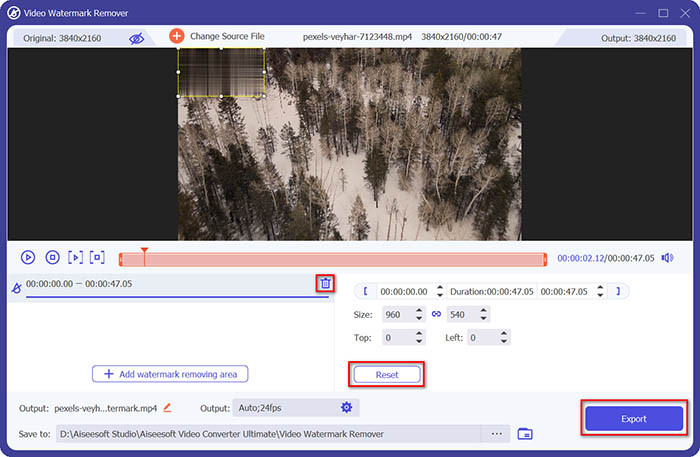
स्टेप 5. अंत में, आप Export बटन पर क्लिक करके बिना वॉटरमार्क वाला वीडियो प्राप्त कर सकते हैं।.
भाग 2. iPhone पर किसी भी वीडियो से वॉटरमार्क कैसे निकालें
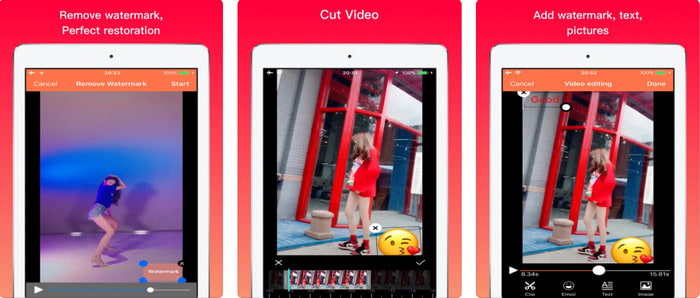
Video Eraser - Remove Logo 4+ ने iOS यूज़र्स को वॉटरमार्क से जुड़ी उनकी कई समस्याओं में मदद की है। यह ऐप हर App Store पर मुफ़्त डाउनलोड के लिए उपलब्ध है, लेकिन प्रो वर्ज़न खरीदने के लिए इसमें इन-ऐप परचेज भी दी गई है। हालाँकि यह टूल वॉटरमार्क हटाने का एक उपयोगी तरीका देता है, फिर भी इसमें कुछ दिक्कतें आती हैं, जैसे कि वीडियो की क्वालिटी एक्सपोर्ट के बाद पहले जैसी नहीं रहती। वॉटरमार्क हटने के बजाय ज़्यादातर धुंधला हो जाता है। इसके अलावा, यहाँ फ़ाइल अपलोड करना भी एक समस्या है, क्योंकि 30 सेकंड से कम की वीडियो होने पर भी इसे अपलोड होने में काफ़ी समय लग सकता है। फिर भी अगर आप iPhone पर वीडियो से वॉटरमार्क हटाना सीखना चाहते हैं, तो नीचे दिए गए स्टेप्स फॉलो करें।.
स्टेप 1. App Store से यह टूल डाउनलोड करें, फिर इसे खोलें और वॉटरमार्क वाले वीडियो को इम्पोर्ट करने के लिए + दबाएँ।.
स्टेप 2. information बटन पर क्लिक करें और फिर Remove Watermark चुनें, वॉटरमार्क पर टैप करें और Start दबाएँ।.
स्टेप 3. प्रोसेस पूरा होने के बाद वीडियो से वॉटरमार्क हटा दिया जाएगा।.
भाग 3. वेब पर किसी भी वीडियो पर वॉटरमार्क से कैसे छुटकारा पाएं
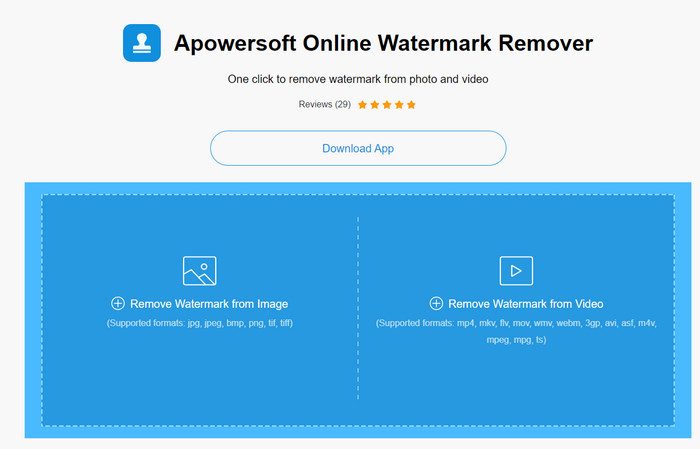
Apowersoft Online Watermark Remover एक मुफ़्त और आसानी से उपलब्ध वेब टूल है, जिसे आप वॉटरमार्क हटाने के लिए इस्तेमाल कर सकते हैं। यह ऑनलाइन टूल, वेब-आधारित होने की वजह से, बिना कुछ डाउनलोड किए ही वॉटरमार्क हटाने का प्रभावी तरीका देता है। हालाँकि यह एक असरदार वॉटरमार्क रिमूवर है, लेकिन पूरी प्रक्रिया पूरी करने के लिए आपको स्थिर इंटरनेट कनेक्शन की ज़रूरत होगी, वरना आपको फिर से शुरुआत करनी पड़ सकती है। तो अगर आपका बजट सीमित है और आप ऑनलाइन वीडियो से वॉटरमार्क हटाना सीखना चाहते हैं, तो यह टूल आपके लिए सही है।.
स्टेप 1. अपने पसंदीदा वेब ब्राउज़र पर Apowersoft Online Watermark Remover सर्च करें और इसे खोलें।.
स्टेप 2. Remove Watermark from Video पर क्लिक करें और वॉटरमार्क वाली फ़ाइल अपलोड करें। अपलोडिंग प्रक्रिया पूरी होने का इंतज़ार करें।.
स्टेप 3. वीडियो पर, अपने माउस के left click को दबाए रखें और उसे खींचकर वॉटरमार्क पर ले जाएँ; जैसे ही वॉटरमार्क टूटी हुई लाइन (डैश्ड बॉक्स) के अंदर आ जाए, माउस छोड़ दें। हटाने की प्रक्रिया शुरू करने के लिए Erase पर क्लिक करें, और फिर इसे अपने कंप्यूटर में सेव करने के लिए Download पर क्लिक करें।.
भाग 4. वीडियो से वॉटरमार्क हटाने के बारे में अक्सर पूछे जाने वाले प्रश्न
मुझे वीडियो पर वॉटरमार्क से छुटकारा पाने की आवश्यकता क्यों है?
पूरे अनुभव के रूप में वीडियो का आनंद लेने के लिए हमें कष्टप्रद वॉटरमार्क को हटाने की आवश्यकता है। यह केवल व्यक्तिगत उपयोग के लिए ही लागू है, लेकिन यदि आप इसे ऑनलाइन पोस्ट करते हैं और दूसरे के काम से लाभ प्राप्त करने के लिए इसका उपयोग करते हैं तो इसका परिणाम हो सकता है।
वॉटरमार्क हटाने के अन्य तरीके क्या हैं?
आप चाहें तो वॉटरमार्क को कवर कर सकते हैं या इसे अपने वॉटरमार्क से बदल सकते हैं। यह प्रक्रिया ओवरलेइंग है; यह तभी सबसे अच्छा काम करता है जब वॉटरमार्क छोटा हो या वीडियो के किनारे पर हो। या आप वीडियो को उस पर वॉटरमार्क के साथ काट सकते हैं और फिर इसे दूसरे वीडियो के साथ मर्ज कर सकते हैं। वॉटरमार्क पॉप-अप होने पर ही काटने की यह प्रक्रिया सबसे अच्छा काम करती है। वॉटरमार्क हटाने के दो अलग-अलग तरीके हैं: वीडियो को धुंधला करना और क्रॉप करना। ये दोनों हमारे द्वारा ऊपर प्रस्तुत किए गए टूल के साथ काम करते हैं।
फोटोशॉप में वॉटरमार्क कैसे लगाएं?
अगर आप Photoshop में वॉटरमार्क जोड़ना चाहते हैं, तो इस लिंक पर क्लिक करें और पूरी तरह पढ़ें ताकि आप इसका सही तरीका समझ सकें।.
निष्कर्ष
इस लेख में बताए गए टूल की मदद से आप आसानी से वीडियो से वॉटरमार्क मुफ़्त में हटा सकते हैं, या चाहें तो अल्टीमेट टूल खरीदकर भी इस्तेमाल कर सकते हैं। हालाँकि यहाँ दिए गए सारे वॉटरमार्क रिमूवर इस्तेमाल करने में आसान हैं, फिर भी हमारा मानना है कि Video Converter Ultimate सबसे सरल इंटरफ़ेस के साथ सबसे प्रभावी नतीजे देता है। इसलिए, अगर आप इसे इस्तेमाल करना चाहते हैं, तो ऊपर दिए गए डाउनलोड बटन पर क्लिक करके इसे ट्राई करें और देखें कि क्या यह आपके लिए सही बैठता है।.
-
 DivX को MKV फॉर्मेट में बदलने के शीर्ष 2 तरीके [हल]
 मुझे DivX को MKV में बदलने की आवश्यकता क्यों है? मैं किन कन्वर्टर्स का उपयोग कर सकता हूं? क्या आपका भी यही विचार है? फिर, यह लेख आपको DivX और MKV के बारे में अधिक जानने में मदद करेगा।
-
 एमपीजी को WMV में मुफ्त में बदलने के लिए 2 अल्टीमेट एमपीजी कन्वर्टर्स
 क्या आप MPG को WMV फ्री में बदलना चाहते हैं? उस स्थिति में, आप भाग्यशाली हैं क्योंकि हमें पता चला है कि दो उपकरण हैं जिनका उपयोग आप अपनी एमपीजी फ़ाइलों को परिवर्तित करने के लिए कर सकते हैं।
-
 मैक और विंडोज पर iTunes M4V को MKV में कैसे बदलें [सबसे तेज़ तरीका]
 यदि आपको मैक पर M4V को MKV में बदलने की आवश्यकता है, तो आपको यह लेख अवश्य पढ़ना चाहिए। जैसा कि हम कन्वर्टर्स के बारे में तथ्य प्रदान करते हैं जो आपकी रूपांतरण प्रक्रिया में आपकी सहायता करेंगे।
