


 वीडियो कनवर्टर अंतिम
 स्क्रीन अभिलेखी
 वीडियो मरम्मत
 सुरक्षित डाउनलोड
एक वीडियो से VideoScribe लोगो को कैसे हटाएं, इस पर सर्वोत्तम तरीके
क्या आप यह सीखना चाहते हैं कि अपनी वीडियो से VideoScribe का लोगो कैसे हटाएँ? कई बार ऐसा होता है कि आपकी वीडियो पर लोगो दिखाई देता है। आप इसे टाल नहीं सकते, खासकर तब जब वीडियो का मालिक अपनी वीडियो की सुरक्षा करना और अपने ब्रांड को बढ़ावा देना चाहता हो। किसी ऐप्लिकेशन के फ्री वर्ज़न का इस्तेमाल करने पर भी आपको लोगो दिख सकता है। इसका सबसे अच्छा उदाहरण VideoScribe ऐप्लिकेशन है। अगर आप इस ऐप्लिकेशन का फ्री वर्ज़न इस्तेमाल कर रहे हैं, तो आपकी वीडियो पर VideoScribe का लोगो रहेगा, जब तक कि आप इसे खरीद न लें। लेकिन, उससे पहले आप दूसरी फ्री ऐप्लिकेशन का उपयोग करके अपनी वीडियो से लोगो हटा सकते हैं। बिना कुछ खरीदे लोगो कैसे हटाएँ, यह जानने के लिए आपको यह लेख ज़रूर पढ़ना चाहिए।.

भाग 1: वीडियो ऑफ़लाइन से वीडियोस्क्राइब लोगो कैसे निकालें
अगर आप ऑफ़लाइन अपनी वीडियो से VideoScribe का लोगो हटाना चाहते हैं, तो आप Video Converter Ultimate का उपयोग कर सकते हैं। यह ऐप्लिकेशन आपकी वीडियो से VideoScribe का लोगो आसानी और तेज़ी से हटाने में मदद कर सकती है। आप इस सॉफ़्टवेयर से बिना गुणवत्ता खोए अपनी वीडियो को एडिट भी कर सकते हैं। इसके अलावा, इसका सरल GUI उच्च गुणवत्ता वाला आउटपुट देता है। Video Converter Ultimate, Mac और Windows दोनों पर उपलब्ध है। हालाँकि इसमें कई फ़ीचर हैं, फिर भी यह शुरुआती उपयोगकर्ताओं के लिए भी उपयुक्त है। यह ऐप्लिकेशन FLV, MOV, MP4, MTS, DivX, XviD और कई अन्य फ़ाइल फ़ॉर्मैट को सपोर्ट करती है। साथ ही, इस ऐप्लिकेशन में कई एडिटिंग टूल हैं जिनसे आप अपनी वीडियो को बेहतर बना सकते हैं, जैसे एन्हांस करना, ट्रिम करना, क्रॉप करना, रंग सुधारना, वीडियो घुमाना और बहुत कुछ। Video Converter Ultimate आपकी वीडियो से VideoScribe का लोगो हटाने के दो तरीके भी प्रदान करता है।.
वीडियो वॉटरमार्क रिमूवर का उपयोग करना
Step 1: नीचे दिए गए डाउनलोड बटन पर क्लिक करके Windows या Mac पर Video Converter Ultimate डाउनलोड करें। इसके बाद, सॉफ़्टवेयर को अपने डिवाइस पर इंस्टॉल करें और ऐप्लिकेशन चलाएँ।.
फ्री डाउनलोडWindows 7 या बाद के संस्करण के लिएसुरक्षित डाउनलोड
फ्री डाउनलोडMacOS 10.7 या बाद के संस्करण के लिएसुरक्षित डाउनलोड
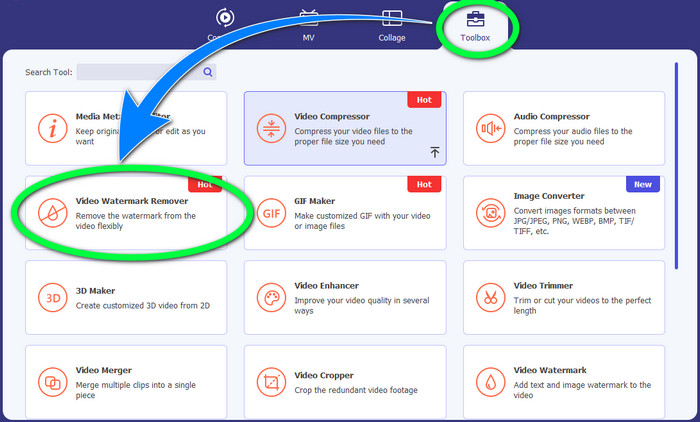
Step 2: इसके बाद, Toolbox पैनल पर जाएँ और Video Watermark Remover बटन पर क्लिक करें। आपकी स्क्रीन पर एक नया इंटरफ़ेस दिखाई देगा।.
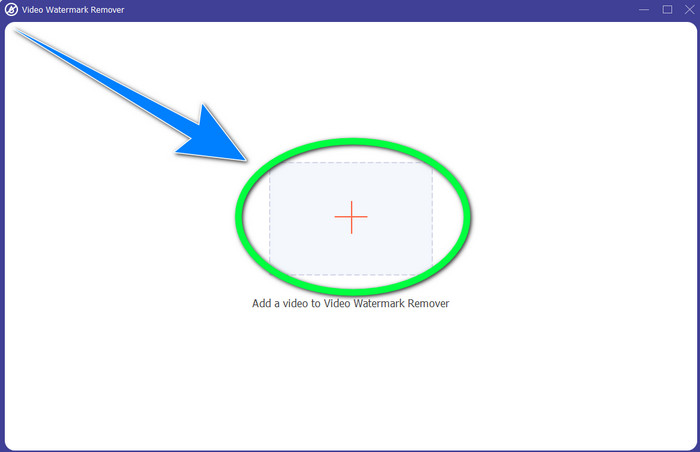
Step 3: जिस वीडियो में VideoScribe का लोगो है, उसे इम्पोर्ट करने के लिए + बटन पर क्लिक करें।.
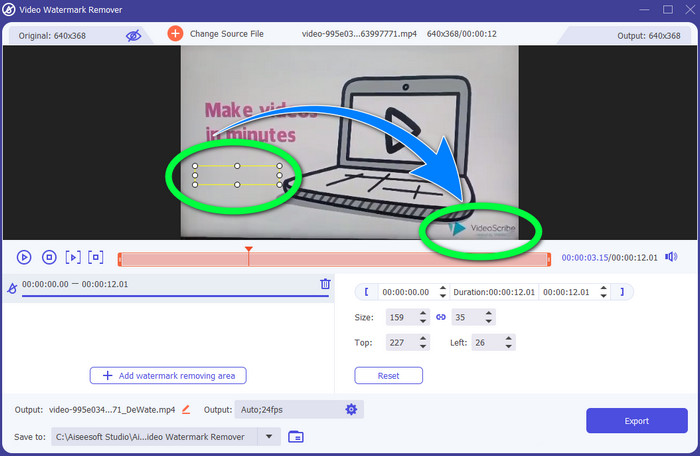
Step 4: वीडियो इम्पोर्ट करने के बाद, Add Watermark Removing Area पर क्लिक करें और छोटे से सिलेक्शन बॉक्स को लोगो पर रखें। आप बॉक्स का आकार समायोजित कर सकते हैं।.
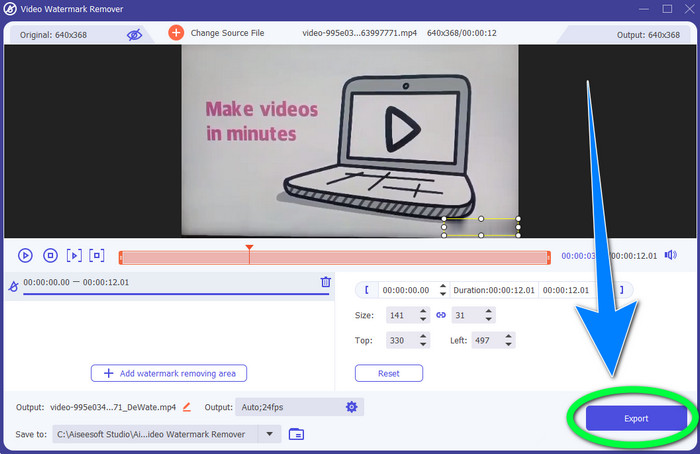
Step 5: अंतिम चरण में, Export बटन पर क्लिक करें ताकि आप लोगो के बिना वीडियो को सेव कर सकें।.
वीडियो क्रॉपर फ़ंक्शन का उपयोग करना
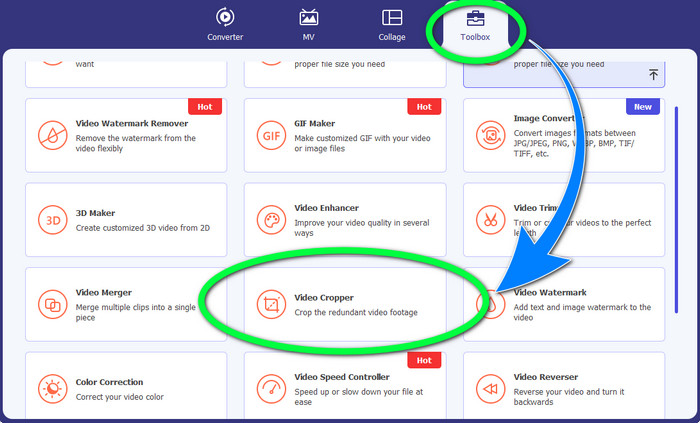
Step 1: क्रॉपिंग टूल, VideoScribe का लोगो हटाने का एक और तरीका है। Toolbox के अंतर्गत, Video Cropper बटन पर क्लिक करें।.
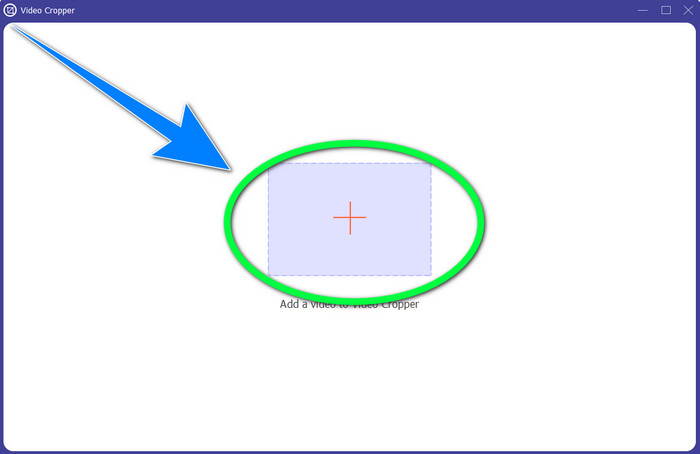
Step 2: आपकी स्क्रीन पर नया इंटरफ़ेस दिखाई देगा। + साइन बटन चुनें और VideoScribe लोगो वाली वीडियो डालें।.
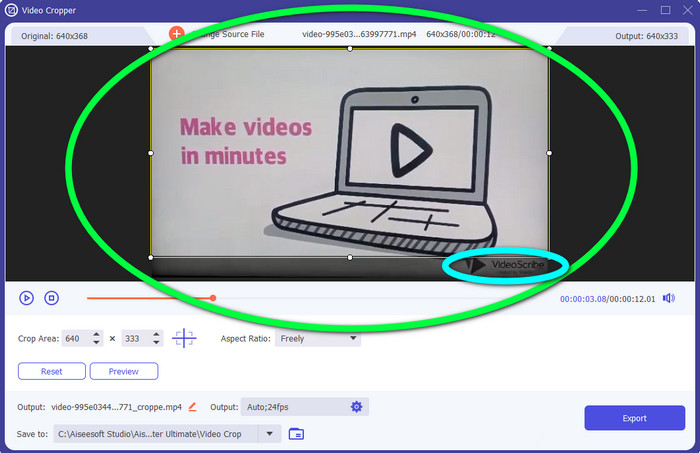
Step 3: क्रॉपिंग टूल आपको अपनी वीडियो के किनारे क्रॉप करने की सुविधा देता है। अगर लोगो आपकी वीडियो के किनारे पर है, तो आप किनारा काटकर लोगो हटा सकते हैं।.
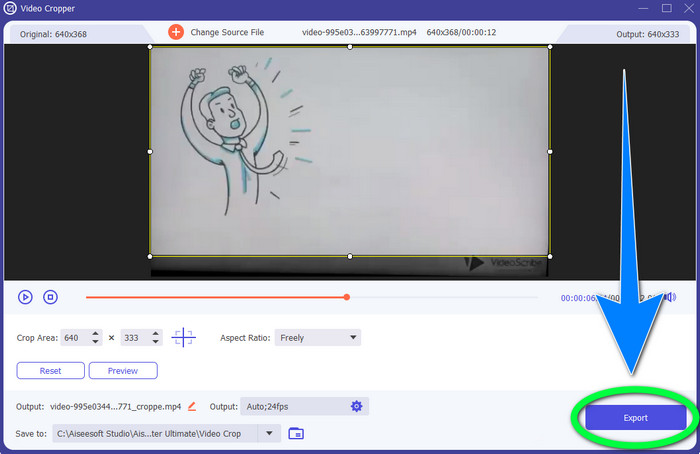
Step 4: इसके बाद, अगर आपको लगता है कि आपने VideoScribe का लोगो हटा दिया है, तो आप Export बटन चुनकर अपनी अंतिम वीडियो को डिवाइस पर सेव कर सकते हैं।.
भाग 2: वीडियो ऑनलाइन से वीडियोस्क्राइब लोगो कैसे निकालें
BeeCut-ऑनलाइन वॉटरमार्क रिमूवर का उपयोग करना
क्या आप अपनी वीडियो से VideoScribe का लोगो ऑनलाइन हटाना चाहते हैं? BeeCut-Online Watermark Remover एक बेहतरीन और उपयोगी ऑनलाइन टूल है जिसका आप उपयोग कर सकते हैं। यह ऑनलाइन टूल आपकी वीडियो से लोगो, वॉटरमार्क, टेक्स्ट, डेट स्टैम्प और अन्य परेशान करने वाली चीज़ें हटाने में मदद कर सकता है। इसलिए, इसके सरल इंटरफ़ेस की वजह से आप आसानी से अपनी वीडियो से VideoScribe का लोगो हटा सकते हैं। साथ ही, BeeCut-Online Watermark Remover FLV, MOV, MP4, WebM, ASF, AVI, 3GP, MPG और अन्य कई फ़ाइल फ़ॉर्मैट को सपोर्ट करता है। इसके अलावा, आप इस टूल की मदद से अपनी इमेज से भी परेशान करने वाले तत्व हटा सकते हैं।दुर्भाग्य से, यह ऐप्लिकेशन इंटरनेट पर निर्भर है, यानी अगर आपके पास इंटरनेट एक्सेस या इंटरनेट कनेक्शन नहीं है, तो आप इस ऑनलाइन टूल का उपयोग नहीं कर पाएँगे। जहाँ तक रिमूवल प्रक्रिया की बात है, कई बार इसमें समय लग सकता है, जो आपके इंटरनेट कनेक्शन की गति (तेज़ या धीमी) पर निर्भर करता है। नीचे हमने आपके लिए क्रमवार चरण दिए हैं।.
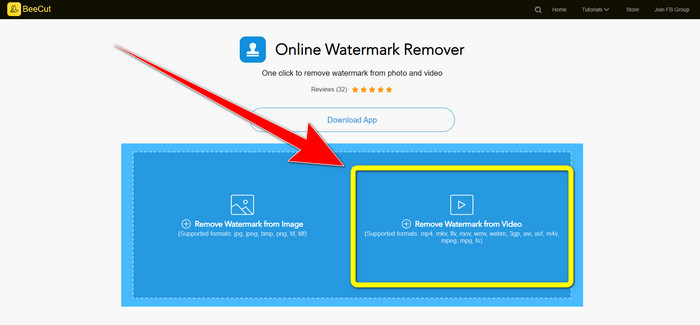
Step 1: BeeCut-Online Watermark Remover की वेबसाइट पर जाएँ। Remove Watermark from Video बटन पर क्लिक करें और VideoScribe लोगो वाली अपनी वीडियो अटैच करें।.
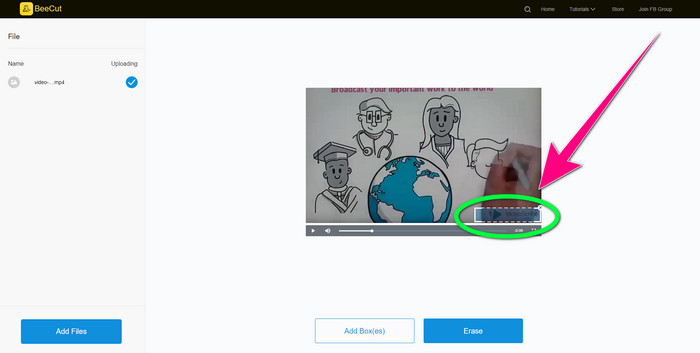
Step 2: वीडियो जोड़ने के बाद, वीडियो पर दिखने वाले small box का उपयोग करें और उसे खींचकर लोगो पर ले जाएँ ताकि लोगो ढक जाए।.
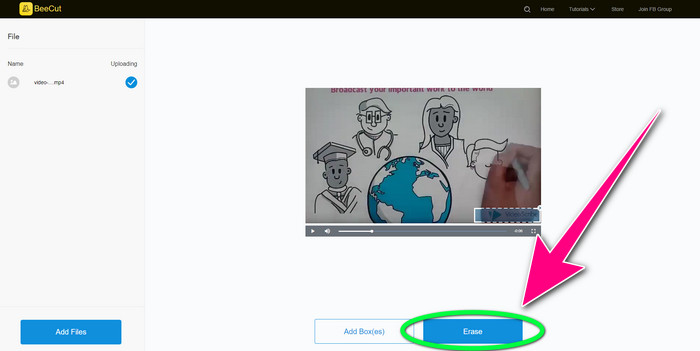
Step 3: जब आप छोटे बॉक्स से लोगो को पूरी तरह ढक लें, तो Erase बटन चुनें, ताकि आप VideoScribe लोगो के बिना अपनी वीडियो को सेव और डाउनलोड कर सकें।.
वीडियो वॉटरमार्क रिमूवर ऑनलाइन का उपयोग करना
Video Watermark Remover Online एक और ऑनलाइन टूल है जिसका उपयोग आप अपनी वीडियो से VideoScribe का लोगो हटाने के लिए कर सकते हैं। इसका इंटरफ़ेस सरल है और यह शुरुआती उपयोगकर्ताओं के लिए अच्छा है। इसके अलावा, आप इस टूल की मदद से अपनी वीडियो से लोगो हटा सकते हैं, वह भी बिना गुणवत्ता खोए, जो कि काफ़ी शानदार है। हालाँकि, फ्री वर्ज़न में इस ऑनलाइन टूल की सुविधाएँ सीमित हैं। आप केवल 5 वीडियो से लोगो हटा सकते हैं और उन्हें अन्य फ़ाइल फ़ॉर्मैट में एक्सपोर्ट नहीं कर सकते। और चूँकि यह एक ऑनलाइन ऐप्लिकेशन है, आप बिना इंटरनेट कनेक्शन के इसका उपयोग नहीं कर पाएँगे। साथ ही, कई बार यह टूल ठीक से काम भी नहीं करता। अगर आप वीडियो से लोगो हटाना सीखना चाहते हैं, तो नीचे दिए गए आसान चरणों का पालन करें।.
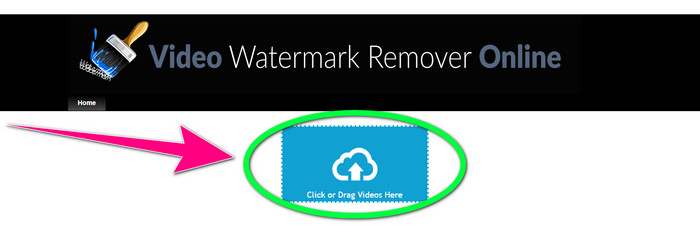
Step 1: Video Watermark Remover Online की वेबसाइट पर जाएँ। VideoScribe लोगो वाली अपनी वीडियो डालने के लिए Click or Drag Videos Here बटन पर क्लिक करें।.
Step 2: Remove Watermark बटन पर क्लिक करें और रिमूवल प्रक्रिया के पूरा होने तक इंतज़ार करें। फिर आप अपनी वीडियो सेव कर सकते हैं।.
भाग 3: वीडियो से वीडियोस्क्राइब लोगो हटाने के बारे में अक्सर पूछे जाने वाले प्रश्न
क्या मैं अपने वीडियो से लोगो हटाने के लिए ऑनलाइन टूल पर भरोसा कर सकता हूं?
हाँ तुम कर सकते हो। ऑनलाइन उपकरण सुरक्षित हैं और आपकी वीडियो फ़ाइल को सुरक्षित कर सकते हैं। प्रक्रिया के बाद कुछ टूल स्वचालित रूप से आपकी फ़ाइलों को हटा सकते हैं, इसलिए आपको चिंता करने की आवश्यकता नहीं है। हालाँकि, सभी ऑनलाइन टूल समान नहीं हैं, इसलिए आपको अभी भी यह जानने के लिए समीक्षाओं की तलाश करनी होगी कि क्या आप किसी विशेष टूल पर भरोसा कर सकते हैं।
आप एक वीडियो से लोगो से कैसे छुटकारा पा सकते हैं?
यदि आप लोगो से छुटकारा पाना चाहते हैं, तो अपने कंप्यूटर या मैक पर वीडियो कन्वर्टर अल्टीमेट डाउनलोड करें। आप वीडियो वॉटरमार्क रिमूवर या वीडियो क्रॉपर टूल का उपयोग कर सकते हैं। इन दो तरीकों से आप अपने वीडियो से लोगो को हटा सकते हैं।
क्या मैं बिना सब्सक्रिप्शन के VideoScribe लोगो को हटा सकता हूँ?
हाँ बिल्कुल! आप वीडियो कन्वर्टर अल्टीमेट का उपयोग करके VideoScribe लोगो को हटा सकते हैं। लोगो को हटाने के लिए आपको इस एप्लिकेशन को खरीदने की आवश्यकता नहीं है क्योंकि यह मुफ़्त है।
निष्कर्ष
इस लेख में आपको डाउनलोडेबल टूल और ऑनलाइन टूल का उपयोग करके वीडियो से VideoScribe लोगो हटाने के बारे में जानकारी दी गई। लेकिन, अगर आप अपनी वीडियो से लोगो को जल्दी और बिना किसी झंझट के हटाना चाहते हैं, तो आप Video Converter Ultimate का उपयोग कर सकते हैं।.
-
 नवीनतम शटरस्टॉक वॉटरमार्क रिमूवर में से 3 जिनकी आपको कभी आवश्यकता होगी
 निर्यात किए गए वीडियो से जुड़ा शटरस्टॉक वॉटरमार्क पसंद नहीं है? इसे प्रभावी ढंग से मिटाने के लिए आप शटरस्टॉक वॉटरमार्क रिमूवर का उपयोग कर सकते हैं।
-
 4 प्रभावी तरीकों का उपयोग करके पॉवटून वॉटरमार्क कैसे निकालें
 हमारे द्वारा यहां शामिल किए गए सर्वोत्तम टूल और एक ट्यूटोरियल का उपयोग करके पॉवटून वॉटरमार्क को हटाने का तरीका जानने के लिए इस लेख को पढ़ें।
-
 Apowersoft वॉटरमार्क रिमूवर रिव्यू - विशेषताएं, फायदे और नुकसान, और कीमतें
 Apowersoft वॉटरमार्क रिमूवर सबसे अच्छे वॉटरमार्क हटाने में से एक है जो ऑनलाइन और ऑफलाइन का समर्थन करता है, अधिक जानने के लिए इसे क्लिक करें!
