


 वीडियो कनवर्टर अंतिम
 स्क्रीन अभिलेखी
 वीडियो मरम्मत
 सुरक्षित डाउनलोड
विभिन्न प्लेटफार्मों पर वीडियोशॉप वॉटरमार्क हटाने के शीर्ष तरीके [फ्री]
वीडियोशॉप एक ऑल-इन-वन पैकेज वीडियो संपादक है जिसका उपयोग आप अपने मोबाइल उपकरणों पर कर सकते हैं, और अब तक, ऐप को नियमित रूप से एक अपडेट प्राप्त हुआ है। चूंकि ऐप को नियमित अपडेट मिलता है और अपडेट मिलने के बाद इसमें नई सुविधाएं जोड़ी जाती हैं, इसलिए मोबाइल उपयोगकर्ता इसे अपने वीडियो एडिटर के रूप में चुनते हैं। हालांकि ऐप लगभग पूर्ण वीडियो संपादन सुविधाएं प्रदान करता है, फिर भी कई उपयोगकर्ताओं को कमियां आती हैं, जैसे भ्रमित इंटरफ़ेस और निर्यात किए गए वीडियो पर वॉटरमार्क जोड़ा जाता है। इसलिए, आज के लेख में, हम आपको उन विभिन्न तरीकों के बारे में बताएंगे, जिनका उपयोग आप वीडियोशॉप वॉटरमार्क को हटाने के लिए कर सकते हैं, जिसे आप अपने आईओएस और एंड्रॉइड पर डाउनलोड कर सकते हैं, साथ ही अंतिम सॉफ्टवेयर जिसे आप अपने डेस्कटॉप पर उपयोग कर सकते हैं।

भाग 1. अपने प्लेटफॉर्म पर सबसे प्रभावी टूल के साथ वीडियोशॉप वॉटरमार्क कैसे निकालें
FVC वीडियो कन्वर्टर अल्टीमेट - विंडोज और मैक पर वॉटरमार्क हटाने का अंतिम समाधान
FVC Video Converter Ultimate हमारी आज की लेख में पसंद है, क्योंकि यह आपके वीडियो से अवांछित वॉटरमार्क को हटाने में बेहद प्रभावी है। यह टूल वॉटरमार्क हटाने की कई सुविधाओं से भरपूर है, जिन्हें आप पहली ही बार में आसानी से सीखकर इस्तेमाल कर सकते हैं। इसका सहज इंटरफ़ेस और हल्का टूल होने की वजह से, अगर आप इसे चुनते हैं तो वॉटरमार्क हटाने की प्रक्रिया में आपको ज़रा भी उलझन नहीं होगी। इस टूल की मदद से आप वॉटरमार्क जोड़ना, री-साइज़ करना, कंप्रेस करना, कट करना, ट्रिम करना आदि कई कमाल के काम भी कर सकते हैं।.
वॉटरमार्क का अंतिम समाधान यहाँ है; यदि आपको वीडियोशॉप वॉटरमार्क हटाने के बारे में एक ट्यूटोरियल की आवश्यकता है, तो नीचे दिए गए चरणों का पालन करें, और वॉटरमार्क को खत्म करने के लिए अंतिम टूल का उपयोग करें।
Step 1. सबसे पहले, आपको अपने डेस्कटॉप पर यह टूल डाउनलोड करना होगा, जिसके लिए आप इस्तेमाल किए जा रहे OS वर्ज़न का चयन करें। इंस्टॉलेशन प्रक्रिया पूरी करें, और फिर सॉफ्टवेयर लॉन्च करके इसका इस्तेमाल शुरू करें।.
फ्री डाउनलोडWindows 7 या बाद के संस्करण के लिएसुरक्षित डाउनलोड
फ्री डाउनलोडMacOS 10.7 या बाद के संस्करण के लिएसुरक्षित डाउनलोड
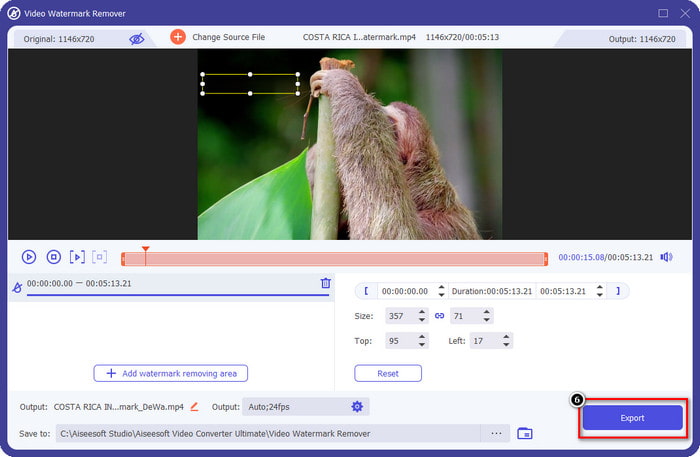
Step 2. Toolbox को उस पर क्लिक करके खोलें, फिर जो फ़ीचर लिस्ट आपकी स्क्रीन पर दिखाई देगी, उसमें से Video Watermark Remover को ढूंढें।.
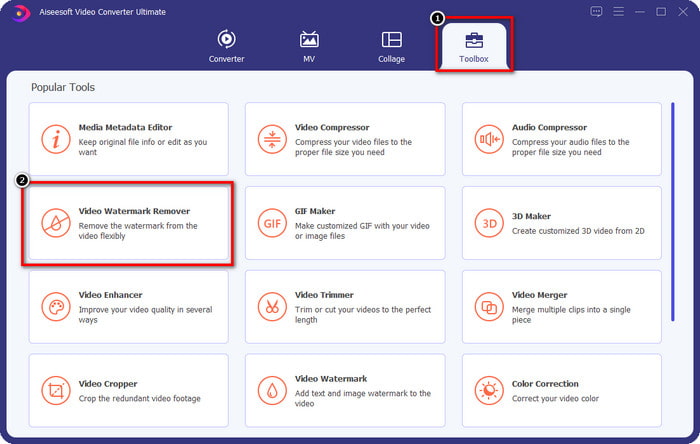
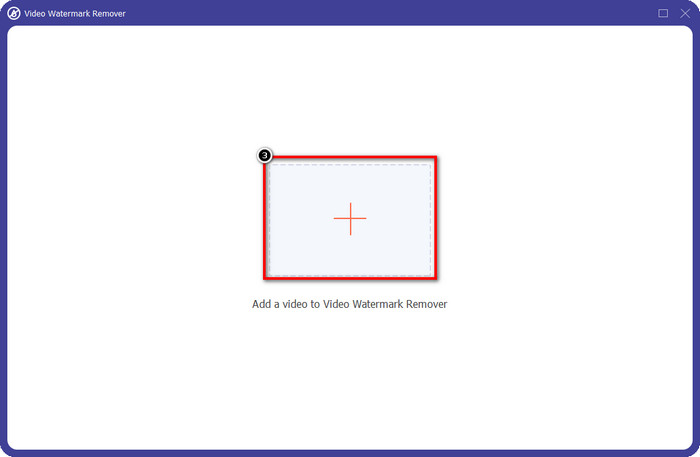
Step 3. इसके बाद + पर क्लिक करें और वह वीडियो फ़ाइल जोड़ें जिसमें Videoshop का वॉटरमार्क है। फ़ाइल मैनेजर में वीडियो फ़ाइल ढूंढें, उस पर एक बार क्लिक करें, और फिर उसे अपलोड करने के लिए Open दबाएँ।.
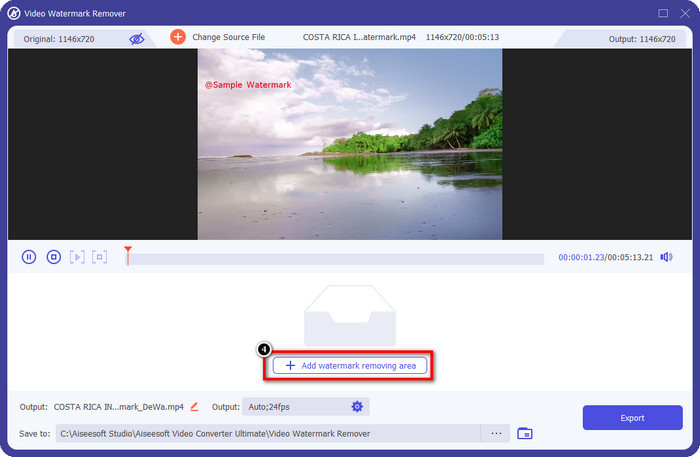
Step 4. फ़ाइल अपलोड होने के बाद जो अगली विंडो दिखाई देगी, उस पर Add Watermark Removing Area पर क्लिक करें।.
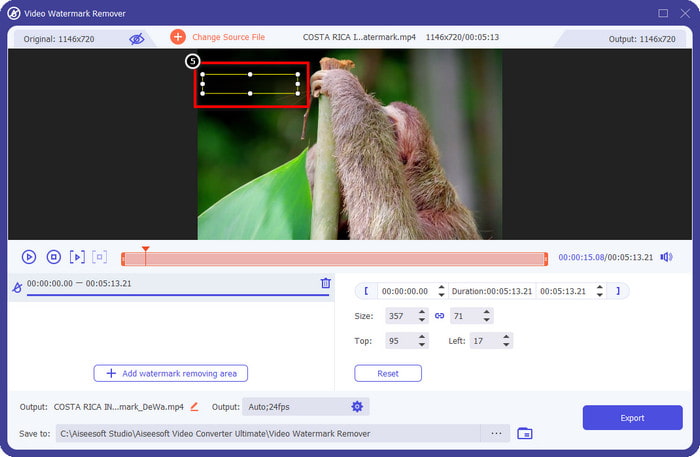
Step 5. वॉटरमार्क को ढकने के लिए आयताकार शेप को वॉटरमार्क के ऊपर Place करें। कृपया सुनिश्चित करें कि प्रीव्यू में दिखाई देने वाला आयताकार आपके वीडियो में वॉटरमार्क को पूरी तरह कवर कर रहा हो, ताकि जब आप फ़ाइल डाउनलोड करें तो उस पर कोई वॉटरमार्क न रहे।.
Step 6. Export दबाएँ, ताकि बिना वॉटरमार्क वाला संपादित Videoshop वीडियो आपके डेस्कटॉप पर सेव हो जाए; एक्सपोर्टिंग प्रक्रिया पूरी होने के बाद जो फ़ोल्डर पॉप-अप होगा, उसमें आप फ़ाइल देख सकते हैं।.
संबंधित:
फोटो सुधार [आईओएस] - आईओएस उपकरणों पर सर्वश्रेष्ठ वॉटरमार्क रिमूवर
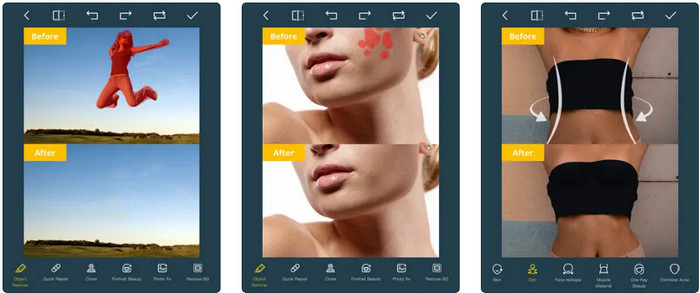
Photo Retouch एक iOS-आधारित ऐप है, जो आपके वीडियो से वॉटरमार्क को इस तरह हटाता है कि एक्सपोर्ट करने के बाद कोई निशान नहीं रहता। यह ऐप App Store पर मुफ़्त में डाउनलोड के लिए उपलब्ध है, आप इसे देख सकते हैं। भले ही टूल के नाम में ‘Photo’ है, फिर भी आप इसका इस्तेमाल वीडियो से वॉटरमार्क हटाने और अपने वीडियो से किसी भी अवांछित ऑब्जेक्ट को मिटाने के लिए कर सकते हैं। अगर आप इस ऐप को आज़माना चाहते हैं, तो नीचे दिया गया Videoshop वॉटरमार्क हटाने का ट्यूटोरियल फॉलो करें।.
Step 1. App Store पर इसका नाम सर्च करके ऐप डाउनलोड करें और Get पर क्लिक करें।.
Step 2. इसके बाद ऐप खोलें, + आइकन पर क्लिक करें और Video Eraser चुनें। फिर वह वीडियो फ़ाइल चुनें जिस पर वॉटरमार्क लगा हुआ है।.
Step 3. नीचे दिए गए टूल्स का इस्तेमाल करके अपने वीडियो पर मौजूद Trace the watermark करें; आप इस टूल में मौजूद Mark शेप का उपयोग करके अपने वीडियो में वॉटरमार्क को हाइलाइट कर सकते हैं।.
Step 4. जैसे ही आप वीडियो पर वॉटरमार्क को हाइलाइट कर लेते हैं, एक्सपोर्टिंग प्रक्रिया अपने आप शुरू हो जाएगी। बीच में रुकावट से बचने के लिए अपना iOS डिवाइस बंद न करें और 100% तक इंतज़ार करें।.
वॉटरमार्क निकालें और जोड़ें [Android] - Android उपकरणों के लिए शीर्ष वॉटरमार्क रिमूवर
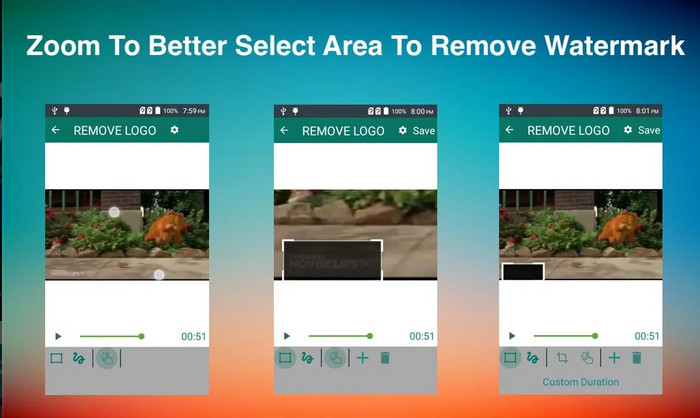
एंड्रॉइड पर वीडियोशॉप वॉटरमार्क कैसे निकालें? Android उपयोगकर्ताओं, चिंता करने की कोई आवश्यकता नहीं है क्योंकि आप अपने डिवाइस पर निकालें और वॉटरमार्क जोड़ें डाउनलोड कर सकते हैं। यह ऐप डाउनलोड करने के लिए स्वतंत्र है; यदि आप अपने डिवाइस पर ऐप डाउनलोड करना चाहते हैं तो आप बाद में Playstore पर जा सकते हैं। इस ऐप को शामिल करने के लिए क्या खास बनाता है? यह छवियों और वीडियो पर प्रदान की जाने वाली प्रभावी वॉटरमार्क हटाने वाली सुविधाओं के कारण है। इस ऐप के साथ, आप चाहें तो अपने पास मौजूद विजुअल मीडिया पर अपना व्यक्तिगत वॉटरमार्क भी जोड़ सकते हैं। यदि आप वीडियोशॉप द्वारा आपके वीडियो पर छोड़े गए वॉटरमार्क को हटाने के लिए इस ऐप का उपयोग करना चाहते हैं तो नीचे दिए गए गाइड का पालन करें।
Step 1. ऐप का इस्तेमाल करने के लिए, सबसे पहले आपको इसे Play Store से डाउनलोड करना होगा; इसके लिए सर्च बॉक्स में इसका नाम टाइप करें।.
Step 2. ऐप खोलें, Select Video पर क्लिक करें, फिर जो दो विकल्प दिखाई देंगे, उनमें से Remove Watermark पर क्लिक करें। अपनी गैलरी से वह वीडियो अपलोड करें जिसे आप इस्तेमाल करना चाहते हैं।.
Step 3. अपने वीडियो में वॉटरमार्क को हाइलाइट करने के लिए rectangle select area या lasso का उपयोग करें।.
Step 4. Save पर क्लिक करें, ताकि यहाँ अपलोड किया गया वीडियो बिना किसी वॉटरमार्क के डाउनलोड हो सके।.
भाग 2. वीडियोशॉप वॉटरमार्क कैसे निकालें पर अक्सर पूछे जाने वाले प्रश्न
वीडियोशॉप कितना है?
वीडियोशॉप प्रो वर्जन की कीमत $2.99 है। इस कम लागत वाली कीमत के साथ, आप वीडियोशॉप के साथ अपने डिवाइस पर सर्वश्रेष्ठ वीडियो संपादकों में से एक प्राप्त कर सकते हैं।
क्या वीडियोशॉप Android और iOS पर डाउनलोड करने के लिए उपलब्ध है?
हां, वीडियोशॉप को एंड्रॉइड और आईओएस पर डाउनलोड किया जा सकता है। इसलिए, मल्टीप्लेटफार्म उपयोगकर्ताओं के बारे में चिंता करने की कोई आवश्यकता नहीं है क्योंकि यह वीडियो संपादक समान सुविधाओं और कार्यों के साथ दो अलग-अलग ऑपरेटिंग सिस्टम पर उपलब्ध है।
मैं वीडियोशॉप ऐप पर भुगतान कैसे कर सकता हूं?
IOS उपयोगकर्ताओं के लिए, आप एक आसान लेनदेन के लिए अपने iTunes खाते को लोड कर सकते हैं, यह आपके द्वारा चुनी गई सदस्यता योजना के आधार पर स्वचालित रूप से आपके खाते से शुल्क लेगा, लेकिन एक दिन पहले होगा। Android उपयोगकर्ताओं के लिए, आप इसके प्रो संस्करण का लाभ उठाने के लिए अपने Google पे का उपयोग कर सकते हैं।
निष्कर्ष
यह लेख उन उपयोगकर्ताओं के लिए है जो विभिन्न प्लेटफार्मों पर वीडियोशॉप वॉटरमार्क को प्रभावी ढंग से हटाने के लिए एक ट्यूटोरियल की तलाश कर रहे हैं। जिन ऐप्स को हम यहां शामिल करते हैं, उनके साथ वॉटरमार्क को बिना किसी निशान के हटाना संभव है यदि हम इस लेख में शामिल चरणों का पालन करते हैं। उनका उपयोग करने के बारे में चिंता करने की कोई आवश्यकता नहीं है क्योंकि हमने पहले उन्हें आजमाया और हमें जो परिणाम मिले उससे संतुष्ट हैं, इसलिए आज हम उन्हें साझा कर रहे हैं। भले ही आप वॉटरमार्क हटाने से परिचित नहीं हैं, फिर भी आप हमारे द्वारा शामिल किए गए वॉटरमार्क रिमूवर के साथ इसे आजमा सकते हैं। हमें उम्मीद है कि हमने इस लेख में आपकी मदद की है; आप चाहें तो नीचे अन्य उपयोगी लेख पढ़ सकते हैं।
-
 Wondershare DVD Creator से वॉटरमार्क आसानी से कैसे निकालें?
 यह आलेख Wondershare DVD Creator से वॉटरमार्क निकालने के तरीके के बारे में जानकारी को कवर करता है। आपको आवश्यक सभी जानकारी प्राप्त करने के लिए इसे पढ़ना आवश्यक है।
-
 आसान चरणों के साथ पीडीएफ से वॉटरमार्क आसानी से निकालें
 इन सरल चरणों का पालन करके पीडीएफ से वॉटरमार्क निकालें। इन अद्भुत टूल का उपयोग करके अपनी पीडीएफ फाइल से वॉटरमार्क को आसानी से हटाने का तरीका जानें।
-
 सरल चरणों के साथ Coub वॉटरमार्क कैसे निकालें
 इन लोकप्रिय वॉटरमार्क रिमूवर का उपयोग करके अपने वीडियो पर क्यूब वॉटरमार्क हटाने का तरीका जानें। इन अद्भुत उपकरणों को जानने और उनका उपयोग करने के तरीके के बारे में जानने के लिए यह लेख पढ़ें।
