


 वीडियो कनवर्टर अंतिम
 स्क्रीन अभिलेखी
 वीडियो मरम्मत
 सुरक्षित डाउनलोड
Weibo वॉटरमार्क कैसे निकालें, इस पर पूरा ट्यूटोरियल आपको जानना होगा
Weibo एक प्रसिद्ध सोशल मीडिया प्लेटफॉर्म है जिसका उपयोग ट्विटर जैसी जानकारी साझा करने, प्रसारित करने और प्राप्त करने के लिए किया जाता है जिसे आप अक्सर चीन में उपयोग कर सकते हैं। आप यहां थंबनेल, फोटो और वीडियो भी पोस्ट और डाउनलोड कर सकते हैं। हालाँकि, निर्यात करने के बाद एक वॉटरमार्क होगा। कई उपयोगकर्ता इसे हटाना चाहते हैं क्योंकि यह सामग्री के दृश्यों को परेशान करता है।
हजारों वॉटरमार्क रिमूवर उपलब्ध होने के बावजूद, बहुत कम टूल ही वॉटरमार्क को प्रभावी तरीके से हटा पाते हैं। इसलिए, अगर आपको डाउनलोड किए गए विज़ुअल मीडिया पर लगा वॉटरमार्क पसंद नहीं आता, तो यह लेख आपके लिए सबसे बेहतर टूल्स को एक जगह पर पेश करता है। हमने इन्हें टेस्ट भी किया है ताकि साबित हो सके कि ये वॉटरमार्क हटाने में वाकई कारगर और व्यावहारिक हैं। आपको Weibo का वॉटरमार्क कैसे हटाएँ यह सिखाने के लिए, इस लेख को पूरी तरह और ध्यान से पढ़ते रहना ज़रूरी है।.

भाग 1. अल्टीमेट वॉटरमार्क रिमूवर का उपयोग करके Weibo वीडियो से वॉटरमार्क कैसे निकालें
Weibo का वॉटरमार्क कई दूसरे टूल्स पर समस्या बन जाता है, क्योंकि ज़्यादातर टूल्स वॉटरमार्क की एक धुंधली परत छोड़ देते हैं। लेकिन अगर आप FVC Video Converter Ultimate का इस्तेमाल करते हैं, तो वॉटरमार्क की कोई धुंध या निशान नहीं बचेगा। वॉटरमार्क छोटा हो या बड़ा, यह टूल उसे बिना कोई निशान छोड़े प्रभावी ढंग से मिटा सकता है। इस तरह आप Weibo पर एक्सपोर्ट किए गए वीडियो को बिना वॉटरमार्क के आराम से देख सकते हैं। दूसरे शब्दों में, इस टूल की मदद से वॉटरमार्क हटाना बहुत आसान काम बन जाता है।.
इसके अलावा, आप इस टूल का उपयोग अन्य चीजों के लिए भी कर सकते हैं, जैसे कटिंग, मर्जिंग, कंप्रेसिंग, ट्रिमिंग, जीआईएफ बनाना, और बहुत कुछ। और अगर आप अपने वीडियो पर वॉटरमार्क जोड़ना चाहते हैं ताकि कोई इसे आपसे चुरा न सके, तो आप इसे करने के लिए इस सॉफ्टवेयर का उपयोग कर सकते हैं। यह आपके डेस्कटॉप पर आवश्यक ऑल-इन-वन सॉफ़्टवेयर है। क्या आप जानना चाहते हैं कि Weibo वीडियो से वॉटरमार्क कैसे हटाया जाए? आप निम्नलिखित चरणों का पालन कर सकते हैं जैसा कि हम बताते हैं कि इसे चरण-दर-चरण कैसे करना है।
फ्री डाउनलोडWindows 7 या बाद के संस्करण के लिएसुरक्षित डाउनलोड
फ्री डाउनलोडMacOS 10.7 या बाद के संस्करण के लिएसुरक्षित डाउनलोड
': इससे पहले कि आप आगे के चरणों का पालन करें, सुनिश्चित करें कि आपने वीबो वीडियो निर्यात किया है, जिस पर आप वॉटरमार्क हटाना चाहते हैं ताकि आप इसे आसानी से फ़ोल्डर पर ढूंढ सकें।
स्टेप 1. सबसे पहले आपको यह सॉफ़्टवेयर अपने डेस्कटॉप पर डाउनलोड करना है और अपने ऑपरेटिंग सिस्टम के हिसाब से सही वर्ज़न चुनना है। सॉफ़्टवेयर इंस्टॉल करने के बाद, स्क्रीन पर दिखने वाली WinRAR सेट‑अप प्रक्रिया को फ़ॉलो करें, Start Now पर क्लिक करके इसे लॉन्च करें और आगे बढ़ें।.
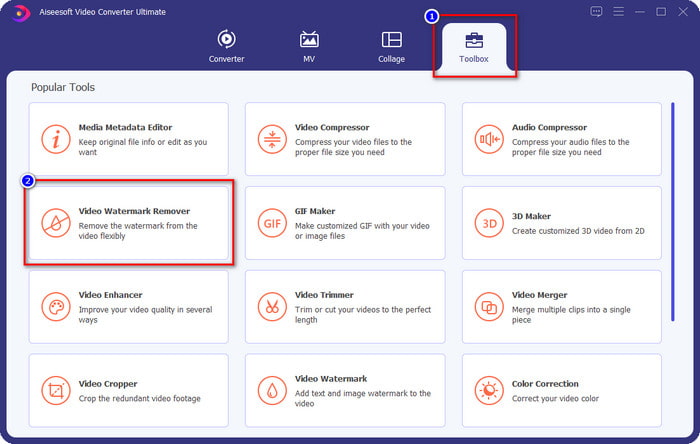
स्टेप 2. Toolbox सेक्शन में जाएँ और वहाँ Video Watermark Remover को खोजकर उस पर क्लिक करें।.
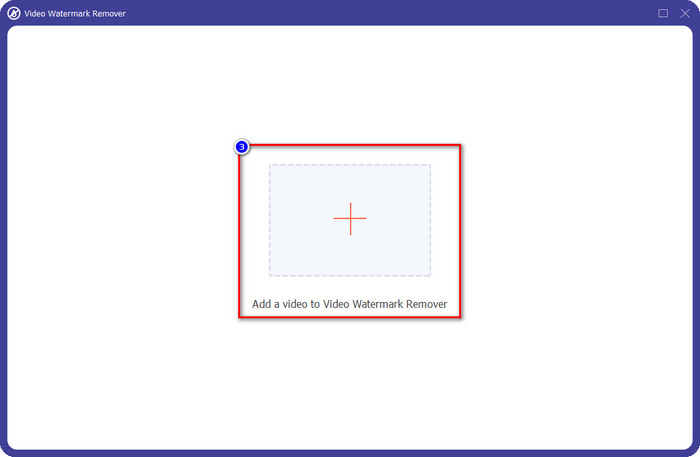
स्टेप 3. + बटन पर क्लिक करें, और फ़ोल्डर में से पहले से डाउनलोड किया गया Weibo वीडियो जिसमें वॉटरमार्क है, उसे ढूँढें, फ़ाइल पर क्लिक करें और Open दबाकर उसे अभी अपलोड करें।.
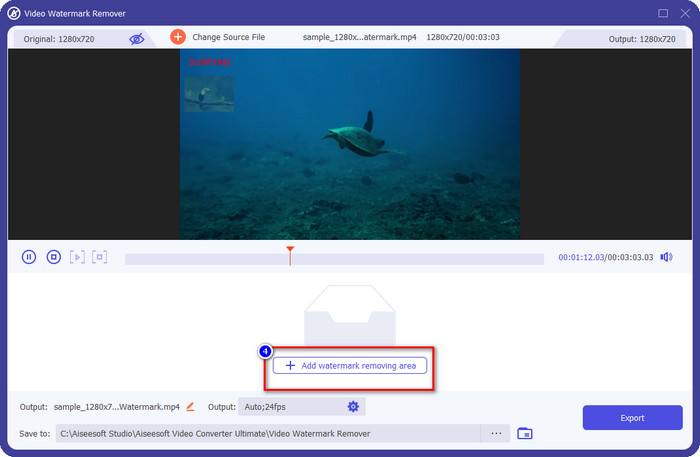
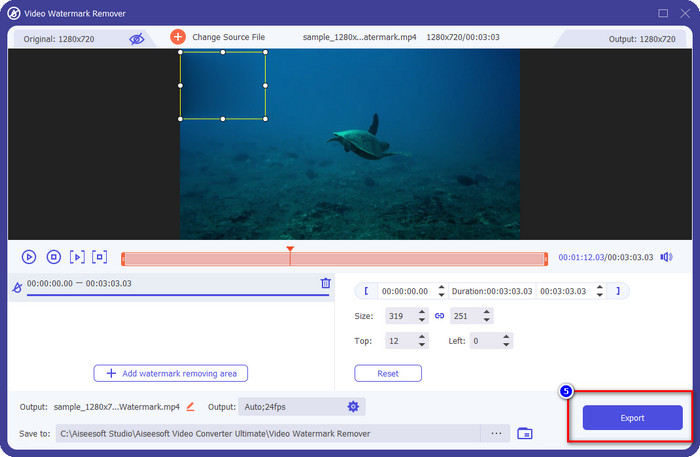
स्टेप 4. जो नई विंडो खुलेगी, उसमें Add Watermark Removing Area पर क्लिक करें ताकि वॉटरमार्क हटाने की प्रक्रिया शुरू हो सके।.
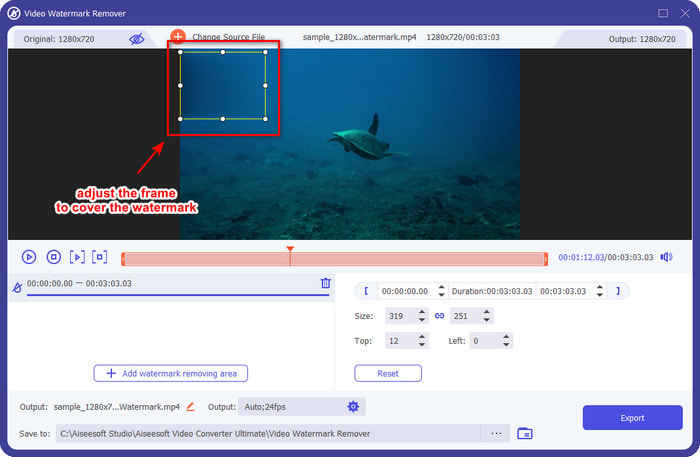
स्टेप 5. चयन बॉक्स को ड्रैग और होल्ड करके वॉटरमार्क के ऊपर रखें; आप अपनी ज़रूरत के मुताबिक इस बॉक्स को बड़ा या छोटा कर सकते हैं, और एक्सपोर्ट करने से पहले वॉटरमार्क को पूरी तरह कवर कर दें।.
स्टेप 6. वॉटरमार्क पर चयन बॉक्स सही से रखने के बाद, Export पर क्लिक करें ताकि अपलोड किए गए वीडियो से वॉटरमार्क हट जाए। इंतज़ार करने की ज़रूरत नहीं है क्योंकि यह टूल अल्ट्रा‑फ़ास्ट प्रोसेस सपोर्ट करता है; कुछ ही सेकंड में आपके पास Weibo वीडियो बिना वॉटरमार्क के तैयार होगा।.
भाग 2. वेब पर मुफ्त संस्करण का उपयोग करके Weibo फोटो से वॉटरमार्क कैसे निकालें
Weibo की फ़ोटो बिना वॉटरमार्क के कैसे सेव करें? अगर आप सीधे Weibo से इमेज एक्सपोर्ट करते हैं, तो उसे बिना वॉटरमार्क के सेव नहीं कर सकते। लेकिन आप FVC Free Watermark Remover का इस्तेमाल करके इमेज से वॉटरमार्क मिटा सकते हैं। यह उन सभी इमेज के लिए एक संपूर्ण वॉटरमार्क रिमूवर है जिन पर वॉटरमार्क लगा हो। फ़ंक्शनलिटी के लिहाज़ से, कहा जा सकता है कि यह टूल वेब पर मौजूद दूसरे वॉटरमार्क रिमूवर की तुलना में कहीं बेहतर है। इसलिए, अगर आप किसी इमेज से वॉटरमार्क हटाना चाहते हैं, तो यह वह पहला विकल्प है जिसे आप आज़माना चाहेंगे। हालाँकि यह इमेज से वॉटरमार्क हटाने में सक्षम है, लेकिन वीडियो से वॉटरमार्क हटाने में यह टूल उतना सक्षम नहीं है, जैसा कि Ultimate वर्ज़न आपके लिए कर सकता है।.
फिर भी, यह उपयोग करने के लिए स्वतंत्र है, और इसका वेब इंटरफ़ेस साफ है, इसलिए आपको कोई भी विज्ञापन दिखाई नहीं देगा जो आपको परेशान कर सकता है। जानना चाहते हैं कि इस वेब टूल का उपयोग कैसे करें? फिर इसे अपने लिए आजमाने के लिए नीचे दिए गए चरणों का पालन करें।
नोट: वीडियो की तरह ही, आप जिस वीबो इमेज को डाउनलोड करना चाहते हैं उसे डाउनलोड करना सुनिश्चित करें और सुनिश्चित करें कि आप इसे एक दृश्यमान और आसानी से एक्सेस करने वाले फोल्डर पर रखें।
स्टेप 1. वेब पर वॉटरमार्क रिमूवर तक पहुँचने के लिए, इस लिंक पर क्लिक करके इसे खोलें।.
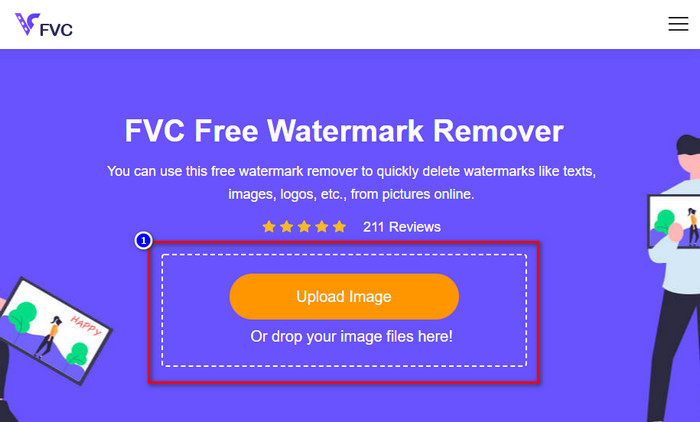
स्टेप 2. वेब इंटरफ़ेस पर Upload Image पर क्लिक करें, फिर आपकी स्क्रीन पर एक फ़ोल्डर खुलेगा; उसमें से अपनी इमेज ढूँढें और Open दबाकर उसे अपलोड करें।.
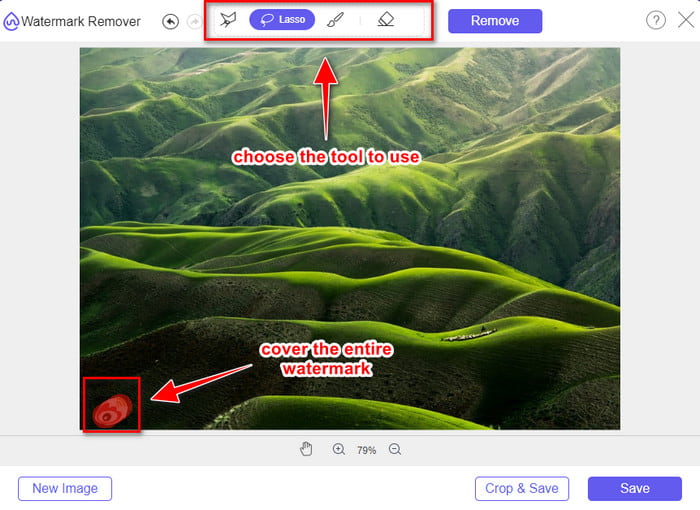
स्टेप 3. यहाँ आप वॉटरमार्क को ट्रेस करके हटा सकते हैं और सुनिश्चित करें कि वॉटरमार्क का हर हिस्सा आपके द्वारा की गई ट्रेसिंग के अंदर आ जाए।.
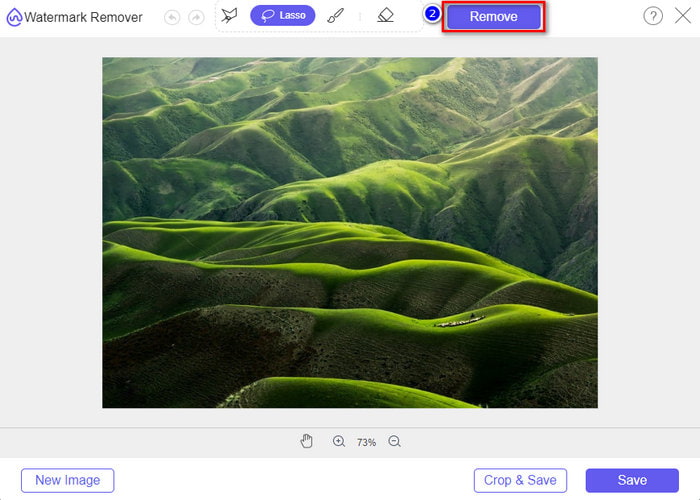
स्टेप 4. अपनी इमेज में मौजूद वॉटरमार्क मिटाने के लिए Remove पर क्लिक करें।.
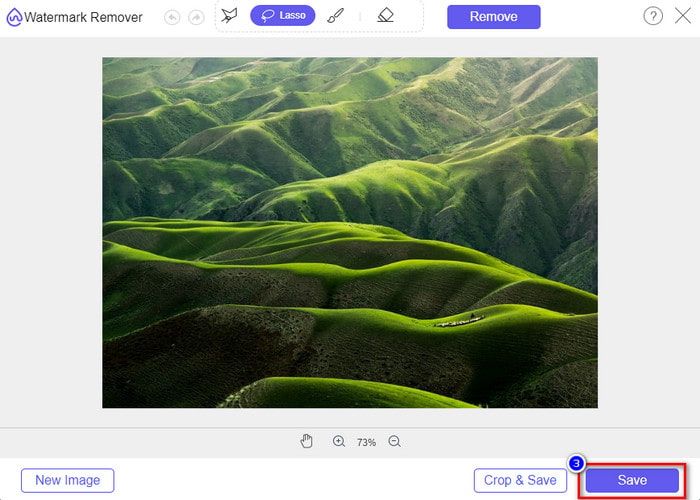
स्टेप 5. Weibo इमेज से वॉटरमार्क हटाने के बाद, बिना वॉटरमार्क वाली Weibo इमेज डाउनलोड करने के लिए Save पर क्लिक करें।.
संबंधित:
वीडियो पर वॉटरमार्क कैसे जोड़ें
भाग 3. Weibo वॉटरमार्क कैसे निकालें पर अक्सर पूछे जाने वाले प्रश्न
Weibo वॉटरमार्क निर्यात करने के बाद धुंधला क्यों हो गया?
कुछ टूल वॉटरमार्क को धुंधला कर देते हैं, ताकि इसे वेइबो पर निर्यात किए गए विज़ुअल मीडिया पर न देखा जा सके। लेकिन सभी उपकरण वॉटरमार्क को धुंधला नहीं करते हैं; कुछ बिना किसी निशान के विज़ुअल मीडिया पर वॉटरमार्क हटा देते हैं। इसलिए, यदि आप Weibo पर वॉटरमार्क को धुंधला किए बिना हटाना चाहते हैं, तो आपको इसे हटाने में मदद करने के लिए ऊपर बताए गए टूल के बारे में पता होना चाहिए।
क्या मैं निर्यात की गई फ़ाइल पर Weibo लोगो को छुपा सकता हूँ?
हाँ आप कर सकते हैं। इस तरह आपको फाइल पर Weibo का वॉटरमार्क नहीं दिखेगा। हालांकि, इसके साथ छेड़छाड़ करने से फ़ाइल के कुछ हिस्से ढक जाएंगे, इसलिए आपकी मदद करने के बजाय, यह फ़ाइल को और खराब कर सकता है। इसलिए, फ़ाइल के वॉटरमार्क को मिटाने के लिए वॉटरमार्क रिमूवर की आवश्यकता होती है।
क्या Weibo पर निर्यात की गई सभी फ़ाइलों में वॉटरमार्क होता है?
इस माइक्रोब्लॉगिंग प्लेटफॉर्म पर किसी भी प्रकार की फाइल को एक्सपोर्ट करना एक छाप छोड़ेगा। कोई फर्क नहीं पड़ता कि यह क्या है, फ़ाइल में वॉटरमार्क जोड़े जाते हैं। फिर भी, आप इस लेख में पहले बताए गए टूल से इसे हटा सकते हैं।
निष्कर्ष
कमाल नहीं है? FVC के पास वह सारे टूल हैं जिनकी आपको Weibo के वीडियो और इमेज से वॉटरमार्क तुरंत हटाने के लिए ज़रूरत होगी। भले ही आपके पास पहले से कोई अनुभव न हो या आप इस तरह की एडिटिंग में प्रोफ़ेशनल न हों, ऊपर बताए गए टूल की मदद से एडिटिंग आसानी से संभव हो जाती है। इसलिए, अगर आप किसी इमेज से वॉटरमार्क हटाना चाहते हैं, चाहे वह Weibo से एक्सपोर्ट की गई हो या नहीं, तो FVC Free Watermark Remover ही वह टूल है जिसकी आपको ज़रूरत होगी। लेकिन वीडियो और GIF के लिए, आपको ऐसा प्रोफ़ेशनल सॉफ़्टवेयर इस्तेमाल करना चाहिए जो इस्तेमाल में आसान और किफ़ायती हो, जैसे कि FVC Video Converter Ultimate। तो फिर किस बात का इंतज़ार है? अपने विज़ुअल मीडिया से वॉटरमार्क हटाएँ और उन्हें किसी भी तरह के निशान के बिना देखने का आनंद लें।.
-
 विंडोज और मैक पर फोटोशॉप में वीडियो में वॉटरमार्क कैसे जोड़ें का सबसे अच्छा तरीका
 जानना चाहते हैं कि फोटोशॉप पर वीडियो में वॉटरमार्क कैसे जोड़ें? उस स्थिति में, यह लेख आपको वह चीज़ प्रदान करेगा जो आपको जानना आवश्यक है।
-
 आसानी से वीडियो से वॉटरमार्क कैसे निकालें, इस पर 3 सर्वश्रेष्ठ समाधान
 वीडियो पर कष्टप्रद वॉटरमार्क हटाना चाहते हैं? इस ब्लॉग के साथ, आप वीडियो पर वॉटरमार्क हटाने के विभिन्न विचारों को जान सकते हैं।
-
 GIF से वॉटरमार्क हटाने के 4 बेहतरीन तरीके [ऑनलाइन और ऑफलाइन]
 GIF से वॉटरमार्क हटाने की आवश्यकता है? इस लेख में टूल के साथ, आप अपने प्लेटफॉर्म पर उपलब्ध विभिन्न वॉटरमार्क रिमूवर के साथ विभिन्न शैलियों को जानेंगे।
