


 वीडियो कनवर्टर अंतिम
 स्क्रीन अभिलेखी
 वीडियो मरम्मत
स्लो मोशन कैमरा के बारे में अपार विकल्प जिन पर आपको विचार करना चाहिए
धीमी गति वाला वीडियो बनाने के लिए अलग‑अलग तरह के एप्लिकेशन, सॉफ़्टवेयर और ऑनलाइन टूल उपलब्ध हैं। लेकिन अगर आप अपने कैमरे से ही स्लो‑मोशन वीडियो रिकॉर्ड कर सकें, तो कैसा रहेगा? पेश है Slow Motion Camera — इस तरह का कैमरा बिना किसी एडिटर की मदद के सीधे स्लो‑मोशन वीडियो रिकॉर्ड कर सकता है। अगर आप तय नहीं कर पा रहे हैं कि आपको कौन‑सा कैमरा खरीदना चाहिए, तो यह लेख आगे पढ़ते रहें ताकि आप वे सभी खास बातें जान सकें जिन पर आपको ध्यान देना चाहिए।.

भाग 1. स्लो मोशन कैमरा क्या है?
स्लो मोशन कैमरा मूल रूप से एक ऐसा कैमरा है जो अंत में चलाए जाने की तुलना में कहीं अधिक तेज गति से तस्वीरें लेता है। ऐसा प्रतीत होता है कि समय धीरे-धीरे आगे बढ़ रहा है क्योंकि इसे पकड़ने के लिए प्रत्येक सेकंड में कई स्थिर फ़्रेमों की आवश्यकता होती है। जब हम धीमी गति के बारे में बात करते हैं, तो हम लगातार फिल्म निर्माण प्रभाव का उल्लेख करते हैं जहां वीडियो सामान्य से अधिक धीमी गति से चलता है। यह पहले केवल फिल्मों, विज्ञापन और टेलीविजन में इस्तेमाल किया गया था। हालांकि, स्मार्टफोन प्रौद्योगिकी में जबरदस्त विकास के लिए धन्यवाद, यहां तक कि एक स्मार्टफोन भी अब धीमी गति से फिल्म कर सकता है।
एक उदाहरण के रूप में फैंटम एचडी हाई-स्पीड कैमरा पर विचार करें। हाई डेफिनिशन में शूटिंग करते समय इस कैमरे की अधिकतम फ्रेम दर 1,455 फ्रेम प्रति सेकंड होती है (जबकि सामान्य फिल्म आमतौर पर 24 फ्रेम प्रति सेकंड पर दिखाई जाती है)। 24 फ़्रेम प्रति सेकंड पर फ़ोटो लेने और उन्हें 24 फ़्रेम प्रति सेकंड पर वापस चलाकर एक सामान्य गति देखी जा सकती है। यदि आप उससे अधिक फ्रेम दर पर शूट करते हैं, जैसे कि 1,455 फ्रेम प्रति सेकंड, और फिर उन्हें 24 फ्रेम प्रति सेकंड (धीमी गति प्रभाव) पर वापस चलाएं, तो आपको कार्रवाई में मंदी दिखाई देगी।
भाग 2. 3 बेस्ट स्लो मोशन कैमरा
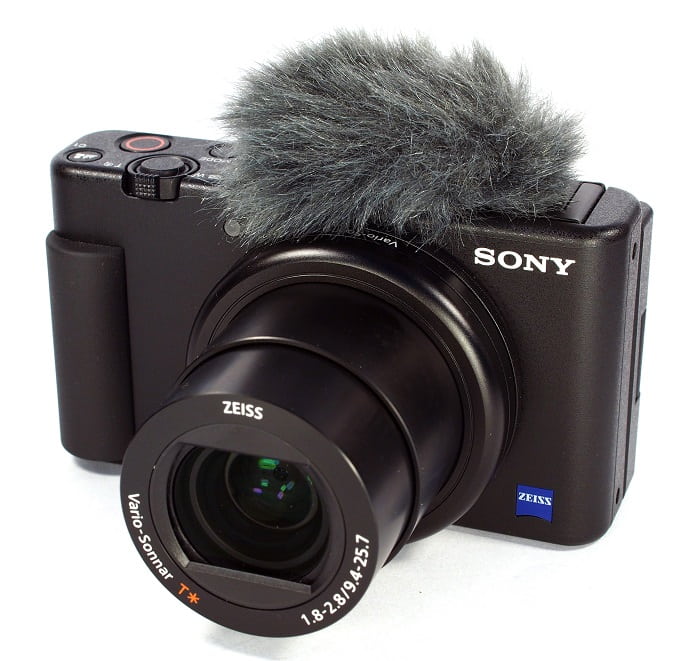
1. सोनी ZV-1 कैमरा
4K स्लो-मोशन वीडियो के लिए सबसे उल्लेखनीय कैमरों में से एक Sony ZV-1 है। सोनी का यह डिवाइस व्लॉगिंग के लिए आदर्श है क्योंकि यह बिना फोकस खोए मोड के बीच घूम सकता है। यदि आप इसे फोटोग्राफी के लिए एक उत्कृष्ट विषय के रूप में देखते हैं तो इस पर फिर से विचार करें। Sony ZV-1 बहुत कुछ कर सकता है, लेकिन व्लॉगिंग वह जगह है जहां यह चमकता है। फोकस और डिफोकस को सिस्टम द्वारा नियंत्रित किया जाता है। यह प्राथमिक रणनीति है जो इसे नियोजित करती है। अंधेरे में इसका इस्तेमाल करने से आपके काम में गलतियां हो सकती हैं। Sony ZV-1 का ऑटोफोकस और चित्र स्थिरीकरण प्रतिस्पर्धी कैमकोर्डर से बेहतर है। YouTubers के लिए, यह कैमरा है। लेकिन चीजें सही नहीं हैं। इस उपकरण की कीमत निषेधात्मक है। क्योंकि इसकी कीमत $700 है, आपको आश्चर्य हो सकता है कि क्या यह वास्तव में इसके लायक है। Sony ZV-1 का डाइमेंशन 4.15 x 2.36 x 1.7 इंच है, 21MP पर इमेज कैप्चर करता है और 2160p पर वीडियो रिकॉर्ड करता है। उपरोक्त सभी कारणों से Sony ZV-1 जैसा कैमरा होने का एक कारण है।
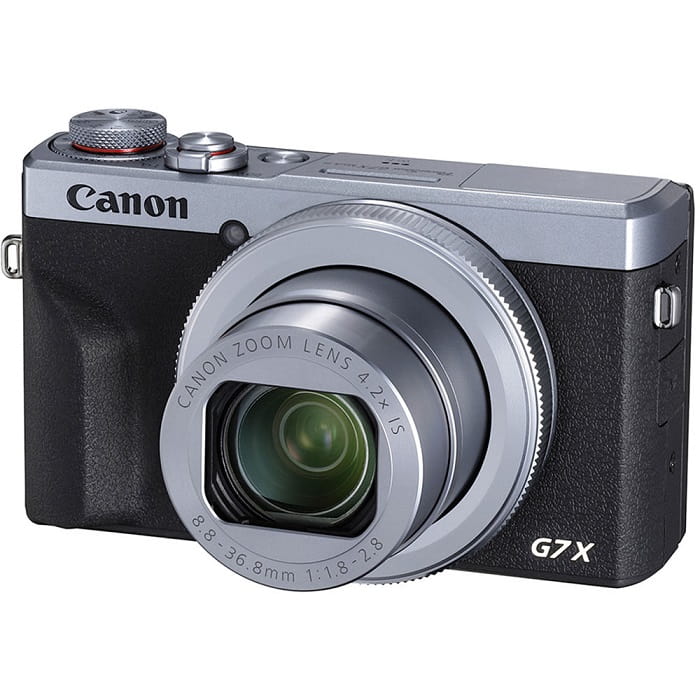
2. कैनन पॉवरशॉट G7 X मार्क III
कैनन पॉवरशॉट G7 X मार्क III, Sony ZV-1 के विपरीत, लाइव स्ट्रीमिंग के लिए एक उत्कृष्ट विकल्प है। यह उन लोगों के लिए उपयोगी है जो घर के अंदर वीडियो बनाते हैं, जैसे कि YouTube पर। इसकी बिना काटे 4K वीडियो गुणवत्ता और कलात्मक सेल्फी लेने के लिए उत्कृष्ट LCD के परिणामस्वरूप, इसे इस राउंडअप में शामिल किया गया है। कैनन पॉवरशॉट G7 X मार्क III में फ़ोटो और 4K 30p वीडियो के लिए 20.1 मेगापिक्सेल का अधिकतम रिज़ॉल्यूशन है, लेकिन कोई 4K 60p विकल्प नहीं है। इसे ध्यान में रखा जाना चाहिए। सेल्फी कैमरे में देखने का 180-डिग्री क्षेत्र, 1/25600 से 30 सेकंड की शटर गति सीमा और एक ऑप्टिकल छवि स्थिरीकरण प्रणाली है। अधिक संभावना है, इस कैनन पॉवरशॉट G7 X मार्क III की कीमत लगभग $750 है।
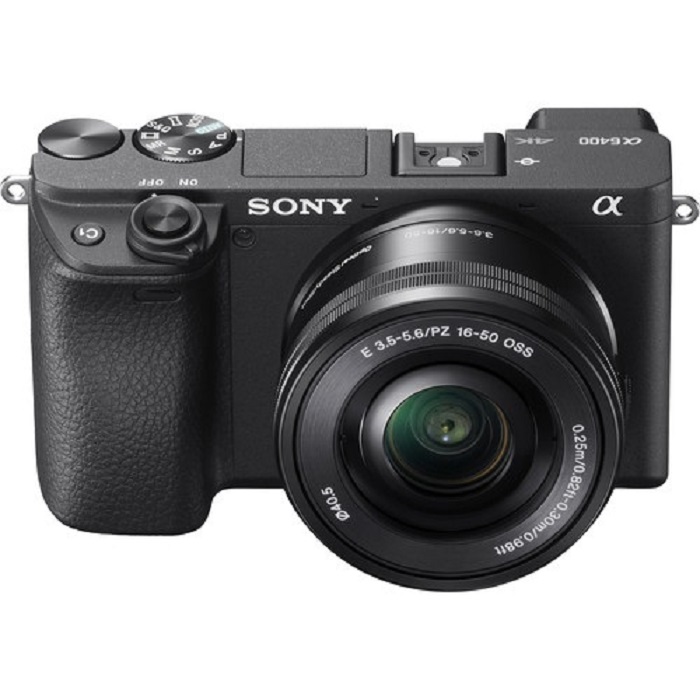
3. सोनी ए6400
दूसरी ओर, Sony A6400 पिछले मॉडल की तुलना में अधिक कार्यात्मक है। डिवाइस की अपील इसकी उल्लेखनीय बहुमुखी प्रतिभा में निहित है, जिसका उपयोग पेशेवर वीडियोग्राफी, व्यक्तिगत व्लॉगिंग और फोटोग्राफी के लिए किया जा सकता है। इसके अतिरिक्त, Sony A6400 स्लो मोशन और टाइम-लैप्स में रिकॉर्ड कर सकता है, जिससे आपको अपनी फिल्मों में उन प्रभावों का उपयोग करने का विकल्प मिलता है। तस्वीर की गुणवत्ता उत्कृष्ट है, ऐसी तस्वीरें जो कुरकुरी, स्पष्ट और कैमरे के 24 एमपी रिज़ॉल्यूशन के लिए बिना रंग के धब्बा वाली हैं। हालांकि, तीनों में से यह कैमरा इतना महंगा है कि इसकी कीमत लगभग $1299 हो सकती है।
भाग 3. क्या होगा यदि मेरे पास धीमी गति वाला कैमरा नहीं है?
ऊपर सूचीबद्ध सभी कैमरे स्लो‑मोशन के मामले में बेहतरीन और उत्कृष्ट वीडियो आउटपुट देते हैं, क्योंकि इनमें यह सुविधा पहले से ही इनबिल्ट होती है और इन्हें स्लो‑मोशन वीडियो कैप्चर करने के लिए ही बनाया गया है। एकमात्र कमी यह है कि स्लो‑मोशन कैमरा काफ़ी महंगा होता है और स्लो‑मोशन वीडियो बनाने की प्रक्रिया भी कुछ जटिल हो सकती है। अगर आपके पास स्लो‑मोशन कैमरा नहीं है, तो हम Video Converter Ultimate को सबसे बेहतर विकल्प के रूप में सुझाते हैं। स्लो‑मोशन कैमरे के विपरीत, यह सॉफ़्टवेयर मुफ़्त में डाउनलोड किया जा सकता है और हर प्रकार के उपयोगकर्ताओं के लिए आसानी से उपलब्ध है।.
इसके प्रमुख टूल्स में से एक, Video Speed Controller, किसी सामान्य गति वाले वीडियो को आपकी मनचाही बेहतरीन स्लो‑मोशन वीडियो में बदल सकता है। हर चरण पर एक‑क्लिक के साथ, अब आप बिना किसी महंगे कैमरे के अपना वीडियो स्लो‑मोशन में देखकर आनंद ले सकते हैं। सॉफ़्टवेयर के बारे में और जानकारी जानने के लिए नीचे दिए गए चरणों का पालन करें:
Step 1: सॉफ़्टवेयर को इस्तेमाल करने से पहले इसे डाउनलोड करना ज़रूरी है। इसके लिए, शामिल बटन के नीचे दिए गए Free Download लिंक पर क्लिक करें। इसे अपने डेस्कटॉप पर डाउनलोड करें और फिर इंस्टॉलेशन शुरू करने के लिए Start Now बटन पर क्लिक करके बहुत आसानी से इंस्टॉल कर लें।.
फ्री डाउनलोडWindows 7 या बाद के संस्करण के लिएसुरक्षित डाउनलोड
फ्री डाउनलोडMacOS 10.7 या बाद के संस्करण के लिएसुरक्षित डाउनलोड
Step 2: जब आप प्रोग्राम की इंस्टॉलेशन पूरी कर लेंगे, तो आप मुख्य सॉफ़्टवेयर इंटरफ़ेस पर कन्वर्ज़न प्रक्रिया देख पाएँगे। इसके बाद Toolbox फ़ंक्शन का उपयोग करके आप स्लो‑मोशन वीडियो बनाने से संबंधित बिल्कुल वही टूल ढूँढ सकते हैं जिसकी आपको ज़रूरत है। उपलब्ध टूल्स की सूची देखते समय, अगर आप अपने वीडियो की स्पीड समायोजित करना चाहते हैं या सिर्फ़ उसे स्लो‑मोशन बनाना चाहते हैं, तो Video Speed Controller चुनें।.
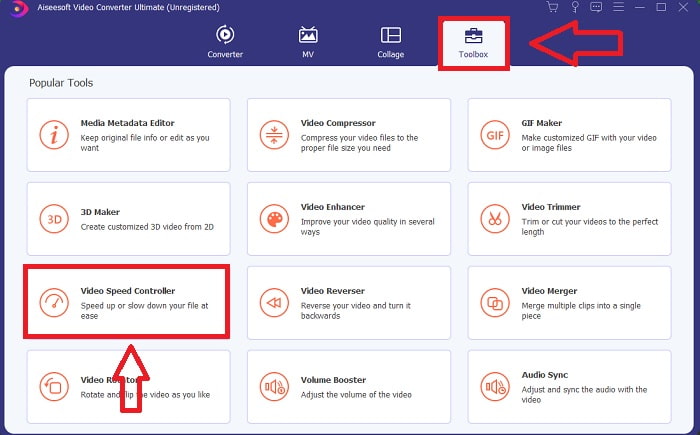
Step 3: अगर आप आगे बढ़ने का चुनाव करते हैं, तो आपके कंप्यूटर स्क्रीन पर एक नई विंडो दिखाई देगी। प्लस चिन्ह + पर क्लिक करके आप संशोधन करना शुरू कर सकते हैं।.
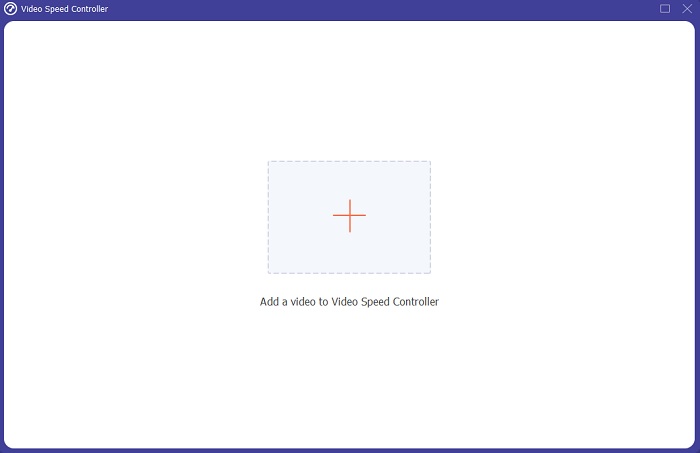
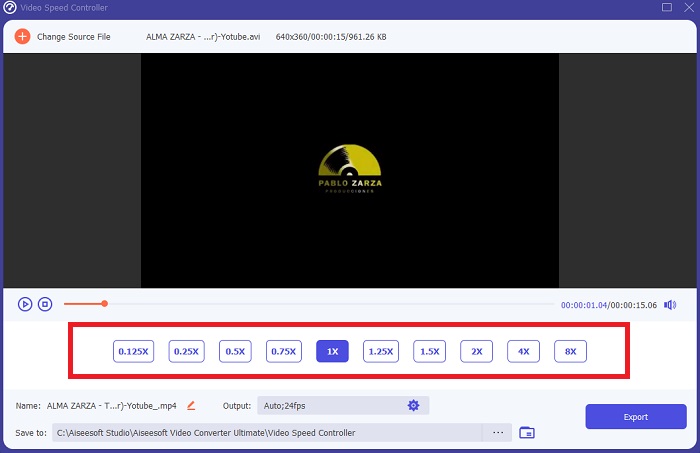
Step 4: सबसे पहले वीडियो की फ़्रेम रेट से शुरू करें और तय करें कि प्लेबैक के दौरान उसे कितनी बार बढ़ाना या घटाना है, ताकि यह निर्धारित हो सके कि वीडियो कितना तेज़ या धीमा चलेगा; इससे यह तय होगा कि आप अपने वीडियो में कितना स्लो‑मोशन इफ़ेक्ट जोड़ेंगे। चूँकि आप स्लो‑मोशन कैमरे का विकल्प बना रहे हैं, इसलिए आप स्पीड को सामान्य गति से कम चुनकर घटाएँगे; परिणामस्वरूप आपके वीडियो पर स्लो‑मोशन इफ़ेक्ट लागू हो जाएगा।.
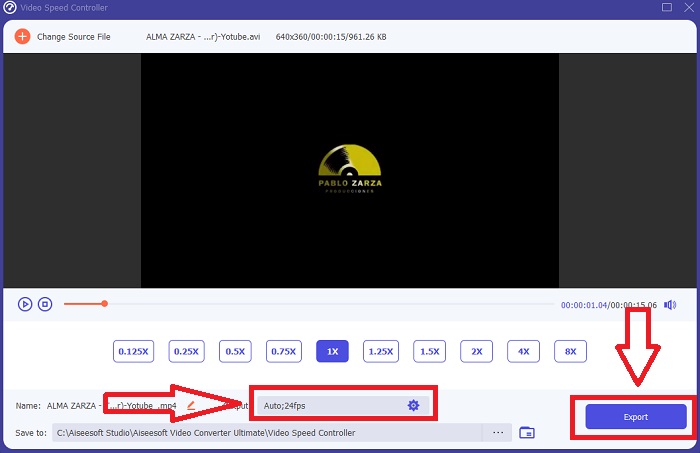
Step 5: अगर आप अपने वीडियो की स्पीड से संतुष्ट हैं, तो अब आप फ़ॉर्मेट, रेज़ोल्यूशन, फ़्रेम रेट और अन्य पैरामीटर बदलकर उसकी क्वालिटी को और बेहतर बना सकते हैं। आप अपने वीडियो आउटपुट का नाम भी बदल सकते हैं। अपना काम सेव करने के लिए Export पर क्लिक करें और अपने कंप्यूटर की फ़ाइल सिस्टम में कोई स्थान चुनें।.
संबंधित
Windows Media Player में वीडियो की स्पीड कैसे बढ़ाएँ
स्लो‑मोशन वीडियो को सामान्य स्पीड में कैसे बदलें
भाग 4. धीमी गति वाले कैमरे के बारे में अक्सर पूछे जाने वाले प्रश्न
स्लो-मोशन कैमरा की कीमत कितनी है?
यदि आप उच्च-गुणवत्ता वाला स्लो-मोशन प्रभाव चाहते हैं, तो उच्च फ़्रेम दर वाला कैमरा चुनें। इससे हमें यह आभास होता है कि अगर कैमरे की फ्रेम दर उच्च या मध्यम है तो कोई भी वीडियो झटकेदार या हकलाने वाला नहीं होगा। सोचने वाली एक और बात आपका बजट है। धीमी गति के फुटेज के लिए महंगे गियर की खरीद की आवश्यकता नहीं होती है। ऐसे कैमरे लगभग $350 से शुरू होते हैं और $4,000 तक जा सकते हैं। अद्भुत फ्री-फ्रेम फुटेज को सिर्फ एक कैमरे से कैप्चर किया जा सकता है जिसमें ये दो विशेषताएं हैं।
फ्रेम दर क्या है?
आमतौर पर फ्रेम प्रति सेकंड में परिभाषित, फ्रेम दर उस आवृत्ति को संदर्भित करता है जिसके साथ स्क्रीन पर लगातार छवियां प्रदर्शित होती हैं (एफपीएस)। वाक्यांश फ्रेम दर एक ही चीज़ को संदर्भित करता है, भले ही इसका उपयोग फिल्म या वीडियो कैमरा, कंप्यूटर ग्राफिक्स, या मोशन कैप्चर सिस्टम का वर्णन करने के लिए किया जा रहा हो। SMPTE (सोसाइटी ऑफ़ मोशन पिक्चर एंड टेलीविज़न एडिटर्स) सिनेमा और टेलीविज़न फ्रेम दर (SMPTE) के लिए उद्योग मानक निर्धारित करता है।
क्या कोई स्लो-मोशन कैमरा ऐप है?
हां, बहुत सारे स्लो-मोशन एप्लिकेशन हैं जो एंड्रॉइड और आईओएस ऑपरेटिंग सिस्टम में उपलब्ध हैं। IOS के लिए, iMotion, SloPro, SlowCam, आदि हैं और Android के लिए, Slow Motion Video FX, Efectum, Coach's Eye, आदि।
निष्कर्ष
संक्षेप में, स्लो‑मोशन कैमरा कुछ टेक्निकल और प्रोफ़ेशनल उपयोग के लिए ज़्यादा उपयुक्त होता है, क्योंकि यह महंगा भी होता है और ऐसे कैमरे का इस्तेमाल करने के लिए अच्छी‑खासी अनुभव की भी ज़रूरत होती है। सौभाग्य से हमारा नया सॉफ़्टवेयर Video Converter Ultimate स्लो‑मोशन कैमरे के उद्देश्य को दोहरा सकता है, क्योंकि इसके एक टूल की मदद से आप अपने सामान्य स्पीड वाले वीडियो को मुफ़्त में स्लो‑मोशन में बदल सकते हैं।.
-
 [आसान] सिंक ऑडियो और वीडियो को कैसे ठीक करें?
 मान लीजिए आप'कल के लिए अपनी स्ट्रीम शेड्यूल करने जा रहे हैं, लेकिन जब आप अपना सेट-अप चेक करते हैं, तो ऑडियो और वीडियो सिंक से बाहर हो जाते हैं। इस चिंता के बारे में अधिक जानने के लिए इस लेख को पढ़ें।
-
 ओबीएस ऑडियो देरी के मुद्दों को कैसे ठीक करें, इस पर 7 आसान कदम [हल]
 ओबीएस स्टूडियो का उपयोग करते समय ऑडियो में देरी के कारण क्या आपको रिकॉर्डिंग के बाद अपनी वीडियो क्लिप देखने में कठिनाई होती है? आउट-ऑफ़-सिंक ऑडियो को प्रभावी ढंग से ठीक करने का तरीका जानने के लिए नीचे दिया गया लेख पढ़ें।
-
 बेहतरीन तरीके संभव | वीएलसी ऑडियो विलंब को कैसे ठीक करें [2021]
 क्या आपको ऑडियो अनिश्चितता के कारण अपने वीएलसी मीडिया प्लेयर पर अपनी पसंदीदा फिल्म देखने में कठिनाई होती है? वीएलसी ऑडियो विलंब को ठीक करने के सभी संभावित तरीकों को जानने के लिए इस लेख को पढ़ना जारी रखें।
