


 वीडियो कनवर्टर अंतिम
 स्क्रीन अभिलेखी
 वीडियो मरम्मत
वीडियो ऐप्स विंडोज़/मैक/एंड्रॉइड/आईओएस पर उपलब्ध टेक्स्ट के बारे में संक्षिप्त विश्लेषण
Protecting your project is essential, especially if you post it online to avoid theft from stealing your work. However, not all websites can save your work from the possible stealing of other people. So, before you post your project to the web, it is ideal for adding a watermark. Although a watermark can't always protect your work, we can say that this is another way of securing your work from possible theft. As a result of this post will provide the tools you can use; most are free, but some need to purchase to unlock the tool's full potential. This very minute, let's take a total glance at the text on the video app this year 2022.

वीडियो एप्लिकेशन पर सर्वश्रेष्ठ टेक्स्ट का भाग 1. 3 जिसे आप विंडोज और मैक पर डाउनलोड कर सकते हैं
FVC वीडियो कन्वर्टर अंतिम
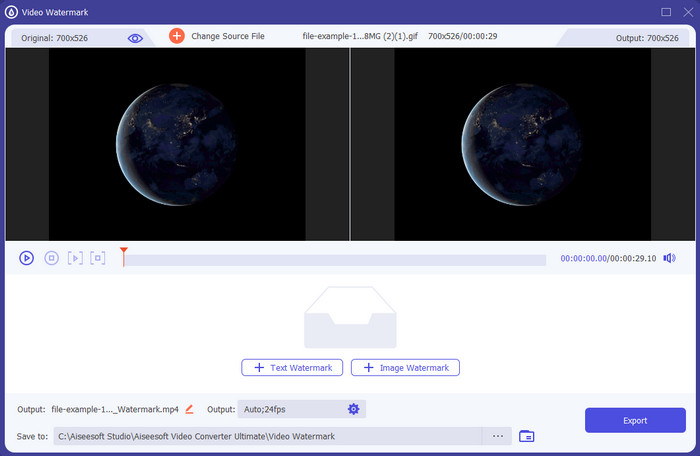
Cost: Free trial available, price starts at $39.50 for one year, $55.20 for a lifetime, and for 2-5 pcs Lifetime $119.00.
Platfom/s Supported: Windows and Mac.
If you want an app to add text to a video, you must go for the most picked tool of 2022, the FVC Video Converter Ultimate. This tool supports extended formats you can upload into, so adding the video file here won't be a trouble for you; you can also change the format if you need it. At first glance at the GUI, the tool looks neat and professional at the same time. Although it is a professional tool, users with little or no experience can quickly learn how to use it. The learning curve isn't as stiff as Adobe Photoshop.
इसके अलावा, टूल अपने नाम को अंतिम टूल के रूप में गौरवान्वित करता है क्योंकि इसमें अपलोड करने और डाउनलोड करने की सबसे तेज़ प्रक्रिया है, चाहे एक, दो या अधिक फाइलें हों। यदि आप इस उपकरण का उपयोग करते हैं तो हानिपूर्ण या दोषरहित फ़ाइल स्वरूप को एन्कोड करना त्वरित और आसान है। यद्यपि यह टूल वीडियो टेक्स्ट एडिटर की सूची से थोड़ा महंगा है, फिर भी हम इस टूल को उपयोग करने में सबसे आसान और सबसे प्रभावी पाते हैं।
फ्री डाउनलोडWindows 7 या बाद के संस्करण के लिएसुरक्षित डाउनलोड
फ्री डाउनलोडMacOS 10.7 या बाद के संस्करण के लिएसुरक्षित डाउनलोड
एडोब फोटोशॉप
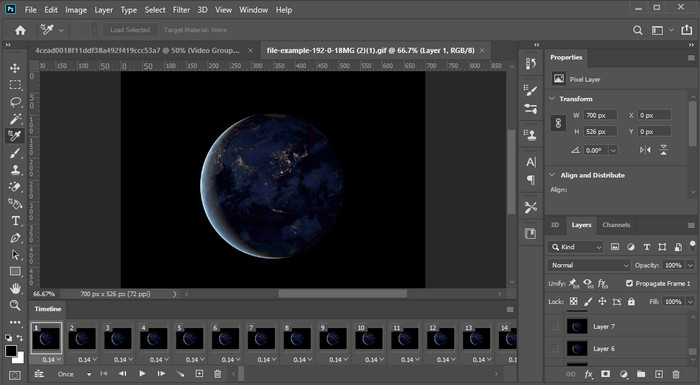
Cost: Free 7 days trial and $20.99 every month.
Platfom/s Supported: Windows, Mac, and iPad.
Need a pro tool to take up the task? Well, Adobe Photoshop is the pro tool in this tool. Its full pact GUI and features became the pro's first choice editor they can download on their platform. In addition to that, this tool offers advanced editing features you can use to make the text on the video looks better than ever.
हालाँकि, यदि आप संपादन में एक नौसिखिया हैं तो यह उपकरण सबसे अच्छा चयन नहीं है क्योंकि यह इतना तकनीकी है कि कुछ पेशेवरों को भी किसी विशेष कार्य को करने के तरीके पर कुछ ट्यूटोरियल पढ़ने की आवश्यकता होती है। लेकिन अगर आप इसका इस्तेमाल करना चाहते हैं, तो वीडियो ऐप में टेक्स्ट जोड़ें; आप इसे एडोब की आधिकारिक वेबसाइट पर डाउनलोड कर सकते हैं।
iMovie
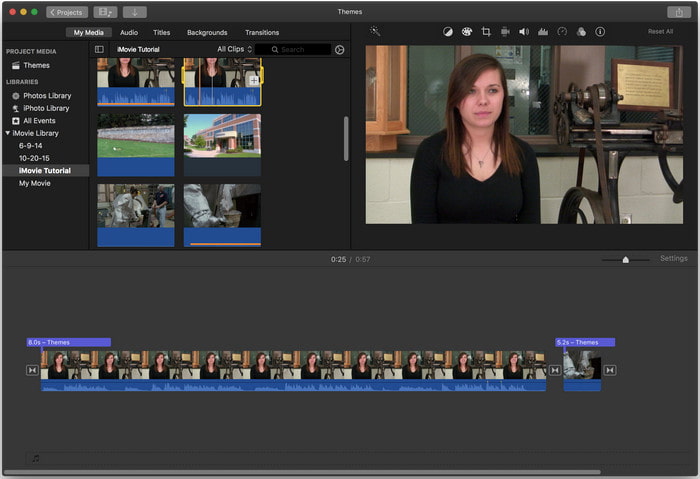
Cost: Free pre-installed.
Platfom/s Supported: Mac and iOS.
If you need a free tool on your Mac or iOS device and add a watermark on the video, you can use iMovie to compensate for this task. This tool is not downloadable on any Windows or Android devices because it is for Apple devices only. Although the tool has a limited supported platform, it is still considered one of the best watermark editors you can use on Mac and iOS. Most beginners would love to use it because of its free full-pact editing. So, if you have a Mac or iOS, you must first try to use this added text-over video app and try it out if it suits your needs.
भाग 2. 3 सर्वश्रेष्ठ वीडियो टेक्स्ट एप्लिकेशन सभी Android और iOS में उपलब्ध है
ऊपर वर्णित सभी उपकरण विंडोज और मैक पर उपलब्ध हैं, जबकि कुछ सीमित मोबाइल उपकरणों का समर्थन करते हैं। क्या होगा यदि आपके पास एक मोबाइल डिवाइस है और आप किसी वीडियो पर वॉटरमार्क के रूप में टेक्स्ट जोड़ना चाहते हैं? क्या आप अभी भी कर सकते हैं? आप हमारे द्वारा नीचे प्रस्तुत टूल से कर सकते हैं। यह जानने के लिए इसे सावधानी से पढ़ें कि क्या यह उपकरण आपकी आवश्यकताओं को पूरा करेगा।
वीडियो एडिटर: वीडियो पर टेक्स्ट
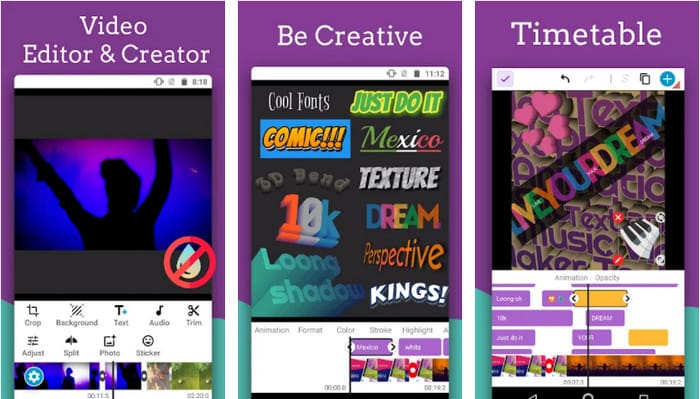
Cost: Free to download.
Platfom/s Supported: Android.
Although there are many add text to video apps free to download on Android, we still find the Video Editor: Text on Video great in many aspects. This Android app offers users many advanced editing features to make their video look outstanding. If you want to use it and add a watermark to your video, it also has text animation to include animated text on the video.
यद्यपि उपकरण डाउनलोड करने के लिए स्वतंत्र है, फिर भी इस उपकरण में बहुत सुधार की आवश्यकता है और इसे ठीक करने की आवश्यकता है, जैसे कुछ उपयोगकर्ताओं के सामने आने वाली बग और गड़बड़ियां। साथ ही, जब आप अपने फ़ोन में ऐप खोलेंगे और उसका उपयोग करेंगे तो कुछ विज्ञापन पॉप अप होंगे। बहरहाल, डेवलपर अपनी पूरी क्षमता तक पहुंचने के लिए Android पर सर्वश्रेष्ठ वीडियो संपादक बनने के लिए टूल को अपडेट करता रहता है।
वोंट - वीडियो पर टेक्स्ट 4+
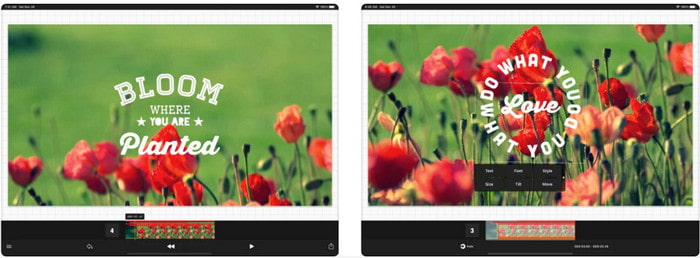
Cost: Free to download, $2.99 to $9.49 In-App purchases.
Platfom/s Supported: iPhone, iPad, and Android.
Vont - Text on Videos 4+ is one of the best apps for adding text to video on all mobile devices. This app supports both Android and iOS devices, so, naturally, this tool gains a reputation and popularity on both ends. But if we compare it to where the app works better, we can say that it is more favorable on iOS devices because it supports more format and has much more detailed editing features you can use.
हालांकि आईओएस पर टूल बेहतर है, फिर भी हम इस बात से सहमत हो सकते हैं कि कुछ वीडियो पर वॉटरमार्क को जल्दी से जोड़ने के लिए यह टूल एंड्रॉइड डिवाइस पर भी उपयोग करने के लिए उत्कृष्ट है।
वीडियो पर टेक्स्ट: आसान वीडियो संपादक 4+
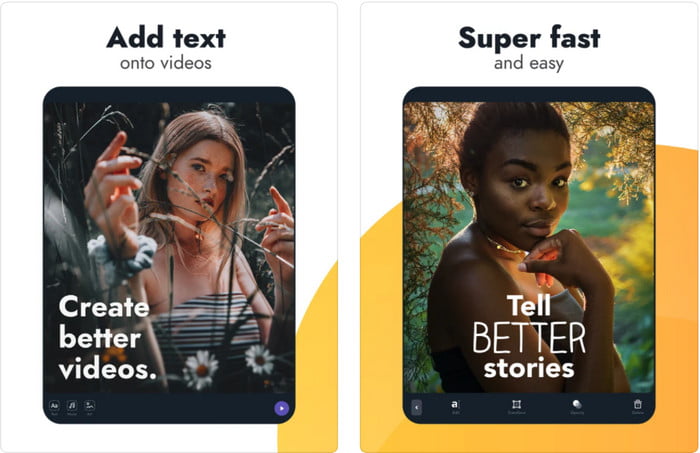
Cost: Free to download, $1.99 to $49.99 In-App purchase
Platfom/s Supported: iPhone and iPad.
If you want to know the best text on video app on iOS, well, this is no doubt that it is the Text On Video: Easy Vid Editor 4+. This tool supports several editing features you can use to add a text watermark to your video with different font styles easily.
फ़ोटोशॉप की तरह, यह टूल टेक्स्ट में हेरफेर करने और इसे कहीं भी रखने में आपकी मदद करने के लिए 3D टेक्स्ट वॉटरमार्किंग को बढ़ावा देता है जैसे कि यह वीडियो या फोटो लेते समय है। भले ही हम इसे सबसे अच्छा मानते हैं, फिर भी हमें लगता है कि यह वह प्रो टूल नहीं है जिसकी आपको आवश्यकता होगी यदि आप अधिक विस्तृत संपादन में हैं जिसकी एक समर्थक को आवश्यकता है।
संबंधित:
भाग 3. टेक्स्ट वॉटरमार्क ऐप्स जोड़ें के बारे में अक्सर पूछे जाने वाले प्रश्न
क्या टेक्स्ट वॉटरमार्क ऐप डाउनलोड करना सुरक्षित है?
यदि आपने आधिकारिक साइटों या डाउनलोडर पर टूल डाउनलोड किया है तो यह सुरक्षित है। यदि आप इसे आधिकारिक वेबसाइट पर डाउनलोड करते हैं तो इससे कोई समस्या नहीं होगी। हालांकि, सभी वेबसाइट सुरक्षित नहीं हैं, इसलिए आपको किसी भी समस्या से बचने के लिए अपने ऑपरेटिंग सिस्टम पर टूल का उपयोग करने के लिए सबसे सुरक्षित डाउनलोड करने से सावधान रहना चाहिए।
कौन सा टेक्स्ट वॉटरमार्क ऐप डेस्कटॉप या फोन पर बेहतर प्रदर्शन करता है?
इसमें कोई संदेह नहीं है कि डेस्कटॉप टेक्स्ट वॉटरमार्क ऐप हैवी-ड्यूटी के लिए बेहतर प्रदर्शन करता है क्योंकि डेस्कटॉप में फोन की तुलना में अधिक सीपीयू होता है। लेकिन अगर आप सेमी-वेटेड एडिटिंग चाहते हैं, तो फोन टेक्स्ट वॉटरमार्क आपके लिए सबसे अच्छा है, क्योंकि आप इसे कहीं भी ला सकते हैं और बिना डेस्कटॉप सेट किए कभी भी इसका इस्तेमाल कर सकते हैं।
क्या टेक्स्ट वॉटरमार्क ऐप के लिए खरीदारी करना आदर्श है?
यदि आपके पास एक सीमित बजट है, तो हम मुफ्त टूल का उपयोग करने का सुझाव देते हैं, लेकिन कुछ सीमाएं हैं, और उम्मीद है कि यह मुफ़्त है। लेकिन यदि आप प्रीमियम संस्करण में सर्वोत्तम सुविधाएं उपलब्ध कराना चाहते हैं, तो हमारा सुझाव है कि आप इसे खरीद लें या इसकी सदस्यता लें क्योंकि आप उन्हें मुफ्त संस्करण के साथ प्राप्त नहीं कर सकते।
निष्कर्ष
Now that we have finished analyzing the tools, it is time to download the suitable one for you. We hope this post helps you decide which you should use, but if you can't decide what to use, we suggest you pick the FVC Video Converter Ultimate. Because it is an all-in-one tool you can download on your Windows and Mac, and all of its features are designed well to help you on a specific task. So, without a doubt, it is the best text watermark app you can download above.
-
 कैसे अपने कंप्यूटर / फोन पर मुफ्त में वीडियो के लिए ऑडियो और संगीत जोड़ें
 यह लेख मुफ्त में वीडियो में ऑडियो जोड़ने के 4 आसान तरीके दिखाता है। कोई फर्क नहीं पड़ता कि आप अपने वीडियो में कौन सा ऑडियो ट्रैक जोड़ना चाहते हैं, आप यहाँ संतोषजनक परिणाम प्राप्त कर सकते हैं।
-
 GIF को वीडियो फॉर्मेट में बदलें: GIF मीम्स को वीडियो में बदलें [2025]
 निर्धारित करें कि नीचे सूचीबद्ध टूल की सहायता से GIF को वीडियो प्रारूप में कैसे रूपांतरित किया जाए। कौन सा चुनें और सीखें कि इसे कैसे करना है, क्योंकि हम उन पर पर्याप्त सबूत इकट्ठा करते हैं।
-
 Android और iOS उपकरणों के लिए वीडियो ऐप्स के लिए अद्भुत GIF
 क्या आप जानते हैं कि आप जीआईएफ को अपने फोन का उपयोग करके किसी भी वीडियो प्रारूप में परिवर्तित कर सकते हैं? अपने Android या iOS पर सर्वश्रेष्ठ ऐप्स चुनें।
