


 वीडियो कनवर्टर अंतिम
 स्क्रीन अभिलेखी
 वीडियो मरम्मत
विंडो, मैक और ऑनलाइन पर WAV मेटाडेटा संपादक पर व्यापक समीक्षा
मुझे अपनी WAV फ़ाइल में कोई समस्या है; मैंने पाया कि टैग गलत हैं। मैंने समस्या को ठीक करने के लिए विभिन्न WAV मेटाडेटा संपादकों का उपयोग करने की कोशिश की, लेकिन दुर्भाग्य से, इसने इसे ठीक नहीं किया। क्या आपके पास कोई विचार है कि इसे कैसे ठीक किया जाए? यह एक बड़ी मदद होगी। धन्यवाद।
क्या आपको भी यही समस्या है? यह होना स्वाभाविक है, क्योंकि बाज़ार में Windows और Mac के लिए सबसे अच्छा WAV मेटाडेटा एडिटर ढूंढने की मांग बहुत ज़्यादा है। भले ही विकल्प कई हैं, फिर भी यह जान पाना झंझट भरा है कि वे इस समस्या के लिहाज़ से सच‑मुच अच्छा काम करते हैं या नहीं। तो गहरी साँस लें, क्योंकि हम इस समस्या को जल्दी सुलझा सकते हैं उन टूल्स की मदद से जिन्हें हमने बड़ी सावधानी से चुना है, ताकि आप अपनी WAV फ़ाइलों के टैग आसानी से एडिट कर सकें। गहन रिसर्च और इस लेख की मदद से, हमने उन्हें तीन अलग‑अलग विकल्पों में समेटा है, और हम आपको ऑनलाइन व ऑफ़लाइन उपलब्ध सबसे अच्छा WAV एडिटर चुनने में मदद करेंगे।.

भाग 1. विंडोज और मैक के लिए सर्वश्रेष्ठ WAV मेटाडेटा संपादक [उपयोगकर्ता की पसंद]
FVC Video Converter Ultimate उन WAV टैग एडिटर्स में से एक है जो निश्चित रूप से आपको यह काम कुछ ही क्लिक में पूरा करने में मदद करेगा। लाखों डाउनलोड के साथ, इस टूल ने पहले ही यूज़र्स के मेटाडेटा एडिट करने और कन्वर्टिंग, एडिटिंग आदि जैसे अन्य कामों में अपना काम बख़ूबी किया है। यह यूज़र्स के बीच काफ़ी लोकप्रिय हो चुका है। मार्केट में मिलने वाले दूसरे टैग एडिटर्स से अलग, यह टूल एडिटिंग और कई अन्य पहलुओं के मामले में काफ़ी अलग है, क्योंकि यह प्रोफ़ेशनल होने के साथ‑साथ इस्तेमाल करने में आसान भी है—अब भी यह सोच रहे हैं कि यह मेटाडेटा एडिटर चुनने के लिए सबसे सही विकल्प है या नहीं? अगर ऐसा है, तो हम वे फ़ीचर्स बताएँगे जो आपको यह कन्वर्टर अपने डेस्कटॉप पर इंस्टॉल करने पर मिलेंगे।.

FVC वीडियो कन्वर्टर अंतिम
5,689,200+ डाउनलोड- यह कुछ ही क्लिक में आपकी मीडिया फ़ाइल में मेटाडेटा जोड़ने का सबसे तेज़ टूल है।
- यह WAV, WMV, MP3 और 1000+ से उपलब्ध ऑडियो प्रारूपों की एक विस्तृत श्रृंखला का समर्थन करता है।
- यह हर शुरुआत करने वाले के लिए सबसे अच्छा विकल्प है, जिसे डेस्कटॉप पर मेटाडेटा संपादक की बुरी तरह आवश्यकता होती है।
- इसकी कोई फ़ाइल आकार सीमा नहीं है और एकाधिक फ़ाइलों के लिए बैच रूपांतरण प्रक्रिया प्रदान करता है।
- इसके टूलबॉक्स में कई उन्नत विशेषताएं हैं जिनका आप उपयोग करना पसंद करेंगे।
फ्री डाउनलोडWindows 7 या बाद के संस्करण के लिएसुरक्षित डाउनलोड
फ्री डाउनलोडMacOS 10.7 या बाद के संस्करण के लिएसुरक्षित डाउनलोड
क्या आप इस उपकरण के कार्यों से चकित हैं और यह क्या करने में सक्षम है? यदि हां, तो निम्नलिखित विवरण पढ़ें क्योंकि हम आपको अंतिम टूल के साथ WAV टैग्स को संपादित करना सिखाते हैं। किसी और चीज से पहले, आपको अपने सिस्टम पर सॉफ्टवेयर डाउनलोड करना होगा और यह चुनना होगा कि आप किस ओएस का उपयोग कर रहे हैं। स्थापना प्रक्रिया का पालन करें, और प्रारंभ करने के लिए अभी प्रारंभ करें पर क्लिक करें।
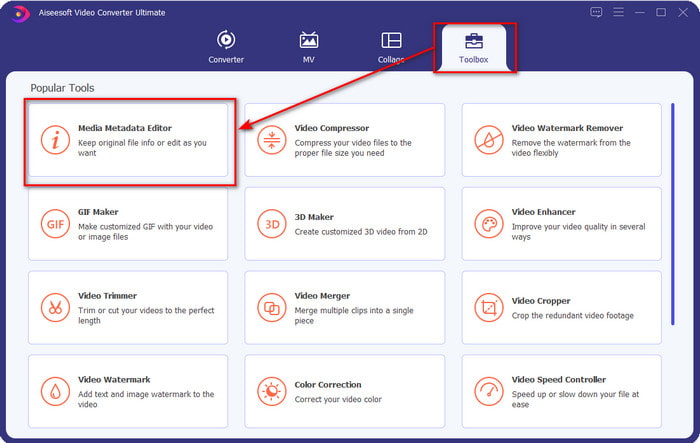
स्टेप 1. सॉफ़्टवेयर डाउनलोड करने के बाद, आपको Toolbox पर क्लिक करना है और वहाँ से Media Metadata Editor ढूँढना है।.
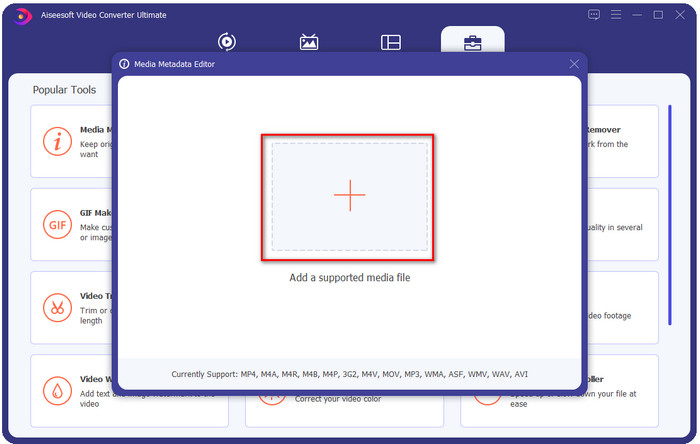
स्टेप 2. + बटन दबाकर WMA फ़ाइल जोड़ें, अपने डेस्कटॉप फ़ोल्डर में WMA फ़ाइल खोजें, और मिलने पर Open पर क्लिक करें।.
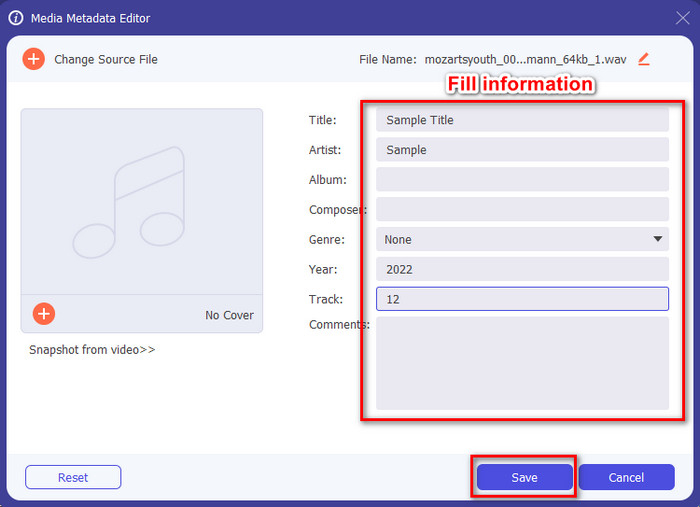
स्टेप 3. जो जानकारी आप जोड़ना चाहते हैं उसे जोड़ें, उपलब्ध textboxes भरें और काम पूरा होने पर Save बटन दबाएँ। आसान है, है ना? खैर, हमारे कन्वर्टर का दूसरा नाम ही सफलता है।.
संबंधित:
MP3 को WAV में कैसे कन्वर्ट करें
M4A को WAV में कैसे कन्वर्ट करें
भाग 2. वेब पर उपलब्ध शीर्ष 2 WAV मेटाडेटा व्यूअर
मान लीजिए कि आप WAV पर संपूर्ण टैग नहीं देख सकते हैं; आपको क्या करना चाहिये? इस मामले में, WAV पर टैग व्यूअर का उपयोग करना आदर्श है। यदि आप कोई टूल डाउनलोड नहीं करना चाहते हैं, तो आप वेब पर उपलब्ध इस मेटा व्यूअर का उपयोग कर सकते हैं। हालाँकि, ये दो उपकरण WAV फ़ाइल मेटाडेटा को संपादित नहीं कर सकते क्योंकि वे मेटाडेटा देखने का इरादा रखते हैं।
मुफ़्त ऑनलाइन EXIF और मेटाडेटा व्यूअर
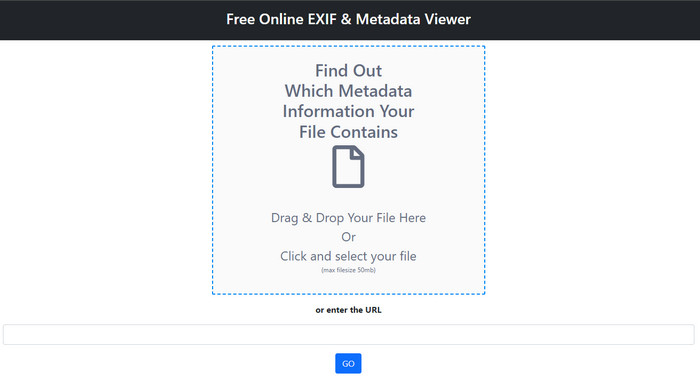
Free online EXIF & Metadata Viewer एक मुफ़्त ऑनलाइन मेटाडेटा व्यूअर है, जिसका इस्तेमाल आप मीडिया फ़ाइल के टैग देखने के लिए कर सकते हैं। इस वेब टूल के ज़रिए आप अपलोड की गई फ़ाइल की अलग‑अलग संरचनाएँ देख सकते हैं, जैसे RAW, FILE, RIFF और COMPOSITE। यह टूल उन मेटाडेटा व्यूअर्स में से एक है जो आपको मुफ़्त में इतना अधिक डीटेल सपोर्ट करते हैं। कुछ टैग व्यूअर्स में फ़ाइल की इतनी बारीक जानकारी देखने के लिए पैसे देने पड़ते हैं। हालाँकि इस टूल में एडिट करना संभव नहीं है, फिर भी यह सबसे बेहतरीन डिटेल्ड मेटा व्यूअर है जिसे आप इस्तेमाल कर सकते हैं, और बाद में ऊपर बताए गए अल्टीमेट टूल से WAV मेटाडेटा जोड़, हट या बदल सकते हैं।.
मेटाडेटा2गो
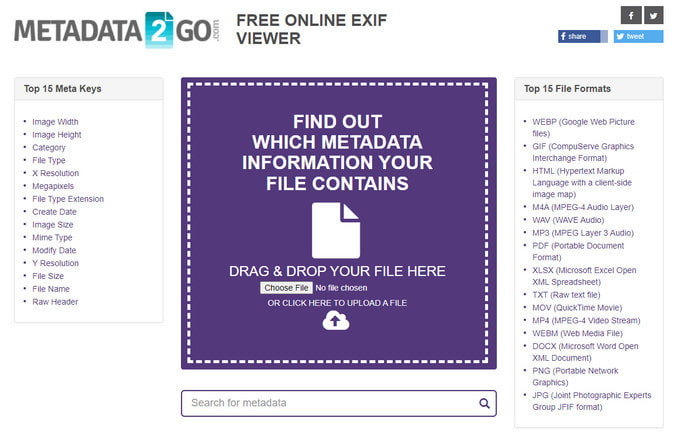
पहले वाले टूल की तरह, Metadata2Go भी आपकी फ़ाइलों के लिए एक मुफ़्त टैग व्यूअर और एक्सट्रैक्टर है, जिसे आप वेब पर बिना किसी शुल्क के एक्सेस कर सकते हैं। यह टूल आपको वह छुपा हुआ मेटाडेटा दिखाने की अनुमति देता है जो आपने अपनी फ़ाइल में कभी नहीं देखा होगा। अगर आपको अपनी मीडिया फ़ाइल का मेटाडेटा देखना है, तो यह वेब पर उपलब्ध आपका वन‑स्टॉप व्यूअर है। पहले टूल के उलट, यह टूल इमेज मेटाडेटा को भी सपोर्ट करता है ताकि आप उसे देख सकें, और ज़रूरत पड़ने पर उस फ़ाइल से डेटा एक्सट्रैक्ट भी कर सकता है। फ़ाइल के प्रकार के अनुसार, यह आपकी फ़ाइल की जानकारी दिखा सकता है। ऊपर दिए गए पहले मेटा व्यूअर की तरह, यह भी आपकी मीडिया फ़ाइल, यहाँ तक कि WAV पर भी, टैग एडिट नहीं कर सकता। इसलिए, अगर आपको लगे कि पहला टैग व्यूअर आपकी ज़रूरत पूरी नहीं कर रहा है, तो इस टूल को आज़माएँ। इसके बाद, अल्टीमेट टूल का इस्तेमाल करें और जानें कि अगर आपको उन्हें सही करना हो तो WAV फ़ाइलों में ID3 टैग कैसे जोड़ें।.
भाग 3. WAV मेटाडेटा संपादक के बारे में अक्सर पूछे जाने वाले प्रश्न
मैं WAV पर मेटाडेटा का उपयोग क्यों नहीं कर सकता?
ऐसे कई कारण हैं जिनसे आप उन तक नहीं पहुंच सकते हैं, लेकिन दो प्रमुख कारण हैं जिनसे हमें पता चलता है कि आप उन तक क्यों नहीं पहुंच सकते। पहला कारण यह है कि फ़ाइल दूषित है; जाहिर है, फ़ाइल दूषित होने पर WAV पर मेटाडेटा भी गायब हो जाएगा। दूसरा यह है कि फ़ाइल में पहले स्थान पर कोई मेटाडेटा नहीं है। WAV जैसी सभी मीडिया फ़ाइलों में मेटाडेटा नहीं होता है। यदि आपने वेब पर फ़ाइल डाउनलोड की है, तो इस बात की संभावना है कि लेखक या निर्माता उस मेटाडेटा को हटा देगा ताकि जानकारी उजागर न हो।
क्या WAV मेटाडेटा MP3 के समान है?
हां, इस ऑडियो प्रारूप में आपको लेखक का नाम, शीर्षक, एल्बम ट्रैक, शैली, रेटिंग और बहुत कुछ दिखाई देगा। लेकिन आप FVC वीडियो कन्वर्टर अल्टीमेट जैसे MP3 या WAV पर उपलब्ध मेटाडेटा संपादक का उपयोग करके भी उन्हें जोड़ सकते हैं।
क्या वेब पर WAV अपलोड करना ठीक है?
ऐसा इसलिए नहीं है क्योंकि प्रारूप असम्पीडित है, और फ़ाइल को वेब पर अपलोड करने में बहुत समय लगेगा। यद्यपि आप प्रारूप को इंटरनेट के अनुकूल साझाकरण प्रारूप में परिवर्तित कर सकते हैं, इसकी गुणवत्ता WAV के समान नहीं होगी, खासकर यदि यह संपीड़ित है।
निष्कर्ष
आख़िरकार, हमें सबसे अच्छा WAV मेटाडेटा एडिटर मिल गया है जिसे आप मुफ़्त में डाउनलोड कर सकते हैं, और वह है FVC Video Converter Ultimate। इस टूल की मदद से आप यह काम किसी भी समय पूरा कर सकते हैं, और भले ही आपकी फ़ाइल का फ़ॉर्मैट अलग हो, यहाँ 1000+ से ज़्यादा फ़ॉर्मैट सपोर्टेड हैं। क्या आप Mac पर टूल डाउनलोड करना चाहते हैं? तो आपको मुँह मोड़कर दूसरा टूल ढूँढने की ज़रूरत नहीं, क्योंकि आप Mac यूज़र होने पर भी इस अल्टीमेट टूल का इस्तेमाल कर सकते हैं।.
-
 मेटा डेटा क्या है: मेटाडेटा के बारे में बुनियादी जानकारी जानें
 मेटाडेटा क्या है? क्या यह महत्वपूर्ण है? मेटाडेटा के भाग क्या हैं? क्या आपके पास भी यही प्रश्न है? इस लेख में, आप मेटाडेटा के बारे में बुनियादी जानकारी जानेंगे।
-
 सर्वश्रेष्ठ मेटाडेटा व्यूअर में से 4 ऑनलाइन और ऑफलाइन [अपडेट किया गया 2022]
 क्या मैं अपनी फाइल के मेटाडेटा की जांच कर सकता हूं? हां, आप कर सकते हैं, इस पोस्ट की मदद से हम आपको उन विभिन्न मेटाडेटा दर्शकों से परिचित कराएंगे जिनका आप उपयोग कर सकते हैं।
-
 स्नैपचैट पर 6 पसंदीदा विकल्प स्नैपचैट एनिमेटेड स्नैपचैट फिल्टर
 स्नैपचैट वीडियो पर फिल्टर जोड़ने का सबसे अच्छा तरीका जानना चाहते हैं? ठीक है, आप इसे क्लिक कर सकते हैं और विभिन्न फ़िल्टर सीख सकते हैं जिनका उपयोग आप स्नैपचैट वीडियो पर लागू करने के लिए कर सकते हैं।
