


 Video Converter Ultimate
 Snimač zaslona
 Video popravak
4 najlakša načina kako pretvoriti F4V datoteku u AVI format medijske datoteke
Macromedia je predstavila F4V, a kasnije ga je Adobe razvio kako bi se natjecao s modernom pohranom video zapisa visoke kvalitete. Također, stvoren je kao zamjena za FLV budući da FLV ima ograničenja. Daljnje objašnjenje je da F4V datoteka koristi ISO osnovni format medijske datoteke s H.264 kodekom za smanjenje veličine datoteke. Iako format sadrži visokokvalitetni izlaz, F4V ima manju kompatibilnost od drugog formata. I ne samo to, nego je i ovaj format postupno ukinut jer je Adobe Flash Player već povučen.
Dakle, ako imate isti problem kao i drugi, jer se njihove .f4v datoteke ne mogu reproducirati na njihovom medijskom reproduktoru, nastavite čitati u nastavku. Prikupili smo različite alate koji će vam pomoći reproducirati neproizvodive .f4v datoteke tako da pretvorite format u AVI. A sada prijeđimo dalje i saznajmo kako pretvoriti F4V u AVI format pomoću dostupnih online i offline alata.

Dio 1. Naučite kako pretvoriti F4V u AVI pomoću fenomenalnog pretvarača F4V u AVI
Ako tražite najbolji pretvarač koji će vam pomoći riješiti problem, onda FVC Video Converter Ultimate mora biti pravo rješenje. Sami smo isprobali ovaj alat i pročitali neke komentare; “ultimate” nije samo naziv, već su i performanse i značajke softvera zaista vrhunske. Također, jedna od najimpresivnijih značajki koju ovaj alat nudi jest brzo pretvaranje i hardversko ubrzanje, tako da korisnici koji koriste ovaj softver ne moraju dugo čekati.
Ako želite stvarati GIF-ove, ubrzavati ili usporavati videozapise, puštati ih unatrag, pojačati zvuk itd. Kako ovaj alat pruža napredne funkcije, morat ćete ga platiti prije nego što ga počnete koristiti, ali ne trebate brinuti jer nećete potrošiti više od sto dolara. Dakle, ako ste još uvijek u fazi odlučivanja hoćete li kupiti ovaj alat, pokušajte pročitati korake u nastavku i pretvoriti F4V datoteku u AVI slijedeći ove upute.
Korak 1. Prije nego što možete koristiti ovaj moćan alat, morate ga sada preuzeti na svoje računalo. Zatim ga instalirajte i vrlo brzo obavite početno podešavanje; kliknite Start Now da biste otvorili program.
Besplatno preuzimanjeZa Windows 7 ili novijiSigurno preuzimanje
Besplatno preuzimanjeZa MacOS 10.7 ili novijiSigurno preuzimanje
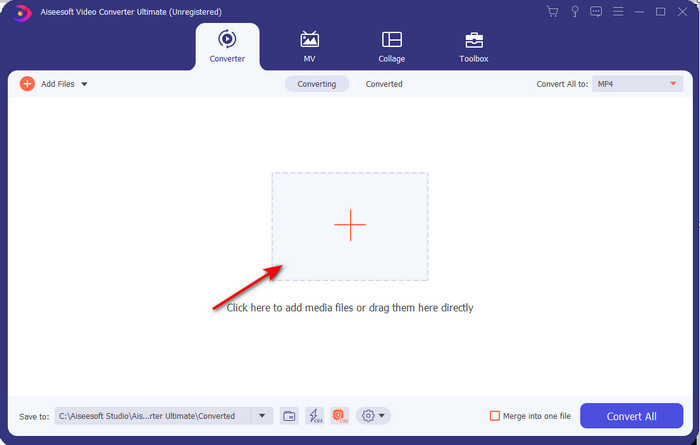
Korak 2. Ako je alat već otvoren, idite na Add Files ili kliknite gumb +, zatim će se pojaviti mapa pa potražite datoteku s ekstenzijom .f4v i kliknite Open.
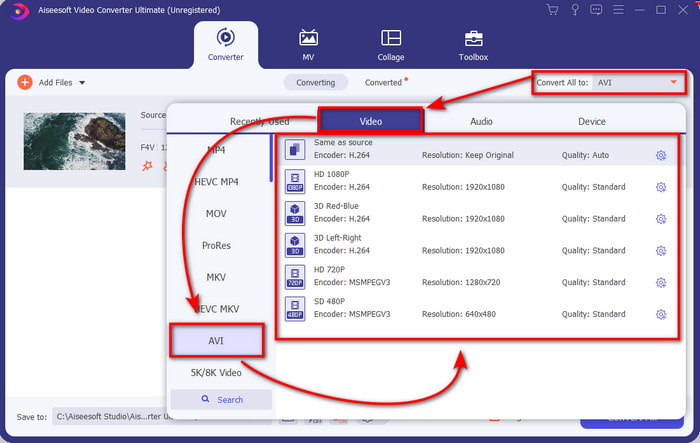
Korak 3. Nakon umetanja datoteke, kliknite Convert All to u gornjem desnom dijelu sučelja i odaberite format AVI.
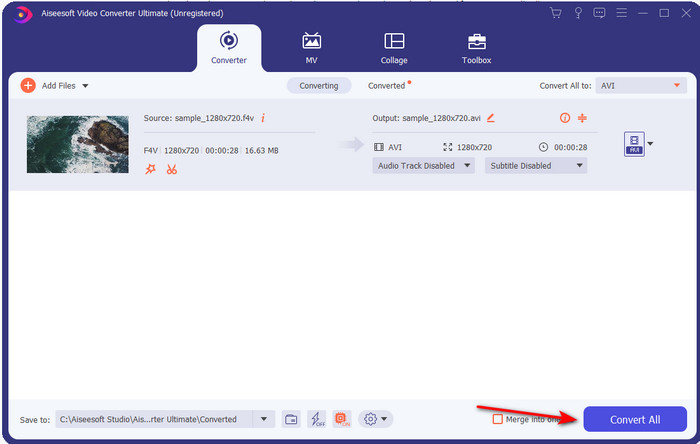
Korak 4. Sada, da biste pokrenuli postupak pretvorbe, kliknite Convert All. Pričekajte nekoliko minuta da biste pretvorili svoju datoteku iz F4V u AVI.
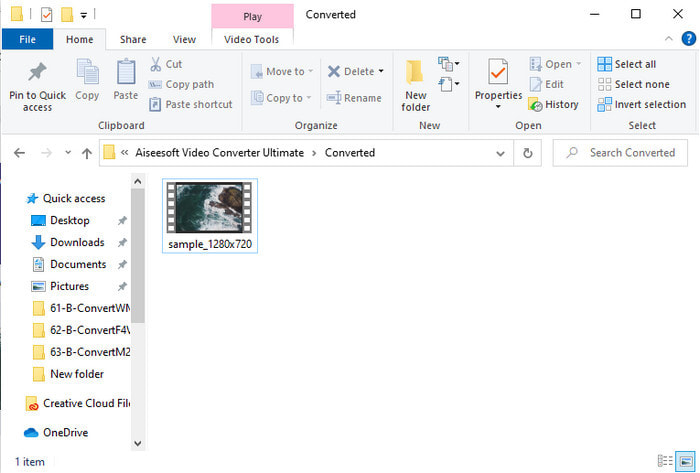
Korak 5. Mapa s datotekama automatski će se otvoriti na vašem računalu s pretvorenom .f4v datotekom koju ste ovdje napravili. Kliknite videosadržaj kako biste na računalu pogledali ono što se prije nije moglo reproducirati ili ga, ako želite, prenesite na svoj telefon.
Dio 2. Naučite kako pretvoriti F4V u AVI na mreži s 3 dostupna web pretvarača
1. FVC besplatni video pretvarač na mreži
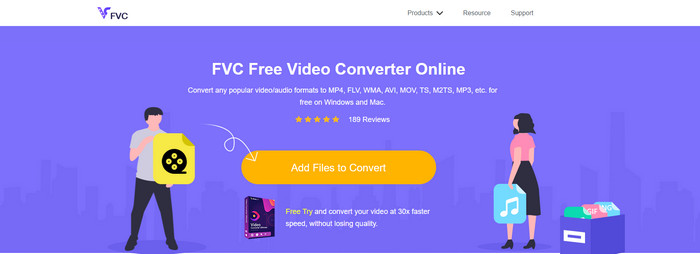
Ako želite saznati koji je web pretvarač najbolji, FVC Free Video Converter Online mogao bi biti taj. Sve značajke koje biste željeli koristiti dostupne su ovdje, jer možete promijeniti bitrate i fps videa kako biste ga učinili visokokvalitetnim prije pretvorbe. Milijuni internetskih korisnika već su pohvalili ukupne performanse ovog web alata. Također, ovaj web alat podržava srednje velik raspon formata koje možete odabrati i učitati. Međutim, ne možete svoje videozapise učiniti vizualno impresivnima kao što to omogućuje verzija Ultimate. Ipak, ako želite isprobati i pretvoriti F4V u AVI format, slijedite korake u nastavku.
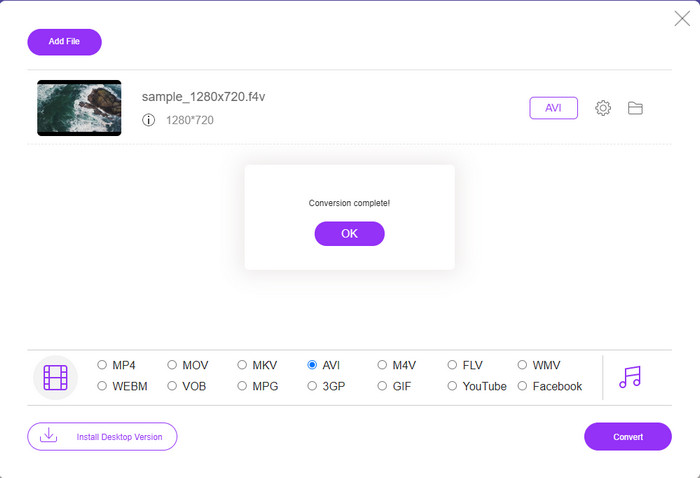
Korak 1. Kliknite ovu poveznicu kako biste otišli na FVC Free Video Converter Online.
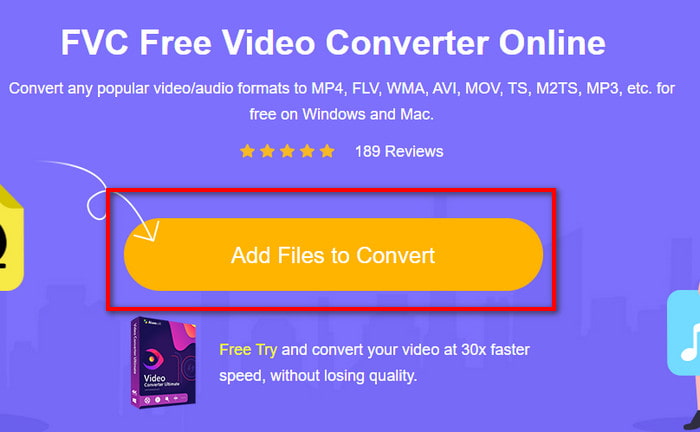
Korak 2. Zatim pritisnite Add Files to Convert da biste pokrenuli alat i odabrali datoteku koju želite pretvoriti u novi format u mapi klikom na Open.
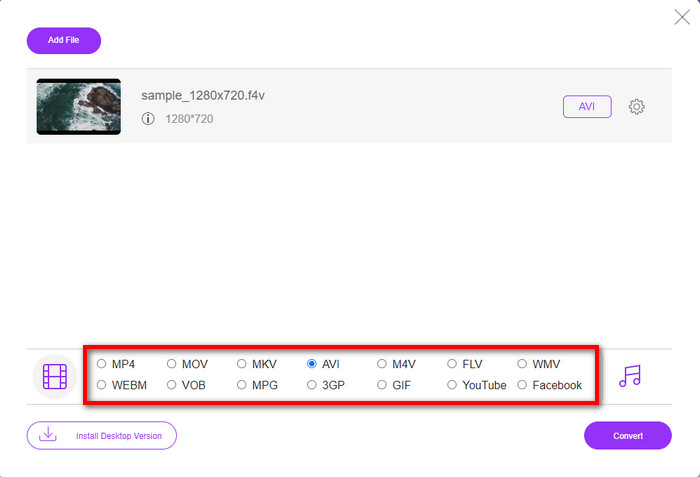
Korak 3. Kada je datoteka učitana, odaberite format AVI u donjem dijelu popisa formata u koji je želite pretvoriti.
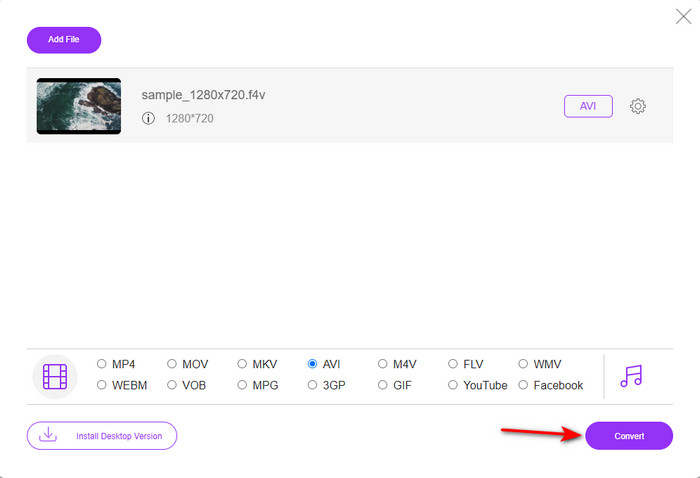
Korak 4. Nakon što odaberete AVI format, vrijeme je da započnete pretvorbu klikom na gumb Convert.
Korak 5. Pričekajte nekoliko minuta da se datoteka preuzme, a zatim će se pojaviti mapa s pretvorenom datotekom.
2. Zamzar
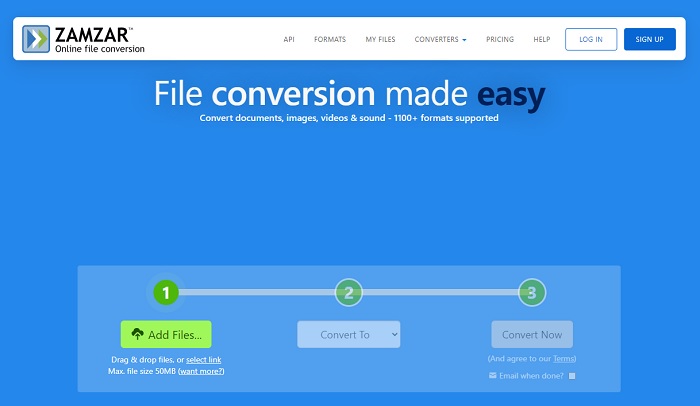
Još jedna alternativa pretvarača koju možete koristiti online je Zamzar. Kao i svaki drugi pretvarač, ovaj alat treba internetsku vezu kako bi se mogao koristiti ili pristupiti. Svi web alati predstavljeni ovdje trebaju internet da bi “pokretali” pretvorbu. Kako ga mnogi korisnici koriste, Zamzar je postao popularan jer podržava mnogo formata koje možete koristiti i odabrati. Također, besplatan je za korištenje, no postoji ograničenje veličine datoteke koju ovaj alat može pretvoriti. Dakle, ako je vaša .f4v datoteka veća od 50 MB, ovdje je ne možete pretvoriti, kao što je navedeno u nastavku. A ako je vaša datoteka manja od toga, možete pokušati koristiti ovaj alat da biste online pretvorili F4V u AVI slijedeći donji postupak.
Korak 1. Otvorite svoj web-preglednik i potražite Zamzar.
Korak 2. Pritisnite Add Files i pronađite datoteku koju želite pretvoriti. Zatim odaberite format AVI, pritisnite Convert to, a nakon toga kliknite Convert.
Korak 3. Pričekajte da postupak završi; zatim će se pojaviti novo sučelje i kliknite Download da biste spremili datoteku.
3. Pretvori datoteke
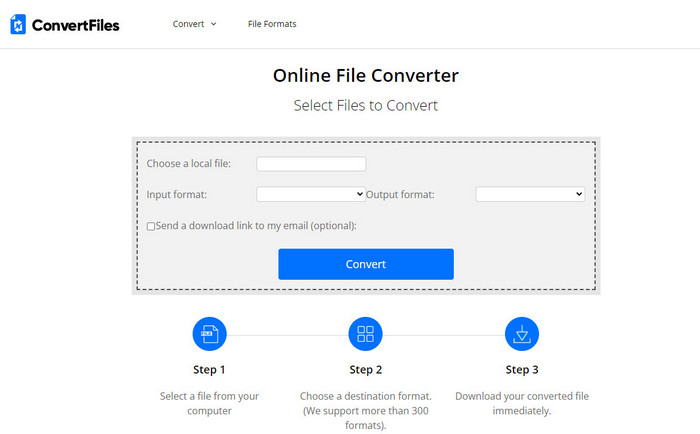
Ako želite jednostavniji postupak pretvorbe koji traje samo nekoliko minuta, pokušajte koristiti ConvertFiles. Alat se odlično ponaša tijekom i nakon same pretvorbe. No, oglasi “ubijaju” ovaj alat jer ih je mnogo na sučelju web alata. Također, postupak traje dosta duže u usporedbi s drugim online i offline pretvaračima. Veličina datoteke koju ovdje možete umetnuti puno je veća nego kod Zamzara. Dakle, ako želite koristiti ovaj alat za pretvaranje F4V datoteke u AVI, slijedite ove korake.
Korak 1. Idite u svoj web-preglednik i potražite ConvertFiles, zatim ga otvorite.
Korak 2. Kliknite Choose a Local File kako biste otvorili mapu i pronašli datoteku, a pod Output Format kliknite AVI. Zatim kliknite Convert da biste pokrenuli pretvorbu.
Korak 3. Nakon pretvorbe kliknite plavu istaknutu URL adresu koja će vas prebaciti na novu web-stranicu. Kliknite tu poveznicu kako biste preuzeli pretvoreni format.
Dio 3. Koji je format bolji; F4V protiv AVI
Pa, F4V i AVI u najboljem slučaju rade svoj posao kao spremnik. Međutim, postoji mnogo ovih zajedničkih formata, a svrha im nije ista. Na primjer, ako želite pohraniti video visoke kvalitete unutar male datoteke i zadržati i zaštititi DRM MPEG-4 video podatke, F4V je najbolji izbor. Ali pretpostavimo da želite pohraniti video visoke kvalitete koji podržava sinkroniziranu reprodukciju medija. U tom slučaju morate odabrati AVI format jer ima drugačiji spremnik za audio i video. Unatoč tome, veličina AVI datoteke je prevelika za rukovanje mnogim uređajima, pa čak i stolnim računalima jer nije komprimirana.
Dio 4. Često postavljana pitanja o pretvorbi F4V u AVI
Smanjuje li pretvorba F4V rezoluciju nakon pretvorbe?
Razlučivost videozapisa mora zadržati izvornu kvalitetu čak i nakon što ga pretvorite u novi format. U nekim slučajevima, mnogi korisnici doživljavaju da je kvaliteta njihovog F4V postala niža. Jedan od razloga mora biti nizak stupanj kvalitete koji ste postavili ili alat koji koristite ne podržava 1080 ili 4k videozapise.
Zašto se F4V ne može reproducirati na mom media playeru?
Ovaj format može se reproducirati u nekoliko medijskih reproduktora, ali ga ne podržavaju svi. Dakle, ako želite gledati video u ovom formatu, najbolji je izbor pretvoriti ga u novi format ili pronaći novi treći medijski reproduktor za gledanje svojih F4V videozapisa.
Trebam li komprimirati F4V da bi bio manji?
Veličina datoteke F4V nije tako velika u usporedbi s AVI formatom. Ipak, ako pokušate dodatno komprimirati ovaj kontejner datoteke, postoji mogućnost da se kvaliteta videa smanji. Ovdje možete naučiti kako komprimirati svoje F4V videozapise.
Zaključak
Na kraju ovog članka, sada imamo uvid u to što je F4V i zašto ga morate pretvoriti. Sav online i offline softver spomenut u ovom članku radi dobro. Iako su svi alati izvrsni, FVC Video Converter Ultimate ipak se ističe među ostalima. Budući da ovaj softver radi dobro čak i kada nemate internetsku vezu, a ovaj alat može završiti proces konverzije u tren oka. Pa sada, ako želite doživjeti fenomenalnu pretvorbu o kojoj govorimo, preuzmite je sada.
-
 Kako pretvoriti TS u AVI / MKV / MOV / WMV na mreži i besplatno na Win / Mac
 Želite brzo pretvoriti TS datoteke u AVI / MKV / MOV / WMV? Ovaj članak prikazuje mrežne i izvanmrežne video pretvarače s potpunim vodičem. Možda ovdje možete dobiti najbolji besplatni TS pretvarač.
-
 [Besplatno i na mreži] 7 načina za pretvaranje MTS-a u AVI na Mac/Windows računalu
 Kako s lakoćom pretvoriti MTS u AVI? U ovom ćete vodiču pronaći 7 besplatnih i jednostavnih načina za pretvorbu MTS datoteka u AVI na sustavu Windows ili Mac bez gubitka kvalitete.
-
 Vodič za pretvaranje MP4 u AVI datoteke sa 7 besplatnih video pretvarača
 Želite li dobiti sve besplatne načine za pretvaranje AVI u MP4 video? Ne biste trebali propustiti ovaj članak. Evo 7 načina za besplatno pretvaranje AVI datoteka u MP4 na Windows, Mac, iPhone, Android i na mreži.
