


 Video Converter Ultimate
 Snimač zaslona
 Video popravak
Fenomenalni alati za korištenje u pretvaranju XviD-a u FLV [Offline & Online]
XviD je biblioteka otvorenog koda za MPEG‑4 video kodek koja se distribuira pod uvjetima GNU General Public License i može se besplatno preuzeti. Kao konkurent vlasničkom DivX Pro kodeku, koji je podložan licencnim ograničenjima i stoga je dostupan samo članovima DivX Advanced Research Centra (DARC), XviD je razvijen kao alternativa. U međuvremenu, datoteka s ekstenzijom .flv skraćenica je za Flash Video. Ekstenzija FLV odnosi se na video ili audio datoteku koja se prenosi putem interneta pomoću Adobe Flash Playera ili Adobe Aira. Ova dva video formata međusobno se isključuju, ali ih možete pretvarati jedan u drugi. U nastavku su navedeni alati koje trebate uzeti u obzir ako želite pretvoriti XviD u FLV.

Dio 1. Učinkovita metoda za pretvaranje XviD-a u FLV [Offline]
Pretvaranje iz XviD-a u FLV nikada nije bilo lakše zahvaljujući Video Converter Ultimate, koji pruža sve-u-jednom rješenje bez gubitka kvalitete. Osim toga, sučelje je jednostavno za korištenje i možete jednostavno pretvoriti svoje XviD datoteke u FLV bez ikakvih problema. Osim mogućnosti pretvaranja XviD-a u FLV, Video Converter Ultimate nudi mnoštvo drugih korisnih funkcija. Na primjer, možete poboljšati kvalitetu videa i napraviti glazbeni video. Sada kada ste naučili o ovom softveru, sada možete naučiti kako ga koristiti slijedeći dolje navedene postupke:
Korak 1: Započnite preuzimanje softvera klikom na gumb Besplatno preuzimanje ispod ovog koraka. Dostupan je za Mac i Windows, stoga morate odabrati operacijski sustav koji koristite. Nakon što preuzmete softver, instalirajte ga na svoje računalo.
Besplatno preuzimanjeZa Windows 7 ili novijiSigurno preuzimanje
Besplatno preuzimanjeZa MacOS 10.7 ili novijiSigurno preuzimanje
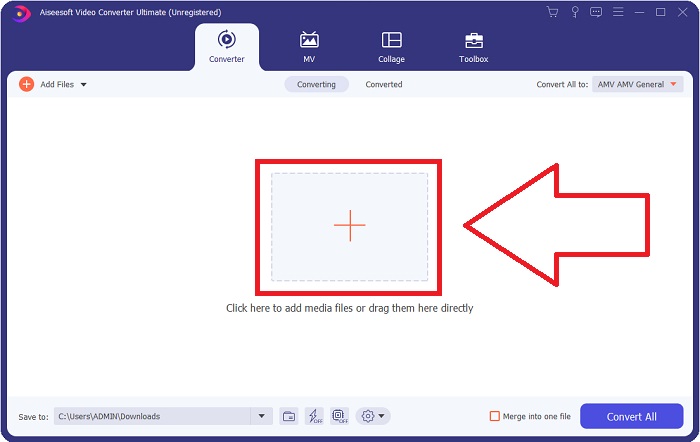
Korak 2: Pokrenite softver kako biste započeli pretvaranje XviD u FLV. Nakon pokretanja softvera pojavit će se prozor na vašem ekranu koji prikazuje sučelje Convertera. Kliknite gumb + smješten na sredini prozora ili povucite videozapise kako biste uvezli datoteke s računala.
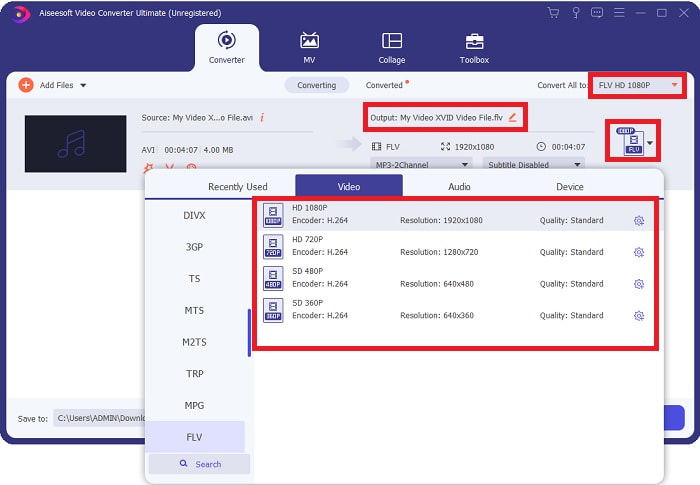
Korak 3: Zatim ćete vidjeti kako se pojavljuje još jedan prozor. Kliknite odabir video formata u desnom kutu zaslona. Pronađite FLV video format i kliknite na kvalitetu videa koju preferirate.
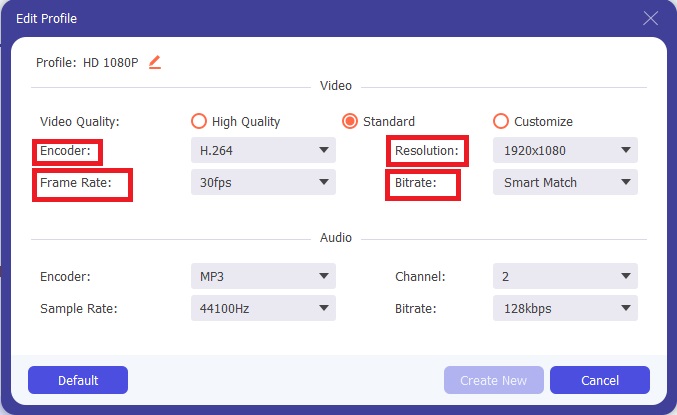
Korak 4: Ako kvaliteta koju želite nije dostupna među ponuđenim kvalitetama videa, možete stvoriti vlastitu kvalitetu videa podešavanjem razlučivosti, bitratea, broja sličica u sekundi itd. Da biste to učinili, kliknite ikonu zupčanika odmah pokraj kvalitete videa koja se prikazuje nakon što odaberete svoj video format. Kliknite OK kada završite s podešavanjem videa.
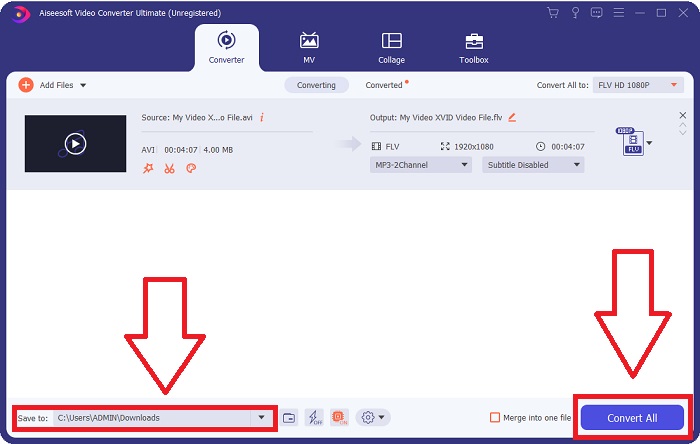
Korak 5: Nakon što završite sa svim prilagodbama, sada možete pretvoriti video klikom na Convert All. Također možete kliknuti gumb Save to i odrediti mapu u koju želite da se pohrane vaši pretvoreni videozapisi.
Dio 2. Izvrsna alternativa za korištenje u pretvaranju XviD-a u FLV [Online]
Nema potrebe preuzimati, instalirati ili registrirati bilo kakav softver kako biste koristili mrežne pretvarače poput alata Free Video Converter Online. Pomoću ovog mrežnog alata možete jednostavno i brzo pretvarati svoje datoteke izravno u prozoru preglednika. U roku od nekoliko sekundi možete pretvoriti svoje HD videozapise u MP4, FLV ili bilo koji drugi popularni video format, uz očuvanje njihove izvorne kvalitete. Ovaj mrežni alat može vam pomoći u svakom slučaju, zato trebate savladati sljedeće korake:
Korak 1: Kliknite ovu poveznicu kako biste otvorili glavnu stranicu alata Free Video Converter Online. Nakon što otvorite glavnu stranicu, kliknite Add Files to Convert, zatim će se na vrhu zaslona pojaviti prozor, a vi kliknite Download kako biste preuzeli pokretač potreban za korištenje mrežnog alata. Instalirajte ga na svoje računalo, a zatim ponovno kliknite Add Files to Convert da biste otvorili mrežni alat.
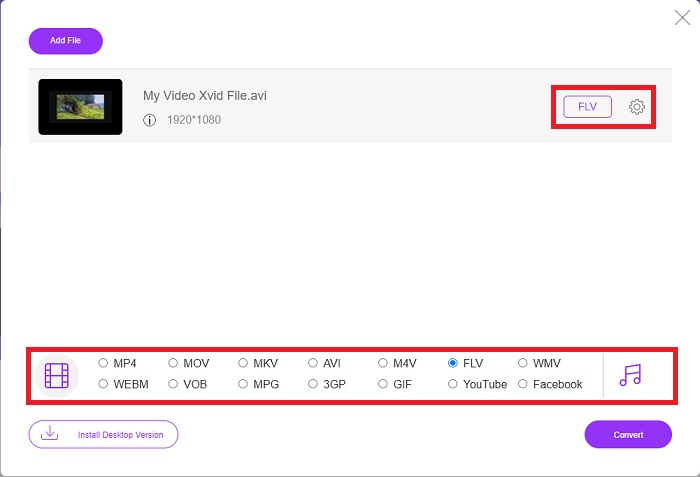
Korak 2: Sada možete odabrati FLV video format iz izbora formata smještenog ispod. Zatim kliknite ikonu zupčanika odmah pokraj FLV video formata kako biste podesili sve detaljne specifikacije videa, primjerice razlučivost, broj sličica u sekundi itd. Kliknite OK kada završite.
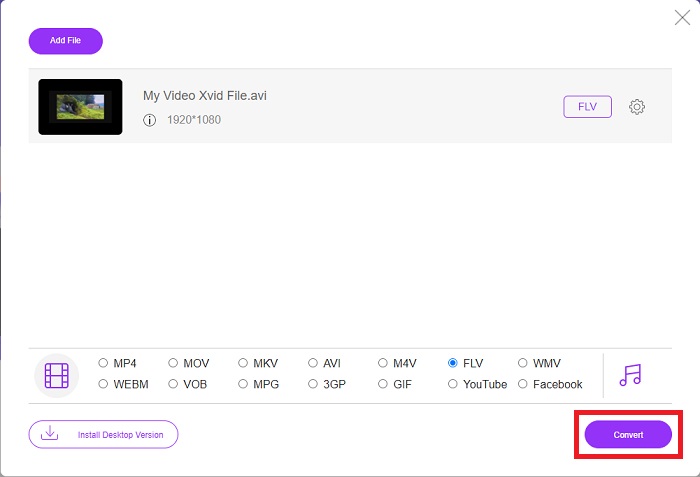
Korak 3: Na kraju, sada možete pretvoriti svoju video datoteku klikom na ikonu Convert na dnu zaslona. Pričekajte minutu ili dvije i pojavit će se prozor koji će vas obavijestiti da je pretvorba završena.
Usput, ovim alatom također možete jednostavno pretvoriti svoje FLV datoteke u XviD.
Dio 3. Usporedna tablica: XviD & FLV
XviD koristi kodek XviD formata. Program koji komprimira i dekompresira video u MPEG-4 ASP, standard kompresije, a ne video format kao što je MP4, to je ono što jest. Zahvaljujući mogućnostima kompresije XviD sadržaja, moguće je skratiti cijeli film kako bi stao na CD uz zadržavanje DVD kvalitete. XviD videosadržaj može se pohraniti u različite spremnike datoteka, čak i ako koristite ekstenziju datoteke .xvid. AVI datoteka može se, na primjer, zvati video.xvid.avi, ovisno o tome tko ju je stvorio. XviD je pod GPL-om, besplatnom licencom otvorenog koda za softver.
Međutim, video datoteke spremljene u formatu spremnika Adobe Flash (FLV) su FLV datoteke. Stream audio i kodiranih video podataka na isti način kao i standardni Flash. SWF format i paketi metapodataka uključeni su u kratko zaglavlje. Uz Flash Video Exporter plug-in (uključen uz Adobe Animate) ili drugu aplikaciju koja podržava FLV datoteke, korisnici mogu izvesti svoj Flash Video sadržaj u FLV formatu. Uz QuickTime i Windows Media, Adobe Media Encoder također može kodirati druge video formate. Kako biste saznali više o detaljnoj usporedbi, nudimo vam usporedni grafikon u nastavku:
| Ekstenzija datoteke | XviD | FLV |
| Vrsta datoteke | MPEG-4 Dio 2 - Video u skladu s MPEG-4 | Flash video datoteka |
| Razvijen od | DivX, Inc. | Adobe sustav |
| Pros | DivX je poznat po svojoj sposobnosti da uspostavi delikatnu ravnotežu između kvalitete i veličine datoteke u smislu kompresije. Kao rezultat toga, može se koristiti za kopiranje, proces kopiranja audio i video datoteka s izvora na tvrdi disk računala u pripremi za pohranu i konverziju. | Adobe Flash izvrstan je izbor za web stranice koje žele uključiti animacije i interaktivne elemente. Ima potencijal da dugoročno ima značajan utjecaj. Flashove najpopularnije igre u to vrijeme bile su jednostavne. |
| Protiv | Nije dostupan za svaku platformu. | Tijekom posljednjih nekoliko godina, popularnost FLV-a je opala. FLV sadržaj zahtijeva puno vremena i novca za proizvodnju. Jedan od glavnih nedostataka Flasha je to što se ne može gledati na iOS uređajima, što ozbiljno ograničava njegovu sposobnost privlačenja novih sljedbenika. |
| Programi otvaraju Video Format | ◆VLC Media Player◆ Windows Media Player& ◆ BS Player ◆ DivX Media Player ◆ Elmedia Player | ◆ VLC Media Player ◆ Adobe Flash Player |
Dio 4. Često postavljana pitanja o pretvorbi XviD u FLV
Je li XviD kodek siguran?
Xvid je popularan i učinkovit kodek i potpuno je siguran za korištenje. Loša je ideja preuzimati Xvid kodek s web-mjesta ili servisa koji ne poznajete ili mu ne vjerujete. Primjerice, strogo savjetujemo da ne instalirate paket kodeka s bit torrent web-mjesta, jer bi to mogli biti zlonamjerni softverski alati prikriveni kao legitimni programi. Problem se javlja i prilikom pokušaja gledanja videozapisa na internetu. Da biste reproducirali svoje XviD datoteke, ovdje je pregled najboljih XviD reproduktora koje možete isprobati.
Je li XviD kodek besplatan?
Xvid Codec Pack je besplatan kodek za kompresiju videa i kvalitetu. Xvid je iznimno brz jer se može optimizirati za moderne procesore. Snimanje videa u stvarnom vremenu s kamere i glatka reprodukcija HD videa ne predstavlja problem. Preostala snaga vašeg računala bit će dovoljna za druge stvari!
Što je FLV stream?
FLV je jednostavan spremnik koji 'podržava' progresivno strujanje zasnovano na datotekama jer omogućuje primanje samo dijela raspona bajtova videozapisa tijekom reprodukcije videozapisa u cjelini (za mp4 trebat će vam meta kao što je Moov, itd. za reprodukciju .)
Zaključak
Da zaključimo sve navedeno, znamo da je konverzija XviD-a u FLV moguća zbog ova dva najbolja i korisniku prilagođena pretvarača u smislu softvera i online alata. Ovaj ga članak najviše preporučuje jer nije usporediv alat s drugim softverima i online alatima i ne morate birati možete li ga koristiti na Windows ili Macu jer ga možete koristiti na oba operacijska sustava besplatno.
-
 4 provjerene metode za pretvaranje TS u FLV na radnoj površini / mreži
 Zadano ne možete otvoriti TS na računalu ili mobitelu. Jedini način gledanja video datoteka je pretvoriti TS u FLV ili druge formate pomoću našeg konkretnog vodiča.
-
 3 rješenja za pretvorbu MTS-a u FLV Free & Online
 Želite pretvoriti MTS u FLV? Evo 3 besplatna softvera za pretvorbu MTS u FLV koji možete pokušati pretvoriti u MTS u FLV na Mac OS X i Windows 10/8/7.
-
 Najbolji načini za pretvaranje VOB-a u FLV [besplatno i online uključeno]
 Želite li pretvoriti VOB datoteku u FLV datoteku? Zadatak možete jednostavno izvršiti bilo putem stolnih računala ili putem mrežnih pretvarača. Pročitajte ovaj vodič i naučite kako lako i brzo transformirati VOB u FLV.
