


 Video Converter Ultimate
 Snimač zaslona
 Video popravak
Offline i online proces pretvorbe: najbolji način za pretvaranje OGV u FLV
Kod korištenja OGV videozapisa ovaj format videozapisa s gubitnom kompresijom može vam smetati jer nakon prilagodbi postaju zamućeni. Međutim, stvari će se poboljšati ako najprije pretvorite OGV u FLV format prije dijeljenja na mreži; jedini izazov bit će pronaći jednostavan, a opet snažan program za pretvaranje videozapisa. Srećom, imamo najbolji i za izvanmrežnu i za mrežnu upotrebu kako biste lako mogli pretvoriti OGV u FLV format datoteke. Samo slijedite korake navedene u ovom članku radi vaše udobnosti.

Dio 1. Kako s lakoćom pretvoriti OGV u FLV [Offline]
Iskreno govoreći, na internetu postoji mnogo pretvarača videozapisa, ali samo ih nekolicina može podržati konverziju OGV-a. Budući da navedeni format nije uobičajen za većinu korisnika videozapisa, proizvođači pretvarača ga često ne uvrštavaju u podržane formate. Upravo zbog toga je Video Converter Ultimate toliko koristan. U potpunosti podržava OGV kao ulaz i omogućuje vam brzo pretvaranje OGV video datoteka u FLV formate. Vrijedi spomenuti i da može transformirati vaše OGV videozapise te ih uređivati praktičnim alatima. Sve što vam treba nalazi se u programu Video Converter Ultimate. Stoga vam nudimo najjednostavnije korake koje trebate slijediti:
Korak 1: Prije nego što možete koristiti softver, morate ga najprije instalirati na svoje računalo. To možete učiniti klikom na jedan od gumba Free Download u nastavku, ovisno o operacijskom sustavu koji koristite. Pričekajte da se .exe ili .dmg datoteka preuzme, a zatim je otvorite kako biste pokrenuli postupak instalacije. Na kraju možete pokrenuti softver odmah nakon završetka instalacije klikom na Start Now.
Besplatno preuzimanjeZa Windows 7 ili novijiSigurno preuzimanje
Besplatno preuzimanjeZa MacOS 10.7 ili novijiSigurno preuzimanje
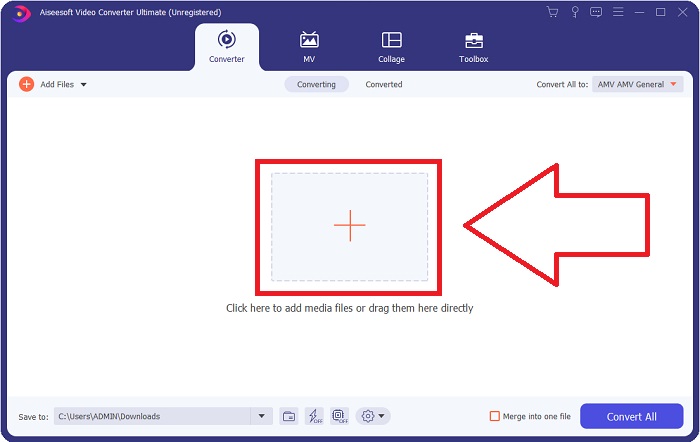
Korak 2: Kada se prozor pojavi, naći ćete se u sučelju s gumbom + u sredini. Za uvoz video datoteke koju želite pretvoriti kliknite na njega ili jednostavno povucite i ispustite datoteku u program.
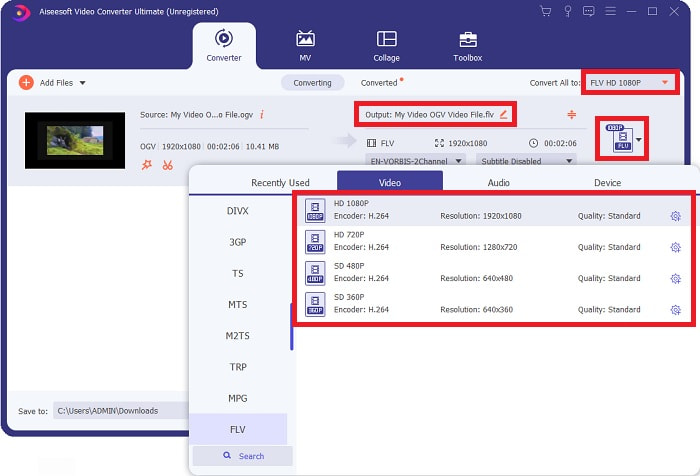
Korak 3: S desne strane prikazuje se trenutačni format vaše video datoteke. Kliknite na njega i prikazat će vam se svi formati između kojih možete birati. U ovom slučaju, pomaknite se prema dolje i odaberite FLV, ili ga jednostavno potražite u donjoj traci za pretraživanje. Sada na desnoj strani kartice možete odabrati i koju kvalitetu videa želite za svoju pretvorenu datoteku.
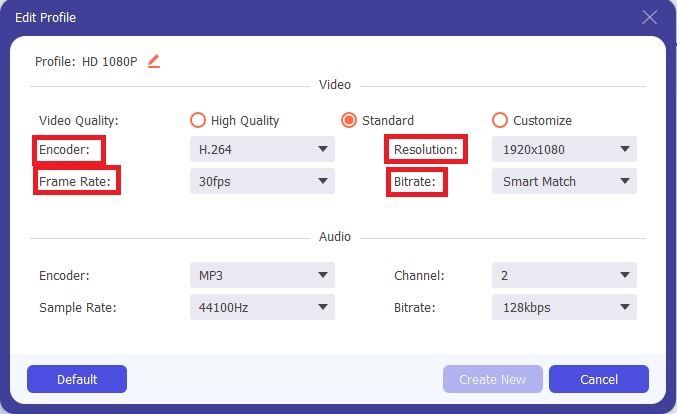
Korak 4: Ako tražite dodatne opcije, možete ih pronaći klikom na ikonu zupčanika pored odabrane kvalitete videa. Na taj način možete dodatno urediti rezoluciju videa i druge opcije poput frame ratea, sample ratea, bitratea i kôdeka. Kada ste zadovoljni, jednostavno kliknite gumb Create New u donjem desnom kutu kako biste spremili promjene.
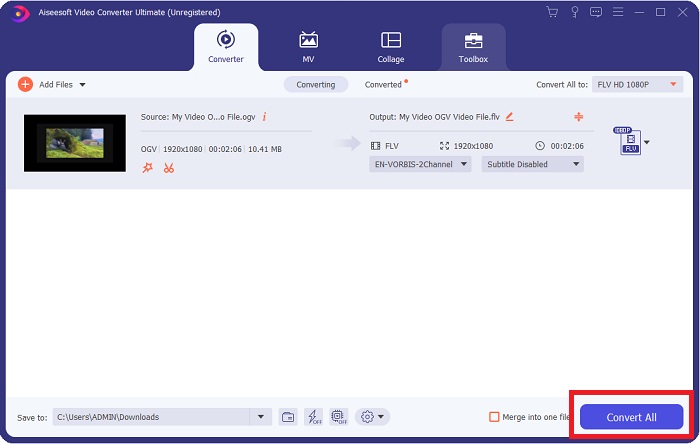
Korak 5: Kada završite sa svim prilagodbama, možete ispravno započeti konverziju klikom na gumb Convert All u donjem desnom kutu i pričekati da završi.
Dio 2. Druga dostupna metoda za pretvaranje OGV u FLV [Online]
Ako vam vrijeme ne dopušta i morate što brže pretvoriti svoj OGV u FLV, ne trebate brinuti jer vas i dalje pokrivamo. Možete koristiti mrežnu inačicu navedenog softvera koja vam i dalje pruža veliku praktičnost uz jednostavan postupak pretvaranja. FVC Free Video Converter Online je web alat koji može lako pretvoriti OGV datoteke u FLV, a pritom i dalje nudi iste opcije rezolucije i kvalitete zvuka. Za korištenje slijedite ove korake:
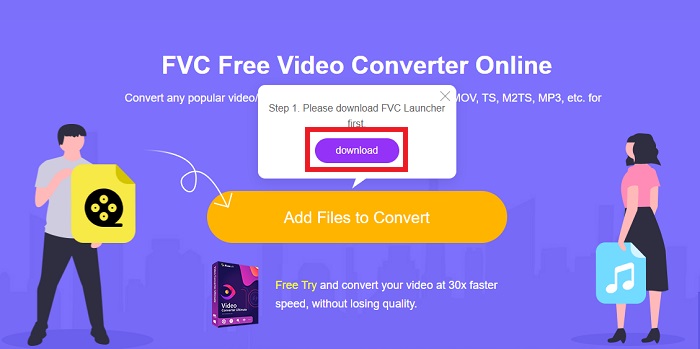
Korak 1: Kliknite ovu poveznicu i bit ćete preusmjereni na sam mrežni pretvarač. U sredini stranice nalazi se gumb s natpisom Add Files to Convert. Morate ga kliknuti kako biste preuzeli pokretač koji vam je potreban za uvoz video datoteke koju želite pretvoriti.
Korak 2: Kada završite, sada možete učitati svoju datoteku ponovnim klikom na navedeni gumb. Ako je prijenos uspio, pojavit će se sučelje. Ondje sada možete odabrati FLV među ostalim formatima ponuđenima na dnu prozora.
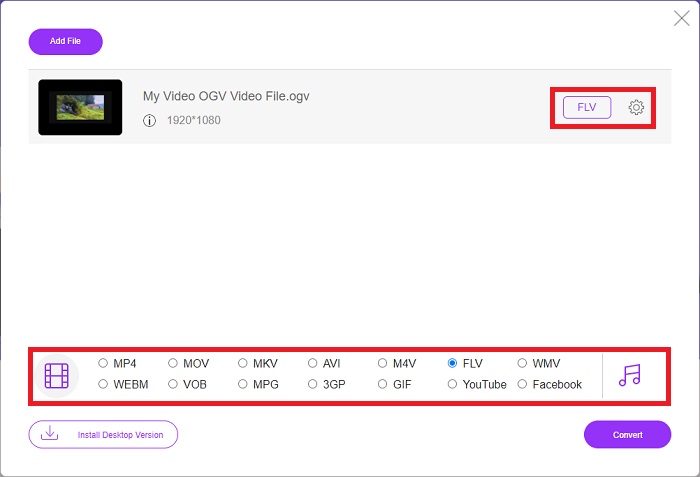
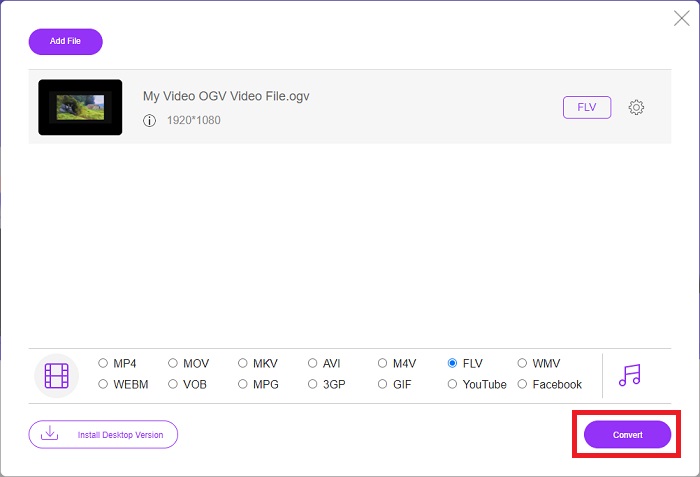
Korak 3: Slično tome, krajnje desno možete pronaći i ikonu zupčanika preko koje možete dodatno urediti svoj video. Klikom na nju pronaći ćete postavke videa i zvuka kako biste mogli urediti kôdeke, rezoluciju, frame rate i još mnogo toga. Kliknite OK i zatim gumb Convert u donjem desnom kutu kako biste započeli proces pretvaranja.
Dio 3. Prošireno znanje o OGV i FLV
Ako želite saznati više o dvije datoteke koje se uspoređuju, ovdje vam pružamo sve potrebne informacije koje biste mogli pročitati:
Metoda kodiranja videa Ogg Vorbis najčešće se može povezati s datotekama koje imaju ekstenziju datoteke .ogv. Ogg Vorbis je otvoreni izvorni, nepatentirani format audio kompresije. Format spremnika za audio, video i informacijske datoteke poznat je kao Ogg, dok je tehnologija kompresije zvuka Vorbis dobila ime. OGV format datoteke je spremnik za video datoteke. Video streamovi povezani s jednim ili više video kodeka, kao što su Theora i DivX, mogu se pronaći u OGV datotekama. Korisnici mogu reproducirati snimljeni materijal unutar datoteke sadržaja na nekoliko medijskih uređaja koristeći te datoteke.
S druge strane, video datoteka pohranjena u formatu spremnika Adobe Flash Video (FLV) je FLV datoteka. Adobe Flash Player ga uglavnom koristi za pružanje online video sadržaja kao što su filmovi i TV epizode. Također, bitno je napomenuti da je to otvoreni format koji podržavaju razne aplikacije koje nisu Adobe/Macromedia. Za konkretniju usporedbu ova dva, napravili smo tablicu samo za vas.
| Ogg Vorbis (OGV) | Adobe Flash Video (FLV) | |
| Ekstenzija datoteke | .ogv | .flv |
| Programer | Zaklada Xiph.Org | Adobe Systems Incorporated |
| Programi podrške | MPlayer Classic, VLC Media Player, Jriver Media Center, MPUI | RealPlayer, Apple QuickTime Player, Mplayer, VLC Media Player |
| Prednosti | OGG ima prednost jer je bez patenata, općepriznat i izvorno podržan od strane većine preglednika. Kao rezultat toga, ako želite prenijeti film na svoju web stranicu, ovaj format je dobra opcija. | Ljepota Flasha je u tome što može pomoći web stranicama koje žele uključiti pokret i interaktivni sadržaj. Postupak je jednostavan i na kraju može imati značajan utjecaj. Svi su također koristili Flash za rudimentarne igre u svom vrhuncu. |
| Nedostaci | Unatoč širokoj upotrebi, OGG video format ima nekoliko nedostataka. Safari i Internet Explorer ga, primjerice, samo djelomično podržavaju; stoga korisnici možda neće ispravno gledati vaš video u ovim preglednicima. | Nedostatak je, naravno, taj što je FLV format posljednjih godina postao nepopularan. Stvaranje FLV sadržaja može potrajati dugo i biti skupo. Još jedan nedostatak je taj što se Flash materijal ne može reproducirati na iOS uređajima, što ozbiljno ograničava njegovu sposobnost privlačenja novih sljedbenika. |
Dio 4. Često postavljana pitanja o OGV i FLV pretvorbi
Jesu li OGG i OGV isto?
To je prikladan podskup Ogg video medija tipa video/Ogg s nastavkom datoteke. ogv. Druge Ogg aplikacije koriste ekstenziju datoteke. ogv s vrstom medija aplikacija/ogg od. ogx je nadskup video/ogg.
Je li kvaliteta FLV-a bolja od MP4?
Za MP4 se kaže da sadrži visokokvalitetno digitalno kodiranje videa i zvuka. Mišljenje javnosti o FLV-u je manje jasno, iako se prednosti i nedostaci FLV-a rijetko usredotočuju na kvalitetu samog formata datoteke. Uz veći stupanj kompresije, MP4 ima manji gubitak kvalitete. Ovdje možete provjeriti načine kako pretvoriti FLV datoteke u MP4.
Je li FLV bez gubitaka ili s gubicima kao OGV?
Format FLV datoteke za Flash Video podržava dvije verzije kodeka za dijeljenje zaslona (Screen video), što je metoda kodiranja zaslona. Ovi se formati temelje na bitmap pločicama i gube se kada se dubine boje smanjuju i komprimiraju pomoću Zliba.
Zaključak
Bez obzira na to koliko vremena imate za pretvaranje vaših video datoteka, i softver i njegov mrežni alat pružit će vam najprikladnije. Dakle, ukratko, Video Convert Ultimate i Free Video Converter su oni koji moraju biti prva stvar na koju pomislite kada je u pitanju pretvorba videa kako biste uštedjeli vrijeme pregledavajući internet i pronalaženje najboljeg. Evo, predajemo vam najbolje.
-
 Najbolji načini za pretvaranje VOB-a u FLV [besplatno i online uključeno]
 Želite li pretvoriti VOB datoteku u FLV datoteku? Zadatak možete jednostavno izvršiti bilo putem stolnih računala ili putem mrežnih pretvarača. Pročitajte ovaj vodič i naučite kako lako i brzo transformirati VOB u FLV.
-
 4 najpopularnija besplatna programa RMVB to FLV Converter na radnoj površini ili na mreži
 Ovaj će vam članak reći najbolji softver za pretvorbu RMVB u FLV i web aplikacije koje mogu pretvoriti datoteke RMVB (RealMedia varijabilna brzina) u FLV video.
-
 Kako komprimirati OGV datoteku bez gubitka kvalitete
 Ne možete slati velike OGV datoteke drugima? Pa, ovaj će vam članak predstaviti 2 jednostavna načina koji će vam pomoći da jednostavno komprimirate OGV datoteke.
