


 Video Converter Ultimate
 Snimač zaslona
 Video popravak
5 brzih i lakih načina da pretvorite MKV u FLV besplatno [online i offline]
Ne možete dijeliti svoje MKV datoteke putem interneta jer je veličina datoteke prevelika? Zašto ih jednostavno ne biste pretvorili umjesto da ih previše sažimate i tako izbjegli gubitak kvalitete? Ovaj problem je riješen ako prije slanja pročitate detalje u nastavku. Nema potrebe da sat vremena čitate ovaj članak, pa bez daljnjeg, upoznajmo šest pretvarača koje možete koristiti za pretvaranje MKV u FLV.

Dio 1. Vrhunski najbolji MKV u FLV pretvarač za preuzimanje
FVC Video Converter Ultimate može vam pomoći da promijenite MKV u FLV lako i učinkovito, bez imalo muke. Ovaj izvanredan pretvarač znatno se razlikuje od pretvarača na ovom popisu ili drugih pretvarača koje već koristite ili ne. To je vrhunski koder i dekoder koji možete preuzeti na svoje računalo ili Mac, a besprijekorno radi izvanmrežno čak i ako nemate vrhunsko stolno računalo.

FVC Video Converter Ultimate
4.987.355+ preuzimanja- Pretvorite MKV u FLV, AVI, MP4, MOV ili u 200+ formata dostupnih za Windows i Mac.
- Neka vaš MKV format bude kompatibilan sa svim stolnim računalima i uređajima.
- Može izvršiti skupnu pretvorbu za vaše MKV formate ili druge formate.
- Pretvornik bez budale koji može koristiti bilo tko.
- Podržava izlaz visoke razlučivosti, pa čak i do 4k video kvalitete.
Besplatno preuzimanjeZa Windows 7 ili novijiSigurno preuzimanje
Besplatno preuzimanjeZa MacOS 10.7 ili novijiSigurno preuzimanje
Koraci kako pretvoriti MKV u FLV pomoću FVC Video Converter Ultimate
Korak 1. Preuzmite aplikaciju na svoj disk, a zatim slijedite postupak instalacije.
Besplatno preuzimanjeZa Windows 7 ili novijiSigurno preuzimanje
Besplatno preuzimanjeZa MacOS 10.7 ili novijiSigurno preuzimanje
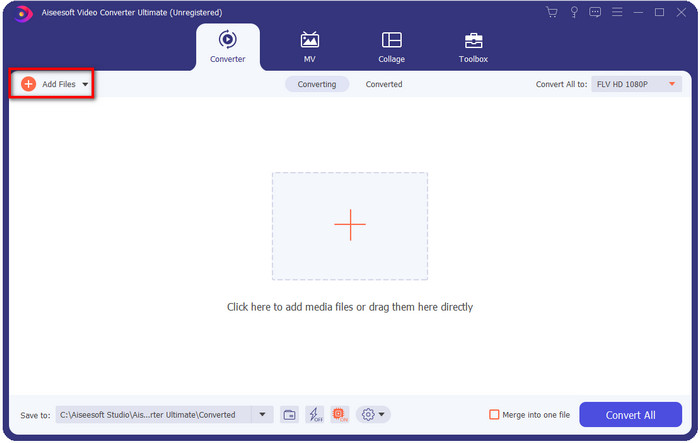
Korak 2. Nakon instalacije otvorite aplikaciju da biste dodali MKV datoteke; možete povuci‑i‑spusti datoteku na sučelje ili kliknuti gumb Add Files.
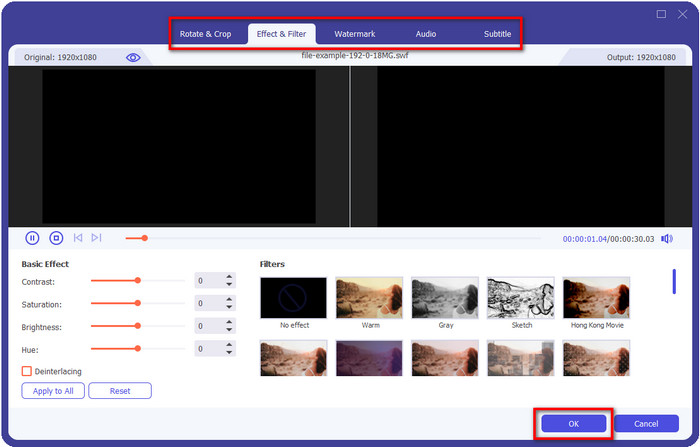
Ako želite urediti svoje MKV datoteke prije pretvorbe, možete kliknuti gumb s čarobnim štapićem da dodate malo magije svom izlazu, kao što je dodavanje efekata, obrezivanje, dodavanje titlova i još mnogo toga. Da biste spremili magiju koju ste dodali u svoj video, kliknite OK.
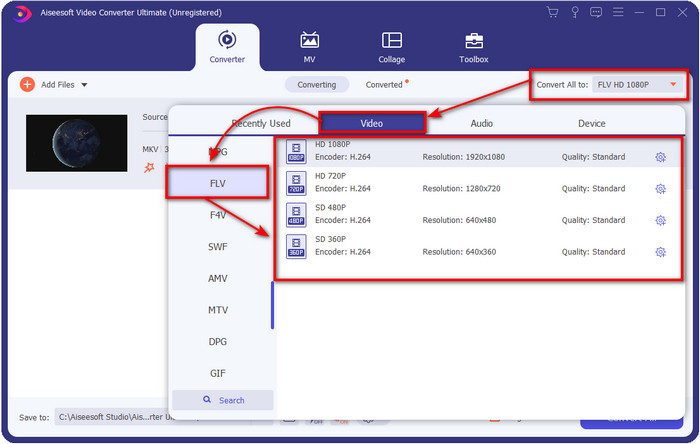
Korak 3. Kliknite gumb drop‑down i odaberite format FLV na popisu postavki.
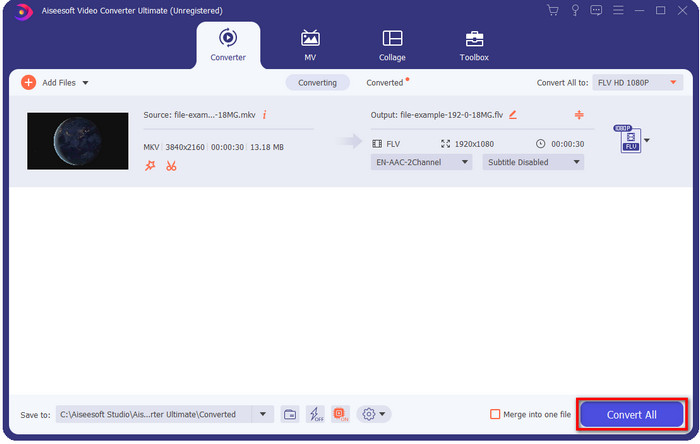
Korak 4. Kliknite gumb Convert All kako biste počeli mijenjati MKV u FLV besplatno. Nakon postupka pojavit će se mapa s novom FLV datotekom.
Dio 2. 4 Najbolji web-based MKV u FLV pretvarač
1. FVC besplatni video pretvarač na mreži
FVC Free Video Converter Online nudi jednostavan, ali impresivan besplatni internetski pretvarač MKV u FLV dostupan u svim preglednicima. Također podržava srednje velik broj formata među kojima možete birati i u koje možete učitati. Iako je alat ovisan o internetu, pretvaranje i učitavanje datoteka ovdje je lakše i brže. Želite znati kako ga koristiti? Zatim slijedite korake u nastavku.
Pros
- Dostupan je za korištenje svima koji imaju internet.
- Sučelje prilagođeno korisniku i lako razumljivo.
- Nema ograničenja za veličinu datoteke.
- Napredne postavke za video i audio.
Protiv
- Srednji format.
Korak 1. Da biste otvorili mrežni pretvarač, kliknite ovu poveznicu.
Korak 2. Pritisnite gumb Add Files to Convert da biste dodali datoteku iz mape na računalu, a zatim kliknite Open.
Preuzmite desktop verziju za skupno pretvaranje datoteka.
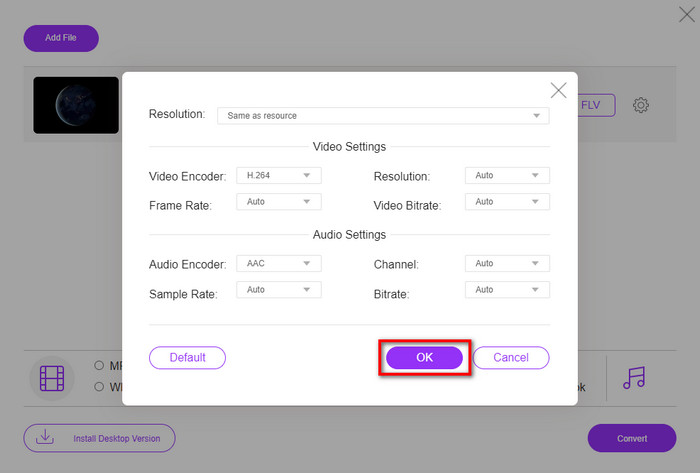
Iako ovdje ne možete uređivati videozapise, možete promijeniti postavke videa i zvuka klikom na gumb gear.
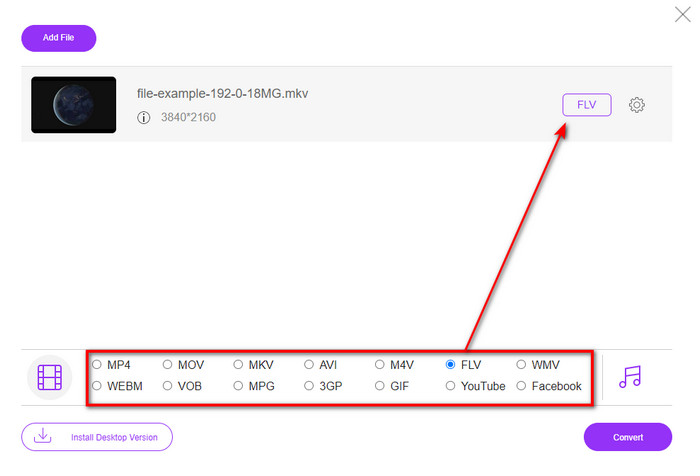
Korak 3. Odaberite format FLV na popisu postavki.
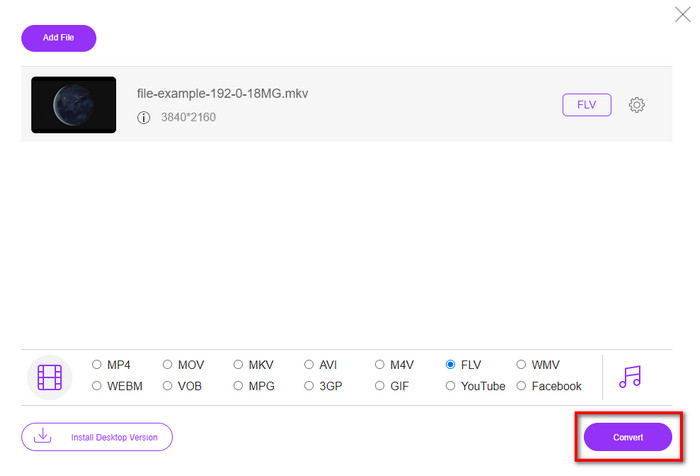
Korak 4. Kliknite Convert da biste započeli postupak pretvorbe.
2. Mkonverter
Jedan od najsigurnijih internetskih pretvarača MKV u FLV koji možete koristiti je Mconverter. Osim pretvaranja video i audio formata, ovdje možete pretvarati i svoje slike, arhive, dokumente i mnoge druge medijske formate. Iako je ovaj pretvarač besplatan za korištenje, postoji ograničenje za svaku datoteku koju možete umetnuti.
Pros
- Pretvorite video, audio, dokumente i još mnogo toga na mreži.
- Podržava višestruke konverzije.
- Jednostavan za korištenje.
Protiv
- Veličina datoteke ne smije biti veća od 200 MB.
- Neki oglasi tijekom pretvaranja datoteke.
Korak 1. Otvorite Mconverter u svom pregledniku, povucite .mkv datoteku i ispustite je u okvir.
Korak 2. Kliknite format FLV i postupak će automatski započeti.
Korak 3. Kada je gotovo, datoteka će se automatski preuzeti na vaš disk.
3. Freeconvert.com
Freeconvert.com će vam pomoći da pretvorite MKV u FLV online besplatno. Ovaj web‑pretvarač ima jednostavno sučelje koje svatko može koristiti. Međutim, ovaj mrežni pretvarač podržava manji broj formata između kojih možete birati, a na web sučelju ima mnogo oglasa.
Korak 1. Potražite Freeconvert.com u svojoj tražilici.
Korak 2. Kliknite Choose File da biste učitali .mkv datoteku iz mape na računalu, pritisnite gumb drop‑down i odaberite format FLV.
Korak 3. Kliknite Convert FLV da biste započeli pretvorbu, a za preuzimanje kliknite Download FLV.
Pros
- Besplatni online pretvarač koji možete koristiti.
- Osiguran i jednostavan web konverter.
- Podržava datoteku od 1 GB za pretvaranje.
Protiv
- Podržava male formate.
- Proces pretvaranja i preuzimanja oduzet će vam puno vremena.
4. Movavi Online Video Converter
Movavi Online Video Converter jedan je od preporučenih alata kada želite pretvoriti MKV u FLV online. To je besplatna web verzija Movavi Video Convertera koju koristi mnogo korisnika na cijelom webu zbog učinkovitosti koju alat pruža i njegovog profesionalnog izgleda.
Korak 1. Otvorite svoj omiljeni preglednik i potražite web‑stranicu Movavi.
Korak 2. Pritisnite +Add Your Media da biste dodali datoteku koju želite pretvoriti. Kliknite gumb drop‑down i pritisnite Video; pronađite format FLV i kliknite ga.
Korak 3. Pritisnite Convert da biste započeli postupak pretvorbe.
Pros
- Web sučelje bez oglasa.
- Jednostavan pretvarač koji svatko može koristiti.
- Podržava format srednje veličine.
Protiv
- Proces pretvaranja formata traje više vremena.
- Internetski ovisni kao i drugi web konverteri.
Dio 3. Usporedna tablica
| Značajka/e | FVC Video Converter Ultimate | FVC besplatni video pretvarač na mreži | Mconverter | Freeconvert.com | Movavi Online Video Converter |
| Mogućnosti pretvaranja formata |  | | | | |
| Ovisna o internetu |  | | | | |
| Skupna konverzija | | | | | |
| Napredne značajke uređivanja | | | | | |
| Dostupne platforme | Alat za radnu površinu | Web-bazirani alat | Web-bazirani alat | Web-bazirani alat | Web-bazirani alat |
MKV u odnosu na FLV
Format multimedijskog spremnika Matroska, objavljen 2002., je format otvorenog koda koji može uključivati brojne video, audio, slike i titlove. Dakle, možete ga koristiti za jednostavno pohranjivanje kratkih videoisječaka, TV emisija i filmova. Prilično je popularan za obožavatelje animea.
Adobe Flash Player koristio je FLV za isporuku video sadržaja poput filmova i TV emisija. Danas Adobe više ne razvija player i preporučuje korisnicima da ga deinstaliraju iz sigurnosnih razloga. Međutim, još uvijek možete koristiti FLV format na mnogim programima koji nisu Adobe/Macromedia.
Dio 4. Često postavljana pitanja o pretvorbi MKV u FLV
Zašto su MKV datoteke prevelike?
Postoje dva osnovna razloga zašto su MKV datoteke prevelike. Prvi razlog je što ovaj format u jednoj datoteci može sadržavati neograničene sadržaje i elemente za video, zvuk i metapodatke. Drugi razlog je taj što, ako je vaš video dug, možete očekivati da će se i veličina datoteke povećati. Međutim, MKV datoteku možete komprimirati uz pomoć ovog MKV kompresora koji možete koristiti. Ali ako želite jednostavniji način, trebali biste razmotriti pretvaranje MKV datoteka u MP4, AVI, MOV, FLV itd.
Je li MKV bolji od AVI-ja?
MKV i AVI su gotovo slični formati jer mogu sadržavati video visoke razlučivosti i velike veličine datoteka. No ti kontejnerski formati imaju različite namjene i strukture koje ih čine jedinstvenima. Na primjer, AVI format je nekomprimirani format koji može sadržavati neobrađeni videozapis, što je najbolje za reprodukciju. On je također bio osnova za razvoj MKV datoteke. Iako MKV datoteke imaju kompresor, njihov je sadržaj i broj elemenata puno veći nego što AVI može zadržati. Dakle, ako želite zadržati visoku kvalitetu svojih videozapisa, onda se odlučite za MKV format. Ali ako vam je važna kompatibilnost, onda je AVI pravi izbor. Ako želite znati kako pretvoriti MKV u AVI, kliknite ovu poveznicu.
Da li ručna kočnica pretvara MKV u FLV?
Ručna kočnica može podnijeti ovaj posao, ali ovaj pretvarač ne podržava macOS i Windows programe koji nisu 10 iznad.
Zaključak
Za kraj, sada znate kako pretvoriti MKV u FLV online i izvanmrežno. Ovi alati gore nisu odabrani nasumično, već smo ih odabrali prema preferencijama korisnika. Kako smo tražili i istraživali, otkrili smo da ovih šest alata najbolje obavlja svoj posao kao pretvarač. No FVC Video Converter Ultimate nadmašuje naša očekivanja kao pretvarač. Želite li saznati druge sposobnosti ovog izvanrednog pretvarača? Pa što čekate? Morate ga odmah preuzeti.
-
 MKV u MOV - Kako pretvoriti MKV u MOV
 Kako pretvoriti MKV u MOV na Macu? Može li iMovie čitati MKV? Što znači MOV format? Ovaj post govori o dva jednostavna načina pomoću kojih možete pretvoriti MKV u MOV pomoću besplatnih mrežnih i profesionalnih video pretvarača.
-
 Kako pretvoriti MKV videozapise u animirane GIF -ove bez Photoshopa/FFmpega
 Nakon preuzimanja i gledanja MKV filmova na računalu, možda ćete htjeti podijeliti neke prekrasne trenutke s prijateljima ili na Internetu kao GIF -ove. U ovom članku možete saznati o 2 najjednostavnija načina pretvaranja MKV -a u GIF.
-
 Savjeti i trikovi o tome kako pretvoriti MKV datoteke u MP3 [2025]
 Imate problema s odabirom pravog pretvarača za MKV u MP3? Zatim nastavite čitati ovaj post jer smo predstavili različita rješenja za jedan problem.

