


 Video Converter Ultimate
 Snimač zaslona
 Video popravak
Opsežan vodič o tome kako pretvoriti AMV u WMV s koracima [Riješeno]
Želite uživati u gledanju AMV video datoteka na svom Windowsu ili ih koristiti za online streaming? Ako je tako, svakako morate pročitati ovaj članak kako biste saznali kako pretvoriti AMV u WMV, poboljšati kvalitetu i učiniti ga kompatibilnim. U ovom popisu upoznat ćete softver koji možete koristiti za pretvaranje svojih AMV datoteka. Stoga, bez daljnjeg odgađanja, zavežite pojaseve i saznajte mnogo više o AMV i WMV formatu.

Dio 1. Pretvorite AMV u WMV s FVC Video Converter Ultimate
FVC Video Converter Ultimate naš je prvi izbor za pretvaranje AMV u WMV jer vam omogućuje transkodiranje medijskih formata i formata specifičnih za uređaje. Štoviše, sposoban je pretvoriti ne samo jednu, dvije ili tri datoteke istovremeno, već i više. Nadalje, ovaj konverter je posvećen svojim korisnicima kako bi im pružio samo najbolje u konverziji. Želite znati zašto? Zatim pročitajte ključne značajke u nastavku.

FVC Video Converter Ultimate
4,355,888+ preuzimanja- Može vam pomoći s problemom pretvorbe AMV u WMV, AVI, FLV, SWF, MP4, AVI.
- Podržava ultrabrzu pretvorbu za još bržu pretvorbu formata.
- Uredite svoje AMV videozapise s jedinstvenim značajkama za uređivanje koje nudi ovaj alat.
- Pomozite vam da postanete stručnjak u nekoliko klikova.
- Podržava sve platforme kao što su Windows i macOS.
Besplatno preuzimanjeZa Windows 7 ili novijiSigurno preuzimanje
Besplatno preuzimanjeZa MacOS 10.7 ili novijiSigurno preuzimanje
Jeste li zadivljeni značajkama alata? Ako je tako, pročitajmo postupak za pretvaranje AMV datoteka i kopiraj korake za uspjeh u pretvaranju.
Korak 1. Preuzmite FVC Video Converter Ultimate na tvrdi disk svog računala klikom na gumb za preuzimanje prikazan u nastavku. Zatim kliknite instalacijsku datoteku za instalaciju i pritisnite Start Now za pokretanje alata.
Besplatno preuzimanjeZa Windows 7 ili novijiSigurno preuzimanje
Besplatno preuzimanjeZa MacOS 10.7 ili novijiSigurno preuzimanje
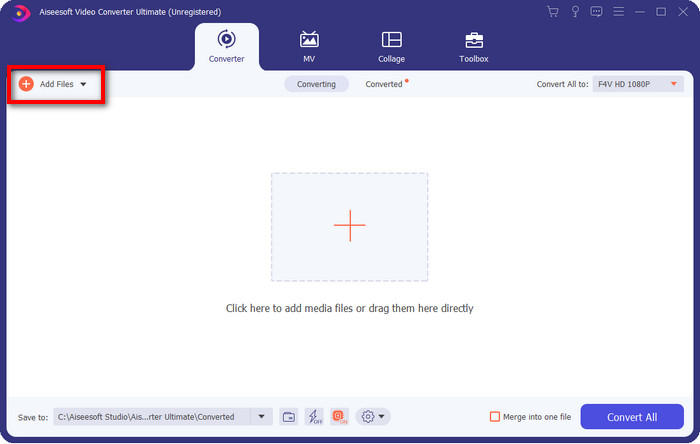
Korak 2. Nakon pokretanja softvera, možete dodati jednu ili više datoteka klikom na opciju Add Files. Pojavit će se mapa računala na vašem zaslonu, odaberite AMV datoteku i pritisnite Open za učitavanje.
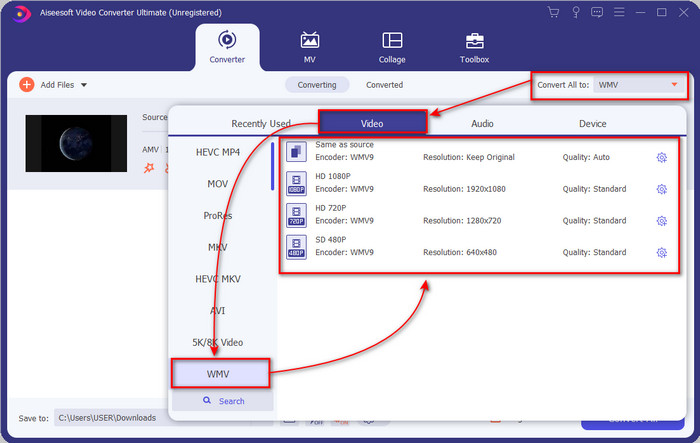
Korak 3. Klikom na opciju Convert All to prikazat će se popis formata. Pronađite format WMV i odaberite željenu rezoluciju, koder i kvalitetu.
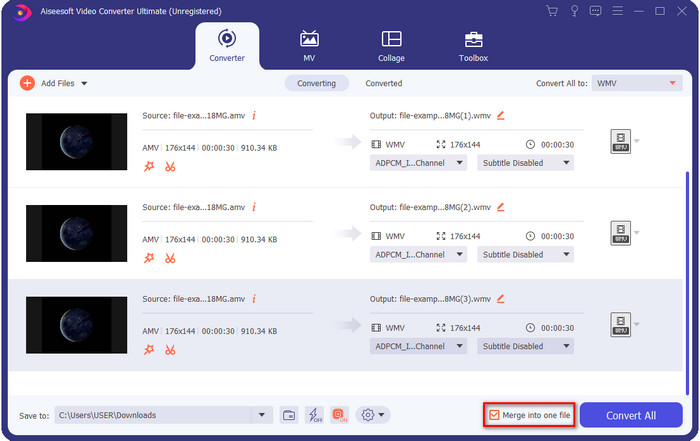
Neobavezno. Želite li svoje AMV datoteke pretvoriti u jedan WMV format? Tada trebate označiti kućicu s natpisom merge into one file (spoji u jednu datoteku).
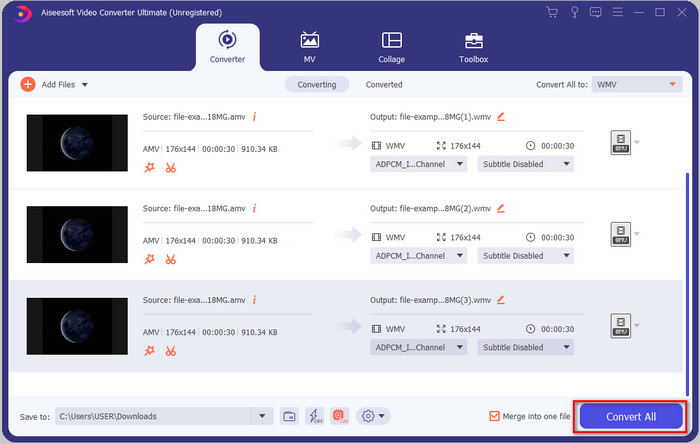
Korak 4. Pritisnite Convert All da bi započeo proces pretvaranja. Nakon završetka procesa, na zaslonu će se pojaviti mapa s konvertiranom WMV datotekom.
Dio 2. Pretvorite AMV u WMV online
Ne želite preuzeti izvanmrežni konverter jer nemate dovoljno prostora za njegovo preuzimanje? Onda upotrijebite FVC Free Online Video Converter. Jer ne trebate preuzeti cijeli konverter; umjesto toga, trebat ćete pokretač, ali on je vrlo malen i neće utjecati na prostor na vašem računalu. Štoviše, ovaj web-konverter pretvara AMV u WMV uz prilagodbu rezolucije. Međutim, brzina pretvaranja datoteke ovisit će o brzini vašeg interneta. Imate li internetsku vezu? Onda svakako isprobajte ovo i doživite online konverziju.
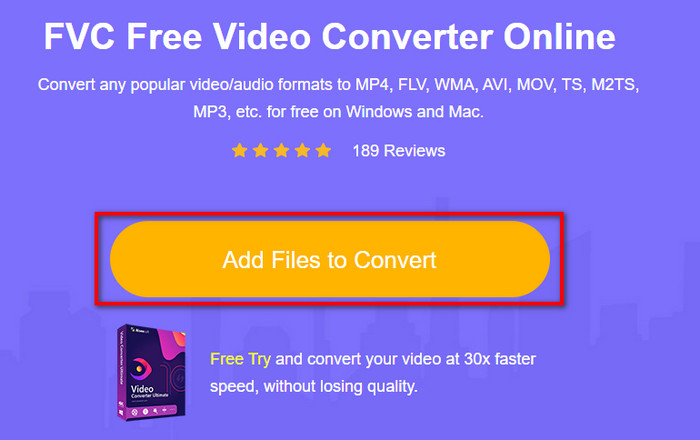
Korak 1. Kliknite ovaj link kako biste otvorili glavnu web-stranicu konvertera.
Korak 2. Klikom na Add Files to Convert pojavit će se mapa u kojoj možete pronaći AMV datoteku i pritisnuti Open.
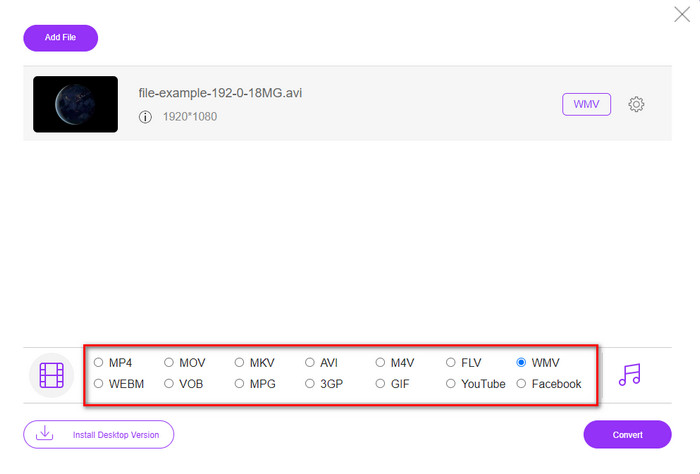
Korak 3. Odaberite format WMV koji će se prikazati na zaslonu.
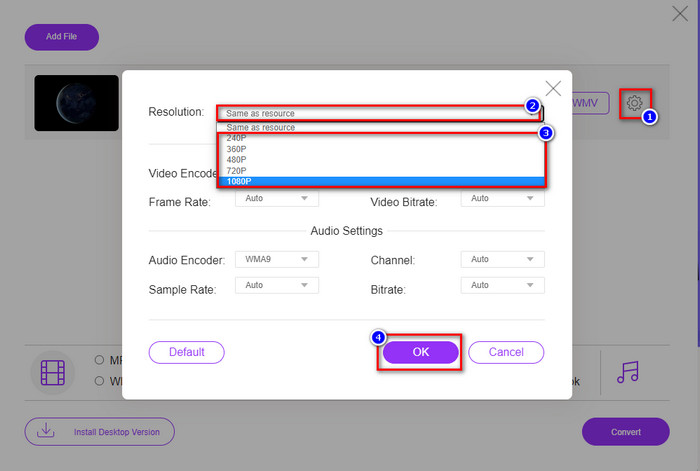
Neobavezno. Kao što smo ranije rekli, ovdje možete prilagoditi rezoluciju. Dakle, sada ćemo izmijeniti rezoluciju klikom na gumb zupčanika. Na gornjem dijelu kliknite padajući izbornik i pojavit će se popis rezolucija; odaberite jednu i pritisnite OK za nastavak.
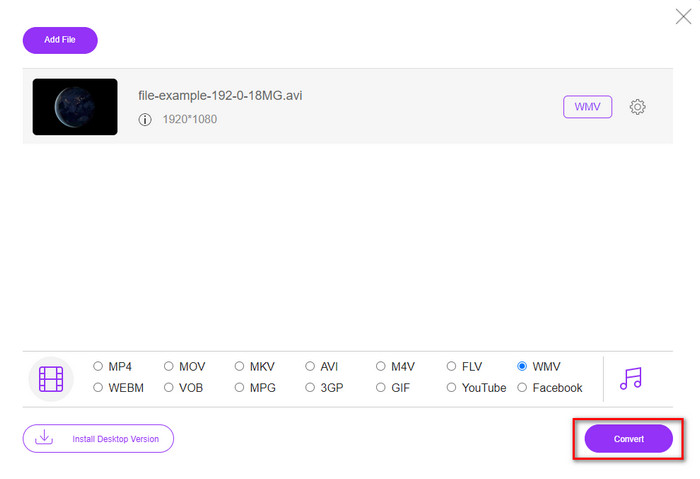
Korak 4. Ako sada želite započeti konverziju, možete kliknuti gumb Convert i proces će započeti.
Dio 3. Koja je razlika između AMV i WMV
Prije svega, ova dva medijska spremnika postala su popularna zbog svojih jedinstvenih mogućnosti formata. Ali danas ćemo proučiti koje su prednosti i nedostaci samog formata. Štoviše, navest ćemo tri aspekta postavljajući pitanje da saznamo više o AMV i WMV.
Koji format ima bolju rezoluciju medija?
Između ova dva formata, bez sumnje, WMV ima bolju kvalitetu. WMV datoteka može pohraniti i strujati video rezoluciju do 300.000 piksela za detaljniji vizualni izlaz. Ali možete postaviti stopu na rezoluciju zaslona 528x576. A za AMV, kvaliteta koju može sadržavati je 96x96 do 320x240, što je prilično nisko u usporedbi s niskom rezolucijom WMV-a. Jedan od razloga zašto AMV ima manju razlučivost je taj što mora odgovarati zaslonu kineskog media playera.
Koji format ima manju veličinu datoteke?
Ova pobjeda ide uz AMV jer je ovaj format super komprimiran. Iako WMV ima kompresor, ipak je veličina AMV-a ekonomičnija, posebno na pogonu vašeg računala, od WMV-a.
Koji je format kompatibilniji?
Možemo reći da imaju različite prednosti kada govorimo o kompatibilnosti, jer je WMV namijenjen samo Windows programima. Ako ste Mac korisnik, ne možete jednostavno koristiti ovaj format i reproducirati ga u QuickTimeu ili uređivati u iMovieju. Umjesto toga, morat ćete pretvoriti WMV u MOV kako bi bio kompatibilan. U slučaju AMV-a, ovaj format se koristi na prijenosnim kineskim medijskim playerima za reprodukciju ovog formata. No danas možete koristiti prijenosni medijski player umjesto kupnje AMV reproduktora. Međutim, traženje AMV reproduktora je prava muka jer je malo playera koji podržavaju ovu vrstu formata i koder. Možemo reći da je WMV postigao veću kompatibilnost nego AMV, osobito kada datoteku prenosimo na Windows.
Sada kada znamo razlog, u ovom je slučaju potrebno pretvoriti datoteku u novi format. Iz tog razloga morate naučiti kako pretvoriti AMV u WMV kako bi medijska datoteka bila kompatibilna sa Windows softverom.
Dio 4. Često postavljana pitanja o AMV i WMV pretvorbi
Kako pretvoriti svoj AMV u MOV?
Mnogo je tehnika i metoda koje možemo pretražiti i isprobati, a dostupne su ako ih potražimo na internetu. Ali teško je odabrati koji je alat bolji za pretvaranje AMV u MOV. Zato, da skratimo priču, kliknite ovaj link i saznajte kako pretvoriti AMV u MOV i učiniti ga kompatibilnim s macOS-om.
Mogu li koristiti VLC media player za gledanje i reprodukciju AMV-a?
Naravno, možete preuzeti VLC media player na svoj desktop kako biste reproducirali AMV datoteke bez potrebe za preuzimanjem dodatnog kodeka. Ali ako želite saznati više o VLC-u i njegovim alternativama, pročitajte ovaj članak klikom na ovaj link.
Zašto trebam komprimirati AMV?
Komprimiramo svoje medijske datoteke i AMV jer trebamo osloboditi malo prostora na tvrdom disku. Dakle, želite naučiti kako komprimirati AMV datoteke? Onda kliknite ovaj link.
Zaključak
Ova dva rješenja pružaju izvrsnost kako bi vaša konverzija iz AMV u WMV bila laka i uspješna. Nadalje, ovo su najbolja rješenja koja možemo pronaći na webu. Dakle, sada je na vama da odaberete koji pretvarač ćete koristiti za pretvaranje svoje AMV datoteke u WMV. Da biste postigli uspjeh, morate koristiti gore navedene FVC alate.
-
 Najbolji način za korištenje u pretvaranju AMV-a u AVI [Odobreno]
 Imate li poteškoća s pretvaranjem video datoteke AMV formata u AVI? Evo nekoliko savjeta koje možete pronaći samo u ovom članku.
-
 [Dokazano] 2 načina za pretvaranje AMV u FLV izvan mreže i na mreži
 Jeste li ikada razmišljali o isprobavanju pretvarača za pretvaranje vaših AMV datoteka u FLV format datoteke. Kako biste riješili svoj problem s gledanjem AMV videa, pročitajte ovaj članak da biste saznali prikladne pretvarače koje trebate koristiti.
-
 Besplatno | 3 najbolje metode za pretvaranje MP4 u WMV bez gubitka kvalitete
 Ovaj post dijeli kako pretvoriti MP4 video u WMV format na Macu ili Windowsu. Također ćemo vam ponuditi nekoliko opcija, uključujući softver za stolna računala i mrežne pretvarače putem weba. Jeste li spremni znati najbolje alate za pretvorbu MP4 u WMV?
