


 Video Converter Ultimate
 Snimač zaslona
 Video popravak
Izvanredni načini za jednostavno pretvaranje VOB u 3GP [Najbolji pretvarači]
Želite reproducirati svoju VOB datoteku na uređaju treće generacije, ali to ne možete učiniti? Tada je najbolje rješenje za vas pretvoriti VOB datoteku u 3GP datoteku. 3GP datoteke su format koji podržavaju 3G uređaji. Stoga, ako tražite najbolji način za dekodiranje VOB datoteke u 3GP, ovaj će vam članak možda dati odgovor. Naveli smo najjednostavnije i najbolje načine kako pretvoriti VOB u 3GP.

Dio 1. Kako pretvoriti pomoću FVC Video Converter Ultimate
FVC Video Converter Ultimate jedan je od najučinkovitijih pretvarača dostupnih na webu. Ovaj besplatni offline pretvarač podržava brojne formate datoteka, uključujući VOB, 3GP, MP4, MKV, MOV, AVI, FLV i više od 1000 drugih formata. Pretvarač vam također omogućuje skraćivanje duljine videa i dodavanje efekata za poboljšanje video datoteke. Štoviše, ako želite spojiti više datoteka, ovaj pretvarač nudi skupnu (batch) konverziju. Dakle, ako želite bez napora pretvoriti svoj VOB u 3GP, pročitajte više detalja u nastavku i preuzmite ga besplatno.

FVC Video Converter Ultimate
5.689.200+ preuzimanja- Može pretvoriti više od 1000 formata datoteka dostupnih na webu.
- Može serijski pretvoriti više formata datoteka.
- Ima ultra-brz proces pretvaranja i hardversko ubrzanje.
- Ima napredne značajke uređivanja za rezanje, dodavanje titlova i dodavanje vodenih žigova vašoj datoteci.
- Dostupno na svim medijskim platformama kao što su Windows i Mac.
Besplatno preuzimanjeZa Windows 7 ili novijiSigurno preuzimanje
Besplatno preuzimanjeZa MacOS 10.7 ili novijiSigurno preuzimanje
Evo koraka kako pretvoriti VOB u 3GP koristeći FVC Video Converter Ultimate:
Korak 1. Najprije preuzmite aplikaciju klikom na gumb Download za Windows ili Mac. Zatim slijedite postupak instalacije i otvorite aplikaciju.
Besplatno preuzimanjeZa Windows 7 ili novijiSigurno preuzimanje
Besplatno preuzimanjeZa MacOS 10.7 ili novijiSigurno preuzimanje
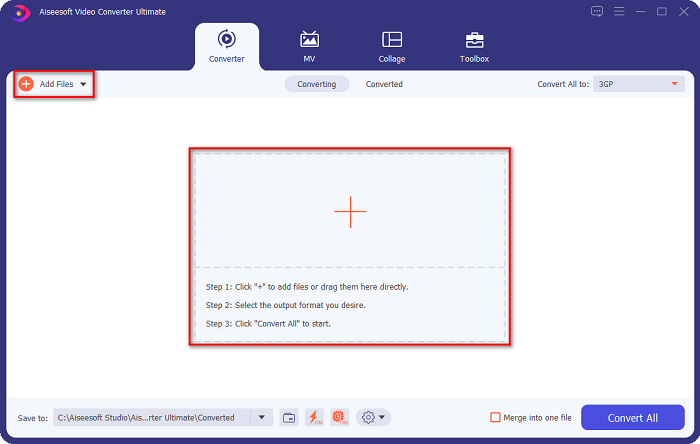
Korak 2. Kliknite gumb Add Files ili gumb sa znakom +. Pojavit će se datoteke na vašem računalu, zatim odaberite svoju VOB datoteku kako biste je dodali u red čekanja.
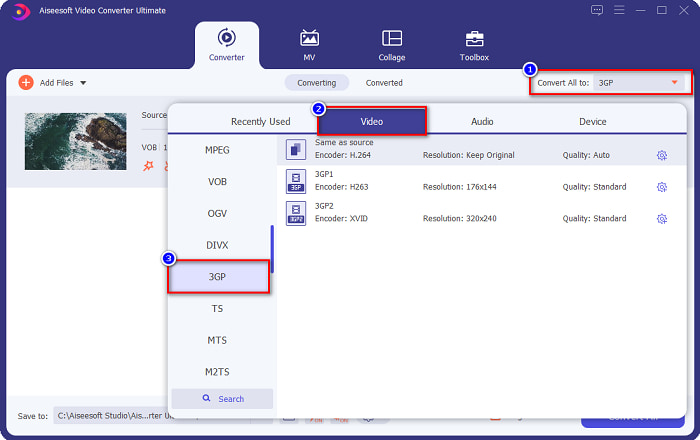
Korak 3. Za treći korak kliknite gumb Convert All to kako biste odabrali željeni izlazni format. Kliknite 3GP, zatim prijeđite na sljedeći korak.
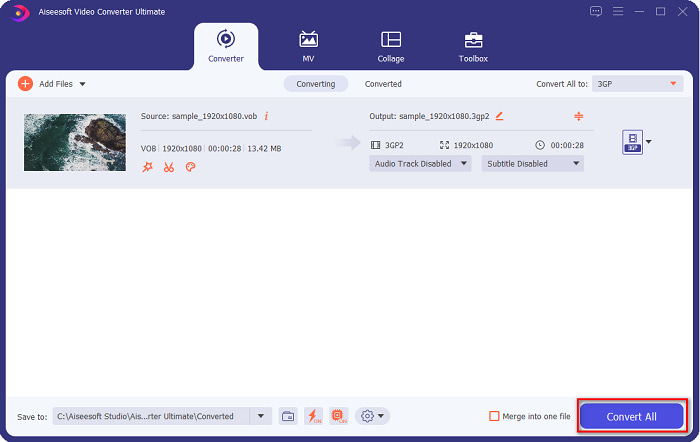
Korak 4. Nakon odabira željenog izlaznog formata, kliknite gumb Convert All kako bi vaša konverzija započela. Pričekajte nekoliko sekundi i voilà! Uz te jednostavne korake možete lako pretvoriti svoju VOB datoteku u 3GP.
Dio 2. Kako pretvoriti VOB u 3GP besplatno online
Ako želite pretvoriti svoju VOB datoteku u 3GP datoteku bez preuzimanja, možete koristiti mrežne pretvarače dostupne na webu. Pogodnost i učinkovitost korištenja mrežnog pretvarača nedvojbeno su dobri. Stoga smo ponudili dva načina za pretvaranje vaše VOB datoteke u 3GP format datoteke.
FileProInfo
FileProInfo je online pretvarač s jednostavnim grafičkim sučeljem, što ga čini prikladnim za početnike. Podržava gotovo sve standardne formate datoteka dostupne na internetu. Međutim, ovi online pretvarači sadrže mnogo nametljivih oglasa. Unatoč tome, mnogi ljudi i dalje koriste ovaj pretvarač.
Korak 1. U pregledniku potražite FileProInfo kako biste otišli na njihovu web-stranicu. Na glavnom sučelju softvera kliknite gumb Select VOB file. Zatim odaberite svoju VOB datoteku za učitavanje.

Korak 2. Zatim u okviru pored riječi to odaberite željeni izlazni format datoteke.

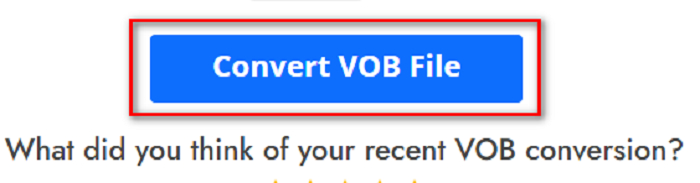
Korak 3. Na kraju kliknite Convert VOB File na donjem dijelu sučelja softvera. Zatim pričekajte da se konverzija dovrši.
I to je to! Bez puno znojenja možete svoju VOB datoteku pretvoriti u 3GP.
Pretvori365
Convert365 je online pretvarač iz VOB u 3GP koji vam omogućuje pretvaranje većine standardnih formata, uključujući VOB, 3GP, AVI, MOV, MP4, MPEG i druge. A ako tražite online pretvarač koji može normalizirati glasnoću zvuka, ovaj alat ima tu funkciju. Međutim, budući da je riječ o online alatu, možete osjetiti sporiju konverziju jer ovisi o internetskoj vezi. Nadalje, slijedite dolje navedene postupke kako biste pretvorili VOB datoteku u 3GP pomoću alata Convert365.
Korak 1. U pregledniku potražite Convert365, kliknite gumb Add Files i odaberite svoju VOB datoteku kada se prikažu datoteke na računalu.

Korak 2. Zatim na padajućem izborniku pored Convert to odaberite željeni izlazni format. Kliknite format datoteke 3GP.
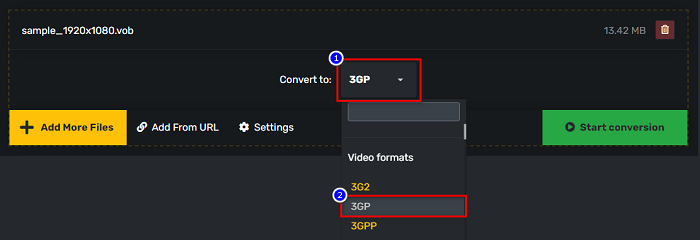
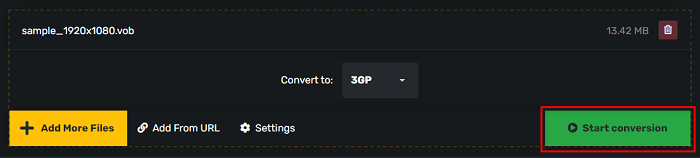
Korak 3. I na kraju, kliknite Start conversion. gumb za pretvaranje vašeg VOB-a u 3GP datoteku.
Dio 3. Koji pretvarač VOB u 3GP trebam koristiti
Prilikom odabira najboljeg pretvarača za pretvaranje VOB-a u 3GP uvijek morate uzeti u obzir brzinu, datoteke koje podržava i jedinstvenost značajki pretvarača. Preporučujemo korištenje izvanmrežnog alata FVC Video Converter Ultimate među najboljim mrežnim i izvanmrežnim pretvaračima prikazanim gore. Ovaj pretvarač nudi mnoge različite značajke koje drugi pretvarači nemaju, kao što je GIF Creator 3D maker, sredstvo za uklanjanje vodenog žiga i mnoge druge.
Štoviše, iako može dati rezultate poput profesionalnih, također ima sučelje jednostavno za korištenje tako da vam neće biti teško koristiti ga.
Dio 4. Više o VOB i 3GP
VOB ili Video Object format je spremnika datoteke koji koriste DVD-ovi. Sadrži video, audio, titlove i sadržaj izbornika. Ova vrsta datoteke ima ograničenja i ograničenja kopiranja radi zaštite od izravnog kopiranja. Nasuprot tome, 3GP datoteke su formati datoteka koji se mogu reproducirati samo na mobilnim uređajima treće generacije. Ove formate datoteka razvio je Third Generation Partnership Project (3GPP). Štoviše, ova vrsta datoteke sadrži samo malu datoteku u usporedbi s VOB datotekama, jer su napravljene za dijeljenje s 3G uređajima. 3GP može pohranjivati video i audio datoteke koje se obično koriste u 3G telefonima.
Dio 5. Često postavljana pitanja o pretvaranju VOB u 3GP
Možete li igrati 3GP na macOS-u?
3GP datoteke je nemoguće reproducirati na macOS-u, posebice u novijim verzijama QuickTimea. Međutim, možete pretvoriti svoju 3GP datoteku u format koji macOS podržava, a to je MOV. Da biste saznali više o pretvaranju 3GP datoteka u MOV, kliknite ovu poveznicu.
Hoće li pretvaranje VOB-a u 3GP utjecati na kvalitetu vaše datoteke?
Apsolutno da. Na veličinu datoteke će utjecati kada pretvorite VOB u 3GP. Budući da 3GP sadrži samo video i audio datoteke i ima manju veličinu datoteke, veličina vaše VOB datoteke bit će manja.
Je li 3GP format datoteke uobičajena datoteka?
Nažalost, danas 3GP formati datoteka nisu toliko uobičajeni jer je danas sve manje 3G telefona. Najčešća datoteka za mobilne korisnike danas je MP4 format datoteke.
Zaključak
Budući da predstavljamo najbolje i najjednostavnije pretvarače za pretvaranje VOB u MOV na Windows i Macu, zaključujemo da je FVC Video Converter Ultimate najbolji među predstavljenim online i offline alatom za pretvaranje po izboru. Ne samo da ima jedinstvene značajke koje treba isprobati, već nudi i brzu konverziju. Još uvijek sumnjate u ovaj pretvarač, preuzmite ga sada i isprobajte najbolji pretvarač VOB u 3GP.
-
 Najbolji načini za pretvaranje VOB-a u FLV [besplatno i online uključeno]
 Želite li pretvoriti VOB datoteku u FLV datoteku? Zadatak možete jednostavno izvršiti bilo putem stolnih računala ili putem mrežnih pretvarača. Pročitajte ovaj vodič i naučite kako lako i brzo transformirati VOB u FLV.
-
 Dostupna su 3 praktična pretvarača za promjenu VOB datoteke u AVI format [2021.]
 Imate problem jer VOB datoteke nisu podržane za reprodukciju? Onda ga pokušajmo pretvoriti na 3 načina prikazana u nastavku s detaljnim koracima za svaki pretvarač.
-
 Izvrsne metode za pretvaranje VOB-a u MOV
 Online video preuzimanja su zgodna, ali što ako je video u VOB formatu, a vaš ga player'ne podržava? Ovaj post će vas naučiti kako pretvoriti VOB u MOV.
