


 Video Converter Ultimate
 Snimač zaslona
 Video popravak
4 metode za uređivanje ili popravljanje MP3 metapodataka na Windows i Mac
Svatko je muzikofil, što znači da volimo glazbu jer nam pomaže da osjetimo emocije pjevača i pisaca iako ih ne vidimo vizualno. Uz glazbu svi mogu ostati povezani, a ona nam može pomoći da se oslobodimo stresa, poboljšamo svoj IQ i budemo produktivni svaki dan. Većina glazbe je u formatu MP3 jer je to standardni audio spremnik za nju. Iako možete reproducirati MP3 na svom uređaju, nećete pravilno reproducirati odgovarajući raspored ako su metapodaci pogrešni. Ne možete postaviti pravo raspoloženje ako je vaša glazbena knjižnica u neredu, što onda učiniti? Zašto ne pokušate popraviti oznake kako biste ih ispravno posložili? Ako želite znati kako uređivati MP3 metapodatke na Windowsima i Macu, ovo je pravi članak za vas, jer prikazujemo četiri različite metode koje možete koristiti.

Dio 1. Najbolji način za popravak ili uređivanje MP3 metapodataka na Windows i macOS [preporučeno]
FVC Video Converter Ultimate već je napravio korak prema tome da postane jedan od najboljih programa za popravljanje MP3 oznaka na vašem Windowsu i Macu. Ovaj alat podržava učitavanje MP3, WAV, WMA, AAC i mnogo drugih audio formata kako bi se riješio isti problem s metapodacima. Također je moguće ukloniti skrivene metapodatke do kojih ne možete doći drugim uređivačima oznaka.
Ne samo to, može pretvoriti MP3 u drugi audio format ako želite, a također nudi puno funkcija i značajki koje se nalaze unutar Toolboxa; možete ih provjeriti ako ga preuzmete. Za nekoliko minuta ovaj program može riješiti problem što je brže moguće. Niste sigurni je li istina? Srećom, pisani vodič u nastavku će naučiti kako uređivati MP3 metapodatke kako bi dokazao da to možete učiniti brzo, kako mi kažemo.
Korak 1. Kliknite gumb za preuzimanje u nastavku i odaberite koji od dvaju operacijskih sustava trenutačno koristite. Nakon preuzimanja ga brzo instalirajte, otvorite alat i prijeđite na sljedeći korak.
Besplatno preuzimanjeZa Windows 7 ili novijiSigurno preuzimanje
Besplatno preuzimanjeZa MacOS 10.7 ili novijiSigurno preuzimanje
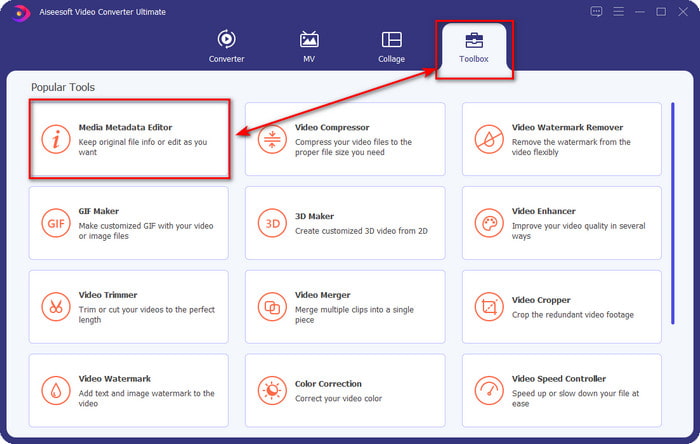
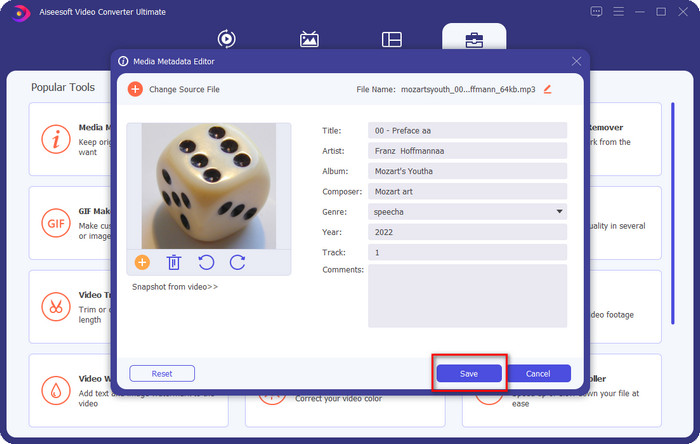
Korak 2. Odaberite Toolbox, a zatim ispod njega kliknite Media Metadata Editor. Kao što smo rekli u uvodu, postoji više funkcija koje možete koristiti u Toolboxu, a koje drugi uređivač ne nudi.
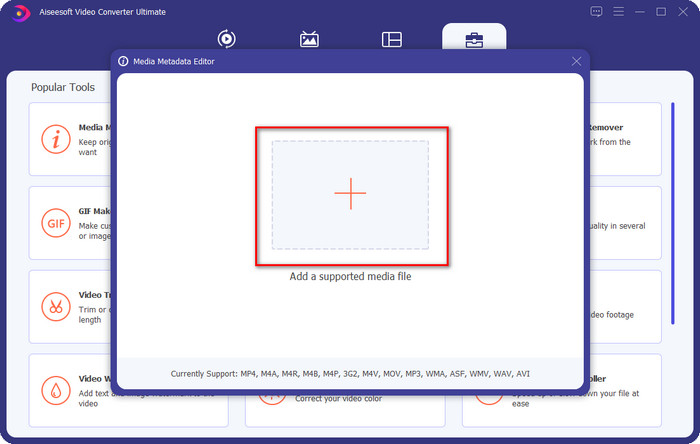
Korak 3. Na zaslonu će se pojaviti mali prozor; kliknite ikonu +. Pronađite audio ili MP3 datoteku u mapi koja će se prikazati, kliknite datoteku i pritisnite Open da biste je učitali.
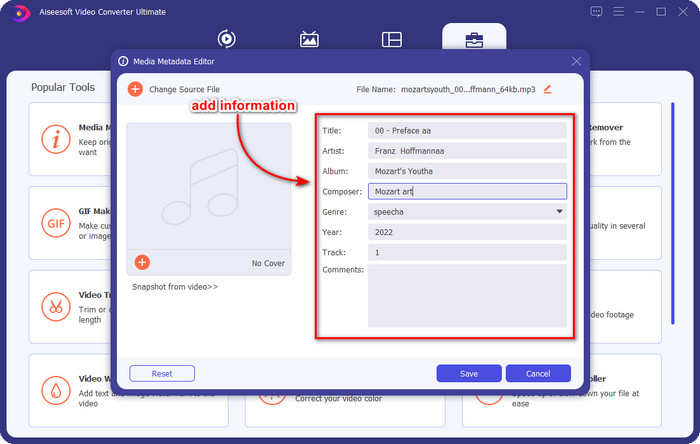
Korak 4. Uredite i popravite metapodatke prema svojim potrebama; kliknite svaki text box kako biste dodali informacije.
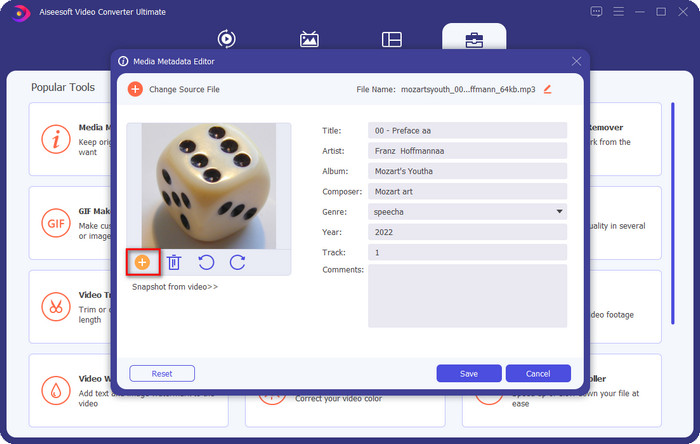
Neobavezno. S ovim alatom također možete dodati ili popraviti metapodatke o omotu albuma MP3 datoteke tako da kliknete ikonu +; odaberite sliku koju želite koristiti kao omot u mapi i kliknite Open za nastavak.
Korak 5. Ako ste završili s dodavanjem i popravljanjem metapodataka svoje MP3 datoteke, pritisnite gumb Save kako biste spremili promjene napravljene na audio datoteci. Eto, time ste sada bez napora popravili audio oznake uz pomoć ultimativnog alata.
Dio 2. 3 besplatne metode za promjenu MP3 oznaka na radnoj površini
iTunes
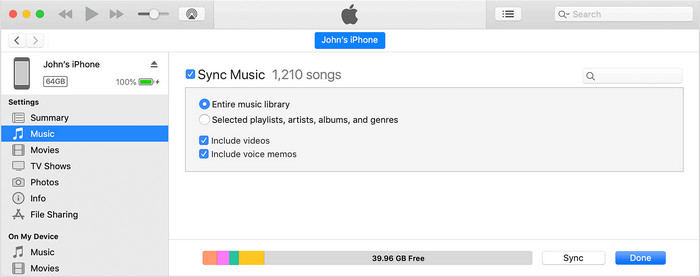
iTunes je ugrađeni program koji vam može pomoći urediti MP3 oznake na macOS X. Radi isto što i Groove Music kada je riječ o uređivanju metapodataka vaše audio datoteke. No s ovim alatom možete kupovati glazbu i reproducirati je ovdje što je brže moguće. Osim toga, glazba koja dolazi iz ove aplikacije već ima oznake, a ako glazba koju ste preuzeli nema oznake, možete ih ovdje dodati. Slijedite korake u nastavku da biste saznali kako to učiniti.
Korak 1. Otvorite iTunes na svom Macu.
Korak 2. Kliknite audio datoteku i odaberite Get Info.
Korak 3. Popravite oznake i kliknite OK da biste spremili promjene.
MP3Tag
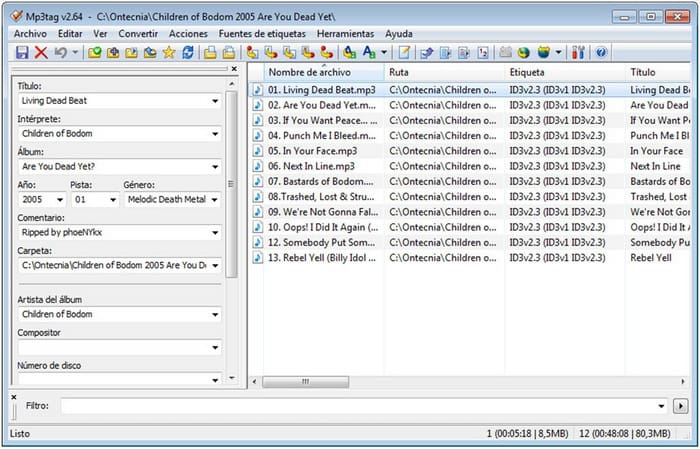
MP3 Tag je namjenski i najbolji program za popravljanje MP3 oznaka koji možete preuzeti na svoj Windows. Uz ovaj alat možete se automatski povezati s glazbenom bazom podataka kako biste dobili točne metapodatke. Iako se alat ne može usporediti s drugim ugrađenim softverom, i dalje vidimo da je moguće prilagoditi metapodatke uz pomoć ovog alata uz prosječan skup podržanih formata. Ako želite preuzeti i koristiti ovaj alat, slijedite korake u nastavku.
Korak 1. Preuzmite softver na svoje računalo i otvorite ga.
Korak 2. Drag and drop (povucite i ispustite) MP3 datoteku u središte, kliknite audio datoteku i na lijevoj strani možete urediti oznake.
Korak 3. Da biste spremili uređivanja koja ste napravili, kliknite ikonu save.
Groove glazba
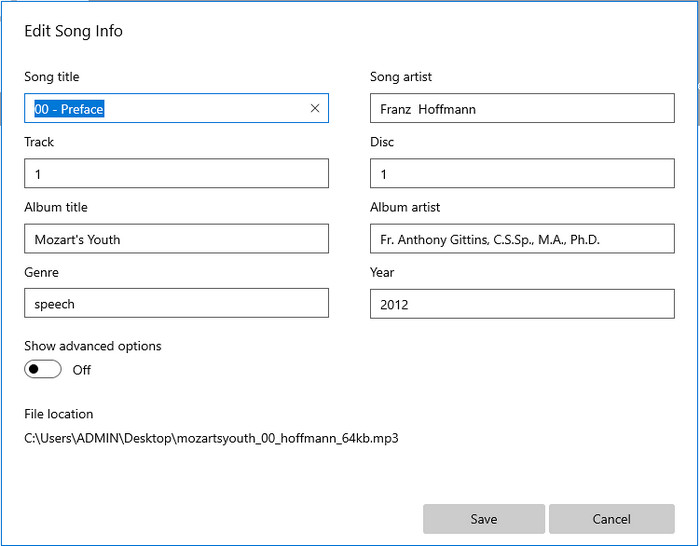
Pretpostavimo da nemate dovoljno prostora na svom disku. Je li moguće naučiti kako urediti MP3 oznake na Windowsu 10? Tada je Groove Music tu da pomogne korisnicima Windowsa da promijene oznake na svojim audio datotekama. S ovim alatom možete s lakoćom reproducirati gotovo svaku audio datoteku spremljenu na vašem disku. Ako želite znati kako koristiti ovu ugrađenu aplikaciju, slijedite korake u nastavku.
Korak 1. Kliknite ikonu windows na zaslonu i upišite Groove Music da biste je otvorili. Nakon što kliknete, alat će se automatski postaviti.
Korak 2. Desnom tipkom miša kliknite audio datoteku i otvorite Edit Info.
Korak 3. Promijenite metapodatke u Edit Song Info i kliknite Save kada sve završite.
Dio 3. Često postavljana pitanja o uređivanju metapodataka na MP3
Je li sigurno uređivati metapodatke MP3 online?
Pa, da, možete urediti metapodatke na svom MP3-u na mreži ako to želite. Ali zapamtite da postoje web-mjesta s nezaštićenom mrežom, pa je prijava loša odluka koju ćete donijeti. Dakle, da biste to izbjegli, morate koristiti alate koje smo gore predstavili kako biste sigurno popravili svoje mp3 metapodatke.
Jesu li metapodaci važni?
Da, svakako. Metapodaci igraju značajnu ulogu u svakoj medijskoj datoteci koju imamo. Uz njih možete lako utvrditi što se nalazi unutar datoteke, kao što su lokacija, vrijeme, datum, informacije i još mnogo toga. Štoviše, informacije koje ovdje dodajemo samo su jednostavne ideje o metapodacima, a ako želite znati više o metapodacima, morate kliknuti ovu poveznicu i pročitati što su metapodaci.
Mogu li vidjeti metapodatke na svom MP3-u?
Apsolutno da, možete, a ako ne znate kako pregledati metapodatke, možete pročitati ovaj članak i slijediti navedene korake kako biste ih ispravno pregledali.
Zaključak
Doista, sva četiri najbolja programa za popravljanje .mp3 oznaka sada su vam nadohvat ruke, što znači da sada možete odabrati alat prema vlastitim potrebama. S činjeničnim informacijama koje navodimo u ovom članku lako možemo urediti ili popraviti oznake na našim MP3 datotekama. Iako su metode koje navodimo izvrsne, i dalje biramo FVC Video Converter Ultimate umjesto drugih ugrađenih alata ili aplikacija trećih strana. Jer ovaj alat nudi najnaprednije i najsnažnije uređivanje oznaka koje će vam trebati bez prevelikog truda. Dakle, ako želite imati ovaj alat, možete kliknuti gumb za preuzimanje i slijediti korake koje smo gore napisali.
-
 5 najviših uređivača MP4 metapodataka [Ažurirano 2022.]
 Kako mogu promijeniti svoje MP4 metapodatke? Najbolji način za promjenu metapodataka vašeg MP4 je korištenje uređivača oznaka koji podržava MP4 format poput uzorka koji navodimo u nastavku.
-
 Top 5 AVI uređivača video oznaka po izboru korisnika za 2022
 Koji je najbolji uređivač AVI oznaka koji mogu koristiti? Tržište uređivača oznaka za AVI datoteke je preširoko. Stoga ćemo danas predstaviti pet najodabranijih urednika u 2022. godini.
-
 4 učinkovita uređivača MKV metapodataka za Windows i macOS
 Ne mogu pronaći MKV uređivač metapodataka na tržištu. Što trebam koristiti? Imate isti problem? Ako je tako, nastavite čitati ovaj blog kako biste saznali koje alate trebate koristiti.
