


 Video Converter Ultimate
 Snimač zaslona
 Video popravak
Nevjerojatno besplatno pretvorite MOV u DivX pomoću najboljih pretvarača
Danas je nastalo mnogo formata datoteka i teško je odabrati koju vrstu datoteke ćete koristiti na svojoj platformi. Svaka datoteka ima različite funkcije, kodeke i veličinu. Ovaj će se članak usredotočiti na upoznavanje ova dva formata i na to kako možete pretvoriti svoju MOV datoteku u DivX format. Zato pročitajte članak do kraja kako biste besplatno pretvorili MOV u DivX na Macu i Windowsu.

Dio 1. Zašto pretvoriti MOV u DivX
MOV datoteka je format medijske datoteke spremljen u QuickTime File Format (QTFF). To je format koji se često koristi jer može pohranjivati filmove, TV programe i videoisječke. Osim toga, Apple je razvio ovaj format datoteke, što ga čini reproduciranim na svim medijskim playerima koje Mac podržava. Stoga, ako želite da se vaša MOV datoteka može reproducirati na drugim Windows OS medijskim playerima, trebate pretvoriti MOV u DivX format datoteke.
Dio 2. Kako pretvoriti MOV u DivX na Macu pomoću Ultimate Converter
Jedan od najkorištenijih i vjerojatno najboljih izvanmrežnih konvertera koje možete pronaći na tržištu je FVC Video Converter Ultimate. Ovaj konverter ima fantastične značajke koje možete koristiti, poput dodavanja efekata na vašu datoteku, obrezivanja i rotiranja te ima 3D kreator. Štoviše, ovaj konverter podržava ogroman broj formata datoteka kao što su MOV, DivX, XviD, AVI, MP4, MKV, FLV, WMV i više od 1000 drugih formata. Iako ovaj konverter može pretvoriti MOV u DivX datoteku s profesionalnim izlazom, ima jednostavno sučelje, što ga čini alatkom prilagođenom korisnicima. Pročitajte opise u nastavku kako biste saznali više o FVC Video Converter Ultimate.
Značajke:
◆ Može pretvoriti datoteke munjevitim procesom pretvorbe.
◆ Podržava više od 1000 formata datoteka, uključujući MOV, DivX, XviD, MP4, AVI, WebM, M4V i mnoge druge.
◆ Nudi skupnu pretvorbu za spajanje više formata datoteka u jedan.
◆ Ima napredne značajke poput uređivanja, poboljšanja i sažimanja datoteke.
◆ Može se preuzeti na svim multimedijskim platformama, uključujući Mac i Windows.
Evo jednostavnih koraka za pretvaranje MOV u DivX pomoću FVC Video Converter Ultimate.
Korak 1. Preuzmite FVC Video Converter Ultimate klikom na gumb Download u nastavku za Mac. Zatim slijedite postupak instalacije.
Besplatno preuzimanjeZa Windows 7 ili novijiSigurno preuzimanje
Besplatno preuzimanjeZa MacOS 10.7 ili novijiSigurno preuzimanje
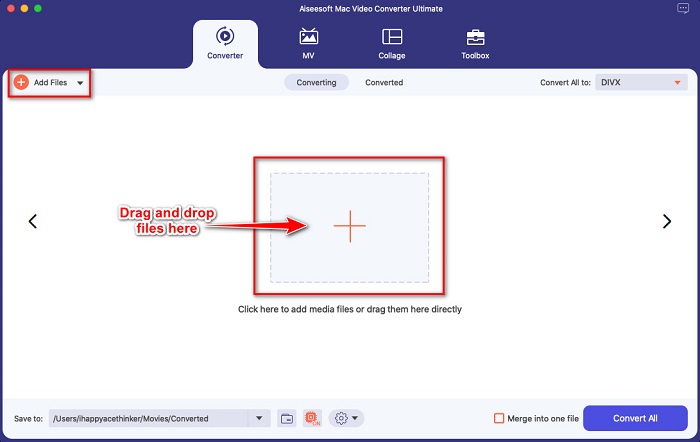
Korak 2. Zatim na glavnom sučelju softvera kliknite gumb Add Files ili povucite i ispustite svoju MOV datoteku na gumb sa znakom +.
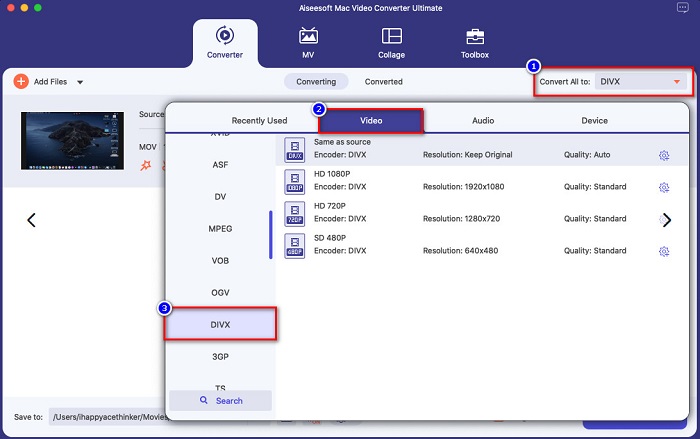
Korak 3. Zatim odaberite izlazni format datoteke klikom na gumb Convert All to, a zatim odaberite format datoteke Divx.
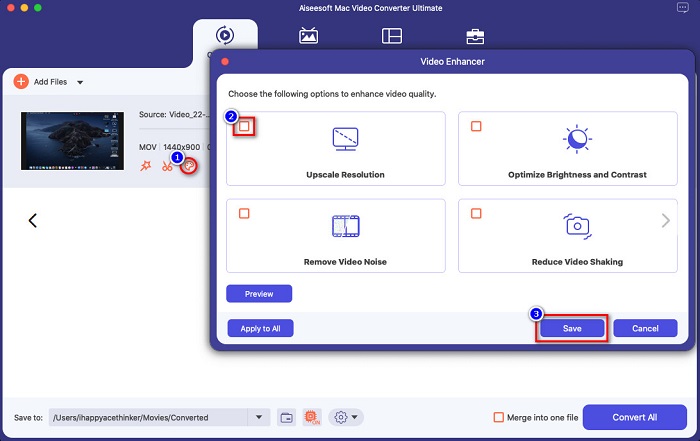
Neobavezno. Ako želite poboljšati svoju video datoteku, kliknite ikonu nalik kistu. Zatim označite kućicu svake opcije koju želite poboljšati na datoteci. Kliknite Save da primijenite promjene. Ako to ne želite, prijeđite na sljedeći dio.
Korak 4. Na kraju kliknite gumb Convert All da biste započeli transkodiranje svoje MOV datoteke u DivX format.
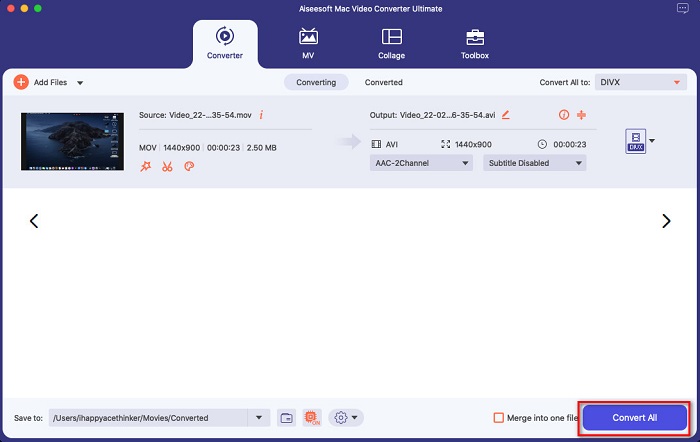
Samo pričekajte nekoliko sekundi i to je to! Svoju MOV datoteku možete pretvoriti u DivX datoteku jednostavno kao ABC.
Dio 3. 2 opcije za pretvaranje MOV u DivX Online
Ako ne biste trebali ništa preuzimati kada pretvarate MOV datoteku u DivX, imamo dvije opcije koje možete koristiti. Isprobali smo poznate pretvarače koji se mogu pronaći na webu i među njima odabrali dva najbolja.
Opcija 1. Convertio
Vjerojatno ćete vidjeti ovaj konverter u rezultatima pretraživanja kada tražite MOV u DivX konvertere. Convertio je mrežni konverter koji vam omogućuje besplatnu internetsku pretvorbu MOV u DivX. Podržava mnoge formate datoteka kao što su MOV, DivX, MPG, WebM, M4V i druge. Osim toga, ima jednostavno sučelje, što ga čini alatom prikladnim za početnike. Međutim, budući da ovisi o internetu, možete iskusiti sporiji proces pretvorbe.
Korak 1. U svom pregledniku potražite Convertio. Na glavnom sučelju alata kliknite gumb Choose Files. Pojavit će se vaše datoteke na računalu, zatim odaberite svoju MOV datoteku.

Korak 2. Zatim kliknite padajući izbornik kako biste odabrali željeni izlazni format datoteke. Kliknite na panel Video, zatim kliknite format datoteke DivX.

Korak 3. Kliknite gumb Convert da biste u završnom koraku započeli proces pretvorbe.

Opcija 2. Evano
Vjerojatno ste već vidjeli ovaj mrežni pretvarač ako ste korisnik Maca. Evano je internetski konverter koji vam omogućuje pretvorbu MOV u DivX. Ovaj internetski konverter ima jednostavno korisničko sučelje i podržava razne audio i video formate. Osim toga, ne sadrži oglase, za razliku od mnogih drugih mrežnih konvertera.
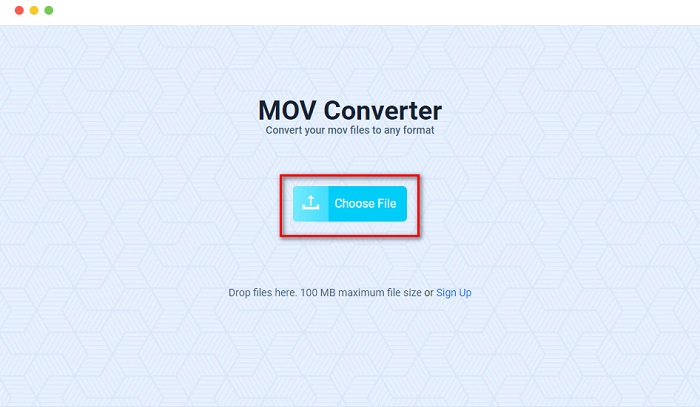
Korak 1. U svom pouzdanom pregledniku potražite mrežni konverter Evano. Na glavnom sučelju softvera kliknite gumb Choos File, zatim će se pojaviti mape vašeg računala gdje ćete odabrati svoju MOV mapu za učitavanje.
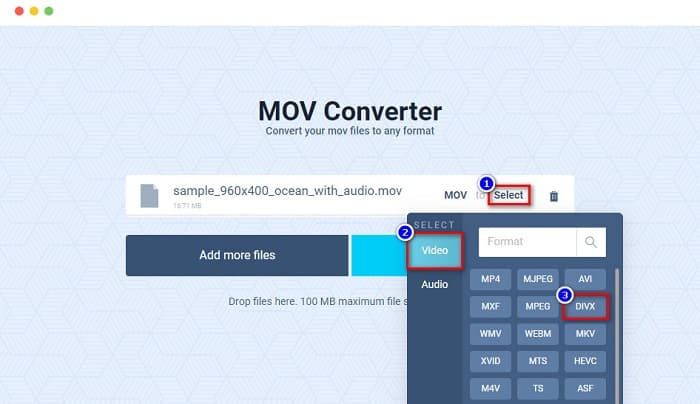
Korak 2. Nakon učitavanja datoteke kliknite opciju Select kako biste odabrali željeni izlazni format datoteke. Zatim kliknite format DivX.
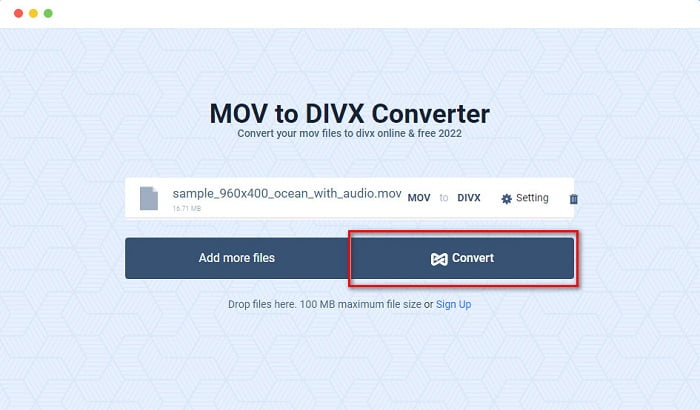
Korak 3. Zatim kliknite gumb Convert kako biste pretvorili MOV u DivX.
Dio 4. Kako pretvoriti pomoću besplatnog pretvarača
Još jedan način da pretvorite svoju MOV datoteku u DivX je korištenje besplatnog konvertera. Jedan od najkorištenijih besplatnih konvertera je Prism Video File Converter. Ovaj konverter je besplatan za preuzimanje i dostupan je na Windowsu i Macu. Također je siguran za korištenje, pa mnogi ljudi pomoću ove aplikacije pretvaraju datoteke. Međutim, neki korisnici imaju poteškoća s korištenjem ovog konvertera jer mu je sučelje pomalo teško za razumjeti. Ipak, to je i dalje izvrstan način za besplatnu pretvorbu MOV u DivX.
Korak 1. Preuzmite Prism Video File Converter na svoj Mac uređaj. Slijedite postupak instalacije, zatim otvorite aplikaciju. Kliknite gumb Add File(s) kako biste na glavno sučelje softvera učitali svoju MOV datoteku.
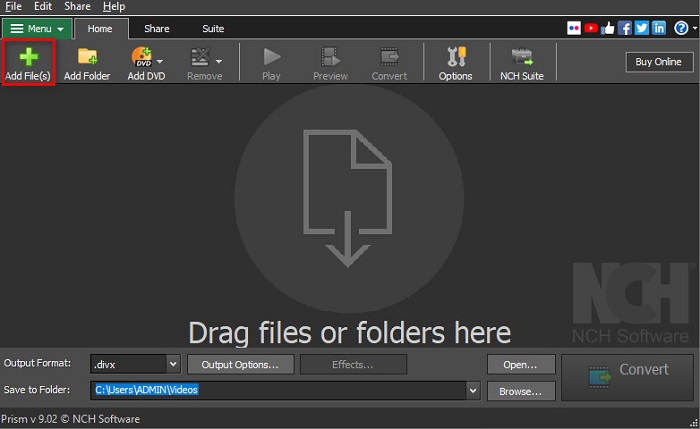
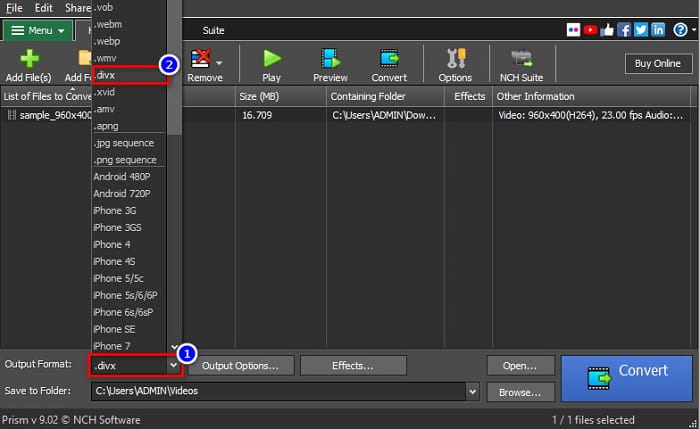
Korak 2. Zatim, na padajućem izborniku pokraj Output Format, kliknite format datoteke DivX.
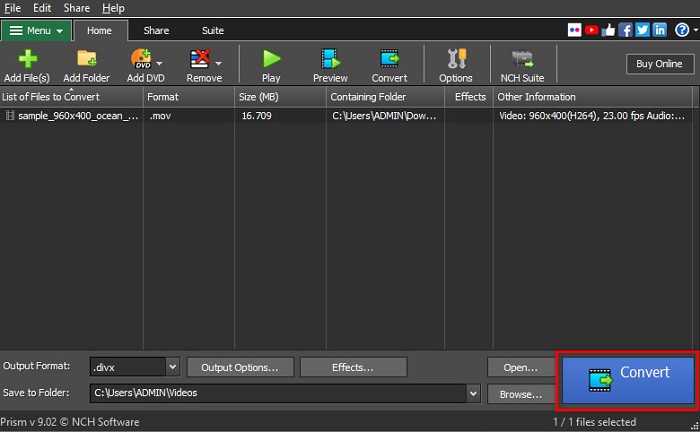
Korak 3. Za kraj kliknite gumb Convert koji se nalazi u donjem desnom kutu sučelja softvera.
Dio 5. Usporedba MOV i DivX
| MOV | VS | DivX |
| Podržavaju samo Apple uređaji | Podržani uređaj | Podržavaju ga gotovo svi uređaji uključujući Mac i Windows |
| Nekomprimirano | Komprimirano/Nekomprimirano | Komprimirano |
| Sadrži veliku datoteku | Veličina datoteke | Ima malu veličinu datoteke |
| MOV je najbolja upotreba za uređivanje videa | Najbolja upotreba za | DivX je najbolja upotreba za komprimiranje veličine datoteke do dvanaestine izvorne veličine datoteke |
| Video | kodek | Video |
Dio 6. Često postavljana pitanja o pretvaranju MOV u DivX
Možete li reproducirati MOV na Windows Media Playeru?
Nažalost, ne. Windows Media Player ne podržava MOV formate datoteka. Ali ako želite reproducirati MOV datoteku u Windows Media Playeru, možete pretvoriti MOV u WMV format. Da biste saznali više o pretvaranju MOV u WMV, kliknite ovu poveznicu.
Utječe li pretvaranje MOV-a u DivX na veličinu datoteke?
Da. Veličina datoteke će se smanjiti jer se DivX datoteka može komprimirati do dvanaestine izvorne veličine.
Podržava li QuickTime DivX datoteke?
Ne. QuickTime je ugrađeni medijski player za Mac koji ne podržava DivX formate datoteka. Međutim, možete pretvoriti DivX datoteke u MKV, što QuickTime podržava.
Zaključak
Eto, to je sve! Ne trebate više tražiti rješenja za pretvaranje MOV u DivX jer ovdje imate sve što vam je potrebno. Izvanmrežni, mrežni i besplatni konverteri prikazani iznad najbolji su načini za pretvaranje vaše MOV datoteke u DivX. Na vama je koji ćete konverter koristiti, ali ako želite koristiti vrhunski konverter, preuzmite FVC Video Converter Ultimate odmah.
-
 2 jednostavna načina za pretvaranje MOV datoteka u FLV na sustavu Windows / Mac
 Kako besplatno pretvoriti MOV u FLV? Ovdje su najbolji video pretvarači na stolnim računalima i na mreži za pretvorbu vaše MOV datoteke u FLV u nekoliko sekundi bez plaćanja i jedne lipe.
-
 MOV u GIF - Kako besplatno pretvoriti MOV u animirani GIF na Macu, računalu i na mreži
 Što je GIF? Kako pretvoriti video u GIF? Kako promijeniti MOV u animirani GIF na mreži? Ovaj post govori o 3 načina pretvaranja MOV -a u GIF na mreži, na Mac/PC -u.
-
 4 učinkovita načina za pretvaranje MOV u AVI na PC-u i Macu [2021]
 Želite li znati koji je najbolji MOV u AVI konverter na webu? I zašto bi FVC Ultimate Video Converter mogao biti pravi za vas.
