


 Video Converter Ultimate
 Snimač zaslona
 Video popravak
7 jednostavnih načina da brzo pretvorite HEIC u PNG u sekundi
Želite svoj HEIC‑datoteku učiniti široko kompatibilnom s drugim uređajima? Imamo upravo ono što tražite! Ovaj članak prikazuje vam najbolje načine kako pretvoriti svoju HEIC‑datoteku u PNG bez muke. Zato se pripremite dok zajedno istražujemo najbolje načine za lako pretvaranje HEIC u PNG.

Dio 1. Zašto pretvoriti HEIC u PNG format
HEIC format datoteke je format slike koji je kreirao Apple. To je format slike koji Apple uređaji obično koriste. Iako je visoke rezolucije, ne zauzima previše prostora na vašem uređaju. Međutim, HEIC datoteke nisu kompatibilne s uređajima koji nisu Apple. Nasuprot tome, PNG, što je skraćenica za Portable Graphics Format, je format slikovne datoteke stvoren da zamijeni GIF formate.
To je najčešće korišteni format slike koji nije komprimiran, što znači da ima veliku veličinu datoteke. Ipak, gotovo svi uređaji podržavaju ovaj format slikovne datoteke. Dakle, ako želite otvoriti svoju HEIC sliku na drugim uređajima osim Applea, bolje je pretvoriti u PNG format datoteke.
Dio 2. 5 jednostavnih načina za pretvaranje vaše HEIC datoteke u PNG datoteku na mreži
Traženje najboljih načina kako pretvoriti HEIC u PNG prilično je teško. Međutim, tražili smo najbolje i najjednostavnije metode za promjenu HEIC-a u PNG format datoteke.
Koristite besplatni FVC HEIC u PNG Converter
Najbolji način za pretvaranje HEIC u PNG jest korištenje alata za konverziju. A najbolji alat koji smo pronašli na internetu je FVC Free HEIC to PNG Converter. Ovaj pretvarač je online alat koji praktično pretvara vašu HEIC‑datoteku u PNG format. Osim toga, ako želite grupno pretvoriti svoje HEIC‑datoteke u PNG, ovaj alat ima i tu funkciju za vas.
Također je dostupan u gotovo svim uobičajenim preglednicima što ga čini alatom bez ograničenja preglednika. Nadalje, ima jednostavno softversko sučelje i nema ograničenja veličine datoteke, tako da možete pretvoriti HEIC datoteke bez razmišljanja o veličini datoteke. Stoga, slijedite jednostavan vodič u nastavku ako ste zainteresirani za korištenje ovog mrežnog pretvarača HEIC u PNG.
Korak 1. U svom pregledniku potražite FVC Free HEIC to PNG Converter. Također možete kliknuti ovaj link kako biste izravno otvorili njihovu web‑stranicu. Ovako izgleda početno sučelje:

Korak 2. Zatim kliknite gumb Add HEIC/HEIF File(s). Pojavit će se mape na vašem računalu, gdje ćete odabrati svoju HEIC‑datoteku.
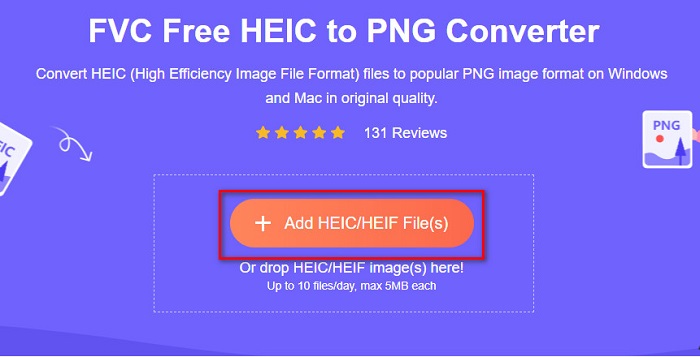
Korak 3. Zatim će se ponovno pojaviti mape na vašem računalu, gdje ćete odabrati svoju HEIC‑datoteku. Pritisnite Open. Tada će započeti pretvorba vaše HEIC‑datoteke u PNG.

Korak 4. Na kraju, u sučelju softvera kliknite gumb Download kako biste preuzeli svoju PNG‑datoteku.

Jednostavno, zar ne? Svoju HEIC datoteku možete pretvoriti u PNG datoteku slijedeći ove jednostavne korake.
Koristite Xconvert.com
Xconvert je besplatni online HEIC u PNG pretvarač koji jednostavno pretvara HEIC datoteke u PNG datoteke. Ovaj online pretvarač ima lako razumljivo sučelje, što je korisno za početnike. Štoviše, prilikom korištenja ovog online pretvarača možete promijeniti i rezoluciju slike. Međutim, budući da ovisi o internetu, možete iskusiti sporiju konverziju kada je internetska veza slaba. Također sadrži oglase koji vam mogu smetati.
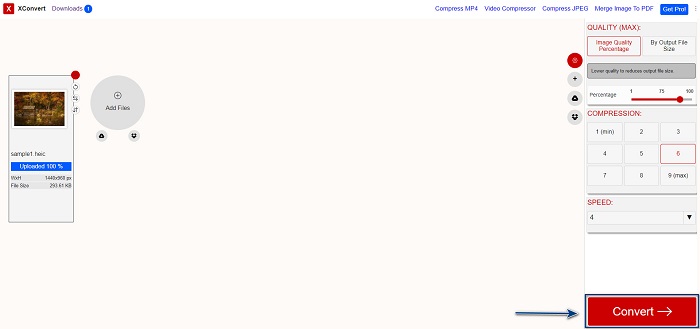
Korak 1. U pregledniku potražite Xconvert.com. Na njihovoj web‑stranici kliknite gumb Add Files, zatim će se pojaviti vaše datoteke na računalu, pa odaberite svoju HEIC‑datoteku.

Korak 2. Vaša će se slika prenijeti u sučelje softvera. Nakon učitavanja, kliknite gumb Convert koji se nalazi u donjem desnom kutu sučelja. Zatim pričekajte da vaša datoteka bude spremna za preuzimanje i prijeđite na sljedeći korak.
Korak 3. Kada je vaša datoteka spremna, kliknite gumb Download kako biste preuzeli svoju PNG‑datoteku; iznad gumba za preuzimanje vidjet ćete i izlaznu veličinu i koliko je vremena bilo potrebno za pretvorbu.

Koristite Zamzar
Još jedan način za online pretvaranje HEIC u PNG je korištenje online pretvarača Zamzar. Vjerojatno ste već naišli na ovaj pretvarač kada ste tražili HEIC u PNG konverter. Ovaj pretvarač je dostupan u gotovo svim popularnim preglednicima. Osim toga, ima jednostavno korisničko sučelje, što ga čini vrlo praktičnim za uporabu. Ipak, vaša datoteka može postati oštećena ako dođe do prekida internetske veze tijekom procesa pretvorbe. Unatoč tome, mnogi korisnici rabe ovaj pretvarač kako bi promijenili HEIC u PNG datoteku.
Korak 1. U pregledniku koji koristite potražite Zamzar. Na njihovoj web‑stranici kliknite gumb Add Files. Pojavit će se datoteke na vašem računalu, pa prenesite svoju HEIC sliku.

Korak 2. Nakon prijenosa HEIC‑datoteke, kliknite gumb drop-down te odaberite PNG kao izlazni format datoteke.

Korak 3. Na kraju kliknite gumb Convert Now kako biste pretvorili svoju HEIC‑datoteku u PNG format. Zatim preuzmite svoju PNG‑datoteku. Samo pričekajte nekoliko sekundi i to je to!

Koristite Conversion Tools.io
Conversion Tool je online HEIC u PNG pretvarač s jednostavnim korisničkim sučeljem. Može vrlo brzo pretvoriti vašu HEIC‑datoteku u PNG. Nadalje, ne sadrži mnogo oglasa, za razliku od nekih drugih online pretvarača. No, njegova je mana to što možete pretvoriti samo deset datoteka dnevno i postoji ograničenje veličine datoteke. Ako ipak pretvarate male datoteke, ovaj alat bi vam mogao savršeno odgovarati.
Korak 1. U pregledniku potražite Conversion Tools.io. Zatim kliknite gumb Browse na glavnom sučelju softvera ili povucite i ispustite svoju HEIC‑datoteku na gumb Browse.

Korak 2. Nakon toga kliknite gumb Run Conversion kako biste započeli pretvaranje svoje HEIC‑datoteke u PNG. Zatim pričekajte da se vaša slika učita i prijeđite na sljedeći korak.

Korak 3. Za kraj kliknite gumb Download kako biste preuzeli svoju PNG‑datoteku.

Koristite CDKM
Posljednji alat koji ćemo vam predstaviti je CDKM. Ovaj alat omogućuje vam da HEIC datoteke pretvorite u PNG u samo nekoliko klikova. Ipak, korištenje ovog online pretvarača može potrajati nekoliko sekundi, ovisno o brzini vaše internetske veze. Također sadrži oglase koji vam mogu biti iritantni. Ipak, nema ograničenja veličine datoteke, pa ga se svakako isplati isprobati.
Korak 1. U svom pregledniku potražite CDKM online converter. Na glavnom sučelju softvera kliknite gumb Choose Files. Pojavit će se mape na vašem računalu, zatim odaberite svoju HEIC datoteku za prijenos.

Korak 2. Zatim kliknite gumb Start Conversion kako biste započeli proces pretvorbe.

Korak 3. Na kraju, pomaknite se malo niže i vidjet ćete gumb Download. Kliknite gumb Download kako biste preuzeli svoju PNG‑datoteku.

Dio 3. Pretvorite HEIC u PNG na Macu
Apple uređaji podržavaju HEIC formate datoteka, a korištenjem Maca možete izvorno otvoriti HEIC datoteku. Ali ako želite pretvoriti svoju HEIC datoteku u PNG, možete je promijeniti pomoću aplikacije Photo na Macu. U skladu s tim, ako ste korisnik Maca, bolje pročitajte ovaj dio.
Korak 1. Najprije povucite i ispustite svoju HEIC‑datoteku u Photo App. Zatim pregledajte svoju HEIC fotografiju i kliknite File > Export > Export 1 Photo.

Korak 2. Nakon toga, pod stavkom Photo Kind odaberite izlazni format koji želite. Odaberite format datoteke PNG.

Korak 3. Zatim kliknite gumb Export, a potom odaberite odredište za izlaznu datoteku. Vidjet ćete da je vaša HEIC‑datoteka promijenjena u PNG format.

Dio 4. Pretvorite HEIC datoteku u PNG na iPhoneu
Ako koristite iPhone, možete otvoriti HEIC datoteku na svom uređaju. Ali ako želite pretvoriti svoju HEIC datoteku u PNG pomoću iPhone uređaja, onda imamo način za vas. Slijedeći ove jednostavne i jednostavne korake u nastavku, možete pretvoriti HEIC u PNG bez napora.
Korak 1. U aplikaciji Photo App na vašem iPhoneu dodirnite gumb Select koji se nalazi na vrhu zaslona. Zatim odaberite svoju HEIC datoteku i dodirnite ikonu Share.
Korak 2. Povucite zaslon prema gore; vidjet ćete opciju Copy Photo, zatim je dodirnite.
Korak 3. Na kraju otvorite aplikaciju Files, dodirnite gumb browse i odaberite željeno odredište izlazne datoteke (kliknite iCloud Drive ili On my iPhone). Zatim ondje zalijepite svoju HEIC‑datoteku.

Nakon što zalijepite datoteku, vidjet ćete da će se vaša datoteka automatski pretvoriti u PNG datoteku.
Dio 5. Prošireno znanje o HEIC datoteci i PNG datoteci
Ako ste još uvijek u nedoumici želite li pretvoriti svoju HEIC datoteku u PNG, nudimo vam tablicu za usporedbu koja će vam pomoći razlikovati razlike između ove dvije datoteke. Štoviše, daje vam jasan pregled HEIC i PNG karakteristika. Pažljivo pročitajte kako biste znali razliku između HEIC datoteka i PNG datoteka.
| HEIC | PNG | |
| Kompatibilnost | Samo Apple uređaj podržava ovaj format datoteke. | Gotovo svi uređaji podržavaju ovu datoteku, uključujući Apple uređaje. |
| Veličina datoteke | Mala veličina datoteke. | Može postići veliku veličinu datoteke. |
| Kvaliteta slike | Visoka kvaliteta slike. | Ima dobru kvalitetu, ali ne bolju od HEIC datoteke. |
| Komprimirano/Nekomprimirano | Komprimirano | Nekomprimirano |
| Uređivanje | Zadržava kvalitetu slike prilikom uređivanja. | Kvaliteta se može pogoršati tijekom uređivanja. |
Dio 6. Često postavljana pitanja o pretvaranju HEIC-a u PNG
Hoće li pretvaranje HEIC-a u PNG utjecati na veličinu datoteke?
Da. Kada pretvorite HEIC u PNG, to će povećati veličinu datoteke, iako neće biti velika.
Možete li otvoriti PNG datoteke u Adobe Photoshopu?
Sigurno. Možete otvoriti PNG datoteke u Adobe Photoshopu jer Adobe Photoshop podržava PNG format datoteke.
Možete li izvorno otvoriti PNG format datoteke na Apple uređajima?
Da. Kada napravite snimke zaslona sa svog iPhonea, one će se automatski spremiti na vašu kameru kao PNG datoteku.
Zaključak
Napokon! Na kraju smo našeg putovanja. Ovaj vam je članak ponudio najbolja rješenja za pretvaranje vaše HEIC‑datoteke u PNG format. Svi online HEIC u PNG pretvarači prikazani iznad mogu učinkovito i lako pretvoriti vašu datoteku. Osim toga, postoje i druge opcije koje možete koristiti ako ste Mac ili iPhone korisnik. No ako tražite najbolji HEIC u PNG pretvarač s izvrsnim funkcijama, tada je FVC Free HEIC to PNG converter najbolji izbor za vas.
-
 Kako otvoriti HEIC datoteku na Windowsima, Macu i na mreži
 Tražite li način kako otvoriti HEIC datoteke? Ovaj vam članak pruža najbolja rješenja za otvaranje HEIC datoteka na Windows, Mac i na mreži.
-
 JPG VS GIF: 3 laka načina kako pretvoriti JPG u GIF
 Želite li znati razliku između JPG-a i GIF-a? Ili želite prebaciti JPG u GIF animirani format? Zatim pročitajte ovaj članak da biste dobili ideju.
-
 5 najboljih načina za promjenu slike u animirani GIF [Ažurirano 2022.]
 Trebate sliku za pretvaranje u GIF? Ovaj članak će pružiti pet najboljih pretvarača koje možemo pronaći na tržištu. Dakle, otkrijmo ove alate čitajući ovaj članak.
