


 Video Converter Ultimate
 Snimač zaslona
 Video popravak
Potpuni vodič o tome kako ukloniti Weibo vodeni žig koji ćete morati znati
Weibo je poznata platforma društvenih medija koja se koristi za dijeljenje, širenje i dobivanje informacija poput Twittera koje često možete koristiti u Kini. Ovdje također možete objavljivati i preuzimati minijature, fotografije i videozapise. Međutim, nakon što ga izvezete, bit će vodeni žig. Mnogi ga korisnici žele ukloniti jer ometa vizualni prikaz sadržaja.
Usprkos tisućama dostupnih alata za uklanjanje vodenih žigova, malo ih može doista učinkovito ukloniti žig. Ako vam se ne sviđa vodeni žig na vizualnom sadržaju koji preuzimate, ovaj članak okuplja najbolje alate koje možete koristiti. Isprobali smo ih kako bismo dokazali da doista funkcioniraju i da su praktični za uklanjanje vodenog žiga. Kako bismo vas naučili kako ukloniti Weibo vodeni žig, nastavite čitati ovaj članak bez preskakanja.

Dio 1. Kako ukloniti vodeni žig s Weibo videa pomoću Ultimate Watermark Remover
Weibo vodeni žig može predstavljati problem u drugim alatima jer većina njih ostavlja mutan trag tamo gdje je bio žig. No ako koristite FVC Video Converter Ultimate, iza uklanjanja neće ostati nikakvo razmazivanje. Bez obzira na to koliko je vodeni žig velik ili malen, ovaj ga alat može učinkovito izbrisati bez ikakvog traga. Tako možete uživati u gledanju videa koji izvezete i objavite na Weibou. Drugim riječima, uz pomoć ovog alata uklanjanje vodenog žiga je mačji kašalj.
Štoviše, ovaj alat možete koristiti i za druge stvari, kao što su rezanje, spajanje, komprimiranje, obrezivanje, stvaranje GIF-ova i još mnogo toga. A ako želite dodati vodeni žig na svoj videozapis kako vam ga nitko ne bi mogao ukrasti, možete upotrijebiti ovaj softver za to. To je sve-u-jednom softver potreban za radnu površinu. Želite li znati kako ukloniti vodeni žig s Weibo videozapisa? Možete slijediti sljedeće korake dok mi objašnjavamo kako to učiniti korak po korak.
Besplatno preuzimanjeZa Windows 7 ili novijiSigurno preuzimanje
Besplatno preuzimanjeZa MacOS 10.7 ili novijiSigurno preuzimanje
': Prije nego što slijedite sljedeće korake, provjerite jeste li izvezli Weibo videozapis s kojeg želite ukloniti vodeni žig kako biste ga lako pronašli u mapi.
Korak 1. Prije svega, morate preuzeti softver na svoje računalo i odabrati verziju prema operativnom sustavu. Nakon instalacije softvera, slijedite WinRAR čarobnjak za postavljanje koji će se prikazati na zaslonu, kliknite Start Now da biste ga pokrenuli i nastavite dalje.
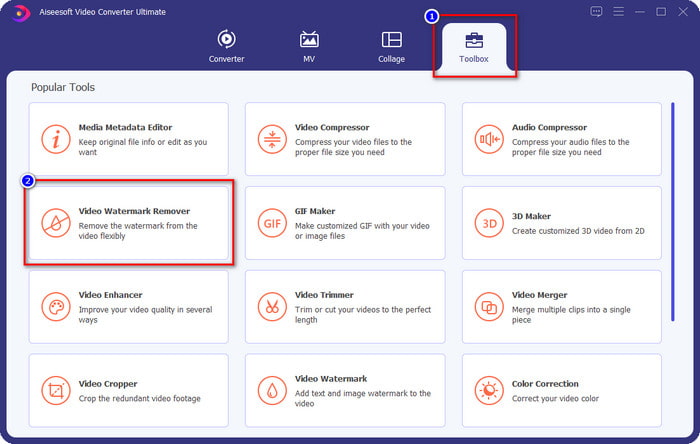
Korak 2. Idite na odjeljak Toolbox i pronađite opciju Video Watermark Remover, zatim je kliknite.
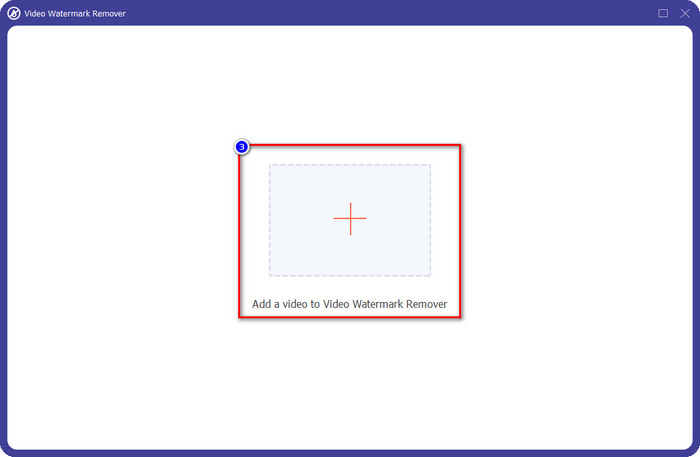
Korak 3. Kliknite gumb +, pronađite u mapi Weibo video s vodenim žigom koji ste ranije preuzeli, kliknite datoteku i pritisnite Open kako biste je sada učitali.
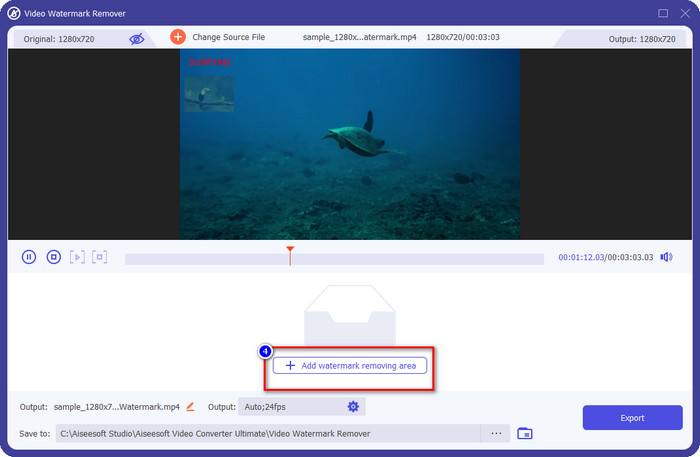
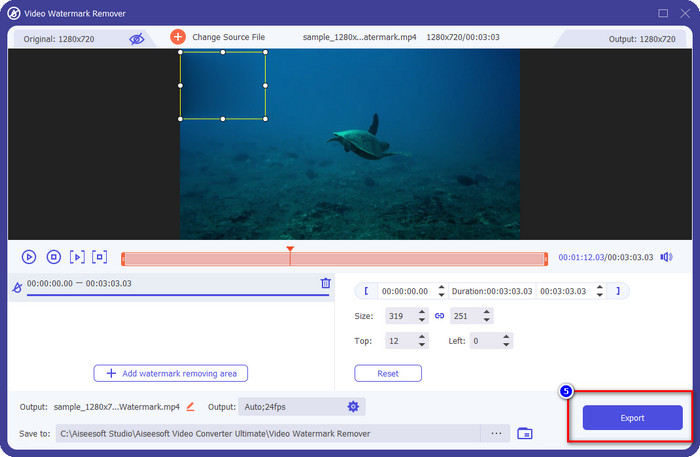
Korak 4. U novom prozoru koji će se otvoriti kliknite Add Watermark Removing Area kako biste nastavili s uklanjanjem vodenog žiga.
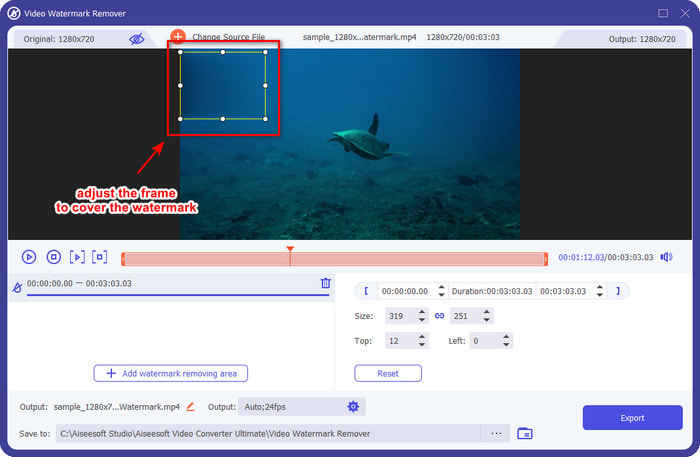
Korak 5. Povucite i držite okvir za odabir kako biste prekrili vodeni žig; okvir možete i proširiti ili smanjiti prema svojim potrebama i potpuno prekriti žig prije izvoza.
Korak 6. Nakon što ste okvir za odabir postavili preko vodenog žiga, kliknite Export kako biste uklonili vodeni žig s videa koji ste učitali. Nema potrebe dugo čekati jer je proces izuzetno brz; za nekoliko sekundi imat ćete Weibo video bez vodenog žiga.
Dio 2. Kako ukloniti vodeni žig s Weibo fotografije pomoću besplatne verzije na webu
Kako spremiti Weibo fotografije bez vodenog žiga? Ne možete spremiti sliku bez vodenog žiga ako je izvezena na Weibou. No možete upotrijebiti FVC Free Watermark Remover da uklonite vodeni žig sa slika. To je vaš potpuni alat za uklanjanje vodenog žiga sa slika. Što se funkcionalnosti tiče, možemo reći da je ovaj alat daleko bolji od drugih alata za uklanjanje vodenog žiga koje možete pronaći na webu. Dakle, ako želite ukloniti vodeni žig sa slike, ovo je prvi izbor koji biste mogli poželjeti isprobati. Iako može ukloniti vodeni žig sa slike, nije u stanju uklanjati ga s videa kao što to može ultimate verzija alata.
Unatoč tome, besplatan je za korištenje, a njegovo web sučelje je čisto, tako da nećete vidjeti niti oglase koji bi vam mogli smetati. Želite znati kako koristiti ovaj web alat? Zatim slijedite dolje navedene korake kako biste ga sami isprobali.
Napomena: Isto kao i video, preuzmite Weibo sliku koju želite imati i stavite je na vidljivu mapu kojoj je lako pristupiti.
Korak 1. Da biste pristupili alatu za uklanjanje vodenog žiga u pregledniku, kliknite ovu poveznicu da biste ga otvorili.
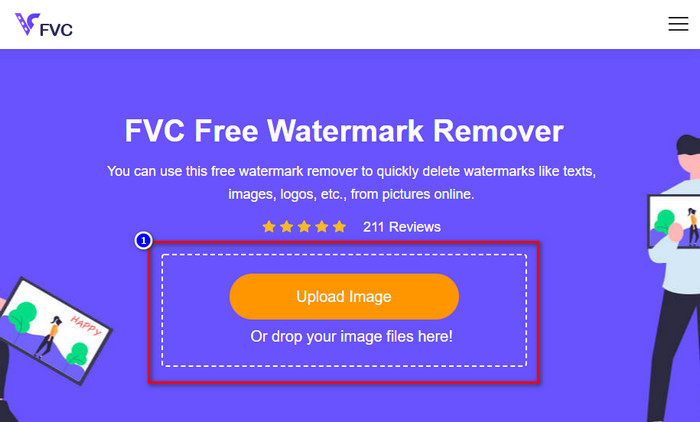
Korak 2. Na web sučelju kliknite Upload Image, zatim će se na zaslonu otvoriti mapa; pronađite sliku i pritisnite Open kako biste je učitali.
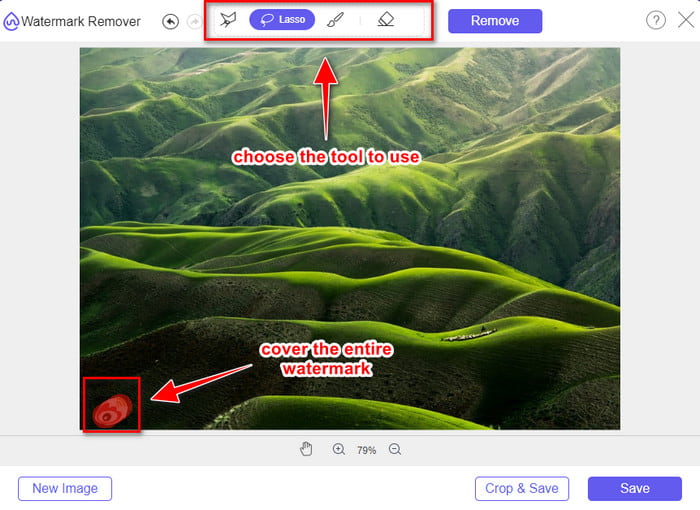
Korak 3. Ovdje možete iscrtati konturu vodenog žiga kako biste ga uklonili i pobrinite se da je svaki njegov dio unutar područja koje ste označili.
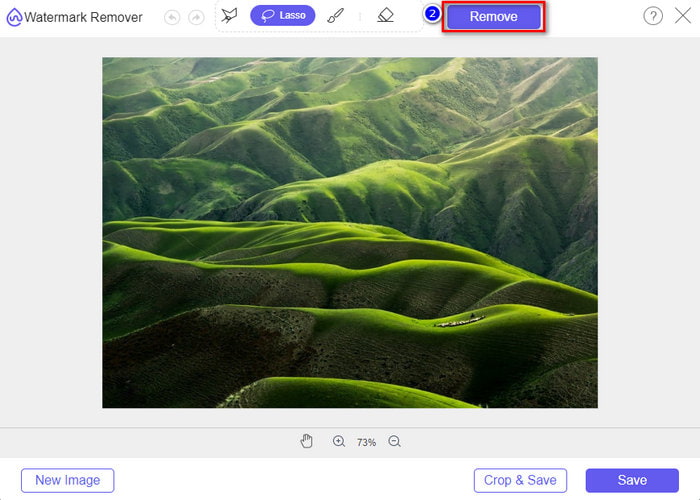
Korak 4. Pritisnite Remove kako biste izbrisali vodeni žig sa svoje slike.
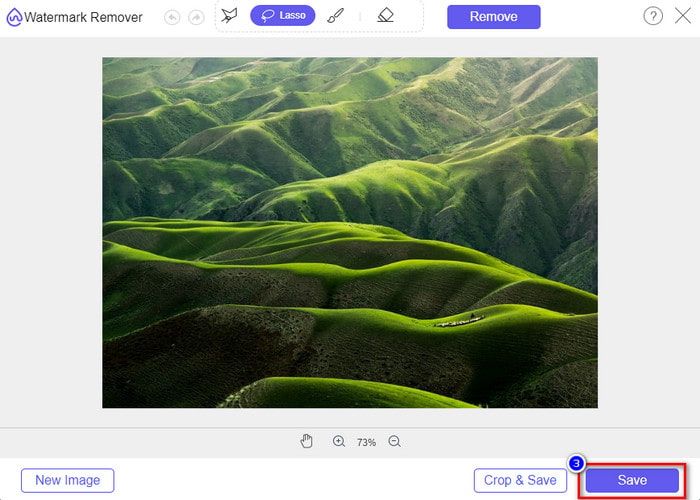
Korak 5. Nakon uklanjanja vodenog žiga sa Weibo slike kliknite Save da biste preuzeli Weibo sliku bez vodenog žiga.
Povezano:
Kako ukloniti TikTok vodeni žig
Kako dodati vodeni žig na video
Dio 3. Često postavljana pitanja o tome kako ukloniti Weibo vodeni žig
Zašto je Weibo vodeni žig postao mutan nakon izvoza?
Neki alati zamagljuju vodeni žig tako da se ne može vidjeti na vizualnim medijima koje su izvezli na Weibo. Ali ne zamagljuju svi alati vodene žigove; neki uklanjaju vodeni žig na vizualnom mediju bez ikakvog traga. Dakle, ako želite ukloniti vodeni žig na Weibou, a da ga ne zamutite, morate poznavati gore spomenuti alat koji će vam pomoći da ga uklonite.
Mogu li prikriti Weibo logo na izvezenoj datoteci?
Da, možete. Na taj način nećete vidjeti vodeni žig Weiboa na datoteci. Međutim, neovlašteno bi se njome poklopilo neke dijelove datoteke, pa bi umjesto da vam pomogne, moglo pogoršati datoteku. Dakle, za brisanje vodenog žiga datoteke potreban je alat za uklanjanje vodenog žiga.
Imaju li sve izvezene datoteke na Weibu vodeni žig?
Izvoz bilo koje vrste datoteke na ovoj platformi za mikroblogovanje ostavit će trag. Bez obzira na to što je, vodeni žigovi se dodaju u datoteku. Ipak, možete ga ukloniti pomoću alata koji smo spomenuli ranije u ovom članku.
Zaključak
Nevjerojatno, zar ne? FVC ima alate koji su vam potrebni da odmah uklonite Weibo vodeni žig s videa i slika. Čak i ako nemate iskustva niti ste profesionalac u ovoj vrsti uređivanja, uz spomenute alate uređivanje je izvedivo. Dakle, ako želite ukloniti vodeni žig sa slike, bilo da je preuzeta s Weiba ili ne, FVC Free Watermark Remover je jedini alat koji će vam trebati. No za videozapise i GIF-ove trebate koristiti profesionalni softver koji je jednostavan za uporabu i pristupačne cijene, poput FVC Video Converter Ultimate. Što još čekate? Uklonite vodeni žig sa svog vizualnog sadržaja i uživajte u njemu bez ikakvog traga oznake.
-
 Najbolji način kako dodati vodeni žig videu u Photoshopu na Windows i Mac
 Želite li znati kako dodati vodeni žig videu u Photoshopu? U tom slučaju, ovaj će vam članak pružiti nešto što trebate znati.
-
 3 najbolja rješenja o tome kako jednostavno ukloniti vodeni žig s videozapisa
 Želite ukloniti dosadni vodeni žig na videu? Uz ovaj blog možete naučiti različite ideje o uklanjanju vodenog žiga na videozapisu.
-
 4 najbolja načina za uklanjanje vodenog žiga s GIF-a [online i offline]
 Trebate ukloniti vodeni žig iz GIF-a? Pomoću alata u ovom članku naučit ćete različite stilove s različitim alatima za uklanjanje vodenih žigova dostupnim na vašoj platformi.
