


 Video Converter Ultimate
 Snimač zaslona
 Video popravak
Kako ukloniti WeVideo vodeni žig na uređivanom videu kao profesionalac
Ne želite preuzeti ili koristiti bilo koji mjesečni uređivač videozapisa na radnoj površini jer nemate dovoljno proračuna za to? WeVideo je alat koji morate isprobati ako želite besplatni uređivač videozapisa koji ne bi ukrao novac. Ovaj web-alat omogućuje vam da napravite nevjerojatan videoizlaz koji vam je nadohvat ruke i na ljepši način u nekoliko jednostavnih koraka. Zbog svoje popularnosti, alat je postao jedan od najposjećenijih video editora kojima možete pristupiti na webu.
From this day forward, the chances of users visiting the website for its video editor will go more. But users have some queries about this video editor online, and more often, users ask does WeVideo have a watermark applied on the video edited? To answer the question, you must read the whole article to find out if it does leave a watermark on the video you edited here.

Dio 1. Ima li WeVideo vodeni žig
Da, dodaje WeVideo vodeni žig nakon što izvezete videozapis koji ovdje uredite. Postoje različite metode za uklanjanje WeVideo vodenog žiga, ali nisu svi alati za uklanjanje vodenih žigova koje možete vidjeti na tržištu jednako učinkoviti kao drugi alati za uklanjanje vodenih žigova. Umjesto da isprobavate sve alate kako biste vidjeli koji vam odgovara, ovdje se razmatraju najbolje stvari, jer vam dajemo ručno odabrani alat za uklanjanje vodenog žiga po našem izboru koji pruža najbolji učinak pri uklanjanju vodenog žiga. Bez obzira jeste li profesionalac ili ne, možete koristiti ovaj alat za uklanjanje vodenog žiga kako biste jednostavno uklonili vodeni žig u svom videu.
Dio 2. Kako se riješiti WeVideo vodenog žiga
FVC Video Converter Ultimate
FVC Video Converter Ultimate provides the best video output for starters and professionals. With its power to remove the watermark on the video, it became popular with many users, and it became their first choice for removing the watermark in their video. It is compatible with Windows and macOS, so it supports multiple platforms from the oldest up to the latest version. Even though the tool is not free to use, you will still achieve the best output once you use this software on your end, for the users who want to use this and those who have already tried it but want to know how to get rid of WeVideo watermark. The step-by-step below will lead you on a path to where you can remove the watermark that is in your video effectively.
Step 1. You can download this software by clicking the download button presented below, choosing which operating system you are currently using, and ensuring to click the right button. After that, install the software promptly, follow the guide on setting it up, then open it.
Besplatno preuzimanjeZa Windows 7 ili novijiSigurno preuzimanje
Besplatno preuzimanjeZa MacOS 10.7 ili novijiSigurno preuzimanje
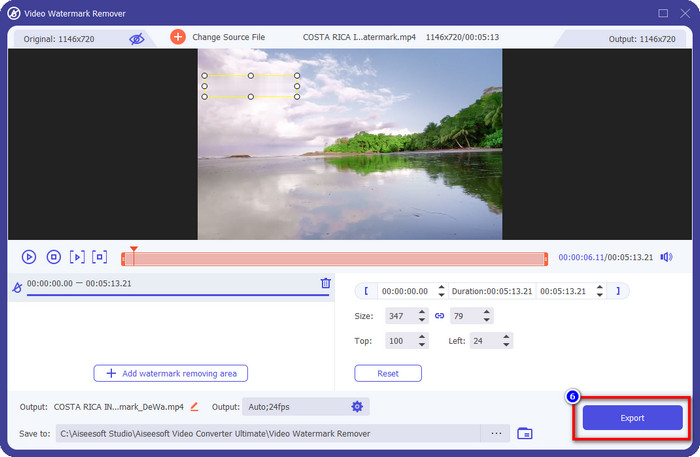
Step 2. On the Toolbox, locate the Video Watermark Remover this tool has, and click it to proceed.
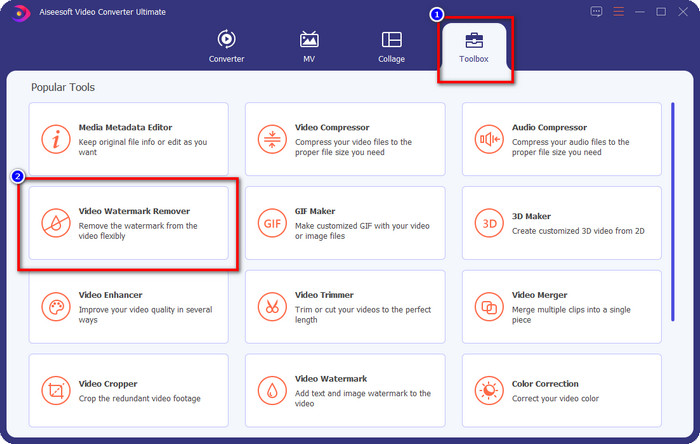
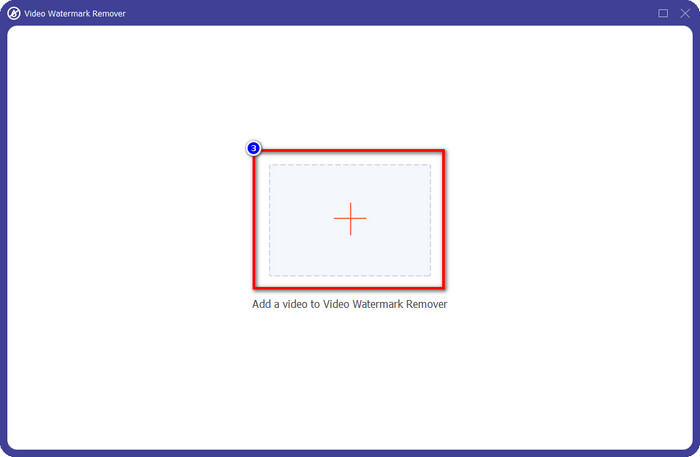
Step 3. By clicking the + icon, you upload the video containing a watermark. Search it over the folder that will show on your screen, click the file once, then press Open to upload it.
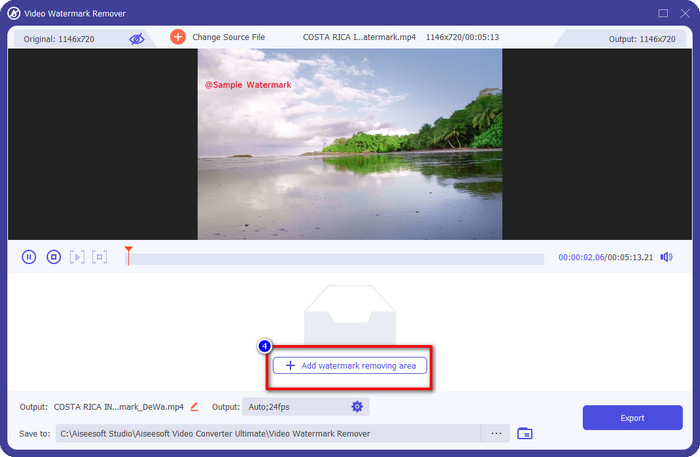
Step 4. After uploading the video with a watermark, press Add Watermark Removing Area and wait for the short loading process.
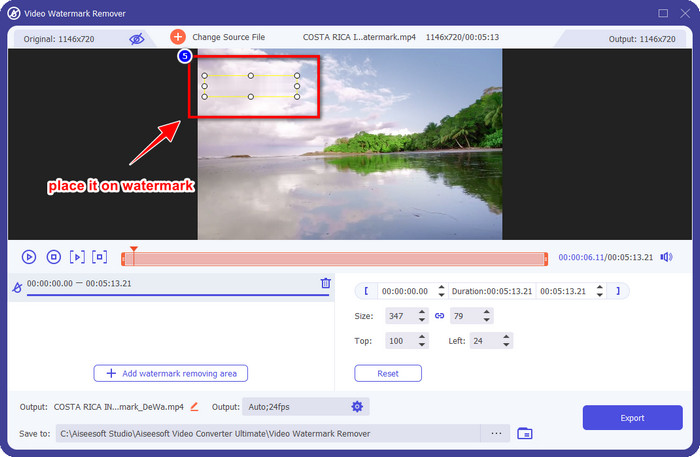
Step 5. Place the selection box to the WeVideo watermark and cover it all up so that when you export the video, you wouldn't see any traces of the watermark at the end of the video.
Step 6. You can save the video now; you remove the watermark here by clicking the Export button. The saving process wouldn't take much time because it supports ultra-fast processes and hardware acceleration.
iMyFone Mark Go
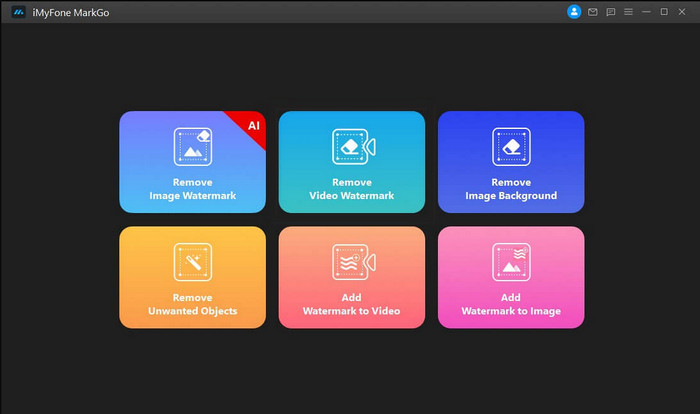
iMyFone Mark Go is another watermark remover you can download on your Windows and Mac to help you how to remove the WeVideo watermark. This tool effectively removes the watermark in your video, like what the ultimate tool can give you. Like any other offline software you can download on your desktop, you will need to avail the tool to remove the watermark and make good use of the premium version to remove the watermark on your video. Though it would cost you, it is not that expensive compared to other watermark removers you can download. So, if you want to remove the watermark on your video easily and effectively, you can follow the indicated steps below as we teach you how to do it step by step.
Step 1. Download the software on your desktop by going to its official website.
Step 2. After you've launched the software, click the Remove Video Watermark.
Step 3. Add the video file by clicking the Add the Video. Choose the video file that has a watermark.
Step 4. Move the rectangular shape that will show and place it to the watermark to cover it up. Even though there are three other options for removing the watermark, you can't access them because these options are for premium users.
Step 5. Click the Export button to save the video you removed the watermark on it.
Mrežni rezač videozapisa – uklonite logotip s videozapisa
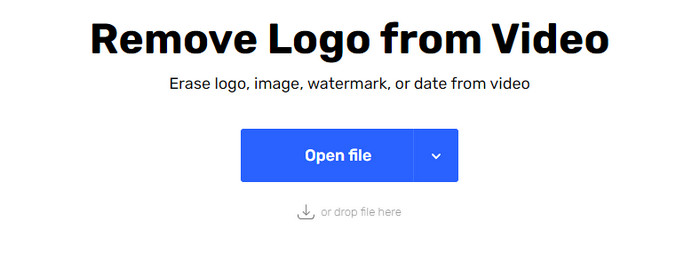
How to remove the WeVideo watermark for free? Use the Online Video Cutter – Remove Logo From Video. This software is a free web tool that you can use to remove the watermark in your video on the web without downloading any or paying any. This tool is effective as the other watermark remover on the market if we are about to compare, but not as good as the ultimate software. It can cover up the watermark in your video to make the video visual better. However, if you don't have an internet connection, this tool wouldn't be the best choice for removing the watermark in your video. But if you do have, then you can follow the steps below to start using this tool to remove the watermark on your video.
Step 1. Open a new tab and search the tool's name to start removing the watermark from the video.
Step 2. Click Open File to upload the WeVideo video here and for it to generate the preview of the video you uploaded.
Step 3. Click on the watermark to apply the removing area this tool has. Once you click any part of the video, there will be a selection box.
Step 4. Press Save to have the video without the watermark on it.
Povezano:
How to Remove Movavi Watermark
How to Remove the Weibo Watermark
Dio 3. Često postavljana pitanja o uklanjanju WeVideo vodenog žiga
Koji je alat najbolji za uklanjanje vodenog žiga WeVideo?
Bez imalo sumnje, to je FVC Video Converter Ultimate; ovaj alat pruža najbolji rezultat u uklanjanju vodenog žiga u vašem videu. Među odabranim alatom za uklanjanje vodenih žigova, ne možemo poreći da je ultimativni alat bolji od ostalih alata za uklanjanje vodenih žigova.
Mogu li izrezati WeVideo vodeni žig?
Da, možete izrezati vodeni žig koji WeVideo ostavlja na vašem videozapisu. Ali dimenzija videozapisa bit će smanjena, a postoji mogućnost da se njegova kvaliteta smanji jer ste izrezali omjer slike.
Što WeVideo čini najboljim video uređivačem na webu?
Sa svojim potpunim temeljnim značajkama za uređivanje videa na koje se možete naviknuti i koliko je jednostavan za korištenje alata. Ovo su najčešća saznanja o tome što WeVideo čini jednim od najboljih video uređivača koje možete koristiti na webu. Ali nije tako dobar kao drugi video uređivači Adobe Premiere Pro, Final Cut Pro itd.
Zaključak
Napokon, uz gore navedene metode sada imate ideju kako se riješiti WeVideo vodenog žiga. Ali što mislite o alatu koji smo angažirali? Ako još uvijek nemate ideju što koristiti, po našem mišljenju morate isprobati FVC Video Converter Ultimate. Pruža najbolje od najboljih u uklanjanju vodenog žiga, a također je jednostavan za korištenje. Pa što čekaš? Pritisnite gumb za preuzimanje da biste dobili alat za uklanjanje vodenog žiga i odmah ga upotrijebili.
-
 123rf Sredstva za uklanjanje vodenih žigova – temeljit pregled vrhunskih alata
 Ako želite znati koji su najizvrsniji 123rf uklanjači vodenih žigova, pažljivo pročitajte ovaj članak. Ovaj članak pruža dubinski pregled alata.
-
 Kako ukloniti DeviantArt vodeni žig na Windows i Mac
 Želite li naučiti kako ukloniti DeviantArt vodeni žig na svojim slikama? Koristeći najizvrsnije DeviantArt alate za uklanjanje vodenih žigova, lako možete ukloniti te dosadne vodene žigove.
-
 Vrhunski softver za uklanjanje vodenog žiga Video Helper na izvezenim videozapisima [2022.]
 Želite li znati kako ukloniti vodeni žig na videozapisu koji ste preuzeli na Video Helper-u? Ako je tako, pročitajte ovaj članak da biste saznali.
